
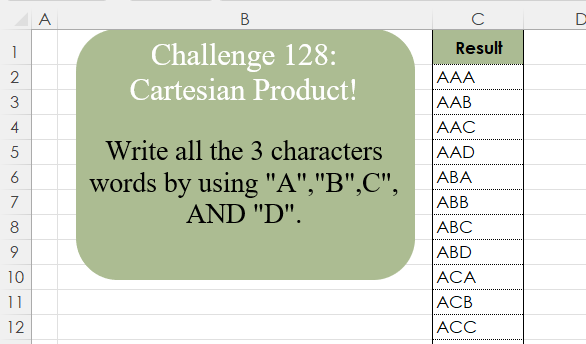
Challenge No. 128: Write all the 3 character words by using “A”,”B”,C”, AND “D”.
Solved using:Excel (LAMBDA, LET, REDUCE), Google Sheets, Power Query (List.Transform, List.TransformMany), Python, Python in Excel, and R.
Solutions categorized by software used.
Challenge No. 128: Write all the 3 character words by using “A”,”B”,C”, AND “D”.
Solved using:Excel (LAMBDA, LET, REDUCE), Google Sheets, Power Query (List.Transform, List.TransformMany), Python, Python in Excel, and R.

Challenge No. 127: Add an index column to the question table, with a separate counter for each stock.
Solved using:Excel (DROP, FILTER, HSTACK), Google Sheets, Power Query (Table.AddColumn, Table.AddIndexColumn), Python, Python in Excel, and R.
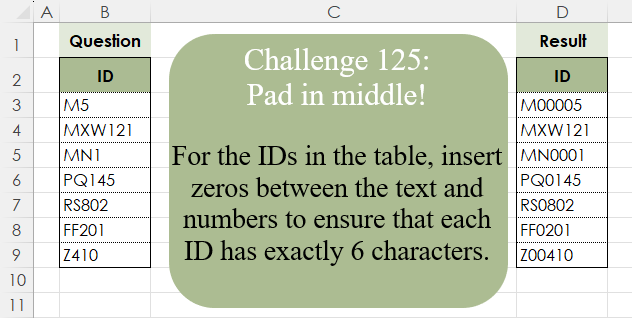
Challenge No. 125: For the IDs in the table, insert zeros between the text and numbers to ensure that each ID has exactly 6 characters.
Solved using:Excel (CONCAT, ISNUMBER, LAMBDA), Google Sheets, Power Query (Text.Repeat, Table.AddColumn), Python, Python in Excel, and R.
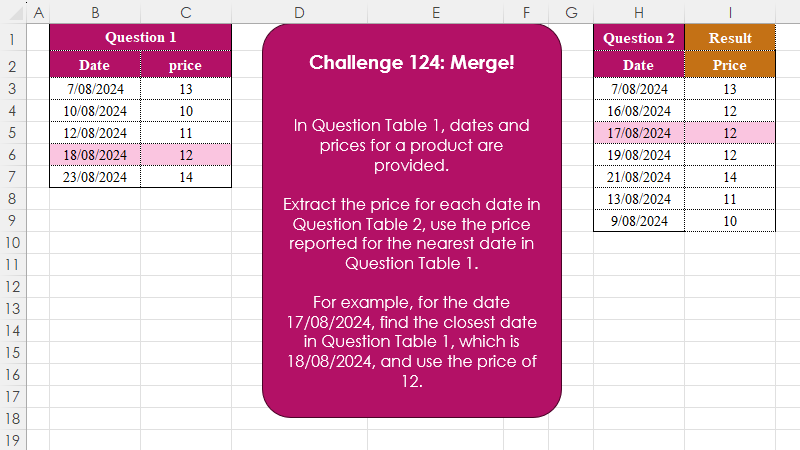
Challenge No. 124: In Question Table 1, dates and prices for a product are provided.
Solved using:Excel (INDEX, LAMBDA, LET), Google Sheets, Power Query (Table.AddColumn), Python, Python in Excel, and R.
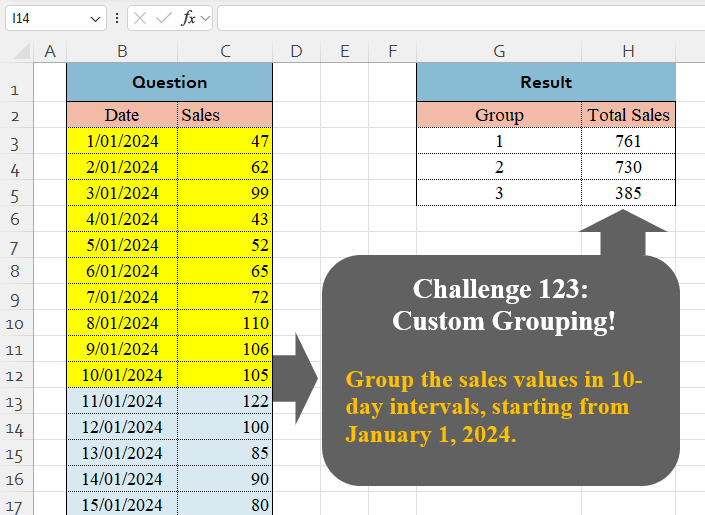
Challenge No. 123: Group the sales values in 10-day intervals, starting from January 1, 2024.
Solved using:Excel (BYROW, DAY, GROUPBY), Google Sheets, Power Query (Table.Group, List.Transform, Table.Group), Python, Python in Excel, and R.
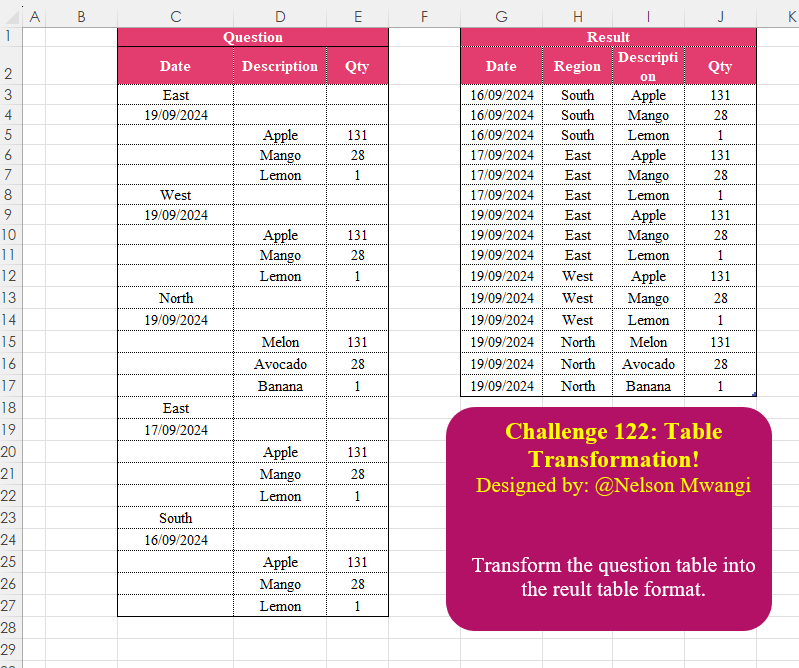
Challenge No. 122: Transform the question table into the reult table format.
Solved using:Excel (DROP, FILTER, HSTACK), Google Sheets, Power Query (List.Transform, Text.Contains, Table.AddColumn), Python, Python in Excel, and R.

Challenge No. 121: Create the given table for the continuous values of power and bases.
Solved using:Excel (LAMBDA, MAKEARRAY, ROW), Office Script, Power Query (List.Transform), and Python in Excel.
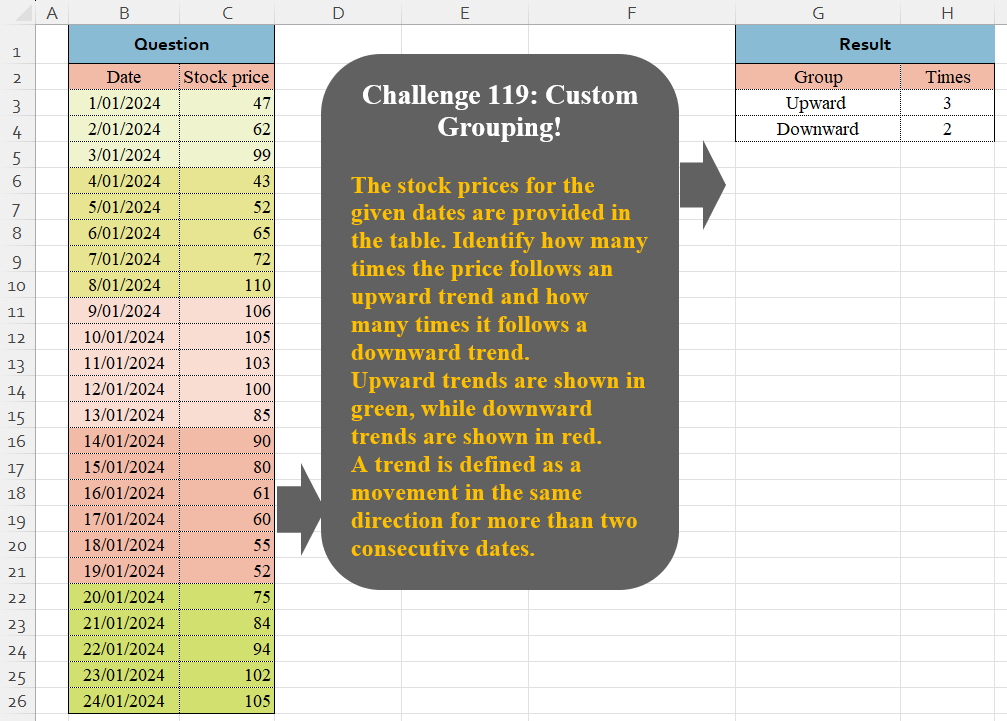
Challenge No. 119: The stock prices for the given dates are provided in the table.
Solved using:Excel (DROP, HSTACK, IF), Google Sheets, Power Query (Table.Group, Table.AddColumn, Table.Group), Python in Excel, and R.

Challenge No. 118: Using the sales transactions from the provided table and the account balance as of 31/08/2024, calculate the Daily Sales Outstanding (DSO) for each customer.
Solved using:Excel, Google Sheets, Power Query, Python, Python in Excel, and R.

Challenge No. 117: Add an Index column for the Question table with a separate counter for each stock.
Solved using:Excel (COUNTIF, HSTACK, IF), Google Sheets, Power Query (Table.AddIndexColumn, Table.Group, Table.Sort), Python, Python in Excel, and R.