
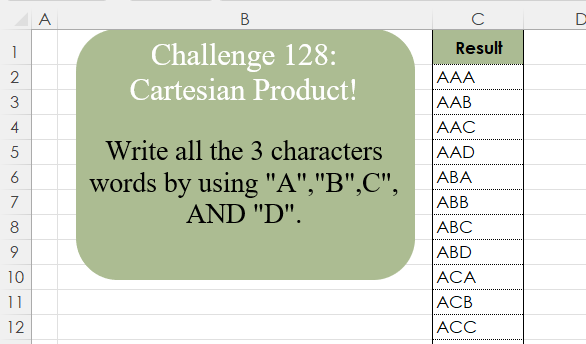
Write all the 3 character words by using “A”,”B”,C”, AND “D”.
📌 Challenge Details and Links
Challenge Number: 128
Challenge Difficulty: ⭐⭐⭐⭐
📥Download Sample File
📥Link to the solutions on LinkedIn
Solving the challenge of Cartesian Product! with Power Query
Power Query solution 1 for Cartesian Product!, proposed by Zoran Milokanović:
let
  Source = {"A" .. "D"},
  S = List.Accumulate({0, 0}, Source, (b, n) => List.TransformMany(b, each Source, (i, _) => i & _))
in
  S
Power Query solution 2 for Cartesian Product!, proposed by Brian Julius:
let
  Source = Table.FromList({"A" .. "D"}, Splitter.SplitByNothing(), {"Letters"}),
  RScript = Table.Sort(
    R.Execute(
      "letters <- dataset$Letters#(lf) result <- expand.grid(letters, letters, letters) |>#(lf) apply(1, paste0, collapse = '') |>#(lf) data.frame(Combos = _)",
      [dataset = Source]
    ){[Name = "result"]}[Value],
    {"Combos", Order.Ascending}
  )
in
  RScript
Power Query solution 3 for Cartesian Product!, proposed by Ramiro Ayala Chávez:
let
a = {"A".."D"},
b = List.Accumulate(List.Repeat({0},List.Count(a)-2), a , (s,c)=> List.TransformMany(s, each a, (x,y)=> x&y)),
Sol = Table.FromColumns({b},{"Result"})
in
Sol
Power Query solution 4 for Cartesian Product!, proposed by Alejandro Simón 🇵🇦 🇪🇸:
let
  Source = {"A" .. "D"},
  Tbl = List.Accumulate(
    {"Col2", "Col3"},
    Table.FromColumns({Source}, {"Col1"}),
    (s, c) => Table.ExpandListColumn(Table.AddColumn(s, c, each Source), c)
  ),
  Sol = List.Transform(Table.ToRows(Tbl), each Text.Combine(_))
in
  Sol
Power Query solution 5 for Cartesian Product!, proposed by Alejandro Simón 🇵🇦 🇪🇸:
let
  Source = {"A" .. "D"},
  Sol = List.Accumulate(
    List.Repeat({Source}, 2),
    Source,
    (s, c) => List.TransformMany(s, each c, (a, b) => a & b)
  )
in
  Sol
Power Query solution 6 for Cartesian Product!, proposed by Abdallah Ally:
let
  Chars = {"A" .. "D"},
  Result = List.TransformMany(
    List.TransformMany(Chars, each Chars, (x, y) => x & y),
    each Chars,
    (x, y) => x & y
  )
in
  Result
Power Query solution 7 for Cartesian Product!, proposed by Yaroslav Drohomyretskyi:
let
  Source = Table.FromList({"A", "B", "C", "D"}),
  Cartesian = Table.ExpandTableColumn(
    Table.ExpandTableColumn(
      Table.AddColumn(Table.AddColumn(Source, "2", each Source), "3", each Source),
      "2",
      {"Column1"},
      {"2"}
    ),
    "3",
    {"Column1"},
    {"3"}
  ),
  Merge = Table.CombineColumns(
    Cartesian,
    {"Column1", "2", "3"},
    Combiner.CombineTextByDelimiter("", QuoteStyle.None),
    "Result"
  )
in
  Merge
Power Query solution 8 for Cartesian Product!, proposed by 🇮🇷 Navid Esmaeilzadeh اسماعیل زاده:
let
So=Table.FromColumns({{"A","B","C","D"}},{"C1"}),
A=List.Accumulate({2,3},So,(s,c)=> Table.AddColumn(s,"C"&Text.From(c),each So[C1])),
B=List.Accumulate(List.Skip(Table.ColumnNames(A),1),A,(s,c)=> Table.ExpandListColumn(s,c)),
D=Table.CombineColumns(B,{"C1", "C2", "C3"},Combiner.CombineTextByDelimiter("", QuoteStyle.None),"Result")
in
D
Power Query solution 9 for Cartesian Product!, proposed by Francesco Bianchi 🇮🇹:
let
  CharList = {"A" .. "D"},
  fxTrsfMany = (list1 as list, list2 as list) as list =>
    let
      fx = List.TransformMany(list1, each list2, (x, y) => x & y)
    in
      fx,
  Sol = List.Last(
    List.Generate(
      () => [x = 1, y = CharList, z = CharList],
      each [x] < List.Count(CharList),
      each [x = [x] + 1, y = [y], z = fxTrsfMany([z], [y])],
      each [z]
    )
  )
in
  Sol
Power Query solution 10 for Cartesian Product!, proposed by Seokho MOON:
let
  Source = {"A" .. "D"},
  CP = (l as list, n as number) =>
    if n = 1 then l else List.TransformMany(@CP(l, n - 1), (x) => l, (x, y) => x & y),
  Res = Table.FromColumns({CP(Source, 3)}, {"Result"})
in
  Res
Solving the challenge of Cartesian Product! with Excel
Excel solution 1 for Cartesian Product!, proposed by Oscar Mendez Roca Farell:
=REDUCE(
    "",
    ROW(
        1:3
    ),
    LAMBDA(
        i,
        x,
        TOCOL(
            i&{"A",
            "B",
            "C",
            "D"},
            3
        )
    )
)
Excel solution 2 for Cartesian Product!, proposed by Julian Poeltl:
=LET(
    C,
    HSTACK(
        "A",
        "B",
        "C",
        "D"
    ),
    SORT(
        TOCOL(
            TOROW(
                C&TOCOL(
                    C
                )
            )&TOCOL(
                    C
                )
        )
    )
)
Excel solution 3 for Cartesian Product!, proposed by Abdallah Ally:
=LET(
    a,
    {"A",
    "B",
    "C",
    "D"},
    b,
    TOCOL,
    SORT(
        b(
            b(
                a & b(
                    a
                )
            )&a
        )
    )
)
Excel solution 4 for Cartesian Product!, proposed by Kris Jaganah:
=BYROW(
    CHAR(
        MID(
            BASE(
                SEQUENCE(
                    4^3,
                    ,
                    0
                ),
                 4,
                 3
            ),
            {1,
            2,
            3},
            1
        )+65
    ),
    CONCAT
)
Excel solution 5 for Cartesian Product!, proposed by Imam Hambali:
=LET(    abcd,
     {"A",
    "B",
    "C",
    "D"},    TOCOL(
        TOCOL(
            abcd&TRANSPOSE(
                abcd
            )
        )&abcd
    ))
Excel solution 6 for Cartesian Product!, proposed by Sunny Baggu:
=LET(
 _a, {"A"; "B"; "C"; "D"},
 _b, TOROW(_a),
 TOCOL(TOCOL(_a & _b) & _b)
)
Excel solution 7 for Cartesian Product!, proposed by Sunny Baggu:
=LET(     _a,
     SEQUENCE(
         4,
          ,
          0
     ),     _b,
     CHAR(
         65 + _a
     ),     REDUCE(          BASE(
              SEQUENCE(
                  4 ^ 3,
                   ,
                   0
              ),
               4,
               3
          ),          _a,          LAMBDA(
              a,
               v,

               SUBSTITUTE(
                   a,
                    v,
                    XLOOKUP(
                        v,
                         _a,
                         _b
                    )
               )

          )     ))
Excel solution 8 for Cartesian Product!, proposed by Andy Heybruch:
= REDUCE(
    "",
    {1;2;3},
    LAMBDA(
        a,
        v,
        TOCOL(
            a & {"A",
            "B",
            "C",
            "D"}
        )
    )
)
Excel solution 9 for Cartesian Product!, proposed by Ankur Sharma:
=TOCOL(
    TOCOL(
        {"A";"B";"C";"D"} & {"A",
        "B",
        "C",
        "D"}
    ) & {"A",
    "B",
    "C",
    "D"}
)
Excel solution 10 for Cartesian Product!, proposed by Bilal Mahmoud kh.:
=TEXTSPLIT(
    TEXTJOIN(
        "-",
        ,
        LET(
            a,
            {"A",
            "B",
            "C",
            "D"},
            MAP(
                a,
                LAMBDA(
                    x,
                    TEXTJOIN(
                        "-",
                        ,
                        MAP(
                            a,
                            LAMBDA(
                                y,
                                TEXTJOIN(
                                    "-",
                                    ,
                                    MAP(
                                        a,
                                        LAMBDA(
                                            z,
                                            x&y&z
                                        )
                                    )
                                )
                            )
                        )
                    )
                )
            )
        )
    ),
    ,
    "-"
)
Excel solution 11 for Cartesian Product!, proposed by Bilal Mahmoud kh.:
=LET(
    a,
    TOCOL(
        CHAR(
            SEQUENCE(
                4,
                ,
                65
            )
        )&CHAR(
            SEQUENCE(
                ,
                4,
                65
            )
        )
    ),
    REDUCE(
        "Result",
        CHAR(
            SEQUENCE(
                4,
                ,
                65
            )
        ),
        LAMBDA(
            x,
            y,
            VSTACK(
                x,
                y&a
            )
        )
    )
)
Excel solution 12 for Cartesian Product!, proposed by Eddy Wijaya:
=LET(    a,
    {"ABCD"},    r,
    REPT(
        a,
        LEN(
            a
        )
    ),    d,
    DROP(
        REDUCE(
            0,
            r,
            LAMBDA(
                a,
                v,
                VSTACK(
                    a,
                    MID(
                        v,
                        SEQUENCE(
                            LEN(
                                v
                            )
                        ),
                        1
                    )
                )
            )
        ),
        1
    ),    l_c,
    MID(
        DROP(
            REDUCE(
                0,
                d,
                LAMBDA(
                    a,
                    v,
                    VSTACK(
                        a,
                        a&v
                    )
                )
            ),
            1
        ),
        2,
        4
    ),    SORT(
        UNIQUE(
            FILTER(
                l_c,
                LEN(
                    l_c
                )=3
            )
        )
    )
)
Excel solution 13 for Cartesian Product!, proposed by ferhat CK:
=SORT(
    TOCOL(
        LET(
            a,
            "A",
            "B",
            "C",
            "D"},
            b,
            TOCOL(
                {"D",
                "C",
                "B",
                "A"}
            ),
            DROP(
                REDUCE(
                    0,
                    a,
                    LAMBDA(
                        x,
                        y,
                        VSTACK(
                            x,
                            TOROW(
                                a&y&b
                            )
                        )
                    )
                ),
                1
            )
        )
    )
)
Excel solution 14 for Cartesian Product!, proposed by Hamidi Hamid:
=LET(
    x,
    SORT(
        BYROW(
            MID(
                BASE(
                    SEQUENCE(
                        4^3
                    )-1,
                    4,
                    3
                ),
                SEQUENCE(
                    ,
                    3
                ),
                1
            )+1,
            LAMBDA(
                a,
                --CONCAT(
                    a
                )
            )
        )
    ),
    SORT(
        SUBSTITUTE(
            SUBSTITUTE(
                SUBSTITUTE(
                    SUBSTITUTE(
                        x,
                        1,
                        "A"
                    ),
                    2,
                    "B"
                ),
                3,
                "C"
            ),
            4,
            "D"
        )
    )
)
Excel solution 15 for Cartesian Product!, proposed by Hazem Hassan:
=LET(     R,
     {"A",
     "B",
     "C",
     "D"},     S,
     TOCOL(
         R
     ),     TOCOL(          UNIQUE(

               TOCOL(
                   LEFT(
                       S & R
                   )
               ) &
               TOROW(
                       S & R
                   )

          )     ))
Excel solution 16 for Cartesian Product!, proposed by Hussein SATOUR:
=LET(
    a,{"A";
    "B";
    "C";
    "D"},TOCOL(
        TOCOL(
            a&TOROW(
                a
            )
        )&TOROW(
                a
            )
    )
)
Excel solution 17 for Cartesian Product!, proposed by Songglod Petchamras:
=LET(
    a,{"A";
    "B";
    "C";
    "D"},TOCOL(
        TOCOL(
            a&TOROW(
                a
            )
        )&TOROW(
                a
            )
    )
)
Excel solution 18 for Cartesian Product!, proposed by Tomasz Jakóbczyk:
=HSTACK(
    TOCOL(
        TEXTSPLIT(
            CONCAT(
                REPT(
                    "A"&"|",
                    4^2
                ),
                REPT(
                    "B"&"|",
                    4^2
                ),
                REPT(
                    "C"&"|",
                    4^2
                ),
                REPT(
                    "D"&"|",
                    4^2
                )
            ),
            "|",
            ,
            TRUE
        )
    ),
    LET(
        c,
        TOCOL(
            TEXTSPLIT(
                CONCAT(
                    REPT(
                        "A"&"|",
                        4
                    ),
                    REPT(
                        "B"&"|",
                        4
                    ),
                    REPT(
                        "C"&"|",
                        4
                    ),
                    REPT(
                        "D"&"|",
                        4
                    )
                ),
                "|",
                ,
                TRUE
            )
        ),
        VSTACK(
            c,
            c,
            c,
            c
        )
    ),
    TOCOL(
        TEXTSPLIT(
            REPT(
                CONCAT(
                    "A"&"|",
                    "B"&"|",
                    "C"&"|",
                    "D"&"|"
                ),
                4^2
            ),
            "|",
            ,
            TRUE
        )
    )
)
Solving the challenge of Cartesian Product! with Python
Python solution 1 for Cartesian Product!, proposed by Konrad Gryczan, PhD:
import itertools
import pandas as pd

path = "CH-128 Cartesian Product.xlsx"
test = pd.read_excel(path, usecols = "C")
lets = ["A","B","C","D"]
combs = [''.join(p) for p in itertools.product(lets, repeat=3)]

print(all(combs == test["Result"])) # True
Python solution 2 for Cartesian Product!, proposed by Nicolas Micot:
import itertools

def combinaisons(lettres, taille):
 return list(itertools.product(lettres, repeat = taille))

lettres = ["A", "B", "C", "D"]
taille = 3

resultat = list(map("".join, combinaisons(lettres, taille)))
Solving the challenge of Cartesian Product! with Python in Excel
Python in Excel solution 1 for Cartesian Product!, proposed by Abdallah Ally:
import product

# Perform data manipulation
items = [x + y + z for x, y, z in product('ABCD', 'ABCD', 'ABCD')]

df = pd.DataFrame(data={'Result': items})

# Display the final results
df
Python in Excel solution 2 for Cartesian Product!, proposed by Abdallah Ally:
_xDCB9_Office script solution ✍


hashtag
#Python
hashtag
#R
hashtag
#SQL
hashtag
#Excel
hashtag
#VBA
hashtag
#OfficeScript
hashtag
#PowerBI
hashtag
#PowerQuery

function main(workbook: ExcelScript.Workbook) {
 const curSheet = workbook.getActiveWorksheet();
 const chars = 'ABCD';
 const arrayValues = ['Result'];

 for (let chr1 of chars)
 for (let chr2 of chars)
 for (let chr3 of chars)
 arrayValues.push(chr1 + chr2 + chr3);

 curSheet.getRange('A1').setFormulaLocal(`={"${arrayValues.join('";"')}"}`);
}
Python in Excel solution 3 for Cartesian Product!, proposed by Ümit Barış Köse, MSc:
import itertools
letters = ['A', 'B', 'C', 'D']
combinations = list(itertools.product(letters, repeat=3))
df = pd.DataFrame([''.join(combo) for combo in combinations], columns=['Solution'])

Alternative solution :
import itertools
letters = ['A', 'B', 'C', 'D']
df = pd.DataFrame(itertools.product(letters, repeat=3), columns=[None, None, None])
df['Alternative Solution'] = df.apply(''.join, axis=1)
Solving the challenge of Cartesian Product! with R
R solution 1 for Cartesian Product!, proposed by Konrad Gryczan, PhD:
library(tidyverse)
library(readxl)

path = "files/CH-128 Cartesian Product.xlsx"
test = read_excel(path, range = "C1:C65")

lets = c("A","B","C","D")

result = expand.grid(lets,lets, lets) %>%
 unite("result", Var1:Var3, sep = "") %>%
 arrange(result)

all.equal(result$result, test$Result)
#> [1] TRUE
Solving the challenge of Cartesian Product! with Google Sheets
Google Sheets solution 1 for Cartesian Product!, proposed by Peter Krkos:
PowerQuery Solution:
https://docs.google.com/spreadsheets/d/1zR5IZLz8OT76vhaPEHfsPrw8-RDKnLyyqS49IJjdhFk/edit?gid=1973085456#gid=1973085456