
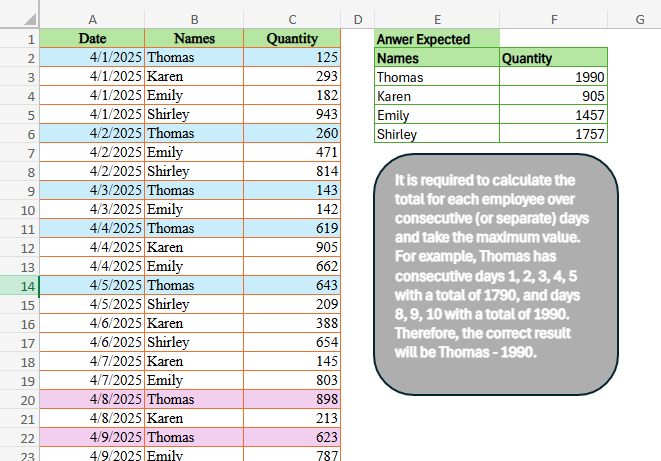
Today’s challenge is contributed by Duy Tùng It is required to calculate the total for each employee over consecutive (or separate) days and take the maximum value. For example, Thomas has consecutive days 1, 2, 3, 4, 5 with a total of 1790, and days 8, 9, 10 with a total of 1990. Therefore, the correct result will be Thomas – 1990.
📌 Challenge Details and Links
ExcelBI Excel Challenge Number: 703
Challenge Difficulty: ⭐️⭐️
📥Download Sample File
📥Link to the solutions on LinkedIn
Solving the challenge of Max Total on Consecutive Days with Power Query
Power Query solution 1 for Max Total on Consecutive Days, proposed by Kris Jaganah:
 p = Table.ToRows(_),
 q =List.Max( List.Generate(()=> [a = 0 , b = p{a}{0} , c = p{a}{2} ] ,
 each [a] < List.Count(p),
 each [a = [a]+1 , b = p{a}{0}  ,
 each [c] )) ][q]})
Power Query solution 2 for Max Total on Consecutive Days, proposed by Seokho MOON:
let
  Source = Excel.CurrentWorkbook(){[Name = "Table1"]}[Content],
  Res = Table.Group(Source, "Names", {"Quantity", Fun}),
  Fun = each [
    A = Table.AddIndexColumn(_, "Idx"),
    B = Table.Group(A, {"Date", "Idx"}, {"Quantity", each List.Sum([Quantity])}, 0, C),
    C = (x, y) => Number.From(Date.AddDays(x[Date], - x[Idx]) <> Date.AddDays(y[Date], - y[Idx])),
    D = List.Max(B[Quantity])
  ][D]
in
  Res
Solving the challenge of Max Total on Consecutive Days with Excel
Excel solution 1 for Max Total on Consecutive Days, proposed by Bo Rydobon 🇹🇭:
=LET(b,B2:B31,u,UNIQUE(b),HSTACK(u,VLOOKUP(u,GROUPBY(HSTACK(b,A2:A31-MAP(b,LAMBDA(x,COUNTIF(B2:x,x)))),C2:C31,SUM,,,-3),3,)))Excel solution 2 for Max Total on Consecutive Days, proposed by Kris Jaganah:
=LET(a,A2:A31,b,B2:B31,c,C2:C31,d,UNIQUE(b),e,MIN(a),f,SEQUENCE(,MAX(a)-e+2,e),g,XLOOKUP(d&f,b&a,c,0),h,SCAN(0,g,LAMBDA(x,y,IF(y,x+y,0))),HSTACK(d,BYROW(h,MAX)))Excel solution 3 for Max Total on Consecutive Days, proposed by Julian Poeltl:
=LET(D,A2:A31,N,B2:B31,Q,C2:C31,U,UNIQUE(N),REDUCE(HSTACK("Names","Quantity"),U,LAMBDA(B,A,VSTACK(B,HSTACK(A,LET(F,FILTER(HSTACK(D,Q),N=A),D,TAKE(F,,1),MAX(GROUPBY(SCAN(0,VSTACK(1,DROP(DROP(D,1)-D,-1))>1,SUM),DROP(F,,1),SUM,,0))))))))Excel solution 4 for Max Total on Consecutive Days, proposed by Timothée BLIOT:
=LET(A,B2:B31,B,UNIQUE(A),HSTACK(B,MAP(B,LAMBDA(x,LET(C,FILTER(HSTACK(A2:A31,C2:C31),A=x),TAKE(SORT(GROUPBY(TAKE(C,,1)-SEQUENCE(ROWS(C)),TAKE(C,,-1),SUM,,0),2,-1),1,-1))))))Excel solution 5 for Max Total on Consecutive Days, proposed by Hussein SATOUR:
=LET(
    n,
    B2:B31,
    b,
    UNIQUE(
        n
    ),
    v,
    MAP(
        b,
        LAMBDA(
            x,
            LET(
                a,
                FILTER(
                    HSTACK(
                        A2:A31,
                        C2:C31
                    ),
                    n=x
                ),
                f,
                LAMBDA(
                    z,
                    DROP(
                        INDEX(
                            a,
                            ,
                            1
                        ),
                        z
                    )
                ),
                c,
                SCAN(
                    ,
                    VSTACK(
                        0,
                        f(
                            1
                        )-f(
                            -1
                        )-1
                    ),
                    SUM
                ),
                MAX(
                    MAP(
                        c,
                        LAMBDA(
                            w,
                            SUM(
                                FILTER(
                                    INDEX(
                                        a,
                                        ,
                                        2
                                    ),
                                    c=w
                                )
                            )
                        )
                    )
                )
            )
        )
    ),
    HSTACK(
        b,
        v
    )
)
Excel solution 6 for Max Total on Consecutive Days, proposed by Sunny Baggu:
=LET(
 _n,
     UNIQUE(
         B2:B31
     ),

 VSTACK(
 B1:C1,

 HSTACK(
 _n,

 MAP(
 _n,

 LAMBDA(n,

 LET(
 _a,
     CHOOSECOLS(
         FILTER(
             A2:C31,
              B2:B31 = n
         ),
          1,
          3
     ),

 _d,
     DAY(
         TAKE(
             _a,
              ,
              1
         )
     ),

 _c,
     SCAN(

          0,

          VSTACK(
              1,
               N(
                   DROP(
                       _d,
                        1
                   ) - DROP(
                       _d,
                        -1
                   ) <> 1
               )
          ),

          LAMBDA(
              a,
               v,
               a + v
          )

     ),

 _uc,
     UNIQUE(
         _c
     ),

 MAX(MAP(_uc,
     LAMBDA(a,
     SUM((_c = a) * TAKE(
         _a,
          ,
          -1
     )))))
 )
 )
 )
 )
 )
)
Excel solution 7 for Max Total on Consecutive Days, proposed by Md. Zohurul Islam:
=LET(
    u,
    A2:A31,
    v,
    B2:B31,
    w,
    C2:C31,

    hdr,
    HSTACK(
        "Names",
        "Quantity"
    ),

    z,
    REDUCE(
        hdr,
        UNIQUE(
            v
        ),
        LAMBDA(
            p,
            q,
            LET(

                 a,
                DAY(
                    FILTER(
                        u,
                        v=q
                    )
                ),

                 b,
                a-SEQUENCE(
                    COUNT(
                        a
                    )
                ),

                 c,
                FILTER(
                    w,
                    v=q
                ),

                 d,
                MAX(
                    MAP(
                        UNIQUE(
                            b
                        ),
                        LAMBDA(
                            x,
                            SUM(
                                FILTER(
                                    c,
                                    b=x
                                )
                            )
                        )
                    )
                ),

                 e,
                HSTACK(
                    q,
                    d
                ),

                 f,
                VSTACK(
                    p,
                    e
                ),
                f
            )
        )
    ),

    z
)
Excel solution 8 for Max Total on Consecutive Days, proposed by Hamidi Hamid:
=LET(
    x,
    SORT(
        A2:C31,
        2
    ),
    c,
    CHOOSECOLS(
        x,
        2
    ),
    m,
    SCAN(
        0,
        c<>DROP(
            VSTACK(
                0,
                c
            ),
            -1
        ),
        SUM
    ),
    d,
    TAKE(
        x,
        ,
        1
    ),
    n,
    SCAN(
        0,
        d-1<>DROP(
            VSTACK(
                0,
                d
            ),
            -1
        ),
        SUM
    ),
    p,
    PIVOTBY(
        c,
        m+n,
        TAKE(
            x,
            ,
            -1
        ),
        SUM,
        ,
        0,
        ,
        0
    ),
    HSTACK(
        DROP(
            TAKE(
                p,
                ,
                1
            ),
            1
        ),
        BYROW(
            IFERROR(
                DROP(
                    p,
                    1,
                    1
                )*1,
                0
            ),
            MAX
        )
    )
)
Excel solution 9 for Max Total on Consecutive Days, proposed by Asheesh Pahwa:
=LET(
    d,
    A2:A31,
    u,
    UNIQUE(
        d
    ),
    x,
    XMATCH(
        u,
        u
    ),
    n,
    B2:B31,
    un,
    UNIQUE(
        n
    ),
    q,
    C2:C31,
    REDUCE(
        E2:F2,
        un,
        LAMBDA(
            a,
            v,
            VSTACK(
                a,
                LET(
                    f,
                    FILTER(
                        HSTACK(
                            d,
                            q
                        ),
                        n=v
                    ),
                    t,
                    TAKE(
                        f,
                        ,
                        1
                    ),
                    x,
                    XLOOKUP(
                        t,
                        u,
                        x
                    ),
                    d,
                    x-SEQUENCE(
                        ROWS(
                            x
                        )
                    ),
                    _u,
                    UNIQUE(
        d
    ),
                    HSTACK(
                        v,
                        MAX(
                            MAP(
                                _u,
                                LAMBDA(
                                    z,
                                    SUM(
                                        FILTER(
                                            TAKE(
                                                f,
                                                ,
                                                -1
                                            ),
                                            d=z
                                        )
                                    )
                                )
                            )
                        )
                    )
                )
            )
        )
    )
)
Excel solution 10 for Max Total on Consecutive Days, proposed by ferhat CK:
=LET(a,DROP(PIVOTBY(B2:B31,A2:A31,C2:C31,SUM,,0,,0),1),HSTACK(TAKE(a,,1),MAP(SEQUENCE(ROWS(a)),LAMBDA(i,MAX(SCAN(0,INDEX(DROP(a,,1),i),LAMBDA(x,y,IF(y="",0,x+y))))))))Excel solution 11 for Max Total on Consecutive Days, proposed by Meganathan Elumalai:
=LET(nm,B2:B31,u,UNIQUE(nm),HSTACK(u,MAP(u,LAMBDA(v,LET(x,FILTER(A2:C31,nm=v),MAX(TAKE(GROUPBY(TAKE(x,,1)-SEQUENCE(ROWS(x)),TAKE(x,,-1),SUM,0,0),,-1)))))))Excel solution 12 for Max Total on Consecutive Days, proposed by Guillermo Arroyo:
=LET(
    f,
    A2:A31,
    n,
    B2:B31,
    q,
    C2:C31,
    u,
    UNIQUE(
        n
    ),
    HSTACK(
        u,
        MAP(
            u,
            LAMBDA(
                x,
                LET(
                    y,
                    FILTER(
                        f,
                        n=x
                    ),
                    o,
                    VSTACK(
                        1,
                        SCAN(
                            1,
                            DROP(
                                y,
                                -1
                            )-DROP(
                                y,
                                1
                            )+1,
                            LAMBDA(
                                i,
                                j,
                                IF(
                                    j,
                                    i+1,
                                    i
                                )
                            )
                        )
                    ),
                    MAX(
                        CHOOSECOLS(
                            GROUPBY(
                                o,
                                FILTER(
                                    q,
                                    n=x
                                ),
                                SUM,
                                0,
                                0
                            ),
                            2
                        )
                    )
                )
            )
        )
    )
)
Excel solution 13 for Max Total on Consecutive Days, proposed by Erdit Qendro:
=LET(u,UNIQUE(B2:B31),mv,MAP(u,LAMBDA(v,LET(fd,
FILTER(HSTACK(A2:A31,C2:C31),B2:B31=v),
Seq,SEQUENCE(ROWS(fd)),MAX(REDUCE(0,Seq,LAMBDA(a,v,
VSTACK(a,IF(v=1,@INDEX(fd,v,2),
IF(INDEX(fd,v,1)-INDEX(fd,v-1,1)=1,
INDEX(fd,v,2)+TAKE(a,-1),INDEX(fd,v,2)))))))))),
VSTACK(B1:C1,HSTACK(u,mv)))
Excel solution 14 for Max Total on Consecutive Days, proposed by Fredson Alves Pinho:
=HSTACK(UNIQUE(B2:B31),BYROW(DROP(PIVOTBY(SORTBY(XMATCH(B2:B31,B2:B31),B2:B31),SORTBY(A2:A31,B2:B31)-SEQUENCE(30),SORTBY(C2:C31,B2:B31),SUM,,0,,0),1,1),MAX))Solving the challenge of Max Total on Consecutive Days with Python
Python solution 1 for Max Total on Consecutive Days, proposed by Konrad Gryczan, PhD:
import pandas as pd
from datetime import timedelta
path = "703 Max_Total_By_Days.xlsx.xlsx"
input = pd.read_excel(path, usecols="A:C", nrows=31)
test = pd.read_excel(path, usecols="E:F", skiprows=1, nrows=4).sort_values(by="Names").reset_index(drop=True)
input = input.sort_values(by=["Names", "Date"])
summary = (input.groupby('Names', group_keys=False)
 .apply(lambda group: group.assign(Group=group['Date'].diff().gt(timedelta(days=1)).cumsum()))
 .groupby(['Names', 'Group'], as_index=False)['Quantity'].sum()
 .loc[lambda df: df.groupby('Names')['Quantity'].idxmax()]
 .drop(columns=['Group'])
 .reset_index(drop=True))
print(summary.equals(test)) # True
Python solution 2 for Max Total on Consecutive Days, proposed by Claudiu B.:
import pandas as pd
df = pd.read_excel(r"employees.xlsx").sort_values(['Names', 'Date']).reset_index(drop=True)
df['day'] = df['Date'].dt.day
day_lst = list(df['day'])
cons_days = [0]
count = 0
for i in range(1, len(day_lst)):
 if day_lst[i] - day_lst[i - 1] == 1:
 cons_days.append(count)
 else:
 count += 1
 cons_days.append(count)
temp_df = pd.DataFrame({'check_days' : cons_days})
comb = pd.concat([df, temp_df], axis=1).loc[:, ['Names', 'Quantity', 'day', 'check_days']]
output = (comb
 .groupby(['Names', 'check_days'])
 .agg(total_quant = ('Quantity', 'sum'))
 .groupby(['Names'])
 .agg(Max_Quantity = ('total_quant', 'max'))
 .reset_index()
 )
output
Solving the challenge of Max Total on Consecutive Days with Python in Excel
Python in Excel solution 1 for Max Total on Consecutive Days, proposed by Alejandro Campos:
df = xl("A1:C31", headers=True).sort_values(['Names', 'Date']).reset_index(drop=True)
result_df = pd.DataFrame([
 {'Names': n, 'Quantity': g.assign(DayDiff=g['Date'].diff().dt.days.fillna(0))
 .assign(Streak=lambda x: (x['DayDiff'] != 1).cumsum())
 .groupby('Streak')['Quantity'].sum().max()}
 for n, g in df.groupby('Names')])
Solving the challenge of Max Total on Consecutive Days with R
R solution 1 for Max Total on Consecutive Days, proposed by Konrad Gryczan, PhD:
library(tidyverse)
library(readxl)
path = "Excel/703 Max_Total_By_Days.xlsx.xlsx"
input = read_excel(path, range = "A1:C31")
test = read_excel(path, range = "E2:F6") %>% arrange(Names)
result = input %>%
 mutate(consecutive_id = cumsum(c(1, diff(Date) > 1)), .by = Names) %>%
 summarise(Quantity = sum(Quantity), .by = c("Names", "consecutive_id")) %>%
 filter(Quantity == max(Quantity), .by = Names) %>%
 select(-consecutive_id) %>%
 arrange(Names)
all.equal(result, test)
#> [1] TRUE
&&