
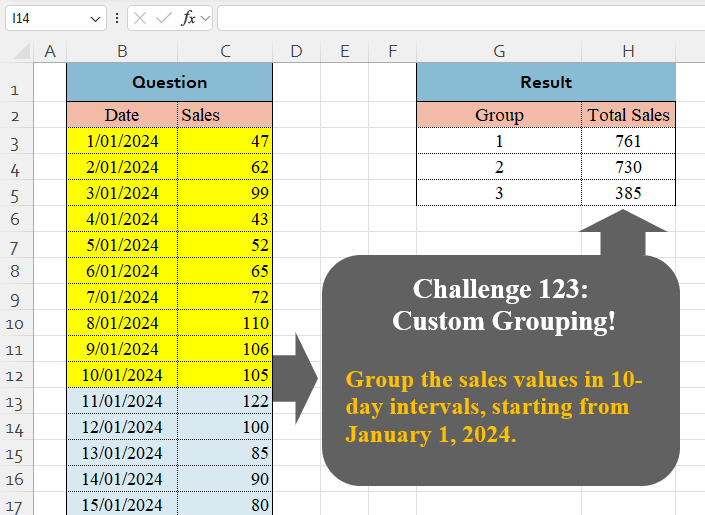
Group the sales values in 10-day intervals, starting from January 1, 2024.
📌 Challenge Details and Links
Challenge Number: 123
Challenge Difficulty: ⭐⭐
📥Download Sample File
📥Link to the solutions on LinkedIn
Solving the challenge of Custom Grouping! Part 5 with Power Query
Power Query solution 1 for Custom Grouping! Part 5, proposed by Zoran Milokanović:
let
  Source = Excel.CurrentWorkbook(){[Name = "Input"]}[Content],
  P = each List.PositionOf(Source[Date], _),
  S = Table.FromRecords(
    Table.Group(
      Source,
      "Date",
      {"A", each [Group = P([Date]{0}) / 10 + 1, Total Sales = List.Sum([Sales])]},
      0,
      (b, n) => Byte.From(Number.Mod(P(n), 10) = 0)
    )[A]
  )
in
  S
Power Query solution 2 for Custom Grouping! Part 5, proposed by Rafael González B.:
let
L1 = List.Transform(List.Split(Excel.CurrentWorkbook(){0}[Content][Sales],10), each List.Sum(_)),
L2 = {1..List.Count(L1)},
Answ = Table.FromColumns({L2,L1}, {"Group", "Total Sales"})
in
Answ
🧙🏻♂️🧙🏻♂️🧙🏻♂️Power Query solution 3 for Custom Grouping! Part 5, proposed by Ramiro Ayala Chávez:
let
S = Excel.CurrentWorkbook(){[Name="Table1"]}[Content],
a = List.Split(S[Sales],10),
b = {{1..3}}&{List.Transform(a,List.Sum)},
Sol = Table.FromColumns(b,{"Group","Total Sales"})
in
Sol
Power Query solution 4 for Custom Grouping! Part 5, proposed by Alejandro Simón 🇵🇦 🇪🇸:
let
  Source = Excel.CurrentWorkbook(){[Name = "Table1"]}[Content],
  Group = Table.Group(
    Source,
    "Date",
    {{"Total Sales", each List.Sum([Sales])}},
    0,
    (a, b) => Number.From(Number.From(b - a) >= 10)
  ),
  Sol = Table.AddIndexColumn(Group, "Group", 1)[[Group], [Total Sales]]
in
  Sol
Power Query solution 5 for Custom Grouping! Part 5, proposed by Abdallah Ally:
let
  Source = Excel.CurrentWorkbook(){[Name = "Table1"]}[Content],
  Split = Table.Split(Source, 10),
  Combine = Table.Combine(
    List.Transform({1 .. List.Count(Split)}, each Table.AddColumn(Split{_ - 1}, "Group", (x) => _))
  ),
  Result = Table.Group(Combine, "Group", {"Total Sales", each List.Sum([Sales])})
in
  Result
Power Query solution 6 for Custom Grouping! Part 5, proposed by Kris Jaganah:
let
  A = Excel.CurrentWorkbook(){[Name = "Table1"]}[Content],
  B = List.Select({0 .. Table.RowCount(A) - 1}, each Number.Mod(_, 10) = 0),
  C = List.Transform(B, each List.Sum(List.Range(A[Sales], _, 10))),
  D = Table.FromColumns({{1 .. List.Count(C)}, C}, {"Group", "Total Sales"})
in
  D
Power Query solution 7 for Custom Grouping! Part 5, proposed by Yaroslav Drohomyretskyi:
let
  Source  = Excel.CurrentWorkbook(){[Name = "Table1"]}[Content],
  Index   = Table.AddIndexColumn(Source, "Index", 0, 1, Int64.Type),
  Group   = Table.AddColumn(Index, "Group", each Number.IntegerDivide([Index], 10) + 1),
  GroupBy = Table.Group(Group, {"Group"}, {{"Total Sales", each List.Sum([Sales]), type number}})
in
  GroupBy
Power Query solution 8 for Custom Grouping! Part 5, proposed by 🇮🇷 Navid Esmaeilzadeh اسماعیل زاده:
let
  Source = Excel.CurrentWorkbook(){[Name = "Table1"]}[Content],
  A = Table.TransformColumnTypes(Source, {{"Date", type date}}),
  B = Table.FromColumns(
    {{1 .. Number.RoundUp(Duration.TotalDays(List.Max(A[Date]) - List.Min(A[Date])) / 10, 0)}},
    {"Group"}
  ),
  C = Table.AddColumn(
    B,
    "Date",
    each List.Dates(Date.AddDays(List.Min(A[Date]), ([Group] - 1) * 10), 10, #duration(1, 0, 0, 0))
  ),
  D = Table.ExpandListColumn(C, "Date"),
  E = Table.NestedJoin(A, {"Date"}, D, {"Date"}, "C"),
  F = Table.ExpandTableColumn(E, "C", {"Group"}, {"Group"}),
  G = Table.Group(F, {"Group"}, {{"Total Sales", each List.Sum([Sales]), type number}})
in
  G
Power Query solution 9 for Custom Grouping! Part 5, proposed by Ahmed Ariem:
let
  f = (x) =>
    Table.FromValue(
      List.Transform(Table.Split(x, 10), (x) => List.Sum(x[Sales])),
      [DefaultColumnName = "Total Sales"]
    ),
  Source = f(Excel.CurrentWorkbook(){[Name = "Table1"]}[Content]),
  Group = Table.AddIndexColumn(Source, "Group", 1, 1, Int64.Type)
in
  Group
Power Query solution 10 for Custom Grouping! Part 5, proposed by CA Raghunath Gundi:
let
  Source = Excel.CurrentWorkbook(){[Name = "Table1"]}[Content],
  Split = Table.FromList(
    Table.Split(Source, 10),
    Splitter.SplitByNothing(),
    null,
    null,
    ExtraValues.Error
  ),
  Index = Table.AddIndexColumn(Split, "Index", 1, 1, Int64.Type),
  Expand = Table.ExpandTableColumn(Index, "Column1", {"Date", "Sales"}, {"Date", "Sales"}),
  Group = Table.Group(Expand, {"Index"}, {{"Total Sales", each List.Sum([Sales]), type number}})
in
  Group
Power Query solution 11 for Custom Grouping! Part 5, proposed by Alexandre Garcia:
let
  Source = Excel.CurrentWorkbook(){[Name = "Table1"]}[Content],
  fx = each Number.IntegerDivide(Duration.Days(Date.From(_) - a{0}), a{1}),
  a = {#date(2024, 1, 1), 10},
  b = Table.Partition(
    Source,
    "Date",
    List.Count(List.Distinct(List.Transform(Source[Date], fx))),
    each fx(_)
  ),
  c = Table.FromRows(
    List.Transform(b, each {List.PositionOf(b, _) + 1, List.Sum([Sales])}),
    {"Group", "Total Sales"}
  )
in
  c
Power Query solution 12 for Custom Grouping! Part 5, proposed by Antriksh Sharma:
let
  Source = Sales,
  SortedRows = Table.Sort(Source, {{"Date", Order.Ascending}}),
  AddedIndex = Table.AddIndexColumn(SortedRows, "Group", 1, 1, Int64.Type),
  DividedColumn = Table.TransformColumns(
    AddedIndex,
    {{"Group", each Number.RoundUp(_ / 10), Int64.Type}}
  ),
  GroupedRows = Table.Group(
    DividedColumn,
    {"Group"},
    {{"Count", each List.Sum([Sales]), type nullable number}}
  )
in
  GroupedRows
Power Query solution 13 for Custom Grouping! Part 5, proposed by Sahan Jayasuriya:
let
  Source      = Excel.CurrentWorkbook(){[Name = "Data"]}[Content],
  ChangedType = Table.TransformColumnTypes(Source, {{"Date", type date}, {"Sales", Int64.Type}}),
  step1       = Table.Split(ChangedType, 10),
  step2       = List.Transform(step1, each List.Sum(_[Sales])),
  step3       = {1 .. List.Count(step2)},
  result      = Table.FromColumns({step3, step2}, {"Group", "Total Sales"})
in
  result
Solving the challenge of Custom Grouping! Part 5 with Excel
Excel solution 1 for Custom Grouping! Part 5, proposed by 🇰🇷 Taeyong Shin:
=GROUPBY(CEILING(DAY(B3:B26)/10,1),C3:C26,SUM,,0)Excel solution 2 for Custom Grouping! Part 5, proposed by Aditya Kumar Darak 🇮🇳:
=GROUPBY(
    QUOTIENT(
        SEQUENCE(
            ROWS(
                C3:C26
            ),
             ,
             0
        ),
         10
    ),
     C3:C26,
     SUM,
     0,
     0
)
Excel solution 3 for Custom Grouping! Part 5, proposed by Oscar Mendez Roca Farell:
=GROUPBY(1+INT((DAY(
    B3:B26
)-1)/10),
    C3:C26,
    SUM,
    ,
    0)
Excel solution 4 for Custom Grouping! Part 5, proposed by Julian Poeltl:
=LET(
    S,
    C3:C26,
    GROUPBY(
        ROUNDUP(
            SEQUENCE(
                ROWS(
                    S
                )
            )/10,

        ),
        S,
        SUM,
        ,
        0
    )
)
Excel solution 5 for Custom Grouping! Part 5, proposed by Kris Jaganah:
=LET(
    a,
    BYROW(
        WRAPROWS(
            C3:C26,
            10,
            0
        ),
        SUM
    ),
    HSTACK(
        XMATCH(
            a,
            a
        ),
        a
    )
)
Excel solution 6 for Custom Grouping! Part 5, proposed by Kris Jaganah:
=LET(a,
    B3:B26,
    b,
    SCAN(
        ,
        C3:C26,
        LAMBDA(
            x,
            y,
            IF(
                MOD(
                    DAY(
                        OFFSET(
                            y,
                            0,
                            -1
                        )
                    ),
                    10
                )=1,
                y,
                x+y
            )
        )
    ),
    c,
    FILTER(b,
    (MOD(
        DAY(
            a
        ),
        10
    )=0)+(a=MAX(
            a
        ))),
    HSTACK(
        XMATCH(
            c,
            c
        ),
        c
    ))
Excel solution 7 for Custom Grouping! Part 5, proposed by Imam Hambali:
=VSTACK(
    G2:H2,
     GROUPBY(
         ROUNDUP(
             SEQUENCE(
                 ROWS(
                     B3:B26
                 )
             )/10,
             0
         ),
         C3:C26,
         SUM,
         0,
         0
     )
)
Excel solution 8 for Custom Grouping! Part 5, proposed by Ivan William:
=GROUPBY(
    CEILING(
        DAY(
            B3:B26
        )/10,
        1
    ),
    C3:C26,
    SUM,
    ,
    0
)
Excel solution 9 for Custom Grouping! Part 5, proposed by Sunny Baggu:
=LET(
 _n,
     ROUNDUP(
         SEQUENCE(
             ROWS(
                 C3:C26
             )
         ) / 10,
          0
     ), _u,
     UNIQUE(
         _n
     ), HSTACK(
 _u, MAP(_u,
     LAMBDA(a,
     SUM((_n = a) * C3:C26)))
 )
)
Excel solution 10 for Custom Grouping! Part 5, proposed by Sunny Baggu:
=LET(     _a,
     MMULT(          WRAPROWS(
              C3:C26,
               10,
               0
          ),          SEQUENCE(
              10,
               ,
               ,
               0
          )     ),     HSTACK(
         SEQUENCE(
             ROWS(
                 _a
             )
         ),
          _a
     ))
Excel solution 11 for Custom Grouping! Part 5, proposed by Sunny Baggu:
=LET(     _a,
     MMULT(          WRAPROWS(
              C3:C26,
               10,
               0
          ),          ROW(
              1:10
          ) ^ 0     ),     HSTACK(
         SEQUENCE(
             ROWS(
                 _a
             )
         ),
          _a
     ))
Excel solution 12 for Custom Grouping! Part 5, proposed by Andy Heybruch:
=HSTACK(
    SEQUENCE(
        3
    ),
    TOCOL(
        BYCOL(
            WRAPCOLS(
                C3:C26,
                10,
                0
            ),
            SUM
        )
    )
)
Excel solution 13 for Custom Grouping! Part 5, proposed by Bilal Mahmoud kh.:
=REDUCE(
    {"Group",
    "Total sales"},
    SEQUENCE(
        3,
        ,
        1,
        10
    ),
    LAMBDA(
        x,
        y,
        VSTACK(
            x,
            HSTACK(
                ROWS(
                    x
                ),
                SUM(
                    OFFSET(
                        C2,
                        y,
                        0,
                        10,
                        1
                    )
                )
            )
        )
    )
)
Excel solution 14 for Custom Grouping! Part 5, proposed by Eddy Wijaya:
=LET(    d,
    B3:C26,    s,
    SCAN(
        0,
        TAKE(
            d,
            ,
            1
        ),
        LAMBDA(
            a,
            v,
            IF(
                MOD(
                    DAY(
                        v
                    ),
                    10
                )=1,
                a+1,
                a
            )
        )
    ),    VSTACK(
        G2:H2,
        GROUPBY(
            s,
            TAKE(
                d,
                ,
                -1
            ),
            SUM,
            ,
            0
        )
    )
)
Excel solution 15 for Custom Grouping! Part 5, proposed by El Badlis Mohd Marzudin:
=GROUPBY(
    INT(
        SEQUENCE(
            ROWS(
                B3:C26
            ),
            ,
            0,
            1/10
        )
    )+1,
    C3:C26,
    SUM,
    ,
    0
)
Excel solution 16 for Custom Grouping! Part 5, proposed by ferhat CK:
=LET(
    a,
    C3:C26,
    b,
    WRAPROWS(
        a,
        10,
        0
    ),
    c,
    BYROW(
        b,
        SUM
    ),
    HSTACK(
        SEQUENCE(
            COUNTA(
                c
            )
        ),
        c
    )
)
Excel solution 17 for Custom Grouping! Part 5, proposed by Gerson Pineda:
=GROUPBY(INT((SEQUENCE(
    24
)-1)/10)+1,
    C3:C26,
    SUM,
    ,
    0)
Excel solution 18 for Custom Grouping! Part 5, proposed by Gerson Pineda:
=LET(
    f,
    {1;2;3},
    HSTACK(
        f,
        MAP(
            f-1,
            LAMBDA(
                x,
                SUM(
                    OFFSET(
                        C3,
                        x*10,
                        ,
                        10
                    )
                )
            )
        )
    )
)
Excel solution 19 for Custom Grouping! Part 5, proposed by Hamidi Hamid:
=LET(x,
    DROP(INT((SEQUENCE(
        COUNTA(
            VSTACK(
                0,
                B3:B26
            )
        )
    )-1)/10+1),
    -1),
    z,
    HSTACK(
        x,
        C3:C26
    ),
    g,
    MAP(
        UNIQUE(
            x
        ),
        LAMBDA(
            a,
            SUM(
                FILTER(
                    TAKE(
                        z,
                        ,
                        -1
                    ),
                    x=a,

                )
            )
        )
    ),
    HSTACK(
        UNIQUE(
            x
        ),
        g
    ))
Excel solution 20 for Custom Grouping! Part 5, proposed by Hussein SATOUR:
=GROUPBY(ROUNDUP((B3:B26-B3+1)/10,
    0),
    C3:C26,
    SUM)
Excel solution 21 for Custom Grouping! Part 5, proposed by Md. Zohurul Islam:
=LET(     A,
     SORT(
         B3:C26,
          1,
          1
     ),     dates,
     CHOOSECOLS(
         A,
          1
     ),     Sales,
     CHOOSECOLS(
         A,
          2
     ),     group,
     CEILING(
         SEQUENCE(
             COUNTA(
                 dates
             )
         ) / 10,
          1
     ),     totalSales,
     GROUPBY(
         group,
          Sales,
          SUM,
          0,
          0
     ),     Result,
     VSTACK(
         {"Group",
          "Total Sales"},
          totalSales
     ),     Result)
Excel solution 22 for Custom Grouping! Part 5, proposed by Petya Koleva:
=SUM(
    CHOOSECOLS(
        WRAPCOLS(
            $C$3:$C$26,
            10,
            ""
        ),
        G3
    )
)
Excel solution 23 for Custom Grouping! Part 5, proposed by Pierluigi Stallone:
=HSTACK(
    SEQUENCE(
        ROUNDUP(
            ROWS(
                B3:B26
            )/10,
            0
        )
    ),
    VSTACK(
        SUM(
            C3:C12
        ),
        SUM(
            C13:C22
        ),
        SUM(
            C23:C33
        )
    )
)

or:
=HSTACK(
    SEQUENCE(
        ROUNDUP(
            ROWS(
                B3:B26
            )/10,
            0
        )
    ),
    BYROW(
        WRAPROWS(
            C3:C26,
            10,
            0
        ),
        LAMBDA(
            array,
            SUM(
                array
            )
        )
    )
)
Excel solution 24 for Custom Grouping! Part 5, proposed by Rick Rothstein:
=HSTACK(
    {1;2;3},
    BYROW(
        WRAPROWS(
            C3:C26,
            10,
            0
        ),
        SUM
    )
)

And with the headers...
=VSTACK(
    {"Group",
    "Total Sales"},
    HSTACK(
    {1;2;3},
    BYROW(
        WRAPROWS(
            C3:C26,
            10,
            0
        ),
        SUM
    )
)
)
Excel solution 25 for Custom Grouping! Part 5, proposed by Songglod Petchamras:
=LET(
    s,
    C3:C26,
    i,
    10,
    g,
    SEQUENCE(
        ROUNDUP(
            ROWS(
                s
            )/i,
            0
        )
    ),
    HSTACK(
        g,
        BYROW(
            WRAPROWS(
                s,
                i,
                0
            ),
            LAMBDA(
                r,
                SUM(
                    r
                )
            )
        )
    )
)
Excel solution 26 for Custom Grouping! Part 5, proposed by Tomasz Jakóbczyk:
=UNIQUE(ROUNDUP(MATCH(B3:B26,B3:B26,0)/10,))
H3: =SUM(OFFSET($C$3,G3*10-10,,10))
Solving the challenge of Custom Grouping! Part 5 with Python
Python solution 1 for Custom Grouping! Part 5, proposed by Konrad Gryczan, PhD:
import pandas as pd

path = "CH-123 Custom Grouping.xlsx"
input = pd.read_excel(path, usecols="B:C", skiprows=1, nrows=24)
test = pd.read_excel(path, usecols="G:H", skiprows=1, nrows=3)

result = input.assign(Group=input.index // 10 + 1).drop(columns=["Date"]).groupby("Group").sum().rename(columns={"Sales": "Total Sales"}).reset_index()

print(result.equals(test))  # True
Solving the challenge of Custom Grouping! Part 5 with Python in Excel
Python in Excel solution 1 for Custom Grouping! Part 5, proposed by Abdallah Ally:
import ceil

# Read the data range
df = xl("B2:C26", headers=True)

# Perform data munging
df = (df
 .assign(Group = ((df.index + 1) / 10).map(ceil))
 .groupby('Group')
 .agg(TotalSales=('Sales', 'sum'))
 .reset_index()
 .rename(columns={'TotalSales': 'Total Sales'})
 )

# Display the final results
df
Python in Excel solution 2 for Custom Grouping! Part 5, proposed by Alejandro Campos:
df = xl("B2:C26", headers=True)

df['Group'] = (df.index // 10) + 1
grouped_df = df.groupby('Group').agg({'Sales': 'sum'}).reset_index()
Python in Excel solution 3 for Custom Grouping! Part 5, proposed by Ümit Barış Köse, MSc:
df = xl("B2:C26", headers=True)
df['Group'] = (df['Date'] - df['Date'].min()).dt.days // 10 + 1
result = df.groupby('Group')['Sales'].sum().reset_index(name='Total Sales')
Python in Excel solution 4 for Custom Grouping! Part 5, proposed by Murat OSMA:
df = xl("B2:C26", headers = True)
df['Group'] = (df.index // 10) + 1
result = df.groupby('Group')['Sales'].sum().reset_index()

Alternative:
df = xl("B2:C26", headers = True).groupby((df.index // 10) + 1)['Sales'].sum().reset_index()
Solving the challenge of Custom Grouping! Part 5 with R
R solution 1 for Custom Grouping! Part 5, proposed by Konrad Gryczan, PhD:
library(tidyverse)
library(readxl)

path = "files/CH-123 Custom Grouping.xlsx"
input = read_excel(path, range = "B2:C26")
test = read_excel(path, range = "G2:H5")


result = input %>%
 mutate(Group = (row_number() - 1) %/% 10 + 1) %>%
 summarise(`Total Sales` = sum(Sales),
 .by = Group)

all.equal(result, test)
#> [1] TRUE
Solving the challenge of Custom Grouping! Part 5 with Google Sheets
Google Sheets solution 1 for Custom Grouping! Part 5, proposed by Peter Krkos:
PowerQuery solution:
https://docs.google.com/spreadsheets/d/1zR5IZLz8OT76vhaPEHfsPrw8-RDKnLyyqS49IJjdhFk/edit?usp=sharing