
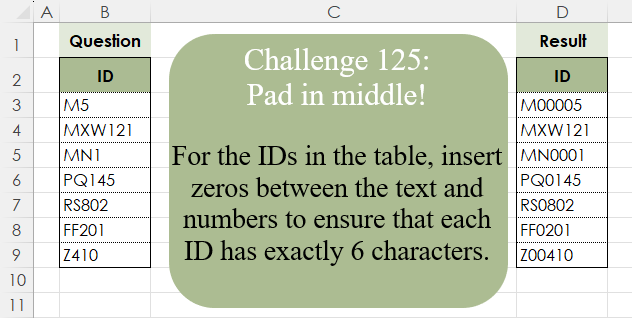
For the IDs in the table, insert zeros between the text and numbers to ensure that each ID has exactly 6 characters.
📌 Challenge Details and Links
Challenge Number: 125
Challenge Difficulty: ⭐⭐
📥Download Sample File
📥Link to the solutions on LinkedIn
📥Link to the solution on YouTube
Solving the challenge of Pad In The Middle! with Power Query
Power Query solution 1 for Pad In The Middle!, proposed by Zoran Milokanović:
let
  Source = Excel.CurrentWorkbook(){[Name = "Input"]}[Content],
  S = Table.TransformColumns(
    Source,
    {
      "ID",
      each Text.Insert(_, Text.PositionOfAny(_, {"0" .. "9"}), Text.Repeat("0", 6 - Text.Length(_)))
    }
  )
in
  S
Power Query solution 2 for Pad In The Middle!, proposed by 🇵🇪 Ned Navarrete C.:
let
  Source = Excel.CurrentWorkbook(){[Name = "Table1"]}[Content],
  Result = Table.TransformColumns(
    Source,
    {
      "ID",
      each Text.Select(_, {"A" .. "Z"})
        & Text.Repeat("0", 6 - Text.Length(_))
        & Text.Select(_, {"0" .. "9"})
    }
  )
in
  Result
Power Query solution 3 for Pad In The Middle!, proposed by Luan Rodrigues:
let
 Fonte = Tabela1,
 res = Table.AddColumn(Fonte, "Personalizar", each if Text.Length([ID]) < 6 then let
a = Splitter.SplitTextByCharacterTransition({"A".."Z","0".."9"},{"0".."9"})([ID]),
b = a{0}&Text.PadStart(Text.Combine(List.Skip(a)),6-Text.Length(a{0}),"0") in b else [ID])
in
 res
Power Query solution 4 for Pad In The Middle!, proposed by Ramiro Ayala Chávez:
let
S = Excel.CurrentWorkbook(){[Name="Table1"]}[Content],
a = Table.AddColumn(S,"L", each Text.Length([ID])),
b = Table.SplitColumn(a,"ID",Splitter.SplitTextByCharacterTransition({"A".."Z"},{"0".."9"}),{"T1","T2"}),
c = Table.AddColumn(b,"Z", each if [L]<6 then Text.Repeat("0",6-[L]) else null),
Sol = Table.CombineColumns(c,{"T1","Z","T2"},Combiner.CombineTextByDelimiter(""),"ID")[[ID]]
in
Sol
Power Query solution 5 for Pad In The Middle!, proposed by Alejandro Simón 🇵🇦 🇪🇸:
let
Source = Excel.CurrentWorkbook(){[Name="Table1"]}[Content],
Sol = Table.AddColumn(Source, "Custom", each
 let
 a = [ID],
 b = Splitter.SplitTextByCharacterTransition({"A".."Z"}, {"0".."9"})(a),
 c = b{0}&Text.PadStart(b{1}, 6-Text.Length(b{0}),"0")
 in c)
in
Sol
Power Query solution 6 for Pad In The Middle!, proposed by Kris Jaganah:
let
  A = Excel.CurrentWorkbook(){[Name = "Table1"]}[Content],
  B = Table.TransformColumns(
    A,
    {
      "ID",
      each [
        a = Text.Remove(_, {"0" .. "9"}),
        b = Text.Length(_),
        c = a & Text.Repeat("0", 6 - b) & Text.End(_, b - Text.Length(a))
      ][c]
    }
  )
in
  B
Power Query solution 7 for Pad In The Middle!, proposed by Abdallah Ally:
let
  Source = Excel.CurrentWorkbook(){[Name = "Table1"]}[Content],
  Result = Table.TransformColumns(
    Source,
    {
      "ID",
      each [
        a = Text.Length(_),
        b = Text.PositionOfAny(_, {"0" .. "9"}),
        c = Text.Insert(_, b, Text.Repeat("0", 6 - a))
      ][c]
    }
  )
in
  Result
Power Query solution 8 for Pad In The Middle!, proposed by Yaroslav Drohomyretskyi:
let
  Source = Excel.CurrentWorkbook(){[Name = "Table1"]}[Content],
  Split = Table.SplitColumn(
    Source,
    "ID",
    Splitter.SplitTextByCharacterTransition((c) => not List.Contains({"0" .. "9"}, c), {"0" .. "9"}),
    {"ID.1", "ID.2"}
  ),
  Zeros = Table.AddColumn(
    Split,
    "Custom",
    each Text.Repeat("0", 6 - Text.Length([ID.1]) - Text.Length([ID.2]))
  ),
  Merge = Table.CombineColumns(
    Zeros,
    {"ID.1", "Custom", "ID.2"},
    Combiner.CombineTextByDelimiter("", QuoteStyle.None),
    "ID"
  )
in
  Merge
Power Query solution 9 for Pad In The Middle!, proposed by 🇮🇷 Navid Esmaeilzadeh اسماعیل زاده:
let
Source = Excel.CurrentWorkbook(){[Name="Table1"]}[Content],
S1 = Table.AddColumn(Source, "Answer", each let
A=Splitter.SplitTextByCharacterTransition({"A".."Z","a".."z"},{"0".."9"})([ID]),
B=6-Text.Length(A{0}),
C=A{0}&Text.PadStart(A{1},B,"0")
in
C)
in
 S1
Power Query solution 10 for Pad In The Middle!, proposed by Daniel Madhadha:
let
  Source = Excel.CurrentWorkbook(){[Name = "Table1"]}[Content],
  #"Inserted Text Length" = Table.AddColumn(Source, "Length", each Text.Length([ID]), Int64.Type),
  #"Split Column by Character Transition" = Table.SplitColumn(
    #"Inserted Text Length",
    "ID",
    Splitter.SplitTextByCharacterTransition((c) => not List.Contains({"0" .. "9"}, c), {"0" .. "9"}),
    {"ID.1", "ID.2"}
  ),
  #"Added Custom" = Table.AddColumn(
    #"Split Column by Character Transition",
    "Custom",
    each Text.Repeat("0", 6 - [Length])
  ),
  #"Inserted Merged Column" = Table.AddColumn(
    #"Added Custom",
    "Merged",
    each Text.Combine({[ID.1], [Custom], [ID.2]}, ""),
    type text
  ),
  #"Removed Columns" = Table.RemoveColumns(
    #"Inserted Merged Column",
    {"ID.1", "ID.2", "Length", "Custom"}
  )
in
  #"Removed Columns"
Power Query solution 11 for Pad In The Middle!, proposed by Sahan Jayasuriya:
let
  Source = Excel.CurrentWorkbook(){[Name = "Data"]}[Content],
  Custom1 = Table.TransformColumns(
    Source,
    {
      "ID",
      each [
        a = Text.Length(_),
        b = Text.ToList(_),
        c = List.PositionOfAny(b, {"a" .. "z", "A" .. "Z"}, Occurrence.Last),
        d = if a < 6 then List.InsertRange(b, c + 1, List.Repeat({"0"}, 6 - a)) else b,
        e = Text.Combine(d, "")
      ][e]
    }
  )
in
  Custom1
Solving the challenge of Pad In The Middle! with Excel
Excel solution 1 for Pad In The Middle!, proposed by Bo Rydobon 🇹🇭:
=REGEXREPLACE(
    B3:B9,
    "d+",
    REPT(
        0,
        6-LEN(
            B3:B9
        )
    )&"$0"
)

=LET(
    i,
    B3:B9,
    j,
    TEXTSPLIT(
        i,
        SEQUENCE(
            9
        )
    ),
    SUBSTITUTE(
        i,
        j,
        j&REPT(
            0,
            6-LEN(
                i
            )
        )
    )
)
Excel solution 2 for Pad In The Middle!, proposed by 🇰🇷 Taeyong Shin:
=REGEXREPLACE(B3:B9,"(d+)",REPT(0,6-LEN(B3:B9))&"$1")

Without Regex
=LET(d,B3:B9,a,TEXTBEFORE(d,SEQUENCE(10,,0)),a&BASE(TEXTAFTER(d,a),10,6-LEN(a)))
Excel solution 3 for Pad In The Middle!, proposed by 🇵🇪 Ned Navarrete C.:
=REPLACE(B3:B9,LEN(REGEXREPLACE(B3:B9,"d",""))+1,,REPT(0,6-LEN(B3:B9)))Excel solution 4 for Pad In The Middle!, proposed by Aditya Kumar Darak 🇮🇳:
=MAP(
    B3:B9,
     LAMBDA(
         a,
          REPLACE(
              a,
               MIN(
                   IFERROR(
                       FIND(
                           SEQUENCE(
                               10,
                                ,
                                0
                           ),
                            a
                       ),
                        99
                   )
               ),
               0,
               REPT(
                   0,
                    6 - LEN(
                        a
                    )
               )
          )
     )
)
Excel solution 5 for Pad In The Middle!, proposed by Oscar Mendez Roca Farell:
=MAP(
    B3:B9,
     LAMBDA(
         a,
          REPLACE(
              a,
               MIN(
                   TOCOL(
                       FIND(
                           ROW(
                               1:9
                           ),
                            a
                       ),
                        2
                   )
               ),
               ,
               REPT(
                   0,
                    6-LEN(
                        a
                    )
               )
          )
     )
)
Excel solution 6 for Pad In The Middle!, proposed by Julian Poeltl:
=MAP(
    B3:B9,
    LAMBDA(
        I,
        LET(
            L,
            LEN(
                I
            ),
            S,
            MID(
                I,
                SEQUENCE(
                    L
                ),
                1
            ),
            CONCAT(
                VSTACK(
                    FILTER(
                        S,
                        NOT(
                            ISNUMBER(
                                --S
                            )
                        )
                    ),
                    REPT(
                        0,
                        6-L
                    ),
                    FILTER(
                        S,
                        ISNUMBER(
                                --S
                            )
                    )
                )
            )
        )
    )
)
Excel solution 7 for Pad In The Middle!, proposed by Kris Jaganah:
=LET(
    a,
    B3:B9,
    b,
    LEN(
        a
    ),
    c,
    TEXTSPLIT(
        a,
        SEQUENCE(
            10,
            ,
            0
        )
    ),
    c&REPT(
        0,
        6-b
    )&RIGHT(
        a,
        b-LEN(
            c
        )
    )
)
Excel solution 8 for Pad In The Middle!, proposed by JvdV -:
=REGEXREPLACE(
    B3:B9,
    "D+K",
    REPT(
        0,
        6-LEN(
            B3:B9
        )
    )
)
Excel solution 9 for Pad In The Middle!, proposed by Imam Hambali:
=LET(    sp,
     REGEXEXTRACT(
         B3:B9,
         {"[A-Z]+",
         "d+"},
         1
     ),    rp,
     REPT(
         "0",
         6-LEN(
             B3:B9
         )
     ),    HSTACK(
        TAKE(
            sp,
            ,
            1
        )&rp&TAKE(
            sp,
            ,
            -1
        )
    ))
Excel solution 10 for Pad In The Middle!, proposed by Sunny Baggu:
=MAP(     B3:B9,     LAMBDA(
         t,          LET(

               _a,
               TEXTSPLIT(
                   t,
                    ,
                    SEQUENCE(
                        10,
                         ,
                         0
                    ),
                    1
               ),

               _b,
               TEXTSPLIT(
                   t,
                    ,
                    _a,
                    1
               ),

               TEXTJOIN(
                   "",
                    1,
                    _a,
                    REPT(
                        "0",
                         6 - LEN(
                             _a
                         ) - LEN(
                             _b
                         )
                    ),
                    _b
               )

          )     ))
Excel solution 11 for Pad In The Middle!, proposed by André Gonçalves:
=LET(     i;
     REPT(
         0;
          6-LEN(
              B3
          )
     );     l;
     CONCAT(
         TEXT(
             MID(
                 B3;
                 SEQUENCE(
                     LEN(
              B3
          )
                 );
                 1
             );
             ";"
         )
     );     n;
     CONCAT(
         TEXT(
             MID(
                 B3;
                 SEQUENCE(
                     LEN(
              B3
          )
                 );
                 1
             );
             "0;;0;"
         )
     );     CONCAT(
         l;
         i;
         n
     ))
Excel solution 12 for Pad In The Middle!, proposed by Andy Heybruch:
=MAP(
    B3:B9,
    LAMBDA(
        _id,
        LET(

            _len,
            LEN(
                _id
            ),

            _arr,
            MID(
                _id,
                SEQUENCE(
                    _len
                ),
                1
            ),

            _nums,
            SUM(
                --ISNUMBER(
                    --_arr
                )
            ),

            CONCAT(
                TAKE(
                    _arr,
                    _len-_nums
                ),
                REPT(
                    "0",
                    6-_len
                ),
                TAKE(
                    _arr,
                    -_nums
                )
            )
        )
    )
)
Excel solution 13 for Pad In The Middle!, proposed by Asheesh Pahwa:
=MAP(
    B3:B9,
    LAMBDA(
        x,        LET(
            _t,
            TEXTSPLIT(
                x,
                SEQUENCE(
                    10,
                    ,
                    0
                ),
                ,
                1
            ),
            _t2,
            TEXTSPLIT(
                x,
                _t,
                ,
                1
            ),

            r,
            REPT(
                "0",
                6-LEN(
                    x
                )
            ),
            TEXTJOIN(
                "",
                1,
                _t,
                r,
                _t2
            )
        )
    )
)
Excel solution 14 for Pad In The Middle!, proposed by Bilal Mahmoud kh.:
=MAP(
    B3:B9,
    LAMBDA(
        x,
        LET(
            a,
            MID(
                x,
                SEQUENCE(
                    LEN(
                        x
                    ),
                    ,
                    LEN(
                        x
                    ),
                    -1
                ),
                SEQUENCE(
                    LEN(
                        x
                    )
                )
            ),
            b,
            MAX(
                IF(
                    ISNUMBER(
                        --a
                    ),
                    --a,
                    0
                )
            ),
            SUBSTITUTE(
                x,
                b,
                REPT(
                    "0",
                    6-LEN(
                        x
                    )
                )&b
            )
        )
    )
)
Excel solution 15 for Pad In The Middle!, proposed by Eddy Wijaya:
=MAP(
    B3:B9,
    LAMBDA(
        m,
        LET(

            id,
            m,

            t,
            TEXTSPLIT(
                id,
                SEQUENCE(
                    11,
                    ,
                    0
                ),
                ,
                TRUE
            ),

            n,
            TEXTSPLIT(
                id,
                CHAR(
                    SEQUENCE(
                        26,
                        ,
                        65
                    )
                ),
                ,
                TRUE
            ),

            t&TEXT(
                n,
                REPT(
                    "0",
                    6-LEN(
                        t
                    )
                )
            )
        )
    )
)
Excel solution 16 for Pad In The Middle!, proposed by Francesco Bianchi 🇮🇹:
=BYROW(B3:B9;LAMBDA(x;LET(a;LEN(x);b;MID(x;SEQUENCE(a);1);n;FILTER(b;ISNUMBER(XMATCH(--b;--SEQUENCE(10;;0))));t;FILTER(b;ISERR(XMATCH(--b;--SEQUENCE(10;;0))));r;TEXTJOIN("";;VSTACK(t;REPT(0;6-a);n));r)))Excel solution 17 for Pad In The Middle!, proposed by Hamidi Hamid:
=LET(
    bt,
    B3:B9,
    x,
    BYROW(
        IFERROR(
            MID(
                bt,
                SEQUENCE(
                    ,
                    6
                ),
                1
            )*1,
            ""
        ),
        COUNT
    ),
    z,
    LEFT(
        B3:B9,
        LEN(
            bt
        )-BYROW(
            IFERROR(
                MID(
                bt,
                SEQUENCE(
                    ,
                    6
                ),
                1
            )*1,
                ""
            ),
            COUNT
        )
    ),
    t,
    z&REPT(
        0,
        6-x-LEN(
            z
        )
    )&RIGHT(
        bt,
        x
    ),
    t
)
Excel solution 18 for Pad In The Middle!, proposed by Hazem Hassan:
=LET(
    r,
    B2:B8,
    g,
    REGEXEXTRACT(
        r,
        "D+"
    ),
    SUBSTITUTE(
        r,
        g,
        g&REPT(
            0,
            6-LEN(
                r
            )
        )
    )
)
Excel solution 19 for Pad In The Middle!, proposed by Hazem Hassan:
=LET(
    r,
    B3:B9,
    s,
    TEXTSPLIT(
        r,
        SEQUENCE(
            10,
            ,
            0
        ),
        ,
        1
    ),
    s&REPT(
        0,
        6-LEN(
            r
        )
    )&TEXTAFTER(
        r,
        s
    )
)
Excel solution 20 for Pad In The Middle!, proposed by Hussein SATOUR:
=LET(
    a,
    B3:B9,
    REPLACE(
        a,
        FIND(
            REGEXEXTRACT(
                a,
                "d"
            ),
            a
        ),
        ,
        REPT(
            0,
            6-LEN(
                a
            )
        )
    )
)
Excel solution 21 for Pad In The Middle!, proposed by Md. Shah Alam, Microsoft Certified Trainer:
=MAP(
    B3:B9,
    LAMBDA(
        x,
        LET(
            a,
            TAKE(
                TOCOL(
                    FIND(
                        --MID(
                            x,
                            SEQUENCE(
                                LEN(
                                    x
                                )
                            ),
                            1
                        ),
                        x
                    ),
                    3
                ),
                1
            ),
            LEFT(
                x,
                a-1
            )&REPT(
                0,
                6-LEN(
                                    x
                                )
            )&MID(
                x,
                a,
                100
            )
        )
    )
)
Excel solution 22 for Pad In The Middle!, proposed by Md. Zohurul Islam:
=MAP(     B3:B9,     LAMBDA(
         a,          LET(

               b,
               LEN(
                   a
               ),

               c,
               SEQUENCE(
                   b
               ),

               d,
               TEXTJOIN(
                   ,
                    ,
                    IFERROR(
                        ABS(
                            MID(
                                a,
                                 c,
                                 1
                            )
                        ),
                         ""
                    )
               ),

               position,
               b - LEN(
                   d
               ) + 1,

               zeros,
               LEFT(
                   "000000",
                    6 - b
               ),

               result,
               REPLACE(
                   a,
                    position,
                    0,
                    zeros
               ),

               result

          )     ))
Excel solution 23 for Pad In The Middle!, proposed by Pierluigi Stallone:
=LET(
    chars,
    TEXTSPLIT(
        B3:B9,
        SEQUENCE(
            9,
            ,
            0
        )
    ),
    zeros,
    REPT(
        0,
        6-LEN(
            B3:B9
        )
    ),
    numbers,
    RIGHT(
        B3:B9,
        LEN(
            B3:B9
        )-LEN(
            chars
        )
    ),
    chars&zeros&numbers
)
Excel solution 24 for Pad In The Middle!, proposed by Pieter de B.:
=MAP(
    B3:B9,
    LAMBDA(
        a,
        LET(
            b,
            TEXTSPLIT(
                a,
                SEQUENCE(
                    10
                )-1,
                ,
                1
            ),
            c,
            TEXTSPLIT(
                a,
                b,
                ,
                1
            ),
            b&REPT(
                0,
                6-LEN(
                    b
                )-LEN(
                    c
                )
            )&c
        )
    )
)
Excel solution 25 for Pad In The Middle!, proposed by Rick Rothstein:
=LET(
    b,
    B3:B9,
    REPLACE(
        b,
        LEN(
            TEXTBEFORE(
                b,
                SEQUENCE(
                    10,
                    ,
                    0
                )
            )
        )+1,
        ,
        REPT(
            0,
            6-LEN(
                b
            )
        )
    )
)
Excel solution 26 for Pad In The Middle!, proposed by Songglod Petchamras:
=MAP(
    B3:B9,
    LAMBDA(
        id,
        LET(
            t,
            MID(
                id,
                SEQUENCE(
                    ,
                    LEN(
                        id
                    )
                ),
                1
            ),
            ch,
            CONCAT(
                FILTER(
                    t,
                    NOT(
                        ISNUMBER(
                            --t
                        )
                    )
                )
            ),
            n,
            TEXT(
                RIGHT(
                    id,
                    LEN(
                        id
                    )-LEN(
                        ch
                    )
                ),
                REPT(
                    0,
                    6-LEN(
                        ch
                    )
                )
            ),
            ch&n
        )
    )
)
Excel solution 27 for Pad In The Middle!, proposed by Tomasz Jakóbczyk:
=CONCAT(
    LEFT(
        B3,
        MATCH(
            TRUE,
            ISNUMBER(
                --MID(
                    B3,
                    SEQUENCE(
                        LEN(
                            B3
                        )
                    ),
                    1
                )
            ),
            0
        )-1
    ),
    REPT(
        0,
        6-LEN(
                            B3
                        )
    ),
    RIGHT(
        B3,
        LEN(
                            B3
                        )-MATCH(
            TRUE,
            ISNUMBER(
                --MID(
                    B3,
                    SEQUENCE(
                        LEN(
                            B3
                        )
                    ),
                    1
                )
            ),
            0
        )+1
    )
)