
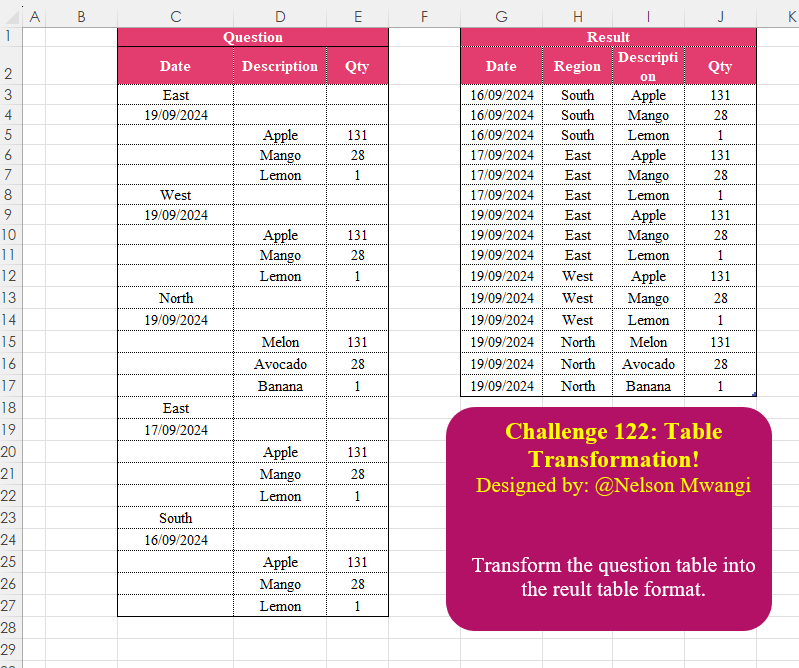
_x000D_
Excel solution 11 for Table Transformation! Part 11, proposed by Eddy Wijaya:
=LET(    d,
    C3:E27,    dummy,
    SEQUENCE(
        ROWS(
            d
        )
    ),    r,
    SEQUENCE(
        5,
        ,
        1,
        5
    ),    dat,
    SEQUENCE(
        5,
        ,
        2,
        5
    ),    datMod,
    BYROW(
        INDEX(
            d,
            dat,
            1
        ),
        LAMBDA(
            r,
            DATE(
                RIGHT(
                    r,
                    4
                ),
                MID(
                    r,
                    4,
                    2
                ),
                LEFT(
                    r,
                    2
                )
            )
        )
    ),    dq_s,
    FILTER(
        dummy,
        NOT(
            ISNUMBER(
                MATCH(
                    dummy,
                    VSTACK(
                        r,
                        dat
                    ),
                    0
                )
            )
        )
    ),    dq,
    INDEX(
        d,
        dq_s,
        {2,
        3}
    ),    l_dat,
    BYROW(
        HSTACK(
            TEXT(
                datMod,
                "mm/dd/yyyy"
            ),
            INDEX(
                d,
                r,
                1
            )
        ),
        LAMBDA(
            r,
            REPT(
                TEXTJOIN(
                    ",",
                    ,
                    r
                )&",",
                COLUMNS(
            d
        )
            )
        )
    ),    VSTACK(
        Solution[        #Headers],        SORT(
            HSTACK(
                WRAPROWS(
                    DROP(
                        REDUCE(
                            0,
                            l_dat,
                            LAMBDA(
                                a,
                                v,
                                VSTACK(
                                    a,
                                    LET(

                                        split,
                                        TEXTSPLIT(
                                            v,
                                            ,
                                            ",",
                                            TRUE
                                        ),

                                        split
                                    )
                                )
                            )
                        ),
                        1
                    ),
                    2
                ),
                dq
            )
        )
    )
)
Transform the question table into the reult table format.
📌 Challenge Details and Links
Challenge Number: 122
Challenge Difficulty: ⭐⭐⭐
Designed by: Nelson Mwangi
📥Download Sample File
📥Link to the solutions on LinkedIn
📥Link to the solution on YouTube
Solving the challenge of Table Transformation! Part 11 with Power Query
_x000D_
Power Query solution 1 for Table Transformation! Part 11, proposed by Omid Motamedisedeh:
let
  Source = Excel.CurrentWorkbook(){[Name = "Table1"]}[Content],
  #"Added Custom" = Table.AddColumn(Source, "Custom", each try Date.From([Date]) otherwise null),
  #"Filled Down" = Table.FillDown(#"Added Custom", {"Custom"}),
  #"Filtered Rows" = Table.SelectRows(
    #"Filled Down",
    each (not Text.Contains([Date], "/") or [Date] = null)
  ),
  #"Filled Down1" = Table.FillDown(#"Filtered Rows", {"Date"}),
  #"Filtered Rows1" = Table.SelectRows(#"Filled Down1", each ([Description] <> null)),
  #"Renamed Columns" = Table.RenameColumns(
    #"Filtered Rows1",
    {{"Date", "Region"}, {"Custom", "Date"}}
  ),
  #"Reordered Columns" = Table.ReorderColumns(
    #"Renamed Columns",
    {"Date", "Region", "Description", "Qty"}
  )
in
  #"Reordered Columns"
_x000D_
_x000D_
Power Query solution 2 for Table Transformation! Part 11, proposed by Omid Motamedisedeh:
let
  Source = Excel.CurrentWorkbook(){[Name = "Table1"]}[Content],
  Result = Table.ReorderColumns(
    Table.Combine(
      List.Transform(
        Table.Split(Source, 5),
        each [
          a = Table.FillDown(_, {"Date"}),
          b = Table.Skip(Table.AddColumn(a, "Region", each a[Date]{0}), 2)
        ][b]
      )
    ),
    {"Date", "Region", "Description", "Qty"}
  )
in
  Result
_x000D_
_x000D_
Power Query solution 3 for Table Transformation! Part 11, proposed by Zoran Milokanović:
let
  Source = Excel.CurrentWorkbook(){[Name = "Input"]}[Content],
  S = Table.Sort(
    Table.FromRows(
      List.Combine(
        Table.Group(
          Source,
          "Date",
          {
            "A",
            each
              let
                l = Table.ToRows(_)
              in
                List.Transform(List.Skip(l, 2), each {l{1}{0}, l{0}{0}} & List.Skip(_))
          },
          0,
          (b, n) => 1 - Byte.From(Text.Contains(n ?? "/", "/"))
        )[A]
      ),
      List.InsertRange(Table.ColumnNames(Source), 1, {"Region"})
    ),
    each Date.FromText([Date], [Format = "dd/MM/yyyy", Culture = "en-US"])
  )
in
  S
_x000D_
_x000D_
Power Query solution 4 for Table Transformation! Part 11, proposed by Brian Julius:
let
  Source = Table.RenameColumns(
    Excel.CurrentWorkbook(){[Name = "Table1"]}[Content],
    {"Date", "Date1"}
  ),
  RegList = {"South", "East", "West", "North"},
  AddRegion = Table.FillDown(
    Table.AddColumn(
      Source,
      "Region",
      each if List.Contains({"0" .. "9"}, Text.Start([Date1], 1)) then null else Text.Trim([Date1])
    ),
    {"Region"}
  ),
  AddDate = Table.FillDown(
    Table.AddColumn(
      AddRegion,
      "Date",
      each if List.Contains(RegList, [Date1]) then null else Date.From([Date1])
    ),
    {"Date"}
  ),
  Filter = Table.RemoveColumns(Table.SelectRows(AddDate, each ([Description] <> null)), "Date1"),
  Clean = [
    x = RegList,
    a = Filter,
    b = List.Transform(a[Region], each List.PositionOf(RegList, _)),
    c = Table.ReorderColumns(a, {"Date", "Region", "Description", "Qty"}),
    d = Table.FromColumns(Table.ToColumns(c) & {b}, Table.ColumnNames(c) & {"RegSort"}),
    e = Table.Sort(d, {{"RegSort", Order.Ascending}, {"Date", Order.Ascending}})
  ][e],
  Sort = Table.RemoveColumns(Clean, "RegSort")
in
  Sort
_x000D_
_x000D_
Power Query solution 5 for Table Transformation! Part 11, proposed by Ramiro Ayala Chávez:
let
S = Excel.CurrentWorkbook(){[Name="Table1"]}[Content],
a = Table.AddColumn(S,"D", each if [Date]=null or [Date]="East" or [Date]="West" or [Date]="North" or [Date]="South" then null else [Date]),
b = Table.AddColumn(a,"Region", each if [Date] is text then [Date] else null),
c = Table.RemoveColumns(Table.FillDown(b,{"D","Region"}),"Date"),
d = Table.SelectRows(c, each [Description]<>null),
Sol = Table.RenameColumns(Table.SelectColumns(Table.Sort(d,{"D",0}),{"D","Region","Description","Qty"}),{"D","Date"})
in
Sol
_x000D_
_x000D_
Power Query solution 6 for Table Transformation! Part 11, proposed by Alejandro Simón 🇵🇦 🇪🇸:
let
  Source = Excel.CurrentWorkbook(){[Name = "Table2"]}[Content],
  Group = Table.Group(
    Source,
    "Date",
    {
      {"A", each Table.FromRows({List.RemoveNulls(List.Reverse([Date]))}, {"Date", "Region"})},
      {"B", each Table.RemoveColumns(Table.Skip(_, 2), "Date")}
    },
    0,
    (a, b) =>
      Number.From(
        List.AnyTrue(List.Transform({"East", "West", "North", "South"}, each Text.Contains(b, _)))
      )
  )[[A], [B]],
  Expand = List.Accumulate(
    {"A", "B"},
    Group,
    (s, c) => Table.ExpandTableColumn(s, c, Table.ColumnNames(Table.Column(Group, c){0}))
  ),
  Sol = Table.Sort(Expand, {{"Date", Order.Ascending}, each List.PositionOf(Expand[Date], [Date])})
in
  Sol
_x000D_
_x000D_
Power Query solution 7 for Table Transformation! Part 11, proposed by Alejandro Simón 🇵🇦 🇪🇸:
let
  Source = Excel.CurrentWorkbook(){[Name = "Table2"]}[Content],
  Group = Table.Group(
    Source,
    "Date",
    {{"A", each Table.Skip(Table.FillDown(Table.Skip(_), {"Date"}))}},
    0,
    (a, b) =>
      Number.From(
        List.AnyTrue(List.Transform({"East", "West", "North", "South"}, each Text.Contains(b, _)))
      )
  ),
  Rename = Table.RenameColumns(Group, {{"Date", "Region"}}),
  Expand = Table.ExpandTableColumn(Rename, "A", Table.ColumnNames(Rename[A]{0})),
  Sol = Table.Sort(Expand, {{"Date", Order.Ascending}, each List.PositionOf(Expand[Date], [Date])})
in
  Sol
_x000D_
_x000D_
Power Query solution 8 for Table Transformation! Part 11, proposed by Kris Jaganah:
let
  A = Excel.CurrentWorkbook(){[Name = "Table3"]}[Content],
  B = Table.FillDown(A, {"Date"}),
  C = Table.AddColumn(
    B,
    "Region",
    each try if Number.From(Date.From([Date])) > 0 then null else null otherwise [Date]
  ),
  D = Table.FillDown(C, {"Region"}),
  E = Table.SelectRows(D, each ([Description] <> null))[[Date], [Region], [Description], [Qty]],
  F = Table.Sort(E, {"Date", 0})
in
  F
_x000D_
_x000D_
Power Query solution 9 for Table Transformation! Part 11, proposed by Abdallah Ally:
let
  Source = Excel.CurrentWorkbook(){[Name = "Table1"]}[Content],
  AddColumn = Table.AddColumn(
    Source,
    "Region",
    each if (try Date.From([Date]))[HasError] then [Date] else null
  ),
  Transform = Table.TransformColumns(
    AddColumn,
    {"Date", each try Date.From(_) otherwise null, type date}
  ),
  FillDown = Table.FillDown(Transform, {"Region", "Date"}),
  Filter = Table.SelectRows(FillDown, each [Description] <> null),
  Sort = Table.Sort(Filter, {{"Date", 0}, each Table.PositionOf(Filter, _)}),
  Result = Table.SelectColumns(Sort, {"Date", "Region", "Description", "Qty"})
in
  Result
_x000D_
_x000D_
Power Query solution 10 for Table Transformation! Part 11, proposed by Nelson Mwangi:
let
  Source = Excel.CurrentWorkbook(){[Name = "Data"]}[Content],
  FilledDownDate = Table.FillDown(Source, {"Date"}),
  RegionColumn = Table.AddColumn(
    FilledDownDate,
    "Region",
    each if Text.Contains([Date], "/") then null else [Date]
  ),
  FilledDownRegion = Table.FillDown(RegionColumn, {"Region"}),
  FilterNull = Table.SelectRows(FilledDownRegion, each ([Description] <> null)),
  DateType = Table.TransformColumnTypes(FilterNull, {{"Date", type date}}),
  SortByDate = Table.Sort(DateType, {{"Date", Order.Ascending}}),
  Reorder = Table.ReorderColumns(SortByDate, {"Date", "Region", "Description", "Qty"})
in
  Reorder
_x000D_
_x000D_
Power Query solution 11 for Table Transformation! Part 11, proposed by 🇮🇷 Navid Esmaeilzadeh اسماعیل زاده:
let
  Source = Excel.CurrentWorkbook(){[Name = "Table2"]}[Content],
  #"Added Custom" = Table.AddColumn(
    Source,
    "Region",
    each
      if Text.Length(Text.Remove([Date], {"0" .. "9"})) <> Text.Length([Date]) or [Date] = null then
        null
      else
        [Date]
  ),
  #"Filled Down" = Table.FillDown(#"Added Custom", {"Region", "Date"}),
  #"Filtered Rows" = Table.SelectRows(#"Filled Down", each ([Description] <> null)),
  #"Removed Other Columns" = Table.SelectColumns(
    #"Filtered Rows",
    {"Date", "Region", "Description", "Qty"}
  ),
  #"Sorted Rows" = Table.Sort(
    #"Removed Other Columns",
    {{"Date", Order.Ascending}, {"Region", Order.Ascending}, {"Description", Order.Ascending}}
  )
in
  #"Sorted Rows"
_x000D_
_x000D_
Power Query solution 12 for Table Transformation! Part 11, proposed by Ahmed Ariem:
let
  f = (x, y) => Table.FillDown(x, {y}),
  Source = Excel.CurrentWorkbook(){[Name = "Table2"]}[Content],
  Down1 = f(Source, "Date"),
  AddCol = Table.AddColumn(
    Down1,
    "Region",
    each if not Text.Contains([Date], "/") then [Date] else null
  ),
  Down2 = f(AddCol, "Region"),
  SelectRows = Table.SelectRows(Down2, each ([Qty] <> null)),
  Sort = Table.Sort(SelectRows, {{"Date", Order.Ascending}}),
  ReorderColumns = Table.ReorderColumns(Sort, {"Date", "Region", "Description", "Qty"})
in
  ReorderColumns
_x000D_
_x000D_
Power Query solution 13 for Table Transformation! Part 11, proposed by CA Raghunath Gundi:
let
  Source = Excel.CurrentWorkbook(){[Name = "Question"]}[Content],
  Fill_Date = Table.FillDown(Source, {"Date"}),
  Region = Table.AddColumn(
    Fill_Date,
    "Region",
    each try if Number.From(Date.From([Date])) > 0 then null else null otherwise [Date]
  ),
  Fill_Region = Table.FillDown(Region, {"Region"}),
  Result = Table.ReorderColumns(
    Table.Sort(Table.SelectRows(Fill_Region, each ([Qty] <> null)), {"Date", 0}),
    {"Date", "Region", "Description", "Qty"}
  )
in
  Result
_x000D_
_x000D_
Power Query solution 14 for Table Transformation! Part 11, proposed by Daniel Madhadha:
let
  Source = Excel.CurrentWorkbook(){[Name = "Table2"]}[Content],
  FilledDown = Table.FillDown(Source, {"Date"}),
  AddedRegion = Table.FillDown(
    Table.AddColumn(FilledDown, "Region", each if Text.Contains([Date], "/") then null else [Date]),
    {"Region"}
  ),
  FilteredRows = Table.SelectRows(AddedRegion, each ([Description] <> null)),
  ReorderedColumns = Table.ReorderColumns(FilteredRows, {"Date", "Region", "Description", "Qty"}),
  SortedRows = Table.Sort(
    Table.AddColumn(
      ReorderedColumns,
      "Custom",
      each
        if [Region] = "South" then
          0
        else if [Region] = "East" then
          1
        else if [Region] = "West" then
          2
        else
          3
    ),
    {{"Custom", Order.Ascending}, {"Qty", Order.Descending}}
  ),
  Result = Table.RemoveColumns(SortedRows, {"Custom"})
in
  Result
_x000D_
_x000D_
Power Query solution 15 for Table Transformation! Part 11, proposed by Francesco Bianchi 🇮🇹:
let
  Source = Excel.CurrentWorkbook(){[Name = "Table2"]}[Content],
  FilledDown = Table.Split(Table.FillDown(Source, {"Date"}), 5),
  AddRegion = List.Transform(
    FilledDown,
    each Table.Skip(Table.AddColumn(_, "Region", (x) => [Date]{0}), 2)
  ),
  ReorderedColumns = Table.ReorderColumns(
    Table.Combine(AddRegion),
    {"Date", "Region", "Description", "Qty"}
  ),
  SortedRows = Table.Sort(
    ReorderedColumns,
    {{"Date", Order.Ascending}, each List.PositionOf({"East", "West", "North", "South"}, [Region])}
  )
in
  SortedRows
_x000D_
Solving the challenge of Table Transformation! Part 11 with Excel
_x000D_
Excel solution 1 for Table Transformation! Part 11, proposed by Bo Rydobon 🇹🇭:
=LET(
    l,
    LAMBDA(
        x,
        SCAN(
            ,
            C3:C27,
            LAMBDA(
                a,
                v,
                IF(
                    v>x,
                    v,
                    a
                )
            )
        )
    ),
    SORT(
        FILTER(
            HSTACK(
                l(
                    0
                ),
                l(
                    "a"
                ),
                D3:E27
            ),
            E3:E27
        )
    )
)
_x000D_
_x000D_
Excel solution 2 for Table Transformation! Part 11, proposed by 🇰🇷 Taeyong Shin:
=LET(
    d,
    D3:D27,
    c,
    TOCOL(
        d,
        1
    ),
    f,
    LAMBDA(
        x,
        TOCOL(
            TOCOL(
                REGEXEXTRACT(
                    C3:C27,
                    x
                ),
                2
            )&LEFT(
                WRAPROWS(
                    c,
                    3
                ),
                0
            )
        )
    ),
    SORT(
        HSTACK(
            --f(
                "[d/]+"
            ),
            f(
                "pL+"
            ),
            c,
            TOCOL(
                E3:E27,
                1
            )
        )
    )
)
_x000D_
_x000D_
Excel solution 3 for Table Transformation! Part 11, proposed by Aditya Kumar Darak 🇮🇳:
=LET(
 _scn1,
     SCAN("",
     E3:E27,
     LAMBDA(a,
     b,
     IF(b,
     a,
     TAKE((@C3:C27):b,
     -1,
     1)))), _scn2,
     SCAN(
         "",
          _scn1,
          LAMBDA(
              a,
               b,
               IF(
                   ISERR(
                       -b
                   ),
                    b,
                    a
               )
          )
     ), _group,
     GROUPBY(
         HSTACK(
             _scn1,
              _scn2,
              D3:D27
         ),
          E3:E27,
          SUM,
          0,
          0,
          ,
          E3:E27
     ), _return,
     SORT(
         _group,
          {1,
          2,
          4},
          {1,
          1,
          -1}
     ), _return
)
_x000D_
_x000D_
Excel solution 4 for Table Transformation! Part 11, proposed by Julian Poeltl:
=LET(
    D,
    C3:C27,
    R,
    ROW(
        D
    ),
    RD,
    FILTER(
        R,
        IFERROR(
            ISNUMBER(
                --D
            )*D>0,
            0
        )
    ),
    I,
    D3:E27,
    F,
    FILTER(
        I,
        DROP(
            I,
            ,
            1
        )>0
    ),
    X,
    XLOOKUP(
        FILTER(
            R,
            TAKE(
                I,
                ,
                -1
            )>0
        ),
        RD,
        RD,
        ,
        -1
    ),
    SORT(
        HSTACK(
            INDEX(
                D,
                X-@R+1
            ),
            INDEX(
                D,
                X-@R
            ),
            F
        )
    )
)
_x000D_
_x000D_
Excel solution 5 for Table Transformation! Part 11, proposed by Kris Jaganah:
=LET(
    a,
    C3:C27,
    b,
    D3:D27,
    c,
    E3:E27,
    d,
    SCAN(
        ,
        --a,
        LAMBDA(
            x,
            y,
            IF(
                y>0,
                y,
                x
            )
        )
    ),
    e,
    SCAN(
        0,
        a,
        LAMBDA(
            v,
            w,
            IF(
                ISERR(
                    -w
                ),
                w,
                v
            )
        )
    ),
    VSTACK(
        {"Date",
        "Region",
        "Description",
        "Qty"},
        SORT(
            FILTER(
                HSTACK(
                    d,
                    e,
                    b,
                    c
                ),
                c>0
            )
        )
    )
)
_x000D_
_x000D_
Excel solution 6 for Table Transformation! Part 11, proposed by Imam Hambali:
=LET(    dt,
     C3:C27,    d,
     D3:D27,    q,
     E3:E27,    a,
     HSTACK(
         FILTER(
             d,
             d>0
         ),
         FILTER(
             q,
             q>0
         )
     ),    b,
     IFNA(
         REGEXEXTRACT(
             dt,
             {"^[A-z]+",
             "d{2}/d{2}/d{4}"}
         ),
         0
     ),    l,
     LAMBDA(
         x,
          TOCOL(
              IF(
                  SEQUENCE(
                      ,
                      3
                  ),
                  FILTER(
                      CHOOSECOLS(
                          b,
                          x
                      ),
                      CHOOSECOLS(
                          b,
                          x
                      )>0
                  )
              )
          )
     ),    VSTACK(
        Solution[        #Headers],
         SORT(
             HSTACK(
                 l(
                     2
                 ),
                  l(
                      1
                  ),
                 a
             ),
             1,
             1
         )
    ))
_x000D_
_x000D_
Excel solution 7 for Table Transformation! Part 11, proposed by Sunny Baggu:
=LET(
 _a,
     (C3:C27 = "") * (D3:D27 <> "") * SEQUENCE(
         ROWS(
             C3:C27
         )
     ), _b,
     DROP(
         _a,
          1
     ), _c,
     DROP(
         _a,
          -1
     ), _d,
     TOCOL(IF((_b <> 0) * (_c = 0),
     _b,
     x),
     3), _e,
     VSTACK(TOCOL(IF((_b = 0) * (_c <> 0),
     _c,
     x),
     3),
     TAKE(
         _a,
          -1
     )), _f,
     WRAPROWS(
         TOCOL(
             C3:C27,
              3
         ),
          2
     ), SORT(      DROP(           REDUCE(

                "",

                SEQUENCE(
                    ROWS(
                        _f
                    )
                ),

                LAMBDA(
                    x,
                     y,

                     VSTACK(

                          x,

                          LET(

                               _r,
                               INDEX(
                                   _f,
                                    y,
                                    {2,
                                    1}
                               ),

                               _m,
                               INDEX(
                                   _d,
                                    y,
                                    1
                               ),

                               _n,
                               INDEX(
                                   _e,
                                    y,
                                    1
                               ),

                               IFNA(
                                   HSTACK(
                                       _r,
                                        INDEX(
                                            D3:E27,
                                             SEQUENCE(
                                                 1 + _n - _m,
                                                  ,
                                                  _m
                                             ),
                                             {1,
                                             2}
                                        )
                                   ),
                                    _r
                               )

                          )

                     )

                )

           ),           1

      ) )
)
_x000D_
_x000D_
Excel solution 8 for Table Transformation! Part 11, proposed by Sunny Baggu:
=LET(
 s,
     C3:C27, _a,
     LEFT(
         s
     ), _b,
     ISNUMBER(
         _a + 0
     ), _c,
     IF(
         _b,
          s,
          ""
     ), _d,
     IF((_a <> "") * NOT(
         _b
     ),
     s,
     ""), L,
     LAMBDA(
         rng,
          SCAN(
              "",
               rng,
               LAMBDA(
                   a,
                    v,
                    IF(
                        v = "",
                         a,
                         v
                    )
               )
          )
     ), SORT(
     FILTER(
         HSTACK(
             L(
                 _c
             ),
              L(
                  _d
              ),
              D3:E27
         ),
          E3:E27 <> ""
     )
 )
)
_x000D_
_x000D_
Excel solution 9 for Table Transformation! Part 11, proposed by Ankur Sharma:
=LET(
    a,
     C3:C27,
     b,
     MAP(
         a,
          LAMBDA(
              z,
               INDEX(
                   a,
                    XMATCH(
                        "*",
                         C3:z,
                         2,
                         -1
                    )
               )
          )
     ),
     c,
     MAP(
        a,
         LAMBDA(
             z,
              INDEX(
                  a,
                   XMATCH(
                       "?*",
                        VALUETOTEXT(
                            C3:z
                        ),
                        2,
                        -1
                   )
              )
         )
    ),
     SORT(
         FILTER(
             HSTACK(
                 c,
                  b,
                  D3:E27
             ),
              a = ""
         )
     )
)
_x000D_
_x000D_
Excel solution 10 for Table Transformation! Part 11, proposed by Bilal Mahmoud kh.:
=REDUCE(
    {"Date",
    "Region",
    "Discription",
    "Qty"},
    SEQUENCE(
        5,
        ,
        1,
        5
    ),
    LAMBDA(
        x,
        y,
        VSTACK(
            x,
            DROP(
                REDUCE(
                    "",
                    SEQUENCE(
                        3,
                        ,
                        y+2
                    ),
                    LAMBDA(
                        n,
                        m,
                        VSTACK(
                            n,
                            HSTACK(
                                INDEX(
                                    C3:E30,
                                    y+1,
                                    1
                                ),
                                INDEX(
                                    C3:E30,
                                    y,
                                    1
                                ),
                                INDEX(
                                    C3:E30,
                                    m,
                                    2
                                ),
                                INDEX(
                                    C3:E30,
                                    m,
                                    3
                                )
                            )
                        )
                    )
                ),
                1
            )
        )
    )
)
_x000D_
_x000D_
Excel solution 11 for Table Transformation! Part 11, proposed by Eddy Wijaya:
=LET(    d,
    C3:E27,    dummy,
    SEQUENCE(
        ROWS(
            d
        )
    ),    r,
    SEQUENCE(
        5,
        ,
        1,
        5
    ),    dat,
    SEQUENCE(
        5,
        ,
        2,
        5
    ),    datMod,
    BYROW(
        INDEX(
            d,
            dat,
            1
        ),
        LAMBDA(
            r,
            DATE(
                RIGHT(
                    r,
                    4
                ),
                MID(
                    r,
                    4,
                    2
                ),
                LEFT(
                    r,
                    2
                )
            )
        )
    ),    dq_s,
    FILTER(
        dummy,
        NOT(
            ISNUMBER(
                MATCH(
                    dummy,
                    VSTACK(
                        r,
                        dat
                    ),
                    0
                )
            )
        )
    ),    dq,
    INDEX(
        d,
        dq_s,
        {2,
        3}
    ),    l_dat,
    BYROW(
        HSTACK(
            TEXT(
                datMod,
                "mm/dd/yyyy"
            ),
            INDEX(
                d,
                r,
                1
            )
        ),
        LAMBDA(
            r,
            REPT(
                TEXTJOIN(
                    ",",
                    ,
                    r
                )&",",
                COLUMNS(
            d
        )
            )
        )
    ),    VSTACK(
        Solution[        #Headers],        SORT(
            HSTACK(
                WRAPROWS(
                    DROP(
                        REDUCE(
                            0,
                            l_dat,
                            LAMBDA(
                                a,
                                v,
                                VSTACK(
                                    a,
                                    LET(

                                        split,
                                        TEXTSPLIT(
                                            v,
                                            ,
                                            ",",
                                            TRUE
                                        ),

                                        split
                                    )
                                )
                            )
                        ),
                        1
                    ),
                    2
                ),
                dq
            )
        )
    )
)