
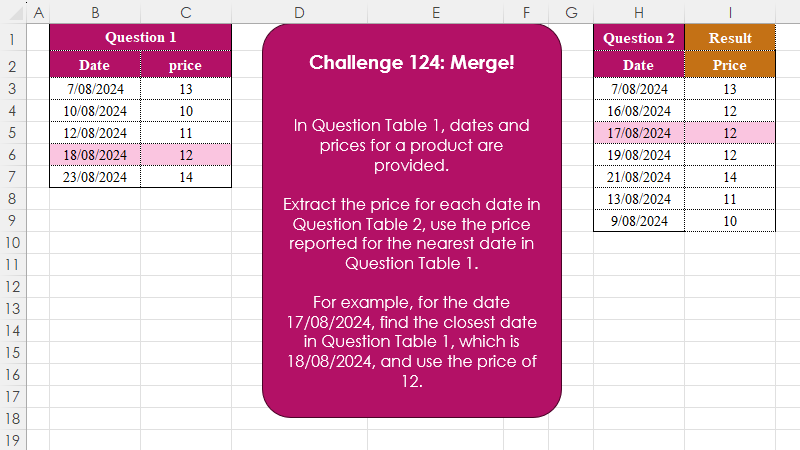
Challenge No. 124: In Question Table 1, dates and prices for a product are provided.
Solved using:Excel (INDEX, LAMBDA, LET), Google Sheets, Power Query (Table.AddColumn), Python, Python in Excel, and R.
Challenges related to Excel formulas.
Challenge No. 124: In Question Table 1, dates and prices for a product are provided.
Solved using:Excel (INDEX, LAMBDA, LET), Google Sheets, Power Query (Table.AddColumn), Python, Python in Excel, and R.
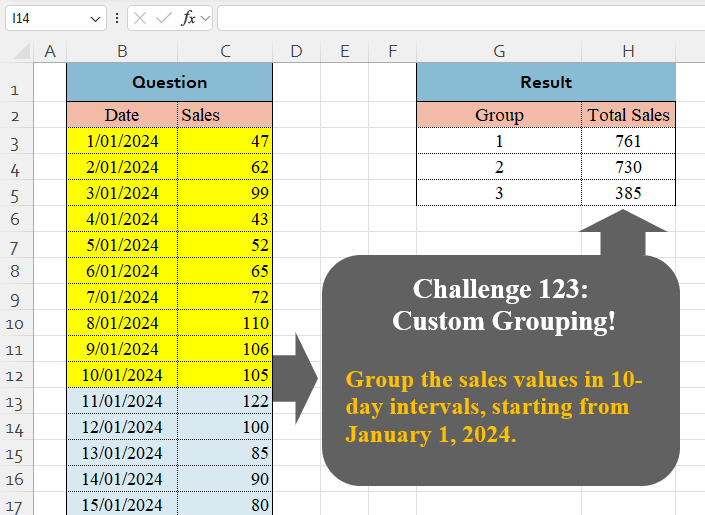
Challenge No. 123: Group the sales values in 10-day intervals, starting from January 1, 2024.
Solved using:Excel (BYROW, DAY, GROUPBY), Google Sheets, Power Query (Table.Group, List.Transform, Table.Group), Python, Python in Excel, and R.
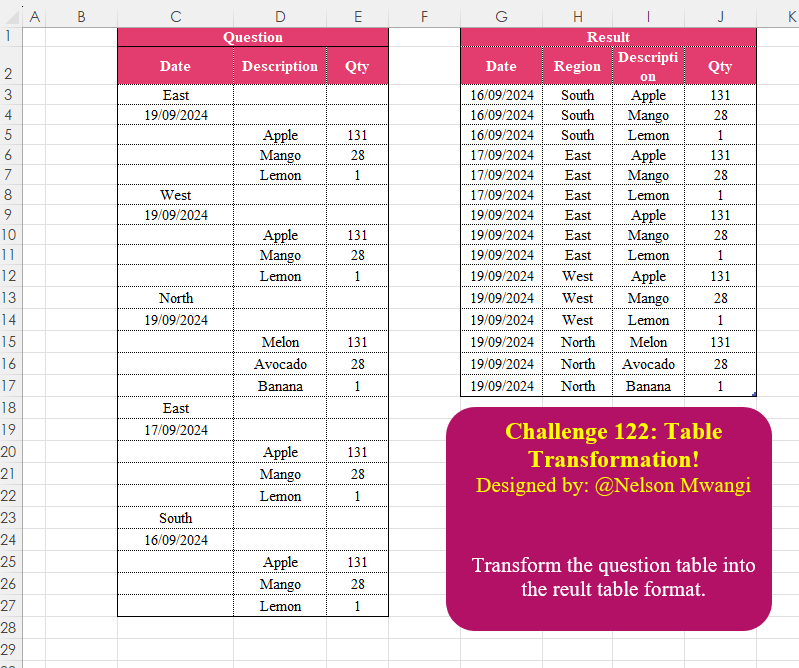
Challenge No. 122: Transform the question table into the reult table format.
Solved using:Excel (DROP, FILTER, HSTACK), Google Sheets, Power Query (List.Transform, Text.Contains, Table.AddColumn), Python, Python in Excel, and R.

Challenge No. 121: Create the given table for the continuous values of power and bases.
Solved using:Excel (LAMBDA, MAKEARRAY, ROW), Office Script, Power Query (List.Transform), and Python in Excel.
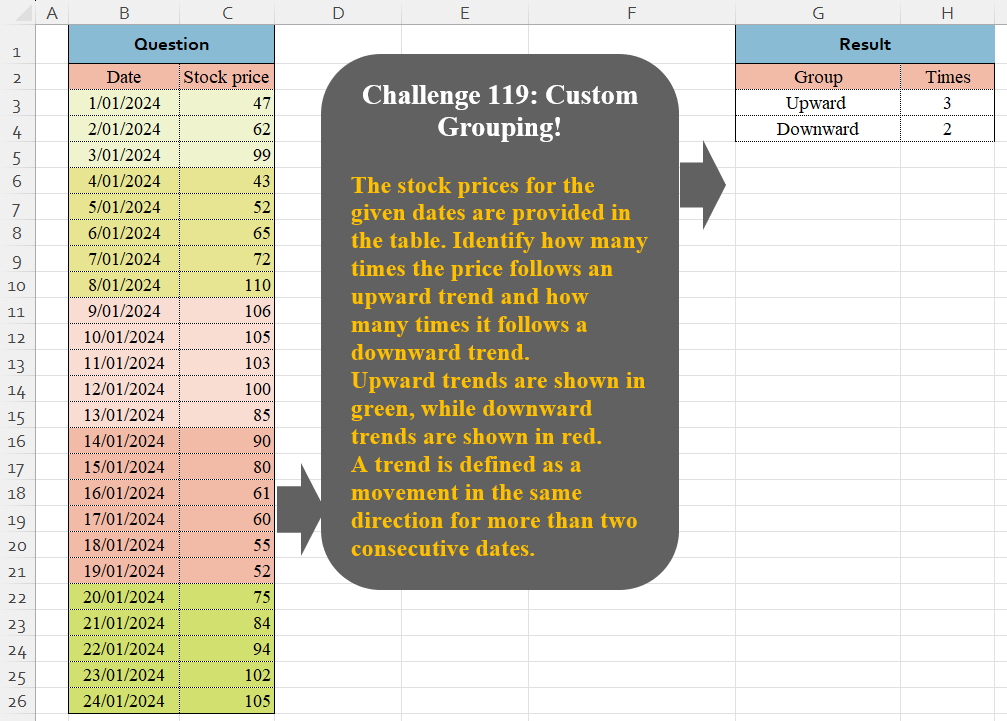
Challenge No. 119: The stock prices for the given dates are provided in the table.
Solved using:Excel (DROP, HSTACK, IF), Google Sheets, Power Query (Table.Group, Table.AddColumn, Table.Group), Python in Excel, and R.

Challenge No. 118: Using the sales transactions from the provided table and the account balance as of 31/08/2024, calculate the Daily Sales Outstanding (DSO) for each customer.
Solved using:Excel, Google Sheets, Power Query, Python, Python in Excel, and R.

Challenge No. 117: Add an Index column for the Question table with a separate counter for each stock.
Solved using:Excel (COUNTIF, HSTACK, IF), Google Sheets, Power Query (Table.AddIndexColumn, Table.Group, Table.Sort), Python, Python in Excel, and R.
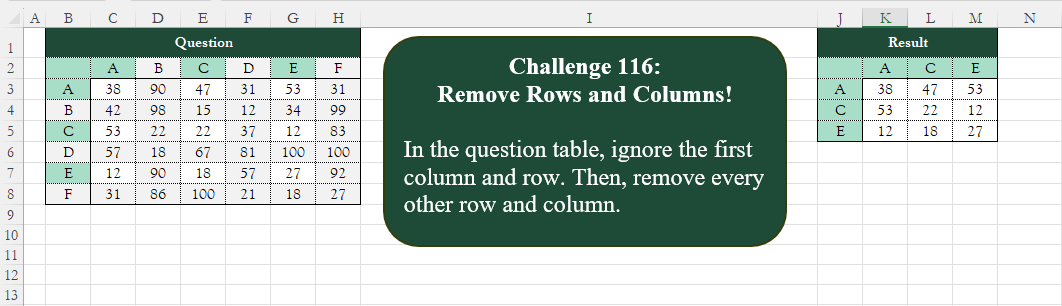
Challenge No. 116: Add an index column to the question table, with a separate counter for each stock.
Solved using:Excel (CHOOSECOLS, CHOOSEROWS, COLUMN), Google Sheets, Power Query (List.Alternate, Table.AlternateRows, Table.Column), Python, Python in Excel, and R.

Challenge No. 115:
Replace “q” and “000” in the Product ID and Customer ID columns with “-“.
Solved using:Excel (HSTACK, LAMBDA, LET), Google Sheets, Power Query (Text.Replace, Table.ReplaceValue, Table.TransformColumns), Python, Python in Excel, R, SQL, and VBA.
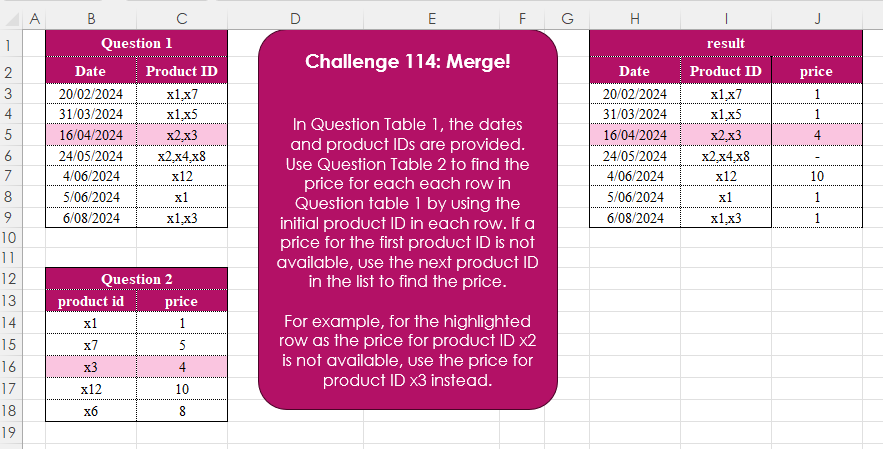
Challenge No. 114: In Question Table 1, the dates and product IDs are provided.
Solved using:Excel (FILTER, HSTACK, IFERROR), Google Sheets, Power Query (Text.Split, Table.AddColumn), Python, Python in Excel, R, and SQL.