
_x000D_
Python in Excel solution 2 for Merge! Part 1, proposed by Abdallah Ally:
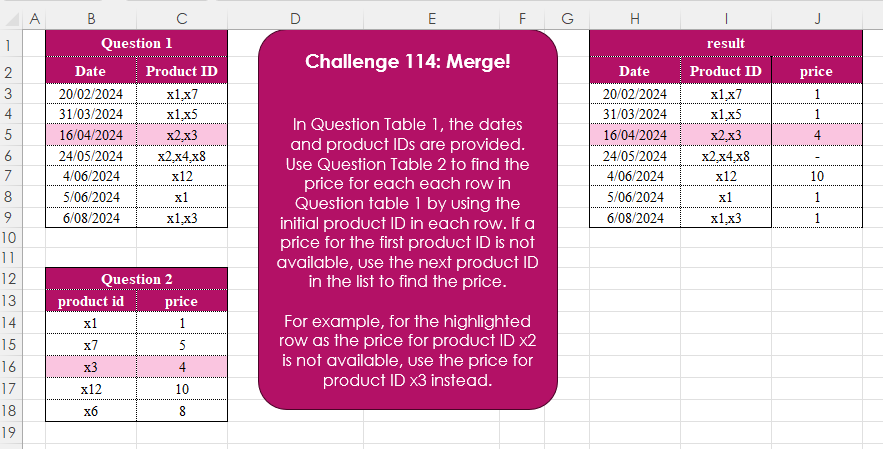
df1 = xl("B2In Question Table 1, the dates and product IDs are provided. Use Question Table 2 to find the price for each row in Question table 1 by using the initial product ID in each row. If a price for the first product ID is not available, use the next product ID in the list to find the price.
For example, for the highlighted row as the price for product ID x2 is not available, use the price for product ID x3 instead.
📌 Challenge Details and Links
Challenge Number: 114
Challenge Difficulty: ⭐⭐⭐
📥Download Sample File
📥Link to the solutions on LinkedIn
📥Link to the solution on YouTube
Solving the challenge of Merge! Part 1 with Power Query
_x000D_
Power Query solution 1 for Merge! Part 1, proposed by Zoran Milokanović:
let
  Source = each Excel.CurrentWorkbook(){[Name = _]}[Content],
  S = Table.AddColumn(
    Source("Table1"),
    "price",
    each Table.SelectRows(
      Source("Table2"),
      (r) => List.Contains(Text.Split([Product ID], ","), r[product id])
    )[price]{0}?
      ?? "-"
  )
in
  S
_x000D_
_x000D_
Power Query solution 2 for Merge! Part 1, proposed by 🇵🇪 Ned Navarrete C.:
let
  Table1 = Excel.CurrentWorkbook(){[Name = "Table1"]}[Content],
  Table2 = Excel.CurrentWorkbook(){[Name = "Table2"]}[Content],
  AddPrice = Table.AddColumn(
    Table1,
    "Price",
    each [
      a = Text.Split([Product ID], ","),
      b = Table.SelectRows(Table2, each List.Contains(a, [product id])),
      c = b[price]{0}? ?? "-"
    ][c]
  )
in
  AddPrice
_x000D_
_x000D_
Power Query solution 3 for Merge! Part 1, proposed by Aditya Kumar Darak 🇮🇳:
let
  Data = Excel.CurrentWorkbook(){[Name = "data"]}[Content],
  Price = Excel.CurrentWorkbook(){[Name = "price"]}[Content],
  ToRows = Table.ToRows(Price),
  Return = Table.AddColumn(
    Data,
    "Price",
    each [
      S  = Text.SplitAny([Product ID], ", "),
      Rp = List.ReplaceMatchingItems(S, ToRows),
      Sk = List.Skip(Rp, (f) => not (f is number)),
      R  = Sk{0}? ?? "-"
    ][R]
  )
in
  Return
_x000D_
_x000D_
Power Query solution 4 for Merge! Part 1, proposed by Alejandro Simón 🇵🇦 🇪🇸:
let
 T1 = Excel.CurrentWorkbook(){[Name="Table1"]}[Content],
 T2 = Excel.CurrentWorkbook(){[Name="Table2"]}[Content],
 Sol = Table.AddColumn(T1, "Answer", (x)=>
let
a = T2,
b = List.Transform(Text.Split(x[Product ID], ","), (y)=> Table.SelectRows(a, each [product id]=y)),
c = Table.Combine(b)[price]{0}?
in c)
in
 Sol
_x000D_
_x000D_
Power Query solution 5 for Merge! Part 1, proposed by Abdallah Ally:
let
  f = each Excel.CurrentWorkbook(){[Name = _]}[Content],
  Transform = Table.TransformColumnTypes(f("Table1"), {"Date", type date}),
  Result = Table.AddColumn(
    Transform,
    "Price",
    each [
      a = Text.Split([Product ID], ","),
      b = List.Transform(a, each List.PositionOf(f("Table2")[product id], _)),
      c = List.Select(b, each _ > - 1){0},
      d = try f("Table2")[price]{c} otherwise "-"
    ][d]
  )
in
  Result
_x000D_
_x000D_
Power Query solution 6 for Merge! Part 1, proposed by Kris Jaganah:
let
  A = (x) => Excel.CurrentWorkbook(){[Name = x]}[Content],
  B = Table.AddColumn(
    A("Table1"),
    "price",
    each
      let
        a = Text.Split([Product ID], ","),
        b = A("Table2"),
        c = List.Transform(
          {0 .. List.Count(a) - 1},
          each try b[price]{List.PositionOf(b[product id], a{_})} otherwise null
        ),
        d = try List.RemoveNulls(c){0} otherwise "-"
      in
        d
  )
in
  B
_x000D_
_x000D_
Power Query solution 7 for Merge! Part 1, proposed by Yaroslav Drohomyretskyi:
let
  Source = Excel.CurrentWorkbook(){[Name = "Table1"]}[Content],
  Result = Table.AddColumn(
    Source,
    "price",
    each try

        let
          curID = Text.Split([Product ID], ",")
        in
          Table.SelectRows(
            Excel.CurrentWorkbook(){[Name = "Table2"]}[Content],
            each List.Contains(curID, _[product id])
          )[price]{0}
    otherwise
      "-"
  )
in
  Result
_x000D_
_x000D_
Power Query solution 8 for Merge! Part 1, proposed by Yaroslav Drohomyretskyi:
let
  Source = Excel.CurrentWorkbook(){[Name = "Table1"]}[Content],
  Split = Table.ExpandListColumn(
    Table.TransformColumns(
      Source,
      {{"Product ID", Splitter.SplitTextByDelimiter(",", QuoteStyle.Csv)}}
    ),
    "Product ID"
  ),
  Merge = Table.NestedJoin(
    Split,
    {"Product ID"},
    Excel.CurrentWorkbook(){[Name = "Table2"]}[Content],
    {"product id"},
    "M",
    JoinKind.LeftOuter
  ),
  Expand = Table.ExpandTableColumn(Merge, "M", {"price"}, {"price"}),
  Group = Table.Group(
    Expand,
    {"Date"},
    {{"Product ID", each Text.Combine(_[#"Product ID"], ",")}, {"price", each [price]{0}}}
  ),
  Replace = Table.ReplaceValue(Group, null, "-", Replacer.ReplaceValue, {"price"})
in
  Replace
_x000D_
_x000D_
Power Query solution 9 for Merge! Part 1, proposed by Glyn Willis:
let
  Source =
    let
      t = Table.ToColumns(Excel.CurrentWorkbook(){[Name = "Table2"]}[Content]),
      r = Record.FromList(t{1}, t{0})
    in
      r,
  Custom1 = Excel.CurrentWorkbook(){[Name = "Table1"]}[Content],
  #"Added Custom" = Table.AddColumn(
    Custom1,
    "Price",
    each
      let
        l  = List.Transform(Text.Split([Product ID], ","), each Record.FieldOrDefault(Source, _)),
        rn = List.RemoveNulls(l),
        r  = List.First(rn)
      in
        r ?? "-"
  ),
  #"Changed Type" = Table.TransformColumnTypes(
    #"Added Custom",
    {{"Date", type date}, {"Product ID", type text}, {"Price", type text}}
  )
in
  #"Changed Type"
_x000D_
Solving the challenge of Merge! Part 1 with Excel
_x000D_
Excel solution 1 for Merge! Part 1, proposed by Bo Rydobon 🇹🇭:
=HSTACK(
    B3:C9,
    XLOOKUP(
        SUBSTITUTE(
            C3:C9,
            ",",
            "|"
        ),
        B14:B18,
        C14:C18,
        "-",
        3
    )
)
_x000D_
_x000D_
Excel solution 2 for Merge! Part 1, proposed by Oscar Mendez Roca Farell:
=MAP(
    C3:C9,
     LAMBDA(
         a,
          IFERROR(
              @TOCOL(
                  IFS(
                      B14:B18=TEXTSPLIT(
                          a,
                           ","
                      ),
                       C14:C18
                  ),
                   2
              ),
               "-"
          )
     )
)
_x000D_
_x000D_
Excel solution 3 for Merge! Part 1, proposed by Julian Poeltl:
=LET(
    T,
    B2:C9,
    P,
    MAP(
        TAKE(
            T,
            -7,
            -1
        ),
        LAMBDA(
            A,
            TAKE(
                SCAN(
                    0,
                    TEXTSPLIT(
                        A,
                        ","
                    ),
                    LAMBDA(
                        A,
                        B,
                        IF(
                            A>0,
                            A,
                            XLOOKUP(
                                B,
                                B14:B18,
                                C14:C18,
                                0
                            )
                        )
                    )
                ),
                ,
                -1
            )
        )
    ),
    HSTACK(
        T,
        VSTACK(
            "price",
            IF(
                P,
                P,
                "-"
            )
        )
    )
)
_x000D_
_x000D_
Excel solution 4 for Merge! Part 1, proposed by Abdallah Ally:
=VSTACK(
    HSTACK(
        B2:C2,
        "Price"
    ),
    HSTACK(
        B3:C9,
        MAP(
            C3:C9,
            LAMBDA(
                x,
                LET(
                    a,
                    XLOOKUP(
                        TEXTSPLIT(
                            x,
                            ","
                        ),
                        B14:B18,
                        C14:C18,
                        ""
                    ),
                    TAKE(
                        FILTER(
                            a,
                            a<>"",
                            "-"
                        ),
                        ,
                        1
                    )
                )
            )
        )
    )
)
_x000D_
_x000D_
Excel solution 5 for Merge! Part 1, proposed by Kris Jaganah:
=MAP(
    C3:C9,
    LAMBDA(
        x,
        IFERROR(
            TAKE(
                TOROW(
                    XLOOKUP(
                        TEXTSPLIT(
                            x,
                            ","
                        ),
                        B14:B18,
                        C14:C18
                    ),
                    3
                ),
                ,
                1
            ),
            "-"
        )
    )
)
_x000D_
_x000D_
Excel solution 6 for Merge! Part 1, proposed by Imam Hambali:
=HSTACK(
    B3:B9,
    C3:C9,
     BYROW(
         XLOOKUP(
             TEXTSPLIT(
                 TEXTJOIN(
                     ";",
                     1,
                     C3:C9
                 ),
                 ",",
                 ";"
             ),
             B14:B18,
             C14:C18
         ),
          LAMBDA(
              x,
               XLOOKUP(
                   TRUE,
                    ISNUMBER(
                        x
                    ),
                   x,
                   "-"
               )
          )
     )
)
_x000D_
_x000D_
Excel solution 7 for Merge! Part 1, proposed by Sunny Baggu:
=HSTACK(     B3:C9,     MAP(          C3:C9,          LAMBDA(
              a,

               TAKE(

                    IFERROR(

                         TOCOL(

                              XLOOKUP(

                                   TEXTSPLIT(
                                       a,
                                        ,
                                        ","
                                   ),

                                   B14:B18,

                                   C14:C18

                              ),

                              3

                         ),

                         "-"

                    ),

                    1

               )

          )     ))
_x000D_
_x000D_
Excel solution 8 for Merge! Part 1, proposed by Alejandro Campos:
=HSTACK(
 B3:C9,
 BYROW(
 XLOOKUP(
 IFNA(TEXTSPLIT(TEXTJOIN("|", TRUE, C3:C9), ",", "|"), ""),
 B14:B18,
 C14:C18,
 ""
 ),
 LAMBDA(x, TEXTJOIN(", ", TRUE, x))))
_x000D_
_x000D_
Excel solution 9 for Merge! Part 1, proposed by Andy Heybruch:
=LET(
    _prodid,
    $B$14:$B$18,
    _price,
    $C$14:$C$18,    VSTACK(
        HSTACK(
            B2,
            C2,
            C13
        ),
        HSTACK(
            B3:C9,

            BYROW(
                C3:C9,
                LAMBDA(
                    a,
                    LET(

                         _p,
                        XLOOKUP(
                            TEXTSPLIT(
                                a,
                                ,
                                ","
                            ),
                            _prodid,
                            _price,
                            "",
                            0
                        ),

                         IFERROR(
                             TAKE(
                                 FILTER(
                                     _p,
                                     _p<>""
                                 ),
                                 1
                             ),
                             "-"
                         )
                    )
                )
            )
        )
    )
)
_x000D_
_x000D_
Excel solution 10 for Merge! Part 1, proposed by Asheesh Pahwa:
=HSTACK(
    B3:C9,
    DROP(
        REDUCE(
            "",
            C3:C9,
            LAMBDA(
                x,
                y,
                VSTACK(
                    x,
                    LET(
                        t,
                        TEXTSPLIT(
                            y,
                            ,
                            ","
                        ),
                        xl,
                        XLOOKUP(
                            t,
                            B14:B18,
                            C14:C18,
                            0
                        ),

                        I,
                        IF(
                            TAKE(
                                xl,
                                1
                            )=0,
                            TAKE(
                                xl,
                                -1
                            ),
                            TAKE(
                                xl,
                                1
                            )
                        ),
                        IF(
                            I=0,
                            "-",
                            I
                        )
                    )
                )
            )
        ),
        1
    )
)
_x000D_
_x000D_
Excel solution 11 for Merge! Part 1, proposed by Bilal Mahmoud kh.:
=MAP(
    C3:C9,
    LAMBDA(
        m,
        LET(
            a,
            TEXTSPLIT(
                m,
                ","
            ),
            b,
            MAP(
                a,
                LAMBDA(
                    n,
                    FILTER(
                        C14:C18,
                        B14:B18=n,
                        "-"
                    )
                )
            ),
            TAKE(
                FILTER(
                    b,
                    b<>"-",
                    "-"
                ),
                ,
                1
            )
        )
    )
)
_x000D_
_x000D_
Excel solution 12 for Merge! Part 1, proposed by ferhat CK:
=BYROW(
    C3:C9,
    LAMBDA(
        x,
        IFERROR(
            TAKE(
                TOCOL(
                    XLOOKUP(
                        TEXTSPLIT(
                            x,
                            ","
                        ),
                        B14:B18,
                        C14:C18,
                        ,
                        3
                    ),
                    3
                ),
                1
            ),
            "-"
        )
    )
)
_x000D_
_x000D_
Excel solution 13 for Merge! Part 1, proposed by Gerson Pineda:
=MAP(
    C3:C9,
    LAMBDA(
        x,
        IFERROR(
            INDEX(
                C14:C18,
                @TOCOL(
                    XMATCH(
                        TEXTSPLIT(
                            x,
                            ","
                        ),
                        B14:B18
                    ),
                    2
                )
            ),
            "-"
        )
    )
)
_x000D_
_x000D_
Excel solution 14 for Merge! Part 1, proposed by Gerson Pineda:
=MAP(
    C3:C9,
    LAMBDA(
        x,
        IFERROR(
            @TOCOL(
                IF(
                    TEXTSPLIT(
                        x,
                        ","
                    )=B14:B18,
                    C14:C18,
                    1/0
                ),
                2
            ),
            "-"
        )
    )
)
_x000D_
_x000D_
Excel solution 15 for Merge! Part 1, proposed by Hamidi Hamid:
=LET(
    z,
    DROP(
        REDUCE(
            ,
            C3:C10,
            LAMBDA(
                a,
                b,
                IFERROR(
                    VSTACK(
                        a,
                        TEXTSPLIT(
                            b,
                            ",",
                            ,
                            1
                        )
                    ),
                    0
                )
            )
        ),
        1
    ),
    x,
    XLOOKUP(
        z,
        B14:B18,
        C14:C18,
        1/0
    ),
    s,
    IFERROR(
        TOCOL(
            BYROW(
                x,
                LAMBDA(
                    a,
                    TAKE(
                        TOROW(
                            a,
                            3
                        ),
                        ,
                        1
                    )
                )
            ),
            1
        ),
        "-"
    ),
    s
)
_x000D_
_x000D_
Excel solution 16 for Merge! Part 1, proposed by Hussein SATOUR:
=MAP(
    F3:F9,
    LAMBDA(
        x,
        MIN(
            XLOOKUP(
                TEXTSPLIT(
                    x,
                    ","
                ),
                B14:B18,
                C14:C18,
                ""
            )
        )
    )
)
_x000D_
_x000D_
Excel solution 17 for Merge! Part 1, proposed by Nicolas Micot:
=LET(
    _products;
    FRACTIONNER.TEXTE(
        I3;
        ;
        ","
    );    _prices;
    RECHERCHEX(
        _products;
        $B$14:$B$18;
        $C$14:$C$18;
        ""
    );    PRENDRE(
        FILTRE(
            _prices;
            _prices<>"";
            "-"
        );
        1;
        1
    )
)
_x000D_
_x000D_
Excel solution 18 for Merge! Part 1, proposed by Peter Bartholomew:
= MAP(
    productIDs,
      LAMBDA(
        productID,         LET(

              ID,
              REGEXEXTRACT(
                  productID,
                   "xd+",
                  1
              ),

              prices,
              XLOOKUP(
                  ID,
                   productList,
                   priceList,
                   ""
              ),

              @FILTER(
                  prices,
                   prices<>"",
                   "-"
              )

         )    ))
_x000D_
_x000D_
Excel solution 19 for Merge! Part 1, proposed by Pieter de B.:
=HSTACK(
    B3:C9,
    MAP(
        C3:C9,
        LAMBDA(
            c,
            IFERROR(
                @TOCOL(
                    VLOOKUP(
                        TEXTSPLIT(
                            c,
                            ","
                        ),
                        B14:C18,
                        2,

                    ),
                    2
                ),
                "-"
            )
        )
    )
)

Or incl. headers:

=HSTACK(
    B2:C9,
    VSTACK(
        C13,
        MAP(
            C3:C9,
            LAMBDA(
                c,
                IFERROR(
                    @TOCOL(
                        VLOOKUP(
                            TEXTSPLIT(
                                c,
                                ","
                            ),
                            B14:C18,
                            2,

                        ),
                        2
                    ),
                    "-"
                )
            )
        )
    )
)
_x000D_
_x000D_
Excel solution 20 for Merge! Part 1, proposed by Rick Rothstein:
=MAP(
    C3:C9,
    LAMBDA(
        x,
        LET(
            t,
            B14:C18,
            IFERROR(
                TAKE(
                    TOROW(
                        XLOOKUP(
                            TEXTSPLIT(
                                x,
                                ","
                            ),
                            TAKE(
                                t,
                                ,
                                1
                            ),
                            TAKE(
                                t,
                                ,
                                -1
                            )
                        ),
                        3
                    ),
                    ,
                    1
                ),
                "-"
            )
        )
    )
)
_x000D_
_x000D_
Excel solution 21 for Merge! Part 1, proposed by Songglod Petchamras:
=MAP(
    C3:C9,
    LAMBDA(
        r,
        LET(
            p,
            XLOOKUP(
                TEXTSPLIT(
                    r,
                    ","
                ),
                B14:B18,
                C14:C18,
                "-"
            ),
            TAKE(
                FILTER(
                    p,
                    ISNUMBER(
                        p
                    ),
                    "-"
                ),
                1,
                1
            )
        )
    )
)
_x000D_
Solving the challenge of Merge! Part 1 with Python
_x000D_
Python solution 1 for Merge! Part 1, proposed by Konrad Gryczan, PhD:
import pandas as pd

path = "CH-114 Merge.xlsx"

input1 = pd.read_excel(path, usecols = "B:C", nrows = 7, skiprows = 1)
input2 = pd.read_excel(path, usecols = "B:C", nrows = 5, skiprows = 12)
test = pd.read_excel(path, usecols="H:J", nrows=7, skiprows=1).rename(columns=lambda x: x.replace('.1', ''))
test["price"] = test["price"].astype(str)

input1['Product ID'] = input1['Product ID'].str.split(',')
input1 = input1.explode('Product ID')
r1 = input1.merge(input2, left_on='Product ID', right_on='product id')
 .groupby('Date').agg({'price': lambda x: x.iloc[0].astype(str)}).reset_index()
r2 = input1.merge(r1, on='Date', how='left').fillna({'price': '-'}).groupby('Date').agg({'Product ID': ','.join, 'price': 'first'}).reset_index()

print(r2.equals(test)) # True
_x000D_
_x000D_
Python solution 2 for Merge! Part 1, proposed by George Mount:
df_products = xl("B2:C9", headers=True)
df_prices = xl("B13:C18", headers=True)

# Expand 'product_id' entries and explode into separate rows
df_products_expanded = df_products.assign(
 product_id=df_products['product_id'].str.split(',')
).explode('product_id')

# Merge expanded products with prices
df_merged = pd.merge(df_products_expanded, df_prices, on='product_id', how='left')

# Group by 'date' and select the first available price
df_prices_first = df_merged.groupby('date')['price'].first().reset_index()

# Merge the prices back to the original product DataFrame
df_final = pd.merge(df_products, df_prices_first, on='date', how='left')
_x000D_
Solving the challenge of Merge! Part 1 with Python in Excel
_x000D_
Python in Excel solution 1 for Merge! Part 1, proposed by 🇵🇪 Ned Navarrete C.:
df1=pd.DataFrame(xl("B2:C9",headers=True))
df2=pd.DataFrame(xl("B13:C18",headers=True))

# Divide the values in the 'Product ID' column into lists
df1['price']=df1['Product ID'].apply(lambda x: x.split(',') )

# Function that returns the first price
def get_price(product,df2):
 df_filtered = df2[df2['product id'].isin(product)]
 if not df_filtered.empty:
 return df_filtered['price'].iloc[0] # Return the first price
 else:
 return "-"

# Apply the function to the 'price' column df1
df1['price']=df1['price'].apply(lambda product: get_price(product,df2))

# Result
df1
_x000D_
_x000D_
Python in Excel solution 2 for Merge! Part 1, proposed by Abdallah Ally:
df1 = xl("B2