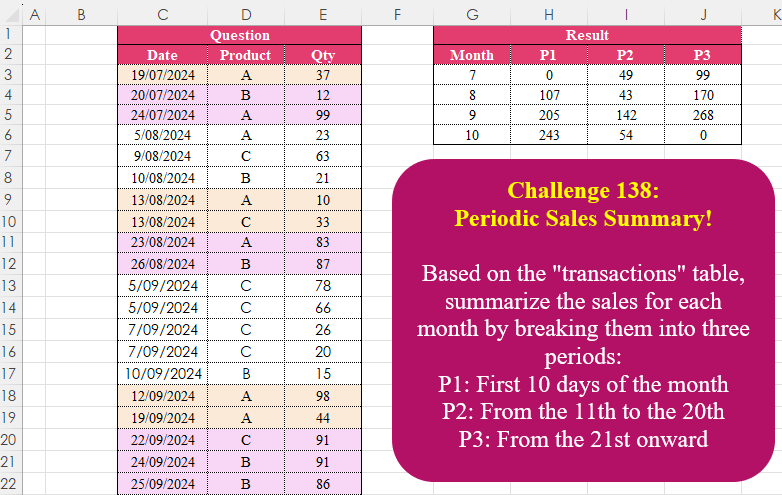
Challenge No. 138: Based on the “transactions” table, summarize the sales for each month by breaking them into three periods:
P1: First 10 days of the month
P2: From the 11th to the 20th
P3: From the 21st onward.
Solved using:Excel (DAY, DROP, HSTACK), Google Sheets, Power Query (Date.Month, List.Distinct, Table.AddColumn), Python, Python in Excel, and R.
Excel Challenges
Challenges related to Excel formulas.
Column Splitting! Part 1
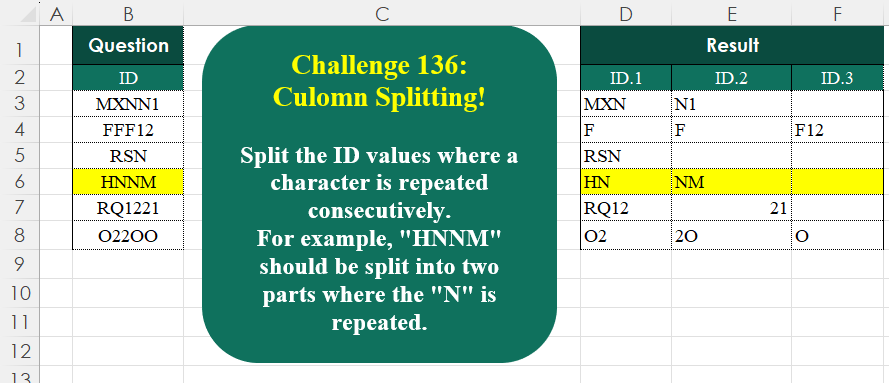
Challenge No. 136: Split the ID values where a character is repeated consecutively.
Solved using:Excel (CONCAT, DROP, IF), Google Sheets, Power Query (List.Transform, Text.Combine, Table.AddColumn), Python, Python in Excel, and R.
Identify The Pattern !
Challenge No. 135: Find the number of occurrences of the “+-+” pattern across the test IDs for each product.
Solved using:Excel (BYROW, CONCAT, DROP), Google Sheets, Power Query (List.Range, Text.Combine, Table.AddColumn), Python, Python in Excel, and R.
Final Week Of The Month!
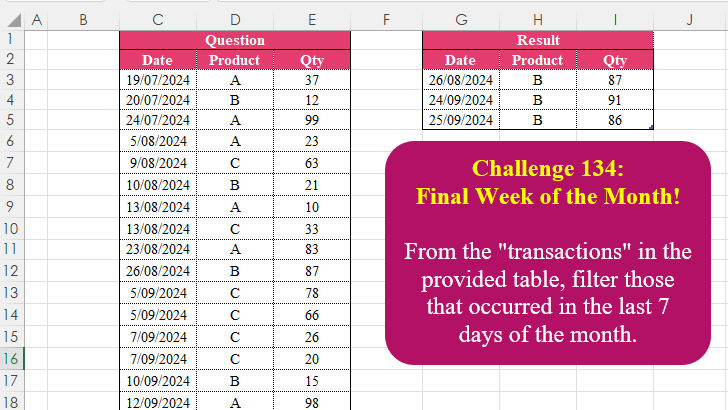
Challenge No. 134: From the “transactions” in the provided table, filter those that occurred in the last 7 days of the month.
Solved using:Excel (CHOOSECOLS, DAY, EOMONTH), Google Sheets, Power Query (Table.AddColumn, Table.SelectRows), Python, Python in Excel, R, and SQL.
Custom Grouping! Part 7
Challenge No. 133: Group the monthly sales values into three categories based on the following logic and provide one of the result tables:
Group 1: 1st to 10th of the month
Group 2: 11th to 20th of the month
Group 3: 21st to the end of the month.
Solved using:Excel (DATE, DAY, DROP), Google Sheets, Power Query (Table.Group, Date.Month, Table.AddColumn), Python, Python in Excel, and R.
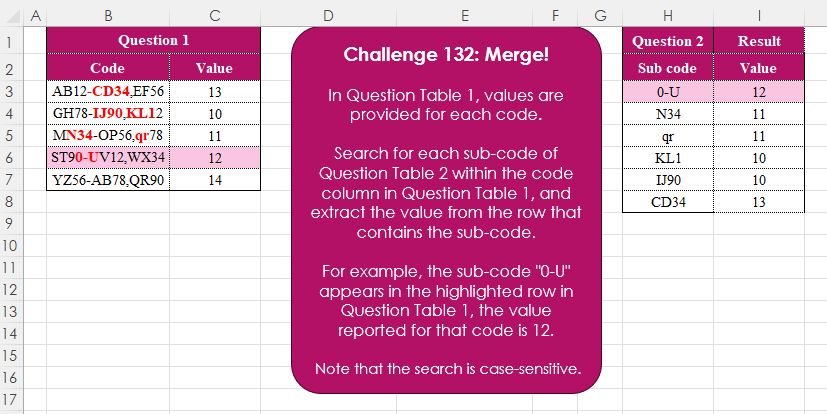
Merge! Part 3
Challenge No. 132: In Question Table 1, values are provided for each code.
Solved using:Excel (FILTER, FIND, ISNUMBER), Google Sheets, Power Query (Text.Contains, Table.AddColumn, Table.SelectRows), Python, Python in Excel, R, and VBA.
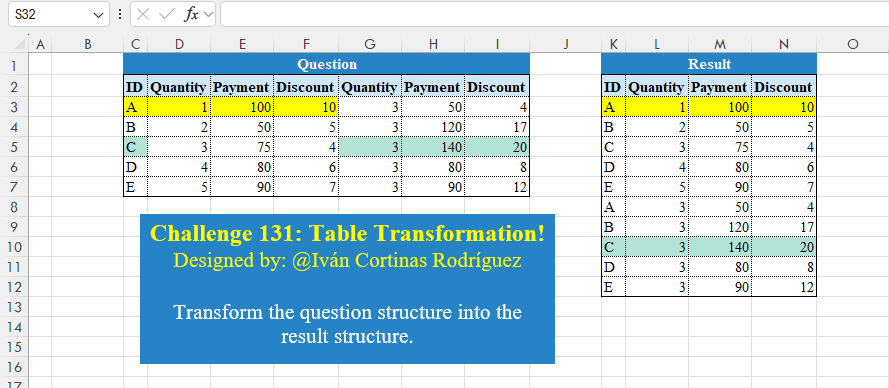
Table Transformation! Part 13
Challenge No. 131: Transform the question structure into the result structure.
Solved using:Excel (HSTACK, LET, ROWS), Google Sheets, Power Query (List.Skip, List.Split, List.Transform), Python, Python in Excel, and R.
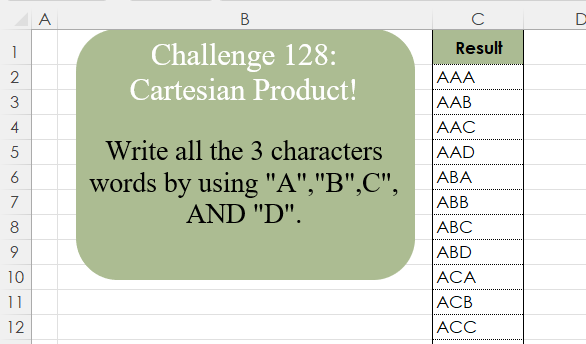
Cartesian Product!
Challenge No. 128: Write all the 3 character words by using “A”,”B”,C”, AND “D”.
Solved using:Excel (LAMBDA, LET, REDUCE), Google Sheets, Power Query (List.Transform, List.TransformMany), Python, Python in Excel, and R.
Add Index Column! Part 4
Challenge No. 127: Add an index column to the question table, with a separate counter for each stock.
Solved using:Excel (DROP, FILTER, HSTACK), Google Sheets, Power Query (Table.AddColumn, Table.AddIndexColumn), Python, Python in Excel, and R.
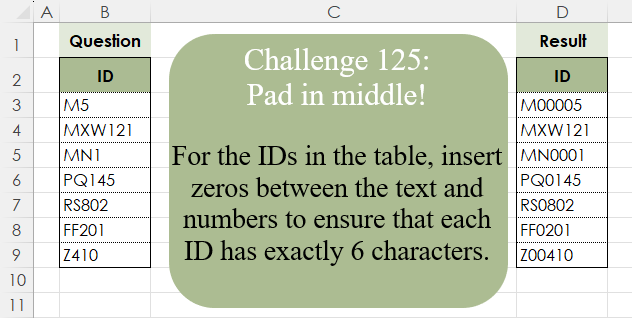
Pad In The Middle!
Challenge No. 125: For the IDs in the table, insert zeros between the text and numbers to ensure that each ID has exactly 6 characters.
Solved using:Excel (CONCAT, ISNUMBER, LAMBDA), Google Sheets, Power Query (Text.Repeat, Table.AddColumn), Python, Python in Excel, and R.