
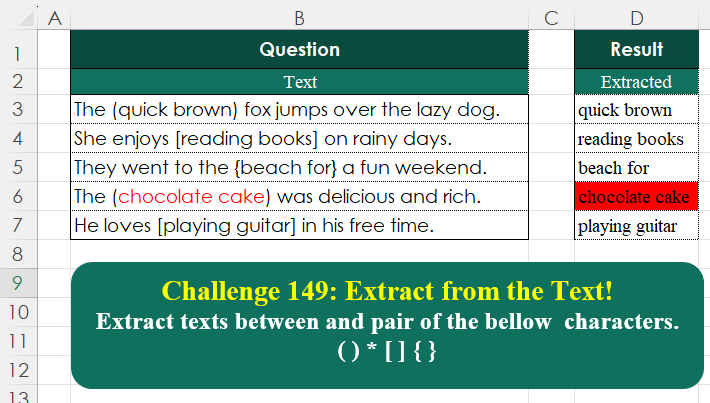
Challenge No. 149: Extract texts between and pair of the bellow characters.
Solved using:Excel (LAMBDA, LET, MAP), Google Sheets, Power Query (Table.AddColumn), Python, Python in Excel, and R.
Challenges related to Excel formulas.
Challenge No. 149: Extract texts between and pair of the bellow characters.
Solved using:Excel (LAMBDA, LET, MAP), Google Sheets, Power Query (Table.AddColumn), Python, Python in Excel, and R.
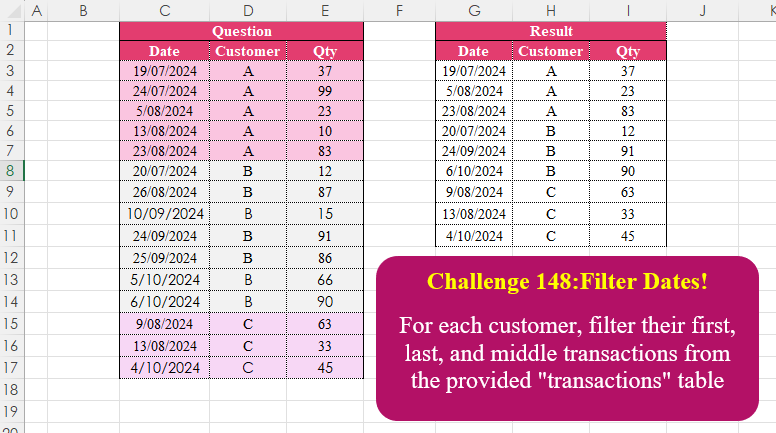
Challenge No. 148: For each customer, filter their first, last, and middle transactions from the provided “transactions” table.
Solved using:Excel (CHOOSEROWS, DROP, FILTER), Google Sheets, Power Query (Table.Combine, Table.Group), Python, Python in Excel, and R.
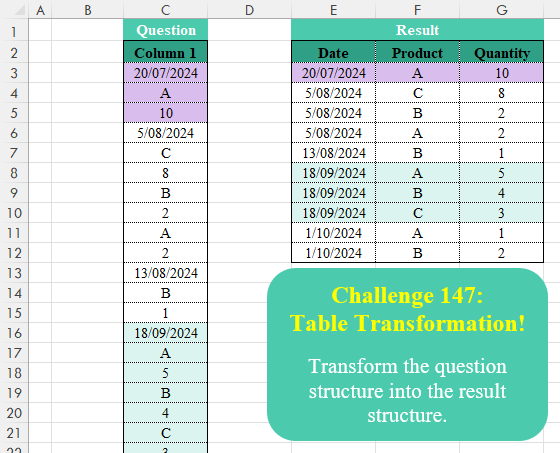
Challenge No. 147: Transform the question structure into the result structure.
Solved using:Excel (FILTER, HSTACK, IF), Google Sheets, Power Query (List.Skip, List.Split, Table.AddColumn), Python, Python in Excel, R, and VBA.
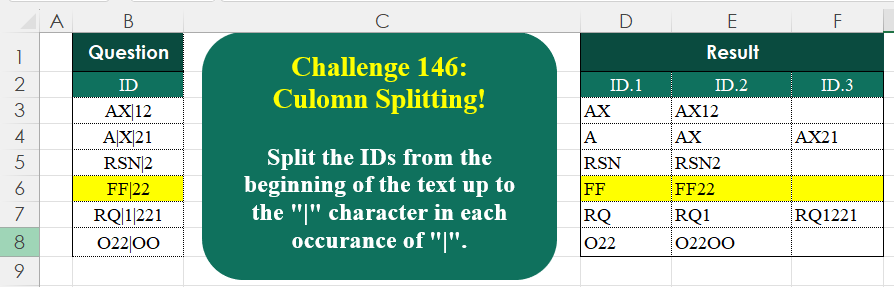
Challenge No. 146: Split the IDs from the beginning of the text up to the “|” character in each occurrence of “|”.
Solved using:Excel (IFNA, LAMBDA, LEN), Google Sheets, Power Query (List.Transform, Text.Combine, Text.Split), Python, Python in Excel, R, and VBA.

Challenge No. 145: Find the largest length of occurrences of the “++-” pattern across the test IDs for each product.
Solved using:Excel (CONCAT, GROUPBY, LAMBDA), Google Sheets, Power Query (List.Transform, Text.Combine, Table.AddColumn), Python, Python in Excel, and R.

Challenge No. 144: From the provided “transactions” table, filter the first transaction for each.
Solved using:Excel (DROP, FILTER, LAMBDA), Google Sheets, Power Query (Date.Month, Table.AddColumn, Table.Group), Python, Python in Excel, and R.
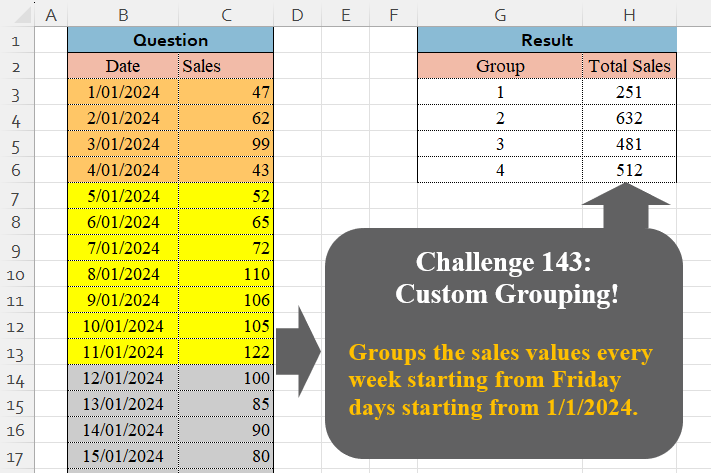
Challenge No. 143: Groups the sales values every week starting from Friday days starting from 1/1/2024.
Solved using:Excel (GROUPBY, LAMBDA, LET), Google Sheets, Power Query (Table.Group, Date.WeekOfYear, Table.AddColumn), Python, Python in Excel, and R.
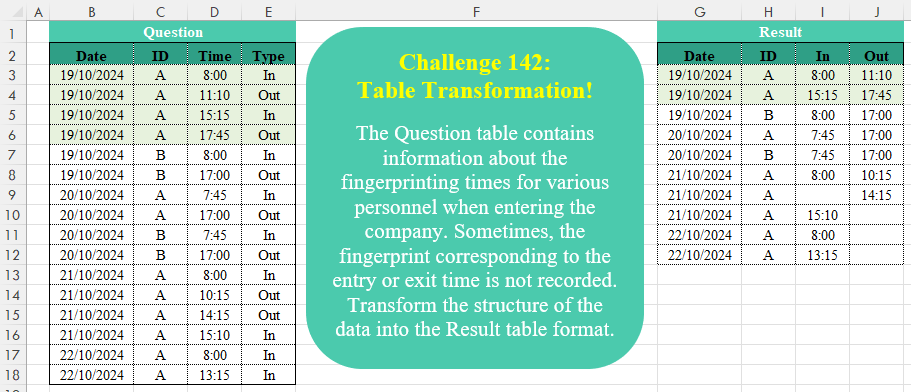
Challenge No. 142: The Question table contains information about the fingerprinting times for various personnel when entering the company.
Solved using:Excel (DROP, HSTACK, IF), Google Sheets, Power Query (Table.AddColumn, Table.Group, Table.Pivot), Python, Python in Excel, and R.
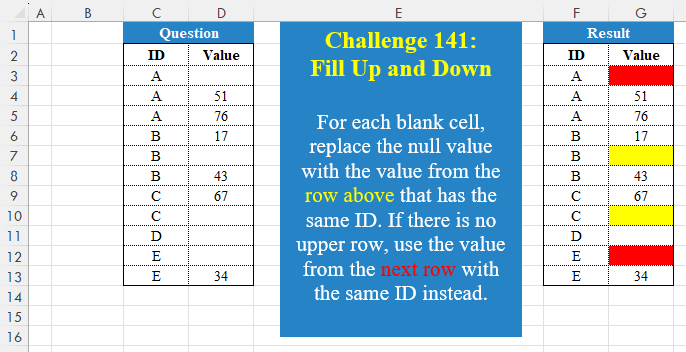
Challenge No. 141: For each blank cell, replace the null value with the value from the row above that has the same ID.
Solved using:Excel (FILTER, HSTACK, IF), Google Sheets, Power Query (Table.Group), Python, Python in Excel, and R.
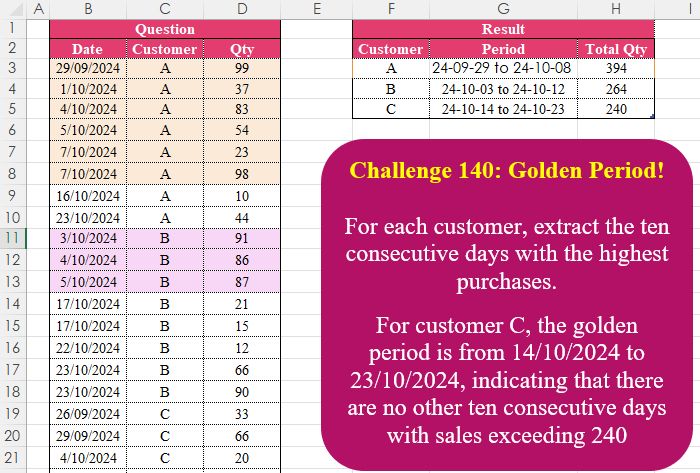
Challenge No. 140: For each customer, extract the ten consecutive days with the highest purchases.
Solved using:Excel (FILTER, HSTACK, IFS), Google Sheets, Power Query (Table.AddColumn, Table.Group), Python in Excel, and R.