
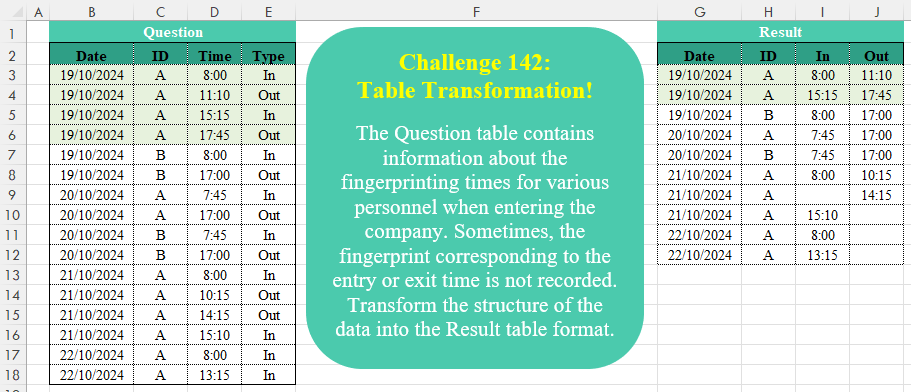
The Question table contains information about the fingerprinting times for various personnel when entering the company. Sometimes, the fingerprint corresponding to the entry or exit time is not recorded. Transform the structure of the data into the Result table format.
📌 Challenge Details and Links
Challenge Number: 142
Challenge Difficulty: ⭐⭐⭐
📥Download Sample File
📥Link to the solutions on LinkedIn
Solving the challenge of Table Transformation! Part 15 with Power Query
Power Query solution 1 for Table Transformation! Part 15, proposed by Zoran Milokanović:
let
  Source = Excel.CurrentWorkbook(){[Name = "Input"]}[Content],
  S = Table.Combine(
    Table.Group(
      Source,
      {"Date", "ID", "Time", "Type"},
      {"R", each Table.Pivot(_, List.Distinct([Type]), "Type", "Time")},
      0,
      (b, n) =>
        Byte.From(
          List.AnyTrue(
            {
              b[Date] <> n[Date],
              b[ID] <> n[ID],
              n[Type] = "In",
              Table.PositionOf(Source, n) - Table.PositionOf(Source, b) > 1
            }
          )
        )
    )[R]
  )
in
  S
Power Query solution 2 for Table Transformation! Part 15, proposed by Brian Julius:
let
  Source = Table.TransformColumnTypes(
    Excel.CurrentWorkbook(){[Name = "Table1"]}[Content],
    {{"Date", Date.Type}, {"Time", Time.Type}}
  ),
  AddIn = Table.AddColumn(Source, "In", each if [Type] = "In" then [Time] else null),
  AddOut = Table.RemoveColumns(
    Table.AddColumn(AddIn, "Out", each if [Type] = "Out" then [Time] else null),
    {"Time", "Type"}
  ),
  Group = Table.Group(AddOut, {"Date", "ID"}, {{"All", each Table.Split(_, 2)}}),
  Expand = Table.ExpandListColumn(Group, "All"),
  AddIsConform = Table.AddColumn(
    Expand,
    "IsConforming",
    each try if List.Max([All][In]) < List.Max([All][Out]) then 1 else 0 otherwise 0,
    Int64.Type
  ),
  AddConfor = Table.AddColumn(
    AddIsConform,
    "Conforming",
    each Table.Distinct(Table.FillUp(Table.FillDown([All], {"In", "Out"}), {"In", "Out"}))
  ),
  AddResult = Table.AddColumn(
    AddConfor,
    "Result",
    each if [IsConforming] = 1 then [Conforming] else [All]
  ),
  Clean = Table.ExpandTableColumn(
    Table.SelectColumns(AddResult, {"Result"}),
    "Result",
    {"Date", "ID", "In", "Out"}
  ),
  Fmt = Table.TransformColumns(
    Clean,
    {{"In", each Time.ToText(_, "hh:mm")}, {"Out", each Time.ToText(_, "hh:mm")}}
  )
in
  Fmt
Power Query solution 3 for Table Transformation! Part 15, proposed by Luan Rodrigues:
let
  Fonte = Tabela1,
  Ind   = Table.AddIndexColumn(Fonte, "Ind", 0, 1, Int64.Type),
  pivot = Table.Pivot(Ind, List.Distinct(Ind[Type]), "Type", "Time"),
  Out   = Table.AddColumn(pivot, "Personalizar", each try pivot{[Ind] + 1}[Out] otherwise null),
  fil   = Table.SelectRows(Out, each ([In] <> null or [Personalizar] <> null)),
  res   = Table.RenameColumns(Table.RemoveColumns(fil, {"Out", "Ind"}), {"Personalizar", "Out"})
in
  res
Power Query solution 4 for Table Transformation! Part 15, proposed by Aditya Kumar Darak 🇮🇳:
let
  Source = Excel.CurrentWorkbook(){[Name = "data"]}[Content],
  Type = Table.TransformColumnTypes(
    Source,
    {{"Date", type date}, {"ID", type text}, {"Time", type time}, {"Type", type text}}
  ),
  Generate = List.Generate(
    () => [a = - 1, c = "", d = 0],
    each [a] < Table.RowCount(Type),
    each [
      a = [a] + 1,
      b = Type{a},
      c = b[Type],
      d = if [c] = "In" and c = "Out" then [d] else [d] + 1
    ],
    each [b] & [RT = [d]]
  ),
  Table = Table.FromRecords(List.Skip(Generate)),
  Pivot = Table.Pivot(Table, List.Distinct(Table[Type]), "Type", "Time"),
  Return = Table.RemoveColumns(Pivot, {"RT"})
in
  Return
Power Query solution 5 for Table Transformation! Part 15, proposed by Aditya Kumar Darak 🇮🇳:
let
  Source = Excel.CurrentWorkbook(){[Name = "data"]}[Content],
  Type = Table.TransformColumnTypes(
    Source,
    {{"Date", type date}, {"ID", type text}, {"Time", type time}, {"Type", type text}}
  ),
  Group = Table.Group(Type, "Type", {"A", each _}, 0, (x, y) => Number.From(x = y)),
  Generate = List.TransformMany(
    Group[A],
    (x) => Table.Split(x, 2),
    (x, y) => Table.Pivot(y, {"In", "Out"}, "Type", "Time")
  ),
  Return = Table.Combine(Generate)
in
  Return
Power Query solution 6 for Table Transformation! Part 15, proposed by Alejandro Simón 🇵🇦 🇪🇸:
let
Source = Excel.CurrentWorkbook(){[Name="Table1"]}[Content],
Time = Table.TransformColumns(Source,{{"Time", each Time.From(_)}}),
Lista = Time[Type],
Rows = List.Skip(List.Generate(
 ()=> [x=0, y=0],
 each [x]<=List.Count(Lista),
 each [x=[x]+1,
 y = if Lista{[x]}="In" then [y]+1 else
 if Lista{[x]}="Out" and Lista{[x]-1}="Out" then [y]+1
 else [y]],
 each [y])),
Tbl = Table.FromColumns(Table.ToColumns(Time)& {Rows}, Table.ColumnNames(Time)&{"Idx"}),
Sol = Table.RemoveColumns(Table.Pivot(Tbl, List.Distinct(Tbl[Type]), "Type", "Time"), "Idx")
in
Sol
Power Query solution 7 for Table Transformation! Part 15, proposed by Kris Jaganah:
let
  A = Excel.CurrentWorkbook(){[Name = "Table1"]}[Content],
  B = Table.AddIndexColumn(A, "Idx", 1),
  C = Table.AddColumn(B, "In", each if [Type] = "In" then [Time] else null),
  D = Table.AddColumn(
    C,
    "Out",
    each try

        if [Date]
          = C[Date]{[Idx]} and [ID]
          = C[ID]{[Idx]} and [Type]
          = "In" and C[Type]{[Idx]}
          = "Out"
        then
          C[Time]{[Idx]}
        else if [Date]
          = C[Date]{[Idx]} and [ID]
          = C[ID]{[Idx]} and [Type]
          = "Out" and C[Type]{[Idx] - 2}
          = "Out"
        then
          [Time]
        else
          null
    otherwise
      null
  ),
  E = Table.SelectRows(D, each [Type] = "Out" and [Out] <> null or [Type] = "In"),
  F = Table.RemoveColumns(E, {"Time", "Type", "Idx"})
in
  F
Power Query solution 8 for Table Transformation! Part 15, proposed by 🇮🇷 Navid Esmaeilzadeh اسماعیل زاده:
let
S = Excel.CurrentWorkbook(){[Name="Table1"]}[Content],
A = Table.TransformColumnTypes(S,{{"Date", type date}, {"Time", type time}}),
B = Table.Group(A, {"Date", "ID"}, {{"T", each _}}),
F=(T)=>
let
A = Table.AddIndexColumn(T, "I", 0, 1),
B = Table.AddColumn(A, "I2", each if [Type]="In" or [Type]=A[Type]{[I]-1} then [I] else null),
C = Table.FillDown(B,{"I2"}),
D = Table.RemoveColumns(C,{"I"}),
E = Table.Pivot(D, {"In","Out"}, "Type", "Time")
in
E,
C = Table.AddColumn(B, "F", each F([T])),
D = Table.RemoveColumns(Table.Combine(C[F]),{"I2"})
in
D
Power Query solution 9 for Table Transformation! Part 15, proposed by Seokho MOON:
let
  Source = Excel.CurrentWorkbook(){[Name = "Table1"]}[Content],
  Rows = List.Accumulate(
    Table.ToRows(Source),
    {},
    (a, v) =>
      let
        Last   = List.Last(a),
        ExLast = List.RemoveLastN(a)
      in
        if v{3} = "In" then
          a & {{v{0}, v{1}, v{2}, null}}
        else if {Last{0}, Last{1}, Last{3}} = {v{0}, v{1}, null} then
          ExLast & {{Last{0}, Last{1}, Last{2}, v{2}}}
        else
          a & {{v{0}, v{1}, null, v{2}}}
  ),
  ColNames = List.FirstN(Table.ColumnNames(Source), 2) & List.Distinct(Source[Type])
in
  Table.FromRows(Rows, ColNames)
Power Query solution 10 for Table Transformation! Part 15, proposed by Vida Vaitkunaite:
let
  Source = Excel.CurrentWorkbook(){[Name = "Table1"]}[Content],
  Types = Table.TransformColumnTypes(Source, {{"Time", type time}, {"Date", type date}}),
  Group = Table.Group(
    Types,
    {"Date", "ID", "Type"},
    {{"All", each Table.AddIndexColumn(_, "Index", 1, 1), type table}}
  ),
  Expand = Table.ExpandTableColumn(Group, "All", {"Time", "Index"}, {"Time", "Index"}),
  ReGroup = Table.Group(Expand, {"Date", "ID", "Index"}, {{"All", each _, type table}}),
  In = Table.AddColumn(ReGroup, "In", each [All]{0}[Time]),
  Out = Table.AddColumn(In, "Out", each try [All]{1}[Time] otherwise null),
  Expand1 = Table.ExpandTableColumn(Out, "All", {"Type", "Time"}, {"Type", "Time"}),
  #"Adjust In" = Table.ReplaceValue(
    Expand1,
    each [In],
    each try if [In] > [Out] and [Type] = "In" then null else [In] otherwise [In],
    Replacer.ReplaceValue,
    {"In"}
  ),
  #"Adjust Out" = Table.ReplaceValue(
    #"Adjust In",
    each [Out],
    each try if [In] > [Out] and [Type] = "Out" then null else [Out] otherwise [Out],
    Replacer.ReplaceValue,
    {"Out"}
  ),
  Final = Table.Distinct(Table.RemoveColumns(#"Adjust Out", {"Time", "Type", "Index"}))
in
  Final
Solving the challenge of Table Transformation! Part 15 with Excel
Excel solution 1 for Table Transformation! Part 15, proposed by Bo Rydobon 🇹🇭:
=LET(y,E3:E18,DROP(PIVOTBY(HSTACK(SCAN(,SCAN(0,IF(y="In",1,3),LAMBDA(a,x,N(a+x<4))),SUM),B3:C18),y,D3:D18,MAX,,0,,0),,1))Excel solution 2 for Table Transformation! Part 15, proposed by 🇰🇷 Taeyong Shin:
=LET(
    t,
    E3:E18,
    n,
    SCAN(
        0,
        IF(
            t="in",
            1,
            2
        ),
        LAMBDA(
            a,
            v,
            a+v<3
        )
    ),
    r,
    SCAN(
        0,
        n,
        SUM
    ),
    HSTACK(
        FILTER(
            B3:C18,
            n
        ),
        XLOOKUP(
            UNIQUE(
                r
            )&{"In",
            "Out"},
            r&t,
            D3:D18,
            ""
        )
    )
)
Excel solution 3 for Table Transformation! Part 15, proposed by Aditya Kumar Darak 🇮🇳:
=LET(     _dts,
     B3:B18,     _id,
     C3:C18,     _time,
     D3:D18,     _type,
     E3:E18,     _left,
     LEFT(
         _type
     ),     _scn_1,
     SCAN(
         "",
          _left,
          LAMBDA(
              a,
               b,
               IF(
                   a & b = "IO",
                    "",
                    b
               )
          )
     ),     _scn_2,
     SCAN(
         0,
          _scn_1 > "",
          SUM
     ),     _pivot,
     PIVOTBY(
         HSTACK(
             _scn_2,
              _dts,
              _id
         ),
          _type,
          _time,
          SUM,
          0,
          0,
          ,
          0
     ),     _rtrn,
     DROP(
         _pivot,
          ,
          1
     ),     _rtrn)
Excel solution 4 for Table Transformation! Part 15, proposed by Julian Poeltl:
=LET(T,
    B3:E18,
    Y,
    TAKE(
        T,
        ,
        -1
    ),
    R,
    IFNA(
        Y=DROP(
            Y,
            1
        ),
        0
    ),
    W,
    WRAPROWS(
        TEXTSPLIT(
            TEXTJOIN(
                "|",
                ,
                BYROW(
                    T,
                    LAMBDA(
                        A,
                        TEXTJOIN(
                            "|",
                            ,
                            A
                        )
                    )
                )&IF(
                    R,
                    REPT(
                        "|",
                        4
                    ),
                    ""
                )
            ),
            "|"
        ),
        4
    ),
    Rw,
    ROWS(
        W
    ),
    I,
    DROP(
        CHOOSEROWS(
            W,
            SEQUENCE(
                ROUNDUP(
                    Rw/2,

                ),
                ,
                ,
                2
            )
        ),
        ,
        -1
    ),
    O,
    DROP(CHOOSEROWS(W,
    SEQUENCE(ROUNDUP((Rw-1)/2,
    ),
    ,
    ,
    2)+1),
    ,
    -1),
    M,
    VSTACK(
        HSTACK(
            "Date",
            "ID",
            "In",
            "Out"
        ),
        IFNA(
            HSTACK(
                IF(
                    DROP(
                        I,
                        ,
                        -1
                    )="",
                    DROP(
                        O,
                        ,
                        -1
                    ),
                    DROP(
                        I,
                        ,
                        -1
                    )
                ),
                TAKE(
                        I,
                        ,
                        -1
                    ),
                TAKE(
                        O,
                        ,
                        -1
                    )
            ),
            ""
        )
    ),
    IFERROR(
        M*1,
        M
    ))
Excel solution 5 for Table Transformation! Part 15, proposed by Kris Jaganah:
=LET(a,
    C3:C18,
    b,
    D3:D18,
    c,
    E3:E18,
    d,
    IF(
        c="In",
        b,
        ""
    ),
    e,
    IFS((OFFSET(
        a,
        1,    )=a)*(OFFSET(
        a,
        1,
        2
    )="Out")*(c="In"),
    OFFSET(
        a,
        1,
        1
    ),
    (a=OFFSET(
        a,
        -1,
        0
    ))*(c="Out")*(OFFSET(
        a,
        -1,
        2
    )="Out"),
    b,
    1,
    ""),
    FILTER(HSTACK(
        B3:C18,
        d,
        e
    ),
    (d<>"")+(e<>"")))
Excel solution 6 for Table Transformation! Part 15, proposed by Md. Zohurul Islam:
=LET(    data,
    B3:C18,    tm,
    D3:D18,    typ,
    E3:E18,    A,
    SCAN(
        "",
        LEFT(
            typ
        ),
        LAMBDA(
            x,
            y,
            IF(
                x&y="IO",
                "",
                y
            )
        )
    ),    B,
    ABS(
        A<>""
    ),    C,
    SCAN(
        0,
        B,
        LAMBDA(
            x,
            y,
            x+y
        )
    ),    D,
    HSTACK(
        data,
        C
    ),    E,
    PIVOTBY(
        D,
        typ,
        tm,
        MAX,
        ,
        0,
        ,
        0
    ),    rng,
    CHOOSECOLS(
        E,
        1,
        2,
        4,
        5
    ),    P,
    CHOOSECOLS(
        rng,
        1,
        2
    ),    Q,
    CHOOSECOLS(
        rng,
        3,
        4
    ),    R,
    VSTACK(
        HSTACK(
            "Date",
            "ID"
        ),
        DROP(
            P,
            1
        )
    ),    result,
    HSTACK(
        R,
        Q
    ),    result
)
Solving the challenge of Table Transformation! Part 15 with Python
Python solution 1 for Table Transformation! Part 15, proposed by Konrad Gryczan, PhD:
import pandas as pd
path = "CH-142 Table Transformation.xlsx"
input = pd.read_excel(path, usecols="B:E", skiprows=1, nrows=16)
test = pd.read_excel(path, usecols="G:J", skiprows=1, nrows=10).rename(columns=lambda x: x.split('.')[0])
ins = input[input['Type'] == 'In'].rename(columns={'Time': 'In'})
outs = input[input['Type'] == 'Out'].rename(columns={'Time': 'Out'})
result = ins.merge(outs, on=['Date', 'ID']).query('In < Out').sort_values(by=['Date', 'ID', 'In'])
 .drop_duplicates(subset=['Date', 'ID', 'In']).reset_index(drop=True)
unmatched_ins = pd.merge(ins, result, on=['Date', 'ID', 'In'], how='left', indicator=True)
unmatched_ins = unmatched_ins[unmatched_ins['_merge'] == 'left_only'].drop(columns=['_merge'])
unmatched_outs = pd.merge(outs, result, on=['Date', 'ID', 'Out'], how='left', indicator=True)
unmatched_outs = unmatched_outs[unmatched_outs['_merge'] == 'left_only'].drop(columns=['_merge'])
result['In_Out'] = result[['In', 'Out']].max(axis=1)
result = pd.concat([result, unmatched_outs, unmatched_ins])
 .sort_values(by=['Date', 'ID', 'In_Out']).reset_index(drop=True)
result = result[['Date', 'ID', 'In', 'Out']]
print(result.equals(test)) # True
Solving the challenge of Table Transformation! Part 15 with Python in Excel
Python in Excel solution 1 for Table Transformation! Part 15, proposed by Alejandro Campos:
df = xl("B2:E18", headers=True)
result_rows = []
for (date, id), group in df.groupby(['Date', 'ID']):
 group = group.sort_values('Time')
 in_time = None
 for _, row in group.iterrows():
 if row['Type'] == "In":
 if in_time is not None: result_rows.append([date, id, in_time, ''])
 in_time = row['Time']
 elif row['Type'] == "Out":
 result_rows.append([date, id, in_time if in_time else '', row['Time']])
 in_time = None
 if in_time: result_rows.append([date, id, in_time, ''])
result_df = pd.DataFrame(result_rows, columns=['Date', 'ID', 'In', 'Out'])
result_df
Solving the challenge of Table Transformation! Part 15 with R
R solution 1 for Table Transformation! Part 15, proposed by Konrad Gryczan, PhD:
library(tidyverse)
library(readxl)
library(hms)
path = "files/CH-142 Table Transformation.xlsx"
input = read_excel(path, range = "B2:E18")
test = read_excel(path, range = "G2:J12") %>%
 mutate(across(c(In, Out), as_hms))
input = input %>% mutate(Time = as_hms(Time))
ins = input %>% filter(Type == "In") %>% rename(In = Time)
outs = input %>% filter(Type == "Out") %>% rename(Out = Time)
result_df = ins %>%
 left_join(outs, by = c("Date", "ID")) %>%
 filter(In < Out) %>%
 group_by(Date, ID, In) %>%
 slice_min(Out) %>%
 ungroup()
unmatched_ins = anti_join(ins, result_df, by = c("Date", "ID", "In"))
unmatched_outs = anti_join(outs, result_df, by = c("Date", "ID", "Out"))
result = bind_rows(result_df, unmatched_outs, unmatched_ins) %>%
 arrange(Date, ID, coalesce(In,Out)) %>%
 select(Date, ID, In, Out)
all.equal(result, test)
#> [1] TRUE
Solving the challenge of Table Transformation! Part 15 with Google Sheets
Google Sheets solution 1 for Table Transformation! Part 15, proposed by Peter Krkos:
PowerQuery solution:
https://docs.google.com/spreadsheets/d/1zR5IZLz8OT76vhaPEHfsPrw8-RDKnLyyqS49IJjdhFk/edit?pli=1&gid=261452255#gid=261452255