
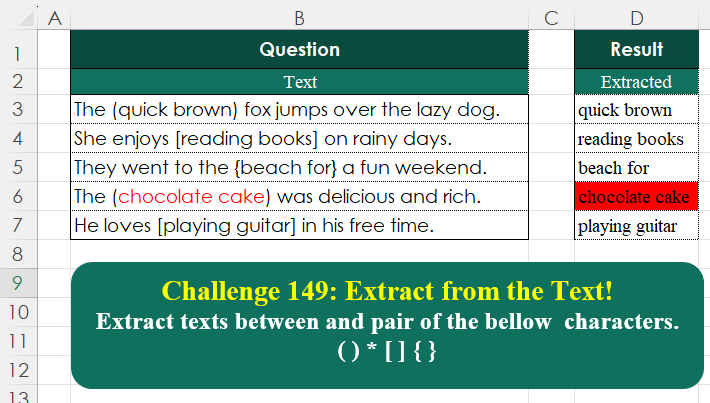
Extract texts between and pair of the bellow characters. ( ) * [ ] { }
📌 Challenge Details and Links
Challenge Number: 149
Challenge Difficulty: ⭐⭐
📥Download Sample File
📥Link to the solutions on LinkedIn
📥Link to the solution on YouTube
Solving the challenge of Extract From Text! Part 3 with Power Query
Power Query solution 1 for Extract From Text! Part 3, proposed by Zoran Milokanović:
let
  Source = Excel.CurrentWorkbook(){[Name = "Input"]}[Content],
  S      = Table.TransformRows(Source, each Text.SplitAny([Text], "()[]{}"){1})
in
  S
Power Query solution 2 for Extract From Text! Part 3, proposed by Luan Rodrigues:
let
lista = {{"(",")"},{"[","]"},{"{","}"}},
res = List.Accumulate({0..List.Count(lista)-1},Tabela1,(s,c)=>
Table.TransformColumns(s,{"Text", each
if Text.Contains(_, lista{c}{0}) and Text.Contains(_, lista{c}{1}) then
Text.BetweenDelimiters(_,lista{c}{0} ,lista{c}{1}) else _ }) )
in res
Power Query solution 3 for Extract From Text! Part 3, proposed by Ramiro Ayala Chávez:
let
S = Excel.CurrentWorkbook(){[Name="Table1"]}[Content],
Fx = (x)=> let
a = Text.SplitAny(x,"([{)]})"),
b = a{1}
in b,
Sol = Table.AddColumn(S,"Extracted", each Fx([Text]))
in
Sol
Power Query solution 4 for Extract From Text! Part 3, proposed by Alejandro Simón 🇵🇦 🇪🇸:
let
Source = Excel.CurrentWorkbook(){[Name="Table1"]}[Content],
Sol = Table.AddColumn(Source, "Extracted", each
 let
 a = [Text],
 b = List.Transform({{"(",")"},{"{","}"},{"[","]"}}, each
 Text.BetweenDelimiters(a, _{0}, _{1})),
 c = Text.Combine(List.Select(b, each _<>""), ", ")
 in c)[[Extracted]]
in
Sol
Power Query solution 5 for Extract From Text! Part 3, proposed by Kris Jaganah:
let
  A = Excel.CurrentWorkbook(){[Name = "Table1"]}[Content],
  B = Table.AddColumn(A, "Extracted", each Text.SplitAny([Text], "()[]{}"){1})
in
  B
Power Query solution 6 for Extract From Text! Part 3, proposed by Abdallah Ally:
let
  Source = Excel.CurrentWorkbook(){[Name = "Table1"]}[Content],
  Result = Table.AddColumn(
    Source,
    "Extracted",
    each [
      a = List.Transform(
        {"()", "[]", "{}"},
        (x) => Text.BetweenDelimiters([Text], Text.At(x, 0), Text.At(x, 1))
      ),
      b = Text.Combine(List.Select(a, each _ <> ""), ", ")
    ][b]
  )[[Extracted]]
in
  Result
Power Query solution 7 for Extract From Text! Part 3, proposed by 🇮🇷 Navid Esmaeilzadeh اسماعیل زاده:
let
S = Excel.CurrentWorkbook(){[Name="Table1"]}[Content],
T = Table.AddColumn(S, "Result", each let
A=Text.ToList(Text.Remove(Text.Lower([Text]),{"a".."z","0".."9"," ","."})),
B=Text.BetweenDelimiters([Text],A{0},A{1})
in
B)
in
T
Power Query solution 8 for Extract From Text! Part 3, proposed by Vida Vaitkunaite:
let
  Source = Excel.CurrentWorkbook(){[Name = "Table1"]}[Content],
  Start = {"(", "[", "{"},
  End = {")", "]", "}"},
  Extracted = Table.AddColumn(
    Source,
    "Extracted",
    each Text.Combine(
      List.Transform({0 .. 2}, (x) => Text.BetweenDelimiters([Text], Start{x}, End{x}))
    )
  ),
  Final = Table.SelectColumns(Extracted, {"Extracted"})
in
  Final
Solving the challenge of Extract From Text! Part 3 with Excel
Excel solution 1 for Extract From Text! Part 3, proposed by 🇰🇷 Taeyong Shin:
=REGEXEXTRACT(
    B3:B7,
    ".*?p{Ps}K.*?(?=p{Pe})"
)
Excel solution 2 for Extract From Text! Part 3, proposed by 🇰🇷 Taeyong Shin:
=LET(
    s,
    {"(",
    ")",
    "[",
    "]",
    "{",
    "}"},
    TEXTSPLIT(
        TEXTAFTER(
            B3:B7,
            s
        ),
        s
    )
)
Excel solution 3 for Extract From Text! Part 3, proposed by Aditya Kumar Darak 🇮🇳:
=MAP(
    B3:B7,
     LAMBDA(
         a,
          INDEX(
              TEXTSPLIT(
                  a,
                   ,
                   {"("; ")"; "["; "]"; "{"; "}"}
              ),
               2
          )
     )
)
Excel solution 4 for Extract From Text! Part 3, proposed by Oscar Mendez Roca Farell:
=TEXTBEFORE(
    TEXTAFTER(
        B3:B7,
        {"(",
        "[",
        "{"}
    ),
    {")",
    "]",
    "}"}
)
Excel solution 5 for Extract From Text! Part 3, proposed by Julian Poeltl:
=LET(
    S,
    {"(",
    "[",
    "{",
    ")",
    "]",
    "}"},
    TEXTBEFORE(
        TEXTAFTER(
            B3:B7,
            S
        ),
        S
    )
)
Excel solution 6 for Extract From Text! Part 3, proposed by Kris Jaganah:
=TEXTBEFORE(
    TEXTAFTER(
        B3:B7,
        {"(",
        "[",
        "{"}
    ),
    {")",
    "]",
    "}"}
)
Excel solution 7 for Extract From Text! Part 3, proposed by Imam Hambali:
=TEXTBEFORE(
    TEXTAFTER(
        B3:B7,
        {"(",
        "[",
        "{"}
    ),
    {")",
    "]",
    "}"}
)
Excel solution 8 for Extract From Text! Part 3, proposed by Ivan William:
=TEXTBEFORE(
    TEXTAFTER(
        B3:B7,
        {"(",
        "[",
        "{"}
    ),
     {")",
    "]",
    "}"}
)
=TEXTSPLIT(
    TEXTAFTER(
        B3:B7,
        {"(",
        "[",
        "{"}
    ),
    {")",
    "]",
    "}"}
)
Excel solution 9 for Extract From Text! Part 3, proposed by Yaroslav Drohomyretskyi:
=TEXTAFTER(TEXTBEFORE(B3:B7,{")","*","]","}"},-1),{"(","*","[","{"})Excel solution 10 for Extract From Text! Part 3, proposed by Sunny Baggu:
=TEXTBEFORE(     TEXTAFTER(
         B3:B7,
          {"(",
          "[",
          "{"}
     ),     {")",
     "]",
     "}"})
Excel solution 11 for Extract From Text! Part 3, proposed by abdelaziz allam:
=MAP(
    B3:B7,
    LAMBDA(
        a,
        LET(
            st,
            FILTER(
                SEARCH(
                    {"(",
                    "[",
                    "{"},
                    a
                ),
                ISNUMBER(
                    SEARCH(
                        {"(",
                        "[",
                        "{"},
                        a
                    )
                )
            ),
            en,
            FILTER(
                SEARCH(
                    {")",
                    "]",
                    "}"},
                    a
                ),
                ISNUMBER(
                    SEARCH(
                        {")",
                        "]",
                        "}"},
                        a
                    )
                )
            ),
            MID(
                a,
                st+1,
                en-st-1
            )
        )
    )
)
Excel solution 12 for Extract From Text! Part 3, proposed by abdelaziz allam:
=TEXTBEFORE(
    TEXTAFTER(
        B3:B7,
        {"(",
        "[",
        "{"}
    ),
    {")",
    "]",
    "}"}
)
Excel solution 13 for Extract From Text! Part 3, proposed by abdelaziz allam:
=MAP(
    B3:B7,
    LAMBDA(
        a,
        TEXTBEFORE(
            TEXTAFTER(
                a,
                {"(",
                "[",
                "{"}
            ),
            {")",
            "]",
            "}"}
        )
    )
)
Excel solution 14 for Extract From Text! Part 3, proposed by Ahmad Algadeeb, MBA:
=MID(B3,
    TEXTJOIN(
        "",
        1,
        IFERROR(
            SEARCH(
                {"{",
                "[",
                "("},
                B3
            ),
            ""
        )
    )+1,(TEXTJOIN(
    "",
    1,
    IFERROR(
        SEARCH(
            {"}",
            "]",
            ")"},
            B3
        ),
        ""
    )
)*1)-1-(TEXTJOIN(
    "",
    1,
    IFERROR(
        SEARCH(
            {"{",
            "[",
            "("},
            B3
        ),
        ""
    )
)*1))
Excel solution 15 for Extract From Text! Part 3, proposed by Alejandro Campos:
=BYROW(
    B3:B7;
    LAMBDA(
        x;
        REGEXEXTRACT(
            x;
            "(?<=().*?(?=))|(?<=[).*?(?=])|(?<={).*?(?=})"
        )
    )
)
Excel solution 16 for Extract From Text! Part 3, proposed by Andy Heybruch:
=BYROW(
    B3:B7,
    LAMBDA(
        a,
        TEXTBEFORE(
            TEXTAFTER(
                a,
                {"(",
                "[",
                "{"}
            ),
            {")",
            "]",
            "}"}
        )
    )
)
Excel solution 17 for Extract From Text! Part 3, proposed by Asheesh Pahwa:
=TEXTAFTER(
    TEXTBEFORE(
        B3:B7,
        {")",
        "*",
        "]",
        "}"}
    ),
    {"(",
    "*",
    "[",
    "{"}
)
Excel solution 18 for Extract From Text! Part 3, proposed by Eddy Wijaya:
=MAP(
    B3:B7,
    LAMBDA(
        m,
        LET(

            d,
            {"(",
            ")",
            "[",
            "]",
            "{",
            "}"},

            TEXTBEFORE(
                TEXTAFTER(
                    m,
                    d
                ),
                d
            )
        )
    )
)
Excel solution 19 for Extract From Text! Part 3, proposed by ferhat CK:
=MAP(
    B3:B7,
    LAMBDA(
        v,
        LET(
            a,
            TOCOL(
                FIND(
                    {"(",
                    ")",
                    "[",
                    "]",
                    "{",
                    "}"},
                    v
                ),
                2
            ),
            MID(
                v,
                MIN(
                    a
                )+1,
                MAX(
                    a
                )-MIN(
                    a
                )-1
            )
        )
    )
)
Excel solution 20 for Extract From Text! Part 3, proposed by Gabriel Pugliese:
=MAP(B3:B7,LAMBDA(x,REGEXEXTRACT(x,"[([{](.*)[)]}]",2)))Excel solution 21 for Extract From Text! Part 3, proposed by Gerson Pineda:
=LET(t,TEXTSPLIT(CONCAT(B3:B7),,{"{","}","[","]","(",")"}),FILTER(t,MOD(SEQUENCE(ROWS(t)),2)=0))Excel solution 22 for Extract From Text! Part 3, proposed by Gerson Pineda:
=REGEXEXTRACT(
    B3:B7,
     "(?<={)[^}]*|(?<=[)[^]]*|(?<=()[^)]*"
)
Excel solution 23 for Extract From Text! Part 3, proposed by Hamidi Hamid:
=MAP(B3:B7,LAMBDA(a,TEXTBEFORE(TEXTAFTER(a,{"(","[","{"},,1),{")","]","}"},,1)))Excel solution 24 for Extract From Text! Part 3, proposed by Md Ismail Hosen:
=LAMBDA(
    sentences,
    delimiters_group,
    [default_value],
    LET(
        _DefaultCorrected,
        IF(
            ISOMITTED(
                default_value
            ),
            "",
            default_value
        ),
        _ReducedOutput,
        REDUCE(
            "",
            sentences,
            LAMBDA(
                Acc,
                Curr,
                VSTACK(
                    Acc,
                    IFERROR(
                        TOROW(
                            DROP(
                                TEXTSPLIT(
                                    Curr,
                                    TAKE(
                                        delimiters_group,
                                        ,
                                        1
                                    ),
                                    TAKE(
                                        delimiters_group,
                                        ,
                                        -1
                                    )
                                ),
                                ,
                                1
                            ),
                            2
                        ),
                        ""
                    )
                )
            )
        ),
        _Result,
        IFNA(
            DROP(
                _ReducedOutput,
                1
            ),
            _DefaultCorrected
        ),
        _Result
    )
)(B3:B7,
    {"(",
    ")";"{",
    "}";"[",
    "]";"*",
    "*"})
Excel solution 25 for Extract From Text! Part 3, proposed by Miguel Angel Franco García:
=LET(
    a;
    {"(";
    "[";
    "{"};
    b;
    {")";
    "]";
    "}"};
    TEXTOANTES(
        TEXTODESPUES(
            B3:B7;
            a
        );
        b
    )
)
Excel solution 26 for Extract From Text! Part 3, proposed by Pieter de B.:
=LET(
    c,
    CHAR(
        {40,
        123,
        91}+{0;1;2}
    ),
    TEXTSPLIT(
        TEXTAFTER(
            B3:B7,
            c
        ),
        c
    )
)
Excel solution 27 for Extract From Text! Part 3, proposed by Rick Rothstein:
=MAP(
    B3:B7&"()",
    LAMBDA(
        x,
        INDEX(
            TEXTSPLIT(
                x,
                {"(",
                ")",
                "[",
                "]",
                "{",
                "}"}
            ),
            ,
            2
        )
    )
)

Note: For those who might be wondering about the &"()
Excel solution 28 for Extract From Text! Part 3, proposed by Songglod Petchamras:
=LET(
    l,
    {"(",
    "[",
    "{"},
    r,
    {")",
    "]",
    "}"},
    TEXTBEFORE(
        TEXTAFTER(
            B3:B7,
            l
        ),
        r
    )
)
Excel solution 29 for Extract From Text! Part 3, proposed by Tomasz Jakóbczyk:
=TEXTAFTER(
    TEXTBEFORE(
        B3:B7,
        {"}",
        ")",
        "]"}
    ),
    {"{",
    "(",
    "["}
)
Solving the challenge of Extract From Text! Part 3 with Python
Python solution 1 for Extract From Text! Part 3, proposed by Konrad Gryczan, PhD:
import pandas as pd
path = "CH-149 Extract From Text.xlsx"
input = pd.read_excel(path, usecols="B", skiprows=1, nrows=6)
test = pd.read_excel(path, usecols="D", skiprows=1, nrows=6)
input['Extracted'] = input.iloc[:, 0].str.extract(r'(?<=[([{*])(.*?)(?=[)]}*])', expand=False).fillna('')
input = input.drop(columns="Text")
print(input.equals(test)) # True
Python solution 2 for Extract From Text! Part 3, proposed by Abdallah Ally:
import pandas as pd
import re

# Load the Excel file
file_path = 'CH-149 Extract From Text.xlsx'
df = pd.read_excel(file_path, usecols='B', skiprows=1)

# Perform data manipulation
df = df.assign(
 Extracted = df['Text'].map(
 lambda x: ', '.join(re.findall(r'[([{](.*?)[)]}]', x))
 )
)[['Extracted']]

# Display the final results
df
Solving the challenge of Extract From Text! Part 3 with Python in Excel
Python in Excel solution 1 for Extract From Text! Part 3, proposed by Aditya Kumar Darak 🇮🇳:
import re

word = xl("B3:B7")[0]

result = [ re.split( r'[()[]{}]',i )[1] for i in word]

result
Python in Excel solution 2 for Extract From Text! Part 3, proposed by Alejandro Campos:
import re
df_input = xl("B2:B7", headers=True)
pattern = r'((.*?))|[(.*?)]|{(.*?)}'
df_extracted = pd.DataFrame(
 [m for t in df_input['Text'] for g in
 re.findall(pattern, t) for m in g if m], columns=['Extracted Text'])
df_extracted
Solving the challenge of Extract From Text! Part 3 with R
R solution 1 for Extract From Text! Part 3, proposed by Konrad Gryczan, PhD:
library(tidyverse)
library(readxl)
path = "files/CH-149 Extract From Text.xlsx"
input = read_excel(path, range = "B2:B7")
test = read_excel(path, range = "D2:D7")
result = input %>%
 mutate(Extracted = str_extract(Text, "(?<=[\(\[\{\*])(.*?)(?=[\)\]\}\*])"))
all.equal(result$Extracted, test$Extracted, check.attributes = FALSE)
#> [1] TRUE
Solving the challenge of Extract From Text! Part 3 with Google Sheets
Google Sheets solution 1 for Extract From Text! Part 3, proposed by Peter Krkos:
PowerQuery solution:
https://docs.google.com/spreadsheets/d/1zR5IZLz8OT76vhaPEHfsPrw8-RDKnLyyqS49IJjdhFk/edit?pli=1&gid=610339090#gid=610339090