
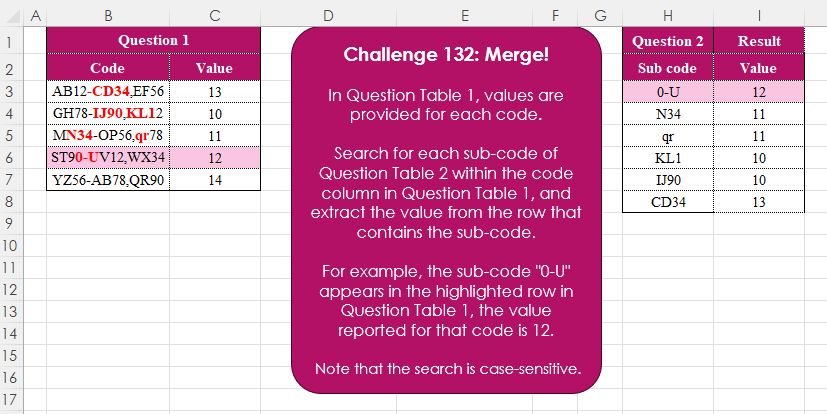
In Question Table 1, values are provided for each code. Search for each sub-code of Question Table 2 within the code column in Question Table 1, and extract the value from the row that contains the sub-code. For example, the sub-code “0-U” appears in the highlighted row in Question Table 1, the value reported for that code is 12. Note that the search is case-sensitive
📌 Challenge Details and Links
Challenge Number: 132
Challenge Difficulty: ⭐⭐⭐
📥Download Sample File
📥Link to the solutions on LinkedIn
📥Link to the solution on YouTube
Solving the challenge of Merge! Part 3 with Power Query
Power Query solution 1 for Merge! Part 3, proposed by Zoran Milokanović:
let
  Source = each Excel.CurrentWorkbook(){[Name = _]}[Content],
  S = Table.AddColumn(
    Source("Table2"),
    "Value",
    (r) => Table.SelectRows(Source("Table1"), each Text.Contains([Code], r[Sub code]))[Value]{0}
  )
in
  S
Power Query solution 2 for Merge! Part 3, proposed by Alejandro Simón 🇵🇦 🇪🇸:
let
 T2 = Excel.CurrentWorkbook(){[Name="Table2"]}[Content],
 Sol = Table.AddColumn(T2, "Value", (x)=>
let
a = Excel.CurrentWorkbook(){[Name="Table1"]}[Content],
b = Table.SelectRows(a, each Text.Contains([Code], x[Sub code]))[Value]{0}
in b)
in
 Sol
Power Query solution 3 for Merge! Part 3, proposed by Kris Jaganah:
let
  A = (y) => Excel.CurrentWorkbook(){[Name = y]}[Content],
  B = Table.AddColumn(
    A("Table2"),
    "Value",
    each Table.SelectRows(A("Table1"), (x) => Text.Contains(x[Code], [Sub code]))[Value]{0}
  )
in
  B
Power Query solution 4 for Merge! Part 3, proposed by Abdallah Ally:
let
  Table = each Excel.CurrentWorkbook(){[Name = _]}[Content],
  Result = Table.AddColumn(
    Table("Table2"),
    "Value",
    each Table.SelectRows(Table("Table1"), (x) => Text.Contains(x[Code], [Sub code]))[Value]{0}
  )
in
  Result
Power Query solution 5 for Merge! Part 3, proposed by Yaroslav Drohomyretskyi:
let
  Source = Excel.CurrentWorkbook(){[Name = "Table2"]}[Content],
  Value = Table.AddColumn(
    Source,
    "Value",
    each
      let
        curCode = [Sub code],
        result = Table.SelectRows(
          Excel.CurrentWorkbook(){[Name = "Table1"]}[Content],
          each Text.Contains([Code], curCode)
        )[Value]{0}
      in
        result
  )
in
  Value
Power Query solution 6 for Merge! Part 3, proposed by 🇮🇷 Navid Esmaeilzadeh اسماعیل زاده:
let
S2 = Excel.CurrentWorkbook(){[Name="Que_2"]}[Content],
S1 = Excel.CurrentWorkbook(){[Name="Que_1"]}[Content],
A = Table.AddColumn(S1, "Sub code", each let
A=List.Accumulate(S2[Sub code],{},(S,C)=> S & {if Text.Contains([Code],C)=true then true else null }),
B=S2[Sub code],
C=Table.SelectRows(Table.FromColumns({A,B},{"S","R"}), each [S]<>null)[R]
in
C),
B = Table.ExpandListColumn(A, "Sub code"),
C = Table.NestedJoin(S2,{"Sub code"},B,{"Sub code"},"T"),
D = Table.ExpandTableColumn(C, "T", {"Value"}, {"Value"})
in
D
Power Query solution 7 for Merge! Part 3, proposed by Tyler N.:
let
  a = T1,
  b = T2,
  c = Table.AddColumn(
    b,
    "Value",
    each
      let
        d = [Sub code],
        e = Table.SelectRows(a, each Text.Contains([Code], d))
      in
        e[Value]{0}
  )
in
  c
Solving the challenge of Merge! Part 3 with Excel
Excel solution 1 for Merge! Part 3, proposed by Bo Rydobon 🇹🇭:
=MMULT(
    1-ISERR(
        FIND(
            H3:H8,
            TOROW(
                B3:B7
            )
        )
    ),
    C3:C7
)
Excel solution 2 for Merge! Part 3, proposed by Oscar Mendez Roca Farell:
=TOCOL(
    C3:C7/ISNUMBER(
        FIND(
            TOROW(
                H3:H8
            ),
            B3:B7
        )
    ),
    2,
    1
)
Excel solution 3 for Merge! Part 3, proposed by Julian Poeltl:
=MAP(
    H3:H8,
    LAMBDA(
        A,
        @FILTER(
            C3:C7,
            ISNUMBER(
                SEARCH(
                    A,
                    B3:B7
                )
            )
        )
    )
)
Excel solution 4 for Merge! Part 3, proposed by Kris Jaganah:
=MAP(H3:H8,
    LAMBDA(x,
    LET(a,
    FIND(
        x,
        B3:B7
    ),
    TOCOL((a/a)*C3:C7,
    3))))
Excel solution 5 for Merge! Part 3, proposed by Abdallah Ally:
=HSTACK(
    H3:H8,
    XLOOKUP(
        H3:H8,
        B3:B7,
        C3:C7,
        "",
        3
    )
)
Excel solution 6 for Merge! Part 3, proposed by JvdV –:
=XLOOKUP(
    H3:H8,
    B3:B7,
    C3:C7,
    ,
    3
)
Excel solution 7 for Merge! Part 3, proposed by Ivan William:
=MAP(
    H3:H8,
    LAMBDA(
        x,
        LOOKUP(
            2,
            1/FIND(
                x,
                B3:B7
            ),
            C3:C7
        )
    )
)
Excel solution 8 for Merge! Part 3, proposed by Sunny Baggu:
=MAP(     H3:H8,     LAMBDA(
         a,
          FILTER(
              C3:C7,
               ISNUMBER(
                   FIND(
                       a,
                        B3:B7
                   )
               )
          )
     ))
Excel solution 9 for Merge! Part 3, proposed by Sunny Baggu:
=MAP(
 H3:H8,
 LAMBDA(a,
 TAKE(
 FILTER(C3:C7, ISNUMBER(SEARCH(a, B3:B7))),
 1
 )
 )
) + N("🌼")
Excel solution 10 for Merge! Part 3, proposed by abdelaziz allam:
=MAP(     H3:H8,     LAMBDA(
         a,
          FILTER(
              C3:C7,
               ISNUMBER(
                   FIND(
                       a,
                        B3:B7
                   )
               )
          )
     ))
Excel solution 11 for Merge! Part 3, proposed by Ankur Sharma:
=MAP(
    H3:H8,
     LAMBDA(
         S_C,
          LET(
              L_T,
               --ISNUMBER(
                   FIND(
                       S_C,
                        B3:B7
                   )
               ),
               IF(
                   SUM(
                       L_T
                   ) = 0,
                    "Sub-code not found",
                    IF(
                        SUM(
                       L_T
                   ) = 1,
                         SUM(
                             L_T * C3:C7
                         ),
                         "Multiple Sub-codes"
                    )
               )
          )
     )
)
Excel solution 12 for Merge! Part 3, proposed by Asheesh Pahwa:
=MAP(
    H3:H8,
    LAMBDA(
        x,
        FILTER(
            C3:C7,
            ISNUMBER(
                FIND(
                    x,
                    B3:B7
                )
            )
        )
    )
)
Excel solution 13 for Merge! Part 3, proposed by Eddy Wijaya:
=MAP(
    H3:H8,
    LAMBDA(
        m,
        LET(

            f,
            FIND(
                m,
                B3:B7
            ),

            l,
            TOCOL(
                MATCH(
                    SEQUENCE(
                        100
                    ),
                    f,
                    0
                ),
                3
            ),

            INDEX(
                C3:C7,
                l
            )
        )
    )
)
Excel solution 14 for Merge! Part 3, proposed by Edwin Tisnado:
=MAP(H3:H8,LAMBDA(i,TOCOL(IF(FIND(i,B3:B7),C3:C7),2)))Excel solution 15 for Merge! Part 3, proposed by Hussein SATOUR:
=XLOOKUP(
    H3:H11&G3:G11,
    C3:C9&B3:B9,
    D3:D9,
    ,
    -1
)
Excel solution 16 for Merge! Part 3, proposed by Md. Zohurul Islam:
=XLOOKUP(
    "*"&E3:E8&"*",
    B3:B7,
    C3:C7,
    ,
    2
)
Excel solution 17 for Merge! Part 3, proposed by Md. Zohurul Islam:
=LET(    a,
    E3:E8,    b,
    B3:B7,    c,
    C3:C7,    d,
    XLOOKUP(
        a,
        b,
        c,
        ,
        3
    ),    e,
    HSTACK(
        a,
        d
    ),    header,
    {"Sub code",
    "Value"},    result,
    VSTACK(
        header,
        e
    ),    result
)
Excel solution 18 for Merge! Part 3, proposed by Peter Bartholomew:
= MAP(
    subCode,
     LAMBDA(
         sc,
          XLOOKUP(
              TRUE,
               REGEXTEST(
                   code,
                    sc
               ),
               value
          )
     )
)
Excel solution 19 for Merge! Part 3, proposed by Rick Rothstein:
=XLOOKUP(
    "*"&H3:H8&"*",
    B3:B7,
    C3:C7,
    "",
    2
)
Excel solution 20 for Merge! Part 3, proposed by Rick Rothstein:
=MAP(
    H3:H8,
    LAMBDA(
        x,
        CONCAT(
            IF(
                ISNUMBER(
                    FIND(
                        x,
                        B3:B7
                    )
                ),
                C3:C7,
                ""
            )
        )
    )
)
Excel solution 21 for Merge! Part 3, proposed by Songglod Petchamras:
=MAP(
    H3:H8,
    LAMBDA(
        sc,
        XLOOKUP(
            "*"&sc&"*",
            B3:B7,
            C3:C7,
            ,
            2
        )
    )
)

Case-sensitive
=MAP(
    H3:H8,
    LAMBDA(
        sc,
        LET(
            i,
            FIND(
                sc,
                B3:B7
            ),
            FILTER(
                C3:C7,
                ISNUMBER(
                    i
                ),
                -1
            )
        )
    )
)
Solving the challenge of Merge! Part 3 with Python
Python solution 1 for Merge! Part 3, proposed by Konrad Gryczan, PhD:
import pandas as pd
import re

path = "CH-132 Merge.xlsx"

input = pd.read_excel(path, usecols="B:C", skiprows=1, nrows=5)
input2 = pd.read_excel(path, usecols="H:H", skiprows=1, nrows=7)
test = pd.read_excel(path, usecols="I:I", skiprows=1, nrows=7).rename(columns=lambda x: x.replace('.1', '')).sort_values(by='Value', ascending=False).reset_index(drop=True)

result = input.merge(input2, how='cross')
result['Match'] = result.apply(lambda x: bool(re.search(x['Sub code'], x['Code'])), axis=1)
result = result[result['Match']].sort_values(by='Value', ascending=False).reset_index(drop=True)[['Value']]

print(result.equals(test)) # True
Solving the challenge of Merge! Part 3 with Python in Excel
Python in Excel solution 1 for Merge! Part 3, proposed by Abdallah Ally:
df1 = xl("B2:C7", headers=True)
df2 = xl("H2:H8", headers=True)

# Perform data manipulation
df2 = (
 df2.assign(
 Value = df2['Sub code'].map(
 lambda x: df1['Value'][df1['Code'].str.contains(x)].tolist()[0]
 )
 )
)

# Display the final results
df2
Python in Excel solution 2 for Merge! Part 3, proposed by Alejandro Campos:
df_question_table_1, sub_codes = xl("B2:C7", headers=True), xl("H3:H8")[0]
extracted_values = {sc: next((r['Value'] for _, r in df_question_table_1.iterrows() if sc in r['Code']), None) for sc in sub_codes}
df_extracted_values = pd.DataFrame(extracted_values.items(), columns=['Sub code', 'Value'])
Python in Excel solution 3 for Merge! Part 3, proposed by Ümit Barış Köse, MSc:
df1=xl("B2:C7", headers=True)
df2=xl("E2:E8", headers=True)
df2['Value'] = df2['Sub code'].apply(
 lambda sub_code: df1.loc[df1['Code'].str.contains(sub_code, case=False), 'Value'].iloc[0] if not df1['Code'].str.contains(sub_code, case=False).empty else None
)
df2
Solving the challenge of Merge! Part 3 with R
R solution 1 for Merge! Part 3, proposed by Konrad Gryczan, PhD:
library(tidyverse)
library(readxl)

path = "files/CH-132 Merge.xlsx"
input = read_excel(path, range = "B2:C7")
input2 = read_excel(path, range = "H2:H8")
test  = read_excel(path, range = "I2:I8") %>% arrange(desc(Value))

result = input %>%
 cross_join(input2) %>%
 filter(str_detect(Code, `Sub code`)) %>%
 select(Value) %>%
 arrange(desc(Value))

all.equal(result, test, check.attributes = FALSE)
#> [1] TRUE
Solving the challenge of Merge! Part 3 with Google Sheets
Google Sheets solution 1 for Merge! Part 3, proposed by Peter Krkos:
PowerQuery solution:
https://docs.google.com/spreadsheets/d/1zR5IZLz8OT76vhaPEHfsPrw8-RDKnLyyqS49IJjdhFk/edit?pli=1&gid=1626075867#gid=1626075867