
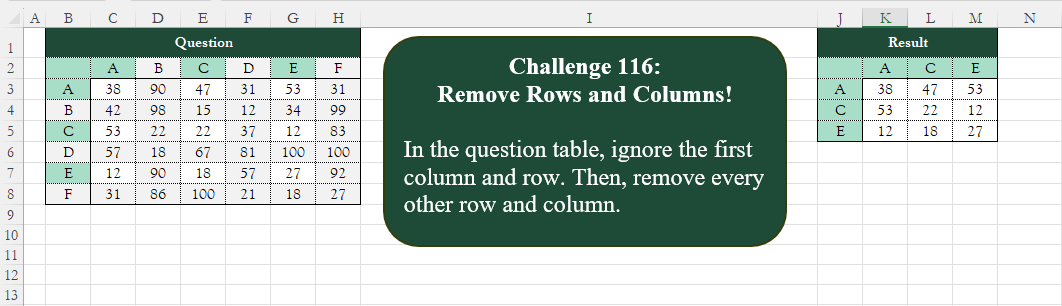
Add an index column to the question table, with a separate counter for each stock.
📌 Challenge Details and Links
Challenge Number: 116
Challenge Difficulty: ⭐⭐
📥Download Sample File
📥Link to the solutions on LinkedIn
📥Link to the solution on YouTube
Solving the challenge of Add Index Column! Part 2 with Power Query
Power Query solution 1 for Add Index Column! Part 2, proposed by Zoran Milokanović:
let
  Source = Excel.CurrentWorkbook(){[Name = "Input"]}[Content],
  H = Table.ColumnNames(Source),
  S = Table.SelectColumns(
    Table.SelectRows(Source, each Number.IsEven(Table.PositionOf(Source, _))),
    {H{0}} & List.Alternate(H, 1, 1)
  )
in
  S
Power Query solution 2 for Add Index Column! Part 2, proposed by Zoran Milokanović:
let
  Source = Excel.CurrentWorkbook(){[Name = "Input"]}[Content],
  L      = {Table.ColumnNames(Source)} & Table.ToRows(Source),
  F      = each {_{0}} & List.Alternate(_, 1, 1),
  T      = List.Transform(F(L), F),
  S      = Table.FromRows(List.Skip(T), T{0})
in
  S
Power Query solution 3 for Add Index Column! Part 2, proposed by Luan Rodrigues:
let
  Fonte = Tabela1,
  cab = Table.DemoteHeaders(Fonte),
  res =
    let
      a = List.Transform(
        List.Alternate(Table.ToColumns(cab), 1, 1),
        each {_{0}} & List.Alternate(_, 1, 1)
      ),
      b = {{null} & List.Transform(a, List.First)}
    in
      Table.PromoteHeaders(Table.FromColumns(b & a))
in
  res
Power Query solution 4 for Add Index Column! Part 2, proposed by Rafael González B.:
let
Source = Excel.CurrentWorkbook(){0}[Content],
Tbl = Table.SelectColumns(
Table.AlternateRows(Source,1,1,1),
{"Column1"} & List.Alternate(Source[Column1],1,1,1)
)
in
Tbl
🧙🏻♂️🧙🏻♂️🧙🏻♂️Power Query solution 5 for Add Index Column! Part 2, proposed by Ramiro Ayala Chávez:
let
S = Excel.CurrentWorkbook(){[Name="Table1"]}[Content],
Z = List.Zip, A = List.Alternate, T = List.Transform,
a = Z(Table.ToColumns(S)),
b = Z(A(T(a, each A(_,1,1)),1,1,1)),
c = A(T(a,List.First),1,1,1),
d = Table.FromColumns({c}&b),
e = Z({Table.ColumnNames(d),{" "}&c}),
Sol = Table.RenameColumns(d,e)
in
Sol
Power Query solution 6 for Add Index Column! Part 2, proposed by Ramiro Ayala Chávez:
let
S = Excel.CurrentWorkbook(){[Name="Table1"]}[Content],
a = Table.SelectRows(S, each [Column1]="A" or [Column1]="C" or [Column1]="E") [[Column1],[A],[C],[E]],
Sol = Table.RenameColumns(a,{"Column1"," "})
in
Sol
Power Query solution 7 for Add Index Column! Part 2, proposed by Aditya Kumar Darak 🇮🇳:
let
  Source = Excel.CurrentWorkbook(){[Name = "data"]}[Content],
  Alt1   = Table.AlternateRows(Source, 1, 1, 1),
  Cols   = Table.ColumnNames(Alt1),
  Alt2   = List.Alternate(Cols, 1, 1, 2),
  Return = Table.SelectColumns(Alt1, Alt2)
in
  Return
Power Query solution 8 for Add Index Column! Part 2, proposed by Alejandro Simón 🇵🇦 🇪🇸:
let
  Source = Table.DemoteHeaders(Excel.CurrentWorkbook(){[Name = "Table1"]}[Content]),
  Col = List.Transform(Table.ToColumns(Source), each {_{0}} & List.Alternate(List.Skip(_), 1, 1, 1)),
  Sol = Table.PromoteHeaders(Table.FromColumns({Col{0}} & List.Alternate(List.Skip(Col), 1, 1, 1)))
in
  Sol
Power Query solution 9 for Add Index Column! Part 2, proposed by Kris Jaganah:
let
  A = Excel.CurrentWorkbook(){[Name = "Table1"]}[Content],
  B = Table.AlternateRows(A, 1, 1, 1),
  C = Table.ToColumns(Table.DemoteHeaders(B)){0},
  D = Table.SelectColumns(B, C)
in
  D
Power Query solution 10 for Add Index Column! Part 2, proposed by Abdallah Ally:
let
  Source = Excel.CurrentWorkbook(){[Name = "Table1"]}[Content],
  SelectCols = Table.SelectColumns(
    Source,
    [
      a = Table.ColumnNames(Source),
      b = {"Column1"} & List.Select(a, each Number.Mod(List.PositionOf(a, _), 2) = 1)
    ][b]
  ),
  Result = Table.SelectRows(SelectCols, each Number.Mod(Table.PositionOf(SelectCols, _), 2) = 0)
in
  Result
Power Query solution 11 for Add Index Column! Part 2, proposed by Nelson Mwangi:
let
  Source = Excel.CurrentWorkbook(){[Name = "Table1"]}[Content],
  AlternateRows = Table.AlternateRows(Source, 1, 1, 1),
  ColNames = Table.SelectRows(
    Table.Schema(AlternateRows),
    each not Number.IsEven([Position]) or [Name] = "Column1"
  )[Name],
  SelectCols = Table.SelectColumns(AlternateRows, ColNames)
in
  SelectCols
Power Query solution 12 for Add Index Column! Part 2, proposed by Yaroslav Drohomyretskyi:
let
  Source  = Excel.CurrentWorkbook(){[Name = "Table1"]}[Content],
  Rows    = Table.AlternateRows(Source, 1, 1, 1),
  Columns = Table.RemoveColumns(Rows, List.Alternate(List.Skip(Table.ColumnNames(Rows), 1), 1, 1))
in
  Columns
Power Query solution 13 for Add Index Column! Part 2, proposed by 🇮🇷 Navid Esmaeilzadeh اسماعیل زاده:
let
  Source = Excel.CurrentWorkbook(){[Name = "Table1"]}[Content],
  A      = Table.AddIndexColumn(Source, "I", 1, 1),
  B      = Table.AddColumn(A, "R", each Number.Mod([I], 2) = 1),
  C      = Table.SelectRows(B, each ([R] = true)),
  D      = Table.RemoveColumns(C, {"I", "R"}),
  E      = Table.UnpivotOtherColumns(D, {"Column1"}, "At", "Va"),
  F      = Table.AddIndexColumn(E, "I", 1, 1),
  G      = Table.AddColumn(F, "C", each Number.Mod([I], 2) = 1),
  H      = Table.SelectRows(G, each ([C] = true)),
  I      = Table.RemoveColumns(H, {"I", "C"}),
  J      = Table.Pivot(I, List.Distinct(I[At]), "At", "Va")
in
  J
Power Query solution 14 for Add Index Column! Part 2, proposed by Ahmed Ariem:
let

 Source = Excel.CurrentWorkbook(){[Name="Table1"]}[Content],
 lst = List.Alternate( Table.ColumnNames(Source),1,1,2),
 tbl= Table.SelectRows(Table.SelectColumns(Source,lst),each List.ContainsAny(lst, {[Question]}))

in
 tbl
attached file
https://1drv.ms/x/s!AiUZ0Ws7G26RkHtfA0pr-aQ_oCuc?e=lN7o15
Power Query solution 15 for Add Index Column! Part 2, proposed by Glyn Willis:
let
  Source = Excel.CurrentWorkbook(){[Name = "Table1"]}[Content],
  Custom1 = Table.SelectColumns(
    Table.AlternateRows(Source, 1, 1, 1),
    List.Select(
      List.Skip(Table.ColumnNames(Source)),
      (r) => Number.Mod(Character.ToNumber(r), 2) = 1
    )
  )
in
  Custom1
Solving the challenge of Add Index Column! Part 2 with Excel
Excel solution 1 for Add Index Column! Part 2, proposed by Aditya Kumar Darak 🇮🇳:
=LET(     _d,
     B2:H8,     _rws,
     ROWS(
         _d
     ) / 2,     _cols,
     COLUMNS(
         _d
     ) / 2,     _seq1,
     VSTACK(
         1,
          SEQUENCE(
              _rws,
               ,
               2,
               2
          )
     ),     _seq2,
     VSTACK(
         1,
          SEQUENCE(
              _cols,
               ,
               2,
               2
          )
     ),     _alt1,
     CHOOSEROWS(
         _d,
          _seq1
     ),     _alt2,
     CHOOSECOLS(
         _alt1,
          _seq2
     ),     _r,
     IF(
         _alt2 = "",
          "",
          _alt2
     ),     _r)
Excel solution 2 for Add Index Column! Part 2, proposed by Aditya Kumar Darak 🇮🇳:
=LET(     _d,
     B2:H8,     _rws,
     ROUNDUP(
         ROWS(
             _d
         ) / 2,
          0
     ),     _cols,
     ROUNDUP(
         COLUMNS(
             _d
         ) / 2,
          0
     ),     _calc,
     MAKEARRAY(          _rws,          _cols,          LAMBDA(
              r,
               c,

               INDEX(
                   _d,
                    r * 1.99 - 0.99,
                    c * 1.99 - 0.99
               )

          )     ),     _r,
     IF(
         _calc = "",
          "",
          _calc
     ),     _r)
Excel solution 3 for Add Index Column! Part 2, proposed by Oscar Mendez Roca Farell:
=LET(
    d,
     B2:H8,
     r,
     ROW(
         d
     )-2,
     f,
     VSTACK(
         1,
          1+FILTER(
              r,
               MOD(
                   r,
                    2
               )
          )
     ),
     INDEX(
         IF(
             N(
                 +d
             ),
              d,
              d&""
         ),
          f,
          TOROW(
              f
          )
     )
)
Excel solution 4 for Add Index Column! Part 2, proposed by Julian Poeltl:
=LET(
    A,
    B2:H8,
    C,
    CHOOSEROWS(
        CHOOSECOLS(
            A,
            VSTACK(
                1,
                SEQUENCE(
                    COLUMNS(
                        A
                    )/2,
                    ,
                    2,
                    2
                )
            )
        ),
        VSTACK(
            1,
            SEQUENCE(
                ROWS(
                        A
                    )/2,
                ,
                2,
                2
            )
        )
    ),
    IF(
        C<>"",
        C,
        ""
    )
)
Excel solution 5 for Add Index Column! Part 2, proposed by Kris Jaganah:
=LET(
    a,
    B2:H8,
    b,
    VSTACK(
        1,
        SEQUENCE(
            ROWS(
                a
            )/2,
            ,
            2,
            2
        )
    ),
    INDEX(
        a,
        b,
        TOROW(
            b
        )
    )
)
Excel solution 6 for Add Index Column! Part 2, proposed by Imam Hambali:
=LET(    data,
     C3:H8,    col,
     B3:B8,    func,
     LAMBDA(
         x,
         y,
         z,
          FILTER(
              x,
               MOD(
                   SEQUENCE(
                       y,
                       z
                   ),
                   2
               )=1
          )
     ),    a,
     func(
         data,
          ROWS(
              data
          ),
         1
     ),    b,
     func(
         a,
          1,
         COLUMNS(
             a
         )
     ),    c,
     func(
         col,
          ROWS(
              col
          ),
         1
     ),    VSTACK(
        HSTACK(
            "",
            TRANSPOSE(
                c
            )
        ),
        HSTACK(
            c,
            b
        )
    ))
Excel solution 7 for Add Index Column! Part 2, proposed by Imam Hambali:
=LET(    a,
     TEXTSPLIT(
         TEXTJOIN(
             ",",
             1,
             B3:B8&"-"&C2:H2
         ),
         "-",
         ","
     ),    func,
     LAMBDA(
         x,
          XLOOKUP(
              x,
              {"A",
              "C",
              "E"},
              {1,
              1,
              1},
              0
          )
     ),    f,
     FILTER(
         HSTACK(
             a,
             TOCOL(
                 C3:H8
             )
         ),
          func(
              TAKE(
                  a,
                  ,
                  1
              )
          )+func(
              TAKE(
                  a,
                  ,
                  -1
              )
          )=2
     ),    PIVOTBY(
        CHOOSECOLS(
            f,
            1
        ),
         CHOOSECOLS(
             f,
             2
         ),
         CHOOSECOLS(
             f,
             3
         ),
        SUM,
        0,
        0,
        ,
        0
    ))
Excel solution 8 for Add Index Column! Part 2, proposed by Sunny Baggu:
=LET(     s,
     SEQUENCE(
         ROWS(
             B3:B8
         )
     ),     r,
     MOD(
         s,
          2
     ),     _a,
     FILTER(
         B3:B8,
          r
     ),     _b,
     TOROW(
         _a
     ),     _c,
     XLOOKUP(
         _a & _b,
          TOCOL(
              B3:B8 & C2:H2
          ),
          TOCOL(
              C3:H8
          )
     ),     VSTACK(
         HSTACK(
             "",
              _b
         ),
          HSTACK(
              _a,
               _c
          )
     ))
Excel solution 9 for Add Index Column! Part 2, proposed by Alejandro Campos:
=HSTACK(     {""; "A"; "C"; "E"},     VSTACK(          {"A",
          "C",
          "E"},          CHOOSEROWS(
              CHOOSECOLS(
                  B2:H8,
                   2,
                   4,
                   6
              ),
               2,
               4,
               6
          )
     )
)
Excel solution 10 for Add Index Column! Part 2, proposed by Bilal Mahmoud kh.:
=CHOOSEROWS(
    CHOOSECOLS(
        A2:G8,
        VSTACK(
            1,
            SEQUENCE(
                3,
                ,
                2,
                2
            )
        )
    ),
    VSTACK(
            1,
            SEQUENCE(
                3,
                ,
                2,
                2
            )
        )
)
Excel solution 11 for Add Index Column! Part 2, proposed by Diarmuid Early:
=LET(
    data,
    B2:G8,     cols,
    HSTACK(
        1,
        SEQUENCE(
            ,
            COLUMNS(
                data
            )/2,
            2,
            2
        )
    ),     rws,
    VSTACK(
        1,
        SEQUENCE(
            ROWS(
                data
            )/2,
            ,
            2,
            2
        )
    ),     out,
    CHOOSECOLS(
        CHOOSEROWS(
            data,
            rws
        ),
        cols
    ),     IF(
         out="",
         "",
         out
     )
)
Excel solution 12 for Add Index Column! Part 2, proposed by Eddy Wijaya:
=LET(
d,B2:H8,
s,SEQUENCE((COLUMNS(d)-1)/2,,2,2),
CHOOSEROWS(CHOOSECOLS(d,1,s),1,s))
Excel solution 13 for Add Index Column! Part 2, proposed by ferhat CK:
=CHOOSECOLS(
    CHOOSEROWS(
        C3:H8,
        XMATCH(
            TOCOL(
                {38,
                53,
                12}
            ),
            C3:C8
        )
    ),
    XMATCH(
        {38,
        47,
        53},
        C3:H3
    )
)
Excel solution 14 for Add Index Column! Part 2, proposed by Hamidi Hamid:
=LET(
    z,
    CHOOSECOLS(
        C2:H2,
        SEQUENCE(
            ,
            COUNTA(
                C2:H2
            )/2,
            1,
            2
        )
    ),
    x,
    CHOOSECOLS(
        C3:H8,
        SEQUENCE(
            ,
            COUNTA(
                C3:H3
            )/2,
            1,
            2
        )
    ),
    w,
    CHOOSEROWS(
        x,
        SEQUENCE(
            COUNTA(
                TAKE(
                    x,
                    ,
                    1
                )
            )/2,
            ,
            1,
            2
        )
    ),
    HSTACK(
        VSTACK(
            "",
            TRANSPOSE(
                z
            )
        ),
        VSTACK(
            z,
            w
        )
    )
)
Excel solution 15 for Add Index Column! Part 2, proposed by Pierluigi Stallone:
=LET(
    Array,    FILTER(         IF(
             MOD(
                 COLUMN(
                     A2:G2
                 ),
                 2
             )=0,
             COLUMN(
                     A2:G2
                 ),
             IF(
                 COLUMN(
                     A2:G2
                 )=1,
                 COLUMN(
                     A2:G2
                 ),
                 ""
             )
         ),         ISNUMBER(
             IF(
                 MOD(
                 COLUMN(
                     A2:G2
                 ),
                 2
             )=0,
                 COLUMN(
                     A2:G2
                 ),
                 IF(
                     COLUMN(
                     A2:G2
                 )=1,
                     COLUMN(
                     A2:G2
                 ),
                     ""
                 )
             )
         )    ),    CHOOSECOLS(         CHOOSEROWS(

              A2:G8,

              Array

         ),         Array    ))
Excel solution 16 for Add Index Column! Part 2, proposed by Pieter de B.:
=LET(
    n,
    {1,
    2,
    4,
    6},
    i,
    INDEX(
        B2:H8,
        n,
        TOCOL(
            n
        )
    ),
    IF(
        i="",
        "",
        i
    )
)
Excel solution 17 for Add Index Column! Part 2, proposed by Rick Rothstein:
=CHOOSEROWS(
    CHOOSECOLS(
        B2:H8,
        1,
        2,
        4,
        6
    ),
    1,
    2,
    4,
    6
)

or,
     a bit shorter (note - the semicolon is my locales delimiter for "next row" in an array constant)...

=INDEX(
    B2:H8,
    {1;2;4;6},
    {1,
    2,
    4,
    6}
)
Solving the challenge of Add Index Column! Part 2 with Python
Python solution 1 for Add Index Column! Part 2, proposed by Konrad Gryczan, PhD:
import pandas as pd
import numpy as np

path = "CH-116 Remove rows and colums.xlsx"
input = pd.read_excel(path, usecols="C:H", skiprows = 1, nrows = 7).to_numpy()
test = pd.read_excel(path, usecols="K:M", skiprows = 1, nrows = 3).to_numpy()
result = input[::2,::2]

print(np.array_equal(result, test))
Solving the challenge of Add Index Column! Part 2 with Python in Excel
Python in Excel solution 1 for Add Index Column! Part 2, proposed by Abdallah Ally:
df = xl("B2:H8", headers=True)

# Perform data manipulation
df.set_index(keys=None, inplace=True)
df = df.iloc[::2, ::2]

# Display the final results
df
Python in Excel solution 2 for Add Index Column! Part 2, proposed by Alejandro Campos:
df = xl("B2:H8", headers=True)
df.set_index(df.columns[0], inplace=True)
index = ['A', 'C', 'E']
result_df = df.loc[index, index]
result_df
Solving the challenge of Add Index Column! Part 2 with R
R solution 1 for Add Index Column! Part 2, proposed by Konrad Gryczan, PhD:
library(tidyverse)
library(readxl)

path = "files/CH-116 Remove rows and colums.xlsx"
input = read_excel(path, range = "B2:H8") %>%
 column_to_rownames(var = "...1") %>%
 as.matrix()

test = read_excel(path, range = "J2:M5") %>%
 column_to_rownames(var = "...1") %>%
 as.matrix()

result = input[seq(1, nrow(input), 2), seq(1, ncol(input), 2)]

all.equal(result, test)
#> [1] TRUE
Solving the challenge of Add Index Column! Part 2 with Google Sheets
Google Sheets solution 1 for Add Index Column! Part 2, proposed by Milan Shrimali:
Google Sheets:
=let(
a,vstack(BYCOL(B2:H8,lambda(x,arrayformula(mod(COLUMN(x),2)))),B2:H8),
fltr,FILTER(a,CHOOSEROWS(a,1)=1),
header,CHOOSEROWS(fltr,2),
b,
hstack(BYrow(B2:H8,lambda(x,arrayformula(mod(row(x),2)))),B2:H8),
main,
hstack(vstack("",choosecols(b,1)),fltr),vstack(hstack("",header),iferror(map(filter(main,choosecols(main,1)=1),lambda(x,filter(x,x>1))),transpose(header))))
Google Sheets solution 2 for Add Index Column! Part 2, proposed by Peter Krkos:
PowerQuery Solution:
https://docs.google.com/spreadsheets/d/1zR5IZLz8OT76vhaPEHfsPrw8-RDKnLyyqS49IJjdhFk/edit?gid=1204718984#gid=1204718984