Skip to content
OmidBI Logo – Expert in Power Query, Excel, and Business Intelligence Solutions

OmidBI

  • By Difficulty
    • ⭐️ Beginner
    • ⭐️⭐️ Easy
    • ⭐️⭐️⭐️ Intermediate
    • ⭐️⭐️⭐️⭐️ Advanced
    • ⭐️⭐️⭐️⭐️⭐️Expert
    • ⭐️⭐️⭐️⭐️⭐️⭐️Complex
  • By Topic
    • Advanced Mathematics Problem
    • Aggregation & Summarization
    • Column Splitting
    • Column Transformation
    • Custom Grouping
    • Data Cleaning
    • Data Transformation
    • Date & Time Handling
    • Financial Problems
    • Indexing & Ranking
    • Merging & Joining
    • Missing Values
    • Pivot & Unpivot
    • Text Processing
  • By Creator
    • Omid Challenges
    • ExcelBI Excel Challenges
    • ExcelBI Power Query Challenges
    • Crispo Challenges
  • By Software
    • DAX Challenges
    • Excel Challenges
    • Excel VBA Challenges
    • Google Sheets Challenges
    • Office Script Challenges
    • Power Query Challenges
    • Python Challenges
    • R Challenges
    • SQL Challenges
  • Books
    • 96 Common Challenges in Power Query
Home » General Tags » Power Query » M Functions » M Table Functions » Table.TransformColumns » Page 2

Table.TransformColumns

Applies a function to one or more columns in a table in Power Query.

Classify Items as Used or New
Posted in
  • ExcelBI Power Query Challenges
  • ⭐️⭐️⭐️⭐️ Advanced

Classify Items as Used or New

Challenge No. 60: Generate the Result table from Problem table.
Solved using: Power Query (Table.AddColumn, Table.Split, Table.SplitColumn).

June 17, 2025July 30, 2025
Mark Unique or Not Unique
Posted in
  • ExcelBI Power Query Challenges
  • ⭐️⭐️⭐️⭐️ Advanced

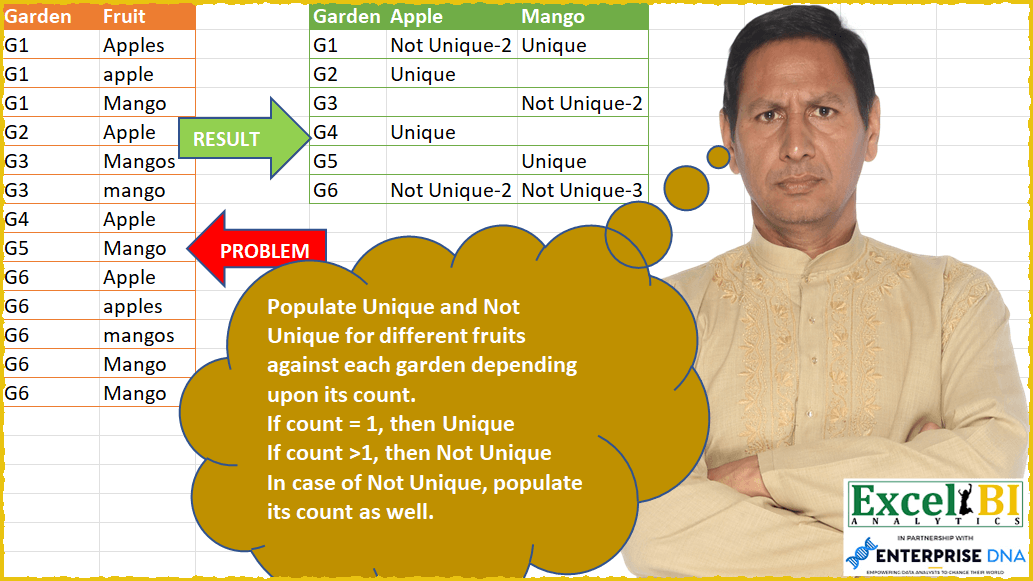
Mark Unique or Not Unique

Challenge No. 56: Populate Unique and Not Unique for different fruits against each garden depending upon its count.
Solved using: Power Query (List.Distinct, Table.Group, Table.TransformColumns).
June 13, 2025July 30, 2025
Return Repeat Customers
Posted in
  • Crispo Challenges
  • Date & Time Handling
  • ⭐️ Beginner

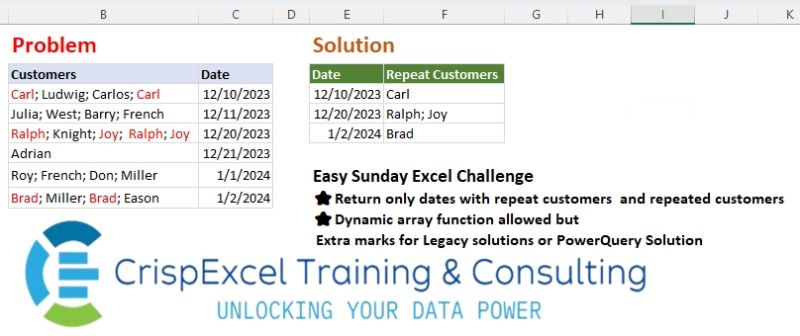
Return Repeat Customers

Challenge No. 37: Return only dates with repeat customers and repeated customers Dynamic array function allowed but Extra marks for Legacy solutions or PowerQuery Solution.
Solved using: Python in Excel.

May 29, 2025July 11, 2025
Multi Replacement!
Posted in
  • Excel Challenges
  • Omid Challenges
  • Power Query Challenges
  • Python Challenges
  • Text Processing
  • ⭐️⭐️ Easy

Multi Replacement!

Challenge No. 115:
Replace “q” and “000” in the Product ID and Customer ID columns with “-“.
Solved using:Excel (HSTACK, LAMBDA, LET), Google Sheets, Power Query (Text.Replace, Table.ReplaceValue, Table.TransformColumns), Python, Python in Excel, R, SQL, and VBA.

May 27, 2025July 11, 2025
Clean Data and Restructure Table
Posted in
  • ExcelBI Power Query Challenges
  • ⭐️⭐️⭐️⭐️ Advanced

Clean Data and Restructure Table

Challenge No. 8: (Excel formulas also welcome)
Clean the data and generate the result table as shown.
Solved using: Power Query (Table.AddColumn, Table.TransformColumns).
April 26, 2025July 30, 2025
Count Unique Subjects Per Row
Posted in
  • ExcelBI Power Query Challenges
  • ⭐️⭐️⭐️⭐️⭐️Expert

Count Unique Subjects Per Row

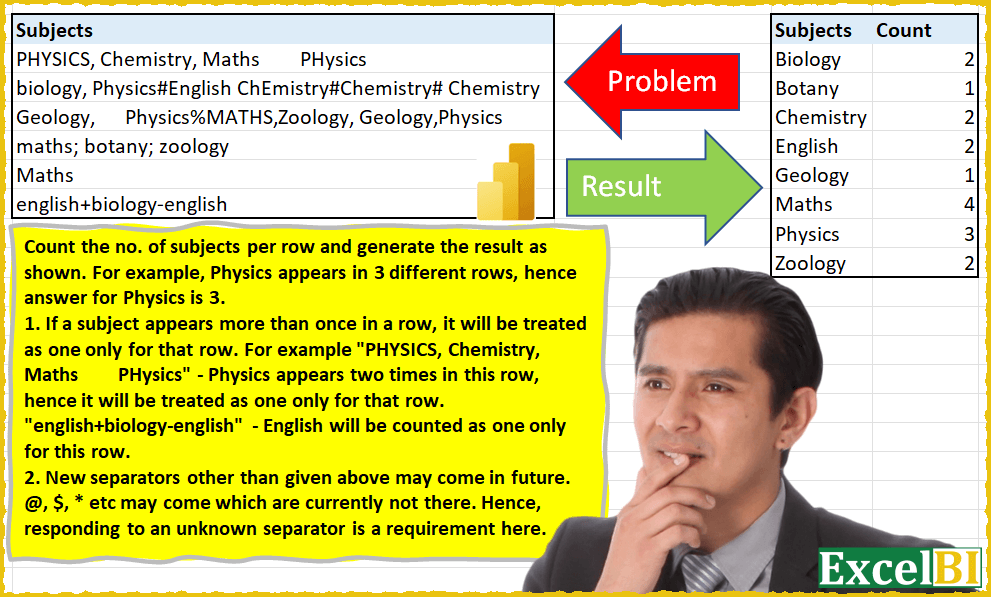
Challenge No. 6: (Excel formulas also welcome)
Count the no.
Solved using: Power Query (Table.TransformColumns).
April 25, 2025July 30, 2025
Text Cleaning!
Posted in
  • Excel Challenges
  • Omid Challenges
  • Power Query Challenges
  • Text Processing
  • ⭐️⭐️⭐️ Intermediate

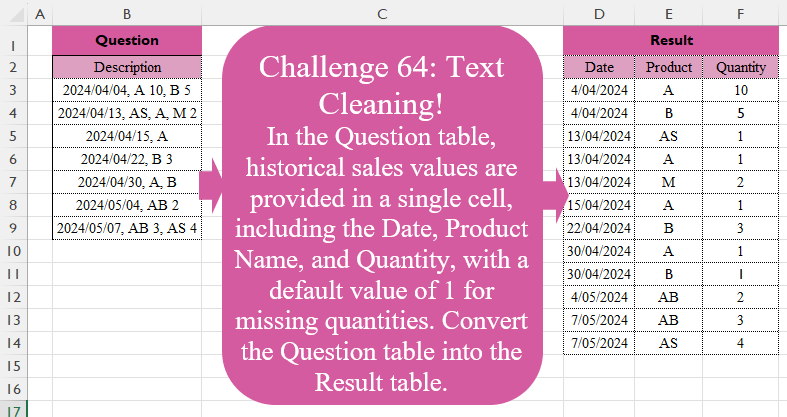
Text Cleaning!

Challenge No. 64: In the Question table, historical sales values are provided in a single cell, including the Date, Product Name, and Quantity, with a default value of 1 for missing quantities.
Solved using:Excel (DROP, HSTACK, IFERROR), Power Query (List.Transform, Text.Split, Table.Split), Python, R, and VBA.

April 6, 2025May 11, 2025

Posts pagination

Previous 1 2
  • 96 Common Challenges in Power Query
  • Advanced Mathematics Problem
  • Aggregation & Summarization
  • Books
  • Column Splitting
  • Column Transformation
  • Crispo Challenges
  • Custom Aggregation & Summarization
  • Custom Grouping
  • Data Cleaning
  • Data Transformation
  • data validation
  • Date & Time Handling
  • Excel Challenges
  • ExcelBI Excel Challenges
  • ExcelBI Power Query Challenges
  • Financial Problems
  • Indexing & Ranking
  • Merging & Joining
  • Missing Values
  • Omid Challenges
  • Pivot & Unpivot
  • Power Query Challenges
  • Python Challenges
  • Text Processing
  • ⭐️ Beginner
  • ⭐️⭐️ Easy
  • ⭐️⭐️⭐️ Intermediate
  • ⭐️⭐️⭐️⭐️ Advanced
  • ⭐️⭐️⭐️⭐️⭐️Expert
  • ⭐️⭐️⭐️⭐️⭐️⭐️Complex

BYROW CHAR CODE CONCAT DROP FILTER HSTACK IF IFERROR INDEX LAMBDA LEFT LEN LET List.Distinct List.Transform LOOKUP MAP MATCH MAX MID MONTH Python Python Automation Python for Data Analysis Python for Excel REDUCE ROW ROWS SCAN SEQUENCE SORT SUBSTITUTE Table.AddColumn Table.Group Table.SelectRows TAKE Text.Combine Text.Split TEXTJOIN TEXTSPLIT TOCOL UNIQUE VSTACK XLOOKUP

Recent Posts

  • Max Total on Consecutive Days
  • Extract Valid Year Ranges
  • Swap Grid Diagonals
  • Pivot with Total Line
  • Remove One Letter Palindrome

Recent Comments

No comments to show.
Copyright © 2026 OmidBI.
Powered by WordPress and HybridMag.
  • By Difficulty
    • ⭐️ Beginner
    • ⭐️⭐️ Easy
    • ⭐️⭐️⭐️ Intermediate
    • ⭐️⭐️⭐️⭐️ Advanced
    • ⭐️⭐️⭐️⭐️⭐️Expert
    • ⭐️⭐️⭐️⭐️⭐️⭐️Complex
  • By Topic
    • Advanced Mathematics Problem
    • Aggregation & Summarization
    • Column Splitting
    • Column Transformation
    • Custom Grouping
    • Data Cleaning
    • Data Transformation
    • Date & Time Handling
    • Financial Problems
    • Indexing & Ranking
    • Merging & Joining
    • Missing Values
    • Pivot & Unpivot
    • Text Processing
  • By Creator
    • Omid Challenges
    • ExcelBI Excel Challenges
    • ExcelBI Power Query Challenges
    • Crispo Challenges
  • By Software
    • DAX Challenges
    • Excel Challenges
    • Excel VBA Challenges
    • Google Sheets Challenges
    • Office Script Challenges
    • Power Query Challenges
    • Python Challenges
    • R Challenges
    • SQL Challenges
  • Books
    • 96 Common Challenges in Power Query