
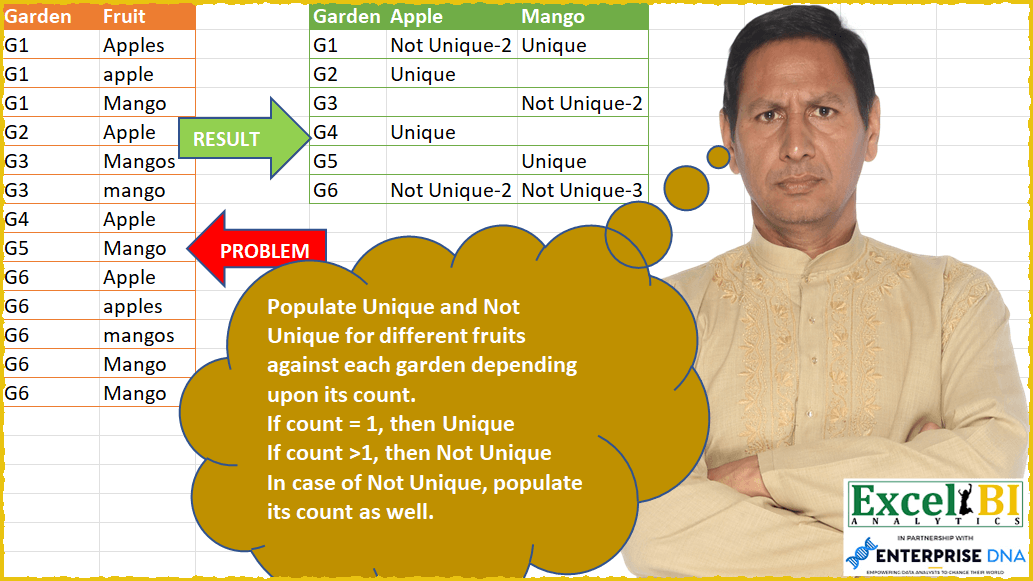
Populate Unique and Not Unique for different fruits against each garden depending upon its count. If count = 1, then Unique If count >1, then Not Unique In case of Not Unique, populate its count as well along with Not Unique. Hence, if Apple appears 5 times in a garden, then it will be populated like Not Unique-5
📌 Challenge Details and Links
ExcelBI Power Query Challenge Number: 56
Challenge Difficulty: ⭐️⭐️⭐️⭐️
📥Download Sample File
📥Link to the solutions on LinkedIn
Solving the challenge of Mark Unique or Not Unique with Power Query
Power Query solution 1 for Mark Unique or Not Unique, proposed by Bo Rydobon 🇹🇭:
let
  Source = Excel.CurrentWorkbook(){[Name = "Table1"]}[Content],
  RemS = Table.TransformColumns(
    Source,
    {{"Fruit", each Text.Start(Text.Proper(_), Text.Length(_) - Number.From(Text.End(_, 1) = "s"))}}
  ),
  Grouped = Table.Group(
    RemS,
    {"Garden", "Fruit"},
    {
      {
        "Count",
        each
          let
            n = Table.RowCount(_)
          in
            if n = 1 then "Unique" else "Not Unique-" & Text.From(n)
      }
    }
  ),
  Pivoted = Table.Pivot(Grouped, List.Distinct(Grouped[Fruit]), "Fruit", "Count")
in
  Pivoted
Power Query solution 2 for Mark Unique or Not Unique, proposed by Zoran Milokanović:
let
  Source = Excel.CurrentWorkbook(){[Name = "Fruits"]}[Content],
  AdjustFruit = Table.TransformColumns(
    Source,
    {
      {
        "Fruit",
        each Text.Proper(if Text.End(_, 1) = "s" then Text.Start(_, Text.Length(_) - 1) else _),
        type text
      }
    }
  ),
  GroupedByGardenFruit = Table.Group(
    AdjustFruit,
    {"Garden", "Fruit"},
    {{"Count", each Table.RowCount(_), Int64.Type}}
  ),
  FormatCount = Table.TransformColumnTypes(GroupedByGardenFruit, {{"Count", type text}}),
  AdjustCount = Table.TransformColumns(
    FormatCount,
    {{"Count", each if _ = "1" then "Unique" else "Not Unique-" & _, type text}}
  ),
  PivotedFruit = Table.Pivot(AdjustCount, List.Distinct(AdjustCount[Fruit]), "Fruit", "Count")
in
  PivotedFruit
Power Query solution 3 for Mark Unique or Not Unique, proposed by Aditya Kumar Darak 🇮🇳:
let
  Source = Excel.CurrentWorkbook(){[Name = "data"]}[Content],
  Transform = Table.TransformColumns(Source, {"Fruit", each Text.TrimEnd(Text.Proper(_), "s")}),
  Group = Table.Group(
    Transform,
    {"Garden", "Fruit"},
    {
      "Count",
      each [C = Table.RowCount(_), R = if C = 1 then "Unique" else "Non Unique-" & Text.From(C)][R]
    }
  ),
  Return = Table.Pivot(Group, List.Distinct(Group[Fruit]), "Fruit", "Count")
in
  Return
Power Query solution 4 for Mark Unique or Not Unique, proposed by Alejandro Simón 🇵🇦 🇪🇸:
let
  Source = Excel.CurrentWorkbook(){[Name = "Table1"]}[Content],
  Text = Table.TransformColumns(Source, {"Fruit", each Text.TrimEnd(Text.Proper(_), "s")}),
  Add1 = Table.AddColumn(Text, "Custom", each 1),
  Pivoted = Table.Pivot(Add1, List.Distinct(Add1[Fruit]), "Fruit", "Custom", List.Sum),
  Sol = Table.TransformColumns(
    Pivoted,
    List.Transform(
      List.Skip(Table.ColumnNames(Pivoted)),
      each {
        _,
        each try
          if _ > 1 then "Not Unique-" & Text.From(_) else if _ = 1 then "Unique" else ""
        otherwise
          ""
      }
    )
  )
in
  Sol
Power Query solution 5 for Mark Unique or Not Unique, proposed by Luan Rodrigues:
let
  Fonte = Tabela1,
  gp = Table.Group(
    Fonte,
    {"Garden"},
    {
      {
        "Contagem",
        each [
          a = _,
          b = Table.AddColumn(a, "Frt", each Text.Proper(Text.TrimEnd([Fruit], "s"))),
          c = Table.Group(b, {"Frt"}, {{"Count", each Table.RowCount(_)}}),
          d = Table.AddColumn(
            c,
            "Cond",
            each if [Count] = 1 then "Unique" else "Not Unique-" & Text.From([Count])
          )[[Frt], [Cond]],
          e = Table.PromoteHeaders(Table.Transpose(d))
        ][e]
      }
    }
  ),
  res = Table.ExpandTableColumn(gp, "Contagem", Table.ColumnNames(gp[Contagem]{0}))
in
  res
Power Query solution 6 for Mark Unique or Not Unique, proposed by Brian Julius:
let
  Source = Excel.CurrentWorkbook(){[Name = "Table1"]}[Content],
  Capitalize = Table.TransformColumns(Source, {{"Fruit", Text.Proper, type text}}),
  RemovePlurals = Table.SplitColumn(
    Capitalize,
    "Fruit",
    Splitter.SplitTextByEachDelimiter({"s"}, QuoteStyle.Csv, true),
    {"Fruit"}
  ),
  Group = Table.Group(
    RemovePlurals,
    {"Garden", "Fruit"},
    {{"Count", each Table.RowCount(_), Int64.Type}}
  ),
  AddValue = Table.RemoveColumns(
    Table.AddColumn(
      Group,
      "Value",
      each if [Count] = 1 then "Unique" else "Not Unique-" & Text.From([Count])
    ),
    "Count"
  ),
  Pivot = Table.Pivot(AddValue, List.Distinct(AddValue[Fruit]), "Fruit", "Value")
in
  Pivot
Power Query solution 7 for Mark Unique or Not Unique, proposed by Bhavya Gupta:
let
  Source = Excel.CurrentWorkbook(){[Name = "Table1"]}[Content],
  C = Table.TransformColumns(Source, {{"Fruit", each Text.TrimEnd(Text.Proper(_), "s")}}),
  G = Table.Group(
    C,
    {"Garden", "Fruit"},
    {
      {
        "All",
        each
          if List.IsDistinct([Fruit]) then
            "Unique"
          else
            "Not Unique-" & Text.From(Table.RowCount(_))
      }
    }
  ),
  Final = Table.FromRecords(
    Table.Group(
      G,
      {"Garden"},
      {{"All", each Record.FromList(List.Distinct([Garden]) & [All], {"Garden"} & [Fruit])}}
    )[All],
    {"Garden"} & List.Distinct(C[Fruit]),
    MissingField.UseNull
  )
in
  Final
Power Query solution 8 for Mark Unique or Not Unique, proposed by Eric Laforce:
let
  Source = Excel.CurrentWorkbook(){[Name = "tData56"]}[Content],
  Clean = Table.TransformColumns(
    Source,
    {{"Fruit", each Text.TrimEnd(Text.Proper(Text.Trim(_)), "s")}}
  ),
  Fruits = List.Distinct(List.Sort(Clean[Fruit])),
  Group = Table.Group(
    Clean,
    {"Garden"},
    {
      {
        "List",
        each
          let
            _Fruits = _[Fruit],
            _Result = List.Accumulate(
              List.Distinct(_Fruits),
              [],
              (s, c) =>
                let
                  _Count = List.Count(List.FindText(_Fruits, c))
                in
                  Record.AddField(
                    s,
                    c,
                    if (_Count = 1) then "Unique" else ("Not Unique-" & Number.ToText(_Count))
                  )
            )
          in
            _Result
      }
    }
  ),
  Expand = Table.ExpandRecordColumn(Group, "List", Fruits, Fruits)
in
  Expand
Power Query solution 9 for Mark Unique or Not Unique, proposed by Sandeep Marwal:
let
 Source = Excel.CurrentWorkbook(){[Name="Table1"]}[Content],
 Custom1 = hashtag#table({"Old","New"},{{"APPLES","APPLE"},{"MANGOS","MANGO"},{"APPLE","APPLE"},{"MANGO","MANGO"}}),
 #"Uppercased Text" = Table.TransformColumns(Source,{{"Fruit", Text.Upper, type text}}),
 #"Merged Queries" = Table.NestedJoin(#"Uppercased Text", {"Fruit"}, Custom1, {"Old"}, "Uppercased Text", JoinKind.LeftOuter),
 #"Expanded Uppercased Text" = Table.ExpandTableColumn(#"Merged Queries", "Uppercased Text", {"New"}, {"New"}),
 #"Removed Columns" = Table.RemoveColumns(#"Expanded Uppercased Text",{"Fruit"}),
 #"Grouped Rows" = Table.Group(#"Removed Columns", {"Garden", "New"}, {{"Count", each Table.RowCount(_), Int64.Type}}),
 #"Pivoted Column" = Table.Pivot(#"Grouped Rows", List.Distinct(#"Grouped Rows"[New]), "New", "Count", List.Sum),
 Custom2 = Table.TransformColumns(#"Pivoted Column",{{"APPLE",each if _ = 1 then "Unique" else "Not Unique-" & Text.From(_)},{"MANGO",each if _ = 1 then "Unique" else "Not Unique-" & Text.From(_)}})
in
 Custom2
Power Query solution 10 for Mark Unique or Not Unique, proposed by Sue Bayes:
let
  Source = Excel.CurrentWorkbook(){[Name = "Table1"]}[Content],
  Proper = Table.TransformColumns(Source, {{"Fruit", Text.Proper, type text}}),
  Trim = Table.TransformColumns(Proper, {{"Fruit", each Text.TrimEnd(_, "s"), type text}}),
  Grp = Table.Group(Trim, {"Garden", "Fruit"}, {{"Count", each Table.RowCount(_), Int64.Type}}),
  Text = Table.RemoveColumns(
    Table.AddColumn(
      Grp,
      "Custom",
      each if [Count] = 1 then "Unique" else "Not Unique - " & Text.From([Count])
    ),
    "Count"
  ),
  Pivot = Table.Pivot(Text, List.Distinct(Text[Fruit]), "Fruit", "Custom")
in
  Pivot
Solving the challenge of Mark Unique or Not Unique with Excel
Excel solution 1 for Mark Unique or Not Unique, proposed by Bo Rydobon 🇹🇭:
=LET(a,A2:A14,b,B2:B14,f,TOROW(UNIQUE(LEFT(b,LEN(b)-(RIGHT(b)="s")))),g,UNIQUE(a),
HSTACK(VSTACK(A1,g),VSTACK(f,TEXT(COUNTIFS(a,g,b,f&"*"),"[>1]Not Unique-0;[=1]Unique;"))))
Excel solution 2 for Mark Unique or Not Unique, proposed by محمد حلمي:
=LET(b,B2:B14,i,UNIQUE(A1:A14),
w,LEFT(b,LEN(b)-(RIGHT(b)="s")),
j,TOROW(UNIQUE(w)),
x,"Unique",HSTACK(i,VSTACK(j,
MAP(DROP(i,1)&j,LAMBDA(a,LET(v,SUM(N(A2:A14&w=a)),
SWITCH(v,0,"",1,x,"Not "&x&-v)))))))
Excel solution 3 for Mark Unique or Not Unique, proposed by محمد حلمي:
=LET(
c,A2:A14,
b,PROPER(B2:B14),
v,UNIQUE(b),
r,TOROW(IF(RIGHT(v)="s",1/0,v),2),
REDUCE(HSTACK(A1,r),UNIQUE(c),LAMBDA(a,d,
VSTACK(a,LET(
i,BYCOL(1-ISERR(FIND(r,FILTER(b,c=d))),LAMBDA(e,SUM(e))),
HSTACK(d,IFS(i=1,"Unique",i,"Not Unique-"&i,1,"")))))))
Excel solution 4 for Mark Unique or Not Unique, proposed by 🇰🇷 Taeyong Shin:
=LET(d,PROPER(REGEXEXTRACT(B2:B14,".*?(?=s?$)")),PIVOTBY(A2:A14,d,d,LAMBDA(x,TEXT(ROWS(x),"[>1]!NotU!niqu!e-0;U!niqu!e")),,0,,0))Excel solution 5 for Mark Unique or Not Unique, proposed by Aditya Kumar Darak 🇮🇳:
=LET(
 _g, A2:A14,
 _ft, B2:B14,
 _tr, LEFT(_ft, LEN(_ft) - (RIGHT(_ft) = "s")),
 _uft, TOROW(PROPER(UNIQUE(_tr))),
 _ug, UNIQUE(_g),
 _c, COUNTIFS(_g, _ug, _ft, _uft & "*"),
 _fc, IFS(_c = 0, "", _c = 1, "Unique", 1, "Not Unique-" & _c),
 _r, VSTACK(HSTACK("Garden", _uft), HSTACK(_ug, _fc)),
 _r
)
Excel solution 6 for Mark Unique or Not Unique, proposed by Hussein SATOUR:
=LET(
g, A2:A14, f, PROPER(TEXTBEFORE(B2:B14, "s", -1, , , B2:B14)),
a, MAP(TOCOL(UNIQUE(g) & TRANSPOSE(UNIQUE(f))), LAMBDA(x, SUM((g & f = x) * 1))),
HSTACK(VSTACK("Garden", UNIQUE(g)),
VSTACK(TRANSPOSE(UNIQUE(f)), WRAPROWS(SWITCH(a, 0, "", 1, "Unique", "Not Unique-" & a), 2))))
Excel solution 7 for Mark Unique or Not Unique, proposed by Duy Tùng:
=LET(a,A2:A14,b,B2:B14,c,LEFT(b,5),d,MAP(a,c,LAMBDA(x,y,SUM((a=x)*(c=y)))),u,PIVOTBY(a,c,IF(d=1,"Unique","Not Unique-"&d),SINGLE,,0,,0),IF(TAKE(u,1)&TAKE(u,,1)="",A1,u))Excel solution 8 for Mark Unique or Not Unique, proposed by Sunny Baggu:
=LET(_G,A2:A14,_F,B2:B14,_UG,UNIQUE(_G),
_header,HSTACK(A1,TOROW(TEXTBEFORE(UNIQUE(_F),"s",-1),3)),
_C1,CHOOSECOLS(_header,2),_C2,CHOOSECOLS(_header,3),
_e1,LAMBDA(x,MAP(_UG,LAMBDA(a,SUM((_G=a)*(ISNUMBER(--SEARCH(x,_F))))))),
_tbl,XLOOKUP(HSTACK(_e1(_C1),_e1(_C2)),{0;1;2;3},{"";"Unique";"Not Unique-2";"Not Unique-3"}),
VSTACK(_header,HSTACK(_UG,_tbl)))
Excel solution 9 for Mark Unique or Not Unique, proposed by Stefan Olsson:
=ArrayFormula(
LET(
garden, A1:A16,
fruit, PROPER(B1:B16),
frt, LEFT(fruit, LEN(fruit)-(RIGHT(fruit)="s")),
ug, UNIQUE(garden),
uf, UNIQUE(frt),
MAKEARRAY(COUNTA(ug), COUNTA(uf),
LAMBDA(rr, cc,
 LET(
 g, INDEX(ug, rr), f, INDEX(uf, cc), c, COUNTIFS(frt, f, garden, g),
 IFS(cc=1, g, rr=1, f, c=0, "", c=1, "Unique", TRUE, "Not Unique-"&c)
)))))
&&&