
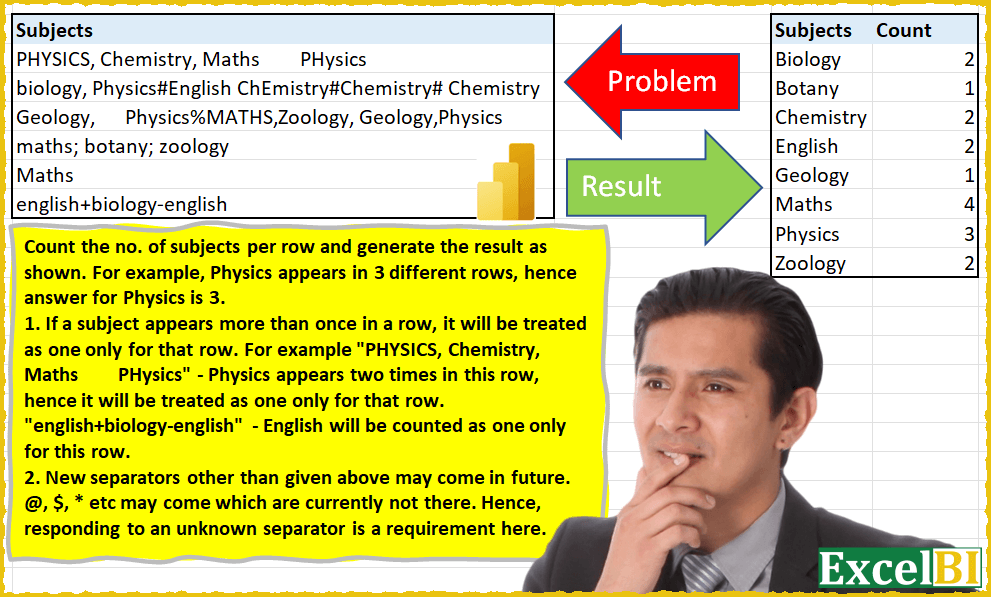
(Excel formulas also welcome) Count the no. of subjects per row and generate the result as shown. For example, Physics appears in 3 different rows, hence answer for Physics is 3. 1. If a subject appears more than once in a row, it will be treated as one only for that row. For example “PHYSICS, Chemistry, Maths PHysics” – Physics appears two times in this row, hence it will be treated as one only for that row. “english+biology-english” – English will be counted as one only for this row. 2. New separators other than given above may come in future. @, $, * etc may come which are currently not there. Hence, responding to an unknown separator is a requirement here.
📌 Challenge Details and Links
ExcelBI Power Query Challenge Number: 6
Challenge Difficulty: ⭐️⭐️⭐️⭐️⭐️
📥Download Sample File
📥Link to the solutions on LinkedIn
Solving the challenge of Count Unique Subjects Per Row with Power Query
Power Query solution 1 for Count Unique Subjects Per Row, proposed by Brian Julius:
let
  Source = #"SubjectData Raw",
  AddIndex = Table.AddIndexColumn(Source, "Index", 1, 1, Int64.Type),
  #"Lowercased Text" = Table.TransformColumns(AddIndex, {{"Subjects", Text.Proper, type text}}),
  AllDelimiters = List.Distinct(
    Text.ToList(
      Text.Remove(Lines.ToText(Table.ToColumns(#"Lowercased Text"){0}), {"a" .. "z", "A" .. "Z"})
    )
  ),
  SplitSubs = Table.SplitColumn(
    #"Lowercased Text",
    "Subjects",
    Splitter.SplitTextByAnyDelimiter(AllDelimiters)
  ),
  #"Unpivoted Other Columns" = Table.UnpivotOtherColumns(SplitSubs, {"Index"}, "Attribute", "Value"),
  #"Filtered Rows" = Table.SelectRows(#"Unpivoted Other Columns", each ([Value] <> "")),
  #"Grouped Rows" = Table.Group(
    #"Filtered Rows",
    {"Index"},
    {{"AllData", each _, type table [Index = number, Attribute = text, Value = text]}}
  ),
  NestDistinct = Table.AddColumn(#"Grouped Rows", "Subjects", each List.Distinct([AllData][Value])),
  #"Expanded DistinctList" = Table.ExpandListColumn(NestDistinct, "Subjects"),
  #"Grouped Rows1" = Table.Group(
    #"Expanded DistinctList",
    {"Subjects"},
    {{"Count", each Table.RowCount(_), Int64.Type}}
  ),
  #"Sorted Rows" = Table.Sort(#"Grouped Rows1", {{"Subjects", Order.Ascending}})
in
  #"Sorted Rows"
Power Query solution 2 for Count Unique Subjects Per Row, proposed by Eric Laforce:
let
  _NormalChar = {"A" .. "Z", "0" .. "9"},
  Source = Excel.CurrentWorkbook(){[Name = "Data06"]}[Content],
  CleanSubjectsList = Table.TransformColumns(
    Source,
    {
      {
        "Subjects",
        each
          let
            _CharList = Text.ToList(Text.Upper(_)),
            _ReplaceSep = List.Transform(
              _CharList,
              each if (List.Contains(_NormalChar, _)) then _ else ";"
            ),
            _DistinctSubj = List.RemoveItems(
              List.Distinct(Text.Split(Text.Proper(Text.Combine(_ReplaceSep)), ";")),
              {""}
            )
          in
            _DistinctSubj
      }
    }
  ),
  Expand = Table.ExpandListColumn(CleanSubjectsList, "Subjects"),
  Group = Table.Group(Expand, {"Subjects"}, {{"Count", each Table.RowCount(_), Int64.Type}}),
  Sort = Table.Sort(Group, {{"Subjects", Order.Ascending}})
in
  Sort
Power Query solution 3 for Count Unique Subjects Per Row, proposed by 🇮🇷 Navid Esmaeilzadeh اسماعیل زاده:
let itemType = (type nullable text) meta [Serialized.Text = true] in type {itemType}}}), "Subjects - Copy"),
 #"Removed Duplicates1" = Table.Distinct(#"Split Column by Delimiter"),
 #"Filtered Rows1" = Table.SelectRows(#"Removed Duplicates1", each ([#"Subjects - Copy"] <> "")),
 #"Grouped Rows" = Table.Group(#"Filtered Rows1", {"Subjects - Copy"}, {{"Count", each Table.RowCount(_), Int64.Type}}),
 #"Renamed Columns" = Table.RenameColumns(#"Grouped Rows",{{"Subjects - Copy", "Subjects"}}),
 #"Capitalized Each Word" = Table.TransformColumns(#"Renamed Columns",{{"Subjects", Text.Proper, type text}}),
 #"Sorted Rows" = Table.Sort(#"Capitalized Each Word",{{"Subjects", Order.Ascending}})
in
 #"Sorted Rows"
Power Query solution 4 for Count Unique Subjects Per Row, proposed by 🇮🇷 Navid Esmaeilzadeh اسماعیل زاده:
let
 Source = Excel.CurrentWorkbook(){[Name = "Table1"]}[Content],
 #"Uppercased Text" = Table.TransformColumns(Source,{{"Subjects", Text.Upper, type text}}),
 #"Added Custom" = Table.AddColumn(#"Uppercased Text", "Custom", each Text.Remove([Subjects],{"A".."Z","0".. "9"})),
 #"Split Column by Position" = Table.ExpandListColumn(Table.TransformColumns(#"Added Custom", {{"Custom", Splitter.SplitTextByRepeatedLengths(1), let itemType = (type nullable text) meta [Serialized.Text = true] in type {itemType}}}), "Custom"),
 #"Changed Type" = Table.TransformColumnTypes(#"Split Column by Position",{{"Custom", type text}}),
 #"Removed Duplicates" = Table.Distinct(#"Changed Type", {"Custom"}),
 #"Filtered Rows" = Table.SelectRows(#"Removed Duplicates", each ([Custom] <> null)),
 ListDeli = #"Filtered Rows"[Custom],
 Back = #"Uppercased Text",
 #"Added Index" = Table.AddIndexColumn(Back, "Index", 1, 1, Int64.Type),
 #"Duplicated Column" = Table.DuplicateColumn(#"Added Index", "Subjects", "Subjects - Copy"),
Power Query solution 5 for Count Unique Subjects Per Row, proposed by Md Ismail Hosen:
let
  Source = Excel.CurrentWorkbook(){[Name = "Table1"]}[Content],
  #"Added Custom" = Table.AddColumn(
    Source,
    "Custom",
    each List.Distinct(
      List.Transform(
        List.Select(
          Text.Split(
            Text.Combine(
              List.Transform(
                Text.ToList([Subjects]),
                each if List.Contains({"A" .. "Z"}, Text.Upper(_)) then _ else " "
              )
            ),
            " "
          ),
          each Text.Trim(_) <> ""
        ),
        each Text.Proper(_)
      )
    )
  ),
  #"Removed Columns" = Table.RemoveColumns(#"Added Custom", {"Subjects"}),
  #"Expanded Custom" = Table.ExpandListColumn(#"Removed Columns", "Custom"),
  #"Grouped Rows" = Table.Group(
    #"Expanded Custom",
    {"Custom"},
    {{"Count", each Table.RowCount(_), Int64.Type}}
  ),
  #"Renamed Columns" = Table.RenameColumns(#"Grouped Rows", {{"Custom", "Subject"}})
in
  #"Renamed Columns"
Power Query solution 6 for Count Unique Subjects Per Row, proposed by Cristian Angyal:
let
  Indexed_Clean_Table = Table.SelectColumns(
    Table.AddIndexColumn(
      Table.AddColumn(
        Excel.CurrentWorkbook(){[Name = "Data"]}[Content],
        "Subject",
        each Text.Proper(
          Text.Combine(
            List.Transform(
              Text.ToList([Subjects]),
              each
                if not List.Contains({"a" .. "z", "A" .. "Z", " ", "0" .. "9"}, _) then
                  Text.Replace(_, _, " ")
                else
                  _
            )
          )
        )
      ),
      "Index",
      1,
      1,
      Int64.Type
    ),
    {"Subject", "Index"}
  ),
  SplitToRows_And_KeepUniqueCombinations = Table.Distinct(
    Table.SelectRows(
      Table.ExpandListColumn(
        Table.TransformColumns(
          Indexed_Clean_Table,
          {
            {
              "Subject",
              Splitter.SplitTextByDelimiter(" ", QuoteStyle.Csv),
              let
                itemType = (type nullable text) meta [Serialized.Text = true]
              in
                type {itemType}
            }
          }
        ),
        "Subject"
      ),
      each ([Subject] <> "")
    ),
    {"Subject", "Index"}
  ),
  GroupBy_And_Sort = Table.SelectColumns(
    Table.Sort(
      Table.Group(
        SplitToRows_And_KeepUniqueCombinations,
        {"Subject"},
        {
          {"Count", each Table.RowCount(_), Int64.Type},
          {"all", each _, type table [Subjects = text, Subject = text, Index = number]}
        }
      ),
      {{"Subject", Order.Ascending}}
    ),
    {"Subject", "Count"}
  )
in
  GroupBy_And_Sort
Power Query solution 7 for Count Unique Subjects Per Row, proposed by Alexandru Badiu:
let
  Source = DataSource,
  AddedCustom = Table.AddColumn(
    Source,
    "Solution",
    each Text.Combine(
      List.Transform(
        Text.ToList([Subjects]),
        each
          if not List.Contains({"a" .. "z", "A" .. "Z", " ", "0" .. "9"}, _) then
            Text.Replace(_, _, " ")
          else
            _
      )
    )
  ),
  SplitbyDelimiter = Table.ExpandListColumn(
    Table.TransformColumns(
      AddedCustom,
      {
        {
          "Solution",
          Splitter.SplitTextByDelimiter(" ", QuoteStyle.Csv),
          let
            itemType = (type nullable text) meta [Serialized.Text = true]
          in
            type {itemType}
        }
      }
    ),
    "Solution"
  ),
  CapitalizedWord = Table.TransformColumns(SplitbyDelimiter, {{"Solution", Text.Proper, type text}}),
  FilteredRows = Table.SelectRows(CapitalizedWord, each ([Solution] <> "")),
  GroupedRows = Table.Group(
    FilteredRows,
    {"Solution"},
    {{"Count", each Table.RowCount(_), Int64.Type}}
  ),
  SortedRows = Table.Sort(GroupedRows, {{"Solution", Order.Ascending}})
in
  SortedRows
Power Query solution 8 for Count Unique Subjects Per Row, proposed by Dawid Sebastian Gałęzyka:
let
  fxStrip = (t as text) as text =>
    let
      lNonUpp = List.RemoveMatchingItems(
        {Character.FromNumber(0) .. Character.FromNumber(255)},
        {"A" .. "Z"}
      ),
      vLst = Text.ToList(Text.Upper(t)),
      vRep = List.Transform(vLst, each if List.Contains(lNonUpp, _) then " " else _)
    in
      Text.Proper(Text.Combine(vRep)),
  Source = Excel.CurrentWorkbook(){[Name = "rngSubjects"]}[Content],
  RenameCol = Table.RenameColumns(Source, {{"Column1", "Subjects"}}),
  Types = Table.TransformColumnTypes(RenameCol, {{"Subjects", type text}}),
  RIndex = Table.AddIndexColumn(Types, "Index", 1, 1, Int64.Type),
  Strip = Table.TransformColumns(RIndex, {{"Subjects", fxStrip, type text}}),
  Split = Table.ExpandListColumn(
    Table.TransformColumns(
      Strip,
      {
        {
          "Subjects",
          Splitter.SplitTextByDelimiter(" ", QuoteStyle.Csv),
          let
            itemType = (type nullable text) meta [Serialized.Text = true]
          in
            type {itemType}
        }
      }
    ),
    "Subjects"
  ),
  Trim = Table.TransformColumns(Split, {{"Subjects", Text.Trim, type text}}),
  Filter = Table.SelectRows(Trim, each ([Subjects] <> "")),
  Distinct = Table.Distinct(Filter),
  Group = Table.Group(Distinct, {"Subjects"}, {{"Count", each Table.RowCount(_), Int64.Type}}),
  Sort = Table.Sort(Group, {{"Subjects", Order.Ascending}})
in
  Sort
Power Query solution 9 for Count Unique Subjects Per Row, proposed by Oleksandr Mynka:
let
  from = Excel.CurrentWorkbook(){[Name = "input"]}[Content][Column1],
  excl = List.Transform({32 .. 47} & {58 .. 64}, Character.FromNumber),
  f = (lst) => List.Distinct(List.Transform(lst, (txt) => Text.Proper(Text.Clean(txt)))),
  g = (lst) => List.Select(lst, (txt) => Text.Length(txt) > 1),
  tr = [
    a = List.Transform(from, Splitter.SplitTextByAnyDelimiter(excl)),
    b = List.Transform(a, (i) => g(f(i))),
    c = List.Combine(b)
  ][c],
  tbl = Table.FromList(tr, Splitter.SplitByNothing(), {"Subjects"}),
  gr = Table.Group(tbl, {"Subjects"}, {"Count", (i) => Table.RowCount(i)}),
  to = Table.Sort(gr, {{"Subjects", Order.Ascending}})
in
  to
Solving the challenge of Count Unique Subjects Per Row with Excel
Excel solution 1 for Count Unique Subjects Per Row, proposed by محمد حلمي:
=LET(
a,TEXTSPLIT(CONCAT(
MAP(B3:B8,LAMBDA(b,
TEXTJOIN(" ",, UNIQUE( PROPER(
TEXTSPLIT(b,{","," ","#",";","+","-","%"})),1))))&" "),," ",1),
b,UNIQUE(a),
SORT(HSTACK(b,MAP(b,LAMBDA(x,SUM(--(a=x)))))))
Excel solution 2 for Count Unique Subjects Per Row, proposed by Duy Tùng:
=LET(b,B3:B8,c,SORT(UNIQUE(PROPER(TEXTSPLIT(ARRAYTOTEXT(B3:B8),,CHAR(SEQUENCE(30,,32)),1)))),HSTACK(c,BYROW(SEARCH(c,TOROW(b)),COUNT)))Excel solution 3 for Count Unique Subjects Per Row, proposed by Jardiel Euflázio:
=LET(

a,TEXTJOIN(" ",,B3:B8),
b,UNIQUE(UPPER(MID(a,SEQUENCE(LEN(a)),1))),
c,CODE(b),
d,IF(NOT((c>=65)*(c<=90)),b," "),
e,UNIQUE(d),
f,TEXTSPLIT(a,,e),
g,FILTER(f,f<>""),
h,SORT(PROPER(UNIQUE(g))),
i,COUNTIF(B3:B8,"*"&h&"*"),
HSTACK(
h,i

)
)
Excel solution 4 for Count Unique Subjects Per Row, proposed by Jardiel Euflázio:
=LET(

a,TEXTJOIN(" ",,B3:B8),
b,UNIQUE(UPPER(MID(a,SEQUENCE(LEN(a)),1))),
c,CODE(b),
d,IF(NOT((c>=65)*(c<=90)),b," "),
e,UNIQUE(d),
f,TEXTSPLIT(a,,e),
g,FILTER(f,f<>""),
h,SORT(PROPER(UNIQUE(g))),
i,COUNTIF(B3:B8,"*"&h&"*"),
CHOOSE(
{12},h,i

)
)
Excel solution 5 for Count Unique Subjects Per Row, proposed by Allen Goldman:
=SUMPRODUCT((LEN($B$3:$B$8)-LEN(SUBSTITUTE(LOWER($B$3:$B$8),LOWER(D3),"",1)))/LEN(D3))