
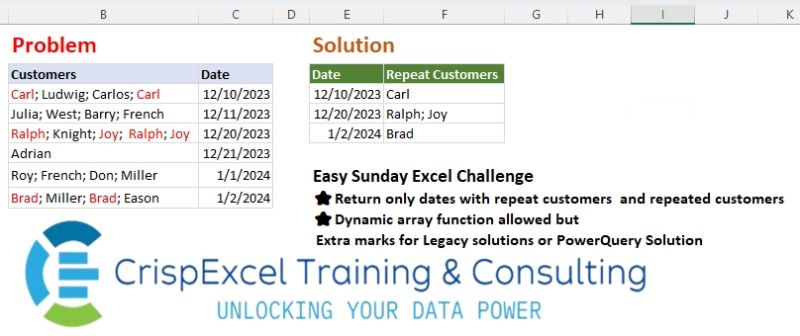
Return only dates with repeat customers and repeated customers Dynamic array function allowed but Extra marks for Legacy solutions or PowerQuery Solution
📌 Challenge Details and Links
Challenge Number: 37
Challenge Difficulty: ⭐
📥Link to the solutions on LinkedIn
Solving the challenge of Return Repeat Customers with Power Query
Power Query solution 1 for Return Repeat Customers, proposed by Zoran Milokanović:
let
  Source = Table.ToRows(Excel.CurrentWorkbook(){[Name = "Input"]}[Content]),
  S = Table.FromRows(
    List.TransformMany(
      Source,
      each
        let
          s = List.Transform(Text.Split(_{0}, "; "), Text.Trim),
          d = List.Distinct(List.Difference(s, List.Distinct(s)))
        in
          {{Text.Combine(d, "; ")}, d}{Byte.From(d = {})},
      (i, _) => {i{1}, _}
    ),
    {"Date", "Repeat Customers"}
  )
in
  S
Power Query solution 2 for Return Repeat Customers, proposed by Kris Jaganah:
let
  Source = Excel.CurrentWorkbook(){[Name = "Table1"]}[Content],
  Ans = Table.AddColumn(
    Source,
    "Repeat Customers",
    each
      let
        a = Text.Split([Customers], "; "),
        b = List.Transform(a, Text.Trim),
        c = List.Distinct(b),
        d = Text.Combine(List.Difference(b, c), "; ")
      in
        d
  ),
  Keep = Table.SelectRows(Ans, each ([Repeat Customers] <> "")),
  Remove = Table.RemoveColumns(Keep, {"Customers"})
in
  Remove
Power Query solution 3 for Return Repeat Customers, proposed by Aditya Kumar Darak 🇮🇳:
let
  Source = Excel.CurrentWorkbook(){[Name = "data"]}[Content],
  ToRow = Table.TransformColumns(
    Source,
    {"Customers", each List.RemoveMatchingItems(Text.SplitAny(_, "; "), {""})}
  ),
  Expand = Table.ExpandListColumn(ToRow, "Customers"),
  Group = Table.Group(Expand, {"Customers", "Date"}, {"C", Table.RowCount}),
  Filter = Table.SelectRows(Group, each [C] > 1),
  Return = Table.Group(Filter, "Date", {"Customers", each Text.Combine([Customers], "; ")})
in
  Return
Power Query solution 4 for Return Repeat Customers, proposed by Alejandro Simón 🇵🇦 🇪🇸:
let
  Source = Excel.CurrentWorkbook(){[Name = "Table1"]}[Content],
  Rep = Table.AddColumn(
    Source,
    "Repeat Customers",
    each
      let
        a = Text.SplitAny([Customers], "; "),
        b = List.Select(List.Distinct(a), each List.Count(List.Select(a, (x) => x = _)) > 1),
        c = Text.Combine(List.Select(b, each _ <> ""), "; ")
      in
        c
  )[[Date], [Repeat Customers]],
  Sol = Table.SelectRows(Rep, each [Repeat Customers] <> "")
in
  Sol
Power Query solution 5 for Return Repeat Customers, proposed by Brian Julius:
letely UI-based, except for one formula bar edit to the UI-created M code

let
 Source = Table.FromRows(Json.Document(Binary.Decompress(Binary.FromText("Tc6xDoIwEAbgV7l0JilUt5tEZUBdXBwIw0UINGlac5UY395SqjI1//Xrf20asSc2COepe+kBYU7OL6fIRKFkkUuVq41os0bUk9GEcOv9E6Ek5jdCxb29j8kWf3sl8xgRTlYPY9C1CxbSMITlgVqV7zrWZNN8XeR+WxAOziJctDE9z1JGt42uZOq+d+F3MR3Ju1gpVYLtBw==", BinaryEncoding.Base64), Compression.Deflate)), let _t = ((type nullable text) meta [Serialized.Text = true]) in type table [Customers = _t, Date = _t]),
 SplitByDelim = Table.ExpandListColumn(Table.TransformColumns(Source, {{"Customers", Splitter.SplitTextByDelimiter(";", QuoteStyle.Csv)}}), "Customers"),
 Trim = Table.TransformColumns(SplitByDelim,{{"Customers", Text.Trim}}),
 GroupBy = Table.Group(Trim, {"Customers", "Date"}, {{"Count", each Table.RowCount(_), Int64.Type}}),
 Filter = Table.SelectRows(GroupBy, each ([Count] = 2)),
 RemCol = Table.RemoveColumns(Filter,{"Count"}),
 ReGroup = Table.Group(RemCol, {"Date"}, {{"Repeat Customers", each [Customers]}}),
 Extract = Table.TransformColumns(ReGroup, {"Repeat Customers", each Text.Combine(List.Transform(_, Text.From), "; ")})
in
 Extract
Power Query solution 6 for Return Repeat Customers, proposed by Abdallah Ally:
let
  Source = Excel.CurrentWorkbook(){[Name = "Table1"]}[Content],
  TransformDate = Table.TransformColumns(Source, {"Date", DateTime.Date}),
  AddColumn = Table.AddColumn(
    TransformDate,
    "Repeat Customers",
    each [
      a = Text.Split([Customers], "; "),
      b = List.Transform(a, Text.Trim),
      c = List.Select(b, each List.Count(List.Select(b, (x) => _ = x)) > 1),
      d = Text.Combine(List.Distinct(c), "; ")
    ][d]
  ),
  Result = Table.SelectRows(AddColumn, each [#"Repeat Customers"] > "")[
    [Date],
    [#"Repeat Customers"]
  ]
in
  Result
Power Query solution 7 for Return Repeat Customers, proposed by 🇮🇷 Navid Esmaeilzadeh اسماعیل زاده:
let
  Source = Excel.CurrentWorkbook(){[Name = "Table1"]}[Content],
  #"Added Custom" = Table.AddColumn(Source, "L", each Text.Split([Customers], "; ")),
  #"Expanded L" = Table.ExpandListColumn(#"Added Custom", "L"),
  #"Trimmed Text" = Table.TransformColumns(#"Expanded L", {{"L", Text.Trim, type text}}),
  #"Grouped Rows" = Table.Group(
    #"Trimmed Text",
    {"Date", "L"},
    {{"Count", each Table.RowCount(_), Int64.Type}}
  ),
  #"Filtered Rows" = Table.SelectRows(#"Grouped Rows", each ([Count] > 1)),
  #"Grouped Rows1" = Table.Group(
    #"Filtered Rows",
    {"Date"},
    {{"Repeat Customers", each Text.Combine([L], "; "), type text}}
  ),
  #"Changed Type" = Table.TransformColumnTypes(#"Grouped Rows1", {{"Date", type date}})
in
  #"Changed Type"
Power Query solution 8 for Return Repeat Customers, proposed by Ankur Sharma:
let
 Source = Excel.CurrentWorkbook(){[Name="Table1"]}[Content],
 #"Changed Type" = Table.TransformColumnTypes(Source,{{"Customers", type text}, {"Date", type date}}),
 #"Split Column by Delimiter" = Table.ExpandListColumn(Table.TransformColumns(#"Changed Type", {{"Customers", Splitter.SplitTextByDelimiter("; ", QuoteStyle.Csv), let itemType = (type nullable text) meta [Serialized.Text = true] in type {itemType}}}), "Customers"),
 #"Trimmed Text" = Table.TransformColumns(#"Split Column by Delimiter",{{"Customers", Text.Trim, type text}}),
 #"Grouped Rows" = Table.Group(#"Trimmed Text", {"Customers", "Date"}, {{"Count", each Table.RowCount(_), Int64.Type}}),
 #"Filtered Rows" = Table.SelectRows(#"Grouped Rows", each [Count] > 1),
 #"Removed Columns" = Table.RemoveColumns(#"Filtered Rows",{"Count"}),
 #"Grouped Rows1" = Table.Group(#"Removed Columns", {"Date"}, {{"ALL", each _, type table [Customers=text, Date=nullable date]}}),
 #"Added Custom" = Table.AddColumn(#"Grouped Rows1", "Name", each Text.Combine([ALL][Customers], "; ")),
 #"Removed Columns1" = Table.RemoveColumns(#"Added Custom",{"ALL"}),
in
 #"Removed Columns1"

Best Wishes!
Power Query solution 9 for Return Repeat Customers, proposed by Yaroslav Drohomyretskyi:
let
  Source = Table.SelectRows(
    Table.RemoveColumns(
      Table.AddColumn(
        Table.ReplaceValue(
          Excel.CurrentWorkbook(){[Name = "Table1"]}[Content],
          " ",
          "",
          Replacer.ReplaceText,
          {"Customers"}
        ),
        "Repeat Customers",
        each Text.Combine(
          List.Difference(Text.Split([Customers], ";"), List.Distinct(Text.Split([Customers], ";"))),
          "; "
        )
      ),
      {"Customers"}
    ),
    each [Repeat Customers] <> ""
  )
in
  Source
Power Query solution 10 for Return Repeat Customers, proposed by Ahmed Ariem:
let
  lst = (y) => Text.Split(Text.Remove(y, " "), ";"),
  Source = Excel.CurrentWorkbook(){[Name = "tbl"]}[Content],
  SelectRows = Table.SelectRows(
    Source,
    (x) => [a = lst(x[Customers]), b = List.Count(List.Distinct(a)) < List.Count(a)][b]
  ),
  TransformColumns = Table.TransformColumns(SelectRows, {"Customers", (x) => List.Mode(lst(x))})
in
  TransformColumns
Power Query solution 11 for Return Repeat Customers, proposed by Mihai Radu O:
let
  Source = Excel.CurrentWorkbook(){[Name = "Table1"]}[Content],
  s = Table.SelectRows(
    Table.AddColumn(
      Source,
      "rc",
      each [
        a = List.Transform(Text.Split([Customers], "; "), Text.Trim),
        b = Text.Combine(List.Difference(a, List.Distinct(a)), "; ")
      ][b]
    )[[Date], [rc]],
    each [rc] <> ""
  )
in
  s
Power Query solution 12 for Return Repeat Customers, proposed by Marc Wring:
leted this off the back of listening to Brian Julius presentation..

let
 Source = Excel.CurrentWorkbook(){[Name="tbl_data"]}[Content],
 #"Split into rows" = Table.ExpandListColumn(Table.TransformColumns(Source, {{"Customers", Splitter.SplitTextByDelimiter(";", QuoteStyle.Csv), let itemType = (type nullable text) meta [Serialized.Text = true] in type {itemType}}}), "Customers"),
 #"Trim Customers" = Table.TransformColumns(#"Split into rows",{{"Customers", Text.Trim, type text}}),
 #"Changed Type" = Table.TransformColumnTypes(#"Trim Customers",{{"Date", type date}}),
 #"Group by Customers and Date" = Table.Group(#"Changed Type", {"Customers", "Date"}, {{"Count", each Table.RowCount(_), Int64.Type}}),
 #"Repeat Customers" = Table.SelectRows(#"Group by Customers and Date", each ([Count] = 2)),
 #"Group by Date into List" = Table.Group(#"Repeat Customers", {"Date"}, {{"Repeat Customers", each [Customers]}}),
 #"Extract Values" = Table.TransformColumns(#"Group by Date into List", {"Repeat Customers", each Text.Combine(List.Transform(_, Text.From), ", "), type text})
in
 #"Extract Values"
Solving the challenge of Return Repeat Customers with Excel
Excel solution 1 for Return Repeat Customers, proposed by Bo Rydobon 🇹🇭:
=REDUCE(
   E2:F2,
   C3:C8,
   LAMBDA(
       a,
       v,
       LET(
           b,
           TEXTSPLIT(
               TRIM(
                   @+B8:v),
               ,
               "; "),
           c,
           TEXTJOIN(
               "; ",
               ,
               FILTER(
                   b,
                   XMATCH(
                       b,
                       b)"",
               VSTACK(
                   a,
                   HSTACK(
                       v,
                       c)),
               a))))
Excel solution 2 for Return Repeat Customers, proposed by Rick Rothstein:
=LET(
   t,
   TEXTSPLIT(
       TEXTAFTER(
           "|"&TOCOL(
               MAP(
                   B3:B8,
                   C3:C8,
                   LAMBDA(
                       x,
                       y,
                       LET(
                           c,
                           TEXTSPLIT(
                               x,
                               "; "),
                           y&"|"&TEXTJOIN(
                               "; ",
                               ,
                               INDEX(
                                   c,
                                   ,
                                   MODE.MULT(
                                       XMATCH(
                                           c,
                                           c))))))),
               3),
           "|",
           {1,
           2}),
       "|"),
   IFERROR(
       0+t,
       t))
Excel solution 3 for Return Repeat Customers, proposed by محمد حلمي:
=REDUCE(
   E2:F2,
   C3:C8,
   LAMBDA(
       a,
       v,
       LET(
           i,
           TEXTSPLIT(
               @+v:B8,
               ,
               "; "),
           k,
           IFNA(
               IF(
                   XMATCH(
                       i,
                       UNIQUE(
                           i,
                           ,
                           1)),
                   ""),
               i),
           r,
           TEXTJOIN(
               "; ",
               ,

               UNIQUE(
                   IF(
                       k=i,
                       k,
                       ""))),
           IF(
               r="",
               a,
               VSTACK(
                   a,
                   HSTACK(
                       v,
                       r))))))
Excel solution 4 for Return Repeat Customers, proposed by 🇰🇷 Taeyong Shin:
=LET(
   r,
   MAP(
       B3:B8,
       LAMBDA(
           x,
           TEXTJOIN(
               ";",
               ,
               REGEXEXTRACT(
                   x,
                   "(bw+b)(?=.*1)",
                   1)))),
   HSTACK(
       TOCOL(
           N(
               r)+C3:C8,
           2),
       TOCOL(
           r,
           2)))

=LET(
   c,
   B3:B8,
   b,
   REGEXTEST(
       c,
       "(bw+b).*1"),
   HSTACK(
       FILTER(
           C3:C8,
           b),
       TEXTBEFORE(
           REGEXREPLACE(
               FILTER(
                   c,
                   b)&"; ",
               "(bw+b;)(?!.*1)",
               ),
           ";",
           -1)))
Excel solution 5 for Return Repeat Customers, proposed by Kris Jaganah:
=LET(
   p,
   MAP(
       B3:B8,
       LAMBDA(
           x,
           LET(
               a,
               TRIM(
                   TEXTSPLIT(
                       x,
                       ,
                       "; ")),
               b,
               UNIQUE(
                   a,
                   ,
                   1),
               TEXTJOIN(
                   "; ",
                   1,
                   UNIQUE(
                       FILTER(
                           a,
                           ISNA(
                               XLOOKUP(
                                   a,
                                   b,
                                   b)),
                           "")))))),
   FILTER(
       HSTACK(
           C3:C8,
           p),
       p<>""))
Excel solution 6 for Return Repeat Customers, proposed by Julian Poeltl:
=LET(
   C,
   B3:B8,
   D,
   C3:C8,
   RP,
   MAP(
       C,
       LAMBDA(
           A,
           LET(
               SP,
               TRIM(
                   TEXTSPLIT(
                       A,
                       "; ")),
               C,
               MAP(
                   SP,
                   LAMBDA(
                       A,
                       COLUMNS(
                           FILTER(
                               SP,
                               SP=A)))),
               TEXTJOIN(
                   "; ",
                   ,
                   UNIQUE(
                       FILTER(
                           SP,
                           C>1),
                       1))))),
   VSTACK(
       HSTACK(
           "Date",
           "Repeat Customers"),
       FILTER(
           HSTACK(
               D,
               RP),
           NOT(
               ISERR(
                   RP)))))
Excel solution 7 for Return Repeat Customers, proposed by Hussein SATOUR:
=LET(
   c,
   MAP(
       TRIM(
           B3:B8),
       LAMBDA(
           x,
           LET(
               a,
               TEXTSPLIT(
                   x,
                   ,
                   "; "),
               TEXTJOIN(
                   "; ",
                   ,
                   UNIQUE(
                       VSTACK(
                           UNIQUE(
                               a),
                           UNIQUE(
                               a,
                               ,
                               1)),
                       ,
                       1))))),
   FILTER(
       HSTACK(
           C3:C8,
           c),
       NOT(
           ISERR(
               c))))
Excel solution 8 for Return Repeat Customers, proposed by Oscar Mendez Roca Farell:
=LET(
   m,
    MAP(
        B3:B8,
         LAMBDA(
             a,
              LET(
                  t,
                   TEXTSPLIT(
                       a,
                        ,
                        "; "),
                   m,
                   XMATCH(
                       t,
                        t),
                   TEXTJOIN(
                       "; ",
                        ,
                        INDEX(
                            t,
                             MODE.MULT(
                                 m)))))),
    VSTACK(
        E2:F2,
         FILTER(
             HSTACK(
                 C3:C8,
                  m),
              1-ISERROR(
                                 m))))
Excel solution 9 for Return Repeat Customers, proposed by Pieter de B.:
=LET(
   m,
   MAP(
       C3:C8,
       B3:B8,
       LAMBDA(
           a,
           b,
           LET(
               c,
               TRIM(
                   TEXTSPLIT(
                       b,
                       ,
                       ";")),
               u,
               UNIQUE(
                   c),
               TEXTJOIN(
                   "; ",
                   ,
                   REPT(
                       u,
                       MMULT(
                           N(
                               u=TOROW(
                   c)),
                           SEQUENCE(
                               ROWS(
                   c),
                               ,
                               ,
                               0))>1))))),
   FILTER(
       HSTACK(
           C3:C8,
           m),
       LEN(
           m)))
Excel solution 10 for Return Repeat Customers, proposed by Ankur Sharma:
=LET(
   a,
    MAP(
        B3:B8,
         LAMBDA(
             z,
              LET(
                  b,
                   TEXTSPLIT(
                       TRIM(
                           z),
                        "; "),
                   c,
                   UNIQUE(
                       b,
                        TRUE),
                   TEXTJOIN(
                       "; ",
                        ,
                        MAP(
                            c,
                             LAMBDA(
                                 y,
                                  IF(
                                      COUNTA(
                                          FILTER(
                                              b,
                                               b = y)) > 1,
                                       y,
                                       ""))))))),
    d,
    TEXT(
        IF(
            a <> "",
             C3:C8,
             ""),
         "dd-mmm-yy"),
    e,
    HSTACK(
        d,
         a),
    FILTER(
        e,
         a <> ""))
Excel solution 11 for Return Repeat Customers, proposed by Meganathan Elumalai:
=IFERROR(
   TRIM(
       CONCAT(
           FILTERXML(
               ""&SUBSTITUTE(
                   SUBSTITUTE(
                       B3,
                       "; ",
                       " "),
                   " ",
                   "")&"",
               "//B[preceding::*=.]")&"; ")),
   "")
In 2nd step,

=IFERROR(
   INDEX(
       J$3:J$8,
       SMALL(
           IF(
               $K$3:$K$8<>"",
               ROW(
                   $K$3:$K$8)-ROW(
                   $K$3)+1),
           ROWS(
               $M$3:M3))),
   "")
Excel solution 12 for Return Repeat Customers, proposed by Gerson Pineda:
=LET(r,
   MAP(B3:B8,
   LAMBDA(i,
   LET(t,
   TRIM(
       TEXTSPLIT(
           i,
           ,
           ";")),
   u,
   UNIQUE(
       t),
   TEXTJOIN("; ",
   ,
   IF(MAP(u,
   LAMBDA(i,
   SUM(--(i=t))))>1,
   u,
   ""))))),
   FILTER(
       HSTACK(
           C3:C8,
           r),
       r>""))
Excel solution 13 for Return Repeat Customers, proposed by Mey Tithveasna:
=LET(
x,
MAP(
B3:B8,
LAMBDA(
a,
TEXTJOIN(
"; ",
TRUE,
FILTERXML(
""&
SUBSTITUTE(
SUBSTITUTE(
a,
CHAR(
160),
""),
";",
" ")&" Excel solution 14 for Return Repeat Customers, proposed by Mey Tithveasna:
=IFERROR(
TEXTJOIN(
";",
,
FILTERXML(
""&SUBSTITUTE(
SUBSTITUTE(
B3,
CHAR(
160),
""),
";",
" ")&" Solving the challenge of Return Repeat Customers with Python
Python solution 1 for Return Repeat Customers, proposed by Konrad Gryczan, PhD:
import pandas as pd
path = "files/Excel Challenge 4th August.xlsx"
input = pd.read_excel(path, usecols="B:C", skiprows = 1, nrows = 6)
test = pd.read_excel(path,  usecols="E:F", skiprows = 1, nrows= 3)
test.columns = test.columns.str.replace('.1', '')
result = input.copy()
result['Customers'] = result['Customers'].str.split('; ')
result = result.explode('Customers')
result['Customers'] = result['Customers'].str.strip()
result['count'] = result.groupby(['Customers', 'Date'])['Customers'].transform('count')
result = result[result['count'] > 1].drop_duplicates()
result = result.groupby('Date')['Customers'].apply(lambda x: '; '.join(x)).reset_index(name='Repeat Customers')
print(result.equals(test)) # True
Solving the challenge of Return Repeat Customers with Python in Excel
Python in Excel solution 1 for Return Repeat Customers, proposed by Abdallah Ally:
# My Python in Excel was busy and not displaying results
import pandas as pd
# Create a function to get repeat customers
def get_repeat_customers(text):
 customers = [x.strip() for x in text.split(';')]
 repeat = [x for x in customers if customers.count(x) > 1]
 unique_repeat = sorted(set(repeat), key=lambda x: repeat.index(x))
 result = '; '.join(unique_repeat)
 return result
file_path = 'Excel Challenge 4th August.xlsx'
df = pd.read_excel(file_path, usecols='B:C', skiprows=1, nrows=6)
# Perform data munging
df['Repeat Customers'] = df['Customers'].map(get_repeat_customers)
df = df[df['Repeat Customers'] > ''].reset_index(drop=True).iloc[:, 1:]
df
Python in Excel solution 2 for Return Repeat Customers, proposed by Owen Price:
Here's my
#pythoninexcel version
Solving the challenge of Return Repeat Customers with R
R solution 1 for Return Repeat Customers, proposed by Konrad Gryczan, PhD:
library(tidyverse)
library(readxl)
path = "files/Excel Challenge 4th August.xlsx"
input = read_excel(path, range = "B2:C8")
test = read_excel(path, range = "E2:F5")
result = input %>%
 separate_rows(Customers, sep = "; ") %>%
 mutate(Customers = str_trim(Customers)) %>%
 mutate(count = n(), .by = c(Customers, Date)) %>%
 filter(count > 1) %>%
 distinct() %>%
 summarise(`Repeat Customers` = str_c(Customers, collapse = "; "), .by = Date)
identical(result, test)
# [1] TRUE