
Skip to content
OmidBI Logo – Expert in Power Query, Excel, and Business Intelligence Solutions

OmidBI

  • By Difficulty
    • ⭐️ Beginner
    • ⭐️⭐️ Easy
    • ⭐️⭐️⭐️ Intermediate
    • ⭐️⭐️⭐️⭐️ Advanced
    • ⭐️⭐️⭐️⭐️⭐️Expert
    • ⭐️⭐️⭐️⭐️⭐️⭐️Complex
  • By Topic
    • Advanced Mathematics Problem
    • Aggregation & Summarization
    • Column Splitting
    • Column Transformation
    • Custom Grouping
    • Data Cleaning
    • Data Transformation
    • Date & Time Handling
    • Financial Problems
    • Indexing & Ranking
    • Merging & Joining
    • Missing Values
    • Pivot & Unpivot
    • Text Processing
  • By Creator
    • Omid Challenges
    • ExcelBI Excel Challenges
    • ExcelBI Power Query Challenges
    • Crispo Challenges
  • By Software
    • DAX Challenges
    • Excel Challenges
    • Excel VBA Challenges
    • Google Sheets Challenges
    • Office Script Challenges
    • Power Query Challenges
    • Python Challenges
    • R Challenges
    • SQL Challenges
  • Books
    • 96 Common Challenges in Power Query
Home » General Tags » Power Query » M Functions » M Table Functions » Table.Sort » Page 3

Table.Sort

Sorts a table by specified columns in ascending or descending order in Power Query.

Sum Bird Quantity Alphabetically
Posted in
  • ExcelBI Power Query Challenges
  • ⭐️ Beginner

Sum Bird Quantity Alphabetically

Challenge No. 64: Looks like yesterday’s problem was a difficult one as only one person responded.
Solved using: Power Query (Table.Group, Table.Sort).

June 19, 2025July 30, 2025
Max Items Within Budget
Posted in
  • ExcelBI Excel Challenges
  • ⭐️ Beginner

Max Items Within Budget

Challenge No. 180: Provide a formula to list the maximum number of items (one unit only of each item) which can be bought in $150 from A2:A10.
Solved using: Power Query (Table.Sort).
June 9, 2025July 11, 2025
Table Transformation! Part 11
Posted in
  • Data Cleaning
  • Excel Challenges
  • Omid Challenges
  • Power Query Challenges
  • ⭐️⭐️⭐️ Intermediate

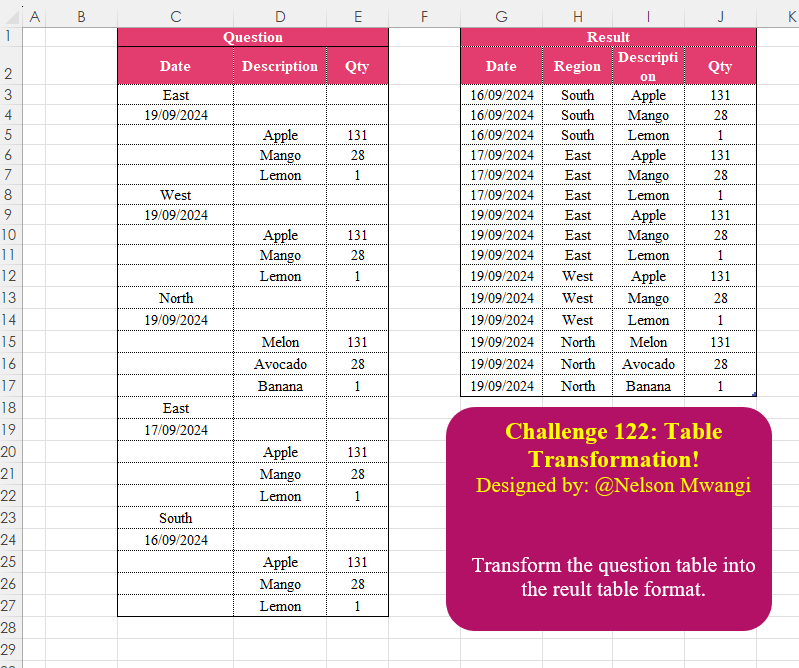
Table Transformation! Part 11

Challenge No. 122: Transform the question table into the reult table format.
Solved using:Excel (DROP, FILTER, HSTACK), Google Sheets, Power Query (List.Transform, Text.Contains, Table.AddColumn), Python, Python in Excel, and R.

June 3, 2025July 11, 2025
Add Index Column! Part 3
Posted in
  • Excel Challenges
  • Indexing & Ranking
  • Omid Challenges
  • Power Query Challenges
  • ⭐️ Beginner

Add Index Column! Part 3

Challenge No. 117: Add an Index column for the Question table with a separate counter for each stock.
Solved using:Excel (COUNTIF, HSTACK, IF), Google Sheets, Power Query (Table.AddIndexColumn, Table.Group, Table.Sort), Python, Python in Excel, and R.
May 29, 2025July 11, 2025
Duplicate Values! Part 2
Posted in
  • Data Cleaning
  • Excel Challenges
  • Omid Challenges
  • Power Query Challenges
  • ⭐️⭐️⭐️ Intermediate

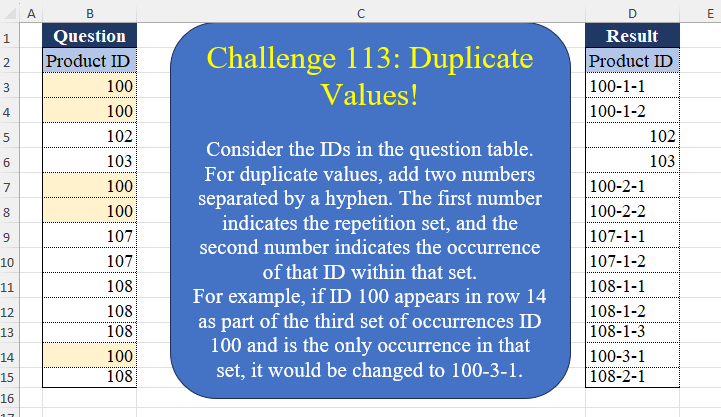
Duplicate Values! Part 2

Challenge No. 113: Consider the IDs in the question table.
Solved using:Excel (DROP, IF, LAMBDA), Google Sheets, Power Query (List.Transform, Table.AddColumn, Table.AddIndexColumn), Python, Python in Excel, and R.
May 25, 2025July 11, 2025
Custom Rank! Part 2
Posted in
  • Excel Challenges
  • Indexing & Ranking
  • Omid Challenges
  • Power Query Challenges
  • ⭐️ Beginner

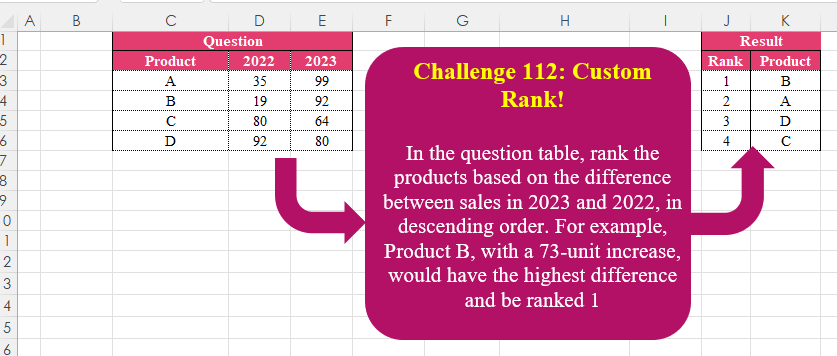
Custom Rank! Part 2

Challenge No. 112: In the question table, rank the products based on the difference between sales in 2023 and 2022, in descending order.
Solved using:Excel (HSTACK, LET, ROWS), Google Sheets, Power Query (Table.AddIndexColumn, Table.Sort), Python, Python in Excel, and R.
May 24, 2025July 11, 2025
Matching Tables!
Posted in
  • Excel Challenges
  • Merging & Joining
  • Omid Challenges
  • Power Query Challenges
  • ⭐️ Beginner

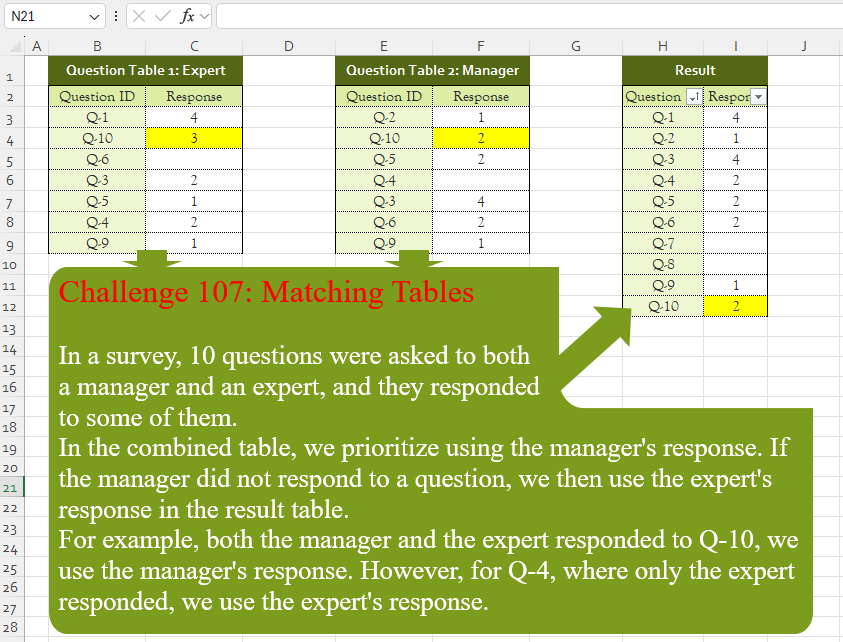
Matching Tables!

Challenge No. 107: In a survey, 10 questions were asked to both
a manager and an expert, and they responded
to some of them.
Solved using:Excel (CHOOSECOLS, FILTER, HSTACK), Google Sheets, Power Query (List.PositionOf, List.Transform, Table.AddColumn), Python, Python in Excel, and R.
May 19, 2025July 11, 2025
Latest Date Shop Data
Posted in
  • Date & Time Handling
  • ExcelBI Excel Challenges
  • ⭐️ Beginner

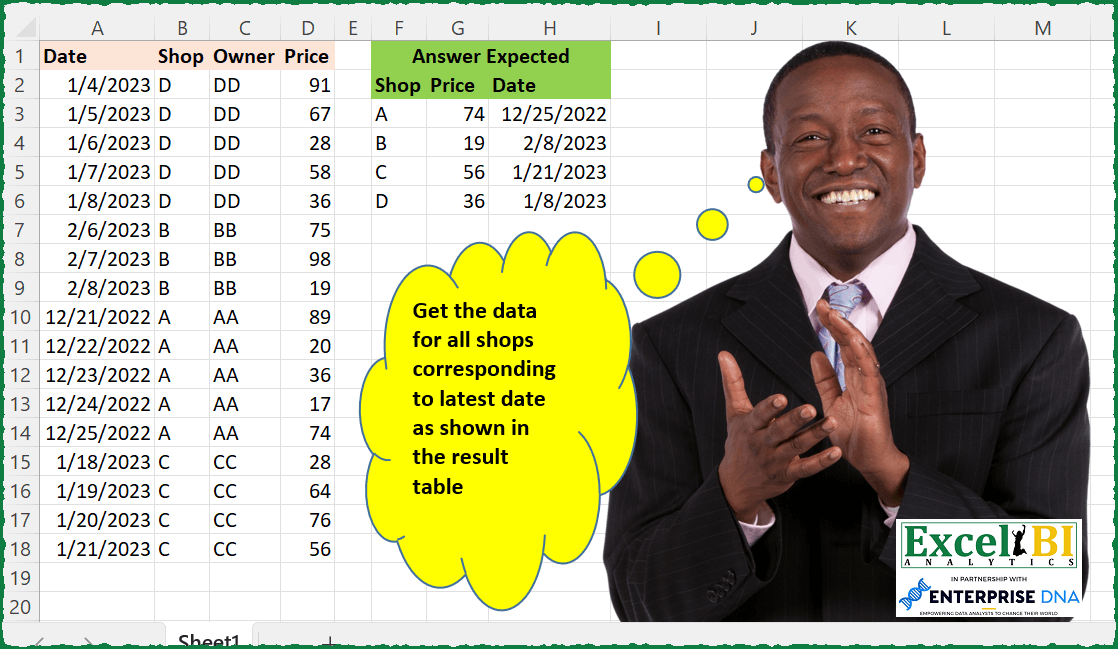
Latest Date Shop Data

Challenge No. 106: Get the data for all shops corresponding to latest date as shown in the result table.
Solved using: Python in Excel.
May 17, 2025July 14, 2025
Sort Cities on Reversed Prefix
Posted in
  • ExcelBI Excel Challenges
  • ⭐️ Beginner

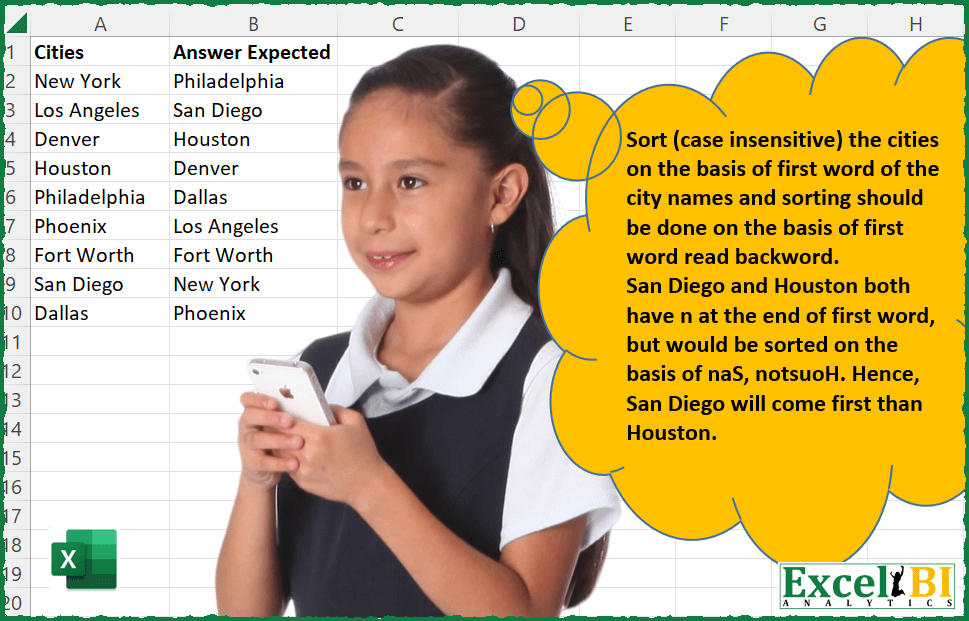
Sort Cities on Reversed Prefix

Challenge No. 48: Sort (case insensitive) the cities on the basis of first word of the city names and sorting should be done on the basis of first word read backward i.
Solved using: Power Query (Table.AddColumn, Table.Sort).
May 2, 2025May 11, 2025
Dynamic Result Table Generation
Posted in
  • ExcelBI Power Query Challenges
  • ⭐️⭐️ Easy

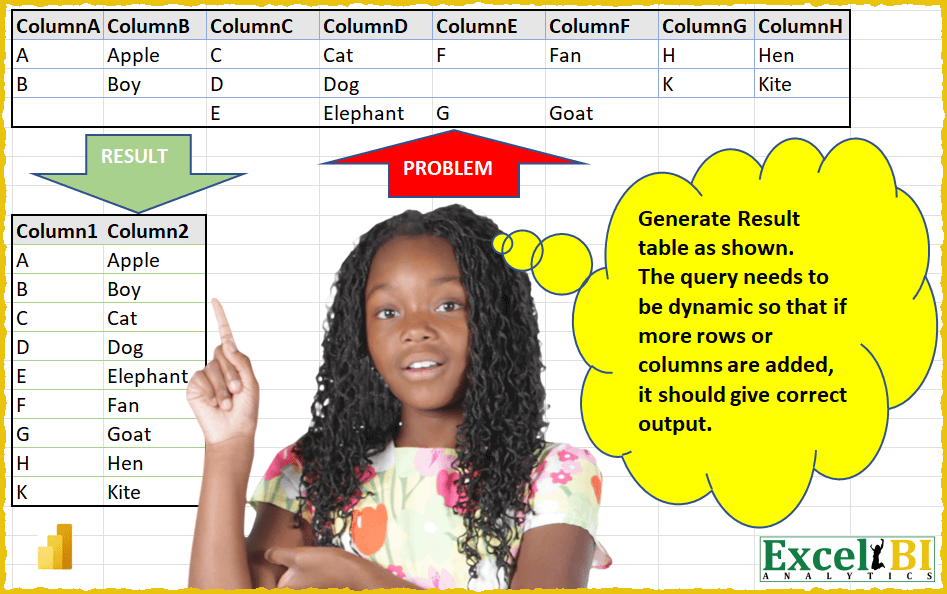
Dynamic Result Table Generation

Challenge No. 10: (Excel formulas also welcome)
Generate Result table as shown.
Solved using: Power Query (Table.AddColumn, Table.SelectRows, Table.Sort).

April 28, 2025July 30, 2025

Posts pagination

Previous 1 2 3 4 Next
  • 96 Common Challenges in Power Query
  • Advanced Mathematics Problem
  • Aggregation & Summarization
  • Books
  • Column Splitting
  • Column Transformation
  • Crispo Challenges
  • Custom Aggregation & Summarization
  • Custom Grouping
  • Data Cleaning
  • Data Transformation
  • data validation
  • Date & Time Handling
  • Excel Challenges
  • ExcelBI Excel Challenges
  • ExcelBI Power Query Challenges
  • Financial Problems
  • Indexing & Ranking
  • Merging & Joining
  • Missing Values
  • Omid Challenges
  • Pivot & Unpivot
  • Power Query Challenges
  • Python Challenges
  • Text Processing
  • ⭐️ Beginner
  • ⭐️⭐️ Easy
  • ⭐️⭐️⭐️ Intermediate
  • ⭐️⭐️⭐️⭐️ Advanced
  • ⭐️⭐️⭐️⭐️⭐️Expert
  • ⭐️⭐️⭐️⭐️⭐️⭐️Complex

BYROW CHAR CODE CONCAT DROP FILTER HSTACK IF IFERROR INDEX LAMBDA LEFT LEN LET List.Distinct List.Transform LOOKUP MAP MATCH MAX MID MONTH Python Python Automation Python for Data Analysis Python for Excel REDUCE ROW ROWS SCAN SEQUENCE SORT SUBSTITUTE Table.AddColumn Table.Group Table.SelectRows TAKE Text.Combine Text.Split TEXTJOIN TEXTSPLIT TOCOL UNIQUE VSTACK XLOOKUP

Recent Posts

  • Max Total on Consecutive Days
  • Extract Valid Year Ranges
  • Swap Grid Diagonals
  • Pivot with Total Line
  • Remove One Letter Palindrome

Recent Comments

No comments to show.
Copyright © 2026 OmidBI.
Powered by WordPress and HybridMag.
  • By Difficulty
    • ⭐️ Beginner
    • ⭐️⭐️ Easy
    • ⭐️⭐️⭐️ Intermediate
    • ⭐️⭐️⭐️⭐️ Advanced
    • ⭐️⭐️⭐️⭐️⭐️Expert
    • ⭐️⭐️⭐️⭐️⭐️⭐️Complex
  • By Topic
    • Advanced Mathematics Problem
    • Aggregation & Summarization
    • Column Splitting
    • Column Transformation
    • Custom Grouping
    • Data Cleaning
    • Data Transformation
    • Date & Time Handling
    • Financial Problems
    • Indexing & Ranking
    • Merging & Joining
    • Missing Values
    • Pivot & Unpivot
    • Text Processing
  • By Creator
    • Omid Challenges
    • ExcelBI Excel Challenges
    • ExcelBI Power Query Challenges
    • Crispo Challenges
  • By Software
    • DAX Challenges
    • Excel Challenges
    • Excel VBA Challenges
    • Google Sheets Challenges
    • Office Script Challenges
    • Power Query Challenges
    • Python Challenges
    • R Challenges
    • SQL Challenges
  • Books
    • 96 Common Challenges in Power Query