
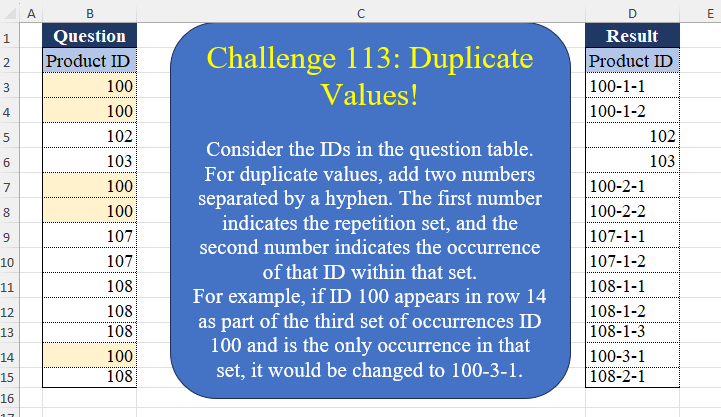
Consider the IDs in the question table. For duplicate values, add two numbers separated by a hyphen. The first number indicates the repetition set, and the second number indicates the occurrence of that ID within that set. For example, if ID 100 appears in row 14 as part of the third set of occurrences ID 100 and is the only occurrence in that set, it would be changed to 100-3-1.
📌 Challenge Details and Links
Challenge Number: 113
Challenge Difficulty: ⭐⭐⭐
📥Download Sample File
📥Link to the solutions on LinkedIn
Solving the challenge of Duplicate Values! Part 2 with Power Query
Power Query solution 1 for Duplicate Values! Part 2, proposed by Zoran Milokanović:
let
  Source = Excel.CurrentWorkbook(){[Name = "Input"]}[Content],
  R = Table.ToRows(
    Table.AddIndexColumn(Table.Group(Source, "Product ID", {"A", each [Product ID]}, 0), "I")
  ),
  S = List.TransformMany(
    R,
    each
      let
        f = (l) => List.Count(List.Select(l, (r) => r{0} = _{0}))
      in
        {
          {_{0}},
          List.Transform(
            List.Positions(_{1}),
            (p) =>
              Text.From(_{0})
                & "-"
                & Text.From(f(List.FirstN(R, List.PositionOf(R, _) + 1)))
                & "-"
                & Text.From(p + 1)
          )
        }{Byte.From(f(R) > 1 or List.Count(List.PositionOf(Source[Product ID], _{0}, 2)) > 1)},
    (i, _) => _
  )
in
  S
Power Query solution 2 for Duplicate Values! Part 2, proposed by Aditya Kumar Darak 🇮🇳:
let
  Source = Excel.CurrentWorkbook(){[Name = "data"]}[Content],
  Group1 = Table.Group(Source, "Product ID", {"C", each {1 .. Table.RowCount(_)}}, 0),
  Index = Table.AddIndexColumn(Group1, "I1"),
  Group2 = Table.Group(
    Index,
    "Product ID",
    {
      "A",
      each [
        I = Table.AddIndexColumn(_, "I2", 1),
        E = Table.ExpandListColumn(I, "C"),
        C = Table.CombineColumns(
          E,
          {"Product ID", "I2", "C"},
          (f) => Text.Combine(List.Transform(f, Text.From), "-"),
          "Product ID"
        ),
        R = if Table.RowCount(E) = 1 then [[Product ID], [I1]] else C
      ][R]
    }
  ),
  Combine = Table.Combine(Group2[A]),
  Return = Table.Sort(Combine, "I1")[[Product ID]]
in
  Return
Power Query solution 3 for Duplicate Values! Part 2, proposed by Alejandro Simón 🇵🇦 🇪🇸:
let
 Source = Excel.CurrentWorkbook(){[Name="Table1"]}[Content],
 Index = Table.AddIndexColumn(Source, "Index", 1, 1),
 Group = Table.Group(Index, {"Product ID"}, {{"A", each
let
a = _,
b = Table.AddIndexColumn(a, "Idx", 1)
in b}},0),
 Group2 = Table.Combine(Table.Group(Group, {"Product ID"}, {{"B", each Table.AddIndexColumn(_, "Idx1", 1)}})[B]),
 Expand = Table.ExpandTableColumn(Group2, "A", {"Product ID", "Index", "Idx"}, {"Product ID.1", "Index", "Idx"}),
 Calc = Table.AddColumn(Expand, "Answer", each
if List.Count(List.Select(Source[Product ID], (x)=> x = [Product ID])) = 1
then [Product ID] else Text.From([Product ID])&"-"&Text.From([Idx1])&"-"&Text.From([Idx]))[[Answer], [Index]],
 Sol = Table.Sort(Calc,{{"Index", 0}})[[Answer]]
in
 Sol
Power Query solution 4 for Duplicate Values! Part 2, proposed by Abdallah Ally:
let
  Source = Excel.CurrentWorkbook(){[Name = "Table1"]}[Content],
  AddIndex = Table.AddIndexColumn(Source, "Index"),
  Group = Table.Group(AddIndex, "Product ID", {"Values", each [Index]}),
  Transform1 = Table.TransformRows(
    Group,
    each [
      a = List.Count([Values]),
      b = List.Accumulate(
        [Values],
        {{[Product ID], a, [Values]{0}, 1, 1}},
        (x, y) =>
          [
            r = List.Last(x){3},
            s = List.Last(x){4},
            t =
              if y = [Values]{0} then
                x
              else if y = [Values]{List.PositionOf([Values], y) - 1} + 1 then
                x & {{[Product ID], a, y, r, s + 1}}
              else
                x & {{[Product ID], a, y, r + 1, 1}}
          ][t]
      )
    ][b]
  ),
  Combine = List.Sort(List.Combine(Transform1), each _{2}),
  Transform2 = List.Transform(
    Combine,
    (x) =>
      if x{1} = 1 then
        x{0}
      else
        [a = {x{0}} & List.LastN(x, 2), b = Text.Combine(List.Transform(a, Text.From), "-")][b]
  ),
  Result = Table.FromColumns({Transform2}, {"Product ID"})
in
  Result
Power Query solution 5 for Duplicate Values! Part 2, proposed by Kris Jaganah:
let
  S = Excel.CurrentWorkbook(){[Name = "Table1"]}[Content],
  A = Table.AddIndexColumn(S, "Id"),
  B = Table.AddColumn(
    A,
    "Oc",
    each if (try [Product ID] - A[Product ID]{[Id] - 1} otherwise 1) = 0 then null else [Id]
  ),
  C = Table.FillDown(B, {"Oc"}),
  D = Table.Group(C, {"Oc"}, {{"All", each Table.AddIndexColumn(_, "Occ", 1)}}),
  E = Table.ExpandTableColumn(D, "All", {"Product ID", "Id", "Occ"}, {"Prd ID", "Id", "O"}),
  G = Table.SelectRows(E, each ([O] = 1)),
  H = Table.Group(G, {"Prd ID"}, {"Al", each Table.AddIndexColumn(_, "Rec", 1)}),
  I = Table.ExpandTableColumn(H, "Al", {"Oc", "Id", "O", "Rec"}),
  J = Table.Distinct(I & E, "Id"),
  K = Table.Sort(J, {"Id", 0}),
  L = Table.FillDown(K, {"Rec"}),
  M = Table.AddColumn(
    L,
    "M",
    each [a = [Prd ID], b = List.Count(List.Select(L[Prd ID], each _ = a))][b]
  ),
  N = Table.AddColumn(
    M,
    "Product ID",
    each
      if [M] = 1 then
        [Prd ID]
      else
        Text.From([Prd ID]) & "-" & Text.From([Rec]) & "-" & Text.From([O])
  ),
  O = Table.SelectColumns(N, {"Product ID"})
in
  O
Power Query solution 6 for Duplicate Values! Part 2, proposed by Kris Jaganah:
let
  S = Excel.CurrentWorkbook(){[Name = "Table1"]}[Content],
  A = Table.AddIndexColumn(S, "Id"),
  B = Table.AddColumn(
    A,
    "R",
    each try if A[Product ID]{[Id] - 1} = [Product ID] then 1 else 0 otherwise 0
  ),
  C = Table.AddColumn(
    B,
    "Occ",
    each List.Accumulate(List.Range(B[R], 1, [Id]), 1, (x, y) => if y = 0 then 1 else x + 1)
  ),
  D = Table.Group(
    C,
    {"Product ID", "Occ"},
    {{"All", each Table.AddIndexColumn(_, "Rec", 1)[[Rec], [Id]]}}
  ),
  E = Table.ExpandTableColumn(D, "All", {"Rec", "Id"}),
  F = Table.AddColumn(
    E,
    "Co",
    each Table.RowCount(Table.SelectRows(E, (z) => z[Product ID] = [Product ID]))
  ),
  G = Table.Sort(F, {"Id", 0}),
  H = Table.AddColumn(
    G,
    "Ans",
    each
      if [Co] = 1 then
        [Product ID]
      else
        Text.From([Product ID]) & "-" & Text.From([Rec]) & "-" & Text.From([Occ])
  )[Ans],
  I = Table.FromColumns({H}, {"Product ID"})
in
  I
Power Query solution 7 for Duplicate Values! Part 2, proposed by 🇮🇷 Navid Esmaeilzadeh اسماعیل زاده:
let
S=Excel.CurrentWorkbook(){[Name="Table1"]}[Content],
A=Table.AddIndexColumn(S,"I", 0, 1),
B=Table.FillDown(Table.AddColumn(A, "I2", each try if [Product ID]<>A[Product ID]{[I]-1} then[I]else null otherwise[I]),{"I2"}),
C=Table.Group(B, {"I2", "Product ID"}, {{"Tbl", each _}}),
D=Table.AddColumn(C, "Tbl2", each Table.AddIndexColumn([Tbl],"I3",1,1)),
E=Table.SelectColumns(D,{"Product ID", "Tbl2"}),
E2=Table.AddColumn(E,"C", each Table.RowCount([Tbl2])),
E3=Table.AddIndexColumn(E2, "In", 1, 1),
G=Table.Group(E3, {"Product ID"}, {{"T", each _}}),
H=Table.AddColumn(G, "T2", each Table.AddIndexColumn([T],"I4",1,1)),
I=Table.SelectColumns(H,{"T2"}),
J=Table.AddColumn(I, "C2", each Table.RowCount([T2])),
J2=Table.ExpandTableColumn(J, "T2", {"Product ID","In", "Tbl2", "C", "I4"}, {"Product ID","In", "Tbl2", "C", "I4"}),
L=Table.ExpandTableColumn(J2, "Tbl2", {"I3"}, {"I3"}),
M=Table.Sort(L,{{"I4",Order.Ascending}, {"Product ID", Order.Ascending}}),
N=Table.TransformColumnTypes(M,{{"Product ID", type text}, {"I3", type text}, {"I4", type text}}),
O=Table.AddColumn(N, "PID", each if [C]=1 and [C2]=1 then [Product ID] else [Product ID]&"-"&[I4]&"-"&[I3]),
O2=Table.Sort(O,{{"In", Order.Ascending}}),
P=Table.SelectColumns(O2,{"PID"})
in
P
Power Query solution 8 for Duplicate Values! Part 2, proposed by Glyn Willis:
let
  Source = Excel.CurrentWorkbook(){[Name = "Table1"]}[Content][Product ID],
  C1 = List.Positions(Source),
  C2 = List.Transform(
    List.Zip({Source, {null} & List.RemoveLastN(Source, 1)}),
    each not (_{0} = _{1})
  ),
  C3 = Table.Group(
    Table.FromColumns({Source, C2, C1}, {"1", "2", "3"}),
    {"1", "2"},
    {{"Rows", each Table.FromColumns({List.Numbers(1, List.Count([1])), [3]})}},
    GroupKind.Local,
    (x, y) => Number.From(y[2])
  ),
  Grouped = Table.Combine(
    Table.Group(
      C3,
      {"1"},
      {
        {
          "Index",
          each Table.FromColumns(
            Table.ToColumns(_) & {List.Numbers(1, Table.RowCount(_))},
            {"Product ID", "Flag", "Rows", "Grp"}
          ),
          type table
        }
      }
    )[Index]
  )[[Product ID], [Grp], [Rows]],
  Expanded = Table.ExpandTableColumn(Grouped, "Rows", {"Column1", "Column2"}, {"Group", "Sort"}),
  Merged = Table.CombineColumns(
    Table.TransformColumnTypes(
      Expanded,
      {{"Product ID", type text}, {"Grp", type text}, {"Group", type text}},
      "en-GB"
    ),
    {"Product ID", "Grp", "Group"},
    Combiner.CombineTextByDelimiter("-", QuoteStyle.None),
    "Product ID"
  ),
  Sorted = Table.Sort(Merged, {{"Sort", Order.Ascending}})[[Product ID]],
  Replaced = Table.ReplaceValue(
    Sorted,
    each Text.Contains([Product ID], "1-1"),
    each Text.BeforeDelimiter([Product ID], "-"),
    (x, y, z) => if y then z else x,
    {"Product ID"}
  )
in
  Replaced
Solving the challenge of Duplicate Values! Part 2 with Excel
Excel solution 1 for Duplicate Values! Part 2, proposed by Bo Rydobon 🇹🇭:
=LET(
    z,
    B3:B15,
    c,
    SCAN(
        0,
        z=DROP(
            VSTACK(
                0,
                z
            ),
            -1
        ),
        LAMBDA(
            a,
            v,
            a*v+1
        )
    ),    REDUCE(
        0,
        UNIQUE(
            z
        ),
        LAMBDA(
            a,
            x,
            IFS(
                a>0,
                a,
                z=x,
                IF(
                    SUM(
                        N(
                            z=x
                        )
                    )=1,
                    x,
                    x&-SCAN(
                        ,
                        z^c=x,
                        SUM
                    )&-c
                ),
                1,
                0
            )
        )
    )
)
Excel solution 2 for Duplicate Values! Part 2, proposed by Aditya Kumar Darak 🇮🇳:
=LET(
 _rng,
     B3:B15, _rows,
     ROWS(
         _rng
     ), _drp1,
     DROP(
         _rng,
          1
     ), _drp2,
     DROP(
         _rng,
          -1
     ), _scn,
     VSTACK(
         1,
          SCAN(
              1,
               _drp1 = _drp2,
               LAMBDA(
                   a,
                    b,
                    IF(
                        b,
                         a + 1,
                         1
                    )
               )
          )
     ), _clc,
     MAP(SEQUENCE(
         _rows
     ),
     LAMBDA(a,
     SUM((TAKE(
         _rng,
          a
     ) = INDEX(
         _rng,
          a
     )) * (TAKE(
         _scn,
          a
     ) = 1)))), _cnt,
     COUNTIFS(
         _rng,
          _rng
     ), _r,
     IF(
         _cnt = 1,
          _rng,
          _rng & "-" & _clc & "-" & _scn
     ), _r
)
Excel solution 3 for Duplicate Values! Part 2, proposed by Oscar Mendez Roca Farell:
=LET(p,
     B3:B15,
     u,
     UNIQUE(
         p
     ),
     r,
     ROW(
         p
     ),
     b,
     REDUCE(0,
     u,
     LAMBDA(i,
     x,
     i+SCAN(,
     N(
         p=x
     ),
     LAMBDA(j,
     y,
     y*(j+y))))),
     z,
    p&-b,
     VSTACK(B2,
     IF(COUNTIF(
         p,
          p
     )-1,
     p&-MMULT((z=TOROW(
         z
     ))*(r>=TOROW(
         r
     )),
     r^0)&-b,
     p)))
Excel solution 4 for Duplicate Values! Part 2, proposed by Julian Poeltl:
=LET(
    I,
    B3:B15,
    R,
    ROW(
        I
    ),
    S,
    SORT(
        HSTACK(
            I,
            R
        )
    ),
    E,
    REDUCE(
        0,
        UNIQUE(
        I
    ),
        LAMBDA(
            B,
            A,
            VSTACK(
                B,
                LET(
                    F,
                    FILTER(
                        S,
                        TAKE(
                            S,
                            ,
                            1
                        )=A
                    ),
                    T,
                    TAKE(
                        F,
                        ,
                        -1
                    ),
                    D,
                    VSTACK(
                        1,
                        DROP(
                            DROP(
                                T,
                                1
                            )-T,
                            -1
                        )
                    ),
                    IFERROR(
                        HSTACK(
                            T,
                            TAKE(
                                F,
                                ,
                                1
                            )&"-"&SCAN(
                                1,
                                D,
                                LAMBDA(
                                    A,
                                    B,
                                    IF(
                                        B>1,
                                        A+1,
                                        A
                                    )
                                )
                            )&"-"&SCAN(
                                0,
                                D,
                                LAMBDA(
                                    A,
                                    B,
                                    IF(
                                        B=1,
                                        A+1,
                                        1
                                    )
                                )
                            )
                        ),
                        A
                    )
                )
            )
        )
    ),
    DROP(
        SORT(
            DROP(
                E,
                1
            )
        ),
        ,
        1
    )
)
Excel solution 5 for Duplicate Values! Part 2, proposed by Kris Jaganah:
=LET(a,
    B3:B15,
    b,
    a=VSTACK(
        @a,
        DROP(
            a,
            -1
        )
    ),
    c,
    SCAN(
        0,
        b,
        LAMBDA(
            x,
            y,
            IF(
                y,
                x+1,
                1
            )
        )
    ),
    d,
    a&"-"&c,
    e,
    MAP(SEQUENCE(
        ROWS(
            d
        )
    ),
    LAMBDA(z,
    SUM(--(CHOOSEROWS(
        d,
        z
    )=TAKE(
        d,
        z
    ))))),
    IF(
        COUNTIF(
            a,
            a
        )=1,
        a,
        a&"-"&e&"-"&c
    ))
Excel solution 6 for Duplicate Values! Part 2, proposed by JvdV –:
=MAP(
    B3:B15,
    LAMBDA(
        s,
        IF(
            COUNTIF(
                B3:B15,
                s
            )=1,
            s,
            LET(
                x,
                TEXTSPLIT(
                    CONCAT(
                        N(
                            B3:s=s
                        )
                    ),
                    ,
                    0,
                    1
                ),
                s&-ROWS(
                    x
                )&-LEN(
                    TAKE(
                        x,
                        -1
                    )
                )
            )
        )
    )
)
Excel solution 7 for Duplicate Values! Part 2, proposed by Andres Rojas Moncada:
=LET(
    r,
    B3:B15,
    b,
    B2:B14<>r,
    SCAN(
        "",
        r,
        LAMBDA(
            a,
            v,
            LET(
                bni,
                r=v,
                _i1,
                SCAN(
                    0,
                    b*bni,
                    SUM
                )*bni,
                _i2,
                SCAN(
                    0,
                    _i1,
                    LAMBDA(
                        ac,
                        va,
                        IF(
                            va,
                            ac+1,
                            0
                        )
                    )
                ),
                IF(
                    COUNTIF(
                        r,
                        v
                    )=1,
                    v,
                    INDEX(
                        v&"-"&_i1&"-"&_i2,
                        ROWS(
                            B3:v
                        )
                    )
                )
            )
        )
    )
)
Excel solution 8 for Duplicate Values! Part 2, proposed by Bilal Mahmoud kh.:
=--y,
    VSTACK(
        IF(
            ROWS(
                x
            )<>1,
            DROP(
                x,
                -1
            ),
            x
        ),
        a&"-"&y
    ),
    VSTACK(
        x,
        y
    ))))),
    1),
    DROP(REDUCE(0,
    UNIQUE(
        A3:A15
    ),
    LAMBDA(x,
    y,
    VSTACK(x,
    LET(a,
    FILTER(
        p,
        --TEXTBEFORE(
            p,
            "-",
            ,
            ,
            ,
            p
        )=--y
    ),
    MAP(a,
    SEQUENCE(
        COUNTA(
            a
        )
    ),
    LAMBDA(n,
    m,
    TEXTJOIN(",",
    ,
    LET(e,
    TEXTSPLIT(
        n,
        ,
        "-"
    ),
    IF((COUNTA(
            a
        )<>1)+(COUNTA(
            e
        )<>1),
    MAP(
        e,
        SEQUENCE(
            COUNTA(
            e
        )
        ),
        LAMBDA(
            r,
            v,
            r&"-"&m&"-"&v
        )
    ),
    e))))))))),
    1))),
    ,
    ","))
Solving the challenge of Duplicate Values! Part 2 with Python
Python solution 1 for Duplicate Values! Part 2, proposed by Konrad Gryczan, PhD:
import pandas as pd

path = "CH-113 Manage Duplicate Values.xlsx"

input = pd.read_excel(path, usecols="B", skiprows=1, names=["Product ID"])
test = pd.read_excel(path, usecols="D", skiprows=1, names=["result"])

input['rn'] = input.index + 1
input = input.sort_values('Product ID').reset_index()
input['dup'] = input.groupby('Product ID')['Product ID'].transform('size') > 1
input['a'] = input.groupby('Product ID')['rn'].diff().gt(1).cumsum()
input['a'] = input.groupby('Product ID')['a'].transform(lambda x: x - x.min() + 1)
input['b'] = input.groupby(['Product ID', 'a']).cumcount() + 1
input = input.sort_values('rn').reset_index()
input['result'] = input.apply(lambda row: f"{row['Product ID']}-{row['a']}-{row['b']}" if row['dup'] else row['Product ID'], axis=1)
print(input['result'].equals(test["result"])) # True
Solving the challenge of Duplicate Values! Part 2 with Python in Excel
Python in Excel solution 1 for Duplicate Values! Part 2, proposed by Alejandro Campos:
df = xl("B2:B15", headers=True)
df['Product ID'] = df.assign(
 group=(df['Product ID'] != df['Product ID'].shift()).cumsum(),
 group_count=lambda d: d.groupby('Product ID')['group'].rank(method='dense').astype(int),
 occurrence_in_group=lambda d: d.groupby(['Product ID', 'group']).cumcount() + 1
).apply(lambda r: f"{r['Product ID']}-{r['group_count']}-{r['occurrence_in_group']}"
 if df['Product ID'].value_counts()[r['Product ID']] > 1 else r['Product ID'], axis=1)
df['Product ID']
Python in Excel solution 2 for Duplicate Values! Part 2, proposed by George Mount:
xlsx

Nice touch making us dynamically format based on the # of items in each group 😅

df = xl("B2:B15", headers=True)

# Create a new column that increments whenever the product_id changes
df['group'] = (df['product_id'] != df['product_id'].shift()).cumsum()

# Assign a group number to each set of consecutive occurrences of the same product_id
df['group_count'] = df.groupby('product_id')['group'].rank(method='dense').astype(int)

# Assign an occurrence number within each group of consecutive occurrences
df['occurrence_in_group'] = df.groupby(['product_id', 'group']).cumcount() + 1

# Create the new product_id format
df['product_id'] = df.apply(lambda row:
 row['product_id'] if df['product_id'].value_counts()[row['product_id']] == 1
 else f"{row['product_id']}-{row['group_count']}-{row['occurrence_in_group']}", axis=1)

df['product_id']
Solving the challenge of Duplicate Values! Part 2 with R
R solution 1 for Duplicate Values! Part 2, proposed by Konrad Gryczan, PhD:
library(tidyverse)
library(readxl)
path = "files/CH-113 Manage Duplicate Values.xlsx"
input = read_excel(path, range = "B2:B15")
test = read_excel(path, range = "D2:D15")
result <- input %>%
 mutate(rn = row_number()) %>%
 arrange(`Product ID`) %>%
 mutate(dup = n() > 1,
 a = cumsum(rn - lag(rn, default = first(rn)) != 1),
 .by = `Product ID`) %>%
 mutate(b = row_number(), .by = c(`Product ID`, a)) %>%
 arrange(rn) %>%
 mutate(result = ifelse(dup, paste0(`Product ID`,"-",a, "-", b), `Product ID`))
identical(result$result, test$`Product ID`)
#> [1] TRUE
Solving the challenge of Duplicate Values! Part 2 with Google Sheets
Google Sheets solution 1 for Duplicate Values! Part 2, proposed by Peter Krkos:
PowerQuery Solution:
https://docs.google.com/spreadsheets/d/1zR5IZLz8OT76vhaPEHfsPrw8-RDKnLyyqS49IJjdhFk/edit?gid=1554544756#gid=1554544756