
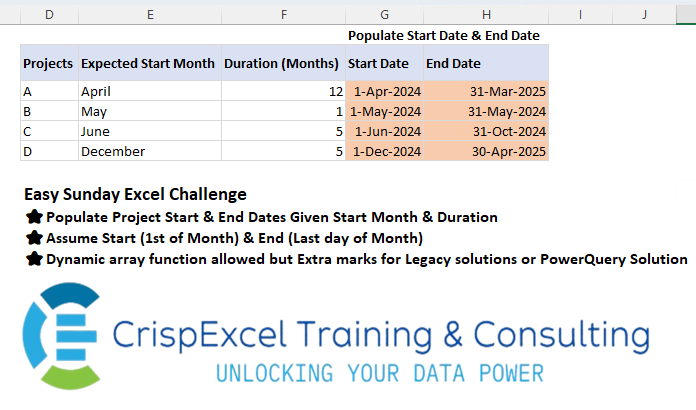
Challenge No. 35: Populate Project Start & End Dates Given Start Month & Duration Assume Start (1st of Month) & End (Last day of Month)
Dynamic array function allowed but Extra marks for Legacy solutions or PowerQuery Solution.
Solved using: R.
Returns the month number from a date in Excel.
Challenge No. 35: Populate Project Start & End Dates Given Start Month & Duration Assume Start (1st of Month) & End (Last day of Month)
Dynamic array function allowed but Extra marks for Legacy solutions or PowerQuery Solution.
Solved using: R.
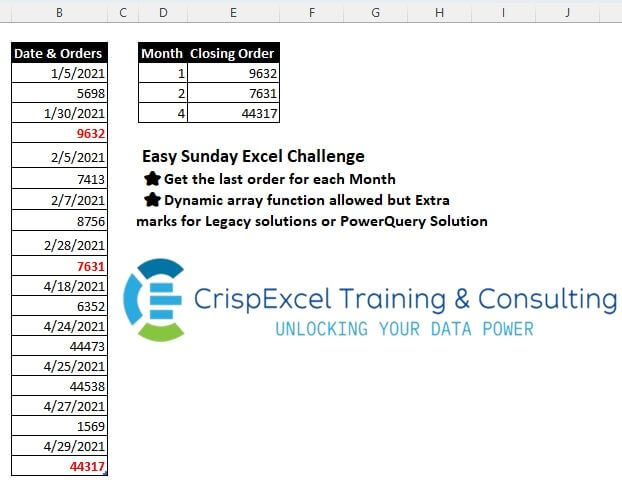
Challenge No. 31: Get the last order for each Month
Dynamic array function allowed, but Extra marks for Legacy solutions or PowerQuery Solution.
Solved using: Python.
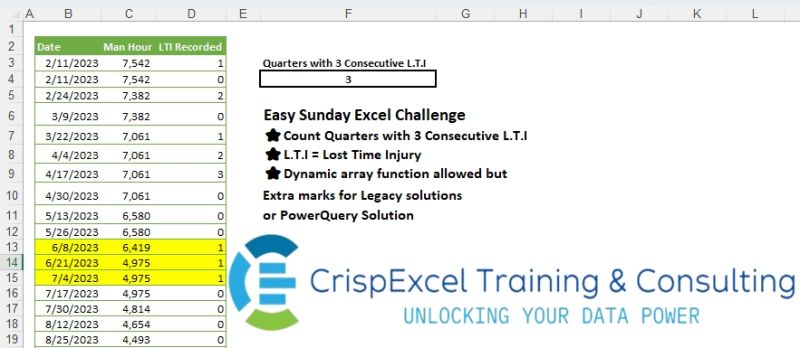
Challenge No. 23: Count Quarters with 3 Consecutive L.
Solved using: Python in Excel.

Challenge No. 20: Analyse the sales data by Financial Year and Financial Quaters
Assume the Financial year starts in April
Dynamic array function allowed, but Extra marks for Legacy solutions or PowerQuery Solution.
Solved using: Python in Excel.

Challenge No. 59: In 21st century (i.e.
Solved using: Power Query.

Challenge No. 52: Provide a formula to list the Last Mondays of each month for a given year in A1 if Last Monday falls on a day > 25.
Solved using: DAX.
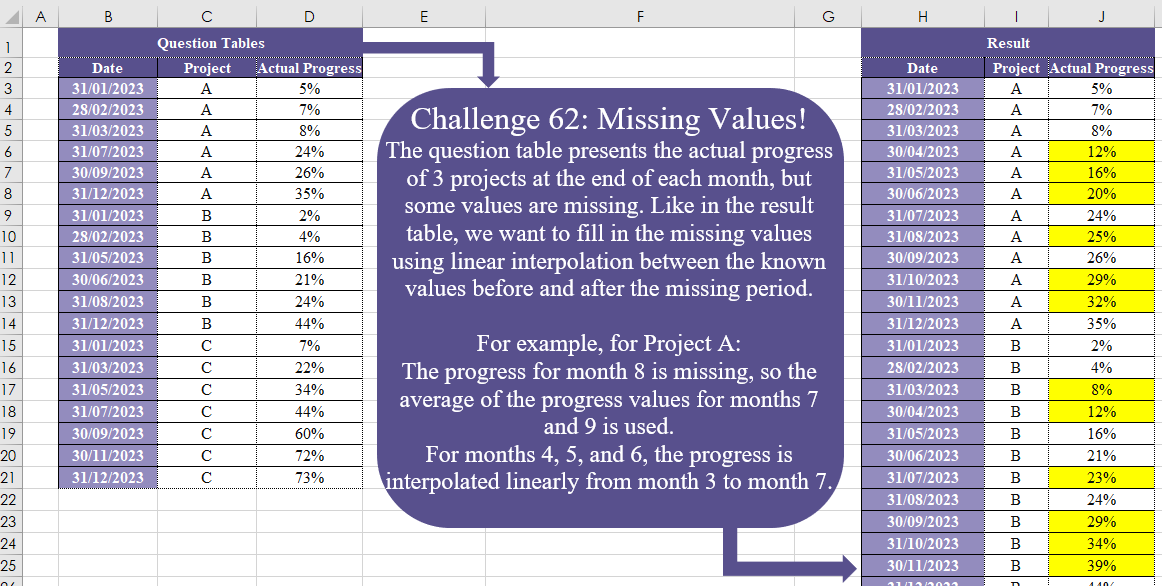
Challenge No. 62: The question table presents the actual progress of 3 projects at the end of each month, but some values are missing.
Solved using:Excel (DATE, DROP, IF), Power Query (Date.Month), Python, and R.
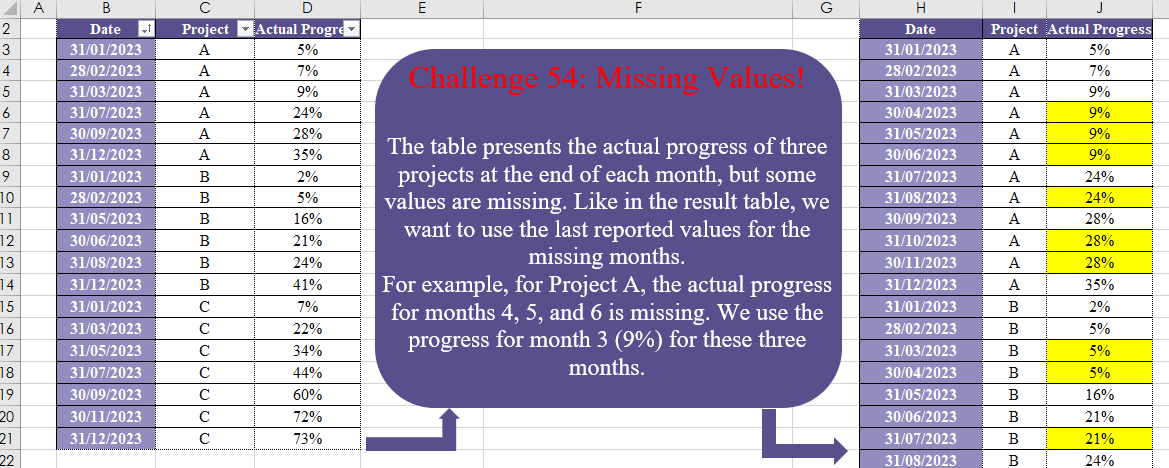
Challenge No. 54: The table presents the actual progress of three projects at the end of each month, but some values are missing.
Solved using:Excel (DATE, DROP, EOMONTH), Power Query (List.Transform, Table.Group, Table.TransformColumnTypes), Python, and R.
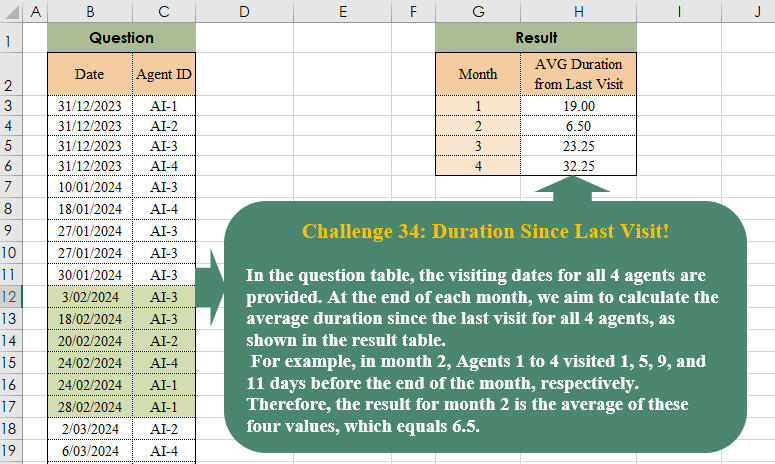
Challenge No. 38: In the question table, the visiting dates for all 4 agents are provided.
Solved using:Excel (AVERAGE, DROP, EOMONTH), Power Query (List.Transform, Table.AddColumn, Table.Group), Python, and R.

Challenge No. 35: In our company, we utilize a grading system to evaluate the technical performance of our agents, assigning grades of C, B, A, and A+.
Solved using:Excel (DROP, FILTER, HSTACK), Power Query (Table.AddColumn, Table.Group), and R.