
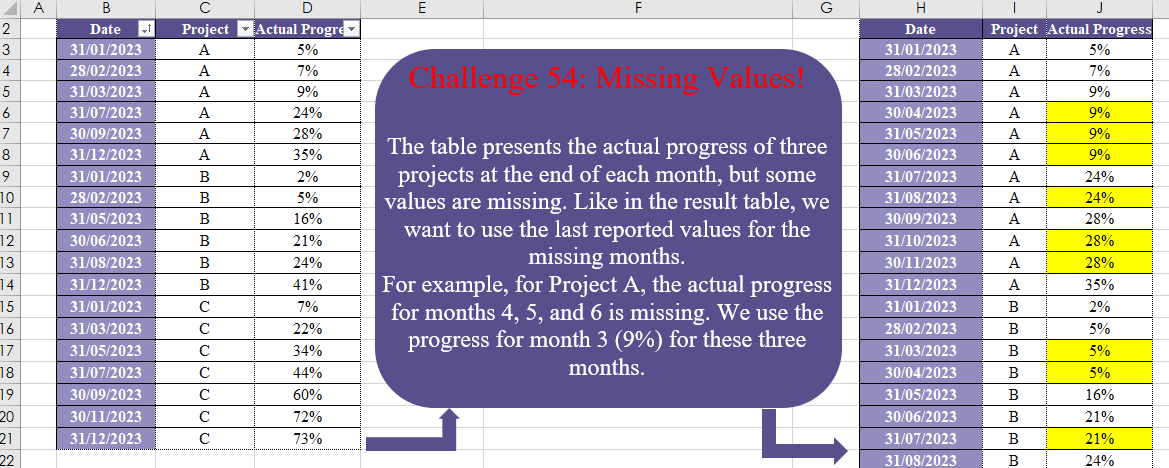
The table presents the actual progress of three projects at the end of each month, but some values are missing. Like in the result table, we want to use the last reported values for the missing months. For example, for Project A, the actual progress for months 4, 5, and 6 is missing. We use the progress for month 3 (9%) for these three months.
📌 Challenge Details and Links
Challenge Number: 54
Challenge Difficulty: ⭐⭐⭐
Designed by: Vahid Doustimajd
📥Download Sample File
📥Link to the solutions on LinkedIn
Solving the challenge of Missing Values! Part 1 with Power Query
Power Query solution 1 for Missing Values! Part 1, proposed by Zoran Milokanović:
let
  Source = Excel.CurrentWorkbook(){[Name = "Input"]}[Content],
  L = Table.ToRows(Source),
  S = Table.FromRows(
    List.TransformMany(
      L,
      each
        let
          Y = Date.Year,
          M = Date.Month,
          n = (L{List.PositionOf(L, _) + 1}? ?? _)
        in
          List.Transform(
            {0 .. {0, (Y(n{0}) - Y(_{0})) * 12 + M(n{0}) - M(_{0}) - 1}{Number.From(n{1} = _{1})}},
            (t) => Date.EndOfMonth(Date.From(Date.AddMonths(_{0}, t)))
          ),
      (i, _) => {_} & List.Skip(i)
    ),
    Table.ColumnNames(Source)
  )
in
  S
Power Query solution 2 for Missing Values! Part 1, proposed by Brian Julius:
let
  Source = Table.PrefixColumns(
    Table.TransformColumnTypes(
      Excel.CurrentWorkbook(){[Name = "Table1"]}[Content],
      {"Date", Date.Type}
    ),
    "x"
  ),
  AllDates = Table.FromList(
    List.Transform(List.Transform({1 .. 12}, each #date(2023, _, 1)), each Date.EndOfMonth(_)),
    Splitter.SplitByNothing(),
    null
  ),
  CJoin = Table.ExpandListColumn(
    Table.AddColumn(AllDates, "Project", each List.Distinct(Source[x.Project])),
    "Project"
  ),
  LOJoin = Table.RemoveColumns(
    Table.Join(CJoin, {"Column1", "Project"}, Source, {"x.Date", "x.Project"}, JoinKind.LeftOuter),
    {"x.Project", "x.Date"}
  ),
  Group = Table.Group(
    LOJoin,
    {"Project"},
    {
      {
        "All",
        each Table.FillUp(
          Table.FillDown(Table.Sort(_, {"Column1"}), {"x.Actual Progress"}),
          {"x.Actual Progress"}
        )
      }
    }
  ),
  Expand = Table.ReorderColumns(
    Table.ExpandTableColumn(
      Group,
      "All",
      {"Column1", "x.Actual Progress"},
      {"Date", "Actual Progress"}
    ),
    {"Date", "Project", "Actual Progress"}
  )
in
  Expand
Power Query solution 3 for Missing Values! Part 1, proposed by Luan Rodrigues:
let
  Fonte = Tabela1,
  tp = Table.TransformColumnTypes(Fonte, {{"Date", type date}}),
  grp = Table.Group(
    tp,
    {"Project"},
    {
      {
        "tab",
        each
          let
            d = List.Transform([Date], Number.From),
            lista = List.Distinct(
              List.Transform({List.Min(d) .. List.Max(d)}, each Date.EndOfMonth(Date.From(_)))
            )
          in
            Table.Sort(
              Table.Join(_, "Date", Table.FromColumns({lista}), "Column1", JoinKind.FullOuter),
              {"Column1", 0}
            )[[Column1], [Project], [Actual Progress]]
      }
    }
  )[tab],
  res = Table.FillDown(Table.Combine(grp), Table.ColumnNames(grp{0}))
in
  res
Power Query solution 4 for Missing Values! Part 1, proposed by Ramiro Ayala Chávez:
let
S = Excel.CurrentWorkbook(){[Name="Table1"]}[Content],
T = Table.TransformColumnTypes,
A = Table.AddColumn,
L = List.Transform,
N = Number.From,
a = T(A(T(S,{"Date",type date}),"A", each [Date]),{"A",type text}),
b = A(a,"B", each [A]&"-"&[Project]),
c = L({N(S[Date]{0})..N(S[Date]{18})},Date.From),
d = L(List.Distinct(L(c, each Date.EndOfMonth(_))),Text.From),
e = Table.FromColumns({List.TransformMany(d,(x)=>{"A".."C"},(x,y)=>x&"-"&y)},{"B"}),
f = A(e,"Actual Progress", each try b[Actual Progress]{List.PositionOf(b[B],[B])} otherwise null),
g = T(Table.SplitColumn(f,"B",Splitter.SplitTextByDelimiter("-"),{"Date","Project"}),{"Date",type date}),
Sol = Table.Combine(Table.Group(g,{"Project"},{"G", each Table.FillDown(_,{"Actual Progress"})})[[G]][G])
in
Sol
Power Query solution 5 for Missing Values! Part 1, proposed by Aditya Kumar Darak 🇮🇳:
let
  Source = Excel.CurrentWorkbook(){[Name = "data"]}[Content],
  TotalMonths = (start, end) =>
    Date.Year(end) * 12 + Date.Month(end) - Date.Year(start) * 12 - Date.Month(start),
  Group = Table.Group(
    Source,
    "Project",
    {
      "G",
      each [
        Min = List.Min([Date]),
        TM  = TotalMonths(Min, List.Max([Date])),
        DT  = List.Transform({0 .. TM}, (f) => Date.AddMonths(Min, f)),
        DF  = Table.FromColumns({List.Difference(DT, [Date])}, {"Date"}),
        C   = Table.Sort(_ & DF, "Date"),
        R   = Table.FillDown(C, {"Project", "Actual Progress"})
      ][R]
    }
  ),
  Return = Table.Combine(Group[G])
in
  Return
Power Query solution 6 for Missing Values! Part 1, proposed by Alejandro Simón 🇵🇦 🇪🇸:
let
 Source = Excel.CurrentWorkbook(){[Name="Table1"]}[Content],
 Group = Table.Group(Source, {"Project"}, {{"A", (x)=>
let
a = Table.ToColumns(x),
b = List.Transform({1..12}, each Date.EndOfMonth(
hashtag
#date(2023, _, 1))),
c = List.Transform(a{0}, each Date.From(_)),
d = List.Difference(b,c),
e = List.Transform(d, each x[Actual Progress]
 {List.PositionOf(c, List.Last(List.Select(c, (x)=> x<=_)))}),
f = List.Sort(List.Zip({d,e})&List.Zip({c, a{2}}), each _{0}),
g = Table.FromRows(f, {"Date", "Actual Progress"})
in g}}),
 Sol = Table.ReorderColumns(Table.ExpandTableColumn(Group, "A",
 Table.ColumnNames(Group[A]{0})), Table.ColumnNames(Source))
in
 Sol
Power Query solution 7 for Missing Values! Part 1, proposed by Alexis Olson:
let
  Source = Table.TransformColumnTypes(
    Excel.CurrentWorkbook(){[Name = "Table1"]}[Content],
    {{"Date", type date}}
  ),
  Dates = List.Transform({1 .. 12}, (m) => Date.EndOfMonth(#date(2023, m, 1))),
  Projects = List.Distinct(Source[Project]),
  OnesTable = (L as list, txt as text) as table =>
    Table.FromColumns({L, List.Repeat({1}, List.Count(L))}, {txt, "Ones"}),
  CrossProduct = Table.Join(
    OnesTable(Dates, "Date"),
    "Ones",
    OnesTable(Projects, "Project"),
    "Ones"
  ),
  Merge = Table.NestedJoin(
    CrossProduct,
    {"Date", "Project"},
    Source,
    {"Date", "Project"},
    "Source",
    JoinKind.LeftOuter
  ),
  Expand = Table.ExpandTableColumn(Merge, "Source", {"Actual Progress"}),
  FillDown = Table.FillDown(
    Table.Sort(Expand, {{"Project", Order.Ascending}, {"Date", Order.Ascending}}),
    {"Actual Progress"}
  ),
  Result = Table.RemoveColumns(FillDown, {"Ones"})
in
  Result
Power Query solution 8 for Missing Values! Part 1, proposed by 🇮🇷 Navid Esmaeilzadeh اسماعیل زاده:
let
  S = Excel.CurrentWorkbook(){[Name = "Table1"]}[Content],
  A = Table.TransformColumnTypes(
    S,
    {{"Date", type date}, {"Project", type text}, {"Actual Progress", type number}}
  ),
  B = Table.Group(
    A,
    {"Project"},
    {
      {"S", each List.Min([Date]), type nullable date},
      {"F", each List.Max([Date]), type nullable date}
    }
  ),
  C = Table.AddColumn(B, "Date", each {Number.From([S]) .. Number.From([F])}),
  D = Table.SelectColumns(C, {"Project", "Date"}),
  E = Table.ExpandListColumn(D, "Date"),
  F = Table.TransformColumnTypes(E, {{"Date", type date}}),
  G = Table.TransformColumns(F, {{"Date", Date.EndOfMonth, type date}}),
  H = Table.Group(G, {"Project", "Date"}, {{"Count", each Table.RowCount(_), Int64.Type}}),
  I = Table.RemoveColumns(H, {"Count"}),
  J = Table.NestedJoin(I, {"Project", "Date"}, A, {"Project", "Date"}, "N"),
  K = Table.ExpandTableColumn(J, "N", {"Actual Progress"}, {"Actual Progress"}),
  L = Table.Sort(K, {{"Project", Order.Ascending}, {"Date", Order.Ascending}}),
  Sol = Table.FillDown(L, {"Actual Progress"})
in
  Sol
Power Query solution 9 for Missing Values! Part 1, proposed by Peter Tholstrup:
let
  Source = Excel.CurrentWorkbook(){[Name = "Table1"]}[Content],
  f = (t) =>
    [
      dates = List.Transform({1 .. 12}, each Date.EndOfMonth(#date(2023, _, 1))),
      get_progress = (d) => Table.SelectRows(t, each Date.From([Date]) = d){0}[Actual Progress],
      transform = List.Transform(
        dates,
        each [
          Date            = _,
          Project         = t[Project]{0},
          Actual Progress = try get_progress(_) otherwise null
        ]
      ),
      fill = Table.FillDown(Table.FromRecords(transform), {"Actual Progress"})
    ][fill],
  group = Table.Group(Source, {"Project"}, {"t", f}),
  result = Table.Combine(group[t])
in
  result
Power Query solution 10 for Missing Values! Part 1, proposed by Venkata Rajesh:
let
  Source = Data,
  Index = Table.AddIndexColumn(Source, "Index", 0, 1, Int64.Type),
  Dates = Table.AddColumn(
    Index,
    "Dates",
    each [
      x = try Index{[Index] + 1}[Date] otherwise [Date],
      y = List.Distinct(
        List.Transform({Number.From([Date]) .. Number.From(x)}, each Date.EndOfMonth(Date.From(_)))
      ),
      z = if Date.Month(x) - Date.Month([Date]) < 1 then {[Date]} else List.RemoveLastN(y)
    ][z]
  ),
  Expand = Table.ExpandListColumn(Dates, "Dates")[[Dates], [Project], [Actual Progress]]
in
  Expand
Solving the challenge of Missing Values! Part 1 with Excel
Excel solution 1 for Missing Values! Part 1, proposed by Bo Rydobon 🇹🇭:
=LET(
    d,
    B3:B21,
    p,
    C3:C21,
    t,
    TOCOL(
        UNIQUE(
            p
        )&-TOROW(
            EOMONTH(
                @d,
                SEQUENCE(
                    ,
                    12,
                    0
                )
            )
        )
    ),
    HSTACK(
        --TEXTAFTER(
            t,
            "-"
        ),
        TEXTSPLIT(
            t,
            "-"
        ),
        LOOKUP(
            t,
            p&-d,
            D3:D21
        )
    )
)
Excel solution 2 for Missing Values! Part 1, proposed by 🇰🇷 Taeyong Shin:
=LET(
    d,
    TOCOL(
        {"A",
        "B",
        "C"}&"|"&EOMONTH(
            2023&"/1",
            SEQUENCE(
                12
            )-1
        ),
        ,
        1
    ),
    a,
    TEXTSPLIT(
        TEXTAFTER(
            "|"&d,
            "|",
            {2,
            1}
        ),
        "|"
    ),
    HSTACK(
        IFERROR(
            --a,
            a
        ),
        LOOKUP(
            d,
            C3:C21&"|"&B3:B21,
            D3:D21
        )
    )
)
Excel solution 3 for Missing Values! Part 1, proposed by محمد حلمي:
=LET(
    c,
    C3:C21,
    v,
    TOCOL(
        EDATE(
            B3,
            SEQUENCE(
                ,
                12,
                0
            )
        )&UNIQUE(
            c
        )
    ),    HSTACK(
        --LEFT(
            v,
            5
        ),
        RIGHT(
            v
        ),        SCAN(
            0,
            v,
            LAMBDA(
                a,
                d,
                XLOOKUP(
                    d,
                    B3:B21&c,
                    D3:D21,
                    a
                )
            )
        )
    )
)
Excel solution 4 for Missing Values! Part 1, proposed by 🇵🇪 Ned Navarrete C.:
=REDUCE(
    H2:J2,
    UNIQUE(
        C3:C21
    ),
    LAMBDA(
        c,
        v,
        LET(
            f,
            FILTER(
                B3:D21,
                C3:C21=v
            ),
            d,
            EDATE(
                @f,
                ROW(
                    1:12
                )-1
            ),
            p,
            LOOKUP(
                d,
                TAKE(
                    f,
                    ,
                    1
                ),
                TAKE(
                    f,
                    ,
                    -1
                )
            ),
            VSTACK(
                c,
                IFNA(
                    HSTACK(
                        d,
                        v,
                        p
                    ),
                    v
                )
            )
        )
    )
)
Excel solution 5 for Missing Values! Part 1, proposed by Oscar Mendez Roca Farell:
=LET(
    c,
     C3:C21,
     e,
     EOMONTH(
         B3,
          ROW(
              1:12
          )-1
     ),
     t,
     TOCOL(
         TOROW(
             UNIQUE(
                 c
             )
         )&e,
         ,
         1
     ),
     m,
     MID(
         t&LOOKUP(
             t,
              c&B3:B21,
              D3:D21
         ),
          {2,
         1,
         7},
          {5,
         1,
         4}
     ),
     IFERROR(
         --m,
          m
     )
)
Excel solution 6 for Missing Values! Part 1, proposed by Julian Poeltl:
=LET(
    TT,
    B2:D21,
    T,
    DROP(
        TT,
        1
    ),
    D,
    TAKE(
        T,
        ,
        1
    ),
    P,
    CHOOSECOLS(
        T,
        2
    ),
    PG,
    TAKE(
        T,
        ,
        -1
    ),
    DR,
    DATE(
        2023,
        SEQUENCE(
            12,
            ,
            2
        ),
        1
    )-1,
    STD,
    VSTACK(
        DR,
        DR,
        DR
    ),
    PJ,
    INDEX(
        VSTACK(
            "A",
            "B",
            "C"
        ),
        SEQUENCE(
            36,
            ,
            ,
            1/12
        )
    ),
    R,
    XLOOKUP(
        PJ&STD,
        P&D,
        PG,
        ,
        -1
    ),
    VSTACK(
        TAKE(
        TT,
        1
    ),
        HSTACK(
            STD,
            PJ,
            R
        )
    )
)
Excel solution 7 for Missing Values! Part 1, proposed by Julian Poeltl:
=LET(T,
    B3:D21,
    D,
    TAKE(
        T,
        ,
        1
    ),
    P,
    CHOOSECOLS(
        T,
        2
    ),
    PG,
    TAKE(
        T,
        ,
        -1
    ),
    DR,
    DATE(
        2023,
        SEQUENCE(
            12,
            ,
            2
        ),
        1
    )-1,
    STD,
    VSTACK(
        DR,
        DR,
        DR
    ),
    PJ,
    INDEX(
        VSTACK(
            "A",
            "B",
            "C"
        ),
        SEQUENCE(
            36,
            ,
            ,
            1/12
        )
    ),
    R,
    MAP(PJ,
    STD,
    LAMBDA(A,
    B,
    TAKE(FILTER(PG,
    (P=A)*(B>=D)),
    -1))),
    VSTACK(
        HSTACK(
            "Date",
            "Project",
            "Actual Progress"
        ),
        HSTACK(
            STD,
            PJ,
            R
        )
    ))
Excel solution 8 for Missing Values! Part 1, proposed by Kris Jaganah:
=LET(
    a,
    B3:B21,
    b,
    C3:C21,
    c,
    D3:D21,
    d,
    MONTH(
        a
    ),
    e,
    MAX(
        d
    )-MIN(
        d
    )+1,
    f,
    UNIQUE(
        b
    ),
    g,
    ROWS(
        f
    ),
    h,
    INT(
        SEQUENCE(
            e,
            g,
            ,
            1/g
        )
    ),
    i,
    TOCOL(
        INDEX(
            f,
            TOROW(
                XMATCH(
                    f,
                    f
                )
            ),
            IF(
                TAKE(
                    h,
                    ,
                    1
                ),
                1
            )
        ),
        ,
        1
    ),
    j,
    TOCOL(
        EOMONTH(
            DATE(
                YEAR(
                    @a
                ),
                h,
                1
            ),
            0
        ),
        ,
        1
    ),
    VSTACK(
        {"Date",
        "Project",
        "Actual Progress"},
        HSTACK(
            j,
            i,
            XLOOKUP(
                i&j,
                b&a,
                c,
                ,
                -1
            )
        )
    )
)
Excel solution 9 for Missing Values! Part 1, proposed by Abdallah Ally:
=LET(
    a,
    EOMONTH(
        DATE(
            2023,
            SEQUENCE(
                12
            ),
            1
        ),
        0
    ),
    c,
     DROP(
         REDUCE(
             "",
             {"A",
             "B",
             "C"},
             LAMBDA(
                 x,
                 y,
                 VSTACK(
                     x,
                     HSTACK(
                         a,
                         MID(
                             REPT(
                                 y,
                                 12
                             ),
                             SEQUENCE(
                12
            ),
                             1
                         ),
                         a&y
                     )
                 )
             )
         ),
         1
     ),
    d,
    XLOOKUP(
        TAKE(
            c,
            ,
            -1
        ),
        B3:B21&C3:C21,
        D3:D21,
        ""
    ),
    HSTACK(
        DROP(
            c,
            ,
            -1
        ),
        DROP(
            REDUCE(
                "",
                d,
                LAMBDA(
                    x,
                    y,
                    VSTACK(
                        x,
                        IF(
                            y="",
                            TAKE(
                                x,
                                -1
                            ),
                            y
                        )
                    )
                )
            ),
            1
        )
    )
)
Excel solution 10 for Missing Values! Part 1, proposed by John Jairo Vergara Domínguez:
=LET(
    p,
    C3:C21,
    i,
    TOCOL(
        TOROW(
            UNIQUE(
                p
            )
        )&EOMONTH(
            B3,
            ROW(
                1:12
            )-1
        ),
        ,
        1
    ),
    HSTACK(
        --MID(
            i,
            2,
            5
        ),
        LEFT(
            i
        ),
        LOOKUP(
            i,
            p&B3:B21,
            D3:D21
        )
    )
)
Excel solution 11 for Missing Values! Part 1, proposed by Sunny Baggu:
=REDUCE(     B2:D2,     UNIQUE(
         C3:C21
     ),     LAMBDA(
         x,
          y,          VSTACK(

               x,

               LET(

                    _f,
                    FILTER(
                        B3:D21,
                         C3:C21 = y
                    ),

                    _m,
                    MONTH(
                        TAKE(
                            _f,
                             ,
                             1
                        )
                    ),

                    _d,
                    EOMONTH(

                         DATE(
                             2023,
                              SEQUENCE(
                                  MAX(
                                      _m
                                  ) - MIN(
                                      _m
                                  ) + 1,
                                   ,
                                   MIN(
                                      _m
                                  )
                              ),
                              1
                         ),

                         0

                    ),

                    _v,
                    XLOOKUP(
                        _d,
                         TAKE(
                            _f,
                             ,
                             1
                        ),
                         TAKE(
                             _f,
                              ,
                              -1
                         ),
                         ,
                         -1
                    ),

                    IFNA(
                        HSTACK(
                            _d,
                             y,
                             _v
                        ),
                         y
                    )

               )

          )     ))
Excel solution 12 for Missing Values! Part 1, proposed by ferhat CK:
=LET(b,
    UNIQUE(
        C3:C21
    ),
    t,
    B3:B21,
    p,
    C3:C21,
    ac,
    D3:D21,
    c,
    --TEXTSPLIT(
        REPT(
            TEXTJOIN(
                ":",
                ,
                EOMONTH(
                    DATE(
                        2023,
                        SEQUENCE(
                            12,
                            ,
                            1,
                            1
                        ),
                        1
                    ),
                    0
                )
            )&":",
            COUNTA(
                b
            )
        ),
        ,
        ":",
        1
    ),
    d,
    TEXTSPLIT(
        TEXTJOIN(
            "",
            ,
            REPT(
                b&",",
                12
            )
        ),
        ,
        ",",
        1
    ),
    e,
    MAP(c,
    d,
    LAMBDA(x,
    y,
    XLOOKUP(x&y,
    B3:B21&C3:C21,
    D3:D21,
    XLOOKUP(x-MIN((IF(
        FILTER(
            t,
            p=y
        )<=x,
        ABS(
            FILTER(
            t,
            p=y
        )-x
        )
    ))),
    FILTER(
            t,
            p=y
        ),
    FILTER(
        ac,
        p=y
    ))))),
    HSTACK(
        c,
        d,
        e
    ))
Excel solution 13 for Missing Values! Part 1, proposed by Hussein SATOUR:
=LET(
    x,
    TOCOL(
        EOMONTH(
            ROW(
                1:12
            )&"/"&"2023",
            0
        )&"|"&{"A",
        "B",
        "C"},
        ,
        1
    ),
    y,
    TEXTBEFORE(
        x,
        "|"
    ),
    z,
    TEXTAFTER(
        x,
        "|"
    ),
    HSTACK(
        --y,
        z,
        XLOOKUP(
            z&y,
            C3:C21&B3:B21,
            D3:D21,
            ,
            -1
        )
    )
)
Excel solution 14 for Missing Values! Part 1, proposed by Mey Tithveasna:
=LET(
    c,
    C3:C21,
    t,
    TOCOL(
        EOMONTH(
            B3,
            SEQUENCE(
                ,
                12,
                0
            )
        )&UNIQUE(
            c
        )
    ),
    HSTACK(
        LEFT(
            t,
            5
        )+0,
        RIGHT(
            t
        ),
        SCAN(
            0,
            XLOOKUP(
                t,
                B3:B21&C3:C21,
                D3:D21
            ),
            LAMBDA(
                x,
                t,
                IFERROR(
                    t,
                    x
                )
            )
        )
    )
)
Excel solution 15 for Missing Values! Part 1, proposed by Tolga Demirci:
=DROP(HSTACK(TEXTSPLIT(
    TEXTJOIN(
        ,
        ,
        MAP(
            UNIQUE(
                B3:B21
            ),
            LAMBDA(
                t,
                TEXTJOIN(
                    ",",
                    ,
                    IF(
                        DATE(
                            2023,
                            SEQUENCE(
                                MAX(
                                    LET(
                                        c,
                                        MONTH(
                                            MAP(
                                                B3:B21,
                                                A3:A21,
                                                LAMBDA(
                                                    a,
                                                    b,
                                                    XLOOKUP(
                                                        t,
                                                        a,
                                                        b
                                                    )
                                                )
                                            )
                                        ),
                                        FILTER(
                                            c,
                                            NOT(
                                                ISNA(
                                                    c
                                                )
                                            )
                                        )
                                    )
                                ),
                                ,
                                1,
                                1
                            )+1,
                            1
                        )-1<>"",
                        t,
                        ""
                    )
                )&","
            )
        )
    ),
    ,
    ","
),
    TEXT(
        TEXTSPLIT(
            TEXTJOIN(
                ,
                ,
                MAP(
                    UNIQUE(
                B3:B21
            ),
                    LAMBDA(
                        j,
                        TEXTJOIN(
                            ",",
                            ,
                            DATE(
                                2023,
                                SEQUENCE(
                                    MAX(
                                        LET(
                                            c,
                                            MONTH(
                                                MAP(
                                                    B3:B21,