
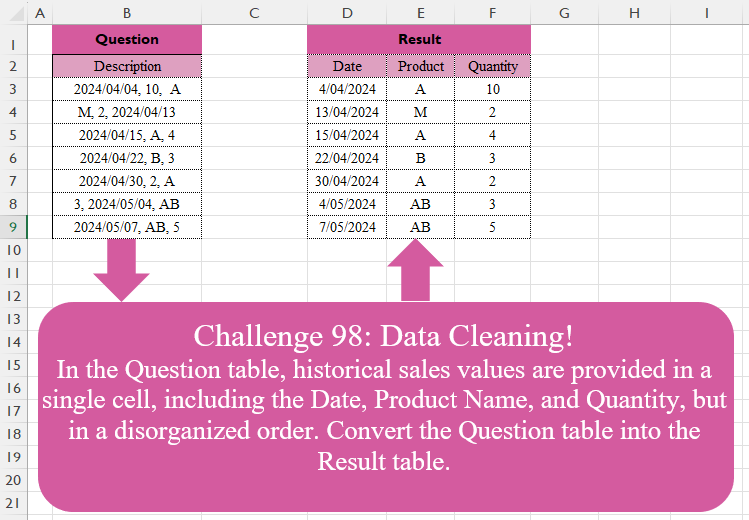
In the Question table, historical sales values are provided in a single cell, including the Date, Product Name, and Quantity, but in a disorganized order. Convert the Question table into the Result table.
📌 Challenge Details and Links
Challenge Number: 98
Challenge Difficulty: ⭐⭐⭐⭐
📥Download Sample File
📥Link to the solutions on LinkedIn
📥Link to the solution on YouTube
Solving the challenge of Data Cleaning! Part 1 with Power Query
Power Query solution 1 for Data Cleaning! Part 1, proposed by Zoran Milokanović:
let
  Source = Excel.CurrentWorkbook(){[Name = "Input"]}[Content],
  S = Table.FromList(
    Source[Description],
    each
      let
        t = List.Sort(
          List.Transform(Text.Split(_, ", "), Text.Trim),
          {{each Text.Contains(_, "/"), 1}, {each _, 1}}
        )
      in
        {Date.FromText(t{0}, [Format = "yyyy/MM/dd", Culture = "en-US"]), t{1}, Number.From(t{2})},
    {"Date", "Product", "Quantity"}
  )
in
  S
Power Query solution 2 for Data Cleaning! Part 1, proposed by 🇵🇪 Ned Navarrete C.:
let
  S = Excel.CurrentWorkbook(){[Name = "Table1"]}[Content][Description],
  R = Table.FromRows(
    List.Transform(
      S,
      each [
        a = Text.SplitAny(_, ", "),
        b = List.FirstN(List.Sort(a, 1), 3),
        c = List.Select(a, each Text.Length(_) = 10),
        d = List.Difference(b, c),
        e = {Date.From(c{0}), d{0}, Number.From(d{1})}
      ][e]
    ),
    type table [Date = date, Product = text, Quantity = number]
  )
in
  R
Power Query solution 3 for Data Cleaning! Part 1, proposed by Brian Julius:
let
  Source = Table.AddIndexColumn(Excel.CurrentWorkbook(){[Name = "Table1"]}[Content], "Index"),
  SplitByDelim = Table.ExpandListColumn(
    Table.TransformColumns(
      Source,
      {{"Description", Splitter.SplitTextByDelimiter(",", QuoteStyle.Csv)}}
    ),
    "Description"
  ),
  Trim = Table.TransformColumns(SplitByDelim, {{"Description", Text.Trim}}),
  AddTyper = Table.ReplaceErrorValues(
    Table.AddColumn(
      Trim,
      "Typer",
      each
        if Text.Contains([Description], "/") then
          "Date"
        else if List.Contains({1 .. 9}, Number.From(Text.Start([Description], 1))) then
          "Quantity"
        else
          "Product"
    ),
    {{"Typer", "Product"}}
  ),
  Clean = Table.ReorderColumns(
    Table.RemoveColumns(
      Table.Pivot(AddTyper, List.Distinct(AddTyper[Typer]), "Typer", "Description"),
      "Index"
    ),
    {"Date", "Product", "Quantity"}
  ),
  ReType = Table.TransformColumnTypes(Clean, {{"Date", type date}, {"Quantity", Int64.Type}})
in
  ReType
Power Query solution 4 for Data Cleaning! Part 1, proposed by Alejandro Simón 🇵🇦 🇪🇸:
let
Source = Excel.CurrentWorkbook(){[Name="Table1"]}[Content],
Sol = Table.Combine(Table.AddColumn(Source, "A", each
 let
 a = Text.Split([Description],", "),
 b = List.Transform(a, each try
 if Text.Contains(_, "/") then {Date.From(_), 0} else
 if Number.From(_) is number then {Number.From(_),2} else null
 otherwise {_, 1}),
 c = List.Sort(b, each _{1}),
 d = List.Transform(c, each _{0}),
 e = Table.FromRows({d}, {"Date", "Product", "Quantity"})
 in e)[A])
in
Sol
Power Query solution 5 for Data Cleaning! Part 1, proposed by Abdallah Ally:
let
  Source = Excel.CurrentWorkbook(){[Name = "Table1"]}[Content],
  Result = Table.FromRows(
    List.Transform(
      Source[Description],
      each [
        a = Text.Split(Text.Replace(_, " ", ""), ","),
        b = List.Select(a, each Text.Contains(_, "/")){0},
        c = List.Select(a, each List.ContainsAny(Text.ToList(_), {"A" .. "Z"})){0},
        d = List.RemoveItems(a, {b, c}){0},
        e = {Date.From(b), c, Number.From(d)}
      ][e]
    ),
    type table [Date = date, Product = text, Quantity = number]
  )
in
  Result
Power Query solution 6 for Data Cleaning! Part 1, proposed by Kris Jaganah:
let
  Source = Excel.CurrentWorkbook(){[Name = "Table1"]}[Content],
  Ans = Table.TransformColumns(
    Source,
    {
      "Description",
      each [
        a = Text.Split(_, ", "),
        b = Date.ToText(
          Date.From(List.Select(a, each Text.Contains(_, "/")){0}),
          [Format = "d/MM/yyyy"]
        ),
        c = List.Sort(
          List.Transform(a, each try Number.From(_) otherwise Text.Select(_, {"A" .. "Z"}))
        ),
        d = Table.FromColumns({{b}, {c{2}}, {c{0}}}, {"X", "Y", "Z"})
      ][d]
    }
  ),
  Xpan = Table.ExpandTableColumn(
    Ans,
    "Description",
    {"X", "Y", "Z"},
    {"Date", "Product", "Quantity"}
  )
in
  Xpan
Power Query solution 7 for Data Cleaning! Part 1, proposed by Yaroslav Drohomyretskyi:
let
  Source = Excel.CurrentWorkbook(){[Name = "Таблиця1"]}[Content],
  Transform = Table.TransformColumns(
    Source,
    {
      {
        "Description",
        each
          let
            SplitText = Text.Split(_, ","),
            DatePart = List.RemoveNulls(
              List.Transform(SplitText, each try Date.FromText(_) otherwise null)
            ){0},
            ProductPart = Text.Select(_, {"A" .. "Z"}),
            QuantityPart = List.RemoveNulls(
              List.Transform(SplitText, each try Number.FromText(_) otherwise null)
            ){0}
          in
            [Date = DatePart, Product = ProductPart, Quantity = QuantityPart],
        type record
      }
    }
  ),
  Expand = Table.ExpandRecordColumn(Transform, "Description", {"Date", "Product", "Quantity"})
in
  Expand
Power Query solution 8 for Data Cleaning! Part 1, proposed by 🇮🇷 Navid Esmaeilzadeh اسماعیل زاده:
let
  Source = Excel.CurrentWorkbook(){[Name = "Table1"]}[Content],
  #"Added Custom" = Table.AddColumn(
    Source,
    "L",
    each
      let
        L = Text.Split([Description], ", "),
        C = List.RemoveNulls(
          List.Transform(
            L,
            each try Date.FromText(_, "EN-en") otherwise try Number.From(_) otherwise Text.From(_)
          )
        ),
        D = List.Select(C, each Value.Is(_, type date)),
        P = List.Select(C, each Value.Is(_, type text)),
        Q = List.Select(C, each Value.Is(_, type number)),
        N = Table.FromColumns({D, P, Q}, {"Date", "Product", "Quantity"})
      in
        N
  ),
  #"Removed Other Columns" = Table.SelectColumns(#"Added Custom", {"L"}),
  #"Expanded L" = Table.ExpandTableColumn(
    #"Removed Other Columns",
    "L",
    {"Date", "Product", "Quantity"},
    {"Date", "Product", "Quantity"}
  )
in
  #"Expanded L"
Power Query solution 9 for Data Cleaning! Part 1, proposed by Francesco Bianchi 🇮🇹:
let
  Source = Excel.CurrentWorkbook(){[Name = "Table1"]}[Content],
  TextToList = Table.AddColumn(
    Source,
    "List",
    each Splitter.SplitTextByDelimiter(", ")([Description])
  )[List],
  Record = List.Transform(
    TextToList,
    each [
      Date = List.RemoveNulls(List.Transform(_, (x) => try Date.From(x) otherwise null)){0},
      Product = List.Select(
        _,
        (x) =>
          List.AnyTrue(
            List.Transform({"A" .. "Z"}, (y) => Text.Contains(y, Text.Start(Text.Trim(x), 1)))
          )
      ){0},
      Quantity = List.RemoveNulls(List.Transform(_, (x) => try Number.From(x) otherwise null)){0}
    ]
  ),
  Result = Table.FromRecords(
    Record,
    type table [Date = date, Product = text, Quantity = Int64.Type]
  )
in
  Result
Power Query solution 10 for Data Cleaning! Part 1, proposed by Szabolcs Phraner:
let Source =...,
ListRows = List.Accumulate(
 Source[Description],
 {},
 (s,c) => let
 ValueList = List.RemoveItems( Text.SplitAny(c,", "), {""}),
 //Create struture for listrows by sorting them, terefore colum names can be attributed to them
 SortValues = List.Sort(ValueList, {each if Text.Contains(_,"/") then 0 else if Text.Remove(_,{"0".."9"}) = _ then 1 else 2})
in s & {SortValues}
),
 Table = Table.FromRows( ListRows, {"Date","Product", "Quantity"} ),
 Format = Table.TransformColumns( Table,
{
 {"Date", each Date.FromText(_, [Format = "yyyy/MM/dd"]), Date.Type},
 {"Product", Text.From,Text.Type},
 {"Quantity", Int64.From,Int64.Type}
}
)
in
 Format
Solving the challenge of Data Cleaning! Part 1 with Excel
Excel solution 1 for Data Cleaning! Part 1, proposed by Bo Rydobon 🇹🇭:
=REDUCE(
    D2:F2,
    B3:B9,
    LAMBDA(
        a,
        x,
        VSTACK(
            a,
            LET(
                y,
                TRIM(
                    TEXTSPLIT(
                        x,
                        ","
                    )
                ),
                SORTBY(
                    IFERROR(
                        --y,
                        y
                    ),
                    LEN(
                        TEXT(
                            y,
                            0
                        )
                    )=LEN(
                        y
                    ),
                    ,
                    y,
                    -1
                )
            )
        )
    )
)
Excel solution 2 for Data Cleaning! Part 1, proposed by Bo Rydobon 🇹🇭:
=LET(
    r,
    REGEXREPLACE(
        B3:B9,
        "([d+/]{9,})|(pL)|(d)|.",
        "$"&{1,
        2,
        3}
    ),
    IFERROR(
        --r,
        r
    )
)
Excel solution 3 for Data Cleaning! Part 1, proposed by 🇰🇷 Taeyong Shin:
=LET(
    r,
    REGEXREPLACE(
        B3:B9,
        {".*(d{4}/d{2}/d{2}).*",
        "[d, /]",
        "d{4}/d{2}/d{2}|[A-Z, ]"},
        {"$1",
        "",
        ""}
    ),
    IFERROR(
        --r,
        r
    )
)


without REGEX

=LET(
    f,
    LAMBDA(
        x,
        TEXTSPLIT(
            TEXTAFTER(
                ", "&x,
                ", ",
                {1,
                2,
                3}
            ),
            ", "
        )
    ),
    s,
    f(
        B3:B9
    ),
    t,
    IFERROR(
        --s,
        TRIM(
            s
        )
    ),
    INDEX(
        t,
        SEQUENCE(
            ROWS(
            s
        )
        ),
        f(
            BYROW(
                t,
                LAMBDA(
                    r,
                    ARRAYTOTEXT(
                        XMATCH(
                            {100;"9";1},
                            r,
                            1
                        )
                    )
                )
            )
        )
    )
)
Excel solution 4 for Data Cleaning! Part 1, proposed by محمد حلمي:
=REDUCE(
    D2:F2,
    B3:B9,
    LAMBDA(
        a,
        v,
        LET(

            i,
            TEXTSPLIT(
                v,
                ,
                ", "
            ),
            j,
            SORT(
                IFERROR(
                    --i,
                    i
                ),
                ,
                -1
            ),

            VSTACK(
                a,
                HSTACK(
                    MAX(
                        j
                    ),
                    @j,
                    MIN(
                        j
                    )
                )
            )
        )
    )
)
Excel solution 5 for Data Cleaning! Part 1, proposed by 🇵🇪 Ned Navarrete C.:
=LET(
    m,
    REGEXEXTRACT(
        B3:B9,
        {"bd{4}/d{2}/d{2}b",
        "[A-Z]+",
        "(?
Excel solution 6 for Data Cleaning! Part 1, proposed by Oscar Mendez Roca Farell:
=CHOOSECOLS(
    REDUCE(
        HSTACK(
            F2,
             D2,
             E2
        ),
         B3:B9,
        LAMBDA(
            i,
             x,
             LET(
                 t,
                  TEXTSPLIT(
                      x,
                       ", "
                  ),
                  VSTACK(
                      i,
                       SORT(
                           IFERROR(
                               --t,
                                t
                           ),
                            ,
                            ,
                            1
                       )
                  )
             )
        )
    ),
     {2,
     3,
     1}
)
Excel solution 7 for Data Cleaning! Part 1, proposed by Julian Poeltl:
=REDUCE(
    HSTACK(
        "Date",
        "Product",
        "Quantity"
    ),
    B3:B9,
    LAMBDA(
        A,
        B,
        VSTACK(
            A,
            LET(
                S,
                TRIM(
                    TEXTSPLIT(
                        B,
                        ","
                    )
                ),
                O,
                SORT(
                    IFERROR(
                        S*1,
                        S
                    ),
                    ,
                    ,
                    1
                ),
                HSTACK(
                    CHOOSECOLS(
                        O,
                        2
                    ),
                    TAKE(
                        O,
                        ,
                        -1
                    ),
                    TAKE(
                        O,
                        ,
                        1
                    )
                )
            )
        )
    )
)
Excel solution 8 for Data Cleaning! Part 1, proposed by Julian Poeltl:
=VSTACK(
    HSTACK(
        "Date",
        "Product",
        "Quantity"
    ),
    LET(
        N,
        TEXTSPLIT(
            TEXTJOIN(
                "§",
                ,
                MAP(
                    B3:B9,
                    LAMBDA(
                        D,
                        LET(
                            S,
                            TRIM(
                                TEXTSPLIT(
                                    D,
                                    ","
                                )
                            ),
                            N,
                            IFERROR(
                                S*1,
                                S
                            ),
                            O,
                            SORT(
                                N,
                                ,
                                ,
                                1
                            ),
                            TEXTJOIN(
                                "|",
                                ,
                                HSTACK(
                                    CHOOSECOLS(
                                        O,
                                        2
                                    ),
                                    TAKE(
                                        O,
                                        ,
                                        -1
                                    ),
                                    TAKE(
                                        O,
                                        ,
                                        1
                                    )
                                )
                            )
                        )
                    )
                )
            ),
            "|",
            "§"
        ),
        IFERROR(
            N*1,
            N
        )
    )
)
Excel solution 9 for Data Cleaning! Part 1, proposed by Kris Jaganah:
=REDUCE(
    {"Date",
    "Product",
    "Quantity"},
    B3:B9,
    LAMBDA(
        x,
        y,
        VSTACK(
            x,
            LET(
                a,
                "d{4}/d{2}/d{2}",
                b,
                TEXT(
                    DATEVALUE(
                        REGEXEXTRACT(
                            y,
                            a,
                            1
                        )
                    ),
                    "d/mm/yyyy"
                ),
                c,
                SORT(
                    TRIM(
                        TEXTSPLIT(
                            REGEXREPLACE(
                                y,
                                a,
                                "",
                                1
                            ),
                            ", ",
                            ,
                            1
                        )
                    ),
                    ,
                    -1,
                    1
                ),
                HSTACK(
                    b,
                    c
                )
            )
        )
    )
)
Excel solution 10 for Data Cleaning! Part 1, proposed by Abdallah Ally:
=REDUCE(
    {"Date",
    "Product",
    "Quantity"},
    B3:B9,
    LAMBDA(
        x,
        y,
        LET(
            a,
             TEXTSPLIT(
                 SUBSTITUTE(
                     y,
                     " ",
                     ""
                 ),
                 ","
             ),
            b,
            DATEVALUE(
                FILTER(
                    a,
                    NOT(
                        ISERROR(
                             FIND(
                                 "/",
                                 a
                             )
                        )
                    )
                )
            ),
            c,
            FILTER(
                a,
                ISERROR(
                    FIND(
                        "/",
                        a
                    )
                )+ISERR(
                    --a
                )=2
            ),
            d,
            MIN(
                --FILTER(
                    a,
                    ISNUMBER(
                        -a
                    )
                )
            ),
            VSTACK(
                x,
                HSTACK(
                    b,
                    c,
                    d
                )
            )
        )
    )
)
Excel solution 11 for Data Cleaning! Part 1, proposed by Abdallah Ally:
=REDUCE(
    {"Date",
    "Product",
    "Quantity"},
    B3:B9,
    LAMBDA(
        x,
        y,
        VSTACK(
            x,
            HSTACK(
                DATEVALUE(
                    REGEXEXTRACT(
                        y,
                        "d+/d+/d+"
                    )
                ),
                REGEXEXTRACT(
                    y,
                    "[A-Za-z]+"
                ),
                --REGEXEXTRACT(
                    y,
                    "(?
Excel solution 12 for Data Cleaning! Part 1, proposed by Imam Hambali:
=LET(    ts,
     DROP(
         REDUCE(
             "",
              B3:B9,
              LAMBDA(
                  x,
                  y,
                   VSTACK(
                       x,
                        TEXTSPLIT(
                            y,
                            ","
                        )
                   )
              )
         ),
         1
     ),    ie,
     IFERROR(
         VALUE(
             ts
         ),
         ts
     ),    l,
     LAMBDA(
         val,
          BYROW(
              ie,
               LAMBDA(
                   x,
                    XLOOKUP(
                        val,
                        IF(
                            val=TRUE,
                             ISTEXT(
                                 x
                             ),
                            x
                        ),
                        x,
                        ,
                        -1
                    )
               )
          )
     ),    HSTACK(
        l(
            50000
        ),
         l(
             TRUE
         ),
         l(
             100
         )
    ))
Excel solution 13 for Data Cleaning! Part 1, proposed by Sunny Baggu:
=LET(     _ts,
     WRAPROWS(
         TEXTSPLIT(
             TEXTJOIN(
                 ", ",
                  ,
                  TRIM(
                      B3:B9
                  )
             ),
              ", "
         ),
          3
     ),     _c,
     _ts + 0,     _d,
     TOCOL(
         IF(
             LEN(
                 _c
             ) = 5,
              _c,
              x
         ),
          3
     ),     _p,
     TOCOL(
         IF(
             ISERR(
                 _c
             ),
              _ts,
              x
         ),
          3
     ),     _q,
     TOCOL(
         IF(
             LEN(
                 _c
             ) <> 5,
              _c,
              x
         ),
          3
     ),     VSTACK(
         {"Date",
          "Product",
          "Quantity"},
          HSTACK(
              _d,
               _p,
               _q
          )
     ))
Excel solution 14 for Data Cleaning! Part 1, proposed by An Nguyen:
=TRIM(
    TEXT(
        REGEXEXTRACT(
            B3:B9,
            {"d{4}/d{2}/d{2}",
            "(?:(?<=^)|(?<=,s?))D+(?=,|$)",
            "(?:(?<=^)|(?<=,s))d+(?=,|$)"}
        ),
        "[>99]dd/mm/yyyy;[<99]0;;@"
    )
)
Excel solution 15 for Data Cleaning! Part 1, proposed by Andy Heybruch:
=TEXTSPLIT(
    REDUCE(
        "Date, Product, Quantity",
        B3:B9,
        LAMBDA(
            a,
            v,
            LET(

                _array,
                TEXTSPLIT(
                    v,
                    ", "
                ),

                _product,
                XLOOKUP(
                    FALSE,
                    ISNUMBER(
                        --_array
                    ),
                    _array
                ),

                _date,
                XLOOKUP(
                    TRUE,
                    ISNUMBER(
                        SEARCH(
                            "/",
                            _array
                        )
                    ),
                    _array
                ),

                _q,
                XLOOKUP(
                    TRUE,
                    --_array<1000,
                    _array
                ),
                a&"|"&ARRAYTOTEXT(
                    HSTACK(
                        _date,
                        _product,
                        _q
                    )
                )
            )
        )
    ),
    ", ",
    "|"
)
Excel solution 16 for Data Cleaning! Part 1, proposed by Asheesh Pahwa:
=REDUCE(
    D2:F2,
    B3:B9,
    LAMBDA(
        x,
        y,
        VSTACK(
            x,
            LET(
                t,
                TEXTSPLIT(
                    y,
                    ", "
                ),
                f,
                ISNUMBER(
                    FIND(
                        "/",
                        t
                    )
                ),
                _f1,
                FILTER(
                    t,
                    f
                ),
                I,
                ISERROR(
                    --t
                ),
                _f2,
                FILTER(
                    t,
                    I
                ),
                h,
                HSTACK(
                    _f1,
                    _f2
                ),
                r,
                REDUCE(
                    t,
                    SEQUENCE(
                        COLUMNS(
                            h
                        )
                    ),
                    LAMBDA(
                        a,
                        v,
                        LET(
                            s,
                            SUBSTITUTE(
                                a,
                                INDEX(
                                    h,
                                    ,
                                    v
                                ),
                                ""
                            ),
                            FILTER(
                                s,
                                s<>""
                            )
                        )
                    )
                ),
                HSTACK(
                    h,
                    r
                )
            )
        )
    )
)
Excel solution 17 for Data Cleaning! Part 1, proposed by Bilal Mahmoud kh.:
=LET(a,
    BYROW(TRIM(
        TEXTSPLIT(
            TEXTJOIN(
                "-",
                ,
                B3:B9
            ),
            ",",
            "-"
        )
    ),
    LAMBDA(x,
    CONCAT(IF(ISNUMBER(
        --x
    )*(IFERROR(
        --x,
        0
    )>10),
    x,
    ""))&"-"&CONCAT(
        IF(
            ISNUMBER(
        --x
    ),
            "",
            x
        )
    )&"-"&CONCAT(IF(ISNUMBER(
        --x
    )*(IFERROR(
        --x,
        0
    )<=10),
    x,
    "")))),
    TEXTSPLIT(
        TEXTJOIN(
            ",",
            ,
            a
        ),
        "-",
        ","
    ))
Excel solution 18 for Data Cleaning! Part 1, proposed by Diarmuid Early:
=REGEXEXTRACT(
    B3:B9,