
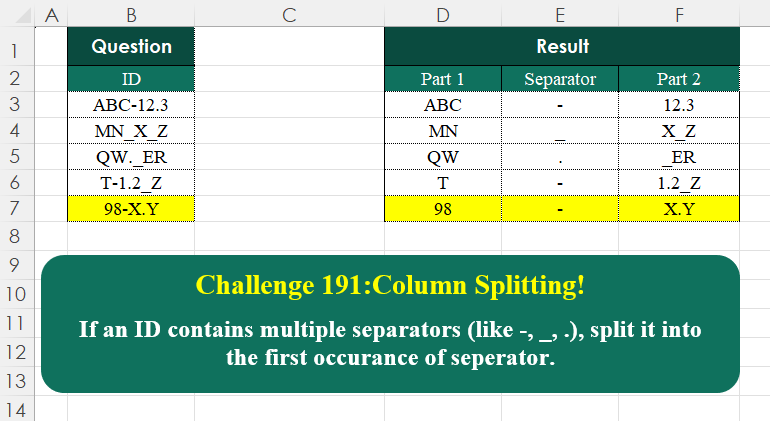
If an ID contains multiple separators (like -, _, .), split it into the first occurrence of separator.
📌 Challenge Details and Links
Challenge Number: 191
Challenge Difficulty: ⭐⭐
📥Download Sample File
📥Link to the solutions on LinkedIn
Solving the challenge of Column Splitting! Part 5 with Power Query
Power Query solution 1 for Column Splitting! Part 5, proposed by Zoran Milokanović:
let
  Source = Excel.CurrentWorkbook(){[Name = "Input"]}[Content][ID],
  _ = Table.FromRows(
    List.TransformMany(
      Source,
      each {Text.At(Text.Remove(_, {"A" .. "Z", "0" .. "9"}), 0)},
      (i, _) => {Text.BeforeDelimiter(i, _), _, Text.AfterDelimiter(i, _)}
    ),
    {"Part 1", "Separator", "Part 2"}
  )
in
  _
Power Query solution 2 for Column Splitting! Part 5, proposed by Brian Julius:
let
  Source = DataRaw,
  AddSep = Table.AddColumn(
    Source,
    "Sep",
    each [
      a = {"A" .. "Z", "0" .. "9"},
      b = Text.ToList([ID]),
      c = List.RemoveMatchingItems(b, a),
      d = List.First(c)
    ][d]
  ),
  AddPt1 = Table.AddColumn(
    AddSep,
    "Part 1",
    each [
      a = [ID],
      b = Text.Length(a),
      c = Text.PositionOfAny(a, {[Sep]}),
      e = Text.Range(a, 0, c),
      f = Text.RemoveRange(Text.Range(a, c, b - c), 0, 1),
      g = Table.FromColumns({{e}, {f}}, {"Part 1", "Part 2"})
    ][g]
  ),
  Exp = Table.ReorderColumns(
    Table.ExpandTableColumn(AddPt1, "Part 1", {"Part 1", "Part 2"}),
    {"ID", "Part 1", "Sep", "Part 2"}
  )
in
  Exp
Power Query solution 3 for Column Splitting! Part 5, proposed by Luan Rodrigues:
let
  Fonte = Table.TransformColumns(
    Tabela1,
    {
      "ID",
      each
        let
          a = Text.Start(Text.Remove(_, {"A" .. "Z", "0" .. "9"}), 1),
          b = {Text.BeforeDelimiter(_, a), a, Text.AfterDelimiter(_, a)},
          c = Table.FromRows(
            {b},
            List.Transform({1 .. List.Count(b)}, (x) => "Part " & Text.From(x))
          )
        in
          c
    }
  )[ID],
  res = Table.Combine(Fonte)
in
  res
Power Query solution 4 for Column Splitting! Part 5, proposed by Ramiro Ayala Chávez:
let
S = Excel.CurrentWorkbook(){[Name="Table1"]}[Content],
Fx = (x)=> let
a = x,
b = Text.SplitAny(a,"-_."),
c = Text.ToList(Text.Combine(b)),
d = List.Difference(Text.ToList(a),c){0},
e = Text.Combine(List.Skip(Splitter.SplitTextByCharacterTransition({"0".."9","A".."z"},{d})(a))),
f = Text.End(e,Text.Length(e)-1),
g = Table.FromRows({{b{0}}&{d}&{f}},{"Part 1","Separator","Part 2"})
in g,
h = Table.AddColumn(S,"A", each Fx([ID])),
Sol = Table.ExpandTableColumn(h,"A",{"Part 1","Separator","Part 2"})
in
Sol
Power Query solution 5 for Column Splitting! Part 5, proposed by Alejandro Simón 🇵🇦 🇪🇸:
let
Source = Excel.CurrentWorkbook(){[Name="Table1"]}[Content],
Sol = Table.Combine(Table.AddColumn(Source, "A", each
 let
 a = [ID],
 b = List.RemoveItems(Text.ToList(a), {"A".."Z", "0".."9"}){0},
 c = Text.PositionOf(a,b),
 d = Splitter.SplitTextByPositions({0,c,c+1})(a),
 e = Table.FromRows({d}, {"Part 1", "Separator", "Part 2"})
 in e)[A])
in
Sol
Power Query solution 6 for Column Splitting! Part 5, proposed by Krzysztof Kominiak:
let
  Source = Table.FromRows(
    Json.Document(
      Binary.Decompress(
        Binary.FromText(
          "i45WcnRy1jU00jNWitWJVvL1i4+IjwIzA8P14l2DwMwQXUM9I6iwpYVuhF6kUmwsAA==",
          BinaryEncoding.Base64
        ),
        Compression.Deflate
      )
    ),
    let
      _t = ((type nullable text) meta [Serialized.Text = true])
    in
      type table [ID = _t]
  ),
  Result = Table.Combine(
    Table.AddColumn(
      Source,
      "tmp",
      each [
        a = Text.Start(Text.Remove([ID], {"A" .. "Z", "0" .. "9"}), 1),
        b = Text.BeforeDelimiter([ID], a),
        c = Text.AfterDelimiter([ID], a),
        d = {b, a, c},
        e = Table.FromRows({d}, {"Part1", "Separator", "Part2"})
      ][e]
    )[tmp]
  )
in
  Result
Power Query solution 7 for Column Splitting! Part 5, proposed by Kris Jaganah:
Table.FromRows(
  List.Transform(
    Excel.CurrentWorkbook(){[Name = "Table1"]}[Content][ID],
    each [
      a = Text.PositionOfAny(_, {"-", "_", "."}),
      b = (x, y) => Text.Middle(_, x, y),
      c = {b(0, a), b(a, 1), b(a + 1, 5)}
    ][c]
  ),
  {"Part 1", "Separator", "Part 2"}
)
Power Query solution 8 for Column Splitting! Part 5, proposed by CA Raghunath Gundi:
let
  Source = Excel.CurrentWorkbook(){[Name = "Table1"]}[Content],
  SplitBy = Table.TransformColumns(
    Source,
    {
      "ID",
      each [
        a = List.PositionOfAny(Text.ToList(_), {".", "-", "_"}),
        b = Text.Start(_, a),
        c = Text.Range(_, a, 1),
        d = Text.End(_, Text.Length(_) - (a + 1))
      ]
    }
  ),
  Result = Table.ExpandRecordColumn(
    SplitBy,
    "ID",
    {"b", "c", "d"},
    {"Part-1", "Separator", "Part-2"}
  )
in
  Result
Power Query solution 9 for Column Splitting! Part 5, proposed by Seokho MOON:
let
  Source = Excel.CurrentWorkbook(){[Name = "Table1"]}[Content],
  Separators = {"-", "_", "."},
  Rows = List.Transform(Source[ID], Fun),
  Fun = each [
    A = Text.PositionOfAny(_, Separators, Occurrence.First),
    B = {Text.Start(_, A), Text.At(_, A), Text.Middle(_, A + 1)}
  ][B],
  Res = Table.FromRows(Rows, {"Part 1", "Separator", "Part 2"})
in
  Res
Power Query solution 10 for Column Splitting! Part 5, proposed by Sahan Jayasuriya:
let
  Source = Excel.CurrentWorkbook(){[Name = "Data"]}[Content],
  AddCommonSeparator = Table.TransformColumns(
    Source,
    {},
    each [
      a = Text.PositionOfAny(_, {"-", "_", "."}, Occurrence.First),
      b = List.Accumulate({a, a + 2}, _, (s, c) => Text.Insert(s, c, "|"))
    ][b]
  ),
  SplitCols = Table.SplitColumn(
    AddCommonSeparator,
    "ID",
    Splitter.SplitTextByDelimiter("|", QuoteStyle.Csv),
    {"Part 1", "Separator", "Part 2"}
  )
in
  SplitCols
Power Query solution 11 for Column Splitting! Part 5, proposed by Vida Vaitkunaite:
let
 Source = Excel.CurrentWorkbook(){[Name="Table1"]}[Content],
 Custom = Table.AddColumn(Source, "Custom", each let
a = Text.Start(Text.Remove([ID], {"a".."z", "A".."Z", "0".."9"}), 1),
b = Text.PositionOf([ID], a),
c = Splitter.SplitTextByPositions({0, b, b+1})([ID]),
d = Table.FromRows({c}, {"Part 1", "Separator", "Part 2"})
in d),
 Final = Table.Combine(Custom[Custom])
in
 Final
Solving the challenge of Column Splitting! Part 5 with Excel
Excel solution 1 for Column Splitting! Part 5, proposed by 🇰🇷 Taeyong Shin:
=REGEXEXTRACT(
    B3:B7,
    ".*?p{Ps}K.*?(?=p{Pe})"
)
Excel solution 2 for Column Splitting! Part 5, proposed by Oscar Mendez Roca Farell:
=LET(
    i,
    B3:B7,
    s,
    REGEXEXTRACT(
        i,
        "[^A-Z1-9]"
    ),
    HSTACK(
        TEXTBEFORE(
            i,
            s
        ),
        s,
         TEXTAFTER(
            i,
            s
        )
    )
)
Excel solution 3 for Column Splitting! Part 5, proposed by Julian Poeltl:
=REDUCE(
    HSTACK(
        "Part 1",
        "Separator",
        "Part 2"
    ),
    B3:B7,
    LAMBDA(
        A,
        B,
        VSTACK(
            A,
            LET(
                T,
                TEXTBEFORE(
                    B,
                    {"-",
                    ".",
                    "_"}
                ),
                C,
                TEXTAFTER(
                    B,
                    T
                ),
                HSTACK(
                    T,
                    LEFT(
                        C,
                        1
                    ),
                    RIGHT(
                        C,
                        LEN(
                            C
                        )-1
                    )
                )
            )
        )
    )
)
Excel solution 4 for Column Splitting! Part 5, proposed by Kris Jaganah:
=LET(
    a,
    B3:B7,
    b,
    TEXTSPLIT(
        a,
        {"-",
        "_",
        "."}
    ),
    HSTACK(
        b,
        MID(
            a,
            LEN(
                b
            )+{1,
            2},
            {1,
            5}
        )
    )
)
Excel solution 5 for Column Splitting! Part 5, proposed by Sunny Baggu:
=REDUCE(     {"Part 1",
     "Separator",
     "Part 2"},     B3:B7,     LAMBDA(
         x,
          y,          VSTACK(

               x,

               LET(

                    _a,
                    VSTACK(
                        CHAR(
                            SEQUENCE(
                                26,
                                 ,
                                 65
                            )
                        ),
                         SEQUENCE(
                             10,
                              ,
                              0
                         )
                    ),

                    _b,
                    LEFT(
                        TAKE(
                            TEXTSPLIT(
                                y,
                                 _a,
                                 ,
                                 1
                            ),
                             ,
                             1
                        )
                    ),

                    HSTACK(
                        TEXTBEFORE(
                            y,
                             _b
                        ),
                         _b,
                         TEXTAFTER(
                            y,
                             _b
                        )
                    )

               )

          )     ))
Excel solution 6 for Column Splitting! Part 5, proposed by abdelaziz allam:
=LET(
    a,
    TEXTBEFORE(
        B3:B7,
        {"-",
        ".",
        "_"}
    ),
    b,
    TEXTAFTER(
        B3:B7,
        a
    ),
    c,
    LEFT(
        b,
        1
    ),
    bb,
    RIGHT(
        b,
        LEN(
            b
        )-1
    ),
    HSTACK(
        a,
        c,
        bb
    )
)
Excel solution 7 for Column Splitting! Part 5, proposed by Alejandro Campos:
=LET(     rng,
     B3:B7,     sep,
     {"-",
     "_",
     "."},     p_1,
     TEXTSPLIT(
         rng,
          sep
     ),     p_2,
     TEXTAFTER(
         rng,
          sep
     ),     sp,
     TEXTBEFORE(
         TEXTAFTER(
             rng,
              p_1
         ),
          p_2
     ),     HSTACK(
         p_1,
          sp,
          p_2
     )
)
Excel solution 8 for Column Splitting! Part 5, proposed by Andy Heybruch:
=TEXTSPLIT(     TEXTJOIN(
         ":",
         ,          BYROW(
              B3:B7,

               LAMBDA(
                   x,

                    TEXTJOIN(
                        "|",
                        ,

                         REGEXEXTRACT(
                             x,
                             "([A-Z0-9]+)([^A-Z0-9]+)([A-Z0-9D]+)",
                             2
                         )

                    )

               )

          )     )
     ,
    "|",
    ":"
)
Excel solution 9 for Column Splitting! Part 5, proposed by Asheesh Pahwa:
=LET(
    v,
    VSTACK(
        SEQUENCE(
            10,
            ,
            0
        ),
        CHAR(
            SEQUENCE(
                26,
                ,
                65
            )
        )
    ),
    REDUCE(
        D2:F2,
        B3:B7,
        LAMBDA(
            y,
            x,
            VSTACK(
                y,
                LET(
                    t,
                    TEXTSPLIT(
                        x,
                        v,
                        ,
                        1
                    ),
                    l,
                    IF(
                        COUNTA(
                            t
                        )>1,
                        TAKE(
                            t,
                            ,
                            1
                        ),
                        LEFT(
                            t
                        )
                    ),
                    _t,
                    TEXTAFTER(
                        x,
                        l
                    ),
                    HSTACK(
                        TEXTBEFORE(
                        x,
                        l
                    ),
                        l,
                        _t
                    )
                )
            )
        )
    )
)
Excel solution 10 for Column Splitting! Part 5, proposed by Burhan Cesur:
=LET(
    a,
    TEXTSPLIT(
        B3:B7,
        {"-",
        "_",
        "."}
    ),
    l,
    LEN(
        a
    ),
    p,
    MID(
        B3:B7,
        l+1,
        1
    ),
    s,
    TEXTAFTER(
        B3:B7,
        p
    ),
    HSTACK(
        a,
        p,
        s
    )
)
Excel solution 11 for Column Splitting! Part 5, proposed by Fausto Bier:
=LET(
    r,
    B3:B7,
    c,
    REGEXEXTRACT(
        r,
        "[W|_]",
        1
    ),
    HSTACK(
        TEXTBEFORE(
            r,
            c
        ),
        c,
        TEXTAFTER(
            r,
            c
        )
    )
)
Excel solution 12 for Column Splitting! Part 5, proposed by ferhat CK:
=REDUCE(
    {"Part 1",
    "Separator",
    "Part 2"},
    B3:B7,
    LAMBDA(
        x,
        y,
        VSTACK(
            x,
            LET(
                r,
                {",",
                ".",
                "-",
                "|",
                "_"},
                a,
                MIN(
                    TOCOL(
                        FIND(
                            r,
                            y,
                            1
                        ),
                        2
                    )
                ),
                sp,
                MID(
                    y,
                    a,
                    1
                ),
                p,
                MID(
                    y,
                    1,
                    a-1
                ),
                HSTACK(
                    p,
                    sp,
                    MID(
                        y,
                        a+1,
                        LEN(
                            y
                        )-a
                    )
                )
            )
        )
    )
)
Excel solution 13 for Column Splitting! Part 5, proposed by Hamidi Hamid:
=LET(
    x,
    BASE(
        SEQUENCE(
            36,
            ,
            0
        ),
        36
    ),
    v,
    TEXTBEFORE(
        BYROW(
            XLOOKUP(
                MID(
                    B3:B7,
                    SEQUENCE(
                        ,
                        20
                    ),
                    1
                ),
                x,
                x,
                "-"
            ),
            CONCAT
        ),
        "-"
    ),
    w,
    MID(
        TEXTAFTER(
            MID(
                B3:B7,
                1,
                100
            ),
            v
        ),
        2,
        100
    ),
    tx,
    TEXTAFTER(
        TEXTAFTER(
            TEXTBEFORE(
                B3:B7,
                w,

            ),

        ),
        v
    ),
    HSTACK(
        v,
        tx,
        w
    )
)
Excel solution 14 for Column Splitting! Part 5, proposed by Hussein SATOUR:
=LET(
    a,
    B3:B7,
    b,
    TEXTBEFORE(
        a,
        {"-",
        "_",
        "."}
    ),
    c,
    LEN(
        b
    ),
    HSTACK(
        b,
        MID(
            a,
            c+1,
            1
        ),
        MID(
            a,
            c+2,
            5
        )
    )
)
Excel solution 15 for Column Splitting! Part 5, proposed by Md. Zohurul Islam:
=LET(
    z,
    B3:B7,
    del,
    {"-",
    "_",
    "."},
    hdr,
    {"Part 1",
    "Separator",
    "Part 2"},
    REDUCE(
        hdr,
        z,
        LAMBDA(
            x,
            y,
            LET(
                a,
                TEXTBEFORE(
                    y,
                    del,
                    1
                ),
                b,
                MIN(
                    IFERROR(
                        SEARCH(
                            del,
                            y
                        ),
                        99
                    )
                ),
                c,
                MID(
                    y,
                    b,
                    1
                ),
                d,
                TEXTAFTER(
                    y,
                    c
                ),
                e,
                HSTACK(
                    a,
                    c,
                    d
                ),
                VSTACK(
                    x,
                    e
                )
            )
        )
    )
)
Excel solution 16 for Column Splitting! Part 5, proposed by Pieter de B.:
=LET(
    b,
    B3:B7,
    x,
    {"-",
    "_",
    "."},
    a,
    TEXTAFTER,
    s,
    TEXTSPLIT(
        b,
        x
    ),
    c,
    a(
        b,
        x
    ),
    HSTACK(
        s,
        LEFT(
            a(
                b,
                s
            )
        ),
        c
    )
)
Excel solution 17 for Column Splitting! Part 5, proposed by Rick Rothstein:
=LET(
    t,
    TEXTBEFORE(
        B3:B7,
        {"-",
        "_",
        "."}
    ),
    HSTACK(
        t,
        MID(
            B3:B7,
            LEN(
                t
            )+{1,
            2},
            {1,
            99}
        )
    )
)
Excel solution 18 for Column Splitting! Part 5, proposed by Seokho MOON:
=DROP(
    REDUCE(
        "",
        B3:B7,
         LAMBDA(
             a,
             v,
              VSTACK(
                  a,
                   REGEXEXTRACT(
                       v,
                       "([^-_.]*)([-_.])(.*)",
                       2
                   )
              )
         )
    ),
    1
)
Excel solution 19 for Column Splitting! Part 5, proposed by Songglod Petchamras:
=LET(
    id,
    B3:B7,
    sep,
    {"-",
    "_",
    "."},
    _p1,
    TEXTBEFORE(
        id,
        sep,
        1
    ),
    _p2,
    TEXTAFTER(
        id,
        sep,
        1
    ),
    HSTACK(
        _p1,
        SUBSTITUTE(
            SUBSTITUTE(
                id,
                _p1,
                ""
            ),
            _p2,
            ""
        ),
        _p2
    )
)
Excel solution 20 for Column Splitting! Part 5, proposed by Vishwa S:
=LET(
    data,
    B3:B7,
    c,
    REGEXEXTRACT(
        data,
        "[.-_]"
    ),
    a,
    TEXTBEFORE(
        data,
        c
    ),
    d,
    TEXTAFTER(
        data,
        c,
        1
    ),
    HSTACK(
        a,
        c,
        d
    )
)
Solving the challenge of Column Splitting! Part 5 with Python
Python solution 1 for Column Splitting! Part 5, proposed by Konrad Gryczan, PhD:
import pandas as pd
import re
path = "CH-191Column Splitting.xlsx"
input = pd.read_excel(path, usecols="B", skiprows=1, nrows=6)
test = pd.read_excel(path, usecols="D:F", skiprows=1, nrows=6).astype(str)
input[['Part 1', 'Separator', 'Part 2']] = input.iloc[:, 0].str.extract(r"([A-Za-z0-9]+)([^A-Za-z0-9])(.*)").astype(str)
result = input[['Part 1', 'Separator', 'Part 2']]
print(result.equals(test))  # True
Python solution 2 for Column Splitting! Part 5, proposed by Luan Rodrigues:
import pandas as pd
file = "CH-191Column Splitting.xlsx"
df = pd.read_excel(file, usecols="B",skiprows=1)
df['ID.1'] = df['ID'].str.replace(r'[0-9A-Z]','',regex=True).str[0]
df = df.apply(lambda x: pd.Series([
 x['ID'].split(str(x['ID.1']))[0] ,
 x['ID.1'] ,
 x['ID'].split(str(x['ID.1']))[1]
 ]), axis=1)
df.columns = ['Part 1','Sepadador','Part 2']
print(df)
Python solution 3 for Column Splitting! Part 5, proposed by Abdallah Ally:
import pandas as pd
from string import digits, ascii_letters
# Create a function to split text
def split_text(text):
 sep_ind = text.find([x for x in text if x not in digits + ascii_letters][0])
 return [text[:sep_ind], text[sep_ind], text[sep_ind + 1:]]

# Load the Excel file
file_path = 'CH-191Column Splitting.xlsx'
df = pd.read_excel(io=file_path, usecols='B', skiprows=1)
# Perform data transformation
df[['Part 1', 'Separator', 'Part 2']] = df['ID'].map(split_text).tolist()
df = df.drop(columns='ID')
# Display the final results
df
Solving the challenge of Column Splitting! Part 5 with Python in Excel
Python in Excel solution 1 for Column Splitting! Part 5, proposed by Alejandro Campos:
import re
def split_id(id_string):
 match = re.search(r'[-_.]', id_string)
 if match:
 separator = match.group()
 parts = re.split(r'[-_.]', id_string, 1)
 return parts[0], separator, parts[1]
 else:
 return id_string, '', ''
ids = xl("B3:B7")[0]
formatted_results = [split_id(id_string) for id_string in ids]
df = pd.DataFrame(formatted_results, columns=["Part 1", "Separator", "Part 2"])
Solving the challenge of Column Splitting! Part 5 with R
R solution 1 for Column Splitting! Part 5, proposed by Konrad Gryczan, PhD:
library(tidyverse)
library(readxl)
path = "files/CH-191Column Splitting.xlsx"
input = read_excel(path, range = "B2:B7")
test = read_excel(path, range = "D2:F7")
result = input %>%
 extract(ID, into = c("Part 1", "Separator", "Part 2"), "([A-Za-z0-9]+)([^A-Za-z0-9])(.*)")
all.equal(result, test, check.attributes = FALSE)
# [1] TRUE