Challenge No. 145: Find the largest length of occurrences of the “++-” pattern across the test IDs for each product.
Solved using:Excel (CONCAT, GROUPBY, LAMBDA), Google Sheets, Power Query (List.Transform, Text.Combine, Table.AddColumn), Python, Python in Excel, and R.
Table.Group
Groups rows in a table based on specified columns and applies aggregations in Power Query.
First Date Of Months!
Challenge No. 144: From the provided “transactions” table, filter the first transaction for each.
Solved using:Excel (DROP, FILTER, LAMBDA), Google Sheets, Power Query (Date.Month, Table.AddColumn, Table.Group), Python, Python in Excel, and R.
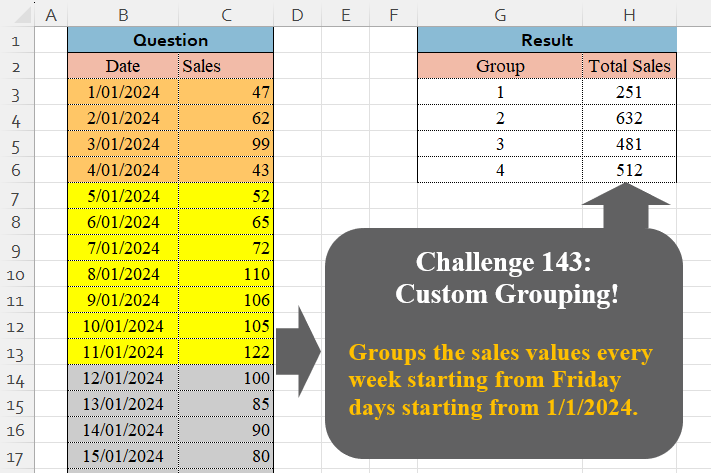
Custom Grouping! Part 9
Challenge No. 143: Groups the sales values every week starting from Friday days starting from 1/1/2024.
Solved using:Excel (GROUPBY, LAMBDA, LET), Google Sheets, Power Query (Table.Group, Date.WeekOfYear, Table.AddColumn), Python, Python in Excel, and R.
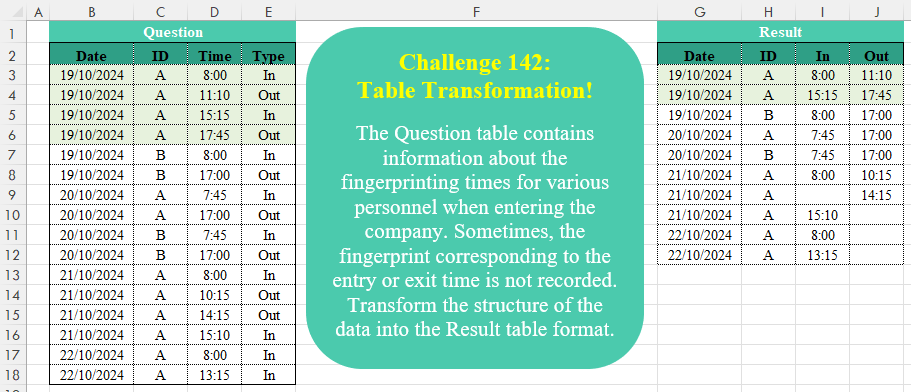
Table Transformation! Part 15
Challenge No. 142: The Question table contains information about the fingerprinting times for various personnel when entering the company.
Solved using:Excel (DROP, HSTACK, IF), Google Sheets, Power Query (Table.AddColumn, Table.Group, Table.Pivot), Python, Python in Excel, and R.
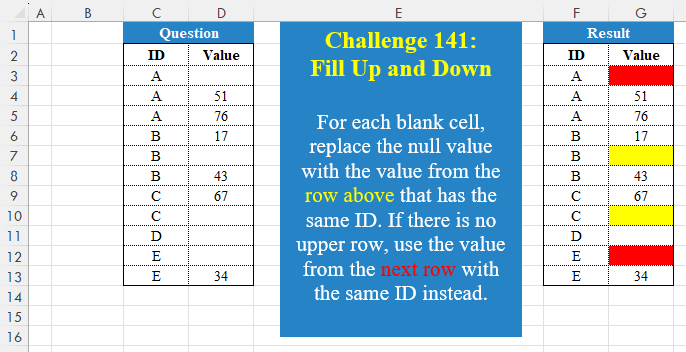
Fill Up And Down !
Challenge No. 141: For each blank cell, replace the null value with the value from the row above that has the same ID.
Solved using:Excel (FILTER, HSTACK, IF), Google Sheets, Power Query (Table.Group), Python, Python in Excel, and R.
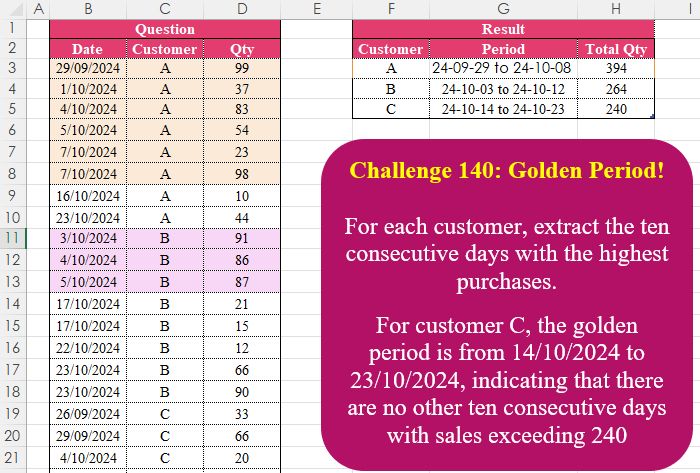
Golden Period!
Challenge No. 140: For each customer, extract the ten consecutive days with the highest purchases.
Solved using:Excel (FILTER, HSTACK, IFS), Google Sheets, Power Query (Table.AddColumn, Table.Group), Python in Excel, and R.
Custom Grouping! Part 8
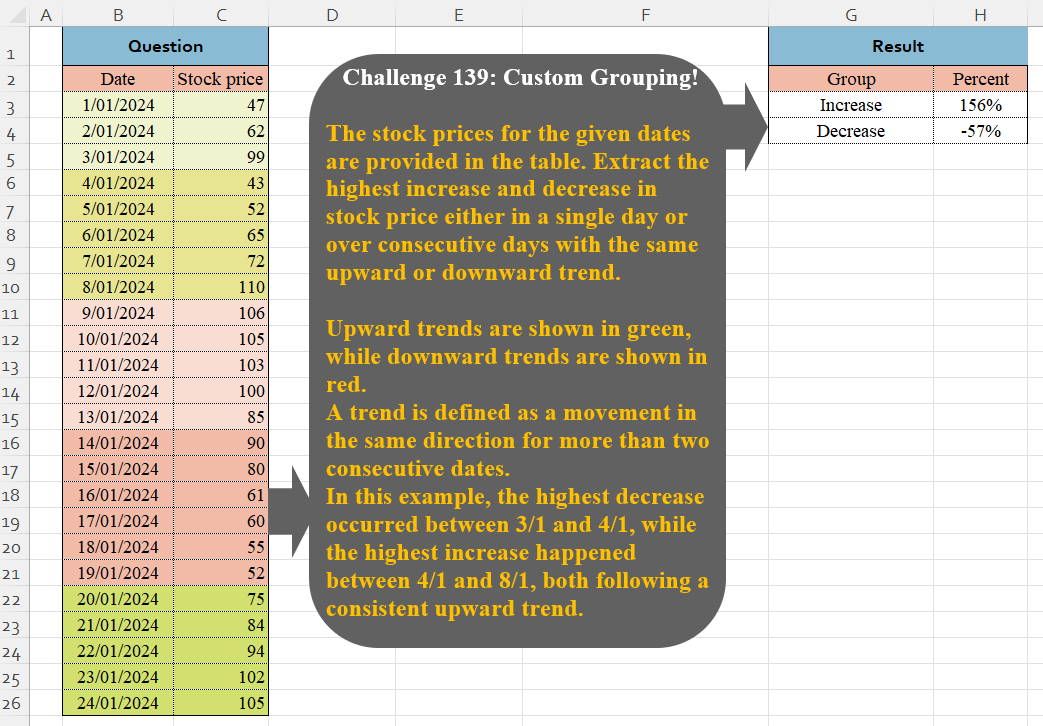
Challenge No. 139: The stock prices for the given dates are provided in the table.
Solved using:Excel (VSTACK), Google Sheets, Power Query (Table.Group, List.Combine, List.Transform), Python, and Python in Excel.
Sum Bird Quantity Alphabetically
Challenge No. 64: Looks like yesterday’s problem was a difficult one as only one person responded.
Solved using: Power Query (Table.Group, Table.Sort).
Filter Values Based on Table
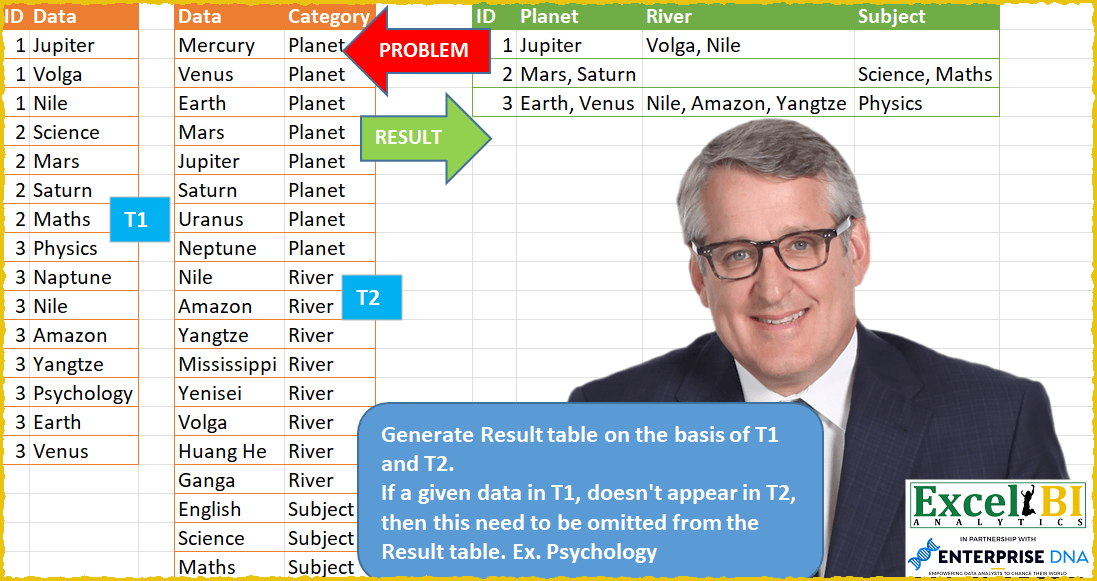
Challenge No. 61: Generate Result table on the basis of T1 and T2.
Solved using: Power Query (List.Distinct, Table.Group, Table.Pivot).
Identify The Pattern !
Challenge No. 135: Find the number of occurrences of the “+-+” pattern across the test IDs for each product.
Solved using:Excel (BYROW, CONCAT, DROP), Google Sheets, Power Query (List.Range, Text.Combine, Table.AddColumn), Python, Python in Excel, and R.