
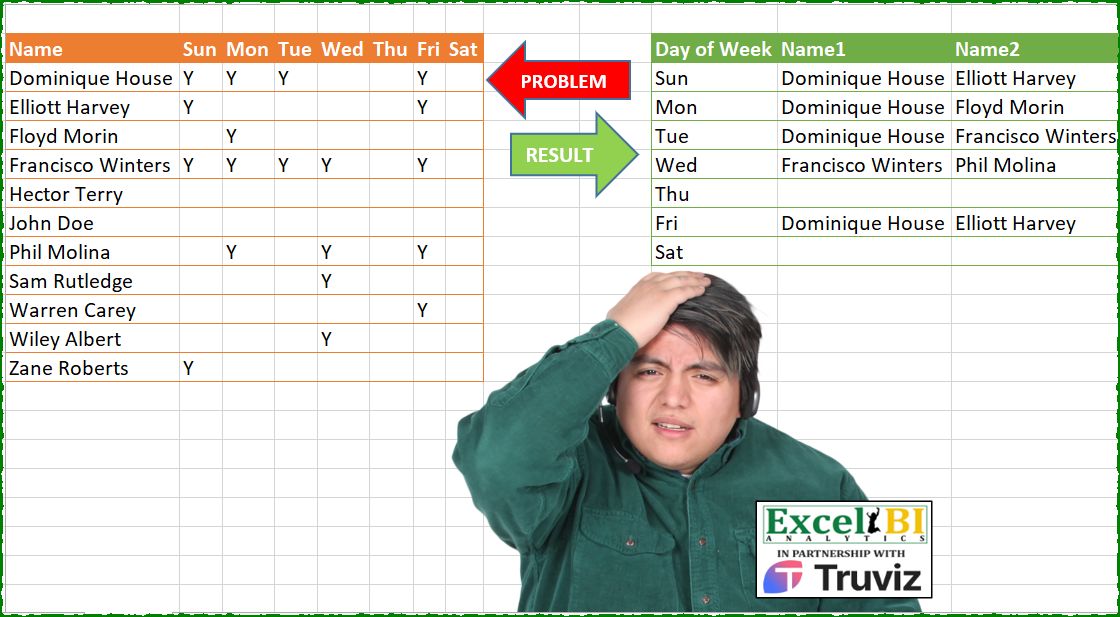
Generate the result table from problem table.
📌 Challenge Details and Links
ExcelBI Power Query Challenge Number: 207
Challenge Difficulty: ⭐️
📥Download Sample File
📥Link to the solutions on LinkedIn
Solving the challenge of Summarize Yearly Sales with Power Query
Power Query solution 1 for Summarize Yearly Sales, proposed by Zoran Milokanović:
let
  Fonte = Excel.CurrentWorkbook(){[Name = "Input"]}[Content],
  UnpivotedOtherColumns = Table.FromRows(
    List.TransformMany(
      Table.ToRows(Fonte),
      each List.Skip(List.Zip({Table.ColumnNames(Fonte), _})),
      (i, _) => {i{0}} & _
    ),
    {"Name", "Atributo", "Valor"}
  ),
  grp = Table.Group(
    UnpivotedOtherColumns,
    {"Atributo"},
    {
      "tab",
      each [
        a = Table.SelectRows(_, each [Valor] <> null)[Name],
        b = Table.FromRows(
          {{_[Atributo]{0}} & a},
          {"Day of Week"} & List.Transform({1 .. List.Count(a)}, each "Name" & Text.From(_))
        )
      ][b]
    }
  )[tab],
  res = Table.Combine(grp)
in
  res
Power Query solution 2 for Summarize Yearly Sales, proposed by Zoran Milokanović:
let
  Source = Excel.CurrentWorkbook(){[Name = "Input"]}[Content],
  P = List.Zip(
    {List.Skip(Table.ColumnNames(Source))}
      & List.TransformMany(
        Table.ToRows(Source),
        each {List.Skip(_)},
        (i, _) => List.Transform(_, each {_, i{0}}{Byte.From(_ = "Y")})
      )
  ),
  S = Table.FromList(
    P,
    List.RemoveNulls,
    List.Transform(
      {0 .. List.NonNullCount(List.Max(P, 0, List.NonNullCount)) - 1},
      each {"Name" & Text.From(_), "Day of Week"}{Byte.From(_ = 0)}
    )
  )
in
  S
Power Query solution 3 for Summarize Yearly Sales, proposed by Kris Jaganah:
let
  Source = Excel.CurrentWorkbook(){[Name = "Table1"]}[Content],
  ColNam = Table.ColumnNames(Source),
  Unpiv = Table.UnpivotOtherColumns(Source, {"Name"}, "Day of Week", "V"),
  Group = Table.Group(
    Unpiv,
    {"Day of Week"},
    {
      "All",
      each Table.TransformColumns(
        Table.AddIndexColumn(_, "I", 1, 1),
        {"I", each "Name" & Text.From(_)}
      )
    }
  ),
  Combin = Table.Distinct(
    Group & Table.FromColumns({List.Skip(ColNam)}, {"Day of Week"}),
    "Day of Week"
  ),
  Xpan = Table.ExpandTableColumn(Combin, "All", {"Name", "I"}),
  Pivot = Table.Pivot(Xpan, List.Distinct(List.RemoveNulls(Xpan[I])), "I", "Name"),
  Sort = Table.Sort(Pivot, {each List.PositionOf(ColNam, [Day of Week]), 0})
in
  Sort
Power Query solution 4 for Summarize Yearly Sales, proposed by Aditya Kumar Darak 🇮🇳:
let
  Source = Excel.CurrentWorkbook(){[Name = "data"]}[Content],
  Unpivot = Table.UnpivotOtherColumns(Source, {"Name"}, "DOW", "Value"),
  DOW = List.Skip(Table.ColumnNames(Source)),
  Transform = List.Transform(DOW, each {_} & Table.SelectRows(Unpivot, (f) => f[DOW] = _)[Name]),
  Count = List.Count(List.Max(Transform, null, List.Count)) - 1,
  Return = Table.FromList(
    Transform,
    each _,
    {"Day of Week"} & List.Transform({1 .. Count}, each Number.ToText(_, "Name 0"))
  )
in
  Return
Power Query solution 5 for Summarize Yearly Sales, proposed by Alejandro Simón 🇵🇦 🇪🇸:
let
  Source = Excel.CurrentWorkbook(){[Name = "Table1"]}[Content],
  Replace = List.Accumulate(
    {"Y", null},
    Source,
    (s, c) =>
      Table.ReplaceValue(
        s,
        c,
        each if c = null then "" else [Name],
        Replacer.ReplaceValue,
        List.Skip(Table.ColumnNames(Source))
      )
  ),
  Unpivot = Table.UnpivotOtherColumns(Replace, {"Name"}, "Days of Week", "Value"),
  Group = Table.Group(
    Unpivot,
    {"Days of Week"},
    {
      {
        "All",
        each
          let
            a = List.Select([Value], each _ <> ""),
            b = Table.FromRows(
              {a},
              List.Transform({1 .. List.Count(a)}, each "Name" & Text.From(_))
            )
          in
            b
      }
    }
  ),
  Col = Table.ColumnNames(Table.Combine(Group[All])),
  Sol = Table.ExpandTableColumn(Group, "All", Col)
in
  Sol
Power Query solution 6 for Summarize Yearly Sales, proposed by Alejandro Simón 🇵🇦 🇪🇸:
let
  Source = Excel.CurrentWorkbook(){[Name = "Table1"]}[Content],
  Replace = Table.ReplaceValue(
    Source,
    "Y",
    each [Name],
    Replacer.ReplaceText,
    List.Skip(Table.ColumnNames(Source))
  ),
  DH = Table.DemoteHeaders(Replace),
  TT = Table.Skip(Table.Transpose(DH)),
  Sol = Table.Combine(
    Table.AddColumn(
      TT,
      "A",
      each
        let
          a = List.RemoveNulls(Record.ToList(_)),
          b = Table.FromRows(
            {a},
            {"Day of Week"} & List.Transform({1 .. List.Count(a) - 1}, each "Name" & Text.From(_))
          )
        in
          b
    )[A]
  )
in
  Sol
Power Query solution 7 for Summarize Yearly Sales, proposed by Luan Rodrigues:
let
  Fonte = Tabela1,
  sub = Table.ReplaceValue(
    Fonte,
    each [Name],
    each "",
    (a, b, c) => if a = "Y" then b else c,
    List.Skip(Table.ColumnNames(Fonte), 1)
  ),
  nDim = Table.UnpivotOtherColumns(sub, {"Name"}, "Atributo", "Valor"),
  grp = Table.Group(
    nDim,
    {"Atributo"},
    {
      "tab",
      each [
        a = Table.SelectRows(_, each [Valor] <> "")[Name],
        b = Table.FromRows(
          {{_[Atributo]{0}} & a},
          {"Day of Week"} & List.Transform({1 .. List.Count(a)}, each "Name" & Text.From(_))
        )
      ][b]
    }
  )[tab],
  res = Table.Combine(grp)
in
  res
Power Query solution 8 for Summarize Yearly Sales, proposed by Abdallah Ally:
let
  Source = Excel.CurrentWorkbook(){[Name = "Table1"]}[Content],
  Days = List.Skip(Table.ColumnNames(Source)),
  Rows = List.Transform(
    Days,
    each [
      a = Table.SelectRows(Source, (x) => Record.FieldValues(Record.SelectFields(x, _)){0} = "Y"),
      b = {_, Text.Combine(a[Name], ", ")}
    ][b]
  ),
  Table = Table.FromRows(Rows, {"Day of Week", "Names"}),
  Columns = List.Max(List.Transform(Table[Names], each List.Count(Text.Split(_, ", ")))),
  Split = Table.SplitColumn(Table, "Names", Splitter.SplitTextByDelimiter(", "), Columns),
  Result = Table.TransformColumnNames(Split, each Text.Replace(_, "s.", ""))
in
  Result
Power Query solution 9 for Summarize Yearly Sales, proposed by Anshu Bantra:
let
  Source = Excel.CurrentWorkbook(){[Name = "Roster"]}[Content],
  #"Changed Type" = Table.TransformColumnTypes(
    Source,
    {
      {"Name", type text},
      {"Sun", type text},
      {"Mon", type text},
      {"Tue", type text},
      {"Wed", type text},
      {"Thu", type any},
      {"Fri", type text},
      {"Sat", type any}
    }
  ),
  #"Replaced Value" = Table.ReplaceValue(
    #"Changed Type",
    null,
    "",
    Replacer.ReplaceValue,
    {"Sun", "Mon", "Tue", "Wed", "Thu", "Fri", "Sat"}
  ),
  #"Unpivoted Other Columns" = Table.UnpivotOtherColumns(
    #"Replaced Value",
    {"Name"},
    "Day of Week",
    "Present"
  ),
  #"Grouped Rows" = Table.Group(
    #"Unpivoted Other Columns",
    {"Day of Week"},
    {
      {
        "Names",
        each [a = Table.SelectRows(_, each [Present] = "Y"), b = Table.FromRows({a[Name]})][b]
      }
    }
  ),
  #"Column Names" = Table.ColumnNames(List.Max(#"Grouped Rows"[Names], 0, Table.ColumnCount)),
  #"Expanded Names" = Table.ExpandTableColumn(
    #"Grouped Rows",
    "Names",
    #"Column Names",
    List.Transform(#"Column Names", each Replacer.ReplaceText(_, "Column", "Name"))
  )
in
  #"Expanded Names"
Power Query solution 10 for Summarize Yearly Sales, proposed by 🇵🇪 Ned Navarrete C.:
let
  Source = Excel.CurrentWorkbook(){[Name = "Table1"]}[Content],
  Transform = List.Accumulate(
    Table.ColumnNames(Source),
    Source,
    (s, i) => Table.TransformColumns(s, {{i, each Replacer.ReplaceValue(_, null, 0)}})
  ),
  Unpivoted = Table.UnpivotOtherColumns(Transform, {"Name"}, "Day of Week", "Value"),
  Grouped = Table.Group(
    Unpivoted,
    {"Day of Week"},
    {{"X", each [a = Table.SelectRows(_, each [Value] = "Y"), b = Table.FromRows({a[Name]})][b]}}
  ),
  Cols = Table.ColumnNames(List.Max(Grouped[X], 0, Table.ColumnCount)),
  R = Table.ExpandTableColumn(
    Grouped,
    "X",
    Cols,
    List.Transform(Cols, each Replacer.ReplaceText(_, "Column", "Name"))
  )
in
  R
Power Query solution 11 for Summarize Yearly Sales, proposed by Eric Laforce:
let
  Source = Excel.CurrentWorkbook(){[Name = "tData207"]}[Content],
  DayNames = List.Skip(Table.ColumnNames(Source)),
  ReplaceName = Table.ReplaceValue(Source, "Y", each [Name], Replacer.ReplaceValue, DayNames),
  Transform = List.Accumulate(
    DayNames,
    {},
    (s, c) =>
      let
        _l  = List.RemoveNulls(Table.Column(ReplaceName, c)),
        _cn = {"Day of Week"} & List.Transform({1 .. List.Count(_l)}, each "Name" & Text.From(_))
      in
        s & {Table.FromRows({{c} & _l}, _cn)}
  ),
  Combine = Table.Combine(Transform)
in
  Combine
Power Query solution 12 for Summarize Yearly Sales, proposed by 🇮🇷 Navid Esmaeilzadeh اسماعیل زاده:
let
  S = Excel.CurrentWorkbook(){[Name = "Table1"]}[Content],
  A = Table.UnpivotOtherColumns(S, {"Name"}, "DayWeek", "Value"),
  B = Table.Group(A, {"DayWeek"}, {{"LN", each List.Split(List.Sort([Name]), 1), type text}}),
  C = Table.AddColumn(
    B,
    "C",
    each List.Transform({1 .. List.Count([LN])}, each "Name" & Text.From(_))
  ),
  D = Table.AddColumn(C, "T", each Table.FromColumns([LN], [C])),
  E = Table.SelectColumns(D, {"DayWeek", "T"}),
  F = Table.ExpandTableColumn(
    E,
    "T",
    {"Name1", "Name2", "Name3", "Name4", "Name5"},
    {"Name1", "Name2", "Name3", "Name4", "Name5"}
  ),
  H = Table.FromColumns({List.Skip(Table.ColumnNames(S), 1)}, {"DayWeek"}),
  I = Table.NestedJoin(H, {"DayWeek"}, F, {"DayWeek"}, "M"),
  J = Table.AddIndexColumn(I, "Index", 1, 1, Int64.Type),
  K = Table.ExpandTableColumn(
    J,
    "M",
    {"Name1", "Name2", "Name3", "Name4", "Name5"},
    {"Name1", "Name2", "Name3", "Name4", "Name5"}
  ),
  L = Table.RemoveColumns(K, {"Index"})
in
  L
Power Query solution 13 for Summarize Yearly Sales, proposed by Peter Tholstrup:
let
  Source = Excel.CurrentWorkbook(){[Name = "Table1"]}[Content],
  all_days = Table.FromRows(List.Zip({List.Skip(Table.ColumnNames(Source))}), {"Day of Week"}),
  unpivot = Table.UnpivotOtherColumns(Source, {"Name"}, "Day of Week", "Value"),
  operations = {
    {"Name", each Table.FromRows({List.RemoveNulls([Name])})},
    {"Count", each Table.RowCount(_) - 1}
  },
  group = Table.Group(Table.Combine({all_days, unpivot}), "Day of Week", operations),
  col_names = (prefix) => List.Transform({1 .. List.Max(group[Count])}, each prefix & Text.From(_)),
  result = Table.ExpandTableColumn(
    group[[Day of Week], [Name]],
    "Name",
    col_names("Column"),
    col_names("Name")
  )
in
  result
Power Query solution 14 for Summarize Yearly Sales, proposed by Yaroslav Drohomyretskyi:
let
  S = Excel.CurrentWorkbook(){[Name = "Table1"]}[Content],
  U = Table.UnpivotOtherColumns(S, {"Name"}, "Day of Week", "Value"),
  G = Table.Group(
    Table.SelectRows(U, each [Value] = "Y"),
    {"Day of Week"},
    {
      {
        "Name",
        each Table.Transpose(
          Table.FromList(
            Table.SelectRows(_, each [Value] = "Y")[Name],
            Splitter.SplitByNothing(),
            null,
            null,
            ExtraValues.Error
          )
        )
      }
    }
  ),
  A = Table.Sort(
    G
      & Table.FromRecords(
        List.Transform(
          List.Difference(List.Skip(Table.ColumnNames(S), 1), G[Day of Week]),
          each [Day of Week = _]
        )
      ),
    each List.PositionOf(List.Skip(Table.ColumnNames(S), 1), [Day of Week])
  ),
  R = Table.ExpandTableColumn(
    A,
    "Name",
    Table.ColumnNames(List.Max(A[Name], 0, Table.ColumnCount)),
    List.Transform(
      Table.ColumnNames(List.Max(A[Name], 0, Table.ColumnCount)),
      each Replacer.ReplaceText(_, "Column", "Name ")
    )
  )
in
  R
Power Query solution 15 for Summarize Yearly Sales, proposed by Yaroslav Drohomyretskyi:
let
  Source = Excel.CurrentWorkbook(){[Name = "Table1"]}[Content],
  U = Table.UnpivotOtherColumns(Source, {"Name"}, "Day of Week", "Value"),
  G = Table.Group(
    Table.RemoveColumns(U, {"Value"}),
    {"Day of Week"},
    {{"Name", each Text.Combine(_[Name], ",")}}
  ),
  A = Table.Sort(
    G
      & Table.FromRecords(
        List.Transform(
          List.Difference(List.Skip(Table.ColumnNames(Source), 1), G[Day of Week]),
          each [Day of Week = _]
        )
      ),
    each List.PositionOf(List.Skip(Table.ColumnNames(Source), 1), [Day of Week])
  ),
  S = Table.SplitColumn(
    A,
    "Name",
    Splitter.SplitTextByDelimiter(",", QuoteStyle.Csv),
    {"Name 1", "Name 2", "Name 3", "Name 4", "Name 5"}
  )
in
  S
Power Query solution 16 for Summarize Yearly Sales, proposed by Ahmed Ariem:
let
  Source = Excel.CurrentWorkbook(){[Name = "tbl"]}[Content],
  from = Table.UnpivotOtherColumns(Source, {"Name"}, "Day", "tmp"),
  Group = Table.Group(
    from,
    {"Day"},
    {
      {
        "tmp",
        (x) =>
          Table.FromRows(
            {x[Name]},
            List.Transform({1 .. List.Count(x[Name])}, (x) => "Name" & Text.From(x))
          )
      }
    }
  ),
  Combin = Group
    & Table.FromList(
      List.Difference(List.Skip(Table.ColumnNames(Source)), Group[Day]),
      (x) => {x},
      {"Day", "tmp"}
    ),
  Expand = Table.ExpandTableColumn(Combin, "tmp", {"Name1", "Name2", "Name3", "Name4", "Name5"}),
  Sort = Table.Sort(Expand, {each List.PositionOf(List.Skip(Table.ColumnNames(Source)), [Day])})
in
  Sort
Power Query solution 17 for Summarize Yearly Sales, proposed by Mihai Radu O:
let
  Source = Excel.CurrentWorkbook(){[Name = "Table1"]}[Content],
  ReplacedNull = Table.ReplaceValue(
    Source,
    null,
    "0",
    Replacer.ReplaceValue,
    List.Skip(Table.ColumnNames(Source), 1)
  ),
  Unpivoted = Table.UnpivotOtherColumns(ReplacedNull, {"Name"}, "DofW", "Value"),
  grup = Table.Group(
    Unpivoted,
    {"DofW"},
    {{"all", each Table.Transpose(Table.SelectRows(_, each [Value] = "Y")[[Name]])}}
  ),
  NrCol = List.Max(List.Transform(grup[all], each Table.ColumnCount(_))),
  f = Table.ExpandTableColumn(
    grup,
    "all",
    List.Transform({1 .. NrCol}, each "Column" & Text.From(_)),
    List.Transform({1 .. NrCol}, each "Name" & Text.From(_))
  )
in
  f
Power Query solution 18 for Summarize Yearly Sales, proposed by Francesco Bianchi 🇮🇹:
let
  Source = Excel.CurrentWorkbook(){[Name = "Table1"]}[Content],
  AddedCustom = List.Transform(
    List.Skip(Table.ColumnNames(Source)),
    each {_}
      & List.Transform(
        List.Select(List.Zip({Source[Name], Table.Column(Source, _)}), each _{1} <> null),
        (x) => x{0}
      )
  ),
  Count = List.Max(List.Transform(AddedCustom, List.Count)),
  NewTable = Table.Transpose(Table.FromColumns(AddedCustom)),
  RenamedColumns = Table.RenameColumns(
    NewTable,
    List.Zip(
      {
        Table.ColumnNames(NewTable),
        {"Day of Week"} & L&ist.Transform({1 .. Count - 1}, each "Name" & Text.From(_))
      }
    )
  )
in
  RenamedColumns
Solving the challenge of Summarize Yearly Sales with Excel
Excel solution 1 for Summarize Yearly Sales, proposed by Bo Rydobon 🇹🇭:
=HSTACK(
    TOCOL(
        B2:H2
    ),
    IFNA(
        TEXTSPLIT(
            TEXTJOIN(
                1,
                0,
                BYCOL(
                    B3:H13,
                    LAMBDA(
                        x,
                        TEXTJOIN(
                            0,
                            ,
                            REPT(
                                A3:A13,
                                x="y"
                            )
                        )
                    )
                )
            ),
            0,
            1
        ),
        ""
    )
)
Excel solution 2 for Summarize Yearly Sales, proposed by Rick Rothstein:
=HSTACK(TOCOL(B2:H2),IFNA(TEXTSPLIT(SUBSTITUTE(SUBSTITUTE(TEXTJOIN("|",,HSTACK(TRANSPOSE(IF(B3:H13>0,A3:A13,"")),{1;1;1;1;1;1;""})),"1|",1),"|1",1),"|",1),""))Excel solution 3 for Summarize Yearly Sales, proposed by محمد حلمي:
=HSTACK(
    TOCOL(
        B2:H2
    ),
    TEXTSPLIT(
        TEXTJOIN(
            2,
            0,
            BYROW(
                TRANSPOSE(
                    REPT(
                        A3:A13,
                        B3:H13>0
                    )
                ),
                LAMBDA(
                    a,
                    TEXTJOIN(
                        1,
                        ,
                        a
                    )
                )
            )
        ),
        1,
        2,
        ,
        ,
        ""
    )
)
Excel solution 4 for Summarize Yearly Sales, proposed by محمد حلمي:
=REDUCE(
    0,
    B2:H2,
    LAMBDA(
        A,
        V,
        LET(

            d,
            A3:A13,

            i,
            VSTACK(
                A,
                HSTACK(
                    V,

                    IFERROR(
                        TOROW(
                            IFS(
                                OFFSET(
                                    V,
                                    1,
                                    ,
                                    ROWS(
                                        d
                                    )
                                )>0,
                                d
                            ),
                            2
                        ),
                        ""
                    )
                )
            ),

            IFNA(

                IF(
                    V=H2,
                    VSTACK(
                        HSTACK(
                            "Day of Week",
                            "Name"&SEQUENCE(
                                ,
                                COLUMNS(
                                    i
                                )-1
                            )
                        ),

                        DROP(
                            i,
                            1
                        )
                    ),
                    i
                ),
                ""
            )
        )
    )
)
Excel solution 5 for Summarize Yearly Sales, proposed by Julian Poeltl:
=LET(
    T,
    TRANSPOSE(
        A2:H13
    ),
    H,
    TAKE(
        T,
        1
    ),
    D,
    DROP(
        IF(
            T="Y",
            H,
            ""
        ),
        1,
        1
    ),
    N,
    IFNA(
        TEXTSPLIT(
            TEXTJOIN(
                "_",
                0,
                BYROW(
                    D,
                    LAMBDA(
                        A,
                        TEXTJOIN(
                            "|",
                            1,
                            A
                        )
                    )
                )
            ),
            "|",
            "_"
        ),
        ""
    ),
    HSTACK(
        VSTACK(
            "Day of Week",
            TAKE(
                T,
                -7,
                1
            )
        ),
        VSTACK(
            "Name"&SEQUENCE(
                ,
                5
            ),
            N
        )
    )
)
Excel solution 6 for Summarize Yearly Sales, proposed by Oscar Mendez Roca Farell:
=REDUCE(
    K2:P2,
     B2:H2,
     LAMBDA(
         i,
          x,
          IFNA(
              VSTACK(
                  i,
                   SUBSTITUTE(
                       TOROW(
                           IFS(
                               TAKE(
                                   x:H13,
                                    ,
                                    1
                               )>0,
                                A2:A13
                           ),
                            3
                       ),
                        A2,
                        x
                   )
              ),
               ""
          )
     )
)
Excel solution 7 for Summarize Yearly Sales, proposed by Duy Tùng:
=LET(f,
    LAMBDA(
        v,
        TOCOL(
            IF(
                B3:H13<"",
                ,
                v
            )
        )
    ),
    a,
    f(
        B2:H2
    ),
    b,
    f(
        A3:A13
    ),
    c,
    f(
        B3:H13
    ),
    d,
    DROP(REDUCE(0,
    UNIQUE(
        a
    ),
    LAMBDA(x,
    y,
    IFNA(VSTACK(x,
    HSTACK(y,
    TOROW(FILTER(b,
    (a=y)*(c="y"),
    "")))),
    ""))),
    1),
    VSTACK(
        HSTACK(
            "Day of Week",
            "Name"&SEQUENCE(
                ,
                COLUMNS(
                    d
                )-1
            )
        ),
        d
    ))
Excel solution 8 for Summarize Yearly Sales, proposed by Sunny Baggu:
=LET(

     n,
     IFNA(

          TEXTSPLIT(
              ARRAYTOTEXT(
                  BYCOL(
                      REPT(
                          A3:A13,
                           B3:H13 = "Y"
                      ),
                       LAMBDA(
                           a,
                            TEXTJOIN(
                                ";",
                                 1,
                                 a
                            )
                       )
                  )
              ),
               ";",
               ","
          ),

          ""

     ),

     HSTACK(
         VSTACK(
             "Day of Week",
              TOCOL(
                  B2:H2
              )
         ),
          VSTACK(
              "Name" & SEQUENCE(
                  ,
                   COLUMNS(
                       n
                   )
              ),
               n
          )
     )

)
Excel solution 9 for Summarize Yearly Sales, proposed by Sunny Baggu:
=LET(
 n, IFNA(
 DROP(
 REDUCE(
 "🕊🌼",
 SEQUENCE(7),
 LAMBDA(a, v,
 VSTACK(
 a,
 IFERROR(
 TOROW(
 INDEX(IF(B3:H13 = B3, A3:A13, x), , v),
 3
 ),
 ""
 )
 )
 )
 ),
 1
 ),
 ""
 ),
 HSTACK(
 VSTACK("Day of Week", TOCOL(B2:H2)),
 VSTACK("Name" & SEQUENCE(, COLUMNS(n)), n)
 )
)
Excel solution 10 for Summarize Yearly Sales, proposed by Anshu Bantra:
=LET(

     days_,
     TRANSPOSE(
         B2:H2
     ),

     names_,
     A3:A13,

     weekdays_,
     B3:H13,

     data_,
     IFERROR(

          REDUCE(

               {"Name1",
               "Name2",
               "Name3",
               "Name4",
               "Name5"},

               days_,

               LAMBDA(
                   he,
                    ro,
                    VSTACK(
                        he,
                         TRANSPOSE(
                             FILTER(
                                 names_,
                                  INDEX(
                                      weekdays_,
                                       ,
                                       XMATCH(
                                           ro,
                                            days_
                                       )
                                  ) = "Y",
                                  ""
                             )
                         )
                    )
               )

          ),

          ""

     ),

     HSTACK(
         VSTACK(
             "Day of Week",
              days_
         ),
          data_
     )

)
Excel solution 11 for Summarize Yearly Sales, proposed by Hamidi Hamid:
=LET(
    x,
    TOCOL(
        IFNA(
            A3:A13,
            B2:H2
        )
    ),
    y,
    TOCOL(
        IFNA(
            B2:H2,
            A3:A13
        )
    ),
    z,
    TOCOL(
        IFNA(
            B3:H13,
            A3:A13
        )
    ),
    w,
    HSTACK(
        x,
        y,
        z
    ),
    q,
    DROP(
        FILTER(
            w,
            TAKE(
                w,
                ,
                -1
            )="y"
        ),
        ,
        -1
    ),
    c,
    TAKE(
        q,
        ,
        1
    ),
    d,
    TAKE(
        q,
        ,
        -1
    ),
    t,
    CHOOSECOLS(
        IFERROR(
            DROP(
                REDUCE(
                    0,
                    B2:H2,
                    LAMBDA(
                        a,
                        b,
                        VSTACK(
                            a,
                            WRAPROWS(
                                TOCOL(
                                    FILTER(
                                        q,
                                        d=b,
                                        ""
                                    )
                                ),
                                100,
                                7
                            )
                        )
                    )
                ),
                1
            ),
            ""
        ),
        SEQUENCE(
            ,
            5,
            1,
            2
        )
    ),
    s,
    HSTACK(
        TRANSPOSE(
            B2:H2
        ),
        t
    ),
    f,
    VSTACK(
        K2:P2,
        s
    ),
    f
)
Excel solution 12 for Summarize Yearly Sales, proposed by Asheesh Pahwa:
=LET(
    n,
    A3:A13,
    w,
    B2:H2,
    ar,
    B3:H13,

    tc,
    TOCOL(
        w&"-"&n&"-"&ar
    ),
    i,
    ISNUMBER(
        FIND(
            "-Y",
            tc
        )
    ),

    f,
    FILTER(
        tc,
        i
    ),
    ts,
    TEXTSPLIT(
        f,
        "-"
    ),
    ta,
    TEXTAFTER(
        f,
        "-"
    ),

    r,
    IFNA(
        DROP(
            REDUCE(
                "",
                TOCOL(
                    w
                ),
                LAMBDA(
                    x,
                    y,
                    VSTACK(
                        x,
                        TOROW(
                            FILTER(
                                ta,
                                ts=y,
                                ""
                            ),
                            2
                        )
                    )
                )
            ),
            1
        ),
        ""
    ),
    HSTACK(
        K3:K9,
        SUBSTITUTE(
            r,
            "-Y",
            ""
        )
    )
)
Excel solution 13 for Summarize Yearly Sales, proposed by ferhat CK:
=LET(
    a,
    VSTACK(
        B2:H2,
        MAKEARRAY(
            11,
            7,
            LAMBDA(
                x,
                y,
                IF(
                    INDEX(
                        B3:H13,
                        x,
                        y
                    )="Y",
                    INDEX(
                        A3:A13,
                        x
                    ),
                    1/0
                )
            )
        )
    ),
    b,
    TRANSPOSE(
        a
    ),
    IFERROR(
        REDUCE(
            {"Day of Week",
            "Name1",
            "Name2",
            "Name3",
            "Name4",
            "Name5"},
            SEQUENCE(
                ,
                7
            ),
            LAMBDA(
                x,
                y,
                VSTACK(
                    x,
                    TOROW(
                        CHOOSEROWS(
                            b,
                            y
                        ),
                        2
                    )
                )
            )
        ),
        ""
    )
)
Excel solution 14 for Summarize Yearly Sales, proposed by Albert Cid Cañigueral:
=HSTACK(
    TOCOL(
        B2:H2
    ),
    IFERROR(
        TEXTSPLIT(
            TEXTJOIN(
                "|",
                0,
                BYCOL(
                    B3:H13,
                    LAMBDA(
                        c,
                        IFERROR(
                            TEXTJOIN(
                                "-",
                                1,
                                FILTER(
                                    A3:A13,
                                    c="Y"
                                )
                            ),
                            ""
                        )
                    )
                )
            ),
            "-",
            "|"
        ),
        ""
    )
)
Excel solution 15 for Summarize Yearly Sales, proposed by Andy Heybruch:
=IFNA(

    TEXTSPLIT(

        TEXTJOIN(
            ";",
            ,

            BYCOL(
                B2:H13,
                LAMBDA(
                    a,

                     TEXTJOIN(
                         "|",
                         ,
                         TAKE(
                             a,
                             1
                         ),

                          IFERROR(
                              FILTER(
                                  A3:A13,
                                  DROP(
                             a,
                             1
                         )="Y"
                              ),
                              ""
                          )

                     )
                )
            )
        )
        ,
        "|",
        ";"
    )
    ,
    ""
)
Excel solution 16 for Summarize Yearly Sales, proposed by Tolga Demirci, PMP, PMI-ACP, MOS-Expert:
=VSTACK(HSTACK(
    "Day of Week",
    "Name1",
    "Name2",
    "Name3",
    "Name4",
    "Name5"
),
    HSTACK(TOCOL(
        B1:H1
    ),
    DROP(IFERROR(TEXTSPLIT(TEXTJOIN(,
    ,
    IFERROR(MAP(TOCOL(
        B1:H1
    ),
    LAMBDA(i,
    TEXTJOIN(";",
    ,
    TEXTSPLIT(TEXTJOIN(",",
    ,
    IF(((i=B1:H1)*(B2:H12="Y"))>0,
    A2:A12,
    "")),
    ",")))),
    " ")&"/"),
    ";",
    "/"),
    ""),
    -1)))
Excel solution 17 for Summarize Yearly Sales, proposed by Imam Hambali:
=VSTACK(HSTACK("Day of Week", "Name1", "Name2", "Name3", "Name4", "Name5"), IFNA(DROP(TEXTSPLIT(TEXTJOIN(",",1,HSTACK(";"&TRANSPOSE(B2:H2),TRANSPOSE(IF(B3:H13="Y",A3:A13,"")))),",",";"),1,-1),""))Excel solution 18 for Summarize Yearly Sales, proposed by Eddy Wijaya:
=LET(

    raw,
    B3:H13,

    tab,
    MAP(
        raw,
        LAMBDA(
            m,

            IF(
                LEN(
                    m
                )>0,
                CONCAT(
                    OFFSET(
                        m,
                        0,
                        -COLUMN(
                    m
                )+1
                    ),
                    ""
                ),
                x
            )
        )
    ),

    adjCol,
    IFERROR(
        TOCOL(
            BYCOL(
                tab,
                LAMBDA(
                    c,
                    TEXTJOIN(
                        ",",
                        ,
                        MID(
                            TOCOL(
                                c,
                                2
                            ),
                            1,
                            100
                        )
                    )
                )
            )
        ),
        ""
    ),

    res,
    DROP(
        IFNA(
            REDUCE(
                0,
                adjCol,
                LAMBDA(
                    a,
                    v,
                    VSTACK(
                        a,
                        IF(
                            LEN(
                                v
                            )>0,
                            TEXTSPLIT(
                                v,
                                ","
                            ),
                            ""
                        )
                    )
                )
            ),
            ""
        ),
        1
    ),

    VSTACK(
        HSTACK(
            "Day of Week",
            "Name"&SEQUENCE(
                ,
                COLUMNS(
                    res
                )
            )
        ),

        HSTACK(
            TEXT(
                SEQUENCE(
                    COLUMNS(
                        tab
                    )
                ),
                "ddd"
            ),
            res
        )
    )
)
Excel solution 19 for Summarize Yearly Sales, proposed by Milan Shrimali:
=LET(

    A,
    A1:H12,

    B,
    TRANSPOSE(
        A
    ),
    C,
    DROP(
        BYROW(
            B,
            LAMBDA(
                X,
                IFERROR(
                    FILTER(
                        CHOOSEROWS(
                            B,
                            1
                        ),
                        X="Y"
                    ),
                    ""
                )
            )
        ),
        1
    ),
    D,
    BYCOL(
        SEQUENCE(
            1,
            MAX(
                BYROW(
                    C,
                    LAMBDA(
                        X,
                        COUNTA(
                            X
                        )
                    )
                )
            )
        ),
        LAMBDA(
            X,
            "NAME"&X
        )
    ),
    IFERROR(
        HSTACK(
            VSTACK(
                "DAY OF WEEK",
                TRANSPOSE(
                    B1:H1
                )
            ),
            VSTACK(
                D,
                C
            )
        ),
        ""
    )
)
Excel solution 20 for Summarize Yearly Sales, proposed by Oscar Javier Rosero Jiménez:
=LET(
    a,
     TOCOL(
         B2:H2
     ),

    HSTACK(
        a,
         TEXTSPLIT(
             TEXTJOIN(
                 "/",
                 ,
                 MAP(
                     a,
                      LAMBDA(
                          x,
                           TEXTJOIN(
                               "-",
                                ,
                               FILTER(
                                   A3:A13,
                                   XLOOKUP(
                                       x,
                                       B2:H2,
                                       B3:H13
                                   )="y",
                                   "-"
                               )
                           )
                      )
                 )
             ),
             "-",
             "/",
             ,
             ,
             ""
         )
    )
)
Excel solution 21 for Summarize Yearly Sales, proposed by Tomasz Jakóbczyk:
=TOCOL(
    B2:H2
)
In L3: =TOROW(
    FILTER(
        $A$3:$A$13,
        XLOOKUP(
            K3,
            $B$2:$H$2,
            $B$3:$H$13,
            "",
            0,
            1
        )="Y",
        ""
    )
)
Solving the challenge of Summarize Yearly Sales with Python
Python solution 1 for Summarize Yearly Sales, proposed by Konrad Gryczan, PhD:
import pandas as pd
path = "PQ_Challenge_207.xlsx"
input = pd.read_excel(path, usecols="A:H", skiprows=1)
test = pd.read_excel(path,  usecols="K:P", skiprows=1, nrows = 7)
r2 = (
 input.melt(id_vars=["Name"], var_name="Day of Week", value_name="Value")
 .query('Value == "Y"')
 .groupby("Day of Week", observed=False)
 .apply(lambda x: x.assign(nr=x.groupby("Day of Week", observed=False).cumcount() + 1))
 .drop("Value", axis=1)
 .pivot(index="Day of Week", columns="nr", values="Name")
 .add_prefix("Name")
 .reindex(["Sun", "Mon", "Tue", "Wed", "Thu", "Fri", "Sat"])
 .reset_index()
 .astype({"Day of Week": str})
 .rename_axis(None, axis=1)
)
print(r2.equals(test)) # True
Solving the challenge of Summarize Yearly Sales with Python in Excel
Python in Excel solution 1 for Summarize Yearly Sales, proposed by Abdallah Ally:
df = xl("A2:H13", headers=True)
# Perform data wrangling
values = []
for col in df.columns[1 : ]:
 names = ', '.join(df['Name'][df[col] == 'Y'])
 values.append([col, names])
df = pd.DataFrame(data=values, columns=['Day of Week', 'names'])
df = pd.concat([df, df['names'].str.split(', ', expand=True)], axis=1)
df.columns = [
 'Week ' + str(x + 1) if str(x).isdigit() else x for x in df.columns
]
df = df.drop(columns='names').fillna('')
df
Python in Excel solution 2 for Summarize Yearly Sales, proposed by Anshu Bantra:
df = xl("A2:H13", headers=True)
dict_roster = {}
for day in list(df)[1:]:
 lst = [df.loc[_,'Name'] for _ in range(len(df[day])) if df[day].iloc[_]=="Y"]
 dict_roster[day] = lst
result = pd.DataFrame(dict([(k, pd.Series(v)) for k, v in dict_roster.items()])).T.fillna('')
result.columns = ['Name'+str(_+1) for _ in result.columns]
result
Solving the challenge of Summarize Yearly Sales with R
R solution 1 for Summarize Yearly Sales, proposed by Konrad Gryczan, PhD:
library(tidyverse)
library(readxl)
path = "Power Query/PQ_Challenge_207.xlsx"
input = read_excel(path, range = "A2:H13")
test = read_excel(path, range = "K2:P9")
r1 = input %>%
 pivot_longer(names_to = "Day of Week", values_to = "Value", cols = -c(1))
r1$`Day of Week` = factor(r1$`Day of Week`,
 levels = c("Sun", "Mon", "Tue", "Wed", "Thu", "Fri", "Sat"),
 ordered = TRUE)
r2 = r1 %>%
 filter(Value == "Y") %>%
 mutate(nr = row_number(), .by = `Day of Week`) %>%
 select(-Value) %>%
 pivot_wider(names_from = nr, values_from = Name, names_glue = "Name{nr}") %>%
 complete(`Day of Week`) %>%
 mutate(`Day of Week` = as.character(`Day of Week`))
all.equal(r2, test, check.attributes = FALSE)
#> [1] TRUE
&