
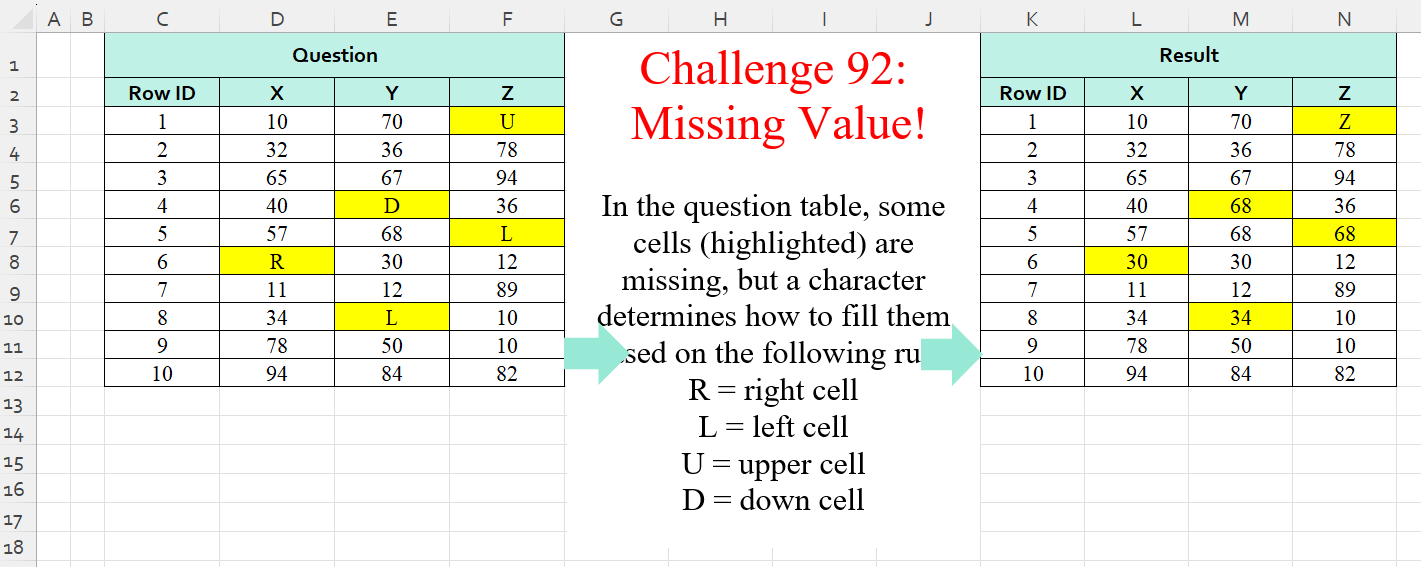
In the question table, some cells (highlighted) are missing, but a character determines how to fill them based on the following rule: R = right cell L = left cell U = upper cell D = down cell
📌 Challenge Details and Links
Challenge Number: 92
Challenge Difficulty: ⭐⭐⭐⭐
📥Download Sample File
📥Link to the solutions on LinkedIn
Solving the challenge of Missing Values! Part 3 with Power Query
Power Query solution 1 for Missing Values! Part 3, proposed by Zoran Milokanović:
let
  Source = Excel.CurrentWorkbook(){[Name = "Input"]}[Content],
  L = Table.ToRows(Table.DemoteHeaders(Source)),
  P = List.Transform(
    List.Positions(L),
    (r) =>
      List.Transform(
        List.Positions(L{r}),
        (c) =>
          {L{r}{c - 1}, L{r}{c + 1}, L{r - 1}{c}, L{r + 1}{c}, L{r}{c}}{
            List.PositionOf({"L", "R", "U", "D", L{r}{c}}, L{r}{c})
          }
      )
  ),
  S = Table.FromRows(List.Skip(P), P{0})
in
  S
Power Query solution 2 for Missing Values! Part 3, proposed by Alejandro Simón 🇵🇦 🇪🇸:
let
  Source = Excel.CurrentWorkbook(){[Name = "Table1"]}[Content],
  DH = Table.DemoteHeaders(Source),
  Row = Table.ToRows(DH),
  Col = Table.ToColumns(DH),
  Rep = List.Transform(
    Row,
    each List.Transform(
      _,
      (x) =>
        if x = "U" then
          Row{_{0} - 1}{List.PositionOf(_, x)}
        else if x = "D" then
          Row{_{0} + 1}{List.PositionOf(_, x)}
        else if x = "L" then
          Row{_{0}}{List.PositionOf(_, x) - 1}
        else if x = "R" then
          Row{_{0}}{List.PositionOf(_, x) + 1}
        else
          x
    )
  ),
  Sol = Table.PromoteHeaders(Table.FromRows(Rep))
in
  Sol
Power Query solution 3 for Missing Values! Part 3, proposed by Kris Jaganah:
let
  Source = Excel.CurrentWorkbook(){[Name = "Table1"]}[Content],
  Demote = Table.DemoteHeaders(Source),
  ToCol = Table.ToColumns(Demote),
  ToRow = List.Count(Table.ToRows(Demote)),
  Comb = List.Combine(ToCol),
  Trans = List.Split(
    List.Transform(
      {0 .. List.Count(Comb) - 1},
      each
        if Comb{_} = "U" then
          Comb{_ - 1}
        else if Comb{_} = "D" then
          Comb{_ + 1}
        else if Comb{_} = "R" then
          Comb{_ + ToRow}
        else if Comb{_} = "L" then
          Comb{_ - ToRow}
        else
          Comb{_}
    ),
    ToRow
  ),
  ToTable = Table.FromColumns(Trans),
  Promote = Table.PromoteHeaders(ToTable)
in
  Promote
Power Query solution 4 for Missing Values! Part 3, proposed by Yaroslav Drohomyretskyi:
let
  Source = Excel.CurrentWorkbook(){[Name = "Table1"]}[Content],
  U = Table.UnpivotOtherColumns(Source, {"Row ID"}, "Attribute", "Value"),
  I = Table.AddIndexColumn(U, "Index", 0, 1, Int64.Type),
  C = Table.AddColumn(
    I,
    "Custom",
    each try

        if [Value] = "L" then
          I{[Index] - 1}[Value]
        else if [Value] = "R" then
          I{[Index] + 1}[Value]
        else if [Value] = "D" then
          I{[Index] + 3}[Value]
        else if [Value] = "U" then
          I{[Index] - 3}[Value]
        else
          [Value]
    otherwise
      [Attribute]
  ),
  R = Table.RemoveColumns(C, {"Index", "Value"}),
  P = Table.Pivot(R, List.Distinct(R[Attribute]), "Attribute", "Custom")
in
  P
Power Query solution 5 for Missing Values! Part 3, proposed by Szabolcs Phraner:
let
Source=...,
 Demote_Headers = Table.DemoteHeaders(Source),
// Transform Rows into record tables, ad a Column Index for navigation
 Col_Index = Table.TransformRows( Demote_Headers,
each Table.AddIndexColumn( Record.ToTable(_), "Col Index",1,1,Int64.Type )
),
// Add Row Index to each Record Table for navigation
 Row_Index = Table.Combine(
 List.Transform( List.Zip( {Col_Index, List.Positions(Col_Index)} ), (R) => Table.AddColumn(R{0},"Row Index", each R{1}, Int64.Type) )
),
// i will refer to this table multiple times
 Buffer = Table.Buffer( Row_Index ),
...
Power Query solution 6 for Missing Values! Part 3, proposed by Victor Wang:
let
  Source = Excel.CurrentWorkbook(){[Name = "Table1"]}[Content],
  DemoteHeaders = Table.DemoteHeaders(Source),
  Fun =
    let
      tolist = Record.ToList,
      pos    = List.PositionOfAny,
      dir    = {"U", "D", "L", "R"}
    in
      Table.ReplaceValue(
        DemoteHeaders,
        each {
          pos(dir, tolist(_)),
          {
            pos(tolist(_), dir),
            pos(tolist(_), dir),
            pos(tolist(_), dir) - 1,
            pos(tolist(_), dir) + 1
          }
        },
        each {
          tolist(
            try
              DemoteHeaders{[Column1 = [Column1] - 1]}
            otherwise
              DemoteHeaders{[Column1 = "Row ID"]}
          ),
          tolist(DemoteHeaders{[Column1 = [Column1] + 1]}),
          tolist(_),
          tolist(_)
        },
        (curr, cond, repl) =>
          if cond{0} >= 0 and curr is text then repl{cond{0}}{cond{1}{cond{0}}} else curr,
        Table.ColumnNames(DemoteHeaders)
      ),
  PromoteHeaders = Table.PromoteHeaders(Fun)
in
  PromoteHeaders
Solving the challenge of Missing Values! Part 3 with Excel
Excel solution 1 for Missing Values! Part 3, proposed by 🇰🇷 Taeyong Shin:
=LET(
    d,
    C2:F12,
    f,
    LAMBDA(
        f,
        x,
        f(
            d
        )+XLOOKUP(
            d,
            x,
            {1;-1},
            0
        )
    ),
    INDEX(
        A1:F12,
        f(
            ROW,
            {"D";"U"}
        ),
        f(
            COLUMN,
            {"R";"L"}
        )
    )
)
Excel solution 2 for Missing Values! Part 3, proposed by محمد حلمي:
=SWITCH(
    C3:F12,    "u",
    C2:F11,
    "d",
    C4:F12,
    "r",
    D3:G12,
    "l",
    B3:E12,
    C3:F12
)
Excel solution 3 for Missing Values! Part 3, proposed by محمد حلمي:
=LET(
    c,
    C3:F12,
    IFS(
        c<"a",
        c,
        c="u",
        C2:F11,
        c="d",        C4:F12,
        c="r",
        D3:G12,
        1,
        B3:E12
    )
)
Excel solution 4 for Missing Values! Part 3, proposed by Oscar Mendez Roca Farell:
=LET(d,
     C2:F12,
     INDEX(d,
     ROW(
         d
     )-1-(d="U")+(d="D"),
     COLUMN(
         d
     )-2-(d="L")+(d="R")))
Excel solution 5 for Missing Values! Part 3, proposed by Julian Poeltl:
=MAP(
    C2:F12,
    LAMBDA(
        A,
        SWITCH(
            A,
            "U",
            OFFSET(
                A,
                -1,

            ),
            "L",
            OFFSET(
                A,
                ,
                -1
            ),
            "D",
            OFFSET(
                A,
                1,

            ),
            "R",
            OFFSET(
                A,
                ,
                1
            ),
            A
        )
    )
)
Excel solution 6 for Missing Values! Part 3, proposed by Kris Jaganah:
=MAP(
    C2:F12,
    LAMBDA(
        x,
        OFFSET(
            x,
            SWITCH(
                x,
                "D",
                1,
                "U",
                -1,
                0
            ),
            SWITCH(
                x,
                "R",
                1,
                "L",
                -1,
                0
            )
        )
    )
)
Excel solution 7 for Missing Values! Part 3, proposed by Imam Hambali:
=LET(    t,
     {"R",
    1;"L",
    -1;"U",
    -4;"D",
    4},    tc,
     TOCOL(
         C2:F12
     ),    sq,
     SEQUENCE(
         COUNTA(
             tc
         )
     ),    WRAPROWS(
        IFERROR(
            INDEX(
                tc,
                 sq+XLOOKUP(
                     tc,
                     TAKE(
                         t,
                         ,
                         1
                     ),
                     TAKE(
                         t,
                         ,
                         -1
                     )
                 )
            ),
            tc
        ),
        4
    ))
Excel solution 8 for Missing Values! Part 3, proposed by Sunny Baggu:
=MAP(     C2:F12,     LAMBDA(
         a,          OFFSET(

               a,

               IFS(
                   a = "D",
                    1,
                    a = "U",
                    -1,
                    1,
                    0
               ),

               IFS(
                   a = "L",
                    -1,
                    a = "R",
                    1,
                    1,
                    0
               )

          )     ))
Excel solution 9 for Missing Values! Part 3, proposed by Sunny Baggu:
=LET(
 v, C2:F12,
 IFS(v = "L", B2:E12, v = "R", D2:G12, v = "U", C1:F11, v = "D", C3:F13, 1, C2:F12)
)
Excel solution 10 for Missing Values! Part 3, proposed by Andy Heybruch:
=LET(_a,
    C2:F12,
    MAKEARRAY(11,
    4,LAMBDA(_r,
    _c,IFERROR(IFS(    _r=1,
    INDEX(
        _a,
        _r,
        _c
    ),    _c=1,
    INDEX(
        _a,
        _r,
        _c
    ),    ISNUMBER(
        INDEX(
        _a,
        _r,
        _c
    )
    ),
    INDEX(
        _a,
        _r,
        _c
    )
),LET(_c,
    INDEX(
        _a,
        _r,
        _c
    ),
    _row,
    (_c="U")*-1+(_c="D")*1,
    _col,
    (_c="L")*-1+(_c="R")*1,
    OFFSET(
        _c,
        _row,
        _col
    ))))))
Excel solution 11 for Missing Values! Part 3, proposed by Asheesh Pahwa:
=MAP(
    D2:F12,
    LAMBDA(
        x,
        IF(
            x="U",
            OFFSET(
                x,
                -1,
                0
            ),
            IF(
                x="R",
                OFFSET(
                    x,
                    0,
                    1
                ),
                IF(
                    x="L",
                    OFFSET(
                        x,
                        0,
                        -1
                    ),
                    IF(
                        x="D",
                        OFFSET(
                            x,
                            1,
                            0
                        ),
                        x
                    )
                )
            )
        )
    )
)
Excel solution 12 for Missing Values! Part 3, proposed by Bilal Mahmoud kh.:
=LET(
    a,
    C2:F12,
    MAKEARRAY(
        11,
        4,
        LAMBDA(
            r,
            c,
            LET(
                b,
                INDEX(
                    a,
                    r,
                    c
                ),
                IF(
                    b="R",
                    INDEX(
                        a,
                        r,
                        c+1
                    ),
                    IF(
                        b="L",
                        INDEX(
                            a,
                            r,
                            c-1
                        ),
                        IF(
                            b="U",
                            INDEX(
                                a,
                                r-1,
                                c
                            ),
                            IF(
                                b="D",
                                INDEX(
                                    a,
                                    r+1,
                                    c
                                ),
                                b
                            )
                        )
                    )
                )
            )
        )
    )
)
Excel solution 13 for Missing Values! Part 3, proposed by Eddy Wijaya:
=MAP(D3:F12,
    LAMBDA(a,
    IF(ISTEXT(
        a
    ),OFFSET(a,IFS((a="R")+(a="L"),
    0,
    (a="U"),
    -1,
    TRUE,
    1),IFS((a="U")+(a="D"),
    0,
    (a="R"),
    1,
    TRUE,
    -1)),a)))
Excel solution 14 for Missing Values! Part 3, proposed by Ernesto Vega Castillo:
=VSTACK((C2:F2),(SCAN(,C3:F12,LAMBDA(a,b,IFS(b="U",OFFSET(b,-1,0),b="D",OFFSET(b,1,0),b="L",OFFSET(b,0,-1),b="R",OFFSET(b,0,1),b,b)))))Excel solution 15 for Missing Values! Part 3, proposed by ferhat CK:
=MAP(
    D3:F12,
    LAMBDA(
        x,
        IF(
            ISTEXT(
                x
            ),
            IF(
                OR(
                    CODE(
                x
            )={82,
                    76}
                ),
                OFFSET(
                    x,
                    0,
                    LOOKUP(
                        CODE(
                x
            ),
                        {76,
                        82},
                        {-1,
                        1}
                    )
                ),
                OFFSET(
                    x,
                    LOOKUP(
                        CODE(
                x
            ),
                        {68,
                        85},
                        {1,
                        -1}
                    ),
                    0
                )
            ),
            x
        )
    )
)
Excel solution 16 for Missing Values! Part 3, proposed by Hamidi Hamid:
=LET(
    x,
    C3:F12,
    W,
    SWITCH(
        x,
        "r",
        OFFSET(
            x,
            0,
            1
        ),
        "L",
        OFFSET(
            x,
            0,
            -1,

        ),
        "u",
        "Z",
        "d",
        OFFSET(
            x,
            -1,
            0
        ),
        x
    ),
    VSTACK(
        C2:F2,
        W
    )
)
Excel solution 17 for Missing Values! Part 3, proposed by Hussein SATOUR:
=LET(
    a,
    TOCOL(
        D2:F12
    ),
    DROP(
        WRAPROWS(
            INDEX(
                a,
                ROW(
                    1:33
                )+SWITCH(
                    a,
                    "U",
                    -3,
                    "D",
                    3,
                    "L",
                    -1,
                    "R",
                    1,
                    0
                )
            ),
            3
        ),
        1
    )
)
Excel solution 18 for Missing Values! Part 3, proposed by Mey Tithveasna:
=MAP(
    C2:F12,
    LAMBDA(
        x,
        IFS(
            x="L",

            OFFSET(
                x,
                ,
                -1
            ),
            x="R",
            OFFSET(
                x,
                ,
                1
            ),

            x="U",
            OFFSET(
                x,
                -1,

            ),
            x="D",

            OFFSET(
                x,
                1,

            ),
            TRUE,
            x
        )
    )
)
Excel solution 19 for Missing Values! Part 3, proposed by Milan Shrimali:
=MAP(
    A1:D11,
    LAMBDA(
        X,
        IFERROR(
            IFS(
                X="U",
                OFFSET(
                    X,
                    -1,
                    0
                ),
                X="D",
                OFFSET(
                    X,
                    1,
                    0
                ),
                X="L",
                OFFSET(
                    X,
                    0,
                    -1
                ),
                X="R",
                OFFSET(
                    X,
                    0,
                    1
                )
            ),
            X
        )
    )
)
Excel solution 20 for Missing Values! Part 3, proposed by Nicolas Micot:
=MAP(
    D3:F12;
    LAMBDA(
        l_value;
        SI.MULTIPLE(
            l_value;
            "U";
            DECALER(
                l_value;
                -1;
                0
            );
            "D";
            DECALER(
                l_value;
                1;
                0
            );
            "R";
            DECALER(
                l_value;
                0;
                1
            );
            "L";
            DECALER(
                l_value;
                0;
                -1
            );
            l_value
        )
    )
)
Excel solution 21 for Missing Values! Part 3, proposed by Pieter de B.:
=MAP(
    C2:F12,
    LAMBDA(
        o,
        OFFSET(
            o,
            IFS(
                o="U",
                -1,
                o="D",
                1,
                1,
                0
            ),
            IFS(
                o="L",
                -1,
                o="R",
                1,
                1,
                0
            )
        )
    )
)
Excel solution 22 for Missing Values! Part 3, proposed by Pieter de B.:
=LET(
    g,
    C2:F12,
    IFS(
        g="U",
        C1:F11,
        g="D",
        C3:F13,
        g="L",
        B2:E12,
        g="R",
        D2:G12,
        1,
        g
    )
)

=SWITCH(
    C2:F12,
    "U",
    C1:F11,
    "D",
    C3:F13,
    "L",
    B2:E12,
    "R",
    D2:G12,
    C2:F12
)
Excel solution 23 for Missing Values! Part 3, proposed by Tomasz Jakóbczyk:
=IFS(
    C3="R",
    D3,
    C3="L",
    B3,
    C3="U",
    C2,
    C3="D",
    C4,
    TRUE,
    C3
)
Excel solution 24 for Missing Values! Part 3, proposed by Vinesh Kumar:
=IF(
    ISNUMBER(
        B3
    ),
    B3,
    IF(
        B3="R",
        OFFSET(
            B3,
            0,
            1
        ),
        IF(
            B3="L",
            OFFSET(
                B3,
                0,
                -1
            ),
            IF(
                B3="U",
                OFFSET(
                    B3,
                    -1,
                    0
                ),
                IF(
                    B3="D",
                    OFFSET(
                        B3,
                        1,
                        0
                    ),
                    1
                )
            )
        )
    )
)
Solving the challenge of Missing Values! Part 3 with Python
Python solution 1 for Missing Values! Part 3, proposed by Konrad Gryczan, PhD:
import pandas as pd

path = "CH-92 Missing value.xlsx"
input = pd.read_excel(path, usecols="C:F", skiprows= 1, header=None).values
test = pd.read_excel(path, usecols= "K:N", skiprows= 1, header=None).values

def replace_values(x):
 for i in range(x.shape[0]):
 for j in range(x.shape[1]):
 if x[i, j] == "D":
 x[i, j] = x[i+1, j]
 elif x[i, j] == "U":
 x[i, j] = x[i-1, j]
 elif x[i, j] == "R":
 x[i, j] = x[i, j+1]
 elif x[i, j] == "L":
 x[i, j] = x[i, j-1]
 return x

result = replace_values(input)

print((result == test).all()) # True
Solving the challenge of Missing Values! Part 3 with Python in Excel
Python in Excel solution 1 for Missing Values! Part 3, proposed by Alejandro Campos:
df = {'U': (-1, 0), 'D': (1, 0), 'L': (0, -1), 'R': (0, 1)}, xl("C2:F12", headers=False)
for i in range(1, df.shape[0]):
 for j in range(df.shape[1]):
 if (v := df.iloc[i, j]) in d: df.iloc[i, j] = df.iloc[i + d[v][0], j + d[v][1]]
df
Solving the challenge of Missing Values! Part 3 with R
R solution 1 for Missing Values! Part 3, proposed by Konrad Gryczan, PhD:
library(tidyverse)
library(readxl)

path = "files/CH - 92 Missing value.xlsx"
input = read_excel(path, range = "C2:F12", col_names = F) %>% as.matrix()
test = read_excel(path, range = "K2:N12", col_names = F) %>% as.matrix()

replace_values = function(x) {
 for (i in 1:nrow(x)) {
 for (j in 1:ncol(x)) {
 if (x[i,j] == "D") {
 x[i,j] = x[i + 1,j]
 } else if (x[i,j] == "U") {
 x[i,j] = x[i - 1,j]
 } else if (x[i,j] == "R") {
 x[i,j] = x[i,j + 1]
 } else if (x[i,j] == "L") {
 x[i,j] = x[i,j - 1]
 }
 }
 }
 return(x)
}

result = replace_values(input)
all.equal(result, test) # TRUE