
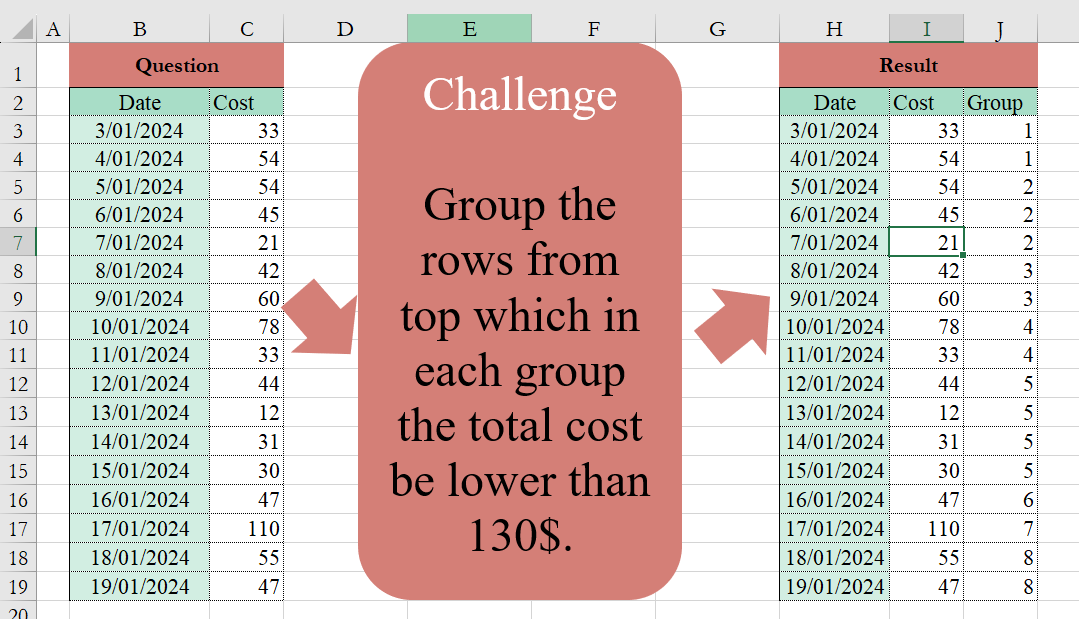
Group the rows from the top, which in each group the total cost be lower than 130$.
📌 Challenge Details and Links
Challenge Number: 2
Challenge Difficulty: ⭐⭐⭐⭐
📥Download Sample File
📥Link to the solutions on LinkedIn
📥Link to the solution on YouTube
Solving the challenge of Custom Grouping! Part 1 with Power Query
Power Query solution 1 for Custom Grouping! Part 1, proposed by Ramiro Ayala Chávez:
let<br>S = Excel.CurrentWorkbook(){[Name="Table1"]}[Content],<br>a = S[Cost],<br>b = List.Generate(()=>[i=a{0},j=0], each [j]<List.Count(a), each if [i]<130 then <br>[i= List.Sum({[i],a{[j]+1}}),j=[j]+1] else [i=a{[j]},j=[j]], each [i]),<br>c = List.Transform(b, each if _>=130 then "X" else Text.From(_)),<br>d = Text.Split(Text.Combine(c, " "),"X"),<br>e = List.Transform(d, each Text.Split(Text.Trim(_), " ")),<br>f = List.Transform(e, each List.Count(_)),<br>g = List.Generate(()=>[i=1], each [i]<= List.Count(f),<br>each [i=[i]+1], each List.Repeat({[i]},f{[i]-1})),<br>Sol = Table.FromColumns({S[Date],a,List.Combine(g)},Table.ColumnNames(S)&{"Group"})<br>in<br>SolPower Query solution 2 for Custom Grouping! Part 1, proposed by 🇮🇷 Navid Esmaeilzadeh اسماعیل زاده:
let
  Source = Excel.CurrentWorkbook(){[Name = "Table1"]}[Content],
  C = Table.TransformColumnTypes(Source, {{"Date", type datetime}, {"Cost", Int64.Type}}),
  In = Table.AddIndexColumn(C, "Index", 1, 1, Int64.Type),
  A = Table.AddColumn(
    In,
    "Custom",
    each
      if List.Accumulate(
        List.Range(In[Cost], 0, [Index]),
        0,
        (P, C) => if P + C > 130 then C else C + P
      )
        = [Cost]
      then
        [Index]
      else
        null
  ),
  F = Table.FillDown(A, {"Custom"}),
  G = Table.Group(
    F,
    {"Custom"},
    {
      {
        "Tbl",
        each _,
        type table [
          Date = nullable datetime,
          Cost = nullable number,
          Index = number,
          Custom = number
        ]
      }
    }
  ),
  In2 = Table.AddIndexColumn(G, "Group", 1, 1, Int64.Type),
  E = Table.ExpandTableColumn(
    In2,
    "Tbl",
    {"Date", "Cost", "Index", "Custom"},
    {"Date", "Cost", "Index.1", "Custom.1"}
  ),
  Sol = Table.SelectColumns(E, {"Date", "Cost", "Group"})
in
  Sol
Solving the challenge of Custom Grouping! Part 1 with Excel
Excel solution 1 for Custom Grouping! Part 1, proposed by Bo Rydobon 🇹🇭:
=HSTACK(B3:C19,
    SCAN(0,
    SCAN(,
    C3:C19,
    LAMBDA(a,
    v,
    (a+v<130)*a+v))=C3:C19,
    SUM))
Excel solution 2 for Custom Grouping! Part 1, proposed by محمد حلمي:
=SCAN(0,
    SCAN(,
    C3:C19,
    LAMBDA(a,
    d,
    (a+d<130)*a+d))=
C3:C19,
    LAMBDA(
        a,
        d,
        a+d
    ))
Excel solution 3 for Custom Grouping! Part 1, proposed by 🇵🇪 Ned Navarrete C.:
=LET(
    m,
    B3:C19,
    c,
    C3:C19,
    x,
    c=SCAN(
        0,
        c,
        LAMBDA(
            a,
            v,
            IF(
                a+v<130,
                a+v,
                v
            )
        )
    ),
    HSTACK(
        m,
        SCAN(
            0,
            x,
            LAMBDA(
                a,
                v,
                a+v
            )
        )
    )
)
Excel solution 4 for Custom Grouping! Part 1, proposed by Kris Jaganah:
=LET(a,
    C3:C19,
    HSTACK(B3:C19,
    SCAN(0,
    --(a=SCAN(0,
    a,
    LAMBDA(x,
    y,
    IF((y+x)>130,
    y,
    y+x)))),
    LAMBDA(
        v,
        w,
        IF(
            w,
            v+1,
            v
        )
    ))))
Excel solution 5 for Custom Grouping! Part 1, proposed by Abdallah Ally:
=LET(
    a,
    C3:C19,
    b,
    a=SCAN(
        0,
        a,
        LAMBDA(
            x,
            y,
            IF(
                x+y<130,
                x+y,
                y
            )
        )
    ),
     SCAN(
         0,
         b,
         LAMBDA(
             x,
             y,
             x+y
         )
     )
)
Excel solution 6 for Custom Grouping! Part 1, proposed by John Jairo Vergara Domínguez:
=HSTACK(B3:C19,
    SCAN(0,
    C3:C19=SCAN(,
    C3:C19,
    LAMBDA(a,
    v,
    v+a*(a+v<130))),
    SUM))
Excel solution 7 for Custom Grouping! Part 1, proposed by JvdV –:
=HSTACK(
    B3:C19,
    SCAN(
        0,
        SCAN(
            0,
            C3:C19,
            LAMBDA(
                x,
                y,
                IF(
                    x+y>129,
                    y,
                    x+y
                )
            )
        )=C3:C19,
        SUM
    )
)
Excel solution 8 for Custom Grouping! Part 1, proposed by Charles Roldan:
=LET(f,
     LAMBDA(
         g,
         x,
          SCAN(
              ,
               x,
               LAMBDA(
                   a,
                   b,
                    IF(
                        g(
                            a,
                             b
                        ),
                         a
                    ) + b
               )
          )
     ),
     LAMBDA(x,f(LAMBDA(
    a,
    b,
     TRUE
),
     --(f(
         LAMBDA(
             a,
             b,
              a + b < 130
         ),
          x
     ) = x)))
)(C3:C19)
Excel solution 9 for Custom Grouping! Part 1, proposed by Charles Roldan:
=LET(
 Sc,
     LAMBDA(
         f,
         [c],
          LAMBDA(
              x,
               SCAN(
                   c,
                    x,
                    f
               )
          )
     ), Add,
     Sc(
         LAMBDA(
             a,
             b,
              a + b
         )
     ), Crit,
     Sc(
         LAMBDA(
             a,
             b,
              b + IF(
                  a + b < 130,
                   a
              )
         )
     ), LAMBDA(x,
     Add(--(x = Crit(
         x
     )))))(C3:C19)
Excel solution 10 for Custom Grouping! Part 1, proposed by Surendra Reddy:
=LET(a,
    B3:B19,
    b,
    C3:C19,
    c,
    SCAN(0,
    b=SCAN(0,
    b,
    LAMBDA(x,
    y,
    IF((x+y)<130,
    x+y,
    y))),
    LAMBDA(
        x,
        y,
        x+y
    )),
    VSTACK(
        HSTACK(
            B2:C2,
            "Group"
        ),
        HSTACK(
            a,
            b,
            c
        )
    ))