
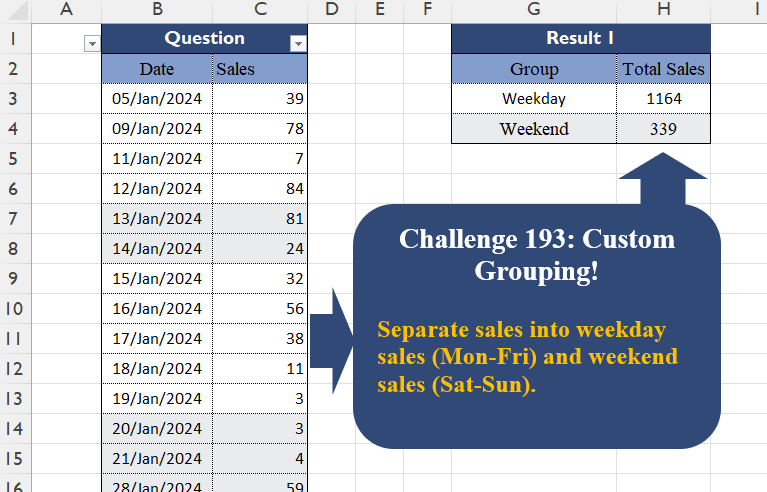
Separate sales into weekday sales (Mon-Fri) and weekend sales (Sat-Sun).
📌 Challenge Details and Links
Challenge Number: 193
Challenge Difficulty: ⭐
📥Download Sample File
📥Link to the solutions on LinkedIn
Solving the challenge of Custom Grouping! Part 18 with Power Query
Power Query solution 1 for Custom Grouping! Part 18, proposed by Zoran Milokanović:
let
  Source = Excel.CurrentWorkbook(){[Name = "Input"]}[Content],
  I = each {"Weekend", "Workday"}{Byte.From(Date.DayOfWeek(_, 1) < 5)},
  _ = Table.FromRows(
    Table.Group(
      Source,
      "Date",
      {"_", each {I([Date]{0}), List.Sum([Sales])}},
      1,
      (b, n) => Value.Compare(I(n), I(b))
    )[_],
    {"Group", "Total Sales"}
  )
in
  _
Power Query solution 2 for Custom Grouping! Part 18, proposed by Brian Julius:
let
  Source = Excel.CurrentWorkbook(){[Name = "Table1"]}[Content],
  Result = Table.AddColumn(
    Source,
    "Result",
    each if Date.DayOfWeek([Date], 6) <= 1 then "Weekend" else "Weekday"
  ),
  TotSal = Table.Group(Result, {"Result"}, {{"Total Sales", each List.Sum([Sales])}})
in
  TotSal
Power Query solution 3 for Custom Grouping! Part 18, proposed by Luan Rodrigues:
let
  Fonte = Table.TransformColumns(
    Tabela1,
    {
      "Date",
      each
        if Number.From(Date.DayOfWeek(_) = 6 or Date.DayOfWeek(_) = 0) = 0 then
          "Weekday"
        else
          "Weekend"
    }
  ),
  grp = Table.Group(Fonte, {"Date"}, {"Total Sales", each List.Sum([Sales])})
in
  grp
Power Query solution 4 for Custom Grouping! Part 18, proposed by Kris Jaganah:
let
  A = Excel.CurrentWorkbook(){[Name = "Table1"]}[Content],
  B = Table.TransformColumns(
    A,
    {"Date", each "Week" & (if Date.DayOfWeek(_) > 4 then "end" else "day")}
  ),
  C = Table.Group(B, "Date", {"Total Sales", each List.Sum([Sales])})
in
  C
Power Query solution 5 for Custom Grouping! Part 18, proposed by Yaroslav Drohomyretskyi:
let
  Source = Excel.CurrentWorkbook(){[Name = "Table1"]}[Content],
  Category = Table.AddColumn(
    Source,
    "Group",
    each if Date.DayOfWeek([Date], Day.Monday) >= 5 then "Weekend" else "Weekday"
  ),
  Group = Table.Group(Category, {"Group"}, {{"Total Sales", each List.Sum([Sales]), type number}})
in
  Group
Power Query solution 6 for Custom Grouping! Part 18, proposed by CA Raghunath Gundi:
let
  Source = Excel.CurrentWorkbook(){[Name = "Table1"]}[Content],
  Group = Table.AddColumn(
    Source,
    "Group",
    each if Number.From(Date.DayOfWeek([Date], 1) < 5) = 1 then "WeekDay" else "WeekEnd"
  ),
  Result = Table.Group(Group, {"Group"}, {{"Total Sales", each List.Sum([Sales]), type number}})
in
  Result
Power Query solution 7 for Custom Grouping! Part 18, proposed by Ezel K.:
let
  Source = Excel.CurrentWorkbook(){[Name = "Table1"]}[Content],
  #"Calculated Day of Week" = Table.TransformColumns(Source, {{"Date", Date.DayOfWeek, Int64.Type}}),
  #"Added to Column" = Table.TransformColumns(
    #"Calculated Day of Week",
    {{"Date", each _ + 1, type number}}
  ),
  #"Added Conditional Column" = Table.AddColumn(
    #"Added to Column",
    "Group",
    each if [Date] < 6 then "Weekday" else "Weekend"
  ),
  #"Removed Columns" = Table.RemoveColumns(#"Added Conditional Column", {"Date"}),
  #"Grouped Rows" = Table.Group(
    #"Removed Columns",
    {"Group"},
    {{"Total Sales", each List.Sum([Sales]), type number}}
  )
in
  #"Grouped Rows"
Power Query solution 8 for Custom Grouping! Part 18, proposed by Gerson Pineda:
let
  Origen = Excel.CurrentWorkbook(){[Name = "Tabla1"]}[Content],
  TT1 = Table.TransformColumns(
    Origen,
    {{"Date", each "Week" & (if Date.DayOfWeek(_, Day.Monday) + 1 < 6 then "day" else "end")}}
  ),
  FA1 = Table.Group(TT1, {"Date"}, {{"Total", each List.Sum([Sales]), type number}})
in
  FA1
Power Query solution 9 for Custom Grouping! Part 18, proposed by Meganathan Elumalai:
let
  Source = Excel.CurrentWorkbook(){[Name = "Table1"]}[Content],
  Result = [
    Lst = Table.Partition(Source, "Date", 2, each Number.From(Date.DayOfWeek(_, 1) > 4)),
    fx = (x) => List.Sum(Lst{x}[Sales]),
    fin = Table.FromRows(
      List.Transform(
        List.Positions(Lst),
        (f) => if f = 0 then {"Weekday", fx(f)} else {"Weekend", fx(f)}
      ),
      {"Group", "Sales"}
    )
  ][fin]
in
  Result
Power Query solution 10 for Custom Grouping! Part 18, proposed by Seokho MOON:
let
  Source = Excel.CurrentWorkbook(){[Name = "Table1"]}[Content],
  AddCol = Table.AddColumn(
    Source,
    "Group",
    each if Date.DayOfWeek([Date], 1) > 4 then "Weekend" else "Weekday"
  ),
  Res = Table.Group(AddCol, "Group", {"Total Sales", each List.Sum([Sales])})
in
  Res
Power Query solution 11 for Custom Grouping! Part 18, proposed by Alexandre Garcia:
let
H = Table.ToRows(Excel.CurrentWorkbook(){[Name="Table1"]}[Content]),
P = {"Weekday","Weekend"},
L = {"Group", "Total Sales"},
C = Table.FromList(P, (x)=> {x, List.Sum(List.Zip(List.Select(H, each x = P{Byte.From(Date.DayOfWeek(_{0}, 6) < 2)})){1})} , L)
in C
Power Query solution 12 for Custom Grouping! Part 18, proposed by Sahan Jayasuriya:
let
  Source = Excel.CurrentWorkbook(){[Name = "Data"]}[Content],
  GroupedRows = Table.Group(
    Source,
    {"Date"},
    {
      {
        "Group",
        each
          if List.ContainsAll({1 .. 5}, List.Transform(_[Date], (x) => Date.DayOfWeek(x))) then
            "Weekday"
          else
            "Weekend"
      },
      {"Total Sales", each List.Sum([Sales]), type number},
      {"details", each _}
    },
    GroupKind.Global,
    (x, y) =>
      Value.Compare(
        List.Contains({1 .. 5}, Date.DayOfWeek(x[Date])),
        List.Contains({1 .. 5}, Date.DayOfWeek(y[Date]))
      )
  )[[Group], [Total Sales]]
in
  GroupedRows
Power Query solution 13 for Custom Grouping! Part 18, proposed by Vida Vaitkunaite:
let
  Source = Excel.CurrentWorkbook(){[Name = "Table2"]}[Content],
  Custom = Table.AddColumn(
    Source,
    "Group",
    each if Date.DayOfWeek([Date], 6) < 2 then "Weekend" else "Weekday"
  ),
  Final = Table.Group(Custom, {"Group"}, {{"Total Sales", each List.Sum([Sales]), type number}})
in
  Final
Power Query solution 14 for Custom Grouping! Part 18, proposed by Zain Shah:
let
  Source = Excel.CurrentWorkbook(){[Name = "Table1"]}[Content],
  AddCol = Table.AddColumn(
    Source,
    "Group",
    each if (Date.DayOfWeek([Date], Day.Monday) <= 4) then "Weekday" else "Weekend"
  ),
  Group = Table.Group(AddCol, "Group", {"Total Sales", each List.Sum([Sales])})
in
  Group
Solving the challenge of Custom Grouping! Part 18 with Excel
Excel solution 1 for Custom Grouping! Part 18, proposed by Oscar Mendez Roca Farell:
=GROUPBY(
    "Week"&IF(
        MOD(
            B3:B37,
            7
        )>1,
        "day",
        "end"
    ),
    C3:C37,
    SUM,
    ,
    0
)
Excel solution 2 for Custom Grouping! Part 18, proposed by Julian Poeltl:
=LET(
    G,
    GROUPBY(
        WEEKDAY(
            B3:B37,
            2
        )<6,
        C3:C37,
        SUM,
        ,
        0,
        -2
    ),
    HSTACK(
        IF(
            TAKE(
                G,
                ,
                1
            ),
            "Weekday",
            "Weekend"
        ),
        DROP(
                G,
                ,
                1
            )
    )
)
Excel solution 3 for Custom Grouping! Part 18, proposed by Kris Jaganah:
=GROUPBY(
    "Week"&IF(
        WEEKDAY(
            B3:B37,
            2
        )>5,
        "end",
        "day"
    ),
    C3:C37,
    SUM,
    ,
    0
)
Excel solution 4 for Custom Grouping! Part 18, proposed by Imam Hambali:
=LET(wd,
     WEEKDAY(
         B3:B37,
         2
     ),
     g,
     IF((wd=6)+(wd=7),
    "Weekend",
    "Weekday"),
     VSTACK(
         {"Group",
         "Total Sales"},
          GROUPBY(
              g,
              C3:C37,
              SUM,
              0,
              0
          )
     ))
Excel solution 5 for Custom Grouping! Part 18, proposed by Iván Cortinas Rodríguez:
=LET(
    f;
    B3:B37;
    sales;
    C3:C37;
    d;
    DIASEM(
        f;
        2
    );
    weekday;
    d<6;
    weekend;
    d>5;
    salesweekday;
    SUMA(
        weekday*sales
    );
    salesweekend;
    SUMA(
        weekend*sales
    );
    APILARH(
        {"Group";
        "Weekday";
        "Weekend"};
        APILARV(
            {"Total Sales"};
            salesweekday;
            salesweekend
        )
    )
)
Excel solution 6 for Custom Grouping! Part 18, proposed by Ivan William:
=GROUPBY(
    IF(
        WEEKDAY(
            B3:B37,
            2
        )>5,
        "Weekend",
        "Weekday"
    ),
    C3:C37,
    SUM,
    ,
    0
)
Excel solution 7 for Custom Grouping! Part 18, proposed by Sunny Baggu:
=LET(     _a,
     WEEKDAY(
         B3:B37
     ),     _b,
     BYROW(
         _a = {1,
          7},
          LAMBDA(
              a,
               OR(
                   a
               )
          )
     ),     _c,
     SUM(
         _b * C3:C37
     ),     HSTACK(          {"Weekday"; "Weekend"},          VSTACK(
              SUM(
                  C3:C37
              ) - _c,
               _c
          )     ))
Excel solution 8 for Custom Grouping! Part 18, proposed by abdelaziz allam:
=LET(
    x,
    SCAN(
        "",
        WEEKDAY(
            B3:B37,
            2
        ),
        LAMBDA(
            a,
            b,
            IF(
                OR(
                    b=6,
                    b=7
                ),
                0,
                1
            )
        )
    ),
    HSTACK(
        {"Weekend";"Weekday"},
        TRANSPOSE(
            MAP(
                {0,
                1},
                LAMBDA(
                    z,
                    SUM(
                        FILTER(
                            C3:C37,
                            x=z
                        )
                    )
                )
            )
        )
    )
)
Excel solution 9 for Custom Grouping! Part 18, proposed by Alejandro Campos:
=VSTACK(     SUM(
         FILTER(
             C3:C37,
              WEEKDAY(
                  B3:B37,
                   2
              ) <= 5
         )
     ),     SUM(
         FILTER(
             C3:C37,
              WEEKDAY(
                  B3:B37,
                   2
              ) >= 6
         )
     )
)
Excel solution 10 for Custom Grouping! Part 18, proposed by Amit Rathi:
=GROUPBY(
    "Week"&IF(
        WEEKDAY(
            B3:B37,
            2
        )>=6,
         "end",
         "day"
    ),
    C3:C37,
    SUM,
    ,
    0
)
Excel solution 11 for Custom Grouping! Part 18, proposed by Asheesh Pahwa:
=LET(
    w,
    WEEKDAY(
        B3:B37,
        2
    ),
    s,
    C3:C37,
    VSTACK(
        HSTACK(
            "Weekday",
            SUM(
                FILTER(
                    s,
                    w<=5
                )
            )
        ),
        HSTACK(
            "Weekend",
            SUM(
                FILTER(
                    s,
                    w>5
                )
            )
        )
    )
)
Excel solution 12 for Custom Grouping! Part 18, proposed by CA Mohit Saxena:
=VSTACK(
    {"Group",
    "Total Sales"},
    HSTACK(
        VSTACK(
            "Weekday",
            "Weekend"
        ),
        LET(
            wd,
            WEEKDAY(
                B3:B37,
                2
            ),
            b,
            C3:C37,
            VSTACK(
                SUM(
                    FILTER(
                        b,
                        wd‹=5
                    )
                ),
                SUM(
                    FILTER(
                        b,
                        wd›5
                    )
                )
            )
        )
    )
)
Excel solution 13 for Custom Grouping! Part 18, proposed by Christophe OLIVA 🇲🇫 🇬🇧:
=SUMPRODUCT((WEEKDAY(Date Range;2)>5)*(Value Range)) for the weekends... 😉
=SUMPRODUCT((WEEKDAY(Date Range;2)<=5)*(Value Range)) for the weekdays.. 😊
or...
=SUM(FILTER(Value Range;WEEKDAY(Date Range;2)>5)) for the weekends 😉😉
=SUM(FILTER(Value Range;WEEKDAY(Date Range;2)<=5))
Excel solution 14 for Custom Grouping! Part 18, proposed by Dilip Pandey, MVP:
=SUMPRODUCT((WEEKDAY(
    $B$3:$B$37,
    2
)<=5)*1,
    $C$3:$C$37)
In Cell H4:-
=SUMPRODUCT((WEEKDAY(
    $B$3:$B$37,
    2
)>=6)*1,
    $C$3:$C$37)
Another Solution by reading day of the week:-
In Cell H3:-
=SUM(
    IF(
        ISNUMBER(
            MATCH(
                TEXT(
                    $B$3:$B$37,
                    "DDD"
                ),
                {"Mon",
                "Tue",
                "Wed",
                "Thu",
                "Fri"},
                0
            )
        ),
        $C$3:$C$37,
        ""
    )
)
In Cell H4:-
=SUM(
    IF(
        ISNUMBER(
            MATCH(
                TEXT(
                    $B$3:$B$37,
                    "DDD"
                ),
                {"Sat",
                "Sun"},
                0
            )
        ),
        $C$3:$C$37,
        ""
    )
)
Another Solution (entered with CSE):-
In Cell H3:-
{=SUM(
    IF(
        WEEKDAY(
    $B$3:$B$37,
    2
)<=5,
        $C$3:$C$37,
        ""
    )
)}
In Cell H4:-
{=SUM(
    IF(
        WEEKDAY(
    $B$3:$B$37,
    2
)>=6,
        $C$3:$C$37,
        ""
    )
)}
and there can be many more.... :)
Excel solution 15 for Custom Grouping! Part 18, proposed by Eddy Wijaya:
=LET(    d,
    B3:C37,    GROUPBY(
        MAP(
            TAKE(
                d,
                ,
                1
            ),
            LAMBDA(
                m,
                LET(
                    v,
                    WEEKDAY(
                        m,
                        2
                    ),
                    IF(
                        v<=5,
                        "Weekday",
                        "Weekend"
                    )
                )
            )
        ),
        TAKE(
            d,
            ,
            -1
        ),
        SUM
    )
)
Excel solution 16 for Custom Grouping! Part 18, proposed by Ezel K.:
=VSTACK(
    HSTACK(
        "Group";
        "Total Sales"
    );
    GROUPBY(
        IF(
            WEEKDAY(
                B3:B37;
                2
            )<6;
            "Weekday";
            "Weekend"
        );
        C3:C37;
        SUM;
        ;
        0
    )
)
Excel solution 17 for Custom Grouping! Part 18, proposed by Gerson Pineda:
=GROUPBY(
    "Week"&IF(
        WEEKDAY(
            B3:B37,
            2
        )<6,
        "day",
        "kend"
    ),
    C3:C37,
    SUM,
    ,
    0
)
Excel solution 18 for Custom Grouping! Part 18, proposed by Hamidi Hamid:
=LET(x,
    (WEEKDAY(
        B3:B37,
        2
    )<=5)*1,
    SORT(
        HSTACK(
            {"Weekend",
            "Weekday"},
            DROP(
                GROUPBY(
                    x,
                    C3:C37,
                    SUM,
                    ,
                    0
                ),
                ,
                1
            )
        ),
        2,
        -1
    ))
Excel solution 19 for Custom Grouping! Part 18, proposed by Hussein SATOUR:
=GROUPBY(
    IF(
        WEEKDAY(
            B3:B37,
            2
        )>5,
        "Weekend",
        "Weekday"
    ),
    C3:C37,
    SUM
)
Excel solution 20 for Custom Grouping! Part 18, proposed by Md. Zohurul Islam:
=LET(    u,
    B3:B37,    v,
    C3:C37,    hdr,
    {"Group",
    "Total Sales"},    w,
    IF(
        WEEKDAY(
            u,
            2
        )<6,
        "Weekday",
        "Weekend"
    ),    x,
    GROUPBY(
        w,
        v,
        SUM,
        0,
        0
    ),    y,
    VSTACK(
        hdr,
        x
    ),    y
)
Excel solution 21 for Custom Grouping! Part 18, proposed by Meganathan Elumalai:
=GROUPBY(
    IF(
        WEEKDAY(
            B3:B37,
            2
        )>5,
        "Weekend",
        "Weekday"
    ),
    C3:C37,
    SUM,
    ,
    0
)
Excel solution 22 for Custom Grouping! Part 18, proposed by Nicolas Micot:
=LET(_groups;
    {"Weekday";
    "Weekend"};_jourSem;
    JOURSEM(
        B3:B37;
        2
    );_groupsTotal;
    MAP({"1;2;3;4;5";
    "6;7"};
    LAMBDA(l_group;
    SOMME(MAP(FRACTIONNER.TEXTE(
        l_group;
        ;
        ";"
    )+0;
    LAMBDA(l_jourSem;
    SOMME(C3:C37*(_jourSem=l_jourSem)))))));
    ASSEMB.H(
        _groups;
        _groupsTotal
    ))
With GROUPBY:
=GROUPER.PAR(
    SI(
        JOURSEM(
        B3:B37;
        2
    )<=5;
        "Weekday";
        "Weekend"
    );
    C3:C37;
    SOMME;
    ;
    0
)
Excel solution 23 for Custom Grouping! Part 18, proposed by Pieter de B.:
=GROUPBY(
    "Week"&IF(
        MOD(
            B3:B37,
            7
        )<2,
        "end",
        "day"
    ),
    C3:C37,
    SUM,
    ,
    0
)
Or:
=HSTACK("Week"&{"day";"end"},
    ABS(VSTACK(
        -SUM(
            C3:C37
        ),
        0
    )+SUM(C3:C37*(MOD(
            B3:B37,
            7
        )<2))))
Excel solution 24 for Custom Grouping! Part 18, proposed by Rick Rothstein:
=HSTACK(
    {"Group";"Weekday";"Weekend"},
    VSTACK(
        "Total Salse",
        SUM(
            FILTER(
                C3:C37,
                WEEKDAY(
                    B3:B37,
                    2
                )<6
            )
        ),
        SUM(
            FILTER(
                C3:C37,
                WEEKDAY(
                    B3:B37,
                    2
                )>5
            )
        )
    )
)
Excel solution 25 for Custom Grouping! Part 18, proposed by Thang Van:
=LET(
wk,
    HSTACK("Weekend",
    SUM(FILTER(C3:C37,
    (WEEKDAY(
        B3:B37
    )=1)+(WEEKDAY(
        B3:B37
    )=7)))),wd,
    HSTACK("Weekday",
    SUM(FILTER(C3:C37,
    (WEEKDAY(
        B3:B37
    )<>1)*(WEEKDAY(
        B3:B37
    )<>7)))),VSTACK(
    G2:H2,
    wk,
    wd
))
Excel solution 26 for Custom Grouping! Part 18, proposed by Tomasz Jakóbczyk:
=VSTACK(
    HSTACK(
        "Group",
        "Total Sales"
    ),
    HSTACK(
        HSTACK(
            VSTACK(
                "Weekday",
                "Weekend"
            )
        ),
        VSTACK(
            SUM(
                FILTER(
                    C3:C37,
                    WEEKDAY(
                        B3:B37,
                        2
                    )<6
                )
            ),
            SUM(
                FILTER(
                    C3:C37,
                    WEEKDAY(
                        B3:B37,
                        2
                    )>5
                )
            )
        )
    )
)
Solving the challenge of Custom Grouping! Part 18 with Python
Python solution 1 for Custom Grouping! Part 18, proposed by Konrad Gryczan, PhD:
import pandas as pd

path = "CH-193 Custom Grouping.xlsx"
input = pd.read_excel(path, usecols="B:C", skiprows=1, nrows=36)
test = pd.read_excel(path, usecols="G:H", skiprows=1, nrows=2)

input['Group'] = input['Date'].dt.weekday.map(lambda x: 'Weekend' if x >= 5 else 'Weekday')
result = input.groupby('Group')['Sales'].sum().reset_index().rename(columns={'Sales': 'Total Sales'})

print(result.equals(test))
Python solution 2 for Custom Grouping! Part 18, proposed by Luan Rodrigues:
import pandas as pd
import numpy as np

file = r"CH-193 Custom Grouping.xlsx"
df = pd.read_excel(file, usecols="B:C",skiprows=1)
df= df.groupby(np.where(
 (df['Date'].dt.day_of_week+1 == 6) |
 (df['Date'].dt.day_of_week+1 == 7),
 'Weekend','Weekday' ))['Sales'].sum()
print(df)
Solving the challenge of Custom Grouping! Part 18 with Python in Excel
Python in Excel solution 1 for Custom Grouping! Part 18, proposed by Aditya Kumar Darak 🇮🇳:
df = xl("B2:C37", True)
df["Group"] = df["Date"].apply(lambda x: "Weekday" if x.weekday() < 5 else "Weekend")
result = df.groupby("Group")["Sales"].sum()
result
Python in Excel solution 2 for Custom Grouping! Part 18, proposed by Alejandro Campos:
df = xl("B2:C37", headers=True)
df['Date'] = pd.to_datetime(df['Date'], format='%d/%b/%Y', errors='coerce')
total_sales_df = pd.DataFrame({
 'Group': ['Weekday', 'Weekend'],
 'Total Sales': [df[df['Date'].dt.dayofweek < 5]['Sales'].sum(),
 df[df['Date'].dt.dayofweek >= 5]['Sales'].sum()]})