
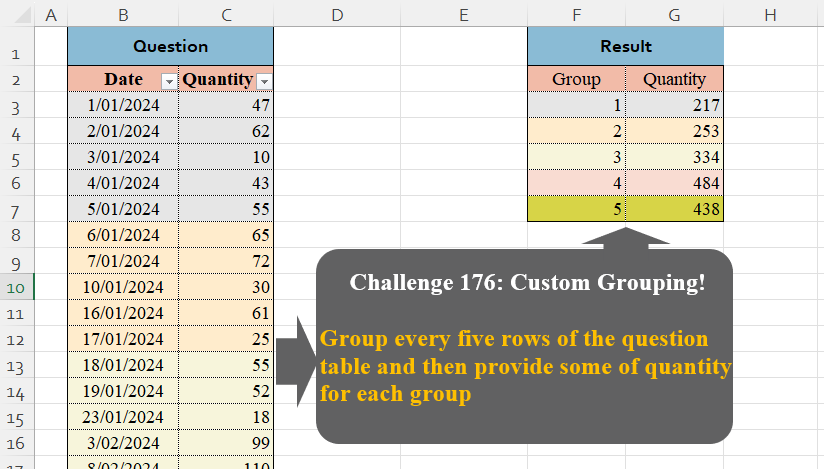
Group every five rows of the question table and then provide some of quantity for each group
📌 Challenge Details and Links
Challenge Number: 176
Challenge Difficulty: ⭐⭐
📥Download Sample File
📥Link to the solutions on LinkedIn
Solving the challenge of Custom Grouping! Part 16 with Power Query
Power Query solution 1 for Custom Grouping! Part 16, proposed by Zoran Milokanović:
let
  Source = List.Split(Table.ToRows(Excel.CurrentWorkbook(){[Name = "Table1"]}[Content]), 5),
  _ = Table.FromRows(
    List.TransformMany(
      Source,
      each {List.Zip(_){1}},
      (i, _) => {List.PositionOf(Source, i) + 1, List.Sum(_)}
    ),
    {"Group", "Quantity"}
  )
in
  _
Power Query solution 2 for Custom Grouping! Part 16, proposed by Zoran Milokanović:
let
  Source = Excel.CurrentWorkbook(){[Name = "Table1"]}[Content],
  P = Table.Group(
    Source,
    "Date",
    {"_", each List.Sum([Quantity])},
    0,
    (b, n) => Byte.From(Number.Mod(List.PositionOf(Source[Date], n), 5) = 0)
  )[_],
  _ = Table.FromColumns({{1 .. List.Count(P)}, P}, {"Group", "Quantity"})
in
  _
Power Query solution 3 for Custom Grouping! Part 16, proposed by Luan Rodrigues:
let
  n = 5,
  res = Table.FromRows(
    List.Zip(
      {
        {1 .. n},
        List.Transform(
          List.Split(Table.ToRows(Table1), n),
          each List.Sum(Table.FromRows(_)[Column2])
        )
      }
    ),
    {"Group", "Quantity"}
  )
in
  res
Power Query solution 4 for Custom Grouping! Part 16, proposed by Rafael González B.:
let
Source = Question_Table,
Qty = List.Transform(List.Split(Source[Quantity], 5), each List.Sum(_)),
Result = Table.FromColumns({{1..List.Count(Qty)}, Qty}, {"Group", "Quantity"})
in
Result
🧙♂️ 🧙🏻♂️🧙🏻♂️Power Query solution 5 for Custom Grouping! Part 16, proposed by Alejandro Simón 🇵🇦 🇪🇸:
let
  Source = Excel.CurrentWorkbook(){[Name = "Table1"]}[Content],
  Index = Table.AddIndexColumn(Source, "Idx", 1),
  Grp = Table.Group(
    Index,
    "Idx",
    {{"Quantity", each List.Sum([Quantity])}},
    0,
    (x, y) => Number.From(y - x > 4)
  ),
  Sol = Table.AddIndexColumn(Grp, "Group", 1, 1)[[Group], [Quantity]]
in
  Sol
Power Query solution 6 for Custom Grouping! Part 16, proposed by Alejandro Simón 🇵🇦 🇪🇸:
let
  Source = Excel.CurrentWorkbook(){[Name = "Table1"]}[Content],
  Grp = Table.Group(
    Source,
    "Date",
    {{"Quantity", each List.Sum([Quantity])}},
    0,
    (x, y) => Number.From(List.PositionOf(Source[Date], y) - List.PositionOf(Source[Date], x) > 4)
  ),
  Sol = Table.AddIndexColumn(Grp, "Group", 1, 1)[[Group], [Quantity]]
in
  Sol
Power Query solution 7 for Custom Grouping! Part 16, proposed by Krzysztof Kominiak:
let
  Source = Excel.CurrentWorkbook(){[Name = "Table1"]}[Content],
  GetTab = Table.FromList(
    List.Transform(Table.Split(Source, 5), each List.Sum([Quantity])),
    (x) => {x},
    {"Quantity"}
  ),
  Result = Table.AddIndexColumn(GetTab, "Group", 1, 1)[[Group], [Quantity]]
in
  Result
Power Query solution 8 for Custom Grouping! Part 16, proposed by Kris Jaganah:
let
  A = Excel.CurrentWorkbook(){[Name = "Table1"]}[Content],
  B = Table.AddIndexColumn(A, "Group"),
  C = Table.TransformColumns(B, {"Group", each Number.IntegerDivide(_, 5) + 1}),
  D = Table.Group(C, {"Group"}, {"Quantity", each List.Sum([Quantity])})
in
  D
Power Query solution 9 for Custom Grouping! Part 16, proposed by Yaroslav Drohomyretskyi:
let
  Source = Excel.CurrentWorkbook(){[Name = "Table1"]}[Content],
  AddGroup = Table.AddColumn(
    Source,
    "Group",
    each Number.RoundDown(Table.PositionOf(Source, _) / 5) + 1
  ),
  GroupBy = Table.Group(AddGroup, {"Group"}, {{"Quantity", each List.Sum([Quantity]), type number}})
in
  GroupBy
Power Query solution 10 for Custom Grouping! Part 16, proposed by CA Raghunath Gundi:
let
  Source = Excel.CurrentWorkbook(){[Name = "Table1"]}[Content],
  Result = Table.ReorderColumns(
    Table.AddIndexColumn(
      Table.FromList(
        List.Transform(Table.Split(Source, 5), each List.Sum(_[Quantity])),
        Splitter.SplitByNothing(),
        {"Quantity"}
      ),
      "Group",
      1,
      1
    ),
    {"Group", "Quantity"}
  )
in
  Result
Power Query solution 11 for Custom Grouping! Part 16, proposed by Daniel Madhadha:
let
  Source = Excel.CurrentWorkbook(){[Name = "Table1"]}[Content],
  AddIndex = Table.AddIndexColumn(Source, "Index", 1, 1, Int64.Type),
  AddGroupColumn = Table.AddColumn(AddIndex, "Group", each Number.RoundUp([Index] / 5), Int64.Type),
  GroupedTable = Table.Group(
    AddGroupColumn,
    {"Group"},
    {{"Quantity", each List.Sum([Quantity]), type number}}
  )
in
  GroupedTable
Power Query solution 12 for Custom Grouping! Part 16, proposed by Meganathan Elumalai:
let
  Source = Excel.CurrentWorkbook(){[Name = "Table1"]}[Content],
  Result = [
    Lst = List.Transform(Table.Split(Source, 5), (f) => List.Sum(f[Quantity])),
    fin = Table.FromRows(
      List.Transform(List.Positions(Lst), (x) => {x + 1, Lst{x}}),
      {"Group", "Quantity"}
    )
  ][fin]
in
  Result
Power Query solution 13 for Custom Grouping! Part 16, proposed by Seokho MOON:
let
  Source   = Excel.CurrentWorkbook(){[Name = "Table1"]}[Content],
  AddIdx   = Table.AddIndexColumn(Source, "Group", 1),
  TransCol = Table.TransformColumns(AddIdx, {"Group", each Number.RoundUp(_ / 5)}),
  Res      = Table.Group(TransCol, "Group", {"Quantity", each List.Sum([Quantity])})
in
  Res
Power Query solution 14 for Custom Grouping! Part 16, proposed by Trung Quan:
let
  Source = Excel.CurrentWorkbook(){[Name = "Table1"]}[Content],
  A = List.Transform({1 .. Table.RowCount(Source)}, each Number.RoundDown((_ - 1) / 5) + 1),
  B = List.Combine(List.Skip(Table.ToColumns(Source), 1)),
  C = List.Zip({A, B}),
  D = Table.Group(Table.FromRows(C, {"Group", "N"}), {"Group"}, {{"Quantity", each List.Sum([N])}})
in
  D
Power Query solution 15 for Custom Grouping! Part 16, proposed by Glyn Willis:
let
  Source = Excel.CurrentWorkbook(){[Name = "Table1"]}[Content],
  #"Changed Type" = Table.TransformColumnTypes(
    Source,
    {{"Date", type date}, {"Quantity", Int64.Type}}
  ),
  #"Sorted Rows" = List.Transform(
    List.Split(Table.Sort(Table.Buffer(#"Changed Type"), {{"Date", Order.Ascending}})[Quantity], 5),
    List.Sum
  ),
  #"Converted to Table" = Table.FromList(
    #"Sorted Rows",
    Splitter.SplitByNothing(),
    type table [Quantity = number],
    null,
    ExtraValues.Error
  ),
  #"Added Index" = Table.AddIndexColumn(#"Converted to Table", "Group", 1, 1, Int64.Type)
in
  #"Added Index"
Power Query solution 16 for Custom Grouping! Part 16, proposed by Moisés Gonga:
let
  Source = Excel.CurrentWorkbook(){[Name = "Table1"]}[Content],
  #"Changed column type" = Table.TransformColumnTypes(
    Source,
    {{"Date", type date}, {"Quantity", Int64.Type}}
  ),
  #"Added index" = Table.AddIndexColumn(#"Changed column type", "Index", 1, 1, Int64.Type),
  #"Added custom" = Table.TransformColumnTypes(
    Table.AddColumn(#"Added index", "Group", each Number.RoundUp([Index] / 5)),
    {{"Group", type number}}
  ),
  #"Grouped rows" = Table.Group(
    #"Added custom",
    {"Group"},
    {{"Quantity", each List.Sum([Quantity]), type nullable number}}
  )
in
  #"Grouped rows"
Power Query solution 17 for Custom Grouping! Part 16, proposed by Vida Vaitkunaite:
let
 Source = Excel.CurrentWorkbook(){[Name="Table1"]}[Content],
 Index = Table.AddIndexColumn(Source, "Group"),
 Index2 = Table.TransformColumns(Index, {{"Group", each Number.RoundDown((_ / 5))+1}}),
 Final = Table.Group(Index2, {"Group"}, {{"Quantity", each List.Sum([Quantity])}})
in
 Final
Solution 2
let
 Source = Excel.CurrentWorkbook(){[Name="Table1"]}[Content],
 Index = Table.AddIndexColumn(Source, "Group"),
 Final = Table.TransformColumns(Table.Group(Index, {"Group"},
 {{"Quantity", each List.Sum([Quantity])}}, 0,
(x,y)=> Number.From( Number.RoundDown(y[Group]/5) <> Number.RoundDown(x[Group]/5) )), {{"Group", each (_ / 5)+1}})
in
 Final
Solving the challenge of Custom Grouping! Part 16 with Excel
Excel solution 1 for Custom Grouping! Part 16, proposed by Oscar Mendez Roca Farell:
=HSTACK(
    ROW(
        1:5
    ),
    BYROW(
        WRAPROWS(
            C3:C27,
            5
        ),
        SUM
    )
)
Excel solution 2 for Custom Grouping! Part 16, proposed by Julian Poeltl:
=LET(T,
    Table1,
    R,
    ROWS(
        T
    ),
    S,
    SEQUENCE(
        R
    ),
    RS,
    ROUNDUP((S)/5,
    0),
    VSTACK(
        HSTACK(
            "Group",
            "Quantity"
        ),
        GROUPBY(
            RS,
            DROP(
                T,
                ,
                1
            ),
            SUM,
            ,
            0
        )
    ))
Excel solution 3 for Custom Grouping! Part 16, proposed by Julian Poeltl:
=LET(
    T,
    Table1,
    R,
    ROWS(
        T
    ),
    S,
    SEQUENCE(
        R
    ),
    RS,
    SEQUENCE(
        ROUNDUP(
            R/5,
            0
        )
    ),
    VSTACK(
        HSTACK(
            "Group",
            "Quantity"
        ),
        HSTACK(
            RS,
            MAP(
                SEQUENCE(
        ROUNDUP(
            R/5,
            0
        )
    ),
                LAMBDA(
                    A,
                    SUM(
                        CHOOSEROWS(
                            DROP(
                T,
                ,
                1
            ),
                            A+SEQUENCE(
                                5,
                                ,
                                0
                            )
                        )
                    )
                )
            )
        )
    )
)
Excel solution 4 for Custom Grouping! Part 16, proposed by Julian Poeltl:
=LET(T,
    Table1,
    R,
    ROWS(
        T
    ),
    S,
    SEQUENCE(
        R
    ),
    RS,
    SEQUENCE(
        ROUNDUP(
            R/5,
            0
        )
    ),
    VSTACK(HSTACK(
        "Group",
        "Quantity"
    ),
    HSTACK(RS,
    MAP(RS,
    LAMBDA(A,
    SUM(OFFSET(INDEX(T,
    (A-1)*5+1,
    2),
    0,
    0,
    5)))))))
Excel solution 5 for Custom Grouping! Part 16, proposed by Kris Jaganah:
=GROUPBY(
    VSTACK(
        "Group",
        INT(
            SEQUENCE(
                ROWS(
                    Table1[Quantity]
                ),
                ,
                ,
                1/5
            )
        )
    ),
    Table1[[    #All],
    [Quantity]],
    SUM,
    3,
    0
)
Excel solution 6 for Custom Grouping! Part 16, proposed by Ivan William:
=GROUPBY(VSTACK("Group",
    INT((ROW(
        B3:B27
    )-3)/5)+1),
    C2:C27,
    SUM,
    3,
    0)
Excel solution 7 for Custom Grouping! Part 16, proposed by Sunny Baggu:
=LET(     _sum,
     BYROW(          WRAPROWS(
              TOROW(
                  Table1[Quantity]
              ),
               5
          ),          LAMBDA(
              a,
               SUM(
                   a
               )
          )     ),     HSTACK(
         SEQUENCE(
             ROWS(
                 _sum
             )
         ),
          _sum
     ))
Excel solution 8 for Custom Grouping! Part 16, proposed by Sunny Baggu:
=LET(     _sum,
     TOCOL(          BYCOL(

               WRAPCOLS(
                   Table1[Quantity],
                    5
               ),

               LAMBDA(
                   a,
                    SUM(
                        a
                    )
               )

          )     ),     HSTACK(
         SEQUENCE(
             ROWS(
                 _sum
             )
         ),
          _sum
     ))
Excel solution 9 for Custom Grouping! Part 16, proposed by abdelaziz allam:
=HSTACK(
    SEQUENCE(
        5
    ),
    BYROW(
        WRAPROWS(
            Table1[Quantity],
            5
        ),
        LAMBDA(
            a,
            SUM(
                a
            )
        )
    )
)
Excel solution 10 for Custom Grouping! Part 16, proposed by Andy Heybruch:
=GROUPBY(
    ROUNDUP(
        SEQUENCE(
            COUNTA(
                C3:C27
            ),
            ,
            0.2,
            0.2
        ),
        0
    ),
    C3:C27,
    SUM,
    0,
    0
)
Excel solution 11 for Custom Grouping! Part 16, proposed by Asheesh Pahwa:
=HSTACK(
    SEQUENCE(
        5
    ),
    BYROW(
        WRAPROWS(
            Table1[Quantity],
            5
        ),
        LAMBDA(
            x,
            SUM(
                x
            )
        )
    )
)
Excel solution 12 for Custom Grouping! Part 16, proposed by CA Raghunath Gundi:
=VSTACK({"Group",
    "Quantity"},GROUPBY(ROUNDUP((ROW(
    B3:B27
)-2)/5,
    0),
    C3:C27,
    SUM,
    ,
    0))
Excel solution 13 for Custom Grouping! Part 16, proposed by Enrico Mendiola:
=LET(
    _h,
    {"Group",
    "Quantity"},
    _rw,
    SEQUENCE(
        ROWS(
            Table1[Date]
        )
    ),
    _i,
    ROUNDUP(
        _rw/5,
        0
    ),
    _q,
    DROP(
        CHOOSECOLS(
            Table1[

            #All],
            2
        ),
        1
    ),
    _result,
    VSTACK(
        _h,
        GROUPBY(
            _i,
            _q,
            SUM,
            ,
            0
        )
    ),
    _result
)
Excel solution 14 for Custom Grouping! Part 16, proposed by Gerson Pineda:
=GROUPBY(
    ROUNDUP(
        SEQUENCE(
            25
        )/5,    ),
     C3:C27,
    SUM,
    ,
    0
)
Excel solution 15 for Custom Grouping! Part 16, proposed by Hamidi Hamid:
=GROUPBY(INT((SEQUENCE(COUNTA(B3:B27))-1)/5)+1,C3:C27,SUM,,0)Excel solution 16 for Custom Grouping! Part 16, proposed by Hussein SATOUR:
=GROUPBY(INT((ROW(B3:B27)+2)/5),C3:C27,SUM,,0)Excel solution 17 for Custom Grouping! Part 16, proposed by Md. Zohurul Islam:
=LET(    a,
    Table13[Date],    b,
    Table13[Quantity],    c,
    CEILING(
        SEQUENCE(
            COUNTA(
                a
            )
        ),
        5
    )/5,    d,
    GROUPBY(
        c,
        b,
        SUM,
        0,
        0
    ),    e,
    VSTACK(
        HSTACK(
            "Group",
            "Quantity"
        ),
        d
    ),    e
)
Excel solution 18 for Custom Grouping! Part 16, proposed by Meganathan Elumalai:
=GROUPBY(
    INT(
        SEQUENCE(
            ROWS(
                B3:B27
            ),
            ,
            0
        )/5
    )+1,
    C3:C27,
    SUM,
    0,
    0
)
Excel solution 19 for Custom Grouping! Part 16, proposed by Pieter de B.:
=GROUPBY(ROUNDUP((ROW(
    B3:B27
)-2)/5,
    ),
    C3:C27,
    SUM,
    ,
    0)
Excel solution 20 for Custom Grouping! Part 16, proposed by Rick Rothstein:
=LET(c,
    ROUNDUP(
        ROWS(
            C3:C27
        )/5,
        0
    ),
    s,
    SEQUENCE(
        c
    ),
    HSTACK(s,
    MAP(5*(s-1),
    LAMBDA(
        x,
        SUM(
            OFFSET(
                C3,
                x,
                ,
                5
            )
        )
    ))))
Excel solution 21 for Custom Grouping! Part 16, proposed by Seokho MOON:
=LET(     data,
     C3:C27,     n,
     5,     Quantity,
     BYROW(
         WRAPROWS(
             data,
              n,
              0
         ),
          SUM
     ),     Group,
     SEQUENCE(
         ROWS(
             Quantity
         )
     ),     HSTACK(
         Group,
          Quantity
     ))
Excel solution 22 for Custom Grouping! Part 16, proposed by Tomasz Jakóbczyk:
=LET(g,
    5,
    ROUNDUP((ROW(
        [@Date]
    )-2)/g,
    0))

F3:
=LET(
    g,
    5,
    s,
    SEQUENCE(
        ROUNDUP(
            COUNT(
                Table1[Date]
            )/g,
            0
        )
    ),
    HSTACK(
        s,
        SUMIF(
            Table1[Column1],
            s,
            Table1[Quantity]
        )
    )
)
Solving the challenge of Custom Grouping! Part 16 with Python
Python solution 1 for Custom Grouping! Part 16, proposed by Konrad Gryczan, PhD:
import pandas as pd

path = "CH-176 Custom Grouping.xlsx"
input = pd.read_excel(path, usecols="B:C", skiprows=1, nrows=26)
test = pd.read_excel(path, usecols="F:G", skiprows=1, nrows=5).rename(columns=lambda x: x.split('.')[0])

input['Group'] = (input.index // 5) + 1
result = input.drop(columns=['Date']).groupby('Group').sum()
result.reset_index(inplace=True)

print(result.equals(test)) # True
Python solution 2 for Custom Grouping! Part 16, proposed by Luan Rodrigues:
import pandas as pd
import numpy as np

file = r"CH-176 Custom Grouping.xlsx"
df = pd.read_excel(file,usecols="B:C",skiprows=1)

n = 5
df['ind'] = df.index + 1
df['resto'] = np.where(df['ind'] % n == 0, df['ind'], np.nan)
df['resto'] = df['resto'].bfill()
grp = df.groupby('resto')['Quantity'].sum().reset_index()
grp['Date'] = grp.index + 1
print(grp[['Date','Quantity']])
Solving the challenge of Custom Grouping! Part 16 with Python in Excel
Python in Excel solution 1 for Custom Grouping! Part 16, proposed by Alejandro Campos:
xl("Table1[
hashtag
#Todo]", headers=True)
grouped_df = (pd.DataFrame(data)
 .select_dtypes(exclude=['datetime'])
 .groupby(lambda i: i // 5).sum()
 .reset_index(drop=True)
 .rename_axis('Group')
 .reset_index()
 .assign(Group=lambda x: x['Group'] + 1))
Solving the challenge of Custom Grouping! Part 16 with R
R solution 1 for Custom Grouping! Part 16, proposed by Konrad Gryczan, PhD:
library(tidyverse)
library(readxl)

path = "files/CH-176 Custom Grouping.xlsx"
input = read_excel(path, range = "B2:C27")
test = read_excel(path, range = "F2:G7")

result = input %>%
 mutate(Group = rep(1:ceiling(nrow(input)/5), each = 5)) %>%
 summarise(Quantity = sum(Quantity), .by = Group)

all.equal(result, test, check.attributes = FALSE)
#> [1] TRUE
Solving the challenge of Custom Grouping! Part 16 with Google Sheets
Google Sheets solution 1 for Custom Grouping! Part 16, proposed by Peter Krkos:
PowerQuery solution:
https://docs.google.com/spreadsheets/d/1zR5IZLz8OT76vhaPEHfsPrw8-RDKnLyyqS49IJjdhFk/edit?pli=1&gid=2048212569#gid=2048212569