
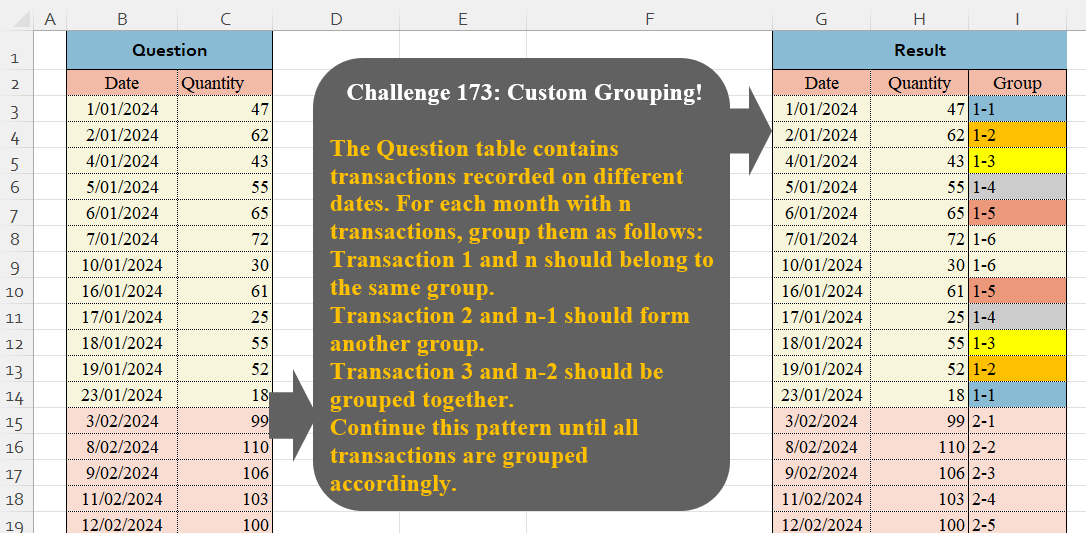
The Question table contains transactions recorded on different dates. For each month with n transactions, group them as follows: Transaction 1 and n should belong to the same group. Transaction 2 and n-1 should form another group. Transaction 3 and n-2 should be grouped together. Continue this pattern until all transactions are grouped accordingly.
📌 Challenge Details and Links
Challenge Number: 173
Challenge Difficulty: ⭐⭐⭐⭐
📥Download Sample File
📥Link to the solutions on LinkedIn
Solving the challenge of Custom Grouping! Part 15 with Power Query
Power Query solution 1 for Custom Grouping! Part 15, proposed by Alejandro Simón 🇵🇦 🇪🇸:
let
Source = Excel.CurrentWorkbook(){[Name="Table1"]}[Content],
Sol = Table.Combine(Table.Group(Source, "Date", {{"A", (x)=>
 let
 a = x,
 b = Table.RowCount(a),
 c = if Number.IsEven(b) then {1..b/2}&List.Reverse({1..b/2})
 else {1..(b/2+.5)}&List.Skip(List.Reverse({1..(b/2+.5)})),
 e = List.Zip({List.Repeat({Date.Month(x[Date]{0})},b), c}),
 f = List.Transform(e, each Text.From(_{0})&"-"&Text.From(_{1})),
 g = Table.FromColumns(Table.ToColumns(a)&{f}, Table.ColumnNames(a)&{"Group"})
 in g}},
0, (x,y)=> Number.From(Date.Month(x)<>Date.Month(y)))[A])
in
Sol
Power Query solution 2 for Custom Grouping! Part 15, proposed by Kris Jaganah:
let
 a = Table.AddIndexColumn( _ ,"Id",1) in
 Table.AddColumn(a, "Group",(v)=>
 Text.From(Date.Month(v[Date])) &"-"& Text.From(
 if v[Id] > List.Max(a[Id])/2 then List.Max(a[Id])+1 -v[Id] else v[Id] ) )
 [[Date],[Quantity],[Group]] },
 0,(x,y)=> Number.From( Date.Month(x) <> Date.Month(y) ))[All])
Power Query solution 3 for Custom Grouping! Part 15, proposed by CA Raghunath Gundi:
let
  Source = Excel.CurrentWorkbook(){[Name = "Table1"]}[Content],
  Grp = Table.Group(
    Source,
    {"Date"},
    {{"Grp", each _}},
    0,
    (x, y) => Value.Compare(Date.Month(y[Date]), Date.Month(x[Date]))
  ),
  Index1 = Table.AddIndexColumn(Grp, "Index1", 1, 1, Int64.Type),
  Logic = Table.TransformColumns(
    Index1,
    {
      "Grp",
      each [
        a = Table.AddIndexColumn(_, "Index2", 1, 1),
        b = Table.RowCount(a),
        c = Table.AddIndexColumn(a, "Index3", b, - 1),
        d = Table.AddColumn(c, "Final", each if [Index2] > b / 2 then [Index3] else [Index2])
      ][d][[Date], [Quantity], [Final]]
    }
  ),
  Expand = Table.ExpandTableColumn(Logic, "Grp", {"Quantity", "Final"}, {"Quantity", "Final"}),
  Merge = Table.CombineColumns(
    Table.TransformColumnTypes(Expand, {{"Index1", type text}, {"Final", type text}}, "en-IN"),
    {"Index1", "Final"},
    Combiner.CombineTextByDelimiter("-", QuoteStyle.None),
    "Group"
  )
in
  Merge
Power Query solution 4 for Custom Grouping! Part 15, proposed by Seokho MOON:
let
  Source = Excel.CurrentWorkbook(){[Name = "Table1"]}[Content],
  Group = Table.Group(
    Source,
    "Date",
    {"Tbl", F},
    0,
    (x, y) => Value.Compare(Date.Month(x), Date.Month(y))
  )[[Tbl]],
  F = each [
    A = Table.AddIndexColumn(_, "Temp", 1),
    B = Table.AddColumn(A, "Idx_2", each List.Min({[Temp], Table.RowCount(A) - [Temp] + 1}))
  ][B],
  AddIdx = Table.AddIndexColumn(Group, "Idx_1", 1),
  Expand = Table.ExpandTableColumn(AddIdx, "Tbl", {"Date", "Quantity", "Idx_2"}),
  Res = Table.AddColumn(Expand, "Group", each Text.From([Idx_1]) & "-" & Text.From([Idx_2]))[
    [Date],
    [Quantity],
    [Group]
  ]
in
  Res
Power Query solution 5 for Custom Grouping! Part 15, proposed by Mihai Radu O:
let
  Source = Excel.CurrentWorkbook(){[Name = "Table4"]}[Content],
  tip = Table.TransformColumnTypes(Source, {{"Date", type date}}),
  s = [
    a = tip[Date],
    b = List.Generate(
      () => [x = 0, y = 1],
      each [x] < List.Count(a),
      each [x = [x] + 1, y = [y] + Byte.From(Date.Month(a{x}) <> Date.Month(a{[x]}))],
      each [y]
    ),
    c = List.Combine(
      List.Transform(
        List.Distinct(b),
        (x) =>
          [
            c1 = Number.RoundUp((List.PositionOf(b, x, Occurrence.Last) + 1) / (2 * x), 0),
            c2 = {1 .. c1},
            c3 =
              if Number.IsOdd(List.Count(c2)) then
                List.Reverse(List.RemoveLastN(c2, 1))
              else
                List.Reverse(c2),
            c4 = List.Combine({c2, c3})
          ][c4]
      )
    ),
    grup = List.Transform(List.Zip({b, c}), (x) => Text.From(x{0}) & "-" & Text.From(x{1})),
    tbl = Table.FromColumns({tip[Date], tip[Quantity], grup}, Table.ColumnNames(tip) & {"Group"})
  ][tbl]
in
  s
Power Query solution 6 for Custom Grouping! Part 15, proposed by Vida Vaitkunaite:
let
 Source = Excel.CurrentWorkbook(){[Name="Table1"]}[Content],
 Group = Table.Group(Source, {"Date"}, {{"All", each
let
a = _,
b = List.Count(a[Date]),
c = Number.RoundUp(b/2),
d = Table.AddIndexColumn(a, "Ind", 1),
e = Table.AddColumn(d, "Gr", each if [Ind]<=c then [Ind] else b+1-[Ind])
in e
}}, GroupKind.Local, (x,y)=> Number.From(Date.Month(y[Date])<>Date.Month(x[Date]))),
 Index = Table.RemoveColumns(Table.AddIndexColumn(Group, "Index", 1, 1), "Date"),
 Expand = Table.ExpandTableColumn(Index, "All", {"Date", "Quantity", "Gr"}),
 MergeCol = Table.CombineColumns(Table.TransformColumnTypes(Expand, {{"Index", type text}, {"Gr", type text}}, "en-GB"),{"Index", "Gr"},Combiner.CombineTextByDelimiter("-", QuoteStyle.None),"Group")
in
 MergeCol
// My solution will work with both even and odd number of transactions
Solving the challenge of Custom Grouping! Part 15 with Excel
Excel solution 1 for Custom Grouping! Part 15, proposed by Bo Rydobon 🇹🇭:
=LET(
    x,
    B3:B26,
    HSTACK(
        B3:C26,
        MONTH(
            x
        )&-BYROW(
            COUNTIFS(
                x,
                {">=",
                "<="}&x,
                x,
                {"<=",
                ">"}&EOMONTH(
                    +x,
                    {0,
                    -1}
                )
            ),
            MIN
        )
    )
)
Excel solution 2 for Custom Grouping! Part 15, proposed by 🇰🇷 Taeyong Shin:
=LET(d,
    B3:B26,
    p,
    DROP(PIVOTBY(B3:C26,
    MONTH(
        d
    ),
    d,
    LAMBDA(x,
    y,
    LET(n,
    XMATCH(
        x,
        y
    ),
    m,
    ROWS(
        y
    ),
    @(MONTH(
        x
    )&-IF(
        n>m/2,
        m-n+1,
        n
    )))),
    ,
    0,
    ,
    0),
    1),
    WRAPROWS(
        TOCOL(
            IFS(
                p<>"",
                p
            ),
            2
        ),
        3
    ))
Excel solution 3 for Custom Grouping! Part 15, proposed by Oscar Mendez Roca Farell:
=HSTACK(B3:C26,
    MAP(B3:B26,
    LAMBDA(b,
    LET(O,
    MONTH,
    m,
    O(
        b
    ),
    n,
    SUM(
        N(
            O(
                B3:b
            )=m
        )
    ),
    e,
    SUM(
        N(
            O(
                B3:B26
            )=m
        )
    )/2,
    m&(n>ROUND(
        e,    ))*(2*MOD(
        n-1,
        e
    )+1)-n))))
Excel solution 4 for Custom Grouping! Part 15, proposed by Julian Poeltl:
=LET(T,B2:C26,D,DROP(TAKE(T,,1),1),M,MONTH(D),HSTACK(T,VSTACK("Group",DROP(REDUCE(0,UNIQUE(M),LAMBDA(A,B,VSTACK(A,LET(C,ROWS(FILTER(M,M=B))/2,B&"-"&VSTACK(SEQUENCE(C),SEQUENCE(C,,C,-1)))))),1))))Excel solution 5 for Custom Grouping! Part 15, proposed by Kris Jaganah:
=LET(
    a,
    B3:B26,
    b,
    XMATCH(
        a,
        a
    ),
    c,
    MONTH(
        a
    ),
    d,
    ROWS(
        UNIQUE(
            c
        )
    ),
    e,
    MAX(
        b
    ),
    f,
    MOD(
        b-1,
        e/d
    )+1,
    HSTACK(
        a,
        C3:C26,
        c&"-"&IF(
            f>e/d/2,
            e/d+1-f,
            f
        )
    )
)
Excel solution 6 for Custom Grouping! Part 15, proposed by ferhat CK:
=REDUCE(
    {"Date",
    "Quantity",
    "Group"},
    UNIQUE(
        MONTH(
            G3:G26
        )
    ),
    LAMBDA(
        x,
        y,
        VSTACK(
            x,
            LET(
                f,
                FILTER(
                    B3:C26,
                    MONTH(
                        B3:B26
                    )=y
                ),
                r,
                ROWS(
                    f
                ),
                HSTACK(
                    f,
                    VSTACK(
                        y&"-"&SEQUENCE(
                            r/2
                        ),
                        y&"-"&SEQUENCE(
                            r/2,
                            ,
                            r/2,
                            -1
                        )
                    )
                )
            )
        )
    )
)
Excel solution 7 for Custom Grouping! Part 15, proposed by Hamidi Hamid:
=LET(tt,
    COUNTA(
        UNIQUE(
            MONTH(
                B3:B26
            )
        )
    ),
    x,
    SEQUENCE(ROWS(
            MONTH(
                B3:B26
            )
        )/(tt*2)),
    y,
    SORT(
        x,
        ,
        -1
    ),
    t,
    VSTACK(
        x,
        y
    ),
    HSTACK(
        B3:C26,
        MONTH(
                B3:B26
            )&"-"&VSTACK(
                t,
                t
            )
    ))
Excel solution 8 for Custom Grouping! Part 15, proposed by Hussein SATOUR:
=HSTACK(B3:C26,
    LET(C,
    CONCAT,
    U,
    SUM,
    S,
    SEQUENCE,
    m,
    MONTH(
        B3:B26
    ),
    TEXTSPLIT(C(MAP(UNIQUE(
        m
    ),
    LAMBDA(x,
    C(x&"-"&VSTACK(S(U((m=x)*1)/2),
    S(U((m=x)*1)/2,
    ,
    U((m=x)*1)/2,
    -1))&"/")))),
    ,
    "/",
    1)))
Excel solution 9 for Custom Grouping! Part 15, proposed by Luis Enrique Charca Ponce:
=LET(data,
    B3:C26,month,
    TEXT(
        MONTH(
            TAKE(
                data,
                ,
                1
            )
        ),
        "0"
    ),summ,
    GROUPBY(
        month,
        month,
        COUNTA,
        0,
        0
    ),idRaw,
    SCAN("1-0",
    month,
    LAMBDA(ac,
    val,LET(parts,
    TEXTSPLIT(
        ac,
        "-"
    ),IF(INDEX(
    parts,
    1
)=val,
    val&"-"&
(1--INDEX(
    parts,
    2
)),
    val&"-1")))),id,
    MAP(
        idRaw,
        LAMBDA(
            i,

            LET(
                a,
                TEXTBEFORE(
                    i,
                    "-"
                ),
                b,
                --TEXTAFTER(
                    i,
                    "-"
                ),

                a&"-"&MIN(
                    b,
                    VLOOKUP(
                        a,
                        summ,
                        2,
                        FALSE
                    )+1-b
                )
            )
        )
    ),HSTACK(
    data,
    id
))
Excel solution 10 for Custom Grouping! Part 15, proposed by Md. Zohurul Islam:
=LET(
    z,
    B3:C26,
    w,
    TAKE(
        z,
        ,
        1
    ),
    p,
    MONTH(
        w
    ),
    unq,
    UNIQUE(
        p
    ),
    q,
    DROP(
        REDUCE(
            "",
            unq,
            LAMBDA(
                x,
                y,
                LET(
                    a,
                    COUNT(
                        FILTER(
                            w,
                            p=y
                        )
                    )/2,
                    b,
                    VSTACK(
                        SEQUENCE(
                            a
                        ),
                        SEQUENCE(
                            a,
                            ,
                            a,
                            -1
                        )
                    ),
                    d,
                    y&"-"&b,
                    e,
                    VSTACK(
                        x,
                        d
                    ),
                    e
                )
            )
        ),
        1
    ),
    s,
    VSTACK(
        HSTACK(
            B2:C2,
            "Group"
        ),
        HSTACK(
            z,
            q
        )
    ),
    s
)
Excel solution 11 for Custom Grouping! Part 15, proposed by Pieter de B.:
=LET(
    m,
    MONTH(
        G3:G26
    ),
    u,
    UNIQUE(
        m
    ),
    REDUCE(
        "Group",
        u,
        LAMBDA(
            x,
            y,
            LET(
                r,
                SEQUENCE(
                    ROWS(
                        FILTER(
                            m,
                            m=y
                        )
                    )
                ),
                VSTACK(
                    x,
                    MATCH(
                        y,
                        u
                    )&-IF(
                        r>MAX(
                            r
                        )/2,
                        SORT(
                            r,
                            ,
                            -1
                        ),
                        r
                    )
                )
            )
        )
    )
)
Solving the challenge of Custom Grouping! Part 15 with Python
Python solution 1 for Custom Grouping! Part 15, proposed by Konrad Gryczan, PhD:
import pandas as pd

path = "CH-173 Custom Grouping.xlsx"
input = pd.read_excel(path, usecols="B:C", skiprows=1, nrows=25)
test = pd.read_excel(path, usecols="G:I", skiprows=1, nrows=25).rename(columns=lambda x: x.split('.')[0])

input['Month'] = input['Date'].dt.month
input['Group'] = input.groupby('Month').cumcount() + 1
input['Group'] = input.apply(lambda x: f"{x['Month']}-{min(x['Group'], len(input[input['Month'] == x['Month']]) - x['Group'] + 1)}", axis=1)

result = input[['Date','Quantity', 'Group']]
print(result.equals(test)) # Test
Solving the challenge of Custom Grouping! Part 15 with Python in Excel
Python in Excel solution 1 for Custom Grouping! Part 15, proposed by Alejandro Campos:
import defaultdict
from datetime import datetime

df = xl("B2:C26", headers=True)
df['Date'] = pd.to_datetime(df['Date'], format="%d/%m/%Y").dt.strftime('%Y-%m-%d')

transactions_by_month = defaultdict(list)
for i, row in df.iterrows():
 transactions_by_month[datetime.strptime(row["Date"], "%Y-%m-%d").strftime("%m/%Y")].append((row["Date"], row["Quantity"]))

grouped_transactions = []
for idx, (month, transactions) in enumerate(transactions_by_month.items(), 1):
 n = len(transactions)
 for i in range((n + 1) // 2):
 group_number = f"{idx}-{i+1}"
 grouped_transactions.append((transactions[i][0], transactions[i][1], group_number))
 if i != n - i - 1:
 grouped_transactions.append((transactions[n - i - 1][0], transactions[n - i - 1][1], group_number))

grouped_transactions_df = pd.DataFrame(grouped_transactions, columns=["Date", "Quantity", "Group"])
grouped_transactions_df['Quantity'] = grouped_transactions_df['Quantity'].astype(float)
df['Quantity'] = df['Quantity'].astype(float)
result_df = pd.merge(df, grouped_transactions_df, on=["Date", "Quantity"], how="left")
result_df['Date'] = pd.to_datetime(result_df['Date']).dt.strftime('%d/%m/%Y')
result_df
Solving the challenge of Custom Grouping! Part 15 with R
R solution 1 for Custom Grouping! Part 15, proposed by Konrad Gryczan, PhD:
library(tidyverse)
library(readxl)

path = "files/CH-173 Custom Grouping.xlsx"
input = read_excel(path, range = "B2:C26")
test = read_excel(path, range = "G2:I26")

result = input %>%
 group_by(month(Date)) %>%
 mutate(Group = paste0(month(Date), "-", pmin(row_number(), rev(row_number())))) %>%
 ungroup() %>%
 select(Date, Quantity, Group)

all.equal(result, test, check.attributes = FALSE)
#> [1] TRUE
Solving the challenge of Custom Grouping! Part 15 with Google Sheets
Google Sheets solution 1 for Custom Grouping! Part 15, proposed by QABBAL HICHAM:
Can you propose this challenge: https://docs.google.com/spreadsheets/d/1toc6rQTOHOe3uDWtEdYxukZdwdImvM2As-7wq1DUjDU/edit?usp=drivesdkGoogle Sheets solution 2 for Custom Grouping! Part 15, proposed by Peter Krkos:
PowerQuery solution:
https://docs.google.com/spreadsheets/d/1zR5IZLz8OT76vhaPEHfsPrw8-RDKnLyyqS49IJjdhFk/edit?pli=1&gid=112402506#gid=112402506