
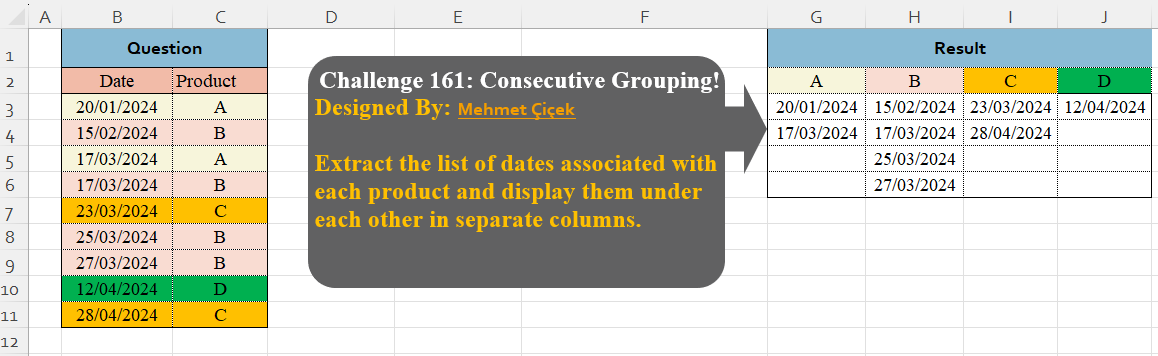
Extract the list of dates associated with each product and display them under each other in separate columns.
📌 Challenge Details and Links
Challenge Number: 161
Challenge Difficulty: ⭐
Designed by: Mehmet Çiçek
📥Download Sample File
📥Link to the solutions on LinkedIn
Solving the challenge of Custom Grouping! Part 11 with Power Query
Power Query solution 1 for Custom Grouping! Part 11, proposed by Alejandro Simón 🇵🇦 🇪🇸:
let
  Source = Excel.CurrentWorkbook(){[Name = "Table1"]}[Content],
  Group  = Table.Group(Source, {"Product"}, {{"A", each [Date]}}),
  Sol    = Table.FromColumns(Group[A], Group[Product])
in
  Sol
Power Query solution 2 for Custom Grouping! Part 11, proposed by 🇮🇷 Navid Esmaeilzadeh اسماعیل زاده:
let
  S = Excel.CurrentWorkbook(){[Name = "Table1"]}[Content],
  A = Table.TransformColumnTypes(S, {"Date", type date}),
  B = Table.Group(A, {"Product"}, {{"T", each _}}),
  C = Table.AddColumn(B, "T2", each Table.AddIndexColumn([T], "Ind", 1, 1)),
  D = Table.Combine(C[T2]),
  E = Table.Pivot(D, List.Distinct(D[Product]), "Product", "Date"),
  F = Table.RemoveColumns(E, {"Ind"})
in
  F
Power Query solution 3 for Custom Grouping! Part 11, proposed by CA Raghunath Gundi:
let
  Source = Excel.CurrentWorkbook(){[Name = "Table1"]}[Content],
  GroupBy = Table.Group(
    Source,
    {"Product"},
    {{"Date", each _[Date], type table [Date = date, Product = text]}}
  ),
  Pivot = Table.Pivot(GroupBy, List.Distinct(GroupBy[Product]), "Product", "Date"),
  Result = Table.AddColumn(
    Pivot,
    "Custom",
    each Table.FromColumns({[A], [B], [C], [D]}, Table.ColumnNames(Pivot))
  )[Custom]{0}
in
  Result
Power Query solution 4 for Custom Grouping! Part 11, proposed by Seokho MOON:
let
  Source = Excel.CurrentWorkbook(){[Name = "Table1"]}[Content],
  Group  = Table.Group(Source, {"Product"}, {"Temp", each [Date]}),
  Res    = Table.FromColumns(Group[Temp], Group[Product])
in
  Res
Solving the challenge of Custom Grouping! Part 11 with Excel
Excel solution 1 for Custom Grouping! Part 11, proposed by 🇰🇷 Taeyong Shin:
=DROP(
    PIVOTBY(
        MAP(
            C3:C11,
            LAMBDA(
                x,
                COUNTIF(
                    C3:x,
                    x
                )
            )
        ),
        C3:C11,
        B3:B11,
        SUM,
        ,
        0,
        ,
        0
    ),
    ,
    1
)
Excel solution 2 for Custom Grouping! Part 11, proposed by Oscar Mendez Roca Farell:
=DROP(
    PIVOTBY(
        MAP(
            C3:C11,
            LAMBDA(
                i,
                SUM(
                    N(
                        C3:i=i
                    )
                )
            )
        ),
        C3:C11,
        B3:B11,
        SUM,
        ,
        0,
        ,
        0
    ),
    ,
    1
)
Excel solution 3 for Custom Grouping! Part 11, proposed by Julian Poeltl:
=IFNA(
    DROP(
        REDUCE(
            0,
            SORT(
                UNIQUE(
                    C3:C11
                )
            ),
            LAMBDA(
                A,
                B,
                HSTACK(
                    A,
                    VSTACK(
                        B,
                        FILTER(
                            B3:B11,
                            C3:C11=B
                        )
                    )
                )
            )
        ),
        ,
        1
    ),
    ""
)
Excel solution 4 for Custom Grouping! Part 11, proposed by Kris Jaganah:
=DROP(
    PIVOTBY(
        MAP(
            C3:C11,
            LAMBDA(
                x,
                COUNTIF(
                    C3:x,
                    x
                )
            )
        ),
        C3:C11,
        B3:B11,
        SINGLE,
        ,
        0,
        ,
        0
    ),
    ,
    1
)
Excel solution 5 for Custom Grouping! Part 11, proposed by Imam Hambali:
=LET(    a,
     TRANSPOSE(
         UNIQUE(
             C3:C11
         )
     ),    r,
     REDUCE(
         "",
         a,
          LAMBDA(
              x,
              y,
               HSTACK(
                   x,
                    FILTER(
                        B3:B11,
                        C3:C11=y
                    )
               )
          )
     ),    IFNA(
        VSTACK(
            a,
             DROP(
                 r,
                 ,
                 1
             )
        ),
        ""
    ))
Excel solution 6 for Custom Grouping! Part 11, proposed by Ivan William:
=LET(
    n,
    B3:B11,
    b,
    C3:C11,
    DROP(
        REDUCE(
            0,
            UNIQUE(
                b
            ),
            LAMBDA(
                a,
                c,
                IFNA(
                    HSTACK(
                        a,
                        VSTACK(
                            c,
                            FILTER(
                                n,
                                b=c
                            )
                        )
                    ),
                    ""
                )
            )
        ),
        ,
        1
    )
)
Excel solution 7 for Custom Grouping! Part 11, proposed by Sunny Baggu:
=LET(     _h,
     TOROW(
         UNIQUE(
             C3:C11
         )
     ),     VSTACK(          _h,          IFNA(

               DROP(

                    REDUCE(

                         "",

                         _h,

                         LAMBDA(
                             a,
                              v,
                              HSTACK(
                                  a,
                                   FILTER(
                                       B3:B11,
                                        C3:C11 = v
                                   )
                              )
                         )

                    ),

                    ,

                    1

               ),

               ""

          )     ))
Excel solution 8 for Custom Grouping! Part 11, proposed by abdelaziz allam:
=VSTACK(
    TOROW(
        UNIQUE(
            C3:C11
        )
    ),
    IFNA(
        DROP(
            REDUCE(
                "",
                TOROW(
        UNIQUE(
            C3:C11
        )
    ),
                LAMBDA(
                    a,
                    b,
                    HSTACK(
                        a,
                        FILTER(
                            B3:B11,
                            C3:C11=b
                        )
                    )
                )
            ),
            ,
            1
        ),
        ""
    )
)
Excel solution 9 for Custom Grouping! Part 11, proposed by Andy Heybruch:
=LET(    _date,
    B3:B11,    _prod,
    C3:C11,    _x,
    TOROW(
        UNIQUE(
            _prod
        )
    ),    VSTACK(
        _x,
        IFERROR(
            --TRANSPOSE(
                TEXTSPLIT(
                    TEXTJOIN(
                        "|",
                        ,
                        BYCOL(
                            _x,
                            LAMBDA(
                                a,
                                ARRAYTOTEXT(
                                    FILTER(
                                        _date,
                                        _prod=a
                                    )
                                )
                            )
                        )
                    ),
                    ", ",
                    "|",
                    ,
                    ,
                    ""
                )
            ),
            ""
        )
    )
)
Excel solution 10 for Custom Grouping! Part 11, proposed by Asheesh Pahwa:
=LET(
    p,
    C3:C11,
    u,
    UNIQUE(
        p
    ),
    IFNA(
        DROP(
            REDUCE(
                "",
                u,
                LAMBDA(
                    x,
                    y,
                    HSTACK(
                        x,
                        FILTER(
                            B3:B11,
                            p=y
                        )
                    )
                )
            ),
            ,
            1
        ),
        ""
    )
)
Excel solution 11 for Custom Grouping! Part 11, proposed by Cary Ballard, DML:
=LET(
    d,
     B3:B11,
     p,
     C3:C11,
     u,
     TOROW(
         SORT(
             UNIQUE(
                 C3:C11
             )
         )
     ),
     c,
     IFNA(
         DROP(
             REDUCE(
                 0,
                  SEQUENCE(
                      COLUMNS(
                          u
                      )
                  ),
                  LAMBDA(
                      a,
                       v,
                       HSTACK(
                           a,
                            FILTER(
                                d,
                                 p = INDEX(
                                     u,
                                      v
                                 )
                            )
                       )
                  )
             ),
              ,
              1
         ),
          ""
     ),
     VSTACK(
         u,
          c
     )
)
Excel solution 12 for Custom Grouping! Part 11, proposed by Eddy Wijaya:
=IFNA(
    DROP(
        REDUCE(
            0,
            UNIQUE(
                C3:C11
            ),
            LAMBDA(
                a,
                v,
                HSTACK(
                    a,
                    VSTACK(
                        v,
                        FILTER(
                            B3:B11,
                            C3:C11=v
                        )
                    )
                )
            )
        ),
        ,
        1
    ),
    ""
)
Excel solution 13 for Custom Grouping! Part 11, proposed by Gerson Pineda:
=DROP(
    IFNA(
        REDUCE(
            1,
            UNIQUE(
                C3:C11
            ),
            LAMBDA(
                i,
                x,
                HSTACK(
                    i,
                    VSTACK(
                        x,
                        FILTER(
                            B3:B11,
                            x=C3:C11
                        )
                    )
                )
            )
        ),
        ""
    ),
    ,
    1
)
Excel solution 14 for Custom Grouping! Part 11, proposed by Hamidi Hamid:
=LET(
    x,
    MAP(
        UNIQUE(
            C3:C11
        ),
        LAMBDA(
            a,
            TEXTJOIN(
                "-",
                ,
                FILTER(
                    B3:B11,
                    C3:C11=a
                )
            )
        )
    ),
    DROP(
        IFERROR(
            TRANSPOSE(
                HSTACK(
                    UNIQUE(
            C3:C11
        ),
                    UNIQUE(
                        TEXTSPLIT(
                            CONCAT(
                                x&"/"
                            ),
                            "-",
                            "/",

                        ),
                        1
                    )*1
                )
            ),
            ""
        ),
        ,
        -1
    )
)
Excel solution 15 for Custom Grouping! Part 11, proposed by Md. Zohurul Islam:
=LET(    dt,
    B3:B11,    prd,
    C3:C11,    unq,
    TOROW(
        UNIQUE(
            prd
        )
    ),    u,
    DROP(
        REDUCE(
            "",
            unq,
            LAMBDA(
                x,
                y,
                HSTACK(
                    x,
                    SORT(
                        FILTER(
                            dt,
                            prd=y
                        )
                    )
                )
            )
        ),
        ,
        1
    ),    v,
    IFNA(
        VSTACK(
            unq,
            u
        ),
        ""
    ),    v
)
Excel solution 17 for Custom Grouping! Part 11, proposed by Pieter de B.:
=DROP(
    REDUCE(
        "",
        UNIQUE(
            C3:C11
        ),
        LAMBDA(
            a,
            b,
            IFNA(
                HSTACK(
                    a,
                    VSTACK(
                        b,
                        FILTER(
                            B3:B11,
                            C3:C11=b
                        )
                    )
                ),
                ""
            )
        )
    ),
    ,
    1
)
Excel solution 18 for Custom Grouping! Part 11, proposed by Rick Rothstein:
=LET(
    b,
    B3:B11,
    c,
    C3:C11,
    p,
    TOROW(
        UNIQUE(
            c
        )
    ),
    VSTACK(
        p,
        IFNA(
            DROP(
                REDUCE(
                    "",
                    p,
                    LAMBDA(
                        a,
                        x,
                        HSTACK(
                            a,
                            FILTER(
                                b,
                                c=x
                            )
                        )
                    )
                ),
                ,
                1
            ),
            ""
        )
    )
)
Excel solution 19 for Custom Grouping! Part 11, proposed by Tomasz Jakóbczyk:
=TRANSPOSE(SORT(UNIQUE(C3:C11)))
E3: =SORT(FILTER($B$3:$B$11,$C$3:$C$11=E$2))
Solving the challenge of Custom Grouping! Part 11 with Python
Python solution 1 for Custom Grouping! Part 11, proposed by Konrad Gryczan, PhD:
import pandas as pd

path = "CH-161 Custom Index Column.xlsx"
input = pd.read_excel(path, usecols="B:C", skiprows=1, nrows=10)
test = pd.read_excel(path, usecols="E:H", skiprows=1, nrows=4)

result = input.assign(rn=input.groupby('Product').cumcount() + 1)
 .pivot(index='rn', columns='Product', values='Date')
 .reset_index(drop=True).rename_axis(None, axis=1)

print(result.equals(test)) # True
Python solution 2 for Custom Grouping! Part 11, proposed by Abdallah Ally:
import pandas as pd

# Load the Excel file
file_path = 'CH-161 Custom Index Column.xlsx'
df = pd.read_excel(file_path, usecols='B:C', skiprows=1)

# Perform data manipulation
df['Date'] = df['Date'].dt.strftime('%d-%m-%Y')
df = df.groupby('Product').agg(lambda x: [x, len(x)]).reset_index()
max_size = max(df['Date'].map(lambda x: x[1]))
df['Date'] = df['Date'].map(
 lambda x: list(x[0]) + [''] * (max_size - len(x[0]))
)
values = {df.iat[i, 0]: df.iat[i, 1] for i in df.index}
df = pd.DataFrame(data=values)

# Display the final results
df
Solving the challenge of Custom Grouping! Part 11 with Python in Excel
Python in Excel solution 1 for Custom Grouping! Part 11, proposed by Alejandro Campos:
df = xl("B2:C11", headers=True)
result_df = pd.DataFrame({p: d + ['']*(max(map(
 len, df.groupby('Product')['Date'].apply(list))) - len(d))
 for p, d in df.groupby('Product')['Date'].apply(
 list).items()})
Python in Excel solution 2 for Custom Grouping! Part 11, proposed by Ümit Barış Köse, MSc:
df=xl("B2:C11", headers=True)
grouped = df.groupby('Product')['Date'].apply(list)
max_len = grouped.apply(len).max()
result_df = pd.DataFrame({
 p: d + [''] * (max_len - len(d)) for p, d in grouped.items()
})
Solving the challenge of Custom Grouping! Part 11 with R
R solution 1 for Custom Grouping! Part 11, proposed by Konrad Gryczan, PhD:
library(tidyverse)
library(readxl)

path = "files/CH-161 Custom Index Column.xlsx"
input = read_excel(path, range = "B2:C11")
test = read_excel(path, range = "E2:H6")

result = input %>%
 mutate(rn = row_number(), .by = Product) %>%
 pivot_wider(names_from = Product, values_from = Date) %>%
 select(-rn)

all.equal(result, test, check.attributes = FALSE)
#> [1] TRUE
Solving the challenge of Custom Grouping! Part 11 with Google Sheets
Google Sheets solution 1 for Custom Grouping! Part 11, proposed by Peter Krkos:
PowerQuery solution:
https://docs.google.com/spreadsheets/d/1zR5IZLz8OT76vhaPEHfsPrw8-RDKnLyyqS49IJjdhFk/edit?pli=1&gid=315895068#gid=315895068