
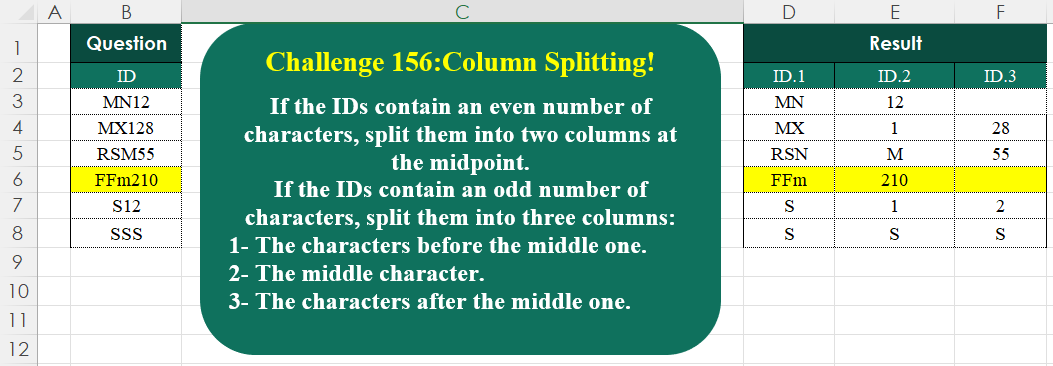
_x000D_
Python solution 1 for Column Splitting! Part 3, proposed by Konrad Gryczan, PhD:
import pandas as pd

path = "CH-156 Column Splitting.xlsx"
input = pd.read_excel(path, usecols="B", skiprows=1, nrows=7)
test = pd.read_excel(path, usecols="D:F", skiprows=1, nrows=7).fillna('')

def split_id(id):
 n = len(id)
 mid = n // 2
 if n % 2 == 0:
 id1, id2, id3 = id[:mid], id[mid:], None
 else:
 id1, id2, id3 = id[:mid], id[mid:mid + 1],
If the IDs contain an even number of characters, split them into two columns at the midpoint.
If the IDs contain an odd number of characters, split them into three columns:
1- The characters before the middle one.
2- The middle character.
3- The characters after the middle one.
📌 Challenge Details and Links
Challenge Number: 156
Challenge Difficulty: ⭐⭐
📥Download Sample File
📥Link to the solutions on LinkedIn
Solving the challenge of Column Splitting! Part 3 with Power Query
_x000D_
Power Query solution 1 for Column Splitting! Part 3, proposed by Zoran Milokanović:
let
  Source = Excel.CurrentWorkbook(){[Name = "Input"]}[Content],
  S = Table.SplitColumn(
    Source,
    "ID",
    each
      let
        l = Text.Length(_),
        o = Byte.From(Number.IsOdd(l)),
        w = (l - o) / 2
      in
        Splitter.SplitTextByLengths({w} & {{}, {o}}{o} & {w})(_),
    2 + Number.Sign(List.Count(List.Skip(Source[ID], each Number.IsEven(Text.Length(_)))))
  )
in
  S
_x000D_
_x000D_
Power Query solution 2 for Column Splitting! Part 3, proposed by Zoran Milokanović:
let
  Source = Excel.CurrentWorkbook(){[Name = "Input"]}[Content],
  S = Table.Combine(
    List.Transform(
      Source[ID],
      each
        let
          l = Text.Length(_),
          o = Byte.From(Number.IsOdd(l)),
          w = (l - o) / 2
        in
          Table.FromRows(
            {{Text.Start(_, w)} & {{}, {Text.At(_, w)}}{o} & {Text.End(_, w)}},
            List.Transform({0 .. 1 + o}, (c) => "ID." & Text.From(c + 1))
          )
    )
  )
in
  S
_x000D_
_x000D_
Power Query solution 3 for Column Splitting! Part 3, proposed by Brian Julius:
let
  Source = Excel.CurrentWorkbook(){[Name = "Table1"]}[Content],
  Prep = Table.AddColumn(
    Source,
    "X",
    each [
      a = [ID],
      b = Text.Length(a),
      c = Number.Mod(b, 2),
      d = Number.IntegerDivide(b, 2),
      e = Text.Start(a, d),
      f = Text.Range(a, d, 1),
      g = Text.End(a, d),
      h = if c = 0 then (e & " " & g) else (e & " " & f & " " & g)
    ][h]
  ),
  SplitBy = Table.RemoveColumns(
    Table.SplitColumn(
      Prep,
      "X",
      Splitter.SplitTextByDelimiter(" ", QuoteStyle.Csv),
      {"ID.1", "ID.2", "ID.3"}
    ),
    "ID"
  )
in
  SplitBy
_x000D_
_x000D_
Power Query solution 4 for Column Splitting! Part 3, proposed by Luan Rodrigues:
let
 Fonte = Tabela1,
 add = Table.TransformColumns(Fonte,{"ID", each
let
a = Text.Length(_),
b = List.Median({0..a-1}),
c = if Number.IsEven(a) then {a/2,a/2} else {b,1,b},
d = Table.FromRows({Splitter.SplitTextByLengths(c)(_)},List.Transform({1..List.Count(c)},each "ID."&Text.From(_) ) )
in d })[ID],
 tab = Table.Combine(add)
in
 tab
_x000D_
_x000D_
Power Query solution 5 for Column Splitting! Part 3, proposed by Ramiro Ayala Chávez:
let
Source = Excel.CurrentWorkbook(){[Name="Table1"]}[Content],
Fx = (x)=> let
S = Splitter.SplitTextByLengths, L = Text.Length,
A = x,
B = Number.RoundDown(L(A)/2),
C = if Number.IsOdd(L(A)) then S({B,1,B})(A) else S({B,B})(A)&{null}
in C,
D = Table.FromRows(Table.AddColumn(Source,"A", each Fx([ID]))[A]),
Sol = Table.TransformColumnNames(D, each Text.Replace(_,"Column","ID."))
in
Sol
_x000D_
_x000D_
Power Query solution 6 for Column Splitting! Part 3, proposed by Alejandro Simón 🇵🇦 🇪🇸:
let
 Source = Excel.CurrentWorkbook(){[Name="Table1"]}[Content],
 Sol = Table.Combine(Table.AddColumn(Source, "A", each
let
a = [ID],
b = Text.Length(a),
c = Splitter.SplitTextByLengths,
d = if Number.IsOdd(b) then c({f-.5, 1, f-.5})(a) else c({f,f})(a),
e = Table.FromRows({d}, List.Transform({1..List.Count(d)}, each "ID."&Text.From(_))),
f = b/2
in e)[A])
in
 Sol
_x000D_
_x000D_
Power Query solution 7 for Column Splitting! Part 3, proposed by Kris Jaganah:
let
  A = Excel.CurrentWorkbook(){[Name = "Table1"]}[Content][ID],
  B = List.Transform(
    A,
    each [
      a = Text.Length(_),
      b = Number.RoundDown(a / 2),
      c = Text.Start(_, b),
      d = Text.Middle(_, b, 1),
      e = Text.End(_, b),
      f = if a / 2 = b then {c, e, ""} else {c, d, e}
    ][f]
  ),
  C = Table.FromRows(B, {"ID.1", "ID.2", "ID.3"})
in
  C
_x000D_
_x000D_
Power Query solution 8 for Column Splitting! Part 3, proposed by Abdallah Ally:
let
  Source = Excel.CurrentWorkbook(){[Name = "Table1"]}[Content],
  Transform = Table.TransformRows(
    Source,
    each [
      a = Text.Length([ID]),
      b = Number.IntegerDivide(a, 2),
      c = Text.Start([ID], b),
      d = Text.End([ID], b),
      e = if Number.IsEven(a) then {c, d, null} else {c, Text.At([ID], b), d}
    ][e]
  ),
  Result = Table.FromRows(Transform, {"ID.1", "ID.2", "ID.3"})
in
  Result
_x000D_
_x000D_
Power Query solution 9 for Column Splitting! Part 3, proposed by Yaroslav Drohomyretskyi:
let
  Source = Excel.CurrentWorkbook(){[Name = "Table1"]}[Content][ID],
  Result = Table.FromRows(
    List.Transform(
      Source,
      each [
        half = Number.RoundDown(Text.Length(_) / 2),
        res =
          if Number.IsEven(Text.Length(_)) then
            {Text.Start(_, half), Text.End(_, half), ""}
          else
            {Text.Start(_, half), Text.Middle(_, half, 1), Text.End(_, half)}
      ][res]
    ),
    {"ID.1", "ID.2", "ID.3"}
  )
in
  Result
_x000D_
_x000D_
Power Query solution 10 for Column Splitting! Part 3, proposed by 🇮🇷 Navid Esmaeilzadeh اسماعیل زاده:
let
S = Excel.CurrentWorkbook(){[Name="Table1"]}[Content],
A = Table.AddColumn(S, "T", each let
a=if Number.IsEven(Text.Length([ID])) then Splitter.SplitTextByPositions({0,Text.Length([ID])/2})([ID]) else Splitter.SplitTextByPositions({0,Number.RoundDown( Text.Length([ID])/2),Number.RoundUp( Text.Length([ID])/2)})([ID]),
b=List.Count(a),
c=List.Transform({1..b}, each "ID."&Text.From(_)),
d=Table.FromColumns(List.Split(a,1),c)
in
d),
 B = Table.Combine(A[T])
in
 B
_x000D_
_x000D_
Power Query solution 11 for Column Splitting! Part 3, proposed by CA Raghunath Gundi:
let
  Source = Excel.CurrentWorkbook(){[Name = "Question"]}[Content],
  A = Table.AddColumn(Source, "Odd", each Number.IsOdd(Text.Length([ID]))),
  B = Table.AddColumn(A, "Length", each Text.Length([ID]) / 2, Int64.Type),
  C = Table.AddColumn(B, "C", each if [Odd] = false then [Length] else [Length] - 0.5),
  ID.1 = Table.AddColumn(C, "ID.1", each Text.Start([ID], [C])),
  ID.2 = Table.AddColumn(
    ID.1,
    "ID.2",
    each if [Odd] = true then Text.Middle([ID], [C], 1) else Text.End([ID], [C])
  ),
  ID.3 = Table.AddColumn(ID.2, "ID.3", each if [Odd] = true then Text.End([ID], [C]) else null),
  Result = Table.SelectColumns(ID.3, {"ID.1", "ID.2", "ID.3"})
in
  Result
_x000D_
_x000D_
Power Query solution 12 for Column Splitting! Part 3, proposed by Seokho MOON:
let
  Source = Excel.CurrentWorkbook(){[Name = "Table1"]}[Content][ID],
  Rows = List.Transform(
    Source,
    each [
      L = Text.Length(_),
      C = Number.IntegerDivide(L, 2),
      M = Number.Mod(L, 2),
      R = List.RemoveMatchingItems(
        {Text.Range(_, 0, C), Text.Range(_, C, M), Text.Range(_, C + M)},
        {""}
      )
    ][R]
  ),
  Cols = List.Zip(Rows),
  ColNames = List.Transform({1 .. List.Count(Cols)}, each "ID." & Text.From(_)),
  Res = Table.FromColumns(Cols, ColNames)
in
  Res
_x000D_
_x000D_
Power Query solution 13 for Column Splitting! Part 3, proposed by Seokho MOON:
let
  Source = Excel.CurrentWorkbook(){[Name = "Table1"]}[Content],
  Split = Table.SplitColumn(
    Source,
    "ID",
    (x) =>
      [
        L = Text.Length(x),
        M = Number.Mod(L, 2),
        C = (L - M) / 2,
        D = List.Distinct({0, C, C + M}),
        R = Splitter.SplitTextByPositions(D)(x)
      ][R],
    3
  )
in
  Split
_x000D_
_x000D_
Power Query solution 14 for Column Splitting! Part 3, proposed by Vida Vaitkunaite:
let
  Source = Excel.CurrentWorkbook(){[Name = "Table1"]}[Content],
  Custom = Table.AddColumn(
    Source,
    "Cust",
    each
      let
        length = Text.Length([ID]),
        middle = Number.RoundDown(length / 2),
        result =
          if Number.IsEven(length) then
            Text.Insert([ID], middle, "|")
          else
            Text.Insert(Text.Insert([ID], middle, "|"), length - middle + 1, "|")
      in
        result
  ),
  Final = Table.SplitColumn(
    Table.RenameColumns(Table.RemoveColumns(Custom, {"ID"}), {{"Cust", "ID"}}),
    "ID",
    Splitter.SplitTextByDelimiter("|", QuoteStyle.Csv),
    {"ID.1", "ID.2", "ID.3"}
  )
in
  Final
_x000D_
Solving the challenge of Column Splitting! Part 3 with Excel
_x000D_
Excel solution 1 for Column Splitting! Part 3, proposed by Bo Rydobon 🇹🇭:
=LET(z,
    B3:B8,
    h,
    LEN(
        z
    )/2,
    MID(z,
    (h+{1,
    1,
    2})^{0,
    1,
    1},
    IF(
        MOD(
            h,
            1
        ),
        h^{1,
        0,
        1},
        h*{1,
        1,
        0}
    )))
_x000D_
_x000D_
Excel solution 2 for Column Splitting! Part 3, proposed by Oscar Mendez Roca Farell:
=LET(
    a,
    B3:B8,
    n,
    LEN(
        a
    )/2,
    R,
    REPLACE,
    TEXTSPLIT(
        CONCAT(
            R(
                R(
                    a,
                    n+1,
                    ,
                    "|"
                ),
                ROUND(
                    n,

                )+2,
                ,
                "|"
            )&"-"
        ),
        "|",
        "-",
        1,
        ,
        ""
    )
)
_x000D_
_x000D_
Excel solution 3 for Column Splitting! Part 3, proposed by Julian Poeltl:
=IFNA(
    REDUCE(
        "ID."&SEQUENCE(
            ,
            3
        ),
        B3:B8,
        LAMBDA(
            A,
            B,
            VSTACK(
                A,
                LET(
                    L,
                    LEN(
                        B
                    ),
                    IF(
                        ISEVEN(
                            L
                        ),
                        HSTACK(
                            LEFT(
                                B,
                                L/2
                            ),
                            RIGHT(
                                B,
                                L/2
                            )
                        ),
                        HSTACK(
                            LEFT(
                                B,
                                INT(
                                    L/2
                                )
                            ),
                            MID(
                                B,
                                ROUNDUP(
                                    L/2,

                                ),
                                1
                            ),
                            RIGHT(
                                B,
                                L/2
                            )
                        )
                    )
                )
            )
        )
    ),
    ""
)
_x000D_
_x000D_
Excel solution 4 for Column Splitting! Part 3, proposed by Kris Jaganah:
=REDUCE(
    "ID."&{1,
    2,
    3},
    B3:B8,
    LAMBDA(
        x,
        y,
        IFNA(
            VSTACK(
                x,
                LET(
                    a,
                    LEN(
                        y
                    ),
                    b,
                    a/2,
                    c,
                    LEFT(
                        y,
                        b
                    ),
                    d,
                    MID(
                        y,
                        b+0.5,
                        1
                    ),
                    e,
                    RIGHT(
                        y,
                        b
                    ),
                    IF(
                        INT(
                            b
                        )=b,
                        HSTACK(
                            c,
                            e
                        ),
                        HSTACK(
                            c,
                            d,
                            e
                        )
                    )
                )
            ),
            ""
        )
    )
)
_x000D_
_x000D_
Excel solution 5 for Column Splitting! Part 3, proposed by JvdV –:
=REGEXREPLACE(
    B3:B8,
    "((w(?=w*?(w3?b)))+?)(w)?3b",
    {"$1",
    "${4:-$3}",
    "${4:+$3:}"}
)

This is (nearly)
_x000D_
_x000D_
Excel solution 6 for Column Splitting! Part 3, proposed by Sunny Baggu:
=LET(     r,
     B3:B8,     _l,
     LEN(
         r
     ),     _c,
     MOD(
         _l,
          2
     ),     _m,
     _l / 2,     _a,
     HSTACK(
         LEFT(
             r,
              _m
         ),
          RIGHT(
             r,
              _m
         )
     ),     _m1,
     ROUNDDOWN(
         _m,
          0
     ),     _m2,
     ROUNDUP(
         _m,
          0
     ),     _b,
     HSTACK(
         LEFT(
             r,
              _m1
         ),
          MID(
              r,
               _m2,
               1
          ),
          RIGHT(
             r,
              _m1
         )
     ),     IFNA(
         IF(
             _c,
              _b,
              _a
         ),
          ""
     ))
_x000D_
_x000D_
Excel solution 7 for Column Splitting! Part 3, proposed by Ankur Sharma:
=IFERROR(    DROP(        REDUCE(
            "",
             B3:B8,
             LAMBDA(
                 i,
                  ar,
                  VSTACK(
                      i,

                      LET(
                          m,
                           MID(
                               ar,
                                1,
                                LEN(
                                    ar
                                )/2
                           ),
                           d,
                           LEN(
                                    ar
                                )/2,

                          IF(
                              MOD(
                                  LEN(
                                    ar
                                ),
                                   2
                              ) = 0,

                              HSTACK(
                                  m,
                                   MID(
                                       ar,
                                        d + 1,
                                        99
                                   )
                              ),

                              HSTACK(
                                  m,
                                   MID(
                                       ar,
                                        d + 1,
                                        1
                                   ),
                                   MID(
                                      ar,
                                       d + 2,
                                       99
                                  )
                              )
                          )
                      )
                  )
             )
        ),        1
    ),    ""
)
_x000D_
_x000D_
Excel solution 8 for Column Splitting! Part 3, proposed by CA Raghunath Gundi:
=LET(
    c,
    B3,
    l,
    LEN(
        B3
    ),     x,
    LEFT(
        c,
        IF(
            MOD(
                l,
                2
            )=0,
            l/2,
            l/2-0.5
        )
    ),     y,
     MID(
         c,
         IF(
             MOD(
                l,
                2
            )=0,
             l/2+1,
             l/2+0.5
         ),
          IF(
              MOD(
                l,
                2
            )=0,
              l/2,
              1
          )
     ),     z,
     RIGHT(
         c,
         IF(
             MOD(
                l,
                2
            )=0,
             0,
             l/2-0.5
         )
     ),    HSTACK(
        x,
        y,
        z
    )
)
_x000D_
_x000D_
Excel solution 9 for Column Splitting! Part 3, proposed by ferhat CK:
=IFNA(
    REDUCE(
        "ID."&SEQUENCE(
            ,
            3
        ),
        B3:B8,
        LAMBDA(
            x,
            y,
            VSTACK(
                x,
                LET(
                    a,
                    LEN(
                        y
                    ),
                    p,
                    MID,
                    IF(
                        ISODD(
                            a
                        ),
                        HSTACK(
                            p(
                                y,
                                1,
                                a/2
                            ),
                            p(
                                y,
                                ROUND(
                                    a/2,
                                    0
                                ),
                                1
                            ),
                            p(
                                y,
                                ROUND(
                                    a/2,
                                    0
                                )+1,
                                a/2
                            )
                        ),
                        HSTACK(
                            p(
                                y,
                                1,
                                a/2
                            ),
                            p(
                                y,
                                a/2+1,
                                a/2
                            )
                        )
                    )
                )
            )
        )
    ),
    ""
)
_x000D_
_x000D_
Excel solution 10 for Column Splitting! Part 3, proposed by Hamidi Hamid:
=LET(bt,
    B3:B8,
    x,
    BYROW(MID(
        bt,
        SEQUENCE(
            ,
            100
        ),
        1
    ),
    LAMBDA(a,
    SUM((a<>"")*1)/2)),
    y,
    IF(
        x=INT(
            x
        ),
        MID(
            bt,
            1,
            x
        ),
        MID(
            bt,
            1,
            INT(
            x
        )
        )
    ),
    z,
    TEXTAFTER(
        bt,
        y,
        1
    ),
    v,
    IF(
        INT(
            x
        )<>x,
        RIGHT(
            bt,
            ROUNDUP(
                INT(
            x
        )-0.5,
                -0.5
            )
        ),
        ""
    ),
    t,
    LEFT(
        z,
        IF(
            LEN(
                v
            )-1<0,
            100,
            1
        )
    ),
    HSTACK(
        y,
        t,
        v
    ))
_x000D_
_x000D_
Excel solution 11 for Column Splitting! Part 3, proposed by Hussein SATOUR:
=IFNA(
    DROP(
        REDUCE(
            "",
            B3:B8,
            LAMBDA(
                x,
                y,
                VSTACK(
                    x,
                    LET(
                        H,
                        HSTACK,
                        a,
                        LEN(
                            y
                        ),
                        b,
                        a/2,
                        c,
                        ROUNDDOWN(
                            a/2,
                            0
                        ),
                        IF(
                            ISEVEN(
                                a
                            ),
                            MID(
                                y,
                                H(
                                    1,
                                    1+b
                                ),
                                b
                            ),
                            MID(
                                y,
                                H(
                                    1,
                                    c+1,
                                    c+2
                                ),
                                H(
                                    c,
                                    1,
                                    c
                                )
                            )
                        )
                    )
                )
            )
        ),
        1
    ),
    ""
)
_x000D_
_x000D_
Excel solution 12 for Column Splitting! Part 3, proposed by Md. Zohurul Islam:
=LET(hdr,
    "ID" &"."&SEQUENCE(
        ,
        3
    ),
    z,
    B3:B8,
    P,
    REDUCE(hdr,
    z,
    LAMBDA(y,
    x,
    LET(a,
    LEN(
        x
    ),
    b,
    ISEVEN(
        a
    ),
    c,
    IF(b,
    a/2,
    (a-1)/2),
    d,
    IF(
        b,
        HSTACK(
            LEFT(
                x,
                c
            ),
            RIGHT(
                x,
                c
            )
        ),
        HSTACK(
            LEFT(
                x,
                c
            ),
            MID(
                x,
                c+1,
                1
            ),
            RIGHT(
                x,
                c
            )
        )
    ),
    e,
    IFNA(
        d,
        ""
    ),
    f,
    VSTACK(
        y,
        e
    ),
    f))),
    Q,
    IFNA(
        P,
        ""
    ),
    Q)
_x000D_
_x000D_
Excel solution 13 for Column Splitting! Part 3, proposed by Pieter de B.:
=DROP(
    REDUCE(
        0,
        B3:B8,
        LAMBDA(
            a,
            q,
            LET(
                L,
                LEN(
                    q
                ),
                H,
                INT(
                    L/2
                ),
                VSTACK(
                    a,
                    IF(
                        ISODD(
                            L
                        ),
                        MID(
                            q,
                            HSTACK(
                                1,
                                H+1,
                                H+2
                            ),
                            HSTACK(
                                H,
                                1,
                                H
                            )
                        ),
                        MID(
                            q,
                            HSTACK(
                                1,
                                H+1,
                                L+1
                            ),
                            HSTACK(
                                H,
                                H,
                                H
                            )
                        )
                    )
                )
            )
        )
    ),
    1
)
_x000D_
_x000D_
Excel solution 14 for Column Splitting! Part 3, proposed by Rick Rothstein:
=LET(
    b,
    B3:B8,
    c,
    LEN(
        b
    )/2,
    l,
    LEFT(
        b,
        c
    ),
    r,
    RIGHT(
        b,
        c
    ),
    m,
    MID(
        b,
        c+1,
        1
    ),
    IFNA(
        IF(
            ISODD(
                LEN(
        b
    )
            ),
            HSTACK(
                l,
                m,
                r
            ),
            HSTACK(
                l,
                r
            )
        ),
        ""
    )
)
_x000D_
_x000D_
Excel solution 15 for Column Splitting! Part 3, proposed by Rick Rothstein:
=LET(
    b,
    B3:B8,
    c,
    LEN(
        b
    )/2,
    l,
    LEFT(
        b,
        c
    ),
    r,
    RIGHT(
        b,
        c
    ),
    m,
    MID(
        b,
        c+1,
        1
    ),
    IF(
        ISODD(
            LEN(
        b
    )
        ),
        HSTACK(
            l,
            m,
            r
        ),
        HSTACK(
            l,
            r,
            LEFT(
                b,

            )
        )
    )
)
_x000D_
Solving the challenge of Column Splitting! Part 3 with Python
_x000D_
Python solution 1 for Column Splitting! Part 3, proposed by Konrad Gryczan, PhD:
import pandas as pd
path = "CH-156 Column Splitting.xlsx"

input = pd.read_excel(path, usecols="B", skiprows=1, nrows=7)

test = pd.read_excel(path, usecols="D:F", skiprows=1, nrows=7).fillna('')
def split_id(id):

 n = len(id)

 mid = n // 2

 if n % 2 == 0:

 id1, id2, id3 = id[:mid], id[mid:], None

 else:

 id1, id2, id3 = id[:mid], id[mid:mid + 1],