
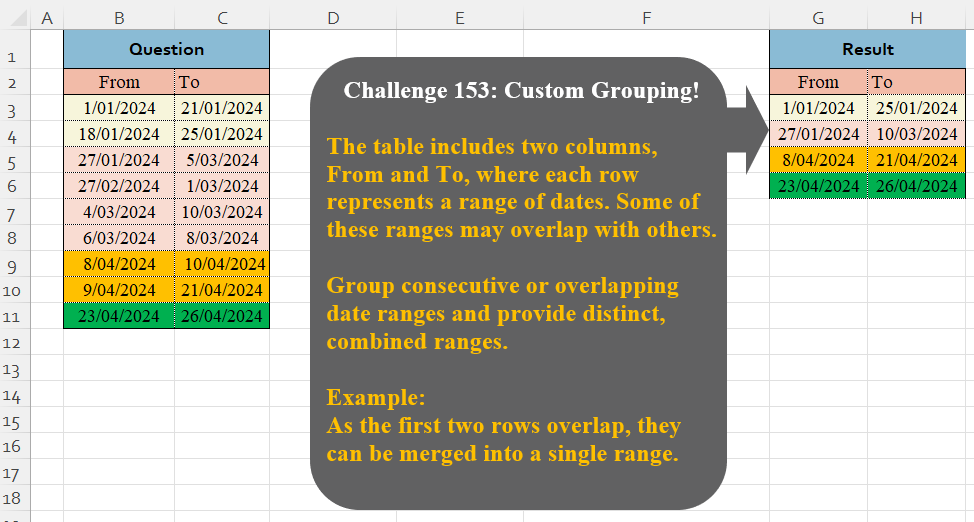
The table includes two columns, From and To, where each row represents a range of dates. Some of these ranges may overlap with others. Group consecutive or overlapping date ranges and provide distinct, combined ranges. Example: As the first two rows overlap, they can be merged into a single range
📌 Challenge Details and Links
Challenge Number: 153
Challenge Difficulty: ⭐⭐⭐
📥Download Sample File
📥Link to the solutions on LinkedIn
Solving the challenge of Custom Grouping! Part 10 with Power Query
Power Query solution 1 for Custom Grouping! Part 10, proposed by Zoran Milokanović:
let
  Source = Excel.CurrentWorkbook(){[Name = "Input"]}[Content],
  S = Table.FromRows(
    List.Transform(
      List.Accumulate(
        Table.ToRows(Source),
        {},
        (b, n) =>
          let
            l = List.Last(b, {}),
            f = Byte.From(List.IsEmpty(List.Select(l, each n{0} >= _{0} and n{0} <= _{1})))
          in
            List.RemoveLastN(b, 1 - f) & {{l, {}}{f} & {n}}
      ),
      each
        let
          z = List.Zip(_)
        in
          {List.Min(z{0}), List.Max(z{1})}
    ),
    Table.ColumnNames(Source)
  )
in
  S
Power Query solution 2 for Custom Grouping! Part 10, proposed by Alejandro Simón 🇵🇦 🇪🇸:
let
Source = Excel.CurrentWorkbook(){[Name="Table1"]}[Content],
Lista = Table.AddColumn(Source, "Lista", each
 {Number.From(Date.From([From]))..Number.From(Date.From([To]))}),
LG = Table.Combine(List.Generate(()=> [x=1, y = Lista[Lista]{0}, z = 1],
each [x]<=List.Count(Lista[Lista]),
each [x=[x]+1,
 n = Lista[Lista]{[x]},
 l = List.ContainsAny([y],n),
 y = if l then List.Sort(n&[y]) else n,
 z = if y = n then [z]+1 else [z]],
each Table.FromRows({Record.ToList([[y], [z]])})
)),
Sol = Table.Combine(Table.Group(LG, {"Column2"}, {{"A", each
 let
 a = List.Sort(List.Combine([Column1])),
 b = Date.From(a{0}),
 c = Date.From(List.Last(a)),
 d = Table.FromColumns({{b},{c}}, Table.ColumnNames(Source))
 in d}})[A])
in
Sol
Power Query solution 3 for Custom Grouping! Part 10, proposed by Kris Jaganah:
let
  A = Excel.CurrentWorkbook(){[Name = "Table1"]}[Content],
  B = Table.AddIndexColumn(A, "Ix", 1),
  C = Table.AddColumn(B, "ToMa", each List.Max(List.FirstN(B[To], [Ix]))),
  D = Table.AddColumn(C, "To.1", each List.Max(Table.SelectRows(C, (x) => x[From] <= [ToMa])[ToMa])),
  E = Table.AddColumn(D, "Fro", each D[From]{List.PositionOf(D[To.1], [To.1])}),
  F = Table.Group(E, {"Fro"}, {"To", each [To.1]{0}})
in
  F
Power Query solution 4 for Custom Grouping! Part 10, proposed by Seokho MOON:
let
  Source = Excel.CurrentWorkbook(){[Name = "Table1"]}[Content],
  Rows = List.Accumulate(
    Table.ToRows(Source),
    {},
    (a, v) =>
      let
        Last   = List.Last(a),
        ExLast = List.RemoveLastN(a)
      in
        if a = {} or v{0} > Last{1} then
          a & {v}
        else
          ExLast & {{Last{0}, List.Max({Last{1}, v{1}})}}
  ),
  ColNames = Table.ColumnNames(Source)
in
  Table.TransformColumnTypes(
    Table.FromRows(Rows, ColNames),
    List.Transform(ColNames, each {_, type date})
  )
Power Query solution 5 for Custom Grouping! Part 10, proposed by Glyn Willis:
let
  Source = Excel.CurrentWorkbook(){[Name = "Table1"]}[Content],
  #"Changed Type" = Table.TransformColumnTypes(Source, {{"From", type date}, {"To", type date}}),
  #"Grouped Rows" = Table.Group(
    #"Changed Type",
    {"From", "To"},
    {{"To - Max", each List.Max(_[To]), type date}},
    GroupKind.Local,
    (x, y) =>
      let
        todatefirst = x[To],
        todatecur   = y[To],
        fromdatecur = y[From],
        med         = List.Median({todatefirst, todatecur, fromdatecur})
      in
        Int64.From(
          not (
            (todatefirst = med) or (todatecur = med) or Duration.Days(fromdatecur - todatefirst) = 1
          )
        )
  )[[From], [#"To - Max"]]
in
  #"Grouped Rows"
Solving the challenge of Custom Grouping! Part 10 with Excel
Excel solution 1 for Custom Grouping! Part 10, proposed by Bo Rydobon 🇹🇭:
=UNIQUE(
    REDUCE(
        B3:C11,
        B3:B11,
        LAMBDA(
            a,
            v,
            LET(
                y,
                BYROW(
                    EXPAND(
                        a,
                        ,
                        3,
                        v
                    ),
                    MEDIAN
                )=v,
                d,
                IF(
                    y,
                    a
                ),
                IF(
                    y,
                    HSTACK(
                        MIN(
                            d
                        ),
                        MAX(
                            d
                        )
                    ),
                    a
                )
            )
        )
    )
)
Excel solution 2 for Custom Grouping! Part 10, proposed by Bo Rydobon 🇹🇭:
=LET(
    f,
    B3:B11,
    t,
    C3:C11,
    DROP(
        GROUPBY(
            SCAN(
                0,
                COUNTIFS(
                    f,
                    "<"&f,
                    t,
                    ">"&f
                )=0,
                SUM
            ),
            B3:C11,
            HSTACK(
                MIN,
                MAX
            ),
            ,
            0
        ),
        1,
        1
    )
)
Excel solution 3 for Custom Grouping! Part 10, proposed by 🇰🇷 Taeyong Shin:
=LET(
    d,
    B3:C11,
    DROP(
        GROUPBY(
            SCAN(
                0,
                VSTACK(
                    0,
                    SCAN(
                        ,
                        DROP(
                            d,
                            -1,
                            1
                        ),
                        MAX
                    )>=DROP(
                        d,
                        1,
                        -1
                    )
                ),
                LAMBDA(
                    a,
                    v,
                    IF(
                        v,
                        a,
                        a+1
                    )
                )
            ),
            d,
            HSTACK(
                MIN,
                MAX
            ),
            ,
            0
        ),
        1,
        1
    )
)
Excel solution 4 for Custom Grouping! Part 10, proposed by Kris Jaganah:
=LET(a,
    B3:B11,
    b,
    C3:C11,
    c,
    SCAN(
        ,
        b,
        MAX
    ),
    d,
    MAP(c,
    LAMBDA(x,
    MAX(c*(a<=x)))),
    e,
    XLOOKUP(
        d,
        d,
        a
    ),
    UNIQUE(
        HSTACK(
            e,
            d
        )
    ))
Excel solution 5 for Custom Grouping! Part 10, proposed by Kris Jaganah:
=LET(
    a,
    B3:B11,
    b,
    C3:C11,
    c,
    SEQUENCE(
        ROWS(
            a
        )
    ),
    d,
    BYROW(
        a-XLOOKUP(
            c-TOROW(
                c
            ),
            c,
            b,
            0
        ),
        MIN
    ),
    e,
    SCAN(
        0,
        d,
        LAMBDA(
            x,
            y,
            IF(
                y>1,
                1+x,
                x
            )
        )
    ),
    GROUPBY(
        XLOOKUP(
            e,
            e,
            a
        ),
        b,
        MAX,
        ,
        0
    )
)
Excel solution 6 for Custom Grouping! Part 10, proposed by ferhat CK:
=LET(
    a,
    SCAN(
        1,
        B3:B11,
        LAMBDA(
            a,
            v,
            IF(
                OR(
                    v
Excel solution 7 for Custom Grouping! Part 10, proposed by Hamidi Hamid:
=LET(
    f,
    LAMBDA(
        o,
        TAKE(
            o,
            ,
            -1
        )
    ),
    x,
    SORT(
        TOCOL(
            B3:C11,
            3
        )
    ),
    y,
    TOCOL(
        B3:C11
    ),
    z,
    IF(
        y""
    ),
    sr,
    SCAN(
        ,
        IFERROR(
            TAKE(
                r,
                ,
                1
            )*1,
            0
        ),
        MAX
    ),
    t,
    HSTACK(
        sr,
        f(
            r
        )
    ),
    pt,
    TAKE(
        t,
        ,
        1
    ),
    w,
    MAP(
        UNIQUE(
            pt
        ),
        LAMBDA(
            a,
            XLOOKUP(
                a,
                pt,
                f(
                    t
                ),
                ,
                ,
                -1
            )
        )
    ),
    HSTACK(
        UNIQUE(
            pt
        ),
        w
    )
)
Excel solution 8 for Custom Grouping! Part 10, proposed by Peter Bartholomew:
=LET(     start,
     EXPAND(
         start,
          ,
          2,
          1
     ),     end,
     EXPAND(
         end,
          ,
          2,
          -1
     ),     events,
     SORT(
         VSTACK(
             start,
              end
         )
     ),     dates,
     TAKE(
         events,
          ,
          1
     ),     change,
     TAKE(
         events,
          ,
          -1
     ),     count,
     SCAN(
         0,
          change,
          SUM
     ),     prior,
     VSTACK(
         0,
          DROP(
              count,
               -1
          )
     ),     from,
     FILTER(
         dates,
          NOT(
              prior
          )
     ),     to,
     FILTER(
         dates,
          NOT(
              count
          )
     ),     WRAPCOLS(
         VSTACK(
             from,
              to
         ),
          ROWS(
              from
          )
     ))
Excel solution 9 for Custom Grouping! Part 10, proposed by Rick Rothstein:
=0+TEXTSPLIT(
    TEXTAFTER(
        "|"&UNIQUE(
            SCAN(
                "00001|00001",
                C3:C11,
                LAMBDA(
                    a,
                    x,
                    LET(
                        d,
                        XLOOKUP(
                            x,
                            B3:B11,
                            C3:C11,
                            ,
                            -1
                        ),
                        IF(
                            d>0+RIGHT(
                                a,
                                5
                            ),
                            OFFSET(
                                x,
                                ,
                                -1
                            )&"|"&d,
                            a
                        )
                    )
                )
            )
        ),
        "|",
        {1,
        2}
    ),
    "|"
)

With the header...

=VSTACK(
    {"From",
    "To"},
    0+TEXTSPLIT(
        TEXTAFTER(
            "|"&UNIQUE(
                SCAN(
                    "00001|00001",
                    C3:C11,
                    LAMBDA(
                        a,
                        x,
                        LET(
                            d,
                            XLOOKUP(
                            x,
                            B3:B11,
                            C3:C11,
                            ,
                            -1
                        ),
                            IF(
                                d>0+RIGHT(
                                a,
                                5
                            ),
                                OFFSET(
                                x,
                                ,
                                -1
                            )&"|"&d,
                                a
                            )
                        )
                    )
                )
            ),
            "|",
            {1,
            2}
        ),
        "|"
    )
)
Excel solution 10 for Custom Grouping! Part 10, proposed by Seokho MOON:
=LET(
    Data,
    B2:C11,    REDUCE(
        TAKE(
            Data,
            2
        ),
        SEQUENCE(
            ROWS(
                Data
            )-2,
            1,
            3
        ),        LAMBDA(
            a,
            v,
            LET(

                nrow,
                ROWS(
                    a
                ),
                LastFrom,
                INDEX(
                    a,
                    nrow,
                    1
                ),
                LastTo,
                INDEX(
                    a,
                    nrow,
                    2
                ),
                ExLastRow,
                DROP(
                    a,
                    -1
                ),

                CurrentFrom,
                INDEX(
                    Data,
                    v,
                    1
                ),
                CurrentTo,
                INDEX(
                    Data,
                    v,
                    2
                ),
                CurrentRow,
                INDEX(
                    Data,
                    v,
                    0
                ),

                NewLastRow,
                HSTACK(
                    LastFrom,
                    MAX(
                        LastTo,
                        CurrentTo
                    )
                ),

                IF(
                    CurrentFrom>LastTo,
                    VSTACK(
                        a,
                        CurrentRow
                    ),
                    VSTACK(
                        ExLastRow,
                        NewLastRow
                    )
                )

            )
        )
    )
)
Solving the challenge of Custom Grouping! Part 10 with Python
Python solution 1 for Custom Grouping! Part 10, proposed by Konrad Gryczan, PhD:
import pandas as pd

path = "CH-153 Custom Grouping.xlsx"
input = pd.read_excel(path, usecols="B:C", skiprows=1, nrows=10)
test = pd.read_excel(path, usecols="G:H", skiprows=1, nrows=4).rename(columns=lambda x: x.split('.')[0])

input['dates'] = input.apply(lambda row: pd.date_range(start=row['From'], end=row['To']), axis=1)
dates = pd.to_datetime(input.explode('dates')['dates'].unique())
grouped_dates = pd.DataFrame({'dates': dates})
grouped_dates['group'] = (grouped_dates['dates'].diff().dt.days > 1).cumsum() + 1
grouped_dates = grouped_dates.groupby('group')['dates'].agg(['min', 'max']).reset_index()
grouped_dates = grouped_dates.rename(columns={'min': 'From', 'max': 'To'})[['From', 'To']]

print(grouped_dates.equals(test)) # True
Solving the challenge of Custom Grouping! Part 10 with Python in Excel
Python in Excel solution 1 for Custom Grouping! Part 10, proposed by Alejandro Campos:
df = xl("B2:C11", headers=True)
df[['From', 'To']] = df[['From', 'To']].apply(pd.to_datetime, format="%d/%m/%Y")
merged_ranges = []
current_start, current_end = df.sort_values('From').iloc[0][['From', 'To']]
for start, end in df.sort_values('From').iloc[1:].itertuples(index=False):
 if start <= current_end:
 current_end = max(current_end, end)
 else:
 merged_ranges.append((current_start, current_end))
 current_start, current_end = start, end
merged_ranges.append((current_start, current_end))
merged_df = pd.DataFrame(merged_ranges, columns=["From", "To"])
merged_df = merged_df.applymap(lambda x: x.strftime("%d/%m/%Y"))
merged_df
Python in Excel solution 2 for Custom Grouping! Part 10, proposed by Seokho MOON:
df =xl("B2:C11", headers=True)
res = []
for i in df.index:
 if res == [] or df.iloc[i,0] > res[-1][1]:
 res += [list(df.iloc[i])]
 else:
 res = res[:-1] + [[res[-1][0], max(res[-1][1],df.iloc[i,1])]]
pd.DataFrame(res, columns=df.columns)
Solving the challenge of Custom Grouping! Part 10 with R
R solution 1 for Custom Grouping! Part 10, proposed by Konrad Gryczan, PhD:
library(tidyverse)
library(readxl)
library(lubridate)

path = "files/CH-153 Custom Grouping.xlsx"
input = read_excel(path, range = "B2:C11")
test = read_excel(path, range = "G2:H6")

output = input %>%
 mutate(dates = map2(From, To, seq, by = "1 day")) %>%
 unnest(dates) %>%
 distinct(dates) %>%
 group_by(cons = cumsum(c(0, diff(dates)) != 1)) %>%
 summarise(From = min(dates), To = max(dates)) %>%
 ungroup() %>%
 select(-cons)

all.equal(output, test)
#> [1] TRUE
Solving the challenge of Custom Grouping! Part 10 with Google Sheets
Google Sheets solution 1 for Custom Grouping! Part 10, proposed by Peter Krkos:
PowerQuery solution:
https://docs.google.com/spreadsheets/d/1zR5IZLz8OT76vhaPEHfsPrw8-RDKnLyyqS49IJjdhFk/edit?pli=1&gid=1885993344#gid=1885993344