
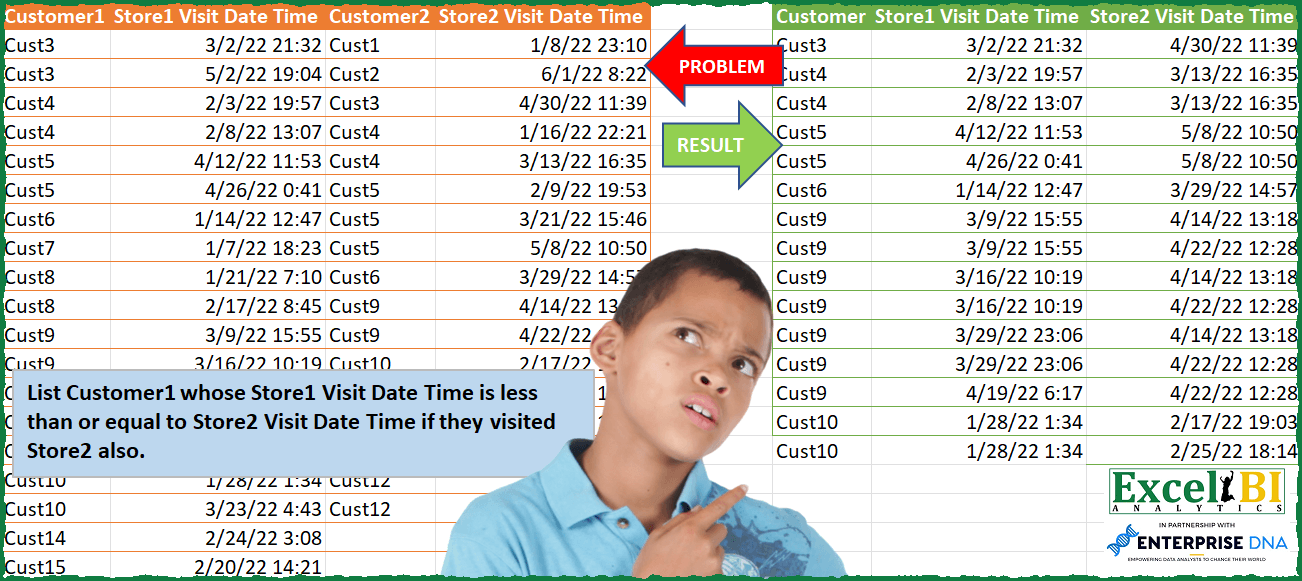
List Customer1 whose Store1 Visit Date Time is less than or equal to Store2 Visit Date Time if they visited Store2 also. So, you will need to find Customer1 which appear in Customer2 as well and then apply the condition of Date Time.
📌 Challenge Details and Links
ExcelBI Power Query Challenge Number: 96
Challenge Difficulty: ⭐️⭐️⭐️⭐️
📥Download Sample File
📥Link to the solutions on LinkedIn
Solving the challenge of Compare Store1 vs Store2 Visits with Power Query
Power Query solution 1 for Compare Store1 vs Store2 Visits, proposed by Bo Rydobon 🇹🇭:
let
  Source = Excel.CurrentWorkbook(){[Name = "Table1"]}[Content],
  Join = Table.NestedJoin(
    Table.SelectColumns(Source, List.FirstN(Table.ColumnNames(Source), 2)),
    "Customer1",
    Table.SelectColumns(Source, List.LastN(Table.ColumnNames(Source), 2)),
    "Customer2",
    "T",
    0
  ),
  Expand = Table.ExpandTableColumn(
    Table.AddColumn(
      Join,
      "D",
      each Table.SelectRows([T], (t) => t[Store2 Visit Date Time] >= [Store1 Visit Date Time])
    ),
    "D",
    {"Store2 Visit Date Time"}
  ),
  Rename = Table.RenameColumns(
    Table.RemoveColumns(Table.SelectRows(Expand, each ([Store2 Visit Date Time] <> null)), "T"),
    {"Customer1", "Customer"}
  )
in
  Rename
Power Query solution 2 for Compare Store1 vs Store2 Visits, proposed by Zoran Milokanović:
let
  Source = Excel.CurrentWorkbook(){[Name = "Input"]}[Content],
  Store2Visit = Source[[Customer2], [Store2 Visit Date Time]],
  Store1Visit = Source[[Customer1], [Store1 Visit Date Time]],
  S = Table.SelectRows(
    Table.ExpandTableColumn(
      Table.AddColumn(
        Store1Visit,
        "S",
        each Table.SelectRows(
          Store2Visit,
          (s) =>
            s[Customer2] = [Customer1] and s[Store2 Visit Date Time] >= [Store1 Visit Date Time]
        )
      ),
      "S",
      {"Store2 Visit Date Time"}
    ),
    each [Store2 Visit Date Time] <> null
  )
in
  S
Power Query solution 3 for Compare Store1 vs Store2 Visits, proposed by Alejandro Simón 🇵🇦 🇪🇸:
let
  Source = Excel.CurrentWorkbook(){[Name = "Table1"]}[Content],
  Cust1 = Table.SelectColumns(Source, List.FirstN(Table.ColumnNames(Source), 2)),
  Cust2 = Table.SelectColumns(Source, List.LastN(Table.ColumnNames(Source), 2)),
  Merge = Table.NestedJoin(Cust1, {"Customer1"}, Cust2, {"Customer2"}, "Cust2", JoinKind.LeftOuter),
  Expand = Table.ExpandTableColumn(
    Merge,
    "Cust2",
    {"Store2 Visit Date Time"},
    {"Store2 Visit Date Time"}
  ),
  Sol = Table.SelectRows(Expand, each [Store1 Visit Date Time] <= [Store2 Visit Date Time])
in
  Sol
Power Query solution 4 for Compare Store1 vs Store2 Visits, proposed by Luan Rodrigues:
let
  Fonte = Query_Tabela1,
  c1 = Table.SelectColumns(Fonte, List.FirstN(Table.ColumnNames(Fonte), 2)),
  c2 = Table.SelectColumns(Fonte, List.LastN(Table.ColumnNames(Fonte), 2)),
  add = Table.AddColumn(
    c1,
    "Store2 Visit Date Time",
    (x) =>
      Table.SelectRows(
        c2,
        each x[Customer1] = [Customer2] and x[Store1 Visit Date Time] <= [Store2 Visit Date Time]
      )[Store2 Visit Date Time]
  ),
  res = Table.SelectRows(
    Table.ExpandListColumn(add, "Store2 Visit Date Time"),
    each [Store2 Visit Date Time] <> null
  )
in
  res
Power Query solution 5 for Compare Store1 vs Store2 Visits, proposed by Hussein SATOUR:
let
  Source1 = Excel.CurrentWorkbook(){[Name = "Data1"]}[Content],
  LocaleTime = Table.TransformColumnTypes(
    Source,
    {{"Store1 Visit Date Time", type datetime}, {"Store2 Visit Date Time", type datetime}},
    "en-US"
  ),
  Customer1 = Table.RemoveColumns(LocaleTime, {"Customer2", "Store2 Visit Date Time"}),
  Customer2 = Table.RemoveColumns(LocaleTime, {"Customer1", "Store1 Visit Date Time"}),
  MergedQ = Table.NestedJoin(
    Customer1,
    {"Customer1"},
    Customer2,
    {"Customer2"},
    "Customer2.1",
    JoinKind.LeftOuter
  ),
  ExpandedV = Table.ExpandTableColumn(
    MergedQ,
    "Customer2.1",
    {"Store2 Visit Date Time"},
    {"Store2 Visit Date Time"}
  ),
  FilterNull = Table.SelectRows(ExpandedV, each ([Store2 Visit Date Time] <> null)),
  CheckCol = Table.AddColumn(
    FilterNull,
    "Custom",
    each [Store1 Visit Date Time] <= [Store2 Visit Date Time]
  ),
  IsTrue = Table.SelectRows(CheckCol, each ([Custom] = true))
in
  IsTrue
Power Query solution 6 for Compare Store1 vs Store2 Visits, proposed by Venkata Rajesh:
let
  Source = Data,
  Store2Vist = Table.AddColumn(
    Source[[Customer1], [Store1 Visit Date Time]],
    "Store2 Visit Date Time",
    each [
      x = [Customer1],
      y = [Store1 Visit Date Time],
      z = Table.SelectRows(
        Source[[Customer2], [Store2 Visit Date Time]],
        each [Customer2] = x and [Store2 Visit Date Time] >= y
      )[Store2 Visit Date Time]
    ][z]
  ),
  Expand = Table.ExpandListColumn(Store2Vist, "Store2 Visit Date Time"),
  Output = Table.SelectRows(Expand, each ([Store2 Visit Date Time] <> null))
in
  Output
Power Query solution 7 for Compare Store1 vs Store2 Visits, proposed by Henriette Hamer:
let
 Source1 = Excel.CurrentWorkbook(){[Name="Data1"]}[Content],
 #"Data1" = Table.TransformColumnTypes(Source1,{{"Store1 Visit Date Time", type datetime}}),
 Source2 = Excel.CurrentWorkbook(){[Name="Data2"]}[Content],
 #"Data2" = Table.TransformColumnTypes(Source2,{{"Store2 Visit Date Time", type datetime}}),
 Source = Table.NestedJoin(Data1, {"Customer1"}, Data2, {"Customer2"}, "Data2", JoinKind.Inner),
 #"Expanded Data2" = Table.ExpandTableColumn(Source, "Data2", {"Customer2", "Store2 Visit Date Time"}, {"Customer2", "Store2 Visit Date Time"}),
 #"Added Custom" = Table.AddColumn(#"Expanded Data2", "select", each [Store1 Visit Date Time] <= [Store2 Visit Date Time]),
 #"Filtered Rows" = Table.SelectRows(#"Added Custom", each ([select] = true)),
 #"Removed Columns" = Table.RemoveColumns(#"Filtered Rows",{"Customer2", "select"}),
 #"Renamed Columns" = Table.RenameColumns(#"Removed Columns",{{"Customer1", "Customer"}})
in
 #"Renamed Columns"
When checking some data gave 'false' in the datetimes, but that must be in the milliseconds, because eye balling it, they're the same. Even to the actual millisecond, but somewhere Excel sees a difference.
Power Query solution 8 for Compare Store1 vs Store2 Visits, proposed by Roy Wilson:
let
  Source = Excel.CurrentWorkbook(){[Name = "Table1"]}[Content],
  ChngTyp = Table.TransformColumnTypes(
    Source,
    {
      {"Customer1", type text},
      {"Store1 Visit Date Time", type datetime},
      {"Customer2", type text},
      {"Store2 Visit Date Time", type datetime}
    }
  ),
  Vst1 = Source[[Customer1], [Store1 Visit Date Time]],
  Vst2 = Source[[Customer2], [Store2 Visit Date Time]],
  MrgTbls = Table.Join(Vst1, "Customer1", Vst2, "Customer2", JoinKind.LeftOuter),
  RmvNulls = Table.SelectRows(MrgTbls, each [Customer2] <> null),
  FltrTimeDate = Table.SelectRows(
    RmvNulls,
    each [Store1 Visit Date Time] <= [Store2 Visit Date Time]
  ),
  ChngTypDT = Table.TransformColumnTypes(
    FltrTimeDate,
    {{"Store1 Visit Date Time", DateTime.Type}, {"Store2 Visit Date Time", DateTime.Type}}
  ),
  DrpCol = Table.RemoveColumns(ChngTypDT, {"Customer2"}),
  ChngHdr = Table.RenameColumns(DrpCol, {{"Customer1", "Customer"}})
in
  ChngHdr
Solving the challenge of Compare Store1 vs Store2 Visits with Excel
Excel solution 1 for Compare Store1 vs Store2 Visits, proposed by Bo Rydobon 🇹🇭:
=REDUCE(HSTACK("Customer",B1,D1),A2:A20,LAMBDA(x,a,
LET(n,ROWS(a:A2),d,D2:D20,b,INDEX(B2:B20,n),y,FILTER(d,(C2:C20=a)*(d>=b),0),IF(@y,VSTACK(x,HSTACK(IF(y,HSTACK(a,b)),y)),x))))
Excel solution 2 for Compare Store1 vs Store2 Visits, proposed by Bo Rydobon 🇹🇭:
=LET(z,A2:D20,d,DROP(z,,3),REDUCE(HSTACK("Customer",B1,D1),SEQUENCE(ROWS(z)),LAMBDA(x,n,
LET(a,INDEX(z,n,1),b,INDEX(z,n,2),y,(INDEX(z,,3)=a)*(d>=b),IF(SUM(y),VSTACK(x,IFNA(HSTACK(a,b,FILTER(d,y)),HSTACK(a,b))),x)))))
Excel solution 3 for Compare Store1 vs Store2 Visits, proposed by محمد حلمي:
=REDUCE(HSTACK("Customer",B1,D1),A2:A20,LAMBDA(a,d,LET(r,D2:D20,e,OFFSET(d,,1),v,FILTER(r,(C2:C20=d)*(r>=e),0),
IF(@v,VSTACK(a,HSTACK(IF(v,d),IF(v,e),v)),a))))
Excel solution 4 for Compare Store1 vs Store2 Visits, proposed by محمد حلمي:
=LET(i,REDUCE(HSTACK("Customer",B1,D1),A2:A20,LAMBDA(a,d,LET(v,FILTER(D2:D20,C2:C20=d,0),r,OFFSET(d,,1),
VSTACK(a,HSTACK(IF(v>r,d),IF(v>r,r),IF(r>v,0,v)))))),FILTER(i,DROP(i,,2)<>0))
Excel solution 5 for Compare Store1 vs Store2 Visits, proposed by Sunny Baggu:
=LET(
 _uc, UNIQUE(A2:A20),
 _res, REDUCE(
 {"Customer", "Store1 Visit Date Time", "Store2 Visit Date Time"},
 _uc,
 LAMBDA(x, y,
 VSTACK(
 x,
 LET(
 _st1, FILTER(B2:B20, A2:A20 = y),
 _st2, FILTER(D2:D20, C2:C20 = y, 0),
 _c1, TOCOL(IFNA(TOROW(_st1), _st2), , 1),
 _c2, DROP(REDUCE("", SEQUENCE(ROWS(_st1)), LAMBDA(a, v, VSTACK(a, _st2))), 1),
 _cri, _c1 <= _c2,
 HSTACK(IF(_cri, y, ""), IF(_cri, _c1, ""), IF(_cri, _c2, ""))
 )
 )
 )
 ),
 FILTER(_res, TAKE(_res, , 1) <> "")
)
Excel solution 6 for Compare Store1 vs Store2 Visits, proposed by LEONARD OCHEA 🇷🇴:
=LET(t,A2:D20,c,LAMBDA(x,INDEX(t,,x)),m,TEXTSPLIT(TEXTJOIN("@",1,TOCOL(IF((c(1)=TOROW(c(3)))*(c(2)<=TOROW(c(4))),c(1)&"-"&c(2)&"-"&TOROW(c(4)),""),3)),"-","@"),VSTACK(HSTACK("Customer",B1,D1),IFERROR(m*1;m)))&&&