
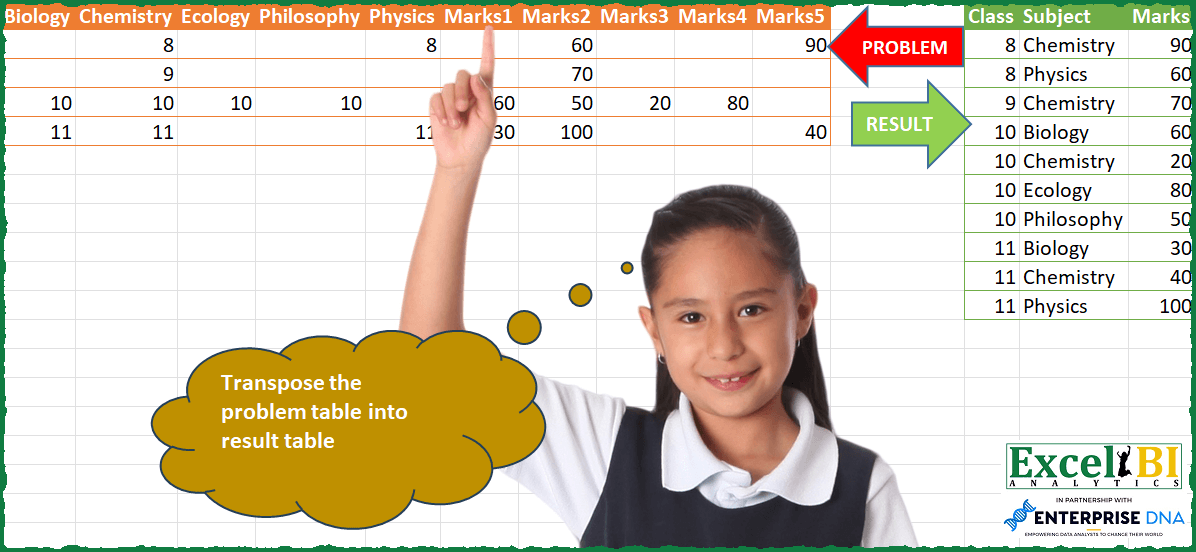
Transpose the problem table into result table. Note – Picture result were messed up which I have corrected in Excel file.
📌 Challenge Details and Links
ExcelBI Power Query Challenge Number: 95
Challenge Difficulty: ⭐️⭐️⭐️⭐️
📥Download Sample File
📥Link to the solutions on LinkedIn
Solving the challenge of Fix and Transpose Messy Table with Power Query
Power Query solution 1 for Fix and Transpose Messy Table, proposed by Bo Rydobon 🇹🇭:
let
  Source = Excel.CurrentWorkbook(){[Name = "Table1"]}[Content],
  N = Table.ColumnCount(Source) / 2,
  SortX = Table.FromColumns(
    List.Transform(
      List.Sort({0 .. N - 1}, each _ - Number.Abs(_ - (N - 1) / 2) * 100),
      each Table.ToColumns(Table.SelectColumns(Source, List.LastN(Table.ColumnNames(Source), N))){_}
    )
  ),
  Unpivot = Table.FromColumns(
    List.Reverse(
      Table.ToColumns(
        Table.UnpivotOtherColumns(
          Table.SelectColumns(Source, List.FirstN(Table.ColumnNames(Source), N)),
          {},
          "A",
          "M"
        )
      )
    )
      & {Table.UnpivotOtherColumns(SortX, {}, "A", "M")[M]},
    {"Class", "Subject", "Marks"}
  )
in
  Unpivot
Power Query solution 2 for Fix and Transpose Messy Table, proposed by Zoran Milokanović:
let
  Source = Excel.CurrentWorkbook(){[Name = "Input"]}[Content],
  S = Table.FromRows(
    List.Combine(
      List.Transform(
        Table.ToRows(Source),
        (r) =>
          let
            c = List.FirstN(r, 5),
            m = List.LastN(r, 5)
          in
            List.Select(
              List.Transform(List.Positions(c), each {c{_}, Table.ColumnNames(Source){_}, m{_}}),
              each _{0} <> null
            )
      )
    ),
    {"Class", "Subject", "Marks"}
  )
in
  S
Power Query solution 3 for Fix and Transpose Messy Table, proposed by Zoran Milokanović:
let
  Source = Excel.CurrentWorkbook(){[Name = "Input"]}[Content],
  S = Table.SelectRows(
    Table.FromRows(
      List.Combine(
        List.Transform(
          Table.ToRows(Source),
          (r) =>
            let
              c = List.FirstN(r, 5),
              m = List.RemoveNulls(List.Transform({0, 4, 2, 3, 1}, each List.LastN(r, 5){_}))
            in
              List.Transform(
                List.Positions(c),
                each {
                  c{_},
                  Table.ColumnNames(Source){_},
                  if c{_} <> null then m{List.Count(List.RemoveNulls(List.FirstN(c, _)))} else null
                }
              )
        )
      ),
      {"Class", "Subject", "Marks"}
    ),
    each ([Class] <> null)
  )
in
  S
Power Query solution 4 for Fix and Transpose Messy Table, proposed by Alejandro Simón 🇵🇦 🇪🇸:
let
  Source = Excel.CurrentWorkbook(){[Name = "Table1"]}[Content],
  Class = Table.FromColumns(
    List.Split(Table.ToColumns(Source), 5){0},
    List.FirstN(Table.ColumnNames(Source), 5)
  ),
  UnpivotClass = Table.UnpivotOtherColumns(Class, {}, "Attribute", "Class"),
  Marks = Table.FromColumns(List.Split(Table.ToColumns(Source), 5){1}, {"1" .. "5"}),
  Reorder = Table.SelectColumns(Marks, {"1", "5", "3", "4", "2"}),
  UnpivotMarks = Table.UnpivotOtherColumns(Reorder, {}, "Attribute", "Marks"),
  Sol = Table.FromColumns(
    List.Reverse(Table.ToColumns(UnpivotClass)) & {UnpivotMarks[Marks]},
    {"Class", "Subject", "Marks"}
  )
in
  Sol
Power Query solution 5 for Fix and Transpose Messy Table, proposed by Brian Julius:
let
  Source = Excel.CurrentWorkbook(){[Name = "Table1"]}[Content],
  DemoteHeaders = Table.DemoteHeaders(Source),
  Transpose = Table.Transpose(DemoteHeaders),
  UnpivotOther = Table.RemoveColumns(
    Table.UnpivotOtherColumns(Transpose, {"Column1"}, "Attribute", "Value"),
    "Attribute"
  ),
  TableSplit = Table.Split(UnpivotOther, Table.RowCount(UnpivotOther) / 2),
  Classes = Table.RenameColumns(
    Table.AddIndexColumn(TableSplit{0}, "Index", 1, 1),
    {{"Column1", "Subject"}, {"Value", "Class"}}
  ),
  Scores = Table.RenameColumns(
    Table.RemoveColumns(Table.AddIndexColumn(TableSplit{1}, "Index", 1, 1), "Column1"),
    {"Value", "Marks"}
  ),
  Join = Table.ReorderColumns(
    Table.RemoveColumns(Table.Join(Classes, "Index", Scores, "Index"), "Index"),
    {"Class", "Subject", "Marks"}
  ),
  Sort = Table.Sort(Join, {{"Class", Order.Ascending}, {"Subject", Order.Ascending}})
in
  Sort
Power Query solution 6 for Fix and Transpose Messy Table, proposed by Eric Laforce:
let
  Source = Excel.CurrentWorkbook(){[Name = "tData95"]}[Content],
  ReOrderMark = Table.SelectColumns(
    Source,
    List.RemoveItems(Table.ColumnNames(Source), {"Marks2"}) & {"Marks2"}
  ),
  Transform = List.Accumulate(
    Table.ToRecords(ReOrderMark),
    {},
    (s, c) =>
      let
        _L = List.Select(List.Zip({Record.FieldNames(c), Record.ToList(c)}), (l) => (l{1} <> null)),
        _NbRec = List.Count(_L) / 2,
        _Records = List.Accumulate(
          {0 .. _NbRec - 1},
          {},
          (s, c) =>
            s
              & {
                Record.FromList(
                  {_L{c}{1}, _L{c}{0}, _L{c + _NbRec}{1}},
                  {"Class", "Subject", "Mark"}
                )
              }
        )
      in
        s & _Records
  ),
  ToTable = Table.FromRecords(Transform)
in
  ToTable
Power Query solution 7 for Fix and Transpose Messy Table, proposed by Rafael González B.:
let
  Source = Excel.CurrentWorkbook(){[Name = "Table1"]}[Content],
  Split = Table.Split(Table.Transpose(Source), 5),
  Tbl1 =
    let
      a = Split{0},
      b = Table.UnpivotOtherColumns(a, {"Column1"}, "Atribute", "Class"),
      c = Table.RemoveColumns(b, {"Atribute"}),
      d = Table.AddIndexColumn(c, "Index", 0, 1)
    in
      d,
  Tbl2 =
    let
      aa = Split{1},
      bb = Table.UnpivotOtherColumns(aa, {"Column1"}, "Atribute", "Marks"),
      cc = Table.RemoveColumns(bb, {"Atribute", "Column1"}),
      dd = Table.AddIndexColumn(cc, "Index", 0, 1)
    in
      dd,
  Result =
    let
      t = Table.NestedJoin(Tbl1, {"Index"}, Tbl2, {"Index"}, "TJ", 1),
      u = Table.ExpandTableColumn(t, "TJ", {"Marks"}, {"Marks"}),
      v = Table.RemoveColumns(u, {"Index"}),
      w = Table.ReorderColumns(v, {"Class", "Column1", "Marks"}),
      x = Table.RenameColumns(w, {{"Column1", "Subject"}}),
      y = Table.Sort(x, {{"Class", 0}, {"Subject", 0}})
    in
      y
in
  Result
Power Query solution 8 for Fix and Transpose Messy Table, proposed by Venkata Rajesh:
let
  Source = Data,
  Table = Table.AddColumn(
    Source,
    "Custom",
    each [
      a = List.Select(Record.FieldNames(_), each not Text.StartsWith(_, "Marks")),
      b = Record.ToList(Record.SelectFields(_, a)),
      c = Record.ToList(Record.RemoveFields(_, a)),
      d = Table.FromColumns({b, a, c}, {"Class", "Subject", "Marks"})
    ][d]
  )[[Custom]],
  Expand = Table.ExpandTableColumn(Table, "Custom", {"Class", "Subject", "Marks"}),
  Output = Table.SelectRows(Expand, each ([Marks] <> null))
in
  Output
Power Query solution 9 for Fix and Transpose Messy Table, proposed by Sandeep Marwal:
let
  Source = Excel.CurrentWorkbook(){[Name = "Table2"]}[Content],
  #"Transposed Table" = Table.Transpose(Source),
  Custom1 = List.Transform(
    List.Skip(Table.ToColumns(#"Transposed Table")),
    each Table.FromRows(
      List.Zip(List.Split(_, 5) & {List.FirstN(Table.ToColumns(#"Transposed Table"){0}, 5)}),
      {"Class", "Marks", "Subject"}
    )
  ),
  Custom2 = Table.Combine(Custom1),
  #"Filtered Rows" = Table.SelectRows(Custom2, each ([Class] <> null)),
  #"Reordered Columns" = Table.ReorderColumns(#"Filtered Rows", {"Class", "Subject", "Marks"})
in
  #"Reordered Columns"
Power Query solution 10 for Fix and Transpose Messy Table, proposed by Henriette Hamer:
let
 Source = Excel.CurrentWorkbook(){[Name="Table1"]}[Content],
 Courses = Table.SelectColumns(Source,{"Biology", "Chemistry", "Ecology", "Philosophy", "Physics"}),
 #"UP Courses" = Table.UnpivotOtherColumns(Courses, {}, "Attribute", "Value"),
 #"AI Courses" = Table.AddIndexColumn(#"UP Courses", "Index", 1, 1, Int64.Type),
 Marks = Table.RemoveColumns(Source,{"Biology", "Chemistry", "Ecology", "Philosophy", "Physics"}),
 #"UP Marks" = Table.UnpivotOtherColumns(Marks, {}, "Attribute", "Value"),
 #"AI Marks" = Table.AddIndexColumn(#"UP Marks", "Index", 1, 1, Int64.Type),
 #"Merged Queries" = Table.NestedJoin(#"AI Courses", {"Index"}, #"AI Marks", {"Index"}, "Marks", JoinKind.LeftOuter),
 #"Expanded Marks" = Table.ExpandTableColumn(#"Merged Queries", "Marks", {"Value"}, {"Marks.Value"}),
 #"Removed Columns" = Table.RemoveColumns(#"Expanded Marks",{"Index"}),
 #"Renamed Columns" = Table.RenameColumns(#"Removed Columns",{{"Value", "Class"}, {"Attribute", "Subject"}, {"Marks.Value", "Marks"}}),
 #"Reordered Columns" = Table.ReorderColumns(#"Renamed Columns",{"Class", "Subject", "Marks"})
in
 #"Reordered Columns"

I'm with Brian Julius that I feel that the result table is off.
Below is the result of above code.
Power Query solution 11 for Fix and Transpose Messy Table, proposed by Daniel Madhadha:
let
 Source = Excel.CurrentWorkbook(){[Name="Table1"]}[Content],
 #"Removed Other Columns1" = Table.SelectColumns(Source,{"Biology", "Chemistry", "Ecology", "Philosophy", "Physics"}),
 N = Table.UnpivotOtherColumns(#"Removed Other Columns1", {}, "Subject", "Class"),
 #"Removed Other Columns" = Table.SelectColumns(#"Source",{"Marks1", "Marks2", "Marks3", "Marks4", "Marks5"}),
 M = Table.UnpivotOtherColumns(#"Removed Other Columns", {}, "Attribute", "Mark"),
 #"Added Custom" = Table.FromColumns(List.Reverse(Table.ToColumns(N))&{M[Mark]}, {"Class", "Subject", "Marks"})
in
 #"Added Custom"
😁
Solving the challenge of Fix and Transpose Messy Table with Excel
Excel solution 1 for Fix and Transpose Messy Table, proposed by Bo Rydobon 🇹🇭:
=LET(z,A2:J5,n,COLUMNS(z)/2,c,TAKE(z,,n),HSTACK(TOCOL(c,3),TOCOL(IFS(c,A1:J1),3),TOCOL(SORTBY(DROP(z,,n),-ABS(SEQUENCE(,n)-(n+1)/2)),3)))Excel solution 2 for Fix and Transpose Messy Table, proposed by محمد حلمي:
=LET(e,F2:J5,r,TOCOL(SORTBY(e,{1,5,2,4,3})),HSTACK(TOCOL(A2:E5,1),
TOCOL(IFS(e,A1:E1),2),FILTER(r,r)))

Without Filter
I thought that
The blank zero of the formula is not excluded by TOCOL
Until I saw a solution of Bo Rydobon

=HSTACK(TOCOL(A2:E5,1),TOCOL(IFS(F2:J5,A1:E1),2),TOCOL(SORTBY(F2:J5,{1,5,2,4,3}),1))
Excel solution 3 for Fix and Transpose Messy Table, proposed by Kris Jaganah:
=LET(a,A1:J5,b,TAKE(a,1),c,DROP(a,1),d,TOCOL(IFS((LEFT(b,5)<>"Marks")*(c<>""),c&"-"&b),3),VSTACK({"Class","Subject","Marks"},HSTACK(TEXTBEFORE(d,"-"),TEXTAFTER(d,"-"),TOCOL(IFS((LEFT(b,5)="Marks")*(c<>""),c),3))))Excel solution 4 for Fix and Transpose Messy Table, proposed by Oscar Mendez Roca Farell:
=LET(_n, 100*F2:J5+A2:E5, _m, TEXTSPLIT(TEXTJOIN("|", , TOCOL(IF(_n, A1:E1&","&_n, ""), 1)), "," ,"|"),_f,--INDEX(_m, ,2), HSTACK(MOD(_f,100), INDEX(_m, ,1), INT(_f/100)))Excel solution 5 for Fix and Transpose Messy Table, proposed by Sunny Baggu:
=LET(_c,COLUMNS(A2:J5)/2,HSTACK(TOCOL(TAKE(A2:J5,,_c),3),TOCOL(IFS(TAKE(A2:J5,,_c),TAKE(A1:E1,,_c)),3),TOCOL(TAKE(A2:J5,,-_c),3)))Excel solution 6 for Fix and Transpose Messy Table, proposed by Asheesh Pahwa:
=LET(sub,A1:J1,
p,TOCOL(FILTER(sub,ISERR(SEARCH("Marks", sub)))), r,TOCOL(FILTER(sub, NOT(ISERR(SEARCH("Marks", sub))))), q,MAP(p,LAMBDA(x,
LET(a,INDEX(A2:J5,,MATCH(x,A1:J1,0)),
b,TOCOL(a,1),
TEXTJOIN(", ",TRUE,b&":"&x)))),
t,MAP(r,q,LAMBDA(z,m,
LET(d,INDEX(A2:J5,,MATCH(z,A1:J1,0)), c,TOCOL(d,1),
UNIQUE(TEXTJOIN(", ",TRUE,C))))),
k,DROP(REDUCE("",q, LAMBDA (acc,itr, VSTACK(acc, TEXTSPLIT(itr, ":",",")))),1), i,DROP(REDUCE("",t,LAMBDA (acc,itr, VSTACK(acc, TEXTSPLIT(itr, ":",",")))),1), SORTBY(HSTACK(k,i),--TAKE(k,,1),1))
Excel solution 7 for Fix and Transpose Messy Table, proposed by Daniel Garzia:
=LET(l,TOCOL(F2:J5),FILTER(HSTACK(TOCOL(A2:E5),INDEX(A1:E1,,1+MOD(ROW(1:20)-1,5)),l),l>0))&&&