
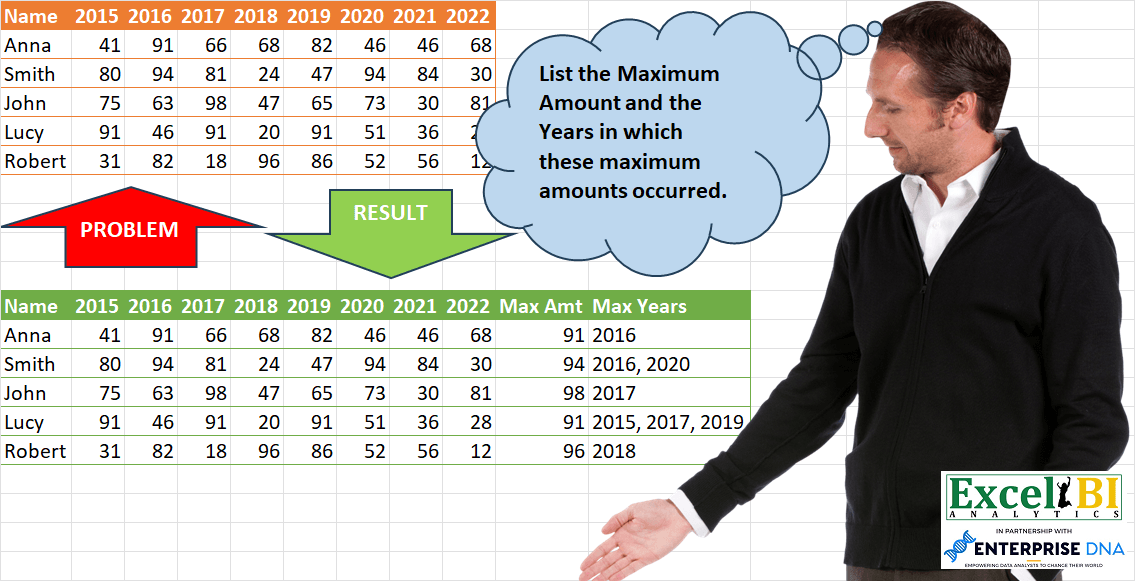
List the Maximum Amount and the Years in which these maximum amounts occurred.
📌 Challenge Details and Links
ExcelBI Power Query Challenge Number: 93
Challenge Difficulty: ⭐️⭐️
📥Download Sample File
📥Link to the solutions on LinkedIn
Solving the challenge of List Year of Maximum Values with Power Query
_x000D_Power Query solution 1 for List Year of Maximum Values, proposed by Bo Rydobon 🇹🇭:
let
  Source = Excel.CurrentWorkbook(){[Name = "Table1"]}[Content],
  Amt = Table.AddColumn(Source, "Max Amt", each List.Max(List.Skip(Record.ToList(_)))),
  Year = Table.AddColumn(
    Amt,
    "Max Year",
    each Text.Combine(
      List.RemoveLastN(
        Table.SelectRows(
          Table.Skip(Table.FromColumns({Record.FieldNames(_), Record.ToList(_)})),
          (t) => t[Column2] = [Max Amt]
        )[Column1]
      ),
      ", "
    )
  )
in
YearPower Query solution 2 for List Year of Maximum Values, proposed by Zoran Milokanović:
let
  Source = Excel.CurrentWorkbook(){[Name = "Input"]}[Content],
  S =
    let
      h = Table.ColumnNames(Source),
      t = Table.ToRows(Source)
    in
      Table.FromRows(
        List.Transform(
          {0 .. Table.RowCount(Source) - 1},
          each
            let
              m = List.Max(List.Skip(t{_})),
              p = Text.Combine(List.Transform(List.PositionOf(t{_}, m, 2), each h{_}), ", ")
            in
              t{_} & {m, p}
        ),
        h & {"Max Amt", "Max Years"}
      )
in
SPower Query solution 3 for List Year of Maximum Values, proposed by Zoran Milokanović:
let
  Source = Excel.CurrentWorkbook(){[Name = "Input"]}[Content],
  S = Table.AddColumn(
    Table.AddColumn(Source, "Max Amt", each List.Max(List.Skip(Record.ToList(_)))),
    "Max Years",
    each
      let
        p = List.PositionOf(List.RemoveLastN(List.Skip(Record.ToList(_))), [Max Amt], 2)
      in
        Text.Combine(List.Transform(p, each Table.ColumnNames(Source){_ + 1}), ", ")
  )
in
SPower Query solution 4 for List Year of Maximum Values, proposed by Alejandro Simón 🇵🇦 🇪🇸:
let
  Source = Excel.CurrentWorkbook(){[Name = "Table1"]}[Content],
  Sol = Table.ExpandRecordColumn(
    Table.AddColumn(
      Source,
      "Custom",
      each [
        a     = List.Skip(Record.ToList(_)),
        Max   = List.Max(a),
        c     = List.PositionOf(a, Max, Occurrence.All),
        Years = Text.Combine(List.Transform(c, each Table.ColumnNames(Source){_ + 1}), ", ")
      ][[Max], [Years]]
    ),
    "Custom",
    {"Max", "Years"}
  )
in
SolPower Query solution 5 for List Year of Maximum Values, proposed by Luan Rodrigues:
let
  Fonte = Tabela1,
  tab = Table.AddColumn(
    Fonte,
    "Personalizar",
    each [
      a = List.RemoveFirstN(Record.FieldValues(_), 1),
      #"Max Amt" = List.Max(a),
      b = List.PositionOf(a, #"Max Amt", Occurrence.All),
      #"Max Years" = Text.Combine(
        List.Transform(b, (x) => List.RemoveFirstN(Table.ColumnNames(Fonte), 1){x}),
        ", "
      )
    ][[#"Max Amt"], [#"Max Years"]]
  ),
  res = Table.ExpandRecordColumn(tab, "Personalizar", Record.FieldNames(tab[Personalizar]{0}))
in
resPower Query solution 6 for List Year of Maximum Values, proposed by Brian Julius:
let
  Source = Excel.CurrentWorkbook(){[Name = "Table1"]}[Content],
  UnpivotOthers = Table.UnpivotOtherColumns(Source, {"Name"}, "Year", "Amount"),
  GroupMaxAmt = Table.Group(
    UnpivotOthers,
    {"Name"},
    {
      {"All", each _, type table [Name = text, Year = text, Amount = number]},
      {"MaxAmount", each List.Max([Amount]), type number}
    }
  ),
  Expand = Table.ExpandTableColumn(GroupMaxAmt, "All", {"Year", "Amount"}, {"Year", "Amount"}),
  Filter = Table.RemoveColumns(Table.SelectRows(Expand, each [Amount] = [MaxAmount]), "Amount"),
  Regroup = Table.Group(Filter, {"Name", "MaxAmount"}, {"MaxYears", each [Year], type list}),
  Extract = Table.TransformColumns(
    Regroup,
    {"MaxYears", each Text.Combine(List.Transform(_, Text.From), ", "), type text}
  ),
  Join = Table.Join(Source, "Name", Extract, "Name")
in
JoinPower Query solution 7 for List Year of Maximum Values, proposed by Eric Laforce:
let
  Source = Excel.CurrentWorkbook(){[Name = "tData93"]}[Content],
  Add_R = Table.AddColumn(
    Source,
    "R",
    each
      let
        _T = Table.FromColumns(
          {List.Skip(Record.ToList(_)), List.Skip(Record.FieldNames(_))},
          {"V", "F"}
        ),
        _Max = List.Max(_T[V]),
        _FList = Text.Combine(Table.SelectRows(_T, each [V] = _Max)[F], ", ")
      in
        [#"Max Amt" = _Max, #"Max Years" = _FList]
  ),
  Expand = Table.ExpandRecordColumn(Add_R, "R", Record.FieldNames(Add_R{0}[R]))
in
ExpandPower Query solution 8 for List Year of Maximum Values, proposed by Rafael González B.:
let
  Source = Excel.CurrentWorkbook(){[Name = "Table1"]}[Content],
  MaxValue = Table.AddColumn(
    Source,
    "Max Amt",
    each
      let
        a = Record.RemoveFields(_, "Name"),
        b = Record.ToList(a),
        c = List.Max(b)
      in
        c
  ),
  MaxYears = Table.AddColumn(
    MaxValue,
    "Max Years",
    each
      let
        x  = Table.RemoveFirstN(Record.ToTable(_), 1),
        y  = Table.RemoveLastN(x, 1),
        z  = List.Max(y[Value]),
        aa = Table.SelectRows(y, each [Value] = z)[Name],
        ab = List.Transform(aa, Text.From),
        ac = Text.Combine(ab, ", ")
      in
        ac
  )
in
MaxYearsPower Query solution 9 for List Year of Maximum Values, proposed by Victor Wang:
let
  Source = Excel.CurrentWorkbook(){[Name = "Table1"]}[Content],
  addMaxAmt = Table.AddColumn(
    Source,
    "Max Amt",
    each List.Max(Record.ToList(_), null, each try _ + 0 otherwise 0)
  ),
  addIndex = Table.AddIndexColumn(addMaxAmt, "Index", 0, 1, Int64.Type),
  addMaxYears = Table.AddColumn(
    addIndex,
    "Max Years",
    each Text.Combine(
      List.Select(Table.ColumnNames(Source), (a) => Table.Column(Source, a){[Index]} = [Max Amt]),
      ", "
    )
  ),
  removeIndex = Table.RemoveColumns(addMaxYears, {"Index"})
in
removeIndexPower Query solution 10 for List Year of Maximum Values, proposed by Venkata Rajesh:
let
  Source = Data,
  Custom = Table.AddColumn(
    Source,
    "Custom",
    each [
      record = _,
      #"Max Amt" = List.Max(List.Skip(Record.ToList(_), 1)),
      #"Max Years" = Text.Combine(
        List.Select(Record.FieldNames(_), each Record.Field(record, _) = #"Max Amt"),
        ", "
      )
    ]
  ),
  Output = Table.ExpandRecordColumn(Custom, "Custom", {"Max Amt", "Max Years"})
in
OutputPower Query solution 11 for List Year of Maximum Values, proposed by Sandeep Marwal:
let
  Source = Excel.CurrentWorkbook(){[Name = "Table1"]}[Content],
  #"Unpivoted Other Columns" = Table.UnpivotOtherColumns(Source, {"Name"}, "Attribute", "Value"),
  #"Grouped Rows" = Table.Group(
    #"Unpivoted Other Columns",
    {"Name"},
    {
      {
        "Year",
        (a) => Text.Combine(Table.SelectRows(a, each [Value] = List.Max(a[Value]))[Attribute], ",")
      },
      {"Max", each List.Max([Value])}
    }
  ),
  #"Merged Queries" = Table.NestedJoin(
    Source,
    {"Name"},
    #"Grouped Rows",
    {"Name"},
    "Grouped Rows",
    JoinKind.LeftOuter
  ),
  #"Expanded Grouped Rows" = Table.ExpandTableColumn(
    #"Merged Queries",
    "Grouped Rows",
    {"Max", "Year"},
    {"Max", "Year"}
  )
in
#"Expanded Grouped Rows"Power Query solution 12 for List Year of Maximum Values, proposed by Henriette Hamer:
let
  S = Excel.CurrentWorkbook(){[Name = "Input"]}[Content],
  IM = Table.AddColumn(
    S,
    "Max Amt",
    each List.Max({[2015], [2016], [2017], [2018], [2019], [2020], [2021], [2022]}),
    type number
  ),
  DC0 = Table.DuplicateColumn(IM, "2015", "2015 C"),
  DC1 = Table.DuplicateColumn(DC0, "2016", "2016 C"),
  DC2 = Table.DuplicateColumn(DC1, "2017", "2017 C"),
  DC3 = Table.DuplicateColumn(DC2, "2018", "2018 C"),
  DC4 = Table.DuplicateColumn(DC3, "2019", "2019 C"),
  DC5 = Table.DuplicateColumn(DC4, "2020", "2020 C"),
  DC6 = Table.DuplicateColumn(DC5, "2021", "2021 C"),
  DC7 = Table.DuplicateColumn(DC6, "2022", "2022 C"),
  UC = Table.UnpivotOtherColumns(
    DC7,
    {"Name", "2015", "2016", "2017", "2018", "2019", "2020", "2021", "2022", "Max Amt"},
    "Attribute",
    "Value"
  ),
  RV = Table.ReplaceValue(UC, " C", "", Replacer.ReplaceText, {"Attribute"}),
  AC = Table.AddColumn(RV, "Max is Year", each [Max Amt] = [Value]),
  FR = Table.SelectRows(AC, each ([Max is Year] = true)),
  RC = Table.RemoveColumns(FR, {"Value", "Max is Year"}),
  GR = Table.Group(
    RC,
    {"Name", "2015", "2016", "2017", "2018", "2019", "2020", "2021", "2022", "Max Amt"},
    {
      {
        "Max Years",
        each Text.Combine(List.Transform([Attribute], Text.From), ", "),
        type nullable text
      }
    }
  )
in
GRPower Query solution 13 for List Year of Maximum Values, proposed by Štěpán Rešl:
let
  Source = Table,
  addon = Table.AddColumn(
    Source,
    "Output",
    each [
      preSelection = Record.ToTable(Record.RemoveFields(_, "Name")),
      mx           = List.Max(preSelection[Value]),
      mxYears      = Text.Combine(Table.SelectRows(preSelection, each [Value] = mx)[Name], ", ")
    ][[mx], [mxYears]],
    type [mx = number, mxYears = text]
  ),
  expand = Table.ExpandRecordColumn(addon, "Output", {"mx", "mxYears"}, {"Max Amt", "Max Years"})
in
expandSolving the challenge of List Year of Maximum Values with Excel
_x000D_Excel solution 1 for List Year of Maximum Values, proposed by Bo Rydobon 🇹🇭:
=LET(z,A1:I6,HSTACK(z,BYROW(z,LAMBDA(a,LET(m,MAX(a),IF(m,m,"Max Amt")))),BYROW(z,LAMBDA(a,TEXTJOIN(", ",,FILTER(A1:I1,a=MAX(a),"Max Year"))))))Excel solution 2 for List Year of Maximum Values, proposed by Rick Rothstein:
=LET(f,LAMBDA(n,BYROW(B2:I6,LAMBDA(r,LET(m,MAX(r),CHOOSE(n,m,TEXTJOIN(", ",,FILTER(B1:I1,r=m))))))),VSTACK({"Max Amt","Max Years"},HSTACK(f(1),f(2))))Excel solution 3 for List Year of Maximum Values, proposed by محمد حلمي:
=HSTACK(A1:I6,REDUCE("Max "&{"Amt","Years"},
B2:B6,LAMBDA(a,d,LET(
r,OFFSET(d,,,,8),m,MAX(r),VSTACK(a,
HSTACK(m,TEXTJOIN(", ",,REPT(B1:I1,r=m))))))))Excel solution 4 for List Year of Maximum Values, proposed by محمد حلمي:
=HSTACK(A1:I6,REDUCE({"Max Amt","Max Years"},
SEQUENCE(ROWS(A2:I6)),LAMBDA(a,d,LET(r,INDEX(B2:I6,d,),m,MAX(r),VSTACK(a,HSTACK(m,TEXTJOIN(", ",,REPT(B1:I1,r=m))))))))Excel solution 5 for List Year of Maximum Values, proposed by Kris Jaganah:
=LET(a,A1:I6,b,DROP(a,1),c,BYROW(b,LAMBDA(x,MAX(x))),d,BYROW(IF(b=c,TAKE(a,1),""),LAMBDA(y,TEXTJOIN(", ",1,y))),HSTACK(a,VSTACK("Max Amt",c),VSTACK("Max Years",d)))Excel solution 6 for List Year of Maximum Values, proposed by Oscar Mendez Roca Farell:
=HSTACK(A1:I6, VSTACK("Max "&{"Amt";"Years"}, TEXTSPLIT(ARRAYTOTEXT(BYROW(B2:I6, LAMBDA(r, MAX(r)&"|"&TEXTJOIN("; ",1,REPT(B1:I1,r=MAX(r)))))),"|",",")))Excel solution 7 for List Year of Maximum Values, proposed by Duy Tùng:
=LET(a,BYROW(B2:I6,MAX),VSTACK(HSTACK(A1:I1,"Max "&{"Amt","Years"}),HSTACK(A2:I6,a,BYROW(IF(a=B2:I6,B1:I1,""),LAMBDA(x,TEXTJOIN(", ",,x))))))Excel solution 8 for List Year of Maximum Values, proposed by Sunny Baggu:
=HSTACK(
 A1:I6,
 VSTACK(
 {"Max Amt", "Max Years"},
 MAKEARRAY(
 5,
 2,
 LAMBDA(r, c,
 LET(
 _tbl, INDEX(TRANSPOSE(B2:I6), , r),
 INDEX(HSTACK(MAX(_tbl), TEXTJOIN(",", , IF(MAX(_tbl) = _tbl, TOCOL(B1:I1), ""))), c)
 )
 )
 )
 )
)Excel solution 9 for List Year of Maximum Values, proposed by Sunny Baggu:
=HSTACK(
 A1:I6,
 REDUCE(
 {"Max Amt", "Max Years"},
 SEQUENCE(ROWS(B2:I6)),
 LAMBDA(a, v,
 VSTACK(
 a,
 LET(
 _m, INDEX(B2:I6, v, ),
 HSTACK(MAX(_m), ARRAYTOTEXT(FILTER(B1:I1, MAX(_m) = _m)))
 )
 )
 )
 )
)Excel solution 10 for List Year of Maximum Values, proposed by Sunny Baggu:
=LET(
 _maxamt, BYROW(B2:H6, LAMBDA(a, MAX(a))),
 _maxyears, BYROW(
 IFS((B2:I6 = _maxamt), B1:I1, 1, ""),
 LAMBDA(a, TEXTJOIN(",", 1, a))
 ),
 VSTACK(
 HSTACK(A1:I1, "Max Amt", "Max Years"),
 HSTACK(A2:I6, _maxamt, _maxyears)
 )
)Excel solution 11 for List Year of Maximum Values, proposed by LEONARD OCHEA 🇷🇴:
=LET(t,A1:I6,d,DROP(t,1,1),m,BYROW(d,LAMBDA(x,MAX(x))),HSTACK(t,VSTACK("Max Amt",m),VSTACK("Max Years",BYROW((m=d)*DROP(TAKE(t,1),,1),LAMBDA(a,TEXTJOIN(", ",,IF(a,a,"")))))))Excel solution 12 for List Year of Maximum Values, proposed by JvdV –:
=HSTACK(A1:I6,REDUCE("Max "&{"Amt","Years"},A2:A6,LAMBDA(x,y,VSTACK(x,LET(r,INDEX(B2:I6,XMATCH(y,A2:A6),),m,MAX(r),HSTACK(m,TEXTJOIN(", ",,REPT(B1:I1,r=m))))))))Excel solution 13 for List Year of Maximum Values, proposed by Julien Lacaze:
=LET(names,Table1[Name],data,Table1[[2015]:[2022]],years,Table1[[hashtag#Headers],[2015]:[2022]],
max,BYROW(data,LAMBDA(a,MAX(a))),
MaxYears,MAP(SEQUENCE(ROWS(max)),LAMBDA(s,TEXTJOIN(",",,FILTER(years,INDEX(data,s,0)=INDEX(max,s))))),
VSTACK(HSTACK("Name",years,"Max Amt","Max Years"),HSTACK(names,data,max,MaxYears)))Excel solution 14 for List Year of Maximum Values, proposed by Nicolas Micot:
=MAX(B12:I12)

Max Years:
{=JOINDRE.TEXTE(", ";VRAI;SI(B12:I12=J12;B$11:I$11;""))Excel solution 15 for List Year of Maximum Values, proposed by Ziad A.:
=ARRAYFORMULA({A1:I6,{"Max Amt","Max Years";BYROW(B2:I6,LAMBDA(r,{MAX(r),TEXTJOIN(", ",1,IF(r=MAX(r),B1:I1,))}))}})

For each row (r) we return the maximum value

MAX(r)

And the values in the header corresponding to the maximum value separated by a comma

TEXTJOIN(", ",1,IF(r=MAX(r),B1:I1,))Excel solution 16 for List Year of Maximum Values, proposed by Quadri Olayinka Atharu:
=LET(d,A1:I6,
y,DROP(TAKE(d,1),,1),
a,DROP(d,1,1),
ma,BYROW(a,LAMBDA(x,MAX(x))),
my,BYROW(a,LAMBDA(x,LET(m,MAX(x),TEXTJOIN(", ",,FILTER(y,m=x))))),
r,HSTACK(d,VSTACK({"Max Amt","Max Years"},HSTACK(ma,my))),
r)Solving the challenge of List Year of Maximum Values with Python in Excel
_x000D_Python in Excel solution 1 for List Year of Maximum Values, proposed by Alejandro Campos:
df = xl("A1:I6", headers=True)
results = df.iloc[:, 1:].apply(lambda row: (row.max(), ", ".join(
 df.columns[1:][row == row.max()])), axis=1)
res_df = pd.concat([df, pd.DataFrame(
 results.tolist(), columns=["Max Amt", "Max Years"])], axis=1)
res_df