
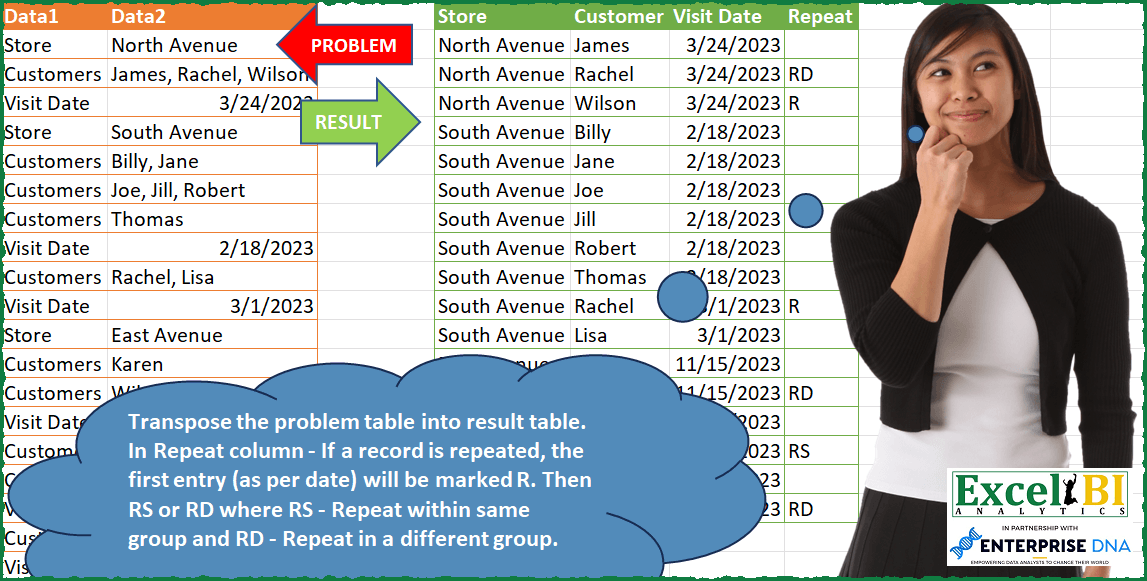
Transpose the problem table into result table. In Repeat column – If a record is repeated, the first entry (as per date) will be marked R. Then RS or RD where RS – Repeat within same group and RD – Repeat in a different group. Note – The dates given are in MDY format so you may need to convert as per your locale.
📌 Challenge Details and Links
ExcelBI Power Query Challenge Number: 91
Challenge Difficulty: ⭐️⭐️⭐️
📥Download Sample File
📥Link to the solutions on LinkedIn
Solving the challenge of Mark Repeats in Date Column with Power Query
Power Query solution 1 for Mark Repeats in Date Column, proposed by Omid Motamedisedeh:
let
  Source = Excel.CurrentWorkbook(){[Name = "Table1"]}[Content],
  Ans = Table.SelectColumns(
    [
      a = Table.ExpandListColumn(
        Table.TransformColumns(
          Table.SelectRows(
            [
              a = Table.AddIndexColumn(Source, "i"),
              b = Table.AddColumn(
                a,
                "Store",
                (o) =>
                  List.Last(Table.SelectRows(a, (x) => x[i] <= o[i] and x[Data1] = "Store")[Data2])
              ),
              c = Table.AddColumn(
                b,
                "Visiting Date",
                (o) =>
                  List.Last(
                    Table.SelectRows(b, (x) => x[i] <= o[i] + 1 and x[Data1] = "Visit Date")[Data2]
                  )
              )
            ][c],
            each [Data1] = "Customers"
          ),
          {"Data2", each Text.Split(_, ", ")}
        ),
        "Data2"
      ),
      b = Table.AddColumn(
        a,
        "repeat",
        (o) =>
          [
            m = Table.SelectRows(a, each [Data2] = o[Data2]),
            p = Table.SelectRows(m, each [Visiting Date] = o[Visiting Date] and [i] <= o[i])[Store],
            n =
              if List.Count(m[Visiting Date]) > 1 then
                (
                  if List.Min(m[Visiting Date]) = o[Visiting Date] then
                    "R"
                  else if List.Count(p) > 1 then
                    "RS"
                  else
                    "RD"
                )
              else
                ""
          ][n]
      )
    ][b],
    {"Store", "Data2", "Visiting Date", "repeat"}
  )
in
  Ans
Power Query solution 2 for Mark Repeats in Date Column, proposed by Bo Rydobon 🇹🇭:
let
  Source = Excel.CurrentWorkbook(){[Name = "Table1"]}[Content],
  V = "Visit Date",
  Group = Table.Combine(
    Table.Group(
      Source,
      "Data1",
      {
        "T",
        (T) =>
          Table.SelectRows(
            Table.FillUp(
              Table.AddColumn(
                Table.AddColumn(T, "Store", each T[Data2]{0}),
                V,
                each if [Data1] = V then [Data2] else null
              ),
              {V}
            ),
            each [Data1] = "Customers"
          )
      },
      0,
      (b, e) => Number.From(e = "Store")
    )[T]
  ),
  Expand = Table.Buffer(
    Table.RenameColumns(
      Table.SelectColumns(
        Table.ExpandListColumn(
          Table.TransformColumns(Group, {"Data2", each Text.Split(_, ", ")}),
          "Data2"
        ),
        {"Store", "Data2", V}
      ),
      {"Data2", "Customer"}
    )
  ),
  Rept = Table.AddColumn(
    Expand,
    "Repeat",
    each
      let
        C = Table.Sort(Table.SelectRows(Expand, (e) => e[Customer] = [Customer]), V),
        D = Table.SelectRows(C, (c) => c[Visit Date] < [Visit Date])
      in
        if Table.RowCount(C) = 1 then
          null
        else
          "R" & (try if Table.Last(D)[Store] = [Store] then "S" else "D" otherwise "")
  )
in
  Rept
Power Query solution 3 for Mark Repeats in Date Column, proposed by Zoran Milokanović:
let
  Source = Excel.CurrentWorkbook(){[Name = "Input"]}[Content],
  PrepCols = Table.SelectRows(
    Table.FillUp(
      Table.FillDown(
        Table.AddColumn(
          Table.AddColumn(Source, "Store", each if [Data1] = "Store" then [Data2] else null),
          "Visit Date",
          each if [Data1] = "Visit Date" then [Data2] else null
        ),
        {"Store"}
      ),
      {"Visit Date"}
    ),
    each ([Data1] = "Customers")
  ),
  GroupRows = Table.ExpandListColumn(
    Table.Group(
      PrepCols,
      {"Store", "Visit Date"},
      {{"Customer", each List.Combine(List.Transform([Data2], each Text.Split(_, ", ")))}}
    ),
    "Customer"
  )[[Store], [Customer], [Visit Date]],
  PrepRepeat = Table.Combine(
    Table.SelectRows(
      Table.Group(
        GroupRows,
        {"Customer"},
        {
          {"Count", each Table.RowCount(_)},
          {
            "t",
            each
              let
                t = Table.AddIndexColumn(Table.Sort(_, "Visit Date"), "I", 1),
                a = Table.AddColumn(
                  t,
                  "Repeat",
                  (r) =>
                    let
                      p = Table.SelectRows(t, each [I] = r[I] - 1)[Store]{0}?
                    in
                      if p = null then "R" else if p = r[Store] then "RS" else "RD"
                )
              in
                a[[Customer], [Visit Date], [Repeat]]
          }
        }
      ),
      each [Count] <> 1
    )[t]
  ),
  AddRepeat = Table.AddColumn(
    GroupRows,
    "Repeat",
    (r) =>
      Table.SelectRows(PrepRepeat, each [Customer] = r[Customer] and [Visit Date] = r[Visit Date])[
        Repeat
      ]{0}?
  )
in
  AddRepeat
Power Query solution 4 for Mark Repeats in Date Column, proposed by Kris Jaganah:
let
 Source = Excel.CurrentWorkbook(){[Name="Table1"]}[Content],
 Index = Table.AddIndexColumn(Source, "Index", 1, 1, Int64.Type),
 Pivot = Table.Pivot(Index, List.Distinct(Index[Data1]), "Data1", "Data2"),
 Split = Table.AddColumn(Pivot, "Customer", each try Text.Split([Customers],", ") otherwise null),
 Expand = Table.ExpandListColumn(Split, "Customer"),
 Down = Table.FillDown(Expand,{"Store"}),
 Up = Table.FillUp(Down,{"Visit Date"}),
 ChangeType = Table.TransformColumnTypes(Up,{{"Visit Date", type date}}),
 Remove = Table.RemoveColumns(ChangeType,{"Index", "Customers"}),
 Filter = Table.SelectRows(Remove, each ([Customer] <> null)),
 Index1 = Table.AddIndexColumn(Filter, "Index", 1, 1, Int64.Type),
 Group = Table.Group(Index1, {"Customer"}, {{"All", each _, type table [Store=text, Visit Date=nullable date, Customer=text, Index=number]}, {"Count", each Table.RowCount(_), Int64.Type}}),
 Sort = Table.AddColumn(Group, "Sort", each Table.Sort([All],{{"Visit Date", Order.Ascending}})),
 IndexCust = Table.AddColumn(Sort, "Custom", each Table.AddIndexColumn([Sort],"IdxCust",1,1)),
Power Query solution 5 for Mark Repeats in Date Column, proposed by Alejandro Simón 🇵🇦 🇪🇸:
let
 Source = Excel.CurrentWorkbook(){[Name="Table1"]}[Content],
 Group = Table.Group(Source, {"Data1"}, {{"Count", (y)=>
 let
 a = y,
 b = y[Data2],
 c = if List.Contains(y[Data1], "Customers") then Text.Combine(b, ", ") else b{0}
 in c}}, GroupKind.Local),
 Visit = Table.SelectRows(Table.FillUp(Table.AddColumn(Group, "Visit Date", each if Value.Type([Count]) = type datetime then [Count] else null), {"Visit Date"}), each [Data1] <> "Visit Date"),
 Store = Table.SelectRows(Table.FillDown(Table.AddColumn(Visit, "Store", each if [Data1] = "Store" then [Count] else null), {"Store"}), each [Data1] <> "Store"),
 Group2 = Table.ReorderColumns(Table.ExpandListColumn(Table.Group(Store, {"Store", "Visit Date"}, {{"Customers", each Text.Split([Count]{0}, ", ")}}), "Customers"),{"Store", "Customers", "Visit Date"}),
 Repeat = Table.SelectRows(Table.Group(Group2, {"Customers"}, {{"Count", each Table.RowCount(_)}, {"Rep", each _}}), each [Count] <> 1),
Power Query solution 6 for Mark Repeats in Date Column, proposed by Luan Rodrigues:
let
  Fonte = Tabela1,
  ad = Table.AddColumn(Fonte, "Customer", each Text.Split(Text.From([Data2]), ", "))[
    [Data1],
    [Customer]
  ],
  e = Table.ExpandListColumn(ad, "Customer"),
  ind = Table.AddIndexColumn(e, "ind", 1, 1),
  pv = Table.TransformColumns(
    Table.SelectRows(
      Table.FillUp(
        Table.FillDown(Table.Pivot(ind, List.Distinct(ind[Data1]), "Data1", "Customer"), {"Store"}),
        {"Visit Date"}
      ),
      each ([Customers] <> null)
    ),
    {{"Visit Date", each Date.From(DateTimeZone.From(_), "en-US")}}
  ),
  gp = Table.Combine(
    List.Transform(
      Table.Group(
        pv,
        {"Customers"},
        {
          {
            "Contagem",
            each [
              min = List.Min(Table.AddColumn(_, "min", each [Visit Date])[min]),
              Count = List.Count(List.Distinct(_[Store])),
              CountRow = Table.RowCount(_),
              y = Table.AddColumn(_, "Dta min", each min),
              z = Table.AddColumn(
                y,
                "Rep",
                each
                  if CountRow = 1 then
                    null
                  else if [#"Dta min"] = [Visit Date] then
                    "R"
                  else if CountRow = Count then
                    "RD"
                  else
                    "RS"
              ),
              i = Table.Group(
                z,
                {"Customers"},
                {
                  {
                    "Contagem",
                    each [
                      a = Table.AddIndexColumn(_, "ind2", 1, 1),
                      b = Table.AddColumn(
                        a,
                        "Repeat",
                        each try if a{[ind2]}[Rep] = [Rep] then "RD" else [Rep] otherwise [Rep]
                      )
                    ][b]
                  }
                }
              )
            ][i]
          }
        }
      )[Contagem],
      each _{0}[Contagem]
    )
  ),
  clas = Table.Sort(gp, {{"ind", 0}})[[Store], [Customers], [#"Visit Date"], [Repeat]]
in
  clas
Power Query solution 7 for Mark Repeats in Date Column, proposed by Eric Laforce:
let
 Source = Excel.CurrentWorkbook(){[Name="tData91"]}[Content],
 Tr_SV = List.Accumulate({{"Store", Table.FillDown, type text}, {"Visit Date", Table.FillUp, type date}},
 Source, (s,c)=>let
 _AddCol = Table.AddColumn(s, c{0}, each if ([Data1]=c{0}) then [Data2] else null, c{2}),
 _CType = Table.TransformColumnTypes(_AddCol,{c{0}, c{2}})
 in Function.Invoke(c{1}, {_CType, {c{0}}}) ),
 Tr_C = let
 _T = Table.SelectRows(Tr_SV, each [Data1]="Customers"),
 _Group = Table.Group(_T, {"Store", "Visit Date"},
 {"Customer", each Text.Split(Text.Combine(_[Data2], ", "), ", ") })
 in Table.ExpandListColumn(_Group, "Customer"),

...
Solving the challenge of Mark Repeats in Date Column with Excel
Excel solution 1 for Mark Repeats in Date Column, proposed by Bo Rydobon 🇹🇭:
=LET(a,A2:A20,b,B2:B20,r,ROW(a),h,TOROW(UNIQUE(a)),s,SCAN(0,a,LAMBDA(c,v,IF(v=@h,OFFSET(v,,1),c))),d,XLOOKUP(r,r/SIGN(b),b,,1),
e,s&"--"&d,f,REDUCE(h,UNIQUE(e),LAMBDA(c,v,LET(w,TEXTSPLIT(v,"-"),VSTACK(c,IF(w="",TEXTSPLIT(TEXTJOIN(", ",,FILTER(b,(e=v)*(LEFT(a)="C"))),,", "),
IFERROR(--w,w)))))),HSTACK(f,MAP(SEQUENCE(ROWS(f)),LAMBDA(n,
LET(g,FILTER(f,INDEX(f,,2)=INDEX(f,n,2)),IFS(n=1,"Repeat",ROWS(g)>1,
"R"&IFNA(IF(XLOOKUP(INDEX(f,n,3)-1,DROP(g,,2),TAKE(g,,1),,-1)=INDEX(f,n,1),"S","D"),""),1,""))))))
Excel solution 2 for Mark Repeats in Date Column, proposed by Bo Rydobon 🇹🇭:
=LET(z,A2:B20,r,SEQUENCE(ROWS(z)),h,TAKE(z,,1),b,DROP(z,,1),i,TOROW(UNIQUE(h)),
s,SCAN(0,r,LAMBDA(a,n,IF(INDEX(h,n)=@i,INDEX(b,n),a))),d,XLOOKUP(r,r/SIGN(b),b,,1),
sd,HSTACK(s&"--"&d),y,REDUCE(i,UNIQUE(sd),LAMBDA(a,v,LET(w,TEXTSPLIT(v,"-"),VSTACK(a,
IFNA(HSTACK(TAKE(w,,1),TEXTSPLIT(TEXTJOIN(", ",,FILTER(b,(sd=v)*(h=INDEX(i,2)))),,", "),--DROP(w,,2)),IFERROR(--w,w)))))),
HSTACK(y,MAP(SEQUENCE(ROWS(y)),LAMBDA(n,
LET(e,FILTER(DROP(y,,2),INDEX(y,,2)=INDEX(y,n,2)),IFS(n=1,"Rept",ROWS(e)>1,"R"&REPT("D",MIN(e)
Excel solution 3 for Mark Repeats in Date Column, proposed by محمد حلمي:
=LET(
a,B2:B20,
n,TEXTSPLIT(CONCAT(a&", "),,", ",,1),
k,ISERR(-n),
p,IF(k,n),
v,XLOOKUP(p,a,A2:A20,""),
l,IF(IF(v="Store",v,"")>"",n,),
xx,LAMBDA(x,[i],SCAN(0,x,LAMBDA(a,d,
IF(i,IF(d>"",d,a),d*(a+1))))),
y,xx(l,1),
u,IFS(l<"",p),
f,-SEQUENCE(ROWS(y)),
x,xx(SORTBY(IF(k,"",n),f),1)+0,
i,SORTBY(x,f),
w,DROP(FILTER(HSTACK(y,u,i),ISTEXT(u)),-1),
j,BYROW(w,LAMBDA(a,CONCAT(a))),
e,SORT(w,{2,3,1}),
r,TAKE(e,,1),
b,INDEX(e,,2),
s,xx((b=VSTACK(0,DROP(b,-1)))+(b=VSTACK(DROP(b,1),0))),
h,DROP(r&b=VSTACK(0,r)&VSTACK(0,b),-1),
VSTACK({"Store","Customer","Visit Date","Repeat"},
HSTACK(w,XLOOKUP(j,r&b&DROP(e,,2),
IFS(h,"RS",s=1,"R",s,"RD",1,"")))))
Excel solution 4 for Mark Repeats in Date Column, proposed by محمد حلمي:
=LET(
a,B2:B20,
n,TEXTSPLIT(CONCAT(a&", "),,", ",,1),
k,ISERR(-n),
p,IF(k,n),
v,XLOOKUP(p,a,A2:A20,""),
l,IF(IF(v="Store",v,"")>"",n,),
y,SCAN(0,l,LAMBDA(a,d,IF(d>"",d,a))),
u,IFS(l<"",p),
f,-SEQUENCE(ROWS(y)),
x,SCAN(0,SORTBY(IF(k,"",n),f),LAMBDA(a,d,IF(d>"",d,a)))+0,
i,SORTBY(x,f),
w,DROP(FILTER(HSTACK(y,u,i),ISTEXT(u)),-1),
j,BYROW(w,LAMBDA(a,CONCAT(a))),
e,SORT(w,{2,3,1}),
r,TAKE(e,,1),
b,INDEX(e,,2),
g,(b=VSTACK(0,DROP(b,-1)))+(b=VSTACK(DROP(b,1),0)),
s,SCAN(0,g,LAMBDA(a,d,d*(a+1))),
h,DROP(r&b=VSTACK(0,r)&VSTACK(0,b),-1),
m,IFS(h,"RS",s=1,"R",s,"RD",1,""),
VSTACK({"Store","Customer","Visit Date","Repeat"},
HSTACK(w,XLOOKUP(j,r& b & DROP(e,,2),m))))
Excel solution 5 for Mark Repeats in Date Column, proposed by محمد حلمي:
=LET(
I,DROP(
SCAN(,ISTEXT(B1:B20),LAMBDA(A,D,IF(D,A,A+1))),-1),
x,UNIQUE(
REDUCE({"Store","Customer","Visit Date"},I,LAMBDA(A,D,
LET(
p,"Store",
b,B2:B20,c,A2:A20,m,I=D,
E,FILTER(b,m*(c<>p)),
R,TOCOL(--E,2),
V,TEXTSPLIT(CONCAT(FILTER(E,ISTEXT(E))&", "),,", ",1),
L,IF(SEQUENCE(ROWS(V)),FILTER(b,m*(c=p),"")),
VSTACK(A,IFNA(HSTACK(IF(L>"",L,TAKE(A,-1,1)),V,R),R)))))),
w,DROP(x,1),
k,BYROW(w,LAMBDA(a,CONCAT(a))),
e,SORT(w,{2,3,1}),
r,TAKE(e,,1),
y,INDEX(e,,2),
g,(y=VSTACK(0,DROP(y,-1)))+(y=VSTACK(DROP(y,1),0)),
s,SCAN(0,g,LAMBDA(a,d,d*(a+1))),
h,DROP((r&y)=(VSTACK(0,r)&VSTACK(0,y)),-1),
f,IFS(h,"RS",s=1,"R",s,"RD",1,""),
HSTACK(x,
VSTACK("Repeat",XLOOKUP(k,r & y & DROP(e,,2),f))))
Excel solution 6 for Mark Repeats in Date Column, proposed by محمد حلمي:
=LET(I,DROP(SCAN(0,ISTEXT(B1:B20),LAMBDA(A,D,IF(D,A,A+1))),-1),UNIQUE(REDUCE({"Store","Customer","Visit Date"},
I,LAMBDA(A,D,LET(b,B2:B20,c,A2:A20,m,I=D,E,FILTER(b,m*(c<>A2)),R,TOCOL(--E,2),V,TEXTSPLIT(CONCAT(FILTER(E,
ISTEXT(E))&", "),,", ",1),L,IF(SEQUENCE(ROWS(V)),FILTER(b,
m*(c=A2),"")),VSTACK(A,IFNA(HSTACK(IF(L>"",L,
TAKE(A,-1,1)),V,R),R)))))))
Excel solution 7 for Mark Repeats in Date Column, proposed by محمد حلمي:
=LET(I,DROP(SCAN(0,ISTEXT(B1:B20),LAMBDA(A,D,IF(D,A,A+1))),-1),UNIQUE(REDUCE({"Store","Customer","Visit Date"},I,LAMBDA(A,D,LET(E,FILTER(B2:B20,(I=D)*(A2:A20<>A2)),R,TOCOL(--E,2),N,FILTER(B2:B20,(I=D)*(A2:A20=A2),""),V,TEXTSPLIT(CONCAT(FILTER(E,ISTEXT(E))&", "),,", ",1),L,IF(SEQUENCE(ROWS(V)),N),VSTACK(A,
IFNA(HSTACK(IF(LEN(L),L,TAKE(A,-1,1)),V,R),R)))))))
Excel solution 8 for Mark Repeats in Date Column, proposed by Kris Jaganah:
=LET(a,A2:A20,b,B2:B20,c,SEQUENCE(ROWS(b)),d,UNIQUE(a),e,FILTER(b,a=CHOOSEROWS(d,2)),f,LEN(e)-LEN(SUBSTITUTE(e,",",""))+1,g,XLOOKUP(XLOOKUP(e,b,c),IF(a=TAKE(d,1),c,""),b,,-1),h,TEXTSPLIT(TEXTJOIN("-",1,MAP(g,f,LAMBDA(v,w,TEXTJOIN("-",1,INDEX(v,SEQUENCE(,w,,0)))))),,"-"),i,XLOOKUP(XLOOKUP(e,b,c),IF(a=TAKE(d,-1),c,""),b,,1),j,--TEXTSPLIT(TEXTJOIN("-",1,MAP(i,f,LAMBDA(x,y,TEXTJOIN("-",1,INDEX(x,SEQUENCE(,y,,0)))))),,"-"),k,TEXTSPLIT(ARRAYTOTEXT(e),,", "),l,SEQUENCE(ROWS(h)),m,SORT(HSTACK(l,h,k,&j),{3,4},1),n,CHOOSECOLS(m,2),o,CHOOSECOLS(m,3),p,CHOOSECOLS(m,4),q,l-XMATCH(o,o)+1,r,MAP(o,LAMBDA(x,SUM(--(x=o)))),s,l-XMATCH(n&o,n&o)+1,t,IFS((r>1)*(q=1),"R",(q>1)*(s=1),"RD",(q>1)*(s>1),"RS",1,""),VSTACK(HSTACK(TOROW(d),"Repeat"),DROP(SORT(HSTACK(m,t)),,1)))Excel solution 9 for Mark Repeats in Date Column, proposed by Tolga Demirci, PMP, PMI-ACP, MOS-Expert:
=LET(d;FILTER(B2:B20;A2:A20=A3);c;IF(ISNUMBER(RIGHT(B2:B20;1)+0);ROW(B2:B20);"");z;MAP(FILTER(B2:B20;A2:A20=A2);LAMBDA(r;MATCH(r;B2:B20;0)));HSTACK(TOCOL(MAP(SEQUENCE(;SUM(MAP(FILTER(B2:B20;A2:A20=A3);LAMBDA(a;COUNTA(TEXTSPLIT(a;", ")))));1;1);LAMBDA(d;LET(x;MAP(FILTER(B2:B20;A2:A20=A2);VSTACK(DROP(z;-1);TAKE(z;-1)+1);DROP(VSTACK(TAKE(DROP(z;1)-1;1);TAKE(DROP(z;1)-1;-1)+1;SUM(MAP(FILTER(B2:B20;A2:A20=A3);LAMBDA(a;COUNTA(TEXTSPLIT(a;", ")))));TAKE(DROP(z;1)-1;-1)+1);-1);LAMBDA(a;b;c;IF(AND(d>=b;d<=c);a;"")));FILTER(x;x<>"")))));TOCOL(TEXTSPLIT(TEXTJOIN(", ";;d);", "));LET(q;d;TEXT(TOCOL(TEXTSPLIT(TEXTJOIN("; ";;TRANSPOSE(MAP(INDEX(B:B;DROP(LET(a;VSTACK(2;c);FILTER(a;a<>""));1));MAP(DROP(LET(a;VSTACK(2;c);FILTER(a;a<>""));-1);DROP(LET(a;VSTACK(2;c);FILTER(a;a<>""));1);LAMBDA(x;y;SUM(MAP(TOROW(MAP(q;LAMBDA(a;MATCH(a;B:B;0))));LAMBDA(a;IF(AND(a>=x;a<=y);XLOOKUP(a;MAP(q;LAMBDA(v;MATCH(v;$B$2:$B$20;0)+1));MAP(q;LAMBDA(a;COUNTA(TEXTSPLIT(a;", ")))));""))))));LAMBDA(x;y;TEXTJOIN("; ";;TOROW(IF(SEQUENCE(y;;1;1)<>"";x;"")))))));"; "));"gg-aa-yyyy"))))Excel solution 10 for Mark Repeats in Date Column, proposed by Ziad A.:
=CHOOSECOLS(SORT(LET(a,A2:A,b,B2:B,v,{TOCOL(SPLIT(FILTER(IF(a="Store","Store",b),ISTEXT(b)),", ",),1);"Store"},e,TOCOL(SPLIT(FILTER(b,a<>"Store"),", ",),1),d,{TOCOL(MAP(FILTER(b,a="Store"),TOCOL(IF(v="Store",{IF(,,);SCAN(,v,LAMBDA(a,c,IF(c="Store",,a+1)))},),1),LAMBDA(v,r,WRAPROWS(v,r,v))),1),TOCOL(FILTER(SPLIT(b,", "),a="Customers"),1),TOCOL(MAP(FILTER(b,b),TOCOL(IF(ISNUMBER(e),{"";SCAN(,e,LAMBDA(a,c,IF(ISNUMBER(c),,a+1)))},),1),LAMBDA(e,r,WRAPROWS(e,r,e))),1)},r,SEQUENCE(ROWS(d)),f,SORT({r,d},4,1),st,INDEX(f,,2),cs,INDEX(f,,3),vd,INDEX(f,,4),{INDEX(f,,1),st,cs,vd,IFS(COUNTIFS(cs,cs,st,st,r,"<"&r),"RS",COUNTIFS(cs,cs,st,"<>"&st,r,"<"&r),"RD",COUNTIF(cs,cs)>1,"R",1,)})),{2,3,4,5})&&