
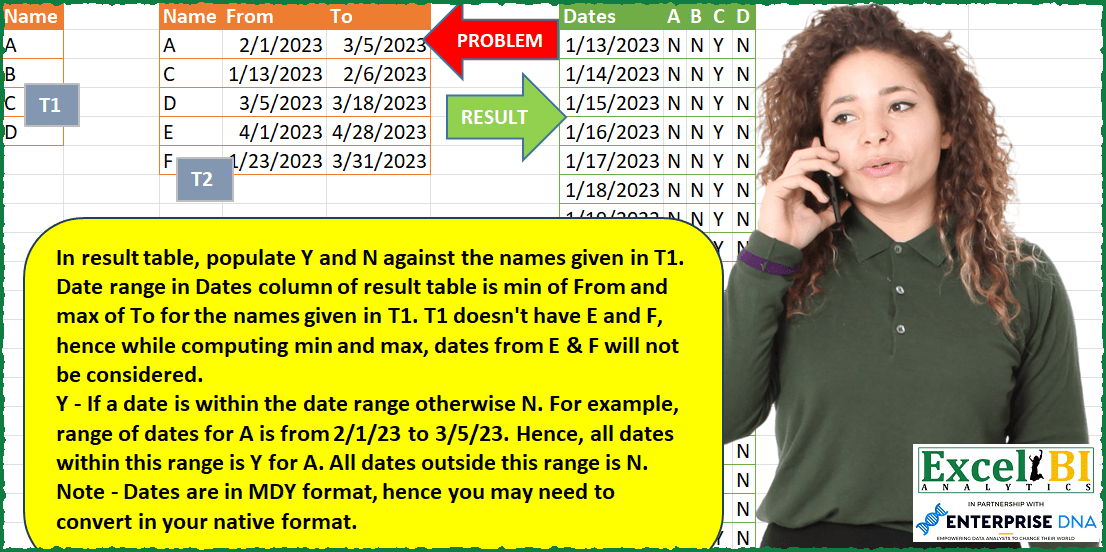
In result table, populate Y and N against the names given in T1. Date range in Dates column of result table is min of From and max of To for the names given in T1. T1 doesn’t have E and F, hence while computing min and max, dates from E & F will not be considered. Y – If a date is within the date range otherwise N. For example, range of dates for A is from 2/1/23 to 3/5/23. Hence, all dates within this range is Y for A. All dates outside this range is N. Note – Dates are in MDY format, hence you may need to convert in your native format.
📌 Challenge Details and Links
ExcelBI Power Query Challenge Number: 86
Challenge Difficulty: ⭐️⭐️⭐️⭐️⭐️
📥Download Sample File
📥Link to the solutions on LinkedIn
Solving the challenge of Check Date Within Name Range with Power Query
Power Query solution 1 for Check Date Within Name Range, proposed by Omid Motamedisedeh:
let

 Table2 = Table.TransformColumnTypes(Excel.CurrentWorkbook(){[Name="Table2"]}[Content],{{"From", type date}, {"To", type date}}),
 X = [A=List.Min(Table2[From]),B=List.Max(Table2[To]),C=List.Dates(A,Number.From(B-A),hashtag#duration(1,0,0,0))][C],
 Table1 = Excel.CurrentWorkbook(){[Name="Table1"]}[Content],
 Y = {X} & List.Transform(Table1[Name], (ox)=> [A=Table.SelectRows(Table2, each [Name]=ox), B=List.Transform(X, each try (if (_>=A[From]{0} and _<=A[To]{0}) then "y" else "n") otherwise "n")][B] ),
 Result = Table.FromColumns(Y,{"Date"} & Table1[Name])
in
 Result
Power Query solution 2 for Check Date Within Name Range, proposed by Bo Rydobon 🇹🇭:
let
  Source = Excel.CurrentWorkbook(){[Name = "Table1"]}[Content],
  N = Table.ExpandListColumn(
    Table.TransformColumns(
      Table.AddColumn(
        Source,
        "Date",
        each Excel.CurrentWorkbook(){[Name = "Table2"]}[Content]{[Name = [Name]]}?
      ),
      {"Date", each try {Number.From([From]) .. Number.From([To])} otherwise {}}
    ),
    "Date"
  ),
  ND = N
    & Table.AddColumn(
      Table.FromValue({List.Min(N[Date]) .. List.Max(N[Date])}, [DefaultColumnName = "Date"]),
      "Name",
      each "Date"
    ),
  Pivot = Table.Pivot(
    Table.DuplicateColumn(Table.SelectRows(ND, each [Date] <> null), "Date", "Ds"),
    List.Distinct(N[Name]),
    "Name",
    "Ds",
    each if List.Count(_) > 0 then "Y" else "N"
  ),
  ChangedType = Table.TransformColumnTypes(Pivot, {{"Date", type date}})
in
  ChangedType
Power Query solution 3 for Check Date Within Name Range, proposed by Zoran Milokanović:
let
  Source = Excel.CurrentWorkbook(){[Name = "Table2"]}[Content],
  Table1 = Excel.CurrentWorkbook(){[Name = "Table1"]}[Content],
  DateRange = Table.CombineColumns(
    Table.SelectRows(Source, each List.Contains(Table1[Name], [Name])),
    {"From", "To"},
    each List.Transform({Number.From(_{0}) .. Number.From(_{1})}, Date.From),
    "DR"
  ),
  Solution = Table.FromRows(
    List.Transform(
      List.Sort(List.Distinct(List.Combine(DateRange[DR]))),
      (d) => {d}
        & List.Transform(
          Table1[Name],
          (t1) =>
            if Table.RowCount(
              Table.SelectRows(DateRange, each List.Contains([DR], d) and [Name] = t1)
            )
              > 0
            then
              "Y"
            else
              "N"
        )
    ),
    {"Dates"} & Table1[Name]
  )
in
  Solution
Power Query solution 4 for Check Date Within Name Range, proposed by Kris Jaganah:
let
 Source = Excel.CurrentWorkbook(){[Name="Table1"]}[Content],
 Change = Table.TransformColumnTypes(Source,{{"From", Int64.Type}, {"To", Int64.Type}}),
 Source1 = Excel.CurrentWorkbook(){[Name="Table2"]}[Content],
 Merge = Table.NestedJoin(Source1, {"Name"}, Change, {"Name"}, "Change", JoinKind.LeftOuter),
 Expand = Table.ExpandTableColumn(Merge, "Change", {"From", "To"}, {"Change.From", "Change.To"}),
 Rept = Table.AddColumn(Expand, "Y", each List.Repeat({"Y"},(if [Change.From]=null then 1 else [Change.To]-[Change.From]+1))),
 Expand1 = Table.ExpandListColumn(Rept, "Y"),
 SortPrep = Table.AddColumn(Expand1, "Sort", each if[Change.From]=null then "" else[Change.From]),
 Group = Table.Group(SortPrep, {"Sort", "Name"}, {{"All", each _, type table [Name=text, Change.From=nullable number, Change.To=nullable number, Y=text, Sort=any]}}),
 DateIndx = Table.AddColumn(Group, "Custom", each try Table.AddIndexColumn([All],"Date",[Sort]) otherwise null),
 ExpDate = Table.ExpandTableColumn(DateIndx, "Custom", {"Y", "Date"}, {"Custom.Y", "Dates"}),
Power Query solution 5 for Check Date Within Name Range, proposed by Alejandro Simón 🇵🇦 🇪🇸:
let
  Origen = Excel.CurrentWorkbook(){[Name = "Tabla1"]}[Content],
  Tabla2 = Excel.CurrentWorkbook(){[Name = "Tabla2"]}[Content],
  Fecha = Table.SelectRows(
    Table.AddColumn(
      Tabla2,
      "Dia",
      each List.Transform({Number.From([From]) .. Number.From([To])}, Date.From)
    )[[Name], [Dia]],
    each List.Contains(Origen[Name], [Name])
  ),
  Lista = Table.FromColumns({List.Sort(List.Distinct(List.Combine(Fecha[Dia])))}, {"Dates"}),
  Sol = List.Accumulate(
    Origen[Name],
    Lista,
    (s, c) =>
      Table.AddColumn(
        s,
        c,
        each try

            if List.Contains(Table.SelectRows(Fecha, each [Name] = c)[Dia]{0}, [Dates]) then
              "Y"
            else
              "N"
        otherwise
          "N"
      )
  )
in
  Sol
Power Query solution 6 for Check Date Within Name Range, proposed by Luan Rodrigues:
let
  Fonte = Excel.CurrentWorkbook(){[Name = "Tabela2"]}[Content],
  fil = Excel.CurrentWorkbook(){[Name = "Tabela1"]}[Content][Name],
  list = [
    a = List.Combine(List.RemoveFirstN(Table.ToColumns(Fonte), 1)),
    b = Table.FromList(
      {Number.From(List.Min(a)) .. Number.From(List.Max(a))},
      Splitter.SplitByNothing()
    )
  ][b],
  mes = Table.NestedJoin(list, {"Column1"}, exp, {"Personalizar"}, "list", JoinKind.LeftOuter),
  ep = Table.ExpandTableColumn(mes, "list", {"Name"}),
  f = Table.SelectRows(ep, each List.Contains(fil, [Name])),
  dup = Table.DuplicateColumn(f, "Column1", "Dates"),
  pv = Table.Pivot(dup, List.Distinct(dup[Name]), "Name", "Column1"),
  reo = Table.ReorderColumns(pv, fil, MissingField.UseNull),
  tip = Table.TransformColumnTypes(reo, {{"Dates", type date, "en-US"}}),
  res = Table.ReplaceValue(tip, null, "N", (a, b, c) => if a = null then "N" else "Y", fil),
  tab = Table.AddColumn(Fonte, "Personalizar", each {Number.From([From]) .. Number.From([To])}),
  exp = Table.ExpandListColumn(tab, "Personalizar")
in
  res
Power Query solution 7 for Check Date Within Name Range, proposed by Eric Laforce:
let
 T1 = Excel.CurrentWorkbook(){[Name="tData86_1"]}[Content],
 T2 = Excel.CurrentWorkbook(){[Name="tData86_2"]}[Content],
 Names = T1[Name],
 TRanges = Table.SelectRows(T2, each List.Contains(Names, [Name]) ),
 DMin = List.Min(TRanges[From]), DMax = List.Max(TRanges[To]),
 CDates = {Number.From(DMin)..Number.From(DMax)},
 CData = List.Accumulate(Names, {}, (s,c)=>let
 _D = Table.SelectRows(TRanges, each [Name]=c){0}?,
 _Col = if (_D=null) then List.Repeat({"N"}, Duration.Days(DMax-DMin)+1)
 else List.Repeat({"N"}, Duration.Days(_D[From]-DMin)*Number.From(_D[From]>DMin))
 & List.Repeat({"Y"}, Duration.Days(_D[To]-_D[From])+1)
 & List.Repeat({"N"}, Duration.Days(DMax-_D[To])*Number.From(DMax>_D[To]))
 in s &{_Col}),
 Result = Table.FromColumns({CDates} & CData, {"Dates"} & Names),
 CType = Table.TransformColumnTypes(Result,{{"Dates", type date}})
in
 CType

NB : Each Name-Column is 3 or 1 repetitions of 'N'/'Y' letter
based on Number of days "Before"/"During"/"After" each Periode
Instead of calculating it individually
Power Query solution 8 for Check Date Within Name Range, proposed by Victor Wang:
let
  Source = Table.SelectRows(T2, each List.Contains(T1[Name], [Name])),
  listOfDates = Table.FromRecords(
    Table.TransformRows(
      Source,
      each [Name = [Name], Dates = {Number.From([From]) .. Number.From([To])}]
    )
  ),
  expandDatesToRows = Table.ExpandListColumn(listOfDates, "Dates"),
  duplicateDates = Table.DuplicateColumn(expandDatesToRows, "Dates", "Dates2"),
  pivotNames = Table.Pivot(
    duplicateDates,
    T1[Name],
    "Name",
    "Dates2",
    each if List.IsEmpty(_) then "N" else "Y"
  ),
  typeDate = Table.TransformColumnTypes(pivotNames, {{"Dates", type date}})
in
  typeDate
Power Query solution 9 for Check Date Within Name Range, proposed by Gráinne Duggan:
let
 Source2 = Excel.CurrentWorkbook(){[Name="Table1"]}[Content],
 Source = Excel.CurrentWorkbook(){[Name="Table2"]}[Content],
 FilterNull = Table.SelectRows(Table.NestedJoin(Source2, {"Name"}, Source, {"Name"}, "Source", JoinKind.FullOuter), each ([Name] <> null)),
 Expand = Table.ExpandTableColumn(FilterNull, "Source", {"From", "To"}, {"From", "To"}),
 AddedDates = Table.AddColumn(Table.TransformColumnTypes(Expand,{{"From", type date}, {"To", type date}}), "Custom", each if [From] = null then { 1 } else {Number.From( [From])..Number.From( [To])}),
 ExpandDates = Table.ExpandListColumn(AddedDates, "Custom")[[Name],[Custom]],
 AddYN = Table.AddColumn(ExpandDates, "Custom.1", each if [Custom] = 1 then "N" else "Y"),
 Sort = Table.Sort(Table.TransformColumnTypes(AddYN,{{"Custom", type date}}),{{"Name", Order.Ascending}}),
 Pivot = Table.Pivot(Sort, List.Distinct(Sort[Name]), "Name", "Custom.1"),
 ReplaceNull = Table.ReplaceValue(Pivot,null,"N",Replacer.ReplaceValue,{"A", "C", "D", "B"}),
 Filter = Table.SelectRows(ReplaceNull, each ([Custom] <> hashtag#date(1899, 12, 31)))
in
 Filter
Solving the challenge of Check Date Within Name Range with Excel
Excel solution 1 for Check Date Within Name Range, proposed by Bo Rydobon 🇹🇭:
=LET(a,TOROW(A2:A5),c,C2:C6,
f,XLOOKUP(a,c,D2:D6,""),t,MAXIFS(E2:E6,c,a),
m,MIN(f),s,SEQUENCE(MAX(t)-m+1,,m),
VSTACK(HSTACK("Dates",a),HSTACK(s,IF((f<=s)*(t>=s),"Y","N"))))
Excel solution 2 for Check Date Within Name Range, proposed by Bo Rydobon 🇹🇭:
=LET(a,A2:A5,b,C2:E6,c,TAKE(b,,1),d,FILTER(b,COUNTIF(a,c)),f,MIN(d),s,SEQUENCE(MAX(d)-f+1,,f),
VSTACK(HSTACK("Dates",TOROW(a)),REDUCE(s,a,LAMBDA(g,v,LET(x,XLOOKUP(v,c,b,0),HSTACK(g,IF((s>=MIN(x))*(s<=MAX(x)),"Y","N")))))))
Excel solution 3 for Check Date Within Name Range, proposed by محمد حلمي:
=LET(i,TOROW(A2:A5),l,C2:C6,m,MIN(IF(i=l,D2:D6)),
s,SEQUENCE(MAX(IF(i=l,E2:E6))-m+1,,m),VSTACK(
HSTACK("Dates",i),REDUCE(s,i,LAMBDA(a,d,LET(r,IF(l=d,D2:E6),HSTACK(a,IF((MIN(r)<=s)*(MAX(r)>=s),"Y","N")))))))
Excel solution 4 for Check Date Within Name Range, proposed by Oscar Mendez Roca Farell:
=LET(_n, A2:A5,_d, LAMBDA(i, XLOOKUP(_n, C2:C6, i, "")), _f,_d(D2:D6),_t,_d(E2:E6),_s, SEQUENCE(MAX(_t)-MIN(_f)+1, ,MIN(_f)), _r,IF((_s>=TOROW(_f))*(_s<=TOROW(_t)),"Y","N"), VSTACK(HSTACK("Dates", TOROW(_n)), HSTACK(_s,_r)))Excel solution 5 for Check Date Within Name Range, proposed by Sunny Baggu:
=LET(
 _ftbl, CHOOSEROWS(
 HSTACK(C2:E6, E2:E6 - D2:D6 + 1),
 TOCOL(XMATCH(A2:A5, C2:C6), 2)
 ),
 _e1, LAMBDA(x, INDEX(_ftbl, , x)),
 _min, MIN(_e1(2)),
 _max, MAX(_e1(3)),
 _rng, SEQUENCE(_max - _min + 1, , _min),
 _res, DROP(
 REDUCE(
 "",
 A2:A5,
 LAMBDA(a, v,
 HSTACK(
 a,
 LET(
 _r, MATCH(v, _e1(1)),
 _list, SEQUENCE(INDEX(_e1(4), _r, 1), , INDEX(_e1(2), _r, 1)),
 IF(ISNUMBER(XMATCH(_rng, _list)), "Y", "N")
 )
 )
 )
 ),
 ,
 1
 ),
 VSTACK(HSTACK("Dates", TOROW(A2:A5)), HSTACK(_rng, _res))
)
&&&