
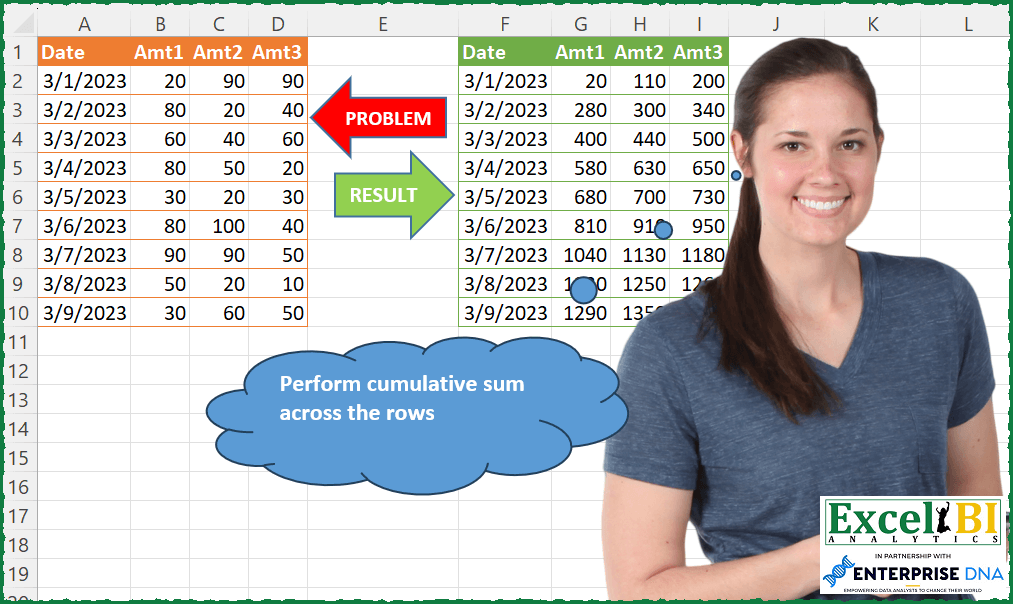
Perform cumulative sum across the rows. Keep it dynamic so that introduction of more columns should not break it.
📌 Challenge Details and Links
ExcelBI Power Query Challenge Number: 79
Challenge Difficulty: ⭐️⭐️
📥Download Sample File
📥Link to the solutions on LinkedIn
Solving the challenge of Cumulative Row-Wise Totaling with Power Query
Power Query solution 1 for Cumulative Row-Wise Totaling, proposed by Bo Rydobon 🇹🇭:
let
  Source = Excel.CurrentWorkbook(){[Name = "Table1"]}[Content],
  Ans = Table.FromColumns(
    {Source[Date]}
      & List.Zip(
        List.Split(
          List.Accumulate(
            List.Combine(List.Transform(Table.ToRows(Source), List.Skip)),
            {},
            (s, l) => s & {List.Last(s, 0) + l}
          ),
          Table.ColumnCount(Source) - 1
        )
      ),
    Table.ColumnNames(Source)
  )
in
  Ans
Power Query solution 2 for Cumulative Row-Wise Totaling, proposed by Zoran Milokanović:
let
  Source = Excel.CurrentWorkbook(){[Name = "Input"]}[Content],
  Solution = Table.FromRows(
    [
      t = Table.ToRows(Source),
      r = List.Accumulate(
        List.Positions(t),
        {},
        (s, c) =>
          s
            & {
              let
                l = t{c}
              in
                {l{0}}
                  & List.Accumulate(
                    List.Skip(l),
                    {},
                    (b, n) =>
                      b
                        & {
                          (
                            List.Last(b)
                              ?? List.Sum(
                                List.FirstN(List.Transform(t, each List.Sum(List.Skip(_))), c)
                              )
                              ?? 0
                          )
                            + n
                        }
                  )
            }
      )
    ][r],
    Table.ColumnNames(Source)
  )
in
  Solution
Power Query solution 3 for Cumulative Row-Wise Totaling, proposed by Kris Jaganah:
let
  Source = Excel.CurrentWorkbook(){[Name = "Table1"]}[Content],
  #"Unpivoted Other Columns" = Table.UnpivotOtherColumns(Source, {"Date"}, "Attribute", "Value"),
  #"Added Index" = Table.AddIndexColumn(#"Unpivoted Other Columns", "Index", 1, 1, Int64.Type),
  #"Added Custom" = Table.AddColumn(
    #"Added Index",
    "Running",
    each List.Sum(List.Buffer(List.FirstN(#"Added Index"[Value], [Index])))
  ),
  #"Removed Columns" = Table.RemoveColumns(#"Added Custom", {"Value", "Index"}),
  #"Pivoted Column" = Table.Pivot(
    #"Removed Columns",
    List.Distinct(#"Removed Columns"[Attribute]),
    "Attribute",
    "Running"
  ),
  #"Changed Type" = Table.TransformColumnTypes(#"Pivoted Column", {"Date", type date})
in
  #"Changed Type"
Power Query solution 4 for Cumulative Row-Wise Totaling, proposed by Alejandro Simón 🇵🇦 🇪🇸:
let
  Source = Excel.CurrentWorkbook(){[Name = "Table1"]}[Content],
  Lista = List.Combine(List.Transform(Table.ToRows(Source), each List.Skip(_))),
  RowRT = Table.FromRows(
    List.Split(
      List.Skip(List.Accumulate(Lista, {0}, (s, c) => s & {List.Last(s) + c})),
      Table.ColumnCount(Source) - 1
    )
  ),
  Sol = Table.FromColumns(
    {List.First(Table.ToColumns(Source))} & Table.ToColumns(RowRT),
    Table.ColumnNames(Source)
  )
in
  Sol
Power Query solution 5 for Cumulative Row-Wise Totaling, proposed by Luan Rodrigues:
let
  Fonte = Tabela1,
  col   = Table.UnpivotOtherColumns(Fonte, {"Date"}, "Atributo", "Valor"),
  ind   = Table.AddIndexColumn(col, "Ind", 1, 1, Int64.Type),
  add   = Table.AddColumn(ind, "Personalizar", each List.Sum(List.FirstN(ind[Valor], [Ind]))),
  rem   = Table.RemoveColumns(add, {"Valor", "Ind"}),
  res   = Table.Pivot(rem, List.Distinct(rem[Atributo]), "Atributo", "Personalizar")
in
  res
Power Query solution 6 for Cumulative Row-Wise Totaling, proposed by Hussein SATOUR:
let
  Source = Excel.CurrentWorkbook(){[Name = "Table1"]}[Content],
  #"Unpivoted Other Columns" = Table.UnpivotOtherColumns(Source, {"Date"}, "Attribute", "Value"),
  #"Changed Type" = Table.TransformColumnTypes(#"Unpivoted Other Columns", {{"Value", Int64.Type}}),
  #"Added Index" = Table.AddIndexColumn(#"Changed Type", "Index", 1, 1, Int64.Type),
  #"Added Custom" = Table.AddColumn(
    #"Added Index",
    "Custom",
    each List.Sum(Table.FirstN(#"Added Index", [Index])[Value])
  ),
  #"Removed Columns" = Table.RemoveColumns(#"Added Custom", {"Value", "Index"}),
  #"Pivoted Column" = Table.Pivot(
    #"Removed Columns",
    List.Distinct(#"Removed Columns"[Attribute]),
    "Attribute",
    "Custom",
    List.Sum
  )
in
  #"Pivoted Column"
Power Query solution 7 for Cumulative Row-Wise Totaling, proposed by Brian Julius:
let
  Source = Table.TransformColumnTypes(
    Excel.CurrentWorkbook(){[Name = "Table1"]}[Content],
    {"Date", Date.Type}
  ),
  UnpivotOther = Table.UnpivotOtherColumns(Source, {"Date"}, "Attribute", "Value"),
  ConvertToIndex = Table.TransformColumnTypes(
    Table.RemoveColumns(
      Table.SplitColumn(
        UnpivotOther,
        "Attribute",
        Splitter.SplitTextByDelimiter("Amt", QuoteStyle.Csv),
        {"x", "Index"}
      ),
      "x"
    ),
    {"Index", Int64.Type}
  ),
  AddIdx = Table.AddIndexColumn(ConvertToIndex, "IndexAll", 1, 1, Int64.Type),
  AddCumul = Table.RemoveColumns(
    Table.AddColumn(AddIdx, "FirstN", each List.Sum(List.FirstN(AddIdx[Value], [IndexAll]))),
    {"Value", "IndexAll"}
  ),
  Pivot = Table.Pivot(
    Table.TransformColumnTypes(AddCumul, {{"Index", type text}}, "en-US"),
    List.Distinct(Table.TransformColumnTypes(AddCumul, {{"Index", type text}}, "en-US")[Index]),
    "Index",
    "FirstN"
  ),
  Pairs = List.Zip({Table.ColumnNames(Pivot), Table.ColumnNames(Source)}),
  Final = Table.RenameColumns(Pivot, Pairs)
in
  Final
Power Query solution 8 for Cumulative Row-Wise Totaling, proposed by Eric Laforce:
let
  Source = Excel.CurrentWorkbook(){[Name = "tData79"]}[Content],
  AllValues = List.Combine(Table.ToRows(Table.RemoveColumns(Source, "Date"))),
  RT = List.Accumulate(
    AllValues,
    [T = 0, RT = {}],
    (s, c) => [T = s[T] + c, RT = s[RT] & {s[T] + c}]
  )[RT],
  ToRows = List.Transform(
    List.Zip({Source[Date], List.Split(RT, 3)}),
    each List.InsertRange(_{1}, 0, {_{0}})
  ),
  ToTable = Table.FromRows(ToRows, Table.ColumnNames(Source))
in
  ToTable
Power Query solution 9 for Cumulative Row-Wise Totaling, proposed by Victor Wang:
let
  Source = Excel.CurrentWorkbook(){[Name = "Table1"]}[Content],
  Unpivot = Table.UnpivotOtherColumns(Source, {"Date"}, "Attribute", "Value"),
  Accumulate = Table.FromColumns(
    List.RemoveLastN(Table.ToColumns(Unpivot))
      & {List.Accumulate(Unpivot[Value], {}, (s, c) => s & {List.Sum({List.Last(s), c})})},
    Table.ColumnNames(Unpivot)
  ),
  Pivot = Table.Pivot(Accumulate, List.Distinct(Accumulate[Attribute]), "Attribute", "Value")
in
  Pivot
Power Query solution 10 for Cumulative Row-Wise Totaling, proposed by Sandeep Marwal:
let
  Source = Excel.CurrentWorkbook(){[Name = "Table1"]}[Content],
  Custom1 = Table.ToRows(Source),
  Custom2 = List.Split(
    List.Skip(
      List.Accumulate(
        List.Combine(List.Transform(Custom1, List.Skip)),
        {0},
        (c, v) => c & {List.Last(c) + v}
      )
    ),
    3
  ),
  Custom3 = List.Transform(Custom1, each {List.First(_)}),
  Custom4 = List.Zip({Custom3, Custom2}),
  Custom5 = List.Transform(Custom4, each List.Combine(_)),
  Custom6 = Table.FromRows(Custom5, Table.ColumnNames(Source)),
  #"Changed Type" = Table.TransformColumnTypes(Custom6, {{"Date", type date}})
in
  #"Changed Type"
Power Query solution 11 for Cumulative Row-Wise Totaling, proposed by Mahmoud Bani Asadi:
let
  Source = Excel.CurrentWorkbook(){[Name = "Table1"]}[Content],
  ChangedType = Table.TransformColumnTypes(
    Source,
    {{"Date", type date}, {"Amt1", Int64.Type}, {"Amt2", Int64.Type}, {"Amt3", Int64.Type}}
  ),
  Unpivot = Table.UnpivotOtherColumns(ChangedType, {"Date"}, "Attribute", "Value"),
  Index = Table.AddIndexColumn(Unpivot, "Index", 1, 1, Int64.Type),
  RunningTotal = Table.AddColumn(
    Index,
    "Custom",
    each List.Sum(List.FirstN(List.Buffer(Index[Value]), [Index]))
  ),
  RemovedColumns = Table.RemoveColumns(RunningTotal, {"Value", "Index"}),
  Pivot = Table.Pivot(
    RemovedColumns,
    List.Distinct(RemovedColumns[Attribute]),
    "Attribute",
    "Custom"
  )
in
  Pivot
Power Query solution 12 for Cumulative Row-Wise Totaling, proposed by Obi E, MPH:
let
  Source = Excel.CurrentWorkbook(){[Name = "Table5"]}[Content],
  #"Unpivoted Columns" = Table.UnpivotOtherColumns(Source, {"Date"}, "Attribute", "Value"),
  #"Added Index" = Table.AddIndexColumn(#"Unpivoted Columns", "Index", 0, 1, Int64.Type),
  #"Changed Type" = Table.TransformColumnTypes(#"Added Index", {{"Value", Int64.Type}}),
  #"Added Custom" = Table.AddColumn(
    #"Changed Type",
    "Running Total",
    each
      let
        CurrentRowIndex = [Index],
        RunningTotal = List.Accumulate(
          {0 .. CurrentRowIndex},
          0,
          (state, current) => state + #"Changed Type"{current}[Value]
        )
      in
        RunningTotal
  ),
  #"Removed Columns" = Table.RemoveColumns(#"Added Custom", {"Value", "Index"}),
  #"Pivoted Column" = Table.Pivot(
    #"Removed Columns",
    List.Distinct(#"Removed Columns"[Attribute]),
    "Attribute",
    "Running Total"
  )
in
  #"Pivoted Column"
Power Query solution 13 for Cumulative Row-Wise Totaling, proposed by Daniel Madhadha:
let
  Source = Excel.CurrentWorkbook(){[Name = "Table1"]}[Content],
  #"Unpivoted Columns" = Table.UnpivotOtherColumns(Source, {"Date"}, "Attribute", "Value"),
  #"Added Index" = Table.AddIndexColumn(#"Unpivoted Columns", "Index", 1, 1, Int64.Type),
  #"Changed Type" = Table.TransformColumnTypes(#"Added Index", {{"Date", type date}}),
  #"Added Custom" = Table.AddColumn(
    #"Changed Type",
    "Custom",
    each List.Sum(List.FirstN(#"Unpivoted Columns"[Value], [Index]))
  ),
  #"Removed Columns" = Table.RemoveColumns(#"Added Custom", {"Value", "Index"}),
  #"Pivoted Column" = Table.Pivot(
    #"Removed Columns",
    List.Distinct(#"Removed Columns"[Attribute]),
    "Attribute",
    "Custom",
    List.Sum
  )
in
  #"Pivoted Column"
Solving the challenge of Cumulative Row-Wise Totaling with Excel
Excel solution 1 for Cumulative Row-Wise Totaling, proposed by Bo Rydobon 🇹🇭:
=HSTACK(A2:A10,SCAN(0,B2:D10,LAMBDA(a,v,a+v)))Excel solution 2 for Cumulative Row-Wise Totaling, proposed by Rick Rothstein:
=VSTACK(A1:D1,HSTACK(A2:A10,SCAN(,B2:D10,LAMBDA(a,x,a+x))))Excel solution 3 for Cumulative Row-Wise Totaling, proposed by محمد حلمي:
=HSTACK(A2:A10,MAP(B2:D10,LAMBDA(a,SUM(B2:a))))Excel solution 4 for Cumulative Row-Wise Totaling, proposed by محمد حلمي:
=HSTACK(A2:A10,SCAN(,B2:D10,LAMBDA(a,d,a+d)))Excel solution 5 for Cumulative Row-Wise Totaling, proposed by Kris Jaganah:
=VSTACK(A1:D1,HSTACK(A2:A10,SCAN(0,B2:D10,LAMBDA(x,y,x+y))))Excel solution 6 for Cumulative Row-Wise Totaling, proposed by Sunny Baggu:
=HSTACK(A2:A10,WRAPROWS(SCAN(0,TOCOL(B2:D10),LAMBDA(a,v,a+v)),3))Excel solution 7 for Cumulative Row-Wise Totaling, proposed by Pieter de B.:
=VSTACK(A1:D1,HSTACK(A2:A10,LET(x,TOCOL(B2:D10),r,SEQUENCE(ROWS(x)),WRAPROWS(MMULT(--(TOROW(r)=r),x),3)))). Or more dynamical: =LET(data,A1:D10,h,TAKE(data,1),b,DROP(data,1),d,TAKE(b,,1),a,TOCOL(TAKE(b,,-3)),r,SEQUENCE(ROWS(a)),VSTACK(h,HSTACK(d,WRAPROWS(MMULT(--(TOROW(r)=r),a),3))))Excel solution 8 for Cumulative Row-Wise Totaling, proposed by Surendra Reddy:
=HSTACK(A2:A10,SCAN(,B2:D10,LAMBDA(a,b,a+b)))Excel solution 9 for Cumulative Row-Wise Totaling, proposed by Pawan Keswani:
=Sum($B2:B2,if(isnumber($I1),$I1,0))&&&