
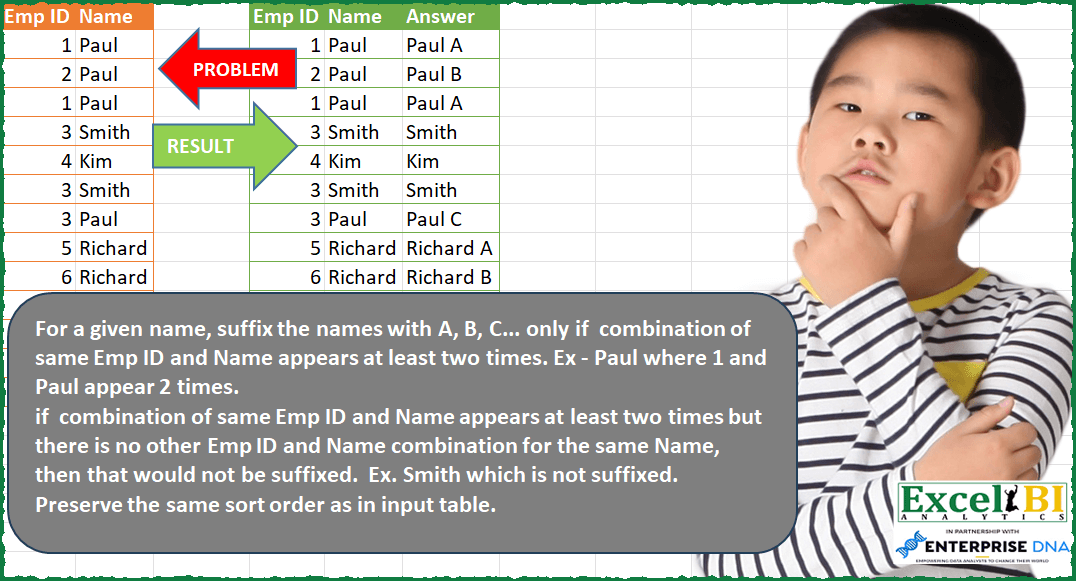
For a given name, suffix the names with A, B, C… only if combination of same Emp ID and Name appears at least two times. Ex – Paul where 1 and Paul appear 2 times. if combination of same Emp ID and Name appears at least two times but there is no other Emp ID and Name combination for the same Name, then that would not be suffixed. Ex. Smith which is not suffixed. Preserve the same sort order as in input table.
📌 Challenge Details and Links
ExcelBI Power Query Challenge Number: 74
Challenge Difficulty: ⭐️⭐️⭐️
📥Download Sample File
📥Link to the solutions on LinkedIn
Solving the challenge of Suffix Names with Duplicates with Power Query
Power Query solution 1 for Suffix Names with Duplicates, proposed by Bo Rydobon 🇹🇭:
let
  Source = Excel.CurrentWorkbook(){[Name = "Table1"]}[Content],
  Suf = Table.Combine(
    Table.Group(
      Table.Distinct(Source),
      "Name",
      {
        "T",
        each Table.AddColumn(
          Table.AddIndexColumn(_, "c", 65),
          "A",
          (r) => r[Name] & (if Table.RowCount(_) > 1 then " " & Character.FromNumber(r[c]) else "")
        )
      }
    )[T]
  ),
  Ans = Table.AddColumn(
    Source,
    "Ans",
    each Table.SelectRows(Suf, (s) => s[Emp ID] = [Emp ID] and s[Name] = [Name])[A]{0}
  )
in
  Ans
Power Query solution 2 for Suffix Names with Duplicates, proposed by Zoran Milokanović:
let
  Source = Excel.CurrentWorkbook(){[Name = "Input"]}[Content],
  GroupedNames = Table.Group(
    Source,
    {"Name"},
    {
      {"CountID", each List.Count([Emp ID]), type number},
      {"CountUniqueID", each List.Count(List.Distinct([Emp ID])), type number},
      {"Emp ID", each List.Distinct([Emp ID])}
    }
  ),
  FilteredNames = Table.SelectRows(
    GroupedNames,
    each ([CountID] > [CountUniqueID]) and ([CountUniqueID] > 1)
  ),
  AddedAnswer = Table.AddColumn(
    Source,
    "Answer",
    (o) =>
      let
        fn = Table.SelectRows(FilteredNames, each o[Name] = _[Name]),
        s  = Character.FromNumber(List.PositionOf(fn[Emp ID]{0}, o[Emp ID]) + 65)
      in
        o[Name] & (if Table.RowCount(fn) > 0 then " " & s else "")
  )
in
  AddedAnswer
Power Query solution 3 for Suffix Names with Duplicates, proposed by Alejandro Simón 🇵🇦 🇪🇸:
let
  Source = Excel.CurrentWorkbook(){[Name = "Table1"]}[Content],
  Group = Table.Group(
    Source,
    {"Name"},
    {
      "All",
      each
        let
          a = Table.AddIndexColumn(_, "Idx", 1),
          b = List.Count(List.Distinct(a[Emp ID])),
          c = {1 .. b},
          d = List.Zip({{1 .. 26}, {"A" .. "Z"}}),
          e =
            if b > 1 then
              Table.FromRows(
                List.Zip({List.Distinct(a[Emp ID]), c, List.ReplaceMatchingItems(c, d)}),
                {"Emp ID", "Idx", "Letter"}
              )
            else
              Table.FromRows({List.Distinct(a[Emp ID])}, {"Emp ID"})
        in
          e
    }
  ),
  Expand = Table.ExpandTableColumn(Group, "All", {"Emp ID", "Letter"}),
  Union = Table.AddColumn(
    Expand,
    "Answer",
    each if [Letter] <> null then [Name] & " " & [Letter] else [Name]
  ),
  Sol = Table.AddColumn(
    Source,
    "new",
    each Table.SelectRows(Union, (x) => [Emp ID] = x[Emp ID] and [Name] = x[Name])[Answer]{0}
  )
in
  Sol
Power Query solution 4 for Suffix Names with Duplicates, proposed by Luan Rodrigues:
let
  Fonte = Tabela1,
  indice = Table.AddIndexColumn(Fonte, "indice", 1, 1, Int64.Type),
  gp = Table.Group(indice, {"Emp ID", "Name"}, {{"Contagem", each _}}),
  gp2 = Table.Group(
    gp,
    {"Name"},
    {{"Contagem", each Table.AddIndexColumn(_, "Ind", 1, 1)}, {"Count", each Table.RowCount(_)}}
  ),
  exp = Table.ExpandTableColumn(gp2, "Contagem", {"Emp ID", "Contagem", "Ind"}),
  add = Table.AddColumn(
    exp,
    "Personalizar",
    each
      if [Count] <> 1 then
        [Name] & " " & Character.FromNumber(if [Ind] = 1 then 65 else 65 + [Ind] - 1)
      else
        [Name]
  )[[Contagem], [Personalizar], [#"Emp ID"], [Name]],
  mes = Table.NestedJoin(
    add,
    {"Emp ID", "Name"},
    indice,
    {"Emp ID", "Name"},
    "add",
    JoinKind.LeftOuter
  ),
  iadd = Table.ExpandTableColumn(mes, "add", {"indice"}),
  res = Table.Sort(iadd, {{"indice", Order.Ascending}})[[#"Emp ID"], [Name], [Personalizar]]
in
  res
Power Query solution 5 for Suffix Names with Duplicates, proposed by Eric Laforce:
let
  Source = Excel.CurrentWorkbook(){[Name = "tData74"]}[Content],
  Add_Index = Table.AddIndexColumn(Source, "Index", 0, 1, Int64.Type),
  Group = Table.Group(
    Add_Index,
    {"Name"},
    {
      "Data",
      each
        let
          _nID = List.Count(List.Distinct(_[Emp ID])),
          _AddRank = Table.AddRankColumn(_, "Answer", "Emp ID", [RankKind = RankKind.Dense]),
          _Result = Table.ReplaceValue(
            _AddRank,
            null,
            each [Name],
            (curr, cond, repl) =>
              repl & (if (_nID = 1) then "" else " " & Character.FromNumber(64 + curr)),
            {"Answer"}
          )
        in
          _Result
    }
  ),
  Sort = Table.Sort(Table.Combine(Group[Data]), {"Index", Order.Ascending}),
  RemoveIndex = Table.RemoveColumns(Sort, {"Index"})
in
  RemoveIndex
Power Query solution 6 for Suffix Names with Duplicates, proposed by Victor Wang:
let
  Source = Excel.CurrentWorkbook(){[Name = "Table1"]}[Content],
  addIndex = Table.AddIndexColumn(Source, "Index", 1, 1),
  Group = Table.Group(
    addIndex,
    {"Name"},
    {
      {
        "all",
        each
          if Table.RowCount(Table.Distinct(Table.RemoveColumns(_, "Index"))) = 1 then
            Table.AddColumn(_, "Answer", (a) => [Name]{0})
          else
            Table.ReplaceValue(
              Table.AddRankColumn(_, "Answer", "Emp ID", [RankKind = RankKind.Dense]),
              null,
              (a) => a[Name],
              (curr, cond, repl) => repl & " " & Character.FromNumber(curr + 64),
              {"Answer"}
            )
      }
    }
  ),
  Combine = Table.Combine(Group[all]),
  sortOnIndex = Table.Sort(Combine, {{"Index", Order.Ascending}}),
  removeIndex = Table.RemoveColumns(sortOnIndex, {"Index"})
in
  removeIndex
Power Query solution 7 for Suffix Names with Duplicates, proposed by Krzysztof Kominiak:
let
  Source = Excel.CurrentWorkbook(){[Name = "Table1"]}[Content],
  AddIndex = Table.AddIndexColumn(Source, "Index", 1, 1),
  AddCountLs = Table.AddColumn(
    AddIndex,
    "Ls",
    each List.Count(Table.Distinct(Table.SelectRows(Source, (x) => x[Name] = [Name]))[Name])
  ),
  GroupRows = Table.Combine(
    Table.Group(
      AddCountLs,
      {"Name"},
      {{"NT", each Table.AddIndexColumn(Table.Distinct(_, "Emp ID"), "Id")}}
    )[NT]
  ),
  MergeQueries = Table.NestedJoin(
    AddIndex,
    {"Emp ID", "Name"},
    GroupRows,
    {"Emp ID", "Name"},
    "Sorted Rows",
    JoinKind.LeftOuter
  ),
  ExpandRows = Table.ExpandTableColumn(MergeQueries, "Sorted Rows", {"Ls", "Id"}, {"Ls", "Id"}),
  SortRows = Table.Sort(ExpandRows, {{"Index", Order.Ascending}}),
  Result = Table.AddColumn(
    SortRows,
    "Answer",
    each if [Ls] > 1 then [Name] & " " & List.Transform({[Id]}, each {"A" .. "Z"}{_}){0} else [Name]
  )[[Emp ID], [Name], [Answer]]
in
  Result
Solving the challenge of Suffix Names with Duplicates with Excel
Excel solution 1 for Suffix Names with Duplicates, proposed by Bo Rydobon 🇹🇭:
=LET(a,A1:A14,b,B1:B14,HSTACK(a,b,MAP(a,b,LAMBDA(c,d,LET(u,UNIQUE(FILTER(a,b=d)),SUBSTITUTE(d,"Name","Answer")&REPT(" "&CHAR(64+SUM(N(u<=c))),ROWS(u)>1))))))Excel solution 2 for Suffix Names with Duplicates, proposed by Bo Rydobon 🇹🇭:
=LET(z,A2:B14,u,UNIQUE(z),R,LAMBDA(a,TAKE(a,,1)&DROP(a,,1)),HSTACK(z,DROP(z,,1)&XLOOKUP(R(z),R(u),
MAP(SEQUENCE(ROWS(u)),LAMBDA(n,LET(L,LAMBDA(m,n,SUM(N(TAKE(u,m)=INDEX(u,n,2)))),REPT(" "&CHAR(L(n,n)+64),L(99,n)>1)))))))
Excel solution 3 for Suffix Names with Duplicates, proposed by محمد حلمي:
=HSTACK(A1:B14,LET(
q,A2:A14,
b,B2:B14,
y,DROP(REDUCE(0,UNIQUE(b),LAMBDA(a,x,LET(
d,FILTER(q,b=x),
v,d-MIN(d)+1,
l,ROW(1:26),
r,XLOOKUP(v,l,CHAR(l+64)),
VSTACK(a,HSTACK(d&x,x&" "&IF(MIN(v)=MAX(v),
TEXT(r,";;;"),r)))))),1),
VSTACK("Answer",XLOOKUP(q&b,TAKE(y,,1),DROP(y,,1)))))
Excel solution 4 for Suffix Names with Duplicates, proposed by 🇰🇷 Taeyong Shin:
=MAP(A2:A14,B2:B14,LAMBDA(a,b,LET(u,UNIQUE(FILTER(A2:A14&B2:B14,B2:B14=b)),IF(ROWS(u)>1,b&" "&CHAR(XMATCH(a&b,u)+64),b))))Excel solution 5 for Suffix Names with Duplicates, proposed by Oscar Mendez Roca Farell:
=MAP(A2:A14, B2:B14, LAMBDA(a, b, LET(_c, COUNT(UNIQUE(FILTER(A2:A14,B2:B14=b))), IF(_c>1, b&" "&CHAR(64+IFERROR((1/MOD(a, _c))^-1, _c)), b))))Solving the challenge of Suffix Names with Duplicates with R
R solution 1 for Suffix Names with Duplicates, proposed by Krzysztof Nowak:
df <- df %>%
 janitor::clean_names()
df %>%
 mutate(Index = row_number(),
 combinations = paste0(name,emp_id)) %>%
 group_by(name) %>%
 mutate(
 Versions = length(unique(combinations)),
 Occurennce = dense_rank(emp_id),
 Answer = case_when(Versions > 1 ~ paste(name,LETTERS[Occurennce],sep = " "),
 Versions <= 1 ~ name,.default = name)) %>%
 select(emp_id,name,Answer)
&&&