
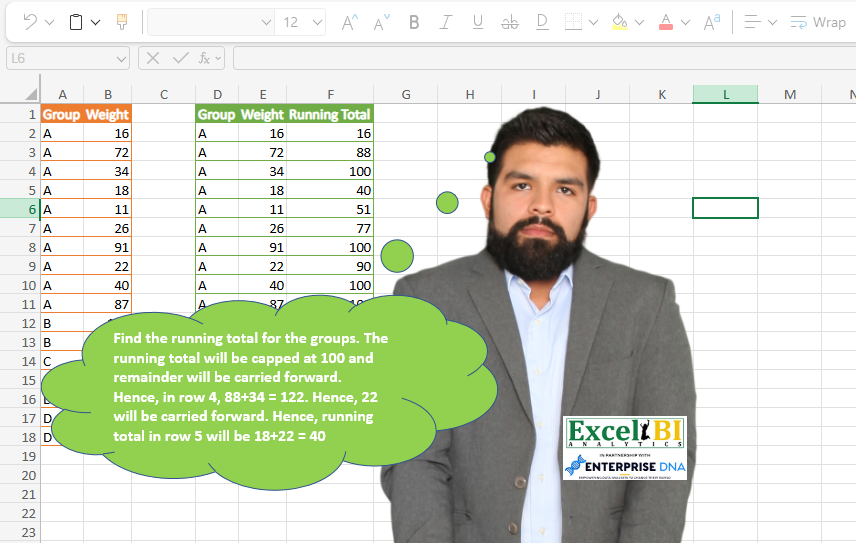
Find the running total for the groups. The running total will be capped at 100 and remainder will be carried forward. Hence, in row 4, 88+34 = 122. Hence, 22 will be carried forward. Hence, running total in row 5 will be 18+22 = 40
📌 Challenge Details and Links
ExcelBI Power Query Challenge Number: 71
Challenge Difficulty: ⭐️⭐️⭐️⭐️
📥Download Sample File
📥Link to the solutions on LinkedIn
Solving the challenge of Cap and Carry Running Totals with Power Query
Power Query solution 1 for Cap and Carry Running Totals, proposed by Bo Rydobon 🇹🇭:
let
  Source = Excel.CurrentWorkbook(){[Name = "Table1"]}[Content],
  Group = Table.Combine(
    Table.Group(
      Source,
      "Group",
      {
        "T",
        each Table.FromColumns(
          Table.ToColumns(_)
            & {
              List.RemoveFirstN(
                List.Zip(
                  List.Accumulate(
                    [Weight],
                    {{0, 0}},
                    (s, l) =>
                      let
                        P = List.Last(s){0} + l
                      in
                        s & {{Number.Mod(P, 100), if P < 100 then P else 100}}
                  )
                ){1},
                1
              )
            },
          Table.ColumnNames(_) & {"Running Total"}
        )
      }
    )[T]
  )
in
  Group
Power Query solution 2 for Cap and Carry Running Totals, proposed by Zoran Milokanović:
let
  Source = Excel.CurrentWorkbook(){[Name = "Input"]}[Content],
  Solution = Table.FromRecords(
    List.Transform(
      List.Accumulate(
        Table.ToRecords(Source),
        {},
        (s, d) =>
          s
            & {
              let
                lg   = List.Last(s)[Group],
                lrt  = List.Last(s)[Running Total],
                rlrt = Number.Mod(lrt, 100),
                lr   = List.Last(s)[Remainder],
                cg   = d[Group],
                cw   = d[Weight]
              in
                if s = {} or lg <> cg then
                  [
                    Group         = cg,
                    Weight        = cw,
                    Running Total = if cw > 100 then 100 else cw,
                    Remainder     = if cw > 100 then cw - 100 else 0
                  ]
                else
                  [
                    Group         = cg,
                    Weight        = cw,
                    Running Total = if rlrt + lr + cw > 100 then 100 else rlrt + lr + cw,
                    Remainder     = if rlrt + lr + cw > 100 then rlrt + lr + cw - 100 else 0
                  ]
            }
      ),
      each Record.RemoveFields(_, "Remainder")
    )
  )
in
  Solution
Power Query solution 3 for Cap and Carry Running Totals, proposed by Aditya Kumar Darak 🇮🇳:
let
  Source = Excel.CurrentWorkbook(){[Name = "data"]}[Content],
  MyFun = (T as table) as table =>
    let
      Table = Table.Buffer(T),
      Calc = List.Generate(
        () => [x = 0, w = Table{x}, y = w[Weight], z = List.Min({100, y})],
        each [x] < Table.RowCount(Table),
        each [
          x = [x] + 1,
          w = Table{x},
          y = (if [z] = 100 then [y] - 100 else [y]) + w[Weight],
          z = List.Min({100, y})
        ],
        each [w] & [Running Total = [z]]
      ),
      Final = Table.FromRecords(Calc)
    in
      Final,
  Group = Table.Group(Source, "Group", {"All", MyFun}),
  Return = Table.Combine(Group[All])
in
  Return
Power Query solution 4 for Cap and Carry Running Totals, proposed by Alejandro Simón 🇵🇦 🇪🇸:
let
  Source = Excel.CurrentWorkbook(){[Name = "Tabla1"]}[Content],
  Group = Table.Group(
    Source,
    {"Group"},
    {
      {
        "All",
        (w) =>
          List.Skip(
            List.Generate(
              () => [x = 1, z = 0, y = w[Weight]{0}, a = 0],
              each [x] <= Table.RowCount(w) + 1,
              each [
                a = w[Weight]{[x]},
                x = [x] + 1,
                y =
                  if [y] + [a] < 100 then
                    [y] + [a]
                  else if [y] + [a] > 100 then
                    [y] + [a] - 100
                  else
                    null,
                z = if [y] + [a] <= 100 then [y] + [a] else 100
              ],
              each [z]
            )
          )
      }
    }
  )[[All]],
  RT = Table.ExpandListColumn(Group, "All")[All],
  Sol = Table.FromColumns(
    Table.ToColumns(Source) & {RT},
    Table.ColumnNames(Source) & {"Running Total"}
  )
in
  Sol
Power Query solution 5 for Cap and Carry Running Totals, proposed by Luan Rodrigues:
let
  Fonte = Tabela1,
  gp = Table.Group(
    Fonte,
    {"Group"},
    {
      {
        "Contagem",
        each [
          a = Table.AddIndexColumn(_, "Ind", 1, 1),
          b = Table.AddColumn(a, "Acc", each List.Sum(List.FirstN(a[Weight], [Ind]))),
          c = Table.AddColumn(b, "Cond", each Number.IntegerDivide([Acc], 100)),
          d = Table.AddColumn(c, "Cond2", each Number.Mod([Acc], 100))
        ][d]
      }
    }
  ),
  exp = Table.ExpandTableColumn(gp, "Contagem", {"Weight", "Ind", "Acc", "Cond", "Cond2"}),
  gp2 = Table.Group(
    exp,
    {"Group", "Cond"},
    {{"Contagem", each Table.AddIndexColumn(_, "Ind2", 0, 1)}}
  ),
  exp2 = Table.ExpandTableColumn(gp2, "Contagem", {"Weight", "Acc", "Cond2", "Ind2"}),
  res = Table.AddColumn(
    exp2,
    "Running Total",
    each if [Cond] = 0 then [Cond2] else if [Ind2] = 0 then 100 else [Cond2]
  )[[Group], [Weight], [Running Total]]
in
  res
Power Query solution 6 for Cap and Carry Running Totals, proposed by Hussein SATOUR:
let
  Source = Excel.CurrentWorkbook(){[Name = "Table1"]}[Content],
  #"Changed Type" = Table.TransformColumnTypes(Source, {{"Weight", Int64.Type}}),
  #"Grouped Rows" = Table.Group(
    #"Changed Type",
    {"Group"},
    {{"Count", each _, type table [Group = nullable text, Weight = nullable number]}}
  ),
  #"Added Custom" = Table.AddColumn(
    #"Grouped Rows",
    "Custom",
    each
      let
        a = Table.AddIndexColumn([Count], "Index", 1),
        b = Table.AddColumn(a, "Cumul", each List.Sum(List.FirstN(a[Weight], [Index]))),
        c = Table.AddColumn(b, "IntDiv", each Number.IntegerDivide([Cumul], 100))
      in
        Table.AddColumn(
          c,
          "Running Total",
          each
            if [IntDiv] = 0 then
              [Cumul]
            else if [Index] = 1 then
              List.Min({[Cumul], 100})
            else if [IntDiv] > c[IntDiv]{[Index] - 2} then
              100
            else
              [Cumul] - 100 * [IntDiv]
        )
  ),
  #"Expanded Custom" = Table.ExpandTableColumn(
    #"Added Custom",
    "Custom",
    {"Group", "Weight", "Running Total"},
    {"Group.1", "Weight", "Running Total"}
  ),
  #"Removed Columns" = Table.RemoveColumns(#"Expanded Custom", {"Group", "Count"})
in
  #"Removed Columns"
Power Query solution 7 for Cap and Carry Running Totals, proposed by Felipe Perez Arevalo:
let
  Sumfx2 = (L) =>
    let
      Source = List.Generate(
        () => [
          i  = L,
          n  = 1,
          l  = List.Range(i, 0, n),
          c  = List.Sum(l),
          j1 = 0 = Number.IntegerDivide(c, 100),
          j  = Number.IntegerDivide(c, 100),
          c1 = if j1 then c - 100 * j else 100
        ],
        each [n] <= List.Count([i]),
        each [
          i  = L,
          n  = [n] + 1,
          l  = List.Range(i, 0, n),
          c  = List.Sum(l),
          j1 = [j] = Number.IntegerDivide(c, 100),
          j  = Number.IntegerDivide(c, 100),
          c1 = if j1 then c - 100 * j else 100
        ],
        each [c1]
      )
    in
      Source,
  Source = Table,
  GroupBy = Table.Group(
    Source,
    {"Group"},
    {
      {
        "Detail",
        each Table.AddIndexColumn(_, "Index", 0, 1, Int64.Type),
        type nullable table [
          Group = nullable text,
          Weight = nullable Int64.Type,
          Index = nullable Int64.Type
        ]
      }
    }
  ),
  AddCustom = Table.AddColumn(GroupBy, "Custom", each [Detail][Weight]),
  ExpandeDetail = Table.ExpandTableColumn(
    AddCustom,
    "Detail",
    {"Weight", "Index"},
    {"Weight", "Index"}
  ),
  AddCustom1 = Table.RemoveColumns(
    Table.AddColumn(ExpandeDetail, "Running Total", each Sumfx2([Custom]){[Index]}, Int64.Type),
    {"Index", "Custom"}
  )
in
  AddCustom1
Solving the challenge of Cap and Carry Running Totals with Excel
Excel solution 1 for Cap and Carry Running Totals, proposed by Bo Rydobon 🇹🇭:
=LET(a,A2:A18,w,B2:B18,h,100,r,ROW(a),s,MMULT((a=TOROW(a))*(r>=TOROW(r)),w),c,INT(s/h),
HSTACK(a,w,DROP(IF(c-VSTACK(0,c)*(a=VSTACK(0,a)),h,MOD(s,h)),-1)))
Excel solution 2 for Cap and Carry Running Totals, proposed by محمد حلمي:
=HSTACK(A1:B18,REDUCE("Running Total",UNIQUE(A2:A18),LAMBDA(c,n,LET(v,SCAN(0,FILTER(B2:B18,A2:A18=n),LAMBDA(a,d,MOD(a,100)+d)),VSTACK(c,IF(v>100,100,v))))))Excel solution 3 for Cap and Carry Running Totals, proposed by Kris Jaganah:
=LET(a,A2:A18,b,B2:B18,HSTACK(VSTACK("Group",a),VSTACK("Weight",b),REDUCE("Running Total",UNIQUE(a),LAMBDA(x,y,LET(p,FILTER(b,a=y),q,SCAN(0,p,LAMBDA(v,w,w+MOD(v,100))),VSTACK(x,IF(q>100,100,q)))))))Excel solution 4 for Cap and Carry Running Totals, proposed by Oscar Mendez Roca Farell:
=HSTACK(A1:B18, REDUCE("Running Total", UNIQUE(A2:A18), LAMBDA(j, y, VSTACK(j, LET(_m, FILTER(B2:B18, A2:A18=y), _s, SCAN(0,_m, LAMBDA(i, x , i+x)), IF( DROP( FREQUENCY( SEQUENCE( INT(MAX(_s)/100)), INT(_s/100)), -1), 100, MOD(_s, 100)))))))Excel solution 5 for Cap and Carry Running Totals, proposed by Sunny Baggu:
=LET(_input,A2:B18,_group,TAKE(_input,,1),_ug,UNIQUE(_group),
DROP(REDUCE("",_ug,LAMBDA(a,v,VSTACK(a,
LET(_cols2,FILTER(_input,_group=v),_wt,DROP(_cols2,,1),_runtot,SCAN(0,_wt,LAMBDA(a,v,a+v)),_trun,TRUNC(_runtot/100),
_cond1,IFERROR(VSTACK(0,DROP(SCAN(0,SEQUENCE(ROWS(_trun)),LAMBDA(a,v,IF(INDEX(_trun,v,1)<>INDEX(_trun,v+1,1),INDEX(_trun,v+1,1),0))),-1)),0),
_cond2,IFERROR(IF(_cond1,100,0),0),_hundred,_trun*100,_diff,_runtot-_hundred,_fruntot,IF(_wt>=100,100,IFERROR(IF(_cond2,_cond2,_diff),MIN(100,_wt))),
HSTACK(_cols2,_fruntot))))),1))
Excel solution 6 for Cap and Carry Running Totals, proposed by Mohamed Helmy:
=DROP(
REDUCE(0,UNIQUE(A2:A18),LAMBDA(c,n, LET(r,FILTER(B2:B18,A2:A18=n),
v,SCAN(0,r,LAMBDA(a,d,MOD(a,100)+d)),
VSTACK(c,IF(v>100,100,v))))),1)
Excel solution 7 for Cap and Carry Running Totals, proposed by Stevenson Yu:
=HSTACK(A2:B2, LET(A, SUMIFS(B$2:B2,A$2:A2,A2),
MIN(100,A-(INT((A-B2)/100)*100))))
Solving the challenge of Cap and Carry Running Totals with Python in Excel
Python in Excel solution 1 for Cap and Carry Running Totals, proposed by Alejandro Campos:
df = xl("A1:B18", headers=True)
results, carry_over, current_group = [], 0, None
for index, row in df.iterrows():
 group, weight = row['Group'], row['Weight']
 if group != current_group:
 cumulative_sum = 0
 current_group = group
 weight += carry_over
 carry_over = max(0, cumulative_sum + weight - 100)
 cumulative_sum = min(100, cumulative_sum + weight)
 results.append((group, row['Weight'], cumulative_sum))
 if carry_over > 0:
 cumulative_sum = carry_over
 carry_over = 0
result_df = pd.DataFrame(results, columns=['Group', 'Weight', 'Running Total'])
result_df
Solving the challenge of Cap and Carry Running Totals with Excel VBA
Excel VBA solution 1 for Cap and Carry Running Totals, proposed by Vasin Nilyok:
Sub PQ71()
LastRow = Cells(Rows.Count, 1).End(xlUp).Row
For r = 2 To LastRow
 If r = 2 Then
 km = Cells(r, 2)
 Cells(r, 8) = km
 ElseIf Cells(r, 1) = Cells(r - 1, 1) Then
 kmAdded = Cells(r, 2)
 If km + kmAdded > 100 Then
 cumu = kmAdded - toH
 Cells(r, 8) = 100
 km = cumu
 Else
 km = km + kmAdded
 Cells(r, 8) = km
 End If
 ElseIf Cells(r, 1) <> Cells(r - 1, 1) Then
 If Cells(r, 2) > 100 Then
 Cells(r, 8) = 100
 cumu = Cells(r, 2) - 100
 km = cumu
 Else
 km = kmAdded
 Cells(r, 8) = km
 End If
 End If
Next r
End Sub
&&&