
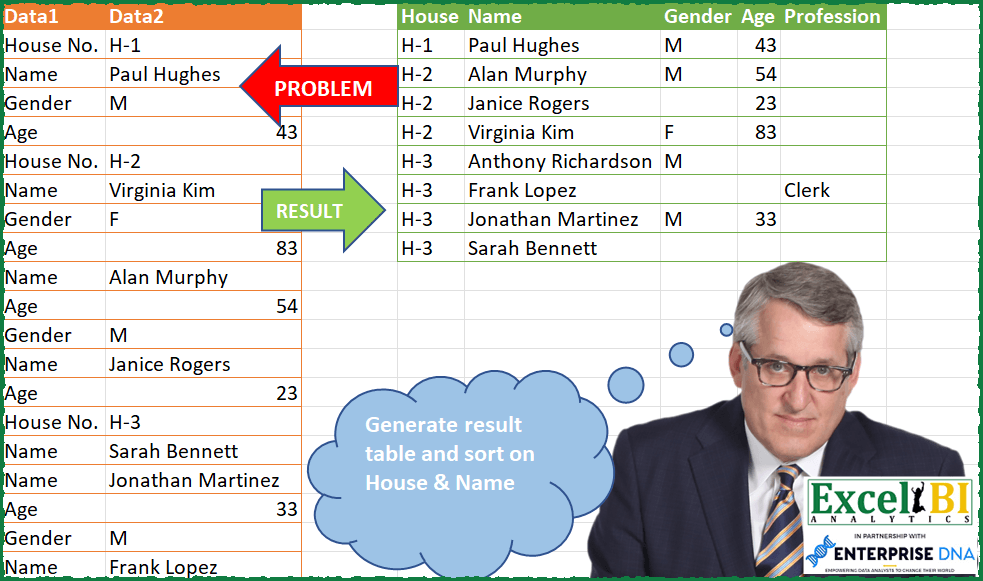
Generate result table and sort on House & Name.
📌 Challenge Details and Links
ExcelBI Power Query Challenge Number: 67
Challenge Difficulty: ⭐️⭐️⭐️⭐️⭐️⭐️
📥Download Sample File
📥Link to the solutions on LinkedIn
Solving the challenge of Sort Results by House and Name with Power Query
Power Query solution 1 for Sort Results by House and Name, proposed by Bo Rydobon 🇹🇭:
let
  Source = Excel.CurrentWorkbook(){[Name = "Table1"]}[Content],
  Group = Table.Group(
    Source,
    "Data1",
    {"T", each Table.PromoteHeaders(Table.Transpose(_))},
    0,
    (b, e) => Number.From(e = "Name" or e = "House No.")
  ),
  Sort = Table.Sort(
    Table.SelectRows(
      Table.FillDown(
        Table.RenameColumns(Table.Combine(Group[T]), {"House No.", "House"}),
        {"House"}
      ),
      each [Name] <> null
    ),
    {"House", "Name"}
  )
in
  Sort
Power Query solution 2 for Sort Results by House and Name, proposed by Zoran Milokanović:
let
  Source = Excel.CurrentWorkbook(){[Name = "Input"]}[Content],
  ReplacedHouseNo = Table.ReplaceValue(
    Source,
    "House No.",
    "House",
    Replacer.ReplaceText,
    {"Data1"}
  ),
  AddedHouseID = Table.AddColumn(
    ReplacedHouseNo,
    "House ID",
    each if [Data1] = "House" then [Data2] else null
  ),
  FilledDownHouseID = Table.FillDown(AddedHouseID, {"House ID"}),
  AddedNameID = Table.AddColumn(
    FilledDownHouseID,
    "Name ID",
    each if [Data1] = "Name" then 1 else 0
  ),
  AddedIndex = Table.AddIndexColumn(AddedNameID, "Index", 1, 1, Int64.Type),
  ReplacedNameID = Table.ReplaceValue(
    AddedIndex,
    each [Name ID],
    each List.Sum(List.Range(AddedNameID[Name ID], 0, [Index])),
    Replacer.ReplaceValue,
    {"Name ID"}
  ),
  RemovedIndex = Table.RemoveColumns(ReplacedNameID, {"Index"}),
  PivotedData1 = Table.Pivot(RemovedIndex, List.Distinct(RemovedIndex[Data1]), "Data1", "Data2"),
  FilledHouse = Table.FillDown(PivotedData1, {"House"}),
  FilteredNames = Table.SelectRows(FilledHouse, each ([Name] <> null)),
  SortedHouseName = Table.Sort(FilteredNames, {{"House", 0}, {"Name", 0}})[
    [House],
    [Name],
    [Gender],
    [Age],
    [Profession]
  ]
in
  SortedHouseName
Power Query solution 3 for Sort Results by House and Name, proposed by Aditya Kumar Darak 🇮🇳:
let
  GroupFun = (Table as table, Column as text, New_Column as text, Function as function) as table =>
    Table.Group(
      Table,
      Column,
      {New_Column, Function},
      GroupKind.Local,
      (a, b) => Number.From(a = b)
    ),
  MyFun = (Table as table) =>
    let
      FirstRow = Table.FromRecords({Table{0}}),
      Skip = Table.Skip(Table),
      Group = GroupFun(Skip, "Data1", "All", each _)[All],
      Transform = List.Transform(
        Group,
        each [
          Join    = FirstRow & _,
          ToCol   = Table.ToColumns(Join),
          FromRow = Table.FromRows({ToCol{1}}, ToCol{0})
        ][FromRow]
      ),
      Combine = Table.Combine(Transform),
      Sort = Table.Sort(Combine, "Name")
    in
      Sort,
  Data = Excel.CurrentWorkbook(){[Name = "data"]}[Content],
  Group = GroupFun(Data, "Data1", "All", MyFun)[All],
  Return = Table.Combine(Group)
in
  Return
Power Query solution 4 for Sort Results by House and Name, proposed by Alejandro Simón 🇵🇦 🇪🇸:
let
  Origen = Excel.CurrentWorkbook(){[Name = "Tabla1"]}[Content],
  Casa = Table.AddColumn(
    Origen,
    "House",
    each if Text.Contains([Data1], "House") then [Data2] else null
  ),
  Rellenar = Table.FillDown(Casa, {"House"}),
  Filtro = Table.SelectRows(Rellenar, each ([Data1] <> "House No.")),
  Nombre = Table.AddColumn(
    Filtro,
    "Name",
    each if Text.Contains([Data1], "Name") then [Data2] else null
  ),
  Rellenar2 = Table.FillDown(Nombre, {"Name"}),
  Agrupar = Table.Combine(
    Table.Group(
      Rellenar2,
      {"House", "Name"},
      {
        {
          "Recuento",
          each
            let
              a = _,
              b = Table.RemoveColumns(a, {"Name"}),
              d = Table.Pivot(b, List.Distinct([Data1]), "Data1", "Data2")
            in
              d
        }
      }
    )[Recuento]
  ),
  Sol = Table.Sort(Agrupar, {{"House", Order.Ascending}, {"Name", Order.Ascending}})
in
  Sol
Power Query solution 5 for Sort Results by House and Name, proposed by Luan Rodrigues:
let
  Fonte = Tabela1,
  ren = Table.AddColumn(Fonte, "House", each if [Data1] = "House No." then [Data2] else null),
  pb = Table.FillDown(ren, {"House"}),
  fil = Table.SelectRows(pb, each ([Data1] <> "House No.")),
  gp = Table.Group(
    fil,
    {"House"},
    {
      {
        "Contagem",
        each [
          a = Table.FillDown(
            Table.AddColumn(_, "Nome", each if [Data1] = "Name" then [Data2] else null),
            {"Nome"}
          ),
          b = Table.Pivot(a, List.Distinct(a[Data1]), "Data1", "Data2")
        ][b]
      }
    }
  )[[Contagem]],
  res = Table.ExpandTableColumn(gp, "Contagem", {"House"} & List.Distinct(fil[Data1]))
in
  res
Power Query solution 6 for Sort Results by House and Name, proposed by Brian Julius:
let
  Source = Excel.CurrentWorkbook(){[Name = "Table1"]}[Content],
  AddHouse = Table.AddColumn(
    Source,
    "House",
    each if Text.StartsWith([Data1], "House") then [Data2] else null
  ),
  AddName1 = Table.AddColumn(
    AddHouse,
    "Name1",
    each if Text.StartsWith([Data1], "Name") then [Data2] else null
  ),
  FillDown = Table.FillDown(AddName1, {"House", "Name1"}),
  Filter = Table.SelectRows(FillDown, each ([Data1] <> "House No.")),
  Pivot = Table.Pivot(Filter, List.Distinct(Filter[Data1]), "Data1", "Data2"),
  RemoveName1 = Table.RemoveColumns(Pivot, {"Name1"})
in
  RemoveName1
Power Query solution 7 for Sort Results by House and Name, proposed by Bhavya Gupta:
let
  Source = Excel.CurrentWorkbook(){[Name = "Table1"]}[Content],
  Grouped = List.Combine(
    Table.Group(
      Source,
      {"Data1"},
      {
        {
          "All1",
          (g_1) =>
            List.Transform(
              Table.Group(
                Table.Skip(g_1),
                {"Data1"},
                {{"All2", (g_2) => g_2}},
                0,
                (a, b) => Number.From(b[Data1] = "Name")
              )[All2],
              (g) => [i = Table.FirstN(g_1, 1) & g, n = Record.FromList(i[Data2], i[Data1])][n]
            )
        }
      },
      0,
      (x, y) => Number.From(y[Data1] = "House No.")
    )[All1]
  ),
  Final = Table.Sort(
    Table.FromRecords(Grouped, Record.FieldNames(Record.Combine(Grouped)), MissingField.UseNull),
    {{"House No.", 0}, {"Name", 0}}
  )
in
  Final
Power Query solution 8 for Sort Results by House and Name, proposed by Victor Wang:
let
  Source = Excel.CurrentWorkbook(){[Name = "Table1"]}[Content],
  #"Added Custom" = Table.AddColumn(
    Source,
    "House",
    each if [Data1] = "House No." then [Data2] else null
  ),
  #"Filled Down" = Table.FillDown(#"Added Custom", {"House"}),
  #"Filtered Rows" = Table.SelectRows(#"Filled Down", each ([Data1] <> "House No.")),
  #"Added Custom1" = Table.AddColumn(
    #"Filtered Rows",
    "Name",
    each if [Data1] = "Name" then [Data2] else null
  ),
  #"Filled Down1" = Table.FillDown(#"Added Custom1", {"Name"}),
  #"Added Custom2" = Table.AddColumn(
    #"Filled Down1",
    "OtherCols",
    each Table.PromoteHeaders(
      Table.Transpose(
        Table.SelectRows(#"Filled Down1", (a) => a[Name] = [Name] and a[House] = [House])[
          [Data1],
          [Data2]
        ]
      )
    )
  ),
  #"Removed Other Columns" = Table.SelectColumns(#"Added Custom2", {"House", "OtherCols"}),
  #"Expanded OtherCols" = Table.ExpandTableColumn(
    #"Removed Other Columns",
    "OtherCols",
    {"Name", "Gender", "Age", "Profession"}
  ),
  #"Removed Duplicates" = Table.Distinct(#"Expanded OtherCols"),
  #"Sorted Rows" = Table.Sort(
    #"Removed Duplicates",
    {{"House", Order.Ascending}, {"Name", Order.Ascending}}
  )
in
  #"Sorted Rows"
Power Query solution 9 for Sort Results by House and Name, proposed by Sandeep Marwal:
let
  Source = Excel.CurrentWorkbook(){[Name = "Table1"]}[Content],
  Custom1 = Table.Group(
    Source,
    {"Data1"},
    {{"Count", each Table.Skip(_)}},
    0,
    (c, n) => Number.From(n[Data1] = "House No.")
  ),
  #"Added Index" = Table.AddIndexColumn(Custom1, "House", 1, 1, Int64.Type),
  Custom2 = Table.TransformColumns(
    #"Added Index",
    {
      "Count",
      each Table.Group(
        _,
        {"Data1"},
        {{"Count", each Table.PromoteHeaders(Table.Transpose(_))}},
        0,
        (c, n) => Number.From(n[Data1] = "Name")
      )[Count]
    }
  ),
  Custom3 = Table.TransformColumns(Custom2, {"Count", each Table.Combine(_)}),
  #"Added Prefix" = Table.TransformColumns(
    Custom3,
    {{"House", each "H-" & Text.From(_, "en-IN"), type text}}
  ),
  #"Removed Columns" = Table.RemoveColumns(#"Added Prefix", {"Data1"}),
  #"Reordered Columns" = Table.ReorderColumns(#"Removed Columns", {"House", "Count"}),
  #"Expanded Count" = Table.ExpandTableColumn(
    #"Reordered Columns",
    "Count",
    {"Name", "Gender", "Age", "Profession"},
    {"Name", "Gender", "Age", "Profession"}
  ),
  #"Sorted Rows" = Table.Sort(
    #"Expanded Count",
    {{"House", Order.Ascending}, {"Name", Order.Ascending}}
  )
in
  #"Sorted Rows"
Power Query solution 10 for Sort Results by House and Name, proposed by Guillermo Arroyo:
let
  Origen = Excel.CurrentWorkbook(){[Name = "Tabla1"]}[Content],
  a = Table.AddColumn(
    Origen,
    "House",
    each if Text.Contains([Data1], "House") then [Data2] else null
  ),
  b = Table.FillDown(a, {"House"}),
  c = Table.SelectRows(b, each ([Data1] <> "House No.")),
  d = Table.AddColumn(c, "Aux", each if [Data1] = "Name" then [Data2] else null),
  e = Table.FillDown(d, {"Aux"}),
  f = Table.Pivot(e, List.Distinct(e[Data1]), "Data1", "Data2"),
  g = Table.RemoveColumns(f, {"Aux"})
in
  g
Solving the challenge of Sort Results by House and Name with Excel
Excel solution 1 for Sort Results by House and Name, proposed by Bo Rydobon 🇹🇭:
=LET(a,A2:A23,b,B2:B23,u,TOROW(DROP(UNIQUE(a),1)),r,ROW(a),n,FILTER(r,a="Name"),
VSTACK(HSTACK("House",u),SORT(HSTACK(LOOKUP(n,r/(CODE(a)=72),b),XLOOKUP(n&u,LOOKUP(r,n)&a,b,"")),{1,2})))
Excel solution 2 for Sort Results by House and Name, proposed by محمد حلمي:
=LET(l,{"House No.","Name","Gender","Age","Profession"},n,SCAN(0,A2:A23="Name",LAMBDA(a,d,IF(d,a+1,a))),e,REDUCE(0,UNIQUE(n),LAMBDA(a,d,LET(v,FILTER(A2:B23,n=d),VSTACK(a,IFNA(VLOOKUP(l,v,2,),""))))),VSTACK(HSTACK("House",DROP(l,,1)),SORT(DROP(HSTACK(
SCAN(0,TAKE(DROP(e,1),,1),LAMBDA(a,d,IF(d>"",d,a))),DROP(e,2,1)),-1),{1,2})))
Excel solution 3 for Sort Results by House and Name, proposed by Oscar Mendez Roca Farell:
=LET(_a, A2:A23,_b, B2:B23,_h, FILTER(_b, LEFT(_b)="H"),_e, TOROW(DROP( UNIQUE(A2:A23),1)), REDUCE(HSTACK("House", _e),_h, LAMBDA(z, y,
LET(_p, DROP(FILTER(HSTACK(_a, _b), SCAN("", IF(_a="House No.", _b, NA()), LAMBDA(i, x, IFNA(x, i )))=y),1),
_m, IF(INDEX(_p,,1)=_e, INDEX(_p,,2), NA()),_f, INDEX(_m,,1), VSTACK(z, IFNA(HSTACK(y, ORDER( DROP(
REDUCE("", TOROW(_f,2), LAMBDA(i, x, VSTACK(i,
BYCOL( IFNA( FILTER(_m, INDEX(_f, SCAN("",MATCH(_f, _f, ), LAMBDA(i, x, IFNA(x, i ))))=x),""), LAMBDA(c, CONCAT(c)))))),1))),y))))))
Excel solution 4 for Sort Results by House and Name, proposed by Guillermo Arroyo:
=LET(m,A1:B23,g,LAMBDA(a,b,REDUCE(a,SEQUENCE(ROWS(m)-1,,2),LAMBDA(i,j,IF(INDEX(m,j,1)=INDEX(m,b,1),VSTACK(i,INDEX(m,j,2)),VSTACK(i,TAKE(i,-1)))))),h,g("House",2),n,g("Name",3),p,HSTACK(h,n,m),u,DROP(FILTER(p,--(INDEX(m,0,1)<>INDEX(m,2,1))),1),v,SORT(SORT(UNIQUE(TAKE(u,,2)),2),1),w,UNIQUE(INDEX(u,,3)),VSTACK(HSTACK(TAKE(p,1,2),TRANSPOSE(DROP(w,1))),HSTACK(v,DROP(MAKEARRAY(ROWS(v),ROWS(w),LAMBDA(x,y,FILTER(INDEX(p,0,4),(--(INDEX(p,0,2)=INDEX(v,x,2)))*(--(INDEX(p,0,3)=INDEX(w,y,1))),""))),,1))))&&&