
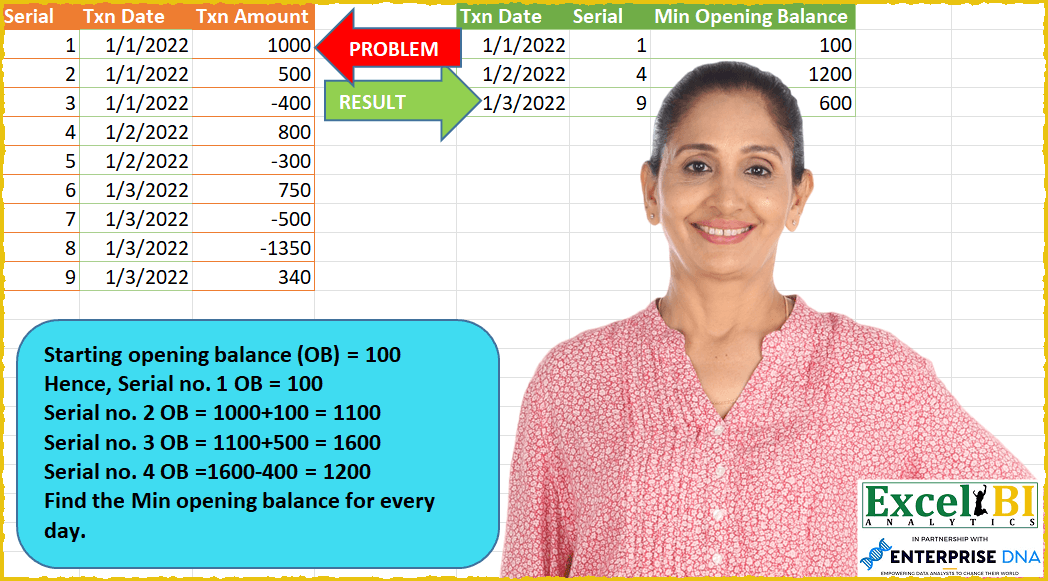
Starting opening balance (OB) = 100 (This is given and you will need to work out OB for Serials 2 through 9) Hence, Serial no. 1 OB = 100 Serial no. 2 OB = 1000+100 = 1100 Serial no. 3 OB = 1100+500 = 1600 Serial no. 4 OB =1600-400 = 1200 ……..and so on Find the Min opening balance for every day.
📌 Challenge Details and Links
ExcelBI Power Query Challenge Number: 58
Challenge Difficulty: ⭐️⭐️⭐️⭐️⭐️
📥Download Sample File
📥Link to the solutions on LinkedIn
Solving the challenge of Compute Daily Opening Balance with Power Query
Power Query solution 1 for Compute Daily Opening Balance, proposed by Bo Rydobon 🇹🇭:
let
  Source = Excel.CurrentWorkbook(){[Name = "Table1"]}[Content],
  Open = Table.FromColumns(
    Table.ToColumns(Source)
      & {
        List.RemoveLastN(
          List.Accumulate(Source[Txn Amount], {100}, (s, l) => s & {List.Last(s) + l}),
          1
        )
      },
    Table.ColumnNames(Source) & {"Min Opening Balance"}
  ),
  Grouped = Table.FromRecords(
    Table.Group(
      Open,
      "Txn Date",
      {
        "T",
        each Record.SelectFields(
          Table.Min(_, "Min Opening Balance"),
          {"Txn Date", "Serial", "Min Opening Balance"}
        )
      }
    )[T]
  )
in
  Grouped
Power Query solution 2 for Compute Daily Opening Balance, proposed by Zoran Milokanović:
let
  Source = Excel.CurrentWorkbook(){[Name = "OpeningBalance"]}[Content],
  AddedBalance = Table.AddColumn(Source, "Balance", each if [Serial] = 1 then 100 else 0),
  TableToRecords = Table.ToRecords(AddedBalance),
  CalculateBalances = List.Accumulate(
    TableToRecords,
    {},
    (s, d) =>
      if List.Count(s) = 0 then
        {d}
      else
        s
          & {
            Record.TransformFields(
              d,
              {"Balance", each List.Last(s)[Balance] + List.Last(s)[Txn Amount]}
            )
          }
  ),
  TableFromRecords = Table.FromRecords(CalculateBalances),
  GroupedRows = Table.Group(
    TableFromRecords,
    {"Txn Date"},
    {{"All", each Table.FirstN(Table.Sort(_, {{"Balance", Order.Ascending}}), 1)}}
  ),
  ExpandedSerialAndBalance = Table.ExpandTableColumn(
    GroupedRows,
    "All",
    {"Serial", "Balance"},
    {"Serial", "Balance"}
  ),
  RenameBalance = Table.RenameColumns(
    ExpandedSerialAndBalance,
    {{"Balance", "Min Opening Balance"}}
  ),
  FormatTxnDate = Table.TransformColumnTypes(RenameBalance, {{"Txn Date", type date}})
in
  FormatTxnDate
Power Query solution 3 for Compute Daily Opening Balance, proposed by Aditya Kumar Darak 🇮🇳:
let
  Opening = 100,
  Source = Excel.CurrentWorkbook(){[Name = "data"]}[Content],
  Running = List.Generate(
    () => [x = 0, y = Source{x}, z = Opening],
    each [x] < Table.RowCount(Source),
    each [x = [x] + 1, y = Source{x}, z = [z] + Source[Txn Amount]{[x]}],
    each [y] & [Running = [z]]
  ),
  Table = Table.FromRecords(Running),
  Grouped = Table.Group(Table, "Txn Date", {"All", each Table.Min(_, "Running")}),
  Return = Table.FromRecords(Grouped[All], {"Txn Date", "Serial", "Running"})
in
  Return
Power Query solution 4 for Compute Daily Opening Balance, proposed by Luan Rodrigues:
let
 Fonte = Table.FromRecords({[Serial = 1 , Txn Date = hashtag#date(2022,01,01),Txn Amount = 100 ]})&Tabela1,
 tipo = Table.TransformColumnTypes(Fonte, {{"Txn Date", type date}}, "en-US"),
 Ind = Table.AddIndexColumn(tipo, "Índice", 1, 1, Int64.Type),
 list = List.Buffer(Ind[Txn Amount]),
 add = Table.AddColumn(Ind, "Personalizar", each List.Sum(List.FirstN(list,[Índice]))),
 tab = Table.AddColumn(add, "Personalizar.1", each [Personalizar]-[Txn Amount]),
 fil = Table.SelectRows(tab, each ([Personalizar.1] <> 0)),
 gp = Table.Group(fil, {"Txn Date"}, {{"Min Open Balance", each List.Min([Personalizar.1]), type number}}),
 mesc = Table.NestedJoin(gp, {"Txn Date", "Min Open Balance"}, tab, {"Txn Date", "Personalizar.1"}, "gp", JoinKind.LeftOuter),
 res = Table.ExpandTableColumn(mesc, "gp", {"Serial"}, {"Serial"})
in
 res
Power Query solution 5 for Compute Daily Opening Balance, proposed by Eric Laforce:
let
  Opening = 100,
  Source = Excel.CurrentWorkbook(){[Name = "tData58"]}[Content],
  OB = List.Accumulate(
    List.RemoveLastN(Source[Txn Amount], 1),
    {Opening},
    (s, c) => s & {List.Last(s) + c}
  ),
  Add_OB = Table.FromColumns({Source[Txn Date], Source[Serial], OB}, {"Txn Date", "Serial", "OB"}),
  Group = Table.Group(Add_OB, {"Txn Date"}, {"Data", each Table.Min(_, "OB")}),
  Expand = Table.FromRecords(Group[Data], {"Txn Date", "Serial", "OB"}),
  Rename = Table.RenameColumns(Expand, {{"OB", "Min OpeningBalance"}})
in
  Rename
Power Query solution 6 for Compute Daily Opening Balance, proposed by Sandeep Marwal:
let
  Source = Excel.CurrentWorkbook(){[Name = "Table1"]}[Content],
  #"Changed Type" = Table.TransformColumnTypes(Source, {{"Txn Date", type date}}),
  #"Added Custom" = Table.AddColumn(
    #"Changed Type",
    "Custom",
    each List.Sum(List.FirstN(#"Changed Type"[Txn Amount], [Serial] - 1)) + 100 ?? 100
  ),
  #"Removed Columns" = Table.RemoveColumns(#"Added Custom", {"Txn Amount"}),
  #"Grouped Rows" = Table.Group(
    #"Removed Columns",
    {"Txn Date"},
    {
      {
        "Count",
        each
          let
            a = List.Min(_[Custom])
          in
            Table.SelectRows(_, each [Custom] = a)
      }
    }
  )[[Count]],
  #"Expanded Count" = Table.ExpandTableColumn(
    #"Grouped Rows",
    "Count",
    {"Serial", "Txn Date", "Custom"},
    {"Serial", "Txn Date", "Custom"}
  ),
  #"Changed Type1" = Table.TransformColumnTypes(#"Expanded Count", {{"Txn Date", type date}}),
  #"Renamed Columns" = Table.RenameColumns(#"Changed Type1", {{"Custom", "Min Balance"}})
in
  #"Renamed Columns"
Power Query solution 7 for Compute Daily Opening Balance, proposed by Udit Chatterjee:
let
 Source = #"PQChallenge-58",
 OpeningBalance = 100,

 opening balance
 updatedTxnAmount = Table.AddColumn(
 Source, "Updated Txn Amnt", each if [Serial] = 1 then [Txn Amount] + 100 else [Txn Amount], Int64.Type
 ),


 ccRunningTotalBalance = Table.AddColumn(
 updatedTxnAmount,
 "Current Balance",
 each List.Sum(List.FirstN(updatedTxnAmount[Updated Txn Amnt], [Serial])),
 Int64.Type
 ),


 ccClosingBalance = Table.AddColumn(
 ccRunningTotalBalance, "Closing Balance", each [Current Balance] - [Txn Amount], Int64.Type
 ),
 getMinClosingBalance = Table.Group(
 ccClosingBalance, {"Txn Date"}, {{"Min Closing Balance", each List.Min([Closing Balance]), type number}}
 ),

 joinForSerialNum = Table.NestedJoin(
 getMinClosingBalance,
 {"Txn Date", "Min Closing Balance"},
 ccClosingBalance,
 {"Txn Date", "Closing Balance"},
 "ccClosingBalance",
 JoinKind.LeftOuter
 ),
 expandTable = Table.ExpandTableColumn(joinForSerialNum, "ccClosingBalance", {"Serial"}, {"Serial"}),
 reorderColumns = Table.ReorderColumns(expandTable, {"Txn Date", "Serial", "Min Closing Balance"})
in
 reorderColumns
Power Query solution 8 for Compute Daily Opening Balance, proposed by Sue Bayes:
let
  Source = Excel.CurrentWorkbook(){[Name = "Table1"]}[Content],
  Type = Table.TransformColumnTypes(
    Source,
    {{"Serial", Int64.Type}, {"Txn Date", type date}, {"Txn Amount", Int64.Type}}
  ),
  BuffValues = List.Buffer(Type[Txn Amount]),
  RunningTotal = List.Accumulate(
    BuffValues,  // input list
    [RunningTotal = {}, CurrentValue = 100],  // starting value
    (state, current) => [
      CurrentValue = List.Sum({state[CurrentValue], current}),
      RunningTotal = state[RunningTotal] & {state[CurrentValue]}
    ]
  )[RunningTotal],
  CombineData = Table.FromColumns(
    Table.ToColumns(Type) & {Value.ReplaceType(RunningTotal, type {Int64.Type})},
    Table.ColumnNames(Type) & {"Running Total"}
  ),
  Group = Table.Group(
    CombineData,
    {"Txn Date"},
    {{"Min", each List.Min([Running Total]), type nullable number}, {"All", each _}}
  ),
  Expand = Table.ExpandTableColumn(
    Group,
    "All",
    {"Serial", "Running Total"},
    {"Serial", "Running Total"}
  ),
  MinFilter = Table.SelectRows(
    Table.AddColumn(Expand, "MinValue", each if [Running Total] = [Min] then 1 else 0),
    each ([MinValue] = 1)
  )[[Txn Date], [Serial], [Min]]
in
  MinFilter
Solving the challenge of Compute Daily Opening Balance with Excel
Excel solution 1 for Compute Daily Opening Balance, proposed by Bo Rydobon 🇹🇭:
=LET(s,A2:A10,d,B2:B10,o,DROP(VSTACK(100,SCAN(100,C2:C10,LAMBDA(a,v,a+v))),-1),INDEX(HSTACK(d,s,o),XMATCH(UNIQUE(d),d+o%%%,1),{1,2,3}))Excel solution 2 for Compute Daily Opening Balance, proposed by محمد حلمي:
=LET(
b,B2:B10,
r,DROP(VSTACK(100,SCAN(100,C2:C10,LAMBDA(a,d,a+d))),-1),
REDUCE(HSTACK(B1,A1,"Min Opening Balance"),UNIQUE(b),
LAMBDA(a,d,VSTACK(a,LET(
m,MIN(TAKE(FILTER(r,b=d),,-1)),
HSTACK(d,XLOOKUP(m,r,A2:A10),m))))))
Excel solution 3 for Compute Daily Opening Balance, proposed by محمد حلمي:
= 100

we need total running

so we use scan

=SCAN(100,C2:C10,LAMBDA(a,d,a+d))

need put 100 in front that's  opening balance of 1/1

so


VSTACK(100,SCAN(100,C2:C10,LAMBDA(a,d,a+d)))


The number of running total values  greater than
 the length of the original data by one value

So we will exclude it with a DROP function

DROP(VSTACK(100,SCAN(100,C2:C10,LAMBDA(a,d,a+d))),-1)
Excel solution 4 for Compute Daily Opening Balance, proposed by 🇰🇷 Taeyong Shin:
=LET(
 t, B2:B10,
 s, DROP(SCAN(0, VSTACK(100, C2:C10), LAMBDA(a,b, a + b)), -1),
 REDUCE(INDEX(A1:C1, {2,1,3}), UNIQUE(t), LAMBDA(a,b,
 LET(
 m, IF(t = b, s),
 VSTACK(a, INDEX(HSTACK(t, A2:A10, s), XMATCH(MIN(m), m), ))
 )
 ))
)
Excel solution 5 for Compute Daily Opening Balance, proposed by Kris Jaganah:
=LET(a,A2:A10,b,B2:B10,c,C2:C10,d,VSTACK(100,SCAN(100,c,LAMBDA(x,y,x+y))),e,SEQUENCE(ROWS(d)),f,XLOOKUP(e,a,b,,-1),g,UNIQUE(f),h,MAP(g,LAMBDA(y,MIN(IF(f=y,d,"")))),i,XLOOKUP(g&h,f&d,e),VSTACK({"Txn Date","Serial","Min Opening Balance"},HSTACK(g,i,h)))Excel solution 6 for Compute Daily Opening Balance, proposed by Sunny Baggu:
=LET(_rtot,DROP(VSTACK(100,SCAN(100,C2:C10,LAMBDA(a,v,a+v))),-1),
_tbl,HSTACK(TEXT(B2:B10,"dd/mm/yyyy"),A2:A10,_rtot),
_udate,UNIQUE(B2:B10),
_col,MAKEARRAY(COUNTA(_udate),1,LAMBDA(r,c,XLOOKUP(MIN(FILTER(_rtot,B2:B10=INDEX(_udate,r,1))),_rtot,A2:A10))),
VSTACK({"Txn Date","Serial","Min Opening Balance"},INDEX(_tbl,_col,SEQUENCE(,3))))
Solving the challenge of Compute Daily Opening Balance with SQL
SQL solution 1 for Compute Daily Opening Balance, proposed by Zoran Milokanović:
WITH /* Microsoft SQL Server 2019 */
CALC
AS
(
 SELECT
 D.SERIAL
 ,D.TXN_DATE
 ,D.TXN_AMOUNT
 ,100 AS BALANCE
 FROM DATA D
 WHERE
 D.SERIAL = 1
 UNION ALL
 SELECT
 D.SERIAL
 ,D.TXN_DATE
 ,D.TXN_AMOUNT
 ,C.BALANCE + C.TXN_AMOUNT AS BALANCE
 FROM CALC C
 JOIN DATA D ON C.SERIAL + 1 = D.SERIAL
)
SELECT
 F.TXN_DATE
,F.SERIAL
,F.BALANCE AS MIN_OPENING_BALANCE
FROM
(
 SELECT
 C.TXN_DATE
 ,C.SERIAL
 ,C.BALANCE
 ,ROW_NUMBER() OVER (PARTITION BY C.TXN_DATE ORDER BY C.BALANCE, C.SERIAL) AS RANKING
 FROM CALC C
) F
WHERE
 F.RANKING = 1
;
&&&