
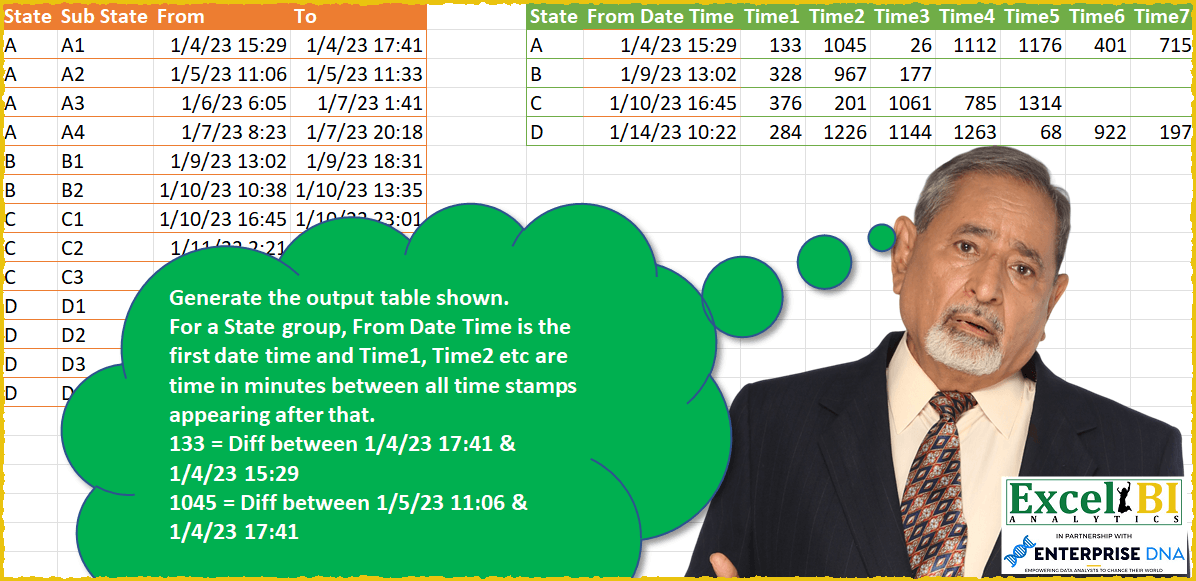
Generate the output table shown. For a State group, From Date Time is the first date time and Time1, Time2 etc. are time in minutes between all time stamps appearing after that. 133 = Diff between 1/4/23 17:41 & 1/4/23 15:29 1045 = Diff between 1/5/23 11:06 & 1/4/23 17:41 For Power Query solutions, this has to be dynamic. Hence for A, if 5 rows appear in place 4, then Time 8 and Time 9 also should be shown.
📌 Challenge Details and Links
ExcelBI Power Query Challenge Number: 49
Challenge Difficulty: ⭐️⭐️⭐️
📥Download Sample File
📥Link to the solutions on LinkedIn
Solving the challenge of Determine Cumulative Sum Based on Rules with Power Query
Power Query solution 1 for Determine Cumulative Sum Based on Rules, proposed by Bo Rydobon 🇹🇭:
let
  Source = Excel.CurrentWorkbook(){[Name = "Table1"]}[Content],
  Unpivoted = Table.UnpivotOtherColumns(Source, {"State", "Sub State"}, "Attribute", "V"),
  Grouped = Table.Group(
    Unpivoted,
    {"State"},
    {
      {"From Date Time", each [V]{0}},
      {"C", each Table.RowCount(_) - 1},
      {
        "B",
        each
          let
            t = {1 .. List.Count([V]) - 1}
          in
            Record.FromList(
              List.Transform(t, (n) => Number.From([V]{n} - [V]{n - 1}) * 1440),
              List.Transform(t, each "Time" & Text.From(_))
            )
      }
    }
  ),
  Expanded = Table.RemoveColumns(
    Table.ExpandRecordColumn(
      Grouped,
      "B",
      List.Transform({1 .. List.Max(Grouped[C])}, each "Time" & Text.From(_))
    ),
    "C"
  )
in
  Expanded
Power Query solution 2 for Determine Cumulative Sum Based on Rules, proposed by Rick de Groot:
let
 Source = Excel.CurrentWorkbook(){[Name="Table1"]}[Content],
 Types = Table.TransformColumnTypes(Source,{ {"From", type datetime}, {"To", type datetime}}),
 Unpiv = Table.UnpivotOtherColumns(Types, {"State", "Sub State"}, "x", "DT"),
 Shift = Table.Combine( {Table.RemoveFirstN( Unpiv[[State],[DT]], 1),
hashtag#table( type table[State = Text.Type, DT = DateTime.Type] , {{ null, null }})}),
 List = Table.ToColumns( Unpiv) & Table.ToColumns( Shift ),
 Combine = Table.FromColumns( List, { "State", "Sub State", "Attribute", "From", "PrevState", "To"} ),
 AddMins = Table.AddColumn(Combine, "Min", each if [State] = [PrevState] then Number.Round( Duration.TotalMinutes( [To] - [From] ) ) else null ),
 #"<>null" = Table.SelectRows(AddMins, each [Min] <> null),
 Group = Table.Group(#"<>null", {"State"}, {{"From Date Time", each List.Min([From]), type nullable datetime},
{"Details", each Record.FromList( _[Min], let NumOfItems = Table.RowCount(_) in List.Generate( ()=> 1, each _ <= NumOfItems, each _+1, each "Time" & Text.From(_) ) ) } } ),
 Exp = Table.ExpandRecordColumn(Group, "Details", {"Time1", "Time2", "Time3", "Time4", "Time5", "Time6", "Time7"} )
in
 Exp
Power Query solution 4 for Determine Cumulative Sum Based on Rules, proposed by Alejandro Simón 🇵🇦 🇪🇸:
let
  Source = Excel.CurrentWorkbook(){[Name = "Table1"]}[Content],
  Removed = Table.RemoveColumns(Source, {"Sub State"}),
  Unpivoted = Table.UnpivotOtherColumns(Removed, {"State"}, "Attribute", "Value"),
  Grouped = Table.Group(
    Unpivoted,
    {"State"},
    {
      {
        "Time",
        each List.Transform(
          let
            a = _,
            b = Table.AddIndexColumn(a, "Idx", 0, 1),
            c = Table.AddColumn(
              b,
              "Time",
              each try
                Number.Round(Duration.TotalMinutes([Value] - b[Value]{[Idx] - 1}))
              otherwise
                [Value]
            )[Time]
          in
            c,
          Text.From
        )
      }
    }
  ),
  Titulos = {"From Date Time"}
    & List.Transform(
      {1 .. List.Max(List.Transform(Grouped[Time], List.Count)) - 1},
      each "Time" & Text.From(_)
    ),
  Extracted = Table.TransformColumns(
    Grouped,
    {"Time", each Text.Combine(List.Transform(_, Text.From), ";")}
  ),
  Sol = Table.SplitColumn(Extracted, "Time", Splitter.SplitTextByDelimiter(";"), Titulos)
in
  Sol
Power Query solution 5 for Determine Cumulative Sum Based on Rules, proposed by Luan Rodrigues:
let
  Fonte = Tabela1[[State], [From], [To]],
  col = Table.UnpivotOtherColumns(Fonte, {"State"}, "Atributo", "Valor"),
  gp = Table.Group(
    col,
    {"State"},
    {
      {
        "Contagem",
        each [
          a = Table.AddIndexColumn(_, "Ind", 0, 1),
          b = Table.AddColumn(a, "Pers", each try a{[Ind] + 1}[Valor] otherwise [Valor]),
          c = Table.AddColumn(
            b,
            "Pers_1",
            each DateTime.From([Pers], "en-US") - DateTime.From([Valor], "en-US")
          ),
          d = Table.SelectRows(
            Table.AddColumn(c, "Total de Minutos", each Duration.TotalMinutes([Pers_1]), Int64.Type),
            each [Total de Minutos] <> 0
          ),
          e = Table.FillDown(
            Table.AddColumn(
              d,
              "From Date Time",
              each if [Ind] = 0 then DateTime.From([Valor], "en-US") else null
            ),
            {"From Date Time"}
          )
        ][e]
      }
    }
  ),
  exp = Table.ExpandTableColumn(gp, "Contagem", {"Total de Minutos", "From Date Time"}),
  tipo = Table.TransformColumnTypes(exp, {{"Total de Minutos", Int64.Type}}),
  gp1 = Table.Group(tipo, {"State", "From Date Time"}, {{"Time", each [Total de Minutos]}}),
  ext = Table.TransformColumns(
    gp1,
    {"Time", each Text.Combine(List.Transform(_, Text.From), "|"), type text}
  ),
  result = Table.SplitColumn(
    ext,
    "Time",
    Splitter.SplitTextByDelimiter("|", QuoteStyle.Csv),
    List.Max(List.Transform(gp1[Time], List.Count))
  )
in
  result
Power Query solution 6 for Determine Cumulative Sum Based on Rules, proposed by Bhavya Gupta:
let
  Source = Excel.CurrentWorkbook(){[Name = "Table1"]}[Content],
  Fn = (l) =>
    List.Transform(
      List.Zip({List.Skip(l), List.RemoveLastN(l)}),
      each Number.Round(Duration.TotalMinutes(_{0} - _{1}))
    ),
  Unpivot = Table.UnpivotOtherColumns(Source, {"State", "Sub State"}, "Attribute", "DateTime"),
  Grouped = Table.Group(
    Unpivot,
    {"State"},
    {
      {"From Date Time", each Table.SelectRows(_, each [Attribute] = "From")[DateTime]{0}},
      {
        "All",
        each Record.FromList(
          Fn([DateTime]),
          List.Transform({1 .. Table.RowCount(_) - 1}, each "Time " & Text.From(_))
        )
      }
    }
  ),
  FieldNames = Record.FieldNames(Record.Combine(Grouped[All])),
  ExpectedOutput = Table.ExpandRecordColumn(Grouped, "All", FieldNames, FieldNames)
in
  ExpectedOutput
Power Query solution 7 for Determine Cumulative Sum Based on Rules, proposed by Matthias Friedmann:
let
  Source = Excel.CurrentWorkbook(){[Name = "StateTime"]}[Content],
  Unpivoted = Table.UnpivotOtherColumns(Source, {"State", "Sub State"}, "Attribute", "DateTime"),
  Type = Table.TransformColumnTypes(Unpivoted, {{"DateTime", type datetime}}, "en-US"),
  Shifted = Table.FromColumns(
    Table.ToColumns(Type) & {{null} & List.RemoveLastN(Type[DateTime], 1)},
    Table.ColumnNames(Type) & {"Shifted"}
  ),
  Time = Table.AddColumn(Shifted, "Time", each [DateTime] - [Shifted], type duration),
  Minutes = Table.TransformColumns(Time, {{"Time", Duration.TotalMinutes, Int64.Type}}),
  Grouped = Table.Group(
    Minutes,
    {"State"},
    {
      {"From Date Time", each List.Min([DateTime]), type nullable datetime},
      {"Time", each List.Skip([Time])}
    }
  ),
  Extracted = Table.TransformColumns(
    Grouped,
    {"Time", each Text.Combine(List.Transform(_, Text.From), ","), type text}
  ),
  Split = Table.SplitColumn(
    Extracted,
    "Time",
    Splitter.SplitTextByDelimiter(",", QuoteStyle.Csv),
    List.Max(List.Transform(Grouped[Time], List.Count))
  )
in
  Split
Power Query solution 8 for Determine Cumulative Sum Based on Rules, proposed by Victor Wang:
let
  Source = Excel.CurrentWorkbook(){[Name = "Table1"]}[Content],
  Unpivot = Table.UnpivotOtherColumns(Source, {"State", "Sub State"}, "Attribute", "Value"),
  Offset = Table.FromColumns(Table.ToColumns(Unpivot) & {{null} & List.RemoveLastN(Unpivot[Value])}),
  Minutes = Table.AddColumn(
    Offset,
    "Minutes",
    each Number.Round(Duration.TotalMinutes([Column4] - [Column5]), 0, RoundingMode.AwayFromZero)
  ),
  Grouped = Table.Combine(
    Table.Group(
      Minutes,
      {"Column1"},
      {
        {
          "all",
          each
            let
              l = List.Transform({[Column4]{0}} & List.Skip([Minutes]), each {_})
            in
              Table.FromColumns(
                {{[Column1]{0}}} & l,
                {"State", "Time"}
                  & List.Transform({1 .. List.Count(l) - 1}, each "Time" & Text.From(_))
              )
        }
      }
    )[all]
  ),
  Type = Table.TransformColumnTypes(Grouped, {{"Time", type datetime}})
in
  Type
Power Query solution 9 for Determine Cumulative Sum Based on Rules, proposed by Krzysztof Kominiak:
let
  Source = Excel.CurrentWorkbook(){[Name = "Table1"]}[Content],
  Type = Table.TransformColumnTypes(Source, {{"From", type datetime}, {"To", type datetime}}),
  Unpivot = Table.UnpivotOtherColumns(Type, {"State", "Sub State"}, "Atrr", "Value"),
  Group = Table.Group(Unpivot, {"State"}, {{"NT", each _, type table}}),
  Fx = (myTab) =>
    let
      RemOthCols = Table.Skip(
        Table.FromColumns(
          Table.ToColumns(Table.SelectColumns(myTab, {"State", "Value"}))
            & {{null} & List.RemoveLastN(myTab[Value], 1)},
          {"State", "End", "Start"}
        ),
        1
      ),
      TimeSub = Table.AddColumn(RemOthCols, "Sub", each [End] - [Start], type duration),
      TotalMinutes = Table.AddColumn(
        TimeSub,
        "Minutes",
        each Number.Round(Duration.TotalMinutes([Sub])),
        type number
      ),
      StartFrom = Table.AddColumn(
        TotalMinutes,
        "FromDateStart",
        each TimeSub[Start]{0},
        type datetime
      ),
      SelCols = Table.SelectColumns(StartFrom, {"State", "FromDateStart", "Minutes"}),
      Id = Table.AddIndexColumn(SelCols, "Id", 1, 1),
      Prefix = Table.TransformColumns(Id, {{"Id", each "Time" & Text.From(_), type text}}),
      PCol = Table.Pivot(Prefix, List.Distinct(Prefix[Id]), "Id", "Minutes")
    in
      PCol,
  Result = Table.Combine(Table.AddColumn(Group, "FnCol", each Fx([NT]))[FnCol])
in
  Result
Solving the challenge of Determine Cumulative Sum Based on Rules with Excel
Excel solution 1 for Determine Cumulative Sum Based on Rules, proposed by Bo Rydobon 🇹🇭:
=LET(s,A2:A14,REDUCE(HSTACK(A1,"From Date Time","Time"&SEQUENCE(,MAX(COUNTIF(s,s))*2-1)),
UNIQUE(s),LAMBDA(a,v,LET(y,TOROW(C2:D14/(s=v),3),
IFNA(VSTACK(a,HSTACK(v,TAKE(y,,1),1440*DROP(DROP(y,,1)-y,,-1))),"")))))
Excel solution 2 for Determine Cumulative Sum Based on Rules, proposed by Bo Rydobon 🇹🇭:
=LET(z,C2:D14,s,TOCOL(IF(z,A2:A14)),t,TOCOL(z),
r,REDUCE(0,UNIQUE(s),LAMBDA(a,v,LET(y,FILTER(t,s=v),IFNA(VSTACK(a,HSTACK(v,TAKE(y,1),1440*TOROW(DROP(DROP(y,1)-y,-1)))),"")))),
VSTACK(HSTACK(A1,"From Date Time","Time"&SEQUENCE(,COLUMNS(r)-2)),DROP(r,1)))
Excel solution 3 for Determine Cumulative Sum Based on Rules, proposed by محمد حلمي:
=LET(
b,A2:A14,
u,UNIQUE(A1:A14),

HSTACK(u,XLOOKUP(u,b,C2:C14,"From Date Time"),

VSTACK("Time"&
SEQUENCE(,MAX(COUNTIF(b,b)*2-1)),

IFNA(TEXTSPLIT(CONCAT(

MAP(UNIQUE(b),
LAMBDA(a,CONCAT(ROUND(LET(
a,TOROW(FILTER(C2:D14,b=a)),
DROP(a,,1)-DROP(a,,-1))*1440,)
&" ")))&"|")," ","|",1)+0,""))))
Excel solution 4 for Determine Cumulative Sum Based on Rules, proposed by محمد حلمي:
=LET(
b,A2:A14,
u,UNIQUE(A1:A14),

v,TEXTSPLIT(CONCAT(MAP(UNIQUE(b),
LAMBDA(a,CONCAT(ROUND(LET(
a,TOROW(FILTER(C2:D14,b=a)),DROP(a,,1)-DROP(a,,-1))*1440,)&" ")))&"|")," ","|",1)+0,

HSTACK(u,XLOOKUP(u,b,C2:C14,"From Date Time"),
VSTACK("Time"&
SEQUENCE(, MAX(COUNTIF(b,b)*2-1)),IFNA(v,""))))
Excel solution 5 for Determine Cumulative Sum Based on Rules, proposed by محمد حلمي:
=LET(
b,A2:A14,
v,TEXTSPLIT(CONCAT(MAP(UNIQUE(b),
LAMBDA(a,CONCAT(ROUND(LET(
a,TOROW(FILTER(C2:D14,b=a)),DROP(a,,1)-DROP(a,,-1))*1440,)&" ")))&"|")," ","|",1)+0,
VSTACK("Time"&SEQUENCE(, MAX(COUNTIF(b,b)*2-1)),IFNA(v,"")))
Excel solution 6 for Determine Cumulative Sum Based on Rules, proposed by 🇰🇷 Taeyong Shin:
=LET(F,LAMBDA(x,TOCOL(IF({1,1},x))),s,F(A2:A14),d,TOCOL(C2:D14),t,SCAN(0,s=DROP(VSTACK(0,s),-1),LAMBDA(a,v,v*a+v)),PIVOTBY(HSTACK(s,SCAN(,(s<>DROP(VSTACK(0,s),-1))*F(C2:C14),MAX)),"Time"&t,ROUND((d-DROP(VSTACK(@d,d),-1))*1440,),SUM,,0,,0,,t))Excel solution 7 for Determine Cumulative Sum Based on Rules, proposed by 🇰🇷 Taeyong Shin:
=LET(
 State, A2:A14,
 Ustate, UNIQUE(State),
 cnt, MAX(COUNTIF(State, Ustate) * 2) - 1,
 tm, REDUCE("Time" & SEQUENCE(, cnt), Ustate, LAMBDA(a,n,
 VSTACK(a,
 LET(
 a, SORT(TOROW(FILTER(C2:D14, State = n)), , -1, 1),
 b, DROP(a, , 1),
 SORTBY(TOROW((a - b) * 24 * 60, 2), b)
 )
 )
 )),
 HSTACK(VSTACK({"State","From Date Time"}, HSTACK(Ustate, VLOOKUP(Ustate, A2:C14, 3, 0))), IFNA(tm, ""))
)
Excel solution 8 for Determine Cumulative Sum Based on Rules, proposed by Kris Jaganah:
=LET(a,IF(RIGHT(B2:B14)/1=1,"@",(OFFSET(B2:B14,0,1)-OFFSET(B2:B14,-1,2))*24*60),b,(D2:D14-C2:C14)*24*60,c,IF(ISNUMBER(a)=TRUE,1,0)+IF(ISNUMBER(b)=TRUE,1,0),d,A2:A14,e,UNIQUE(d),f,MAX(BYROW(e,LAMBDA(x,SUM(IF(d=x,c,0))))),g,VLOOKUP(e&"1",$B$2:$C$14,2,FALSE),h,DROP(DROP(IFERROR(TEXTSPLIT(TEXTJOIN("^",TRUE,TOCOL(HSTACK(a,b))),"^","@")/1,""),1,1),,-1),i,HSTACK("State","From Date Time","Time"&SEQUENCE(,f)),j,VSTACK(i,HSTACK(e,g,h)),j)Excel solution 9 for Determine Cumulative Sum Based on Rules, proposed by Aditya Kumar Darak 🇮🇳:
=LET(
 _d, A2:D14,
 _s, TAKE(_d, , 1),
 _us, UNIQUE(_s),
 _ft, TAKE(_d, , -2),
 _e, LAMBDA(a, b,
 LET(
 f, TOROW(FILTER(_ft, _s = b)),
 st, MIN(f),
 d, DROP(f, , 1) - DROP(f, , -1),
 c, d * 24 * 60,
 r, VSTACK(a, HSTACK(st, c)),
 r
 )
 ),
 _c, HSTACK(_us, IFNA(DROP(REDUCE("", _us, _e), 1), "")),
 _h, HSTACK(
 "State",
 "From",
 "Time" & SEQUENCE(1, COLUMNS(_c) - 2)
 ),
 _r, VSTACK(_h, _c),
 _r
)
Excel solution 10 for Determine Cumulative Sum Based on Rules, proposed by Hussein SATOUR:
=LET(
s,A2:A14, d,C2:D14, su,UNIQUE(s), MinD, MINIFS(INDEX(d, , 1), s, su),
HSTACK(
 su, MinD,
 --TEXTSPLIT(
 CONCAT(
 MAP(su,
 LAMBDA(x,
 TEXTJOIN(",", ,
 ROUND((DROP(TOCOL(FILTER(d, s = x)), 1) -
 DROP(TOCOL(FILTER(d, s = x)), -1)) * 1440, 0)
 ))) & "/"), ",", "/", 1, , 0)))
Excel solution 11 for Determine Cumulative Sum Based on Rules, proposed by Stefan Olsson:
=LAMBDA(states, timestamps,
 BYROW(states,
 L&AMBDA(state,
 SPLIT(
 REGEXEXTRACT(
 REDUCE("@",  QUERY(timestamps, "Select Col2 Where Col1='"&state&"' Order By Col2", 0),
 LAMBDA(Time, Timestamp,
 JOIN("|",
 Timestamp,
 Time,
 IF(Time="@", State&"|"&Timestamp, ROUND(1440*(Timestamp-REGEXEXTRACT(Time, "(.+?)|")), 0))
 ))), "@(.*)"
 ), "|", true, true
))))
(UNIQUE(A2:A14), {{A2:A14;A2:A14},{C2:C14;D2:D14}})
Solving the challenge of Determine Cumulative Sum Based on Rules with SQL
SQL solution 1 for Determine Cumulative Sum Based on Rules, proposed by Zoran Milokanović:
1/2
WITH /* Microsoft SQL Server 2019 */
DATA_PREP
AS
(
 SELECT
 T.STATE
 ,T.SUB_STATE
 ,T."FROM"
 ,LAG(T."FROM") OVER (PARTITION BY T.STATE ORDER BY CONVERT(DATETIME, T."FROM")) AS FROM_PREV
 ,CAST(ROUND(DATEDIFF(SECOND, CONVERT(DATETIME, LAG(T."FROM") OVER (PARTITION BY T.STATE ORDER BY T.SUB_STATE)), CONVERT(DATETIME, T."FROM")) * 1.0 / 60, 0) AS FLOAT) AS DIFF
 ,ROW_NUMBER() OVER (PARTITION BY T.STATE ORDER BY CONVERT(DATETIME, T."FROM")) - 1 AS SEQ
 FROM
 (
 SELECT
 D1.STATE
 ,D1.SUB_STATE
 ,D1."FROM"
 FROM DATA D1
 UNION ALL
 SELECT
 D2.STATE
 ,D2.SUB_STATE
 ,D2."TO"
 FROM DATA D2
 ) T
),
CALC
AS
(
 SELECT
 P.STATE
 ,P.[1] AS TIME1, P.[2] AS TIME2, P.[3] AS TIME3, P.[4] AS TIME4, P.[5] AS TIME5, P.[6] AS TIME6, P.[7] AS TIME7
 FROM
 (
 SELECT
 DP.STATE
 ,MAX(DP.FROM_PREV) OVER (PARTITION BY DP.STATE) AS TEMP
 ,DP.SEQ
 ,DP.DIFF
 FROM DATA_PREP DP
 WHERE
 DP.SEQ > 0
 ) T
 PIVOT
 (
 SUM(T.DIFF)
 FOR T.SEQ IN ([1], [2], [3], [4], [5], [6], [7])
 ) P
)
&&