
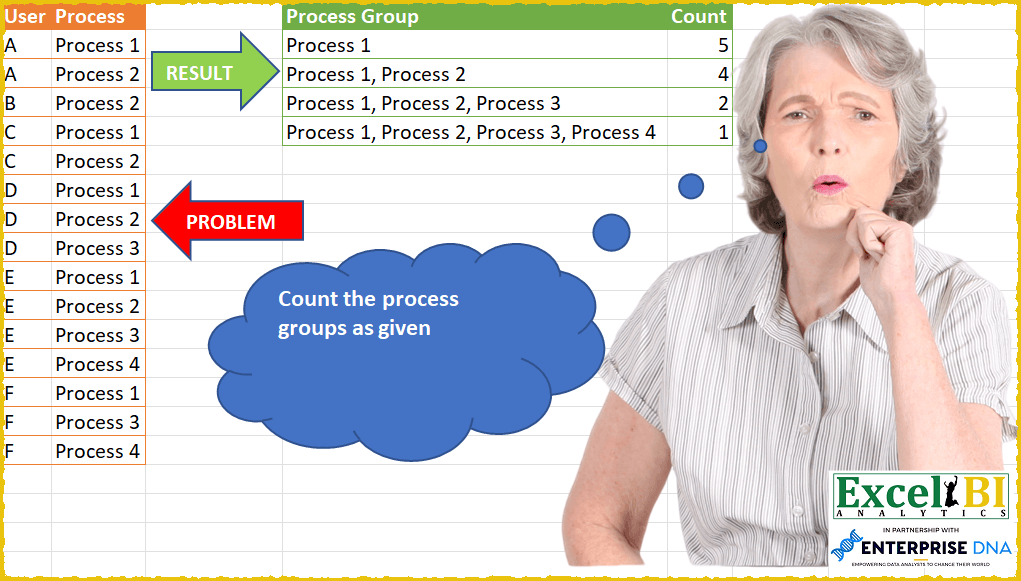
Count the process groups as given. A process group is a continuous set of processes. Hence, Process 1, Process 2 is a process group. But Process 1, Process 3 is not a process group as processes 1 & 3 are not continuous. Similarly, Process 1, Process 2, Process 4 is not a process group as this is not continuous. Hence only process group possible in below set of data is Process 1 Process 1, Process 2 Process 1, Process 2, Process3 Process 1, Process 2, Process 3, Process4
📌 Challenge Details and Links
ExcelBI Power Query Challenge Number: 47
Challenge Difficulty: ⭐️⭐️⭐️
📥Download Sample File
📥Link to the solutions on LinkedIn
Solving the challenge of Determine Result Table Based on Rules with Power Query
Power Query solution 1 for Determine Result Table Based on Rules, proposed by Alejandro Simón 🇵🇦 🇪🇸:
let
  Source = Excel.CurrentWorkbook(){[Name = "Table1"]}[Content],
  Table = Table.FromList(
    List.Transform(
      List.Skip(
        List.Accumulate(
          {0 .. List.Count(List.Distinct(Source[Process])) - 1},
          {""},
          (s, c) => s & {List.Last(s) & ", " & List.Distinct(List.Sort(Source[Process])){c}}
        )
      ),
      each Text.Trim(Text.TrimStart(_, ","))
    ),
    Splitter.SplitByNothing(),
    null,
    null,
    ExtraValues.Error
  ),
  Process = Table.Group(Source, {"User"}, {{"Count", each Text.Combine([Process], ", ")}})[Count],
  Cuenta = Table.AddColumn(
    Table,
    "Custom",
    (X) => List.Count(List.Select(Process, each Text.Contains(_, X[Column1])))
  ),
  Sol = Table.SelectRows(Cuenta, each ([Custom] > 0))
in
  Sol
Power Query solution 2 for Determine Result Table Based on Rules, proposed by Luan Rodrigues:
let
  Fonte = Tabela1,
  gp1 = Table.Group(
    Fonte,
    {"User"},
    {
      {
        "Contagem",
        each [
          a = Table.AddIndexColumn(_, "Rank", 1, 1),
          b = Table.AddColumn(
            a,
            "Seq",
            each Number.From(List.RemoveFirstN(Text.Split([Process], " "), 1){0})
          ),
          c = Table.AddColumn(b, "Comp", each if [Rank] = [Seq] then true else null)
        ][c]
      }
    }
  )[[Contagem]],
  exp1 = Table.ExpandTableColumn(gp1, "Contagem", Table.ColumnNames(gp1[Contagem]{0})),
  fil = Table.SelectRows(exp1, each ([Comp] = true)),
  gp2 = Table.Group(
    fil,
    {"Rank"},
    {
      {"tab", each _},
      {"Contagem", each Table.RowCount(_)},
      {"Seq1", each Table.AddIndexColumn(_, "Sequec", 1, 1)}
    }
  )[[Contagem], [Seq1]],
  exp2 = Table.ExpandTableColumn(gp2, "Seq1", {"Process", "Sequec"}, {"Process", "Sequec"}),
  gp3 = Table.Group(exp2, {"Sequec"}, {{"Contagem1", each _[Process]}, {"Count", each _[Contagem]}}),
  exp3 = Table.TransformColumns(
    gp3,
    {"Contagem1", each Text.Combine(List.Transform(_, Text.From), ","), type text}
  ),
  clas = Table.Sort(exp3, {{"Sequec", Order.Descending}}),
  Result = Table.Distinct(
    Table.AddColumn(
      clas,
      "Personalizar",
      each if List.Contains([Count], [Sequec]) = true then [Sequec] else List.Min([Count])
    )[[Contagem1], [Personalizar]]
  )
in
  Result
Power Query solution 3 for Determine Result Table Based on Rules, proposed by Matthias Friedmann:
let
  Source = Excel.CurrentWorkbook(){[Name = "Process"]}[Content],
  Grouped = Table.Group(
    Source,
    {"User"},
    {
      {
        "Process",
        each [
          a = [Process],
          b = List.Select(a, each try _ = a{Number.From(Text.End(_, 1)) - 1} otherwise null),
          c = Text.Combine(b, ", ")
        ][c]
      }
    }
  )[[Process]],
  Filtered = Table.SelectRows(Grouped, each ([Process] <> "")),
  Duplicated = Table.DuplicateColumn(Filtered, "Process", "Process Group"),
  Split = Table.ExpandListColumn(
    Table.TransformColumns(
      Duplicated,
      {
        {
          "Process",
          Splitter.SplitTextByDelimiter(", ", QuoteStyle.Csv),
          let
            itemType = (type nullable text) meta [Serialized.Text = true]
          in
            type {itemType}
        }
      }
    ),
    "Process"
  ),
  Grouped1 = Table.Group(
    Split,
    {"Process"},
    {
      {"Process Group", each List.Min([Process Group])},
      {"Count", each Table.RowCount(_), Int64.Type}
    }
  )[[Process Group], [Count]]
in
  Grouped1
Power Query solution 4 for Determine Result Table Based on Rules, proposed by Victor Wang:
let
  Source = Excel.CurrentWorkbook(){[Name = "Table1"]}[Content],
  Lists =
    let
      l = List.Buffer(List.Distinct(Source[Process]))
    in
      List.Transform(List.Positions(l), each List.FirstN(l, _ + 1)),
  Grouped = Table.Group(
    Source,
    {"User"},
    {
      {
        "all",
        (a) =>
          List.Transform(
            Lists,
            (b) => [
              Process Group = Text.Combine(b, ", "),
              Count         = Number.From(List.Intersect({b, a[Process]}) = b)
            ]
          )
      }
    }
  ),
  Counts = Table.Group(
    Table.FromRecords(List.Combine(Grouped[all])),
    {"Process Group"},
    {{"Count", each List.Sum([Count])}}
  )
in
  Counts
Solving the challenge of Determine Result Table Based on Rules with Excel
Excel solution 1 for Determine Result Table Based on Rules, proposed by Bo Rydobon 🇹🇭:
=LET(a,A2:A16,b,B2:B16,m,SCAN(,b,LAMBDA(a,v,IF(aExcel solution 2 for Determine Result Table Based on Rules, proposed by Rick Rothstein:
=LET(a,A2:A16,b,B2:B16,u,UNIQUE(b),p,MID(SCAN("",u,LAMBDA(q,s,q&", "&s)),3,99),HSTACK(p,MAP(p,LAMBDA(z,SUM(0+(z=LEFT(MAP(UNIQUE(a),LAMBDA(z,TEXTJOIN(", ",,FILTER(b,a=z)))),LEN(z))))))))Excel solution 3 for Determine Result Table Based on Rules, proposed by محمد حلمي:
=LET(
r,SCAN(,B2:B16,LAMBDA(a,d, IF((OFFSET(d,,-1)=OFFSET(d,-1,-1)) *
(RIGHT(d)+0)=(RIGHT(a)+1), a &", "& d, d))),
V,UNIQUE(r),
U,FILTER(V,LEFT(TEXTAFTER(V," "))+0=1),
HSTACK(U,MAP(U,LAMBDA(x,SUM(--(x=r))))))
Excel solution 4 for Determine Result Table Based on Rules, proposed by محمد حلمي:
=LET(
p,B2:B16,
v,SCAN(,UNIQUE(p),LAMBDA(a,d,a&", "&d)),
r,SCAN(,p,LAMBDA(a,d,IF(OFFSET(d,,-1)=
OFFSET(d,-1,-1), a&", "&d,d))),
HSTACK(v,MAP(v,LAMBDA(x,SUM(--(x=r))))))
Excel solution 5 for Determine Result Table Based on Rules, proposed by محمد حلمي:
=LET(
p,B2:B16,
v,IFERROR(SCAN(,UNIQUE(p),LAMBDA(a,d,
IF((RIGHT(d)+0)=
(RIGHT(a)+1),a&", "&d,""))),""),
u,FILTER(v,LEN(v)),
r,SCAN(,p,LAMBDA(a,d,IF(OFFSET(d,,-1)=
OFFSET(d,-1,-1), a&", "&d,d))),
HSTACK(u,MAP(u,LAMBDA(x,SUM(--(x=r))))))
Excel solution 6 for Determine Result Table Based on Rules, proposed by محمد حلمي:
=LET(
r,SCAN(,B2:B16,LAMBDA(a,d,
IF((OFFSET(d,,-1)=OFFSET(d,-1,-1))*
(RIGHT(d)+0)=(RIGHT(a)+1), a&", "&d,d))),
V,UNIQUE(r),
U,FILTER(V,(RIGHT(TEXTBEFORE(V,",",,,1))+0)=1),
HSTACK(U,MAP(U,LAMBDA(x,SUM(--(x=r))))))
Excel solution 7 for Determine Result Table Based on Rules, proposed by 🇰🇷 Taeyong Shin:
=LET(
 User, A2:A16,
 prc, B2:B16,
 Upg, UNIQUE(SORT(prc)),
 Pg, MAP(SEQUENCE(ROWS(Upg)), LAMBDA(n, ARRAYTOTEXT(TAKE(Upg, n)))),
 uprc, MAP(UNIQUE(User), LAMBDA(m, ARRAYTOTEXT(FILTER(prc, User = m)))),
 HSTACK(Pg, MAP(Pg, LAMBDA(m, COUNT(FIND(m, uprc)))))
)


=LET(
 user, A2:A16,
 prc, B2:B16,
 join, SCAN(, UNIQUE(prc), LAMBDA(a,b, a & ", " & b)),
 one, TOROW(N(+prc)+1),
 Un, TOROW(UNIQUE(user)),
 cnt, MAP(join, LAMBDA(m,
 LET(
 split, TEXTSPLIT(m, ", "),
 COUNT(1 / (MMULT(one, --(Un = REPT(user, TEXTSPLIT(prc, split) = ""))) >= COLUMNS(split)))
 )
 )),
 HSTACK(join, cnt)
)
Excel solution 8 for Determine Result Table Based on Rules, proposed by Kris Jaganah:
=LET(a,A2:A16,b,B2:B16,c,RIGHT(b)/1,d,MAP(SEQUENCE(ROWS(a)),LAMBDA(x,SUM(--(TAKE(a,x)=CHOOSEROWS(a,x))))),e,IF(c=d,1,0),f,SUBSTITUTE(SCAN(,IF(d=1,"x"&b,b),LAMBDA(x,y,IF(LEFT(y,8)<>"xProcess",x&", "&y,y))),"x",""),g,UNIQUE(FILTER(f,e=1)),VSTACK({"Process Group","Count"},HSTACK(g,MAP(g,LAMBDA(q,SUM(--(q=f)))))))Excel solution 9 for Determine Result Table Based on Rules, proposed by Aditya Kumar Darak 🇮🇳:
=LET(
 _d, A2:B16,
 _p, TAKE(_d, , -1),
 _us, TAKE(_d, , 1),
 _up, SORT(UNIQUE(_p)),
 _uus, UNIQUE(_us),
 _pg, SCAN(, _up, LAMBDA(a, b, a & ", " & b)),
 _j, MAP(_uus, LAMBDA(a, ARRAYTOTEXT(SORT(FILTER(_p, _us = a))))),
 _cnt, MAP(_pg, LAMBDA(a, SUM(--ISNUMBER(FIND(a, _j))))),
 _r, HSTACK(_pg, _cnt),
 _r
)
Excel solution 10 for Determine Result Table Based on Rules, proposed by Hussein SATOUR:
=LET(u, A2:A16, p, B2:B16, up, UNIQUE(p),
 l, TEXTSPLIT(
 TEXTJOIN("/",,
 MAP(UNIQUE(u), LAMBDA(x, TEXTJOIN("/",,
 SCAN("", UNIQUE(FILTER(p, u = x)),
 LAMBDA(a, b, TEXTJOIN(", ", , a, b))))))), ,"/"),
 h, SCAN("", up, LAMBDA(a, b, TEXTJOIN(", ", , a, b))),
 g, MAP(h, LAMBDA(x, COUNTA(FILTER(l, l = x)))),
 HSTACK(h, g))
Excel solution 11 for Determine Result Table Based on Rules, proposed by Duy Tùng:
=LET(a,B2:B16,f,LAMBDA(k,SCAN(,k,LAMBDA(x,y,IF(y=B2,y,x&", "&y)))),b,f(UNIQUE(a)),HSTACK(b,BYROW(N(b=TOROW(f(a))),SUM)))Excel solution 12 for Determine Result Table Based on Rules, proposed by Stefan Olsson:
=QUERY({"Process Group", "Count";
LAMBDA(p,
BYROW(SEQUENCE(COLUMNS(p)),
LAMBDA(g,
{
JOIN(", ", ARRAY_CONSTRAIN(p, 1, g)),
COUNTIF(BYROW(ARRAY_CONSTRAIN(p, ROWS(p), g), LAMBDA(r, SUM(r)=COLUMNS(r))), TRUE)
}
)))(QUERY({A2:B}, "Select Count(Col1) Where Col1<>'' Group By Col1 Pivot Col2", 0))},
"Where Col2>0",1)
&&&