
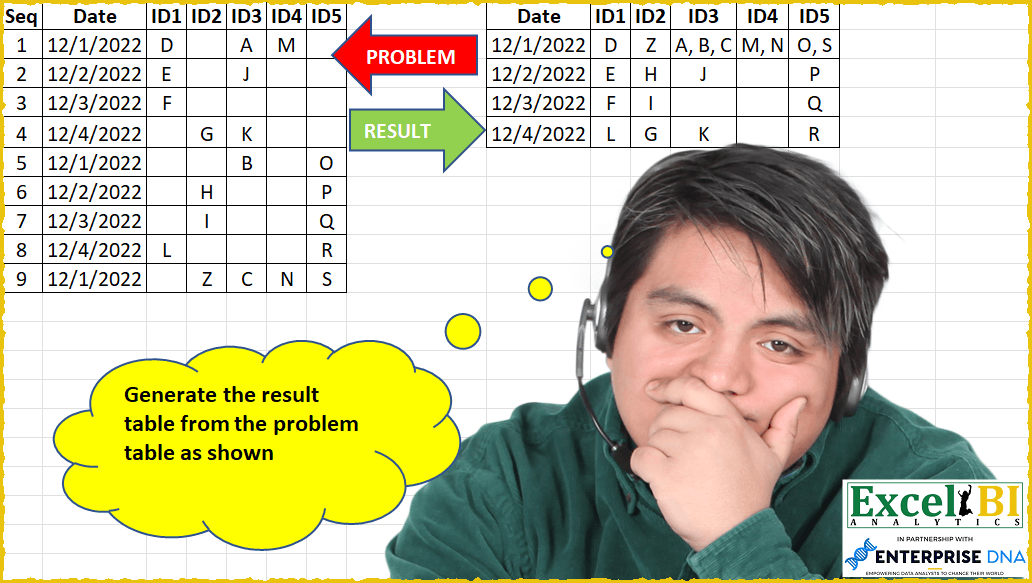
Generate the result table from the problem table as shown
📌 Challenge Details and Links
ExcelBI Power Query Challenge Number: 40
Challenge Difficulty: ⭐️⭐️⭐️⭐️
📥Download Sample File
📥Link to the solutions on LinkedIn
Solving the challenge of Generate result table from the with Power Query
Power Query solution 1 for Generate result table from the, proposed by Bo Rydobon 🇹🇭:
let
  Source = Excel.CurrentWorkbook(){[Name = "Table1"]}[Content],
  ColName = List.Skip(Table.ColumnNames(Source), 2),
  Expanded = Table.ExpandTableColumn(
    Table.Group(
      Source,
      {"Date"},
      {
        "A",
        each Table.FromColumns(
          List.Transform(List.Skip(Table.ToColumns(_), 2), each {Text.Combine(_, ", ")}),
          ColName
        )
      }
    ),
    "A",
    ColName
  )
in
  Expanded
Power Query solution 2 for Generate result table from the, proposed by Alejandro Simón 🇵🇦 🇪🇸:
let
  Source = Excel.CurrentWorkbook(){[Name = "Table1"]}[Content],
  DateType = Table.TransformColumnTypes(Source, {{"Date", type date}}),
  Grouped = Table.Group(
    DateType,
    {"Date"},
    {
      {
        "Count",
        each
          let
            b = Table.RemoveColumns(_, {"Seq", "Date"}),
            c = List.Transform(Table.ToColumns(b), each Text.Combine(_, ", ")),
            d = Table.Transpose(Table.FromColumns({c}))
          in
            d
      }
    }
  ),
  Expanded = Table.ExpandTableColumn(
    Grouped,
    "Count",
    {"Column1", "Column2", "Column3", "Column4", "Column5"}
  ),
  Solucion = Table.RenameColumns(
    Expanded,
    List.Zip({Table.ColumnNames(Expanded), List.Skip(Table.ColumnNames(Source))})
  )
in
  Solucion
Power Query solution 3 for Generate result table from the, proposed by Luan Rodrigues:
let
  Fonte = Tabela1,
  a = Table.UnpivotOtherColumns(Fonte, {"Date"}, "Atributo", "Valor"),
  b = Table.SelectRows(a, each ([Atributo] <> "Seq")),
  c = Table.Group(
    b,
    {"Date", "Atributo"},
    {{"Contagem", each Text.Combine(List.Transform(_[Valor], Text.From), ", ")}}
  ),
  d = Table.Sort(c, {{"Atributo", Order.Ascending}}),
  Result = Table.Pivot(d, List.Distinct(d[Atributo]), "Atributo", "Contagem")
in
  Result
Power Query solution 4 for Generate result table from the, proposed by Brian Julius:
let
  Source = Excel.CurrentWorkbook(){[Name = "Table1"]}[Content],
  Unpivoted = Table.UnpivotOtherColumns(Source, {"Seq", "Date"}, "Column", "Letter"),
  Group = Table.Group(Unpivoted, {"Date", "Column"}, {{"All", each [Letter]}}),
  Extract = Table.TransformColumns(
    Group,
    {"All", each Text.Combine(List.Transform(_, Text.From), ", "), type text}
  ),
  Pivot = Table.Pivot(Extract, List.Distinct(Extract[Column]), "Column", "All"),
  Reorder = Table.ReorderColumns(Pivot, {"Date", "ID1", "ID2", "ID3", "ID4", "ID5"}),
  ReType = Table.TransformColumnTypes(Reorder, {{"Date", type date}})
in
  ReType
Power Query solution 5 for Generate result table from the, proposed by Bhavya Gupta:
let
  Source = Excel.CurrentWorkbook(){[Name = "Table1"]}[Content],
  ChangedType = Table.TransformColumnTypes(Source, {{"Date", type date}}),
  ColNames = List.Skip(Table.ColumnNames(Source), 2),
  Grouped = Table.Group(
    ChangedType,
    {"Date"},
    {
      {
        "Count",
        each Table.FromColumns(
          List.Transform(
            List.Skip(Table.ToColumns(_), 2),
            each {Text.Combine(List.RemoveNulls(_), ", ")}
          ),
          ColNames
        )
      }
    }
  ),
  ExpectedOutput = Table.ExpandTableColumn(Grouped, "Count", ColNames, ColNames)
in
  ExpectedOutput
Power Query solution 6 for Generate result table from the, proposed by Eric Laforce:
Happy New Year to all
1) Identify all ID columns
2) within 1 single GroupBy
 use Table.ToColums + FormColumns to process each IDColums
 by Transforming each content-values with Text.Combine
3) Expand final results
cf screen shot of code below : if interested
Power Query solution 7 for Generate result table from the, proposed by 🇮🇷 Navid Esmaeilzadeh اسماعیل زاده:
let
  Source = Excel.CurrentWorkbook(){[Name = "Table1"]}[Content],
  #"Changed Type" = Table.TransformColumnTypes(
    Source,
    {
      {"Seq", Int64.Type},
      {"Date", type date},
      {"ID1", type text},
      {"ID2", type text},
      {"ID3", type text},
      {"ID4", type text},
      {"ID5", type text}
    }
  ),
  #"Unpivoted Other Columns" = Table.UnpivotOtherColumns(
    #"Changed Type",
    {"Seq", "Date"},
    "Attribute",
    "Value"
  ),
  #"Sorted Rows" = Table.Sort(
    #"Unpivoted Other Columns",
    {{"Date", Order.Ascending}, {"Attribute", Order.Ascending}}
  ),
  #"Grouped Rows" = Table.Group(
    #"Sorted Rows",
    {"Date", "Attribute"},
    {{"Count", each Text.Combine([Value], ","), type text}}
  ),
  #"Sorted Rows1" = Table.Sort(
    #"Grouped Rows",
    {{"Date", Order.Ascending}, {"Attribute", Order.Ascending}}
  ),
  #"Added Custom" = Table.AddColumn(#"Sorted Rows1", "Custom", each 1),
  #"Pivoted Column" = Table.Pivot(
    #"Added Custom",
    List.Distinct(#"Added Custom"[Attribute]),
    "Attribute",
    "Count"
  ),
  #"Removed Other Columns" = Table.SelectColumns(
    #"Pivoted Column",
    {"Date", "ID1", "ID2", "ID3", "ID4", "ID5"}
  )
in
  #"Removed Other Columns"
Power Query solution 8 for Generate result table from the, proposed by Matthias Friedmann:
let
  Source = Excel.CurrentWorkbook(){[Name = "ID"]}[Content],
  IDs = List.Skip(Table.ColumnNames(Source), 2),
  #"Grouped Rows" = Table.Group(
    Source,
    {"Date"},
    {
      {
        "Data",
        each Table.FromColumns(
          List.Transform(
            Table.ToColumns(Table.SelectColumns(_, IDs)),
            each {Text.Combine(List.RemoveNulls(_), ", ")}
          ),
          IDs
        )
      }
    }
  ),
  #"Expanded Data" = Table.ExpandTableColumn(#"Grouped Rows", "Data", IDs)
in
  #"Expanded Data"
Power Query solution 9 for Generate result table from the, proposed by Matthias Friedmann:
Power Query solution 10 for Generate result table from the, proposed by Owen Price:
= Table.Pivot(Extract, List.Sort(List.Distinct(Extract[Column])), "Column", "All")
Power Query solution 12 for Generate result table from the, proposed by Victor Wang:
let
  Source = Excel.CurrentWorkbook(){[Name = "Table1"]}[Content],
  Cols = List.Skip(Table.ColumnNames(Source), 2),
  Group = Table.Group(
    Source,
    {"Date"},
    {
      {
        "all",
        each Table.FromColumns(
          List.Transform(Cols, (a) => {Text.Combine(Table.Column(_, a), ", ")}),
          Cols
        )
      }
    }
  ),
  Expand = Table.ExpandTableColumn(Group, "all", Cols)
in
  Expand
Power Query solution 13 for Generate result table from the, proposed by Krzysztof Kominiak:
let
  Source = Excel.CurrentWorkbook(){[Name = "Table1"]}[Content],
  ChanType = Table.TransformColumnTypes(Source, {{"Date", type date}}),
  Base = Table.Distinct(Table.SelectColumns(ChanType, {"Date"})),
  Headers = List.Skip(Table.ColumnNames(Source), 2),
  AccumList = List.Accumulate(
    Headers,
    Base,
    (S, C) =>
      Table.AddColumn(
        S,
        C,
        each Text.Combine(
          List.RemoveNulls(Table.Column(Table.SelectRows(ChanType, (x) => x[Date] = [Date]), C)),
          ", "
        )
      )
  )
in
  AccumList
Power Query solution 14 for Generate result table from the, proposed by Sandeep Marwal:
let
  Source = Excel.CurrentWorkbook(){[Name = "Table1"]}[Content],
  #"Unpivoted Other Columns" = Table.UnpivotOtherColumns(
    Source,
    {"Seq", "Date"},
    "Attribute",
    "Value"
  ),
  #"Removed Columns" = Table.RemoveColumns(#"Unpivoted Other Columns", {"Seq"}),
  #"Sorted Rows" = Table.Sort(#"Removed Columns", {{"Attribute", Order.Ascending}}),
  #"Pivoted Column" = Table.Pivot(
    #"Sorted Rows",
    List.Distinct(#"Sorted Rows"[Attribute]),
    "Attribute",
    "Value",
    each Text.Combine(_, ",")
  ),
  #"Changed Type" = Table.TransformColumnTypes(#"Pivoted Column", {{"Date", type date}})
in
  #"Changed Type"
Power Query solution 15 for Generate result table from the, proposed by Jan Willem Van Holst:
let
  Source = Table.FromRows(
    Json.Document(
      Binary.Decompress(
        Binary.FromText(
          "Zc7NDoIwEATgd9kzCXQBkaOi8qP8KDeavv9rOO5aICWZSTfpdxhryVBEhmMTc8KM+4YiF7T/nS6yxGrYm7uaTh8hqZLUk8f/bxOZiswLpEafO5IHWzRXfUYhp2AK0qxyElIEU5B2JW8h52DLa7/2I6Q8blnQCh3QmZz7Ag==",
          BinaryEncoding.Base64
        ),
        Compression.Deflate
      )
    ),
    let
      _t = ((type nullable text) meta [Serialized.Text = true])
    in
      type table [Seq = _t, Date = _t, ID1 = _t, ID2 = _t, ID3 = _t, ID4 = _t, ID5 = _t]
  ),
  #"Unpivoted Other Columns" = Table.UnpivotOtherColumns(
    Source,
    {"Seq", "Date"},
    "Attribute",
    "Value"
  ),
  #"Filtered Rows" = Table.SelectRows(#"Unpivoted Other Columns", each ([Value] <> "")),
  #"Grouped Rows" = Table.Group(
    #"Filtered Rows",
    {"Date", "Attribute"},
    {{"Data", each Text.Combine([Value], ", ")}}
  ),
  #"Pivoted Column" = Table.Pivot(
    #"Grouped Rows",
    List.Distinct(#"Grouped Rows"[Attribute]),
    "Attribute",
    "Data"
  ),
  #"Replaced Value" = Table.ReplaceValue(
    #"Pivoted Column",
    null,
    "",
    Replacer.ReplaceValue,
    {"ID1", "ID3", "ID4", "ID2", "ID5"}
  )
in
  #"Replaced Value"
Power Query solution 16 for Generate result table from the, proposed by Obi E, MPH:
let
  Source = Excel.CurrentWorkbook(){[Name = "Table3"]}[Content],
  #"Changed Type" = Table.TransformColumnTypes(Source, {{"Date", type date}}),
  #"Grouped Rows" = Table.Group(
    #"Changed Type",
    {"Date"},
    {
      {
        "Count",
        each _,
        type table [
          Seq = number,
          Date = nullable date,
          ID1 = nullable text,
          ID2 = nullable text,
          ID3 = nullable text,
          ID4 = nullable text,
          ID5 = nullable text
        ]
      },
      {"ID1", each Text.Combine([ID1], ","), type nullable text},
      {"ID2", each Text.Combine([ID2], ","), type nullable text},
      {"ID3", each Text.Combine([ID3], ","), type nullable text},
      {"ID4", each Text.Combine([ID4], ","), type nullable text},
      {"ID5", each Text.Combine([ID5], ","), type nullable text}
    }
  ),
  #"Removed Columns" = Table.RemoveColumns(#"Grouped Rows", {"Count"})
in
  #"Removed Columns"
Power Query solution 17 for Generate result table from the, proposed by Thomas DUCROQUETZ:
let
  Source = YourRawData,
  ModifType = Table.TransformColumnTypes(Source, {{"Seq", Int64.Type}, {"Date", type date}}),
  IDColumns = List.Select(Table.ColumnNames(Source), each Text.Start(_, 2) = "ID"),
  GroupedByDate = Table.Group(
    ModifType,
    {"Date"},
    List.Transform(
      IDColumns,
      each {_, (x) => Text.Combine(List.Select(Table.Column(x, _), (r) => r <> ""), ", ")}
    )
  )
in
  GroupedByDate
Power Query solution 18 for Generate result table from the, proposed by kamal shaterian:
let
  Source = Excel.CurrentWorkbook(){[Name = "Table1"]}[Content],
  #"Changed Type" = Table.TransformColumnTypes(
    Source,
    {
      {"Seq", Int64.Type},
      {"Date", type datetime},
      {"ID1", type text},
      {"ID2", type text},
      {"ID3", type text},
      {"ID4", type text},
      {"ID5", type text}
    }
  ),
  #"Grouped Rows" = Table.Group(
    #"Changed Type",
    {"Date"},
    {
      {
        "All",
        each _,
        type table [
          Seq = nullable number,
          Date = nullable datetime,
          ID1 = nullable text,
          ID2 = nullable text,
          ID3 = nullable text,
          ID4 = nullable text,
          ID5 = nullable text
        ]
      }
    }
  ),
  #"Added Custom" = Table.AddColumn(
    #"Grouped Rows",
    "ID1",
    each Text.Combine(List.Transform([All][ID1], Text.From), ",")
  ),
  #"Added Custom1" = Table.AddColumn(
    #"Added Custom",
    "ID2",
    each Text.Combine(List.Transform([All][ID2], Text.From), ",")
  ),
  #"Added Custom2" = Table.AddColumn(
    #"Added Custom1",
    "ID3",
    each Text.Combine(List.Transform([All][ID3], Text.From), ",")
  ),
  #"Added Custom3" = Table.AddColumn(
    #"Added Custom2",
    "ID4",
    each Text.Combine(List.Transform([All][ID4], Text.From), ",")
  ),
  #"Added Custom4" = Table.AddColumn(
    #"Added Custom3",
    "ID5",
    each Text.Combine(List.Transform([All][ID5], Text.From), ",")
  )
in
  #"Added Custom4"
Solving the challenge of Generate result table from the with Excel
Excel solution 1 for Generate result table from the, proposed by Bo Rydobon 🇹🇭:
=LET(d,
    B1:B10,
    i,
    C1:G1,
    u,
    UNIQUE(
        d
    ),
    HSTACK(u,
    MAKEARRAY(ROWS(
        u
    ),
    COLUMNS(
        i
    ),
    LAMBDA(r,
    c,
    TEXTJOIN(", ",
    ,
    REPT(C1:G10,
    (d=INDEX(
        u,
        r
    ))*(i=INDEX(
        i,
        c
    ))))))))
Excel solution 2 for Generate result table from the, proposed by محمد حلمي:
=LET(
    b,
    B2:B10,
    i,
    UNIQUE(
        b
    ),

    VSTACK(
        B1:G1,
        HSTACK(
            i,
            MAP(
                i&C1:G1,
                LAMBDA(
                    a,

                    TEXTJOIN(
                        ", ",
                        ,
                        REPT(
                            C2:G10,
                            a=b&C1:G1
                        )
                    )
                )
            )
        )
    )
)
Excel solution 3 for Generate result table from the, proposed by محمد حلمي:
=LET(
b,
    B2:B10,

u,
    C1:G1,

v,
    UNIQUE(
        b
    ),

HSTACK(VSTACK(
    B1,
    v
),
    VSTACK(u,

MAKEARRAY(ROWS(
    v
),
    COUNTA(
        u
    ),

LAMBDA(r,
    c,
     TEXTJOIN(", ",
    ,

IF((b=INDEX(
    v,
    r
)*(INDEX(
    u,
    c
)=u)),

TRIM(
    C2:G10
),
    "")))))))
Excel solution 4 for Generate result table from the, proposed by 🇰🇷 Taeyong Shin:
<&code>=LET(
    F,
    LAMBDA(
        x,
        TOCOL(
            IFS(
                C2:G10>0,
                x
            ),
            2
        )
    ),
    p,
    PIVOTBY(
        F(
            B2:B10
        ),
        F(
            C1:G1
        ),
        F(
            C2:G10
        ),
        ARRAYTOTEXT,
        ,
        0,
        ,
        0
    ),
    IF(
        SEQUENCE(
            ROWS(
                p
            )
        )=1,
        "Date",
        p
    )
)
=LET(
    u,
    UNIQUE(
        B1:B10
    ),
    HSTACK(
        u,
        MAP(
            u&C1:G1,
            LAMBDA(
                x,
                TEXTJOIN(
                    ",",
                    ,
                    REPT(
                        C1:G10,
                        B1:B10&C1:G1=x
                    )
                )
            )
        )
    )
)
Excel solution 5 for Generate result table from the, proposed by Aditya Kumar Darak 🇮🇳:
=LET(

     _d,
     A1:G10,

     _h,
     DROP(
         TAKE(
             _d,
              1
         ),
          ,
          1
     ),

     _dt,
     DROP(
         INDEX(
             _d,
              0,
              2
         ),
          1
     ),

     _udt,
     SORT(
         UNIQUE(
             _dt
         )
     ),

     _e,
     LAMBDA(
         r,
          c,

          TEXTJOIN(

               ", ",

               1,

               FILTER(
                   DROP(
                       INDEX(
                           _d,
                            ,
                            c + 2
                       ),
                        1
                   ),
                    _dt = INDEX(
                        _udt,
                         r
                    )
               )

          )

     ),

     _c,
     MAKEARRAY(
         ROWS(
             _udt
         ),
          COLUMNS(
              _h
          ) - 1,
          _e
     ),

     _r,
     VSTACK(
         _h,
          HSTACK(
              _udt,
               _c
          )
     ),

     _r

)
Excel solution 6 for Generate result table from the, proposed by Md. Zohurul Islam:
=LET(
    u,
    B2:B10,
    v,
    C1:G1,
    w,
    C2:G10,

    f,
    LAMBDA(
        x,
        y,
        TOCOL(
            IFNA(
                x,
                y
            )
        )
    ),

    z,
    PIVOTBY(
        f(
            u,
            v
        ),
        f(
            v,
            u
        ),
        TOCOL(
            w
        ),
        LAMBDA(
            x,
            IFERROR(
                ARRAYTOTEXT(
                    FILTER(
                        x,
                        x<>""
                    )
                ),
                ""
            )
        ),
        0,
        0,
        ,
        0
    ),

    HSTACK(
        VSTACK(
            "Date",
            DROP(
                TAKE(
                    z,
                    ,
                    1
                ),
                1
            )
        ),
        DROP(
                    z,
                    ,
                    1
                )
    )
)
Excel solution 7 for Generate result table from the, proposed by Gerson Pineda:
=LET(
    id,
    C2:G10,
    f,
    B2:B10,
    u,
    UNIQUE(
        f
    ),
    VSTACK(
        B1:G1,
        HSTACK(
            u,
            DROP(
                DROP(
                    REDUCE(
                        1,
                        u,
                        LAMBDA(
                            ii,
                            i,
                            VSTACK(
                                ii,
                                REDUCE(
                                    1,
                                    SEQUENCE(
                                        COLUMNS(
                                            id
                                        )
                                    ),
                                    LAMBDA(
                                        jj,
                                        j,
                                        HSTACK(
                                            jj,
                                            TEXTJOIN(
                                                ", ",
                                                ,
                                                INDEX(
                                                    FILTER(
                                                        id,
                                                        f=i
                                                    ),
                                                    ,
                                                    j
                                                )
                                            )
                                        )
                                    )
                                )
                            )
                        )
                    ),
                    1
                ),
                ,
                1
            )
        )
    )
)
Solving the challenge of Generate result table from the with Python
Python solution 1 for Generate result table from the, proposed by Igor Perković:
Happy New Year to all of you!
import pandas as pd
from tabulate import tabulate
# SOURCE
df = pd.read_excel('PQ_Challenge_40.xlsx', usecols="B:G")
df = df.fillna('')
# Processing
res = df.groupby(['Date'], as_index=False, sort=False).agg(' '.join)
res = res.applymap(lambda x: x.strip() if isinstance(x, str) else x)
res = res.replace(' ', ',', regex=True).replace(',,', ',', regex=True)
# Result
print(tabulate(res,headers=res.columns, tablefmt='psql',showindex=False),'n')
Solving the challenge of Generate result table from the with SQL
SQL solution 1 for Generate result table from the, proposed by Zoran Milokanović:
SELECT
 D.DATE
,REPLACE(LISTAGG(DECODE(D.ID1, '', NULL, D.ID1)), ',', ' ,') AS ID1
,REPLACE(LISTAGG(DECODE(D.ID2, '', NULL, D.ID2)), ',', ' ,') AS ID2
,REPLACE(LISTAGG(DECODE(D.ID3, '', NULL, D.ID3)), ',', ' ,') AS ID3
,REPLACE(LISTAGG(DECODE(D.ID4, '', NULL, D.ID4)), ',', ' ,') AS ID4
,REPLACE(LISTAGG(DECODE(D.ID5, '', NULL, D.ID5)), ',', ' ,') AS ID5
FROM DATA D
GROUP BY
 D.DATE
,TO_DATE(D.DATE, 'MM/DD/YYYY')
ORDER BY
 2
;
&&