
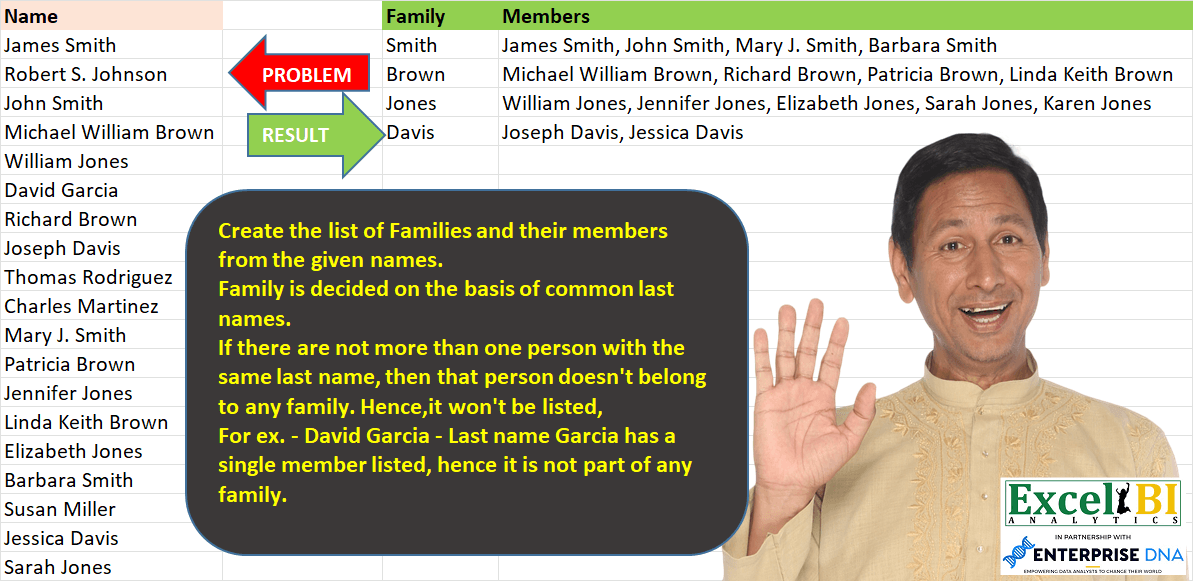
Create the list of Families and their members from the given names. Family is decided on the basis of common last names. If there are not more than one person with the same last name, then that person doesn’t belong to any family. Hence,it won’t be listed, For ex. – David Garcia – Last name Garcia has a single member listed, hence it is not part of any family.
📌 Challenge Details and Links
ExcelBI Power Query Challenge Number: 37
Challenge Difficulty: ⭐️⭐️⭐️⭐️
📥Download Sample File
📥Link to the solutions on LinkedIn
Solving the challenge of List families by common last with Power Query
Power Query solution 1 for List families by common last, proposed by Alejandro Simón 🇵🇦 🇪🇸:
let
  Source = Excel.CurrentWorkbook(){[Name = "Table1"]}[Content],
  ExtractName = Table.AddColumn(
    Source,
    "Family",
    each Text.AfterDelimiter([Name], " ", {0, RelativePosition.FromEnd}),
    type text
  ),
  Names = Table.Group(ExtractName, {"Family"}, {{"Members", each Text.Combine([Name], ", ")}}),
  ListCount = Table.AddColumn(Names, "Custom", each List.Count(Text.Split([Members], ", "))),
  #"Fliter>1" = Table.SelectRows(ListCount, each ([Custom] <> 1))[[Family], [Members]]
in
  #"Fliter>1"
Power Query solution 2 for List families by common last, proposed by Luan Rodrigues:
let
  Fonte = Data,
  a = Table.AddColumn(Fonte, "Family", each [a = Text.Split([Name], " "), b = List.Last(a)][b]),
  b = Table.SelectRows(
    Table.Group(a, {"Family"}, {{"Tab", each _}, {"Count", each Table.RowCount(_)}}),
    each [Count] > 1
  ),
  Result = Table.AddColumn(b, "Members", each Text.Combine([Tab][Name], ", "))[[Family], [Members]]
in
  Result
Power Query solution 3 for List families by common last, proposed by Brian Julius:
let
  Source = Table.DuplicateColumn(
    Excel.CurrentWorkbook(){[Name = "Table1"]}[Content],
    "Name",
    "Family"
  ),
  Split = Table.SplitColumn(
    Source,
    "Family",
    Splitter.SplitTextByEachDelimiter({" "}, QuoteStyle.Csv, true),
    {"Family.1", "Family.2"}
  ),
  Group = Table.Group(
    Split,
    {"Family.2"},
    {{"Count", each Table.RowCount(_), Int64.Type}, {"All", each _[Name], type table [Name = text]}}
  ),
  Filter = Table.RemoveColumns(Table.SelectRows(Group, each ([Count] <> 1)), {"Count"}),
  ExtractClean = Table.RenameColumns(
    Table.RemoveColumns(Table.AddColumn(Filter, "Members", each Text.Combine([All], ", ")), "All"),
    {"Family.2", "Family"}
  )
in
  ExtractClean
Power Query solution 4 for List families by common last, proposed by Bhavya Gupta:
let
  Source = Excel.CurrentWorkbook(){[Name = "Table1"]}[Content],
  GrpCr = Table.AddColumn(
    Source,
    "Family",
    each Text.AfterDelimiter([Name], " ", {0, RelativePosition.FromEnd})
  ),
  Grouped = Table.Group(
    GrpCr,
    {"Family"},
    {{"Members", each Text.Combine([Name], ", ")}, {"Count", each Table.RowCount(_)}}
  ),
  ExpectedOutput = Table.SelectRows(Grouped, each ([Count] <> 1))[[Family], [Members]]
in
  ExpectedOutput
Power Query solution 5 for List families by common last, proposed by 🇮🇷 Navid Esmaeilzadeh اسماعیل زاده:
let
  Source = Excel.CurrentWorkbook(){[Name = "Table1"]}[Content],
  #"Changed Type" = Table.TransformColumnTypes(Source, {{"Name", type text}}),
  #"Inserted Text After Delimiter" = Table.AddColumn(
    #"Changed Type",
    "Text After Delimiter",
    each Text.AfterDelimiter([Name], " ", {0, RelativePosition.FromEnd}),
    type text
  ),
  #"Renamed Columns" = Table.RenameColumns(
    #"Inserted Text After Delimiter",
    {{"Text After Delimiter", "Family"}}
  ),
  #"Trimmed Text" = Table.TransformColumns(#"Renamed Columns", {{"Family", Text.Trim, type text}}),
  #"Grouped Rows" = Table.Group(
    #"Trimmed Text",
    {"Family"},
    {
      {"Count", each Table.RowCount(_), Int64.Type},
      {"Members", each Text.Combine([Name], ", "), type nullable text}
    }
  ),
  #"Filtered Rows" = Table.SelectRows(#"Grouped Rows", each [Count] > 1),
  #"Removed Other Columns" = Table.SelectColumns(#"Filtered Rows", {"Family", "Members"})
in
  #"Removed Other Columns"
Power Query solution 6 for List families by common last, proposed by Matthias Friedmann:
let
  Source = Excel.CurrentWorkbook(){[Name = "FamilyMembers"]}[Content],
  #"Inserted Text After Delimiter" = Table.AddColumn(
    Source,
    "Family",
    each Text.AfterDelimiter([Name], " ", {0, RelativePosition.FromEnd}),
    type text
  ),
  #"Grouped Rows" = Table.Group(
    #"Inserted Text After Delimiter",
    {"Family"},
    {{"Members", each Text.Combine([Name], "; ")}}
  ),
  #"Filtered Rows" = Table.SelectRows(#"Grouped Rows", each Text.Contains([Members], ";"))
in
  #"Filtered Rows"
Power Query solution 7 for List families by common last, proposed by Victor Wang:
let
  Source = Excel.CurrentWorkbook(){[Name = "Table1"]}[Content],
  Family = Table.AddColumn(Source, "Family", each Text.AfterDelimiter([Name], " ", {0, 1})),
  Group  = Table.Group(Family, {"Family"}, {{"Members", each Text.Combine(_[Name], ", ")}}),
  Filter = Table.SelectRows(Group, each Text.Contains([Members], ","))
in
  Filter
Power Query solution 8 for List families by common last, proposed by Sandeep Marwal:
let
  Source = Excel.CurrentWorkbook(){[Name = "Table1"]}[Content],
  #"Inserted Text After Delimiter" = Table.AddColumn(
    Source,
    "Family",
    each Text.AfterDelimiter([Name], " ", {0, RelativePosition.FromEnd}),
    type text
  ),
  #"Grouped Rows" = Table.Group(
    #"Inserted Text After Delimiter",
    {"Family"},
    {{"Members", each Text.Combine(_[Name], ", ")}, {"Details", each Table.RowCount(_)}}
  ),
  #"Filtered Rows" = Table.SelectRows(#"Grouped Rows", each ([Details] <> 1)),
  #"Removed Columns" = Table.RemoveColumns(#"Filtered Rows", {"Details"})
in
  #"Removed Columns"
Power Query solution 9 for List families by common last, proposed by Mahmoud Bani Asadi:
let
  Source = Excel.CurrentWorkbook(){[Name = "Table1"]}[Content],
  InsTextAfterDelim = Table.AddColumn(
    Source,
    "Family",
    each Text.AfterDelimiter([Name], " ", {0, RelativePosition.FromEnd}),
    type text
  ),
  Group = Table.Group(
    InsTextAfterDelim,
    {"Family"},
    {{"Count", each Table.RowCount(_), Int64.Type}, {"Members", each Text.Combine([Name], ", ")}}
  ),
  Filter = Table.SelectRows(Group, each ([Count] <> 1))[[Family], [Members]]
in
  Filter
Solving the challenge of List families by common last with Excel
Excel solution 1 for List families by common last, proposed by Bo Rydobon 🇹🇭:
=LET(
    z,
    A2:A21,
    f,
    TEXTAFTER(
        z,
        " ",
        -1
    ),
    DROP(
        REDUCE(
            0,
            UNIQUE(
                f
            ),
            LAMBDA(
                a,
                l,
                LET(
                    c,
                    l=f,
                    IF(
                        SUM(
                            --c
                        )>1,
                        VSTACK(
                            a,
                            HSTACK(
                                l,
                                ARRAYTOTEXT(
                                    FILTER(
                                        z,
                                        c
                                    )
                                )
                            )
                        ),
                        a
                    )
                )
            )
        ),
        1
    )
)
Excel solution 2 for List families by common last, proposed by Rick Rothstein:
=LET(
    r,
    A2:A21,
    u,
    UNIQUE(
        TEXTAFTER(
            r,
            " ",
            -1
        )
    ),
    f,
    FILTER(
        u,
        COUNTIF(
            r,
            "* "&u
        )>1
    ),
    HSTACK(
        f,
        MAP(
            f,
            LAMBDA(
                x,
                TEXTJOIN(
                    ", ",
                    ,
                    FILTER(
                        r,
                        RIGHT(
                            r,
                            1+LEN(
                                x
                            )
                        )=" "&x
                    )
                )
            )
        )
    )
)
Excel solution 3 for List families by common last, proposed by محمد حلمي:
=LET(

    a,
    A2:A21,

    e,
    TEXTAFTER(
        a,
        " ",
        -1
    ),

    u,
    UNIQUE(
        e
    ),

    x,
    MAP(
        u,
        LAMBDA(
            v,
            LET(
                w,
                FILTER(
                    a,
                    v=e
                ),

                ARRAYTOTEXT(
                    FILTER(
                        w,
                        ROWS(
                            w
                        )>1,
                        ""
                    )
                )
            )
        )
    ),

    FILTER(
        HSTACK(
            u,
            x
        ),
        x<>""
    )
)
=LET(
a,
    A2:A21,

e,
    TEXTAFTER(
        a,
        " ",
        -1
    ),

u,
    UNIQUE(
        e
    ),

x,
    MAP(
        u,
        LAMBDA(
            v,
            ARRAYTOTEXT(
                FILTER(
                    a,
                    v=e
                )
            )
        )
    ),

FILTER(HSTACK(
            u,
            x
        ),
    (LEN(
        x
    )-
LEN(
    SUBSTITUTE(
        x,
        " ",
        ""
    )
))>2))
=LET(
a,
    A2:A21,

c,
    TEXTAFTER(
        a,
        " ",
        -1
    ),

u,
    UNIQUE(
        c
    ),

v,
    DROP(REDUCE("",
    u,
    LAMBDA(x,
    d,

VSTACK(x,
    ARRAYTOTEXT(FILTER(a,
    (d=c)))))),
    1),

FILTER(
    HSTACK(
        u,
        v
    ),
    LEN(
        v
    )-
    LEN(
        SUBSTITUTE(
            v,
            " ",
            ""
        )
    )>2
))
Excel solution 4 for List families by common last, proposed by 🇰🇷 Taeyong Shin:
=LET(
    d,
    A2:A21,
    R,
    LAMBDA(
        R,
        x,
        LET(
            n,
            ROWS(
                x
            ),
            IF(
                n>1,
                VSTACK(
                    R(
                        R,
                        TAKE(
                            x,
                            n/2
                        )
                    ),
                    R(
                        R,
                        DROP(
                            x,
                            n/2
                        )
                    )
                ),
                HSTACK(
                    x,
                    ARRAYTOTEXT(
                        FILTER(
                            d,
                            REGEXTEST(
                                d,
                                ".*"&x
                            )
                        )
                    )
                )
            )
        )
    ),
    u,
    UNIQUE(
        TEXTAFTER(
            d,
            " ",
            -1
        )
    ),
    R(
        R,
        FILTER(
            u,
            COUNTIF(
                d,
                "*"&u
            )-1
        )
    )
)


=LET(
    d,
    A2:A21,
    r,
    REGEXEXTRACT(
        d,
        "pL+$",
        ,
        1
    ),
    DROP(
        GROUPBY(
            HSTACK(
                XMATCH(
                    r,
                    r
                ),
                r
            ),
            d,
            ARRAYTOTEXT,
            ,
            0,
            ,
            COUNTIF(
                d,
                "*"&r
            )-1
        ),
        ,
        1
    )
)
Excel solution 5 for List families by common last, proposed by Kris Jaganah:
=LET(
    a,
    A2:A21,
    b,
    RIGHT(
        a,
        LEN(
            a
        )-FIND(
            " ",
            a,
            1
        )
    ),
    c,
    IFERROR(
        RIGHT(
            b,
            LEN(
                b
            )-FIND(
                " ",
                b,
                1
            )
        ),
        b
    ),
    d,
    FILTER(
        UNIQUE(
            c
        ),
        BYROW(
            UNIQUE(
            c
        ),
            LAMBDA(
                x,
                SUM(
                    IF(
                        c=x,
                        1,
                        0
                    )
                )
            )
        )>1
    ),
    e,
    HSTACK(
        d,
        BYROW(
            d,
            LAMBDA(
                y,
                ARRAYTOTEXT(
                    FILTER(
                        a,
                        c=y
                    )
                )
            )
        )
    ),
    e
)
Excel solution 6 for List families by common last, proposed by Aditya Kumar Darak 🇮🇳:
=LET(

     _d,
     A2:A21,

     _ln,
     TEXTAFTER(
         _d,
          " ",
          -1
     ),

     _uln,
     UNIQUE(
         _ln
     ),

     _fln,
     FILTER(
         _uln,
          COUNTIFS(
              _d,
               "* " & _uln
          ) > 1
     ),

     _c,
     MAP(
         _fln,
          LAMBDA(
              a,
               ARRAYTOTEXT(
                   FILTER(
                       _d,
                        _ln = a
                   )
               )
          )
     ),

     _r,
     VSTACK(
         {"Family",
          "Members"},
          HSTACK(
              _fln,
               _c
          )
     ),

     _r

)
Excel solution 7 for List families by common last, proposed by Rajesh Sinha:
=IF(
    ISBLANK(
        B2
    ),
    "",
    TEXTJOIN(
        ",",
        TRUE,
        FILTER(
            $A$2:$A$15,
             ISNUMBER(
                 SEARCH(
                     B2,
                      $A$2:$A$15
                 )
             ),
             "No results"
        )
    )
)
Solving the challenge of List families by common last with Python
Python solution 1 for List families by common last, proposed by Igor Perković:
import pandas as pd
# Source
df = pd.read_excel('PQ_Challenge_37.xlsx')
# Processing
dd = df.groupby('Last name').groups
# Result
for k,v in dd.items():
 if len(v)>1:
 print(k, df['Name'].iloc[v].values.tolist())
Solving the challenge of List families by common last with SQL
SQL solution 1 for List families by common last, proposed by Zoran Milokanović:
WITH
DATA_PREPARATION
AS
(
 SELECT
 ROW_NUMBER() OVER () AS NAME_SORT
 , D.NAME
 ,SUBSTR(D.NAME, INSTR(D.NAME, ' ', -1, 1) + 1) AS LAST_NAME
 FROM DATA D
)
SELECT
 F.LAST_NAME AS FAMILY
,REPLACE(LISTAGG(F.NAME), ',', ', ') AS MEMBERS
FROM
(
 SELECT
 DP.NAME
 ,DP.LAST_NAME
 ,COUNT(*) OVER (PARTITION BY DP.LAST_NAME) AS LAST_NAME_TOTAL
 ,MIN(DP.NAME_SORT) OVER (PARTITION BY DP.LAST_NAME) AS LAST_NAME_SORT
 FROM DATA_PREPARATION DP
) F
WHERE
 F.LAST_NAME_TOTAL > 1
GROUP BY
 F.LAST_NAME
,F.LAST_NAME_SORT
ORDER BY
 F.LAST_NAME_SORT
;
&&