
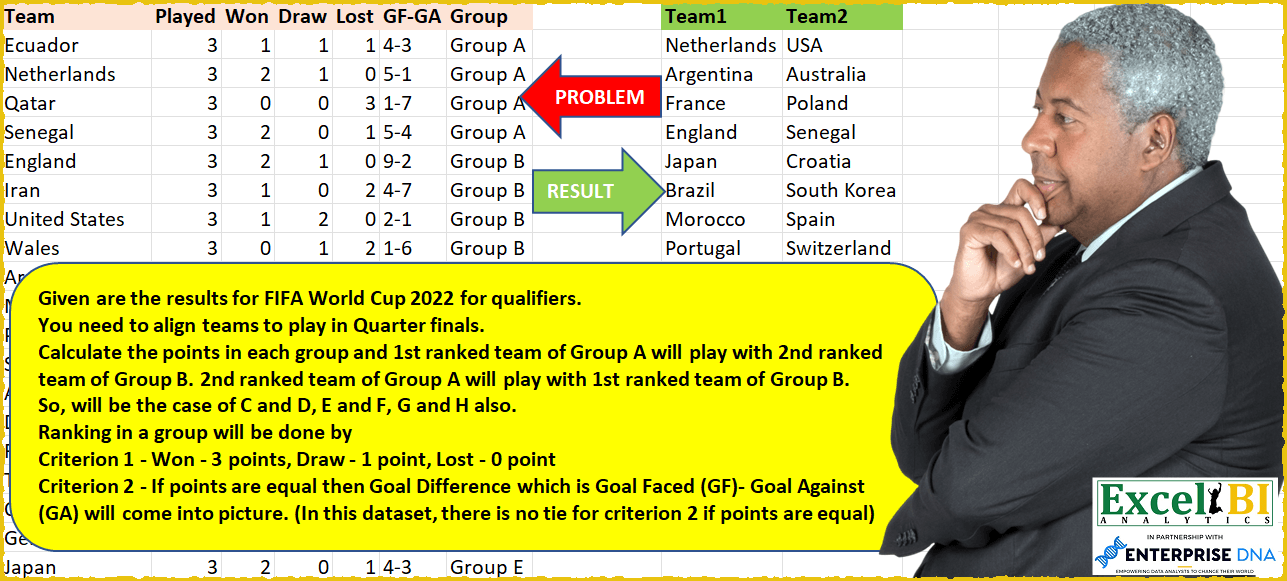
— This is the last problem in the series of FIFA world cup challenges. From tomorrow onwards, we will move to our regular challenges. — Given are the results for FIFA World Cup 2022 for qualifiers. You need to align teams to play in Quarter finals. Calculate the points in each group and 1st ranked team of Group A will play with 2nd ranked team of Group B. 2nd ranked team of Group A will play with 1st ranked team of Group B. So, will be the case of C and D, E and F, G and H also. Ranking in a group will be done by Criterion 1 – Won – 3 points, Draw – 1 point, Lost – 0 point Criterion 2 – If points are equal then Goal Difference (GD) which is Goal Faced (GF) – Goal Against (GA) will come into picture. Higher GD means better rank. Criterion 3 – If GD is also equal, 3rd condition will have to be kicked in…That is more goals scored….Hence, in Group H, South Korea will qualify in place of Uruguay (both tied for second place on the basis of criterion 1 and 2) Sorting of result is not important here but the combination is. You can sort the result as per your wish.
📌 Challenge Details and Links
ExcelBI Power Query Challenge Number: 32
Challenge Difficulty: ⭐️⭐️⭐️⭐️⭐️
📥Download Sample File
📥Link to the solutions on LinkedIn
Solving the challenge of Form quarterfinal pairs by FIFA with Power Query
Power Query solution 1 for Form quarterfinal pairs by FIFA, proposed by Bhavya Gupta:
let
  Source = Excel.CurrentWorkbook(){[Name = "Table1"]}[Content],
  Cr_1 = Table.AddColumn(Source, "C_1", each [Won] * 3 + [Draw]),
  Cr_2 = Table.AddColumn(Cr_1, "C_2", each Expression.Evaluate([#"GF-GA"])),
  Grouped = Table.Group(
    Cr_2,
    {"Group"},
    {
      {
        "All",
        each List.FirstN(
          Table.Sort([[Team], [C_1], [C_2]], {{"C_1", Order.Descending}, {"C_2", Order.Descending}})[
            Team
          ],
          2
        )
      }
    }
  ),
  Sorted = Table.Sort(Grouped, {{"Group", Order.Ascending}})[All],
  Reverse = List.Transform(
    {0 .. List.Count(Sorted) - 1},
    each if Number.IsOdd(_) then List.Reverse(Sorted{_}) else Sorted{_}
  ),
  ExpectedOutput = Table.FromColumns(
    {List.Combine(List.Alternate(Reverse, 1, 1, 1))} & {List.Combine(List.Alternate(Reverse, 1, 1))}
  )
in
  ExpectedOutput
Power Query solution 2 for Form quarterfinal pairs by FIFA, proposed by Eric Laforce:
let
  Source = Excel.CurrentWorkbook(){[Name = "tData32"]}[Content],
  Split_GFGA = Table.TransformColumnTypes(
    Table.SplitColumn(
      Source,
      "GF-GA",
      Splitter.SplitTextByDelimiter("-", QuoteStyle.Csv),
      {"GF", "GA"}
    ),
    {{"GF", Int64.Type}, {"GA", Int64.Type}}
  ),
  Add_Score = Table.AddColumn(Split_GFGA, "Score", each [Won] * 3 + [Draw]),
  Add_GD = Table.AddColumn(Add_Score, "GD", each [GF] - [GA]),
  Group = Table.Group(
    Add_GD,
    {"Group"},
    {
      "Data",
      each
        let
          _Sort = Table.Sort(
            _,
            {{"Score", Order.Descending}, {"GD", Order.Descending}, {"GF", Order.Descending}}
          )
        in
          {_Sort[Team]{0}, _Sort[Team]{1}}
    }
  ),
  ToTable = Table.FromRows(Group[Data], {"T1", "T2"}),
  ReOrderT1 = List.Accumulate({1, 3, 4, 2, 5, 7, 6, 8}, {}, (s, c) => s & {ToTable[T1]{c - 1}}),
  ReOrderT2 = List.Accumulate({2, 4, 3, 1, 6, 8, 5, 7}, {}, (s, c) => s & {ToTable[T2]{c - 1}}),
  Result = Table.FromRows(List.Zip({ReOrderT1, ReOrderT2}), {"Team1", "Team2"})
in
  Result
Power Query solution 3 for Form quarterfinal pairs by FIFA, proposed by Jaroslaw Kujawa:
let
  Source = Excel.CurrentWorkbook(){[Name = "QuarterFinals"]}[Content],
  #"Split Column by Delimiter" = Table.SplitColumn(
    Source,
    "GF-GA",
    Splitter.SplitTextByDelimiter("-", QuoteStyle.Csv),
    {"GF-GA.1", "GF-GA.2"}
  ),
  #"Changed Type" = Table.TransformColumnTypes(
    #"Split Column by Delimiter",
    {{"GF-GA.1", Int64.Type}, {"GF-GA.2", Int64.Type}}
  ),
  #"Renamed Columns" = Table.RenameColumns(#"Changed Type", {{"GF-GA.1", "GF"}, {"GF-GA.2", "GA"}}),
  #"Added Custom" = Table.AddColumn(#"Renamed Columns", "Custom", each [GF] - [GA]),
  #"Added Custom1" = Table.AddColumn(
    #"Added Custom",
    "Ranking points",
    each 100 * ([Won] * 3 + [Draw]) + 10 * [Custom] + [GA]
  ),
  #"Removed Other Columns" = Table.SelectColumns(
    #"Added Custom1",
    {"Team", "Group", "Ranking points"}
  ),
  #"Sorted Rows" = Table.Sort(
    #"Removed Other Columns",
    {{"Group", Order.Ascending}, {"Ranking points", Order.Descending}}
  ),
  #"Reordered Columns" = Table.ReorderColumns(#"Sorted Rows", {"Group", "Team", "Ranking points"}),
  #"Grouped Rows" = Table.Group(
    #"Reordered Columns",
    {"Group"},
    {{"Count", each _, type table [Group = text, Team = text, Ranking points = number]}}
  ),
  #"Added Custom2" = Table.AddColumn(
    #"Grouped Rows",
    "Custom",
    each Table.AddIndexColumn([Count], "Group_Index", 1)
  ),
  #"Removed Columns" = Table.RemoveColumns(#"Added Custom2", {"Count"}),
  #"Expanded Custom" = Table.ExpandTableColumn(
    #"Removed Columns",
    "Custom",
    {"Team", "Group_Index"},
    {"Team", "Group_Index"}
  ),
  #"Filtered Rows" = Table.SelectRows(
    #"Expanded Custom",
    each ([Group_Index] = 1 or [Group_Index] = 2)
  ),
  #"Added Index" = Table.AddIndexColumn(#"Filtered Rows", "Index", 1, 1, Int64.Type),
  #"Added Custom3" = Table.AddColumn(#"Added Index", "Custom", each Number.RoundUp([Index] / 4)),
  #"Added Custom6" = Table.AddColumn(
    #"Added Custom3",
    "Custom.3",
    each if Number.Mod([Index], 4) > 1 then Text.From([Custom]) & "1" else Text.From([Custom]) & "2"
  ),
  #"Removed Other Columns1" = Table.SelectColumns(#"Added Custom6", {"Team", "Custom.3"}),
  #"Reordered Columns1" = Table.ReorderColumns(#"Removed Other Columns1", {"Custom.3", "Team"}),
  #"Grouped Rows1" = Table.Group(
    #"Reordered Columns1",
    {"Custom.3"},
    {{"Count", each _, type table [Team = text]}}
  ),
  #"Added Custom4" = Table.AddColumn(#"Grouped Rows1", "Custom", each Table.Column([Count], "Team")),
  #"Added Custom5" = Table.AddColumn(#"Added Custom4", "Custom.1", each Lines.ToText([Custom])),
  #"Removed Other Columns2" = Table.SelectColumns(#"Added Custom5", {"Custom.1"}),
  #"Split Column by Delimiter1" = Table.SplitColumn(
    #"Removed Other Columns2",
    "Custom.1",
    Splitter.SplitTextByDelimiter("#(cr)", QuoteStyle.None),
    {"Custom.1.1", "Custom.1.2"}
  )
in
  #"Split Column by Delimiter1"
Power Query solution 4 for Form quarterfinal pairs by FIFA, proposed by Victor Wang:
let
  Source = Excel.CurrentWorkbook(){[Name = "Table1"]}[Content],
  MakeTable = Table.Combine(
    List.Transform(
      List.Split(
        List.Split(
          List.Alternate(
            List.Sort(
              List.Transform(
                Table.ToRecords(Source),
                each [
                  Team   = [Team],
                  Group  = [Group],
                  Points = List.Sum({[Won] * 3, [Draw]}),
                  GD     = Expression.Evaluate([#"GF-GA"]),
                  KI     = Number.From(Text.BeforeDelimiter([#"GF-GA"], "-"))
                ]
              ),
              {{each [Group], 0}, {each [Points], 1}, {each [GD], 1}, {each [KI], 1}}
            ),
            2,
            2,
            2
          ),
          2
        ),
        2
      ),
      each Table.FromRecords(
        List.Transform(
          List.Zip({_{0}, List.Reverse(_{1})}),
          each [Team1 = _{0}[Team], Team2 = _{1}[Team]]
        )
      )
    )
  )
in
  MakeTable
Solving the challenge of Form quarterfinal pairs by FIFA with Excel
Excel solution 1 for Form quarterfinal pairs by FIFA, proposed by محمد حلمي:
=LET(

    A,
    BYROW(
        C2:E33*{3,
        1,
        0},
        LAMBDA(
            X,
            SUM(
                X
            )
        )
    ),

    R,
    F2:F33,

    Z,
    TEXTBEFORE(
        R,
        "-"
    )+0,

    B,
    Z-TEXTAFTER(
        R,
        "-"
    ),

    V,
    HSTACK(
        A2:A33,
        A,
        B,
        G2:G33
    ),

    X,
    TAKE(
        SORTBY(
            V,
            G2:G33,
            ,
            A,
            ,
            B,
            ,
            Z,

        ),
        ,
        1
    ),

    HSTACK(
        INDEX(
            X,
            ROW(
                1:8
            )*4
        ),

        INDEX(
            X,
            SEQUENCE(
                8,
                ,
                ,
                4
            )-2+
            ISODD(
                SEQUENCE(
                    8
                )
            )*8
        )
    )
)
Excel solution 2 for Form quarterfinal pairs by FIFA, proposed by محمد حلمي:
=LET(

    A,
    BYROW(
        C2:E33*{3,
        1,
        0},
        LAMBDA(
            X,
            SUM(
                X
            )
        )
    ),

    B,
    TEXTBEFORE(
        F2:F33,
        "-"
    )-TEXTAFTER(
        F2:F33,
        "-"
    ),

    V,
    HSTACK(
        A2:A33,
        A,
        B,
        G2:G33
    ),

    X,
    TAKE(
        SORTBY(
            V,
            G2:G33,
            ,
            A,
            ,
            B,

        ),
        ,
        1
    ),

    HSTACK(
        INDEX(
            X,
            ROW(
                1:8
            )*4
        ),

        INDEX(
            X,
            {7;3;15;11;23;19;31;27}
        )
    )
)
Excel solution 3 for Form quarterfinal pairs by FIFA, proposed by محمد حلمي:
=LET(

    A,
    BYROW(
        C2:E33*{3,
        1,
        0},
        LAMBDA(
            X,
            SUM(
                X
            )
        )
    ),

    B,
    TEXTBEFORE(
        F2:F33,
        "-"
    )-TEXTAFTER(
        F2:F33,
        "-"
    ),

    V,
    HSTACK(
        A2:A33,
        A,
        B,
        G2:G33
    ),

    X,
    TAKE(
        SORTBY(
            V,
            G2:G33,
            ,
            A,
            -1,
            B,
            -1
        ),
        ,
        1
    ),

    HSTACK(
        INDEX(
            X,
            ROW(
                1:8
            )*4-3
        ),

        INDEX(
            X,
            {6;2;14;10;22;18;30;26}
        )
    )
)
Excel solution 4 for Form quarterfinal pairs by FIFA, proposed by 🇰🇷 Taeyong Shin:
=LET(s,
    F2:F33,
    p,
    C2:C33*3+D2:D33+(TEXTSPLIT(
        s,
        "-"
    )-TEXTAFTER(
        s,
        "-"
    ))%,
    t,
    TAKE(
        WRAPROWS(
            SORTBY(
                A2:A33,
                G2:G33,
                ,
                -p,

            ),
            4
        ),
        ,
        2
    ),
    HSTACK(
        TAKE(
            t,
            ,
            1
        ),
        TOCOL(
            SORTBY(
                WRAPROWS(
                    DROP(
            t,
            ,
            1
        ),
                    2
                ),
                {2,
                1}
            )
        )
    ))
Excel solution 5 for Form quarterfinal pairs by FIFA, proposed by 🇰🇷 Taeyong Shin:
=LET(

     Point,
     BYROW(
         C2:E33 * {3,
         1,
         0},
          LAMBDA(
              br,
               SUM(
                   br
               )
          )
     ),

     Gf,
     TEXTBEFORE(
         F2:F33,
          "-"
     ),

     Gd,
     Gf - TEXTAFTER(
         F2:F33,
          "-"
     ),

     Sorted,
     SORTBY(
         A2:A33,
          G2:G33,
          ,
          Point,
          -1,
          Gd,
          -1,
          Gf,
          -1
     ),

     Teams,
     TAKE(
         WRAPCOLS(
             Sorted,
              4
         ),
          2
     ),

     List,
     WRAPROWS(
         TOCOL(
             INDEX(
                 Teams,
                  MOD(
                      SEQUENCE(
                          ,
                           8
                      ) + {-1;0},
                       2
                  ) + 1,
                  SEQUENCE(
                          ,
                           8
                      )
             )
         ),
          2
     ),


     VSTACK(
         TAKE(
             List,
              4
         ),
          CHOOSECOLS(
              TAKE(
                  List,
                   -4
              ),
               2,
               1
          )
     )

)
Solving the challenge of Form quarterfinal pairs by FIFA with SQL
SQL solution 1 for Form quarterfinal pairs by FIFA, proposed by Zoran Milokanović:
WITH
DATA_PREPARATION
AS
(
 SELECT
 T.TEAM
 ,T.TEAM_RANK
 , T.GROUP
 ,DENSE_RANK() OVER (ORDER BY T.GROUP) AS GROUP_SEQUENCE
 ,MOD(DENSE_RANK() OVER (ORDER BY T.GROUP), 2) AS GROUP_ALTERNATION
 FROM
 (
 SELECT
 D.TEAM
 , D.GROUP
 ,DENSE_RANK() OVER (PARTITION BY D.GROUP ORDER BY D.WON DESC, D.DRAW DESC,
 /*GOALS_SCORED*/ TO_NUMBER(REGEXP_REPLACE(D.GF_GA, '([[:digit:]]+)-([[:digit:]]+)','1')) -
 /*GOALS_CONCEDED*/ TO_NUMBER(REGEXP_REPLACE(D.GF_GA, '([[:digit:]]+)-([[:digit:]]+)','2')) DESC,
 /*GOALS_SCORED*/ TO_NUMBER(REGEXP_REPLACE(D.GF_GA, '([[:digit:]]+)-([[:digit:]]+)','1')) DESC
 ) AS TEAM_RANK
 FROM DATA D
 ) T
 WHERE
 T.TEAM_RANK IN (1, 2)
)
SELECT
 DECODE(T1.TEAM_RANK, 1, T1.TEAM, T2.TEAM) AS TEAM1
,DECODE(T1.TEAM_RANK, 1, T2.TEAM, T1.TEAM) AS TEAM2
FROM DATA_PREPARATION T1
JOIN DATA_PREPARATION T2 ON T1.GROUP_SEQUENCE + 1 = T2.GROUP_SEQUENCE
 AND T1.TEAM_RANK <> T2.TEAM_RANK
 AND T1.GROUP_ALTERNATION = 1
ORDER BY
 T1.GROUP
,T1.TEAM_RANK
;
&&&