
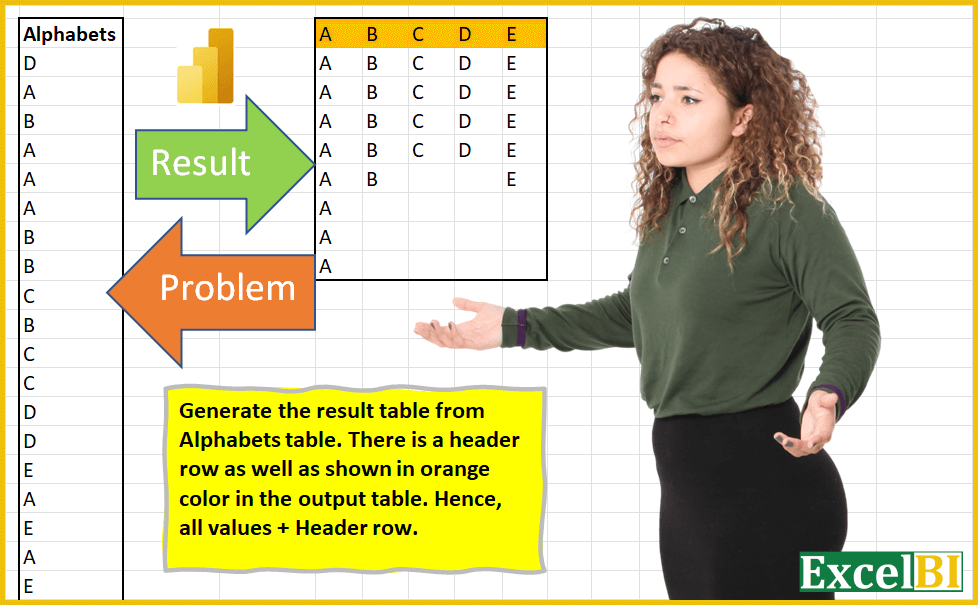
(Excel formulas also welcome) Generate the result table from Alphabets table. There is a header row as well, as shown in orange color in the output table. Hence, all values + Header row. For PQ (not for Excel formulas) – Make sure that query is dynamic i.e. if number of rows and columns increase/decrease, the query should give right result. Note – There is an error in output shown in picture which has been corrected in the practice file below. (Picture update not allowed in Linkedin)
📌 Challenge Details and Links
ExcelBI Power Query Challenge Number: 3
Challenge Difficulty: ⭐️⭐️
📥Download Sample File
📥Link to the solutions on LinkedIn
Solving the challenge of Generate result table from Alphabets with Power Query
Power Query solution 1 for Generate result table from Alphabets, proposed by 🇰🇷 Taeyong Shin:
let
  Source = Excel.CurrentWorkbook(){[Name = "tblData"]}[Content],
  Group = Table.Group(
    Source,
    "Alphabets",
    {"AddId", each Table.AddIndexColumn(_, "Id", 1, 1, Int64.Type)}
  ),
  TblSort = Table.Sort(Group, {{"Alphabets", Order.Ascending}}),
  Expand = Table.ExpandTableColumn(TblSort, "AddId", {"Alphabets", "Id"}, {"Alphabets.1", "Id"}),
  PivotCol = Table.Pivot(Expand, List.Distinct(Expand[Alphabets]), "Alphabets", "Alphabets.1"),
  #"Removed Columns" = Table.RemoveColumns(PivotCol, {"Id"}),
  ChangeType = Table.TransformColumnTypes(
    #"Removed Columns",
    List.Transform(Table.ColumnNames(#"Removed Columns"), each {_, type text})
  )
in
  ChangeType
Power Query solution 2 for Generate result table from Alphabets, proposed by Aditya Kumar Darak 🇮🇳:
let
  Source = Excel.CurrentWorkbook(){[Name = "data"]}[Content],
  Unique = List.Sort(List.Distinct(Source[Alphabets])),
  Repeat = List.Transform(
    Unique,
    (f) => List.Repeat({f}, List.Count(List.Select(Source[Alphabets], (x) => x = f)))
  ),
  Result = Table.FromColumns(Repeat, Unique)
in
  Result
Power Query solution 3 for Generate result table from Alphabets, proposed by Aditya Kumar Darak 🇮🇳:
let
  Source = Excel.CurrentWorkbook(){[Name = "data"]}[Content],
  Unique = List.Sort(List.Distinct(Source[Alphabets])),
  Repeat = List.Transform(
    Unique,
    (f) => List.Repeat({f}, List.Count(List.Select(Source[Alphabets], (x) => x = f)))
  ),
  Records = List.Transform(List.Zip(Repeat), (f) => Record.FromList(f, Unique)),
  Result = Table.FromRecords(Records)
in
  Result
Power Query solution 4 for Generate result table from Alphabets, proposed by Brian Julius:
let
  Source = #"Raw Data",
  #"Grouped Rows" = Table.Group(
    Source,
    {"Alphabets"},
    {{"AllData", each _, type table [Alphabets = nullable text]}}
  ),
  #"Sorted Rows" = Table.Sort(#"Grouped Rows", {{"Alphabets", Order.Ascending}}),
  #"Added Index" = Table.AddIndexColumn(#"Sorted Rows", "Index", 1, 1, Int64.Type),
  #"Expanded AllData" = Table.ExpandTableColumn(
    #"Added Index",
    "AllData",
    {"Alphabets"},
    {"Alphabets.1"}
  ),
  #"Added Index1" = Table.AddIndexColumn(#"Expanded AllData", "Index.1", 1, 1, Int64.Type),
  #"Pivoted Column" = Table.Pivot(
    Table.TransformColumnTypes(#"Added Index1", {{"Index", type text}}, "en-US"),
    List.Distinct(
      Table.TransformColumnTypes(#"Added Index1", {{"Index", type text}}, "en-US")[Index]
    ),
    "Index",
    "Alphabets"
  ),
  ColumnHeaders = List.Distinct(#"Pivoted Column"[Alphabets.1]),
  BreakIntoColumns = Table.ToColumns(#"Pivoted Column"),
  CleanNulls = List.Transform(BreakIntoColumns, each List.RemoveNulls(_)),
  ReassembleTable = Table.FromColumns(List.RemoveRange(CleanNulls, 0, 2), ColumnHeaders)
in
  ReassembleTable
Power Query solution 5 for Generate result table from Alphabets, proposed by Bhavya Gupta:
let
  Source = Excel.CurrentWorkbook(){[Name = "Table1"]}[Content],
  #"Sorted Rows" = Table.Sort(Source, {{"Alphabets", Order.Ascending}}),
  #"Duplicated Column" = Table.DuplicateColumn(#"Sorted Rows", "Alphabets", "Alphabets - Copy"),
  #"Grouped Rows" = Table.Group(
    #"Duplicated Column",
    {"Alphabets - Copy"},
    {{"Count", each Table.AddIndexColumn(_, "Ind", 1)}}
  ),
  #"Expanded Count" = Table.ExpandTableColumn(
    #"Grouped Rows",
    "Count",
    {"Alphabets", "Ind"},
    {"Alphabets", "Ind"}
  ),
  #"Pivoted Column" = Table.Pivot(
    #"Expanded Count",
    List.Distinct(#"Expanded Count"[#"Alphabets - Copy"]),
    "Alphabets - Copy",
    "Alphabets"
  ),
  #"Removed Columns" = Table.RemoveColumns(#"Pivoted Column", {"Ind"})
in
  #"Removed Columns"
Power Query solution 6 for Generate result table from Alphabets, proposed by 🇮🇷 Navid Esmaeilzadeh اسماعیل زاده:
let
  Source = Excel.CurrentWorkbook(){[Name = "Table1"]}[Content],
  #"Changed Type" = Table.TransformColumnTypes(Source, {{"Alphabets", type text}}),
  #"Sorted Rows" = Table.Sort(#"Changed Type", {{"Alphabets", Order.Ascending}}),
  #"Grouped Rows" = Table.Group(
    #"Sorted Rows",
    {"Alphabets"},
    {{"All", each _, type table [Alphabets = nullable text]}}
  ),
  #"Added Custom" = Table.AddColumn(
    #"Grouped Rows",
    "Custom",
    each Table.AddIndexColumn([All], "Index", 1, 1)
  ),
  #"Expanded Custom" = Table.ExpandTableColumn(
    #"Added Custom",
    "Custom",
    {"Alphabets", "Index"},
    {"Alphabets.1", "Index"}
  ),
  #"Removed Other Columns" = Table.SelectColumns(
    #"Expanded Custom",
    {"Alphabets", "Alphabets.1", "Index"}
  ),
  #"Changed Type1" = Table.TransformColumnTypes(
    #"Removed Other Columns",
    {{"Alphabets.1", type text}, {"Index", Int64.Type}}
  ),
  #"Pivoted Column" = Table.Pivot(
    #"Changed Type1",
    List.Distinct(#"Changed Type1"[Alphabets.1]),
    "Alphabets.1",
    "Alphabets"
  ),
  #"Removed Columns" = Table.RemoveColumns(#"Pivoted Column", {"Index"})
in
  #"Removed Columns"
Power Query solution 7 for Generate result table from Alphabets, proposed by Sandeep Marwal:
let
  Source          = Excel.CurrentWorkbook(){[Name = "Table1"]}[Content],
  #"Grouped Rows" = Table.Group(Source, {"Alphabets"}, {{"Count", each _[Alphabets]}}),
  #"Sorted Rows"  = Table.Sort(#"Grouped Rows", {{"Alphabets", Order.Ascending}})[Count],
  Custom1         = Table.FromColumns(#"Sorted Rows", List.Sort(List.Distinct(Source[Alphabets])))
in
  Custom1
Power Query solution 8 for Generate result table from Alphabets, proposed by Mahmoud Bani Asadi:
let
 Source = Excel.CurrentWorkbook(){[Name="Table1"]}[Content],
 GroupedRows = Table.Group(Source, {"Alphabets"}, {{"Count", each _[Alphabets], type table [Alphabets=nullable text]}}),
 Sort = Table.Sort(GroupedRows,{{"Alphabets", Order.Ascending}}),
 SortedRows = hashtag#table(Sort[Alphabets],List.Zip(Sort[Count]))
in
 SortedRows
Power Query solution 9 for Generate result table from Alphabets, proposed by Melissa de Korte:
let
  Source = Excel.CurrentWorkbook(){[Name = "Table1"]}[Content],
  ColumnsToAdd = List.Sort(List.Distinct(Source[Alphabets]), Order.Ascending),
  Result = Table.FromColumns(
    List.Transform(
      ColumnsToAdd,
      each List.Repeat({_}, List.Count(List.Select(Source[Alphabets], (x) => x = _)))
    ),
    ColumnsToAdd
  )
in
  Result
Power Query solution 10 for Generate result table from Alphabets, proposed by Artur Pilipczuk:
let
 Source = Excel.CurrentWorkbook(){[Name="Table1"]}[Content],
 RecordOfLIsts = List.Accumulate(Source[Alphabets],
 List.Accumulate( List.Sort( List.Distinct(Source[Alphabets])), [], ( state, current ) => Record.AddField(state,current,{}) ),
(state,current)=>
Record.TransformFields( state, {current, each List.Combine({Record.Field(state,current) , {current}})})),
 ToTable = Table.FromColumns( Record.ToList( RecordOfLIsts),Record.FieldNames(RecordOfLIsts))
in
 ToTable

Artur
Power Query solution 11 for Generate result table from Alphabets, proposed by Zbigniew Szyszkowski:
let
  Source = Excel.CurrentWorkbook(){[Name = "Table1"]}[Content],
  #"Changed Type" = Table.TransformColumnTypes(Source, {{"Alphabets", type text}}),
  #"Grouped Rows" = Table.Group(
    #"Changed Type",
    {"Alphabets"},
    {{"lst", each _[Alphabets], type list}}
  ),
  #"Sorted Rows" = Table.Sort(#"Grouped Rows", {{"Alphabets", Order.Ascending}}),
  Result = Table.FromColumns(#"Sorted Rows"[lst], #"Sorted Rows"[Alphabets])
in
  Result
Power Query solution 12 for Generate result table from Alphabets, proposed by Alexandru Badiu:
let
  Source = DataSource,
  #"Grouped Rows" = Table.Group(
    Source,
    {"Alphabets"},
    {{"Count", each Table.RowCount(_), Int64.Type}}
  ),
  SortedRows = Table.Sort(#"Grouped Rows", {{"Alphabets", Order.Ascending}}),
  #"Added Index" = Table.AddIndexColumn(SortedRows, "Index", 0, 1, Int64.Type),
  AddedCustom = Table.AddColumn(
    #"Added Index",
    "Custom",
    each
      let
        DataValue  = #"Added Index"[Alphabets]{[Index]},
        CreateList = List.Repeat({DataValue}, [Count])
      in
        CreateList
  ),
  NewColumnName = AddedCustom[Alphabets],
  PivotedColumn = Table.Pivot(AddedCustom, List.Distinct(NewColumnName), "Alphabets", "Custom"),
  ListAccumulate = List.Accumulate(
    NewColumnName,
    PivotedColumn,
    (state, current) => Table.ExpandListColumn(state, current)
  ),
  BreakTabletoLists = Table.ToColumns(ListAccumulate),
  RemoveNulls = List.Transform(BreakTabletoLists, each List.RemoveNulls(_)),
  CreateTable = Table.FromColumns(RemoveNulls),
  #"Removed Columns" = Table.RemoveColumns(CreateTable, {"Column1", "Column2"}),
  RandomName = Table.ColumnNames(#"Removed Columns"),
  Renames = List.Zip({RandomName, NewColumnName}),
  Result = Table.RenameColumns(#"Removed Columns", Renames),
  #"Filtered Rows" = Table.SelectRows(Result, each ([A] = "A"))
in
  #"Filtered Rows"
Power Query solution 13 for Generate result table from Alphabets, proposed by Kamaalpreet Sudan PMO-CP®, PgMP®, PMP®, PMI-ACP®:
let
  Source = Excel.CurrentWorkbook(){[Name = "Table1"]}[Content],
  #"Grouped Rows" = Table.Group(
    Source,
    {"Alphabets"},
    {{"Count", each Table.RowCount(_), Int64.Type}}
  ),
  #"Sorted Rows" = Table.Sort(#"Grouped Rows", {{"Alphabets", Order.Ascending}}),
  #"Added Custom" = Table.AddColumn(
    #"Sorted Rows",
    "Custom",
    each Text.Repeat([Alphabets], [Count] + 1)
  ),
  DynamicCol = List.Transform(
    {1 .. List.Max(#"Added Custom"[Count]) + 1},
    each "Custom" & Text.From(_)
  ),
  Custom1 = #"Added Custom",
  #"Split Column by Position" = Table.SplitColumn(
    Custom1,
    "Custom",
    Splitter.SplitTextByRepeatedLengths(1),
    DynamicCol
  ),
  #"Changed Type" = Table.TransformColumnTypes(
    #"Split Column by Position",
    {
      {"Custom1", type text},
      {"Custom2", type text},
      {"Custom3", type text},
      {"Custom4", type text},
      {"Custom5", type text},
      {"Custom6", type text},
      {"Custom7", type text},
      {"Custom8", type text}
    }
  ),
  #"Removed Columns" = Table.RemoveColumns(#"Changed Type", {"Alphabets", "Count"}),
  #"Transposed Table" = Table.Transpose(#"Removed Columns"),
  #"Promoted Headers" = Table.PromoteHeaders(#"Transposed Table", [PromoteAllScalars = true])
in
  #"Promoted Headers"
Power Query solution 14 for Generate result table from Alphabets, proposed by Oleksandr Mynka:
let
  from = Excel.CurrentWorkbook(){[Name = "input"]}[Content][Column1],
  headers = List.Sort(List.Distinct(from)),
  lst = List.Combine(
    List.Transform(headers, (x) => {List.Repeat({x}, List.Count(List.Select(from, each _ = x)))})
  ),
  to = Table.FromColumns(lst, headers)
in
  to
Solving the challenge of Generate result table from Alphabets with Excel
Excel solution 1 for Generate result table from Alphabets, proposed by محمد حلمي:
=LET(
    A;
    $A$2:$A$10;
    B;
    SORT(
        UNIQUE(
            A
        )
    );

    FILTER(
        A;
        A=INDEX(
            B;
            COLUMN(
                A1
            )
        )
    )
)
Excel solution 2 for Generate result table from Alphabets, proposed by محمد حلمي:
=LET(
    d;
    IF(
        $A$2:$A$32=CHAR(
            COLUMN(
                BM1
            )
        );
        $A$2:$A$32;
        ""
    );

    FILTER(
        d;
        d<>""
    )
)
Excel solution 3 for Generate result table from Alphabets, proposed by محمد حلمي:
=FILTER(
    $A$2:$A$32;
    $A$2:$A$32=CHAR(
        COLUMN(
            A1
        )+64
    )
)
Excel solution 4 for Generate result table from Alphabets, proposed by محمد حلمي:
=LET(
    a;
    $A$2:$A$32;
    FILTER(
        a;
        a=CHAR(
            COLUMN(
                BM1
            )
        )
    )
)
Excel solution 5 for Generate result table from Alphabets, proposed by محمد حلمي:
=LET(
    a;
    $A2:$A32;
    FILTER(
        a;
        a=CHAR(
            COLUMN(
                BM1
            )
        )
    )
)
Excel solution 6 for Generate result table from Alphabets, proposed by محمد حلمي:
=LET(
    d;
    IF(
        $A$2:$A$32=CHAR(
            COLUMN(
                BM1
            )
        );
        $A$2:$A$32;
        ""
    );
    FILTER(
        d;
        d<>""
    )
)
Excel solution 7 for Generate result table from Alphabets, proposed by محمد حلمي:
=FILTER(
    $A$2:$A$32;
    $A$2:$A$32=CHAR(
        COLUMN(
            A1
        )+64
    )
)
Excel solution 8 for Generate result table from Alphabets, proposed by محمد حلمي:
=LET(

    z,
    J3:J24,

    c,
    CHAR(
        SEQUENCE(
            ,
            5,
            65
        )
    ),
    IFNA(
        VSTACK(
            c,
            DROP(

                REDUCE(
                    "",
                    c,
                    LAMBDA(
                        a,
                        s,
                        HSTACK(
                            a,

                            FILTER(
                                z,
        &                        z=s
                            )
                        )
                    )
                ),
                ,
                1
            )
        ),
        ""
    )
)

2-
=LET(

    z,
    J3:J24,

    c,
    CHAR(
        SEQUENCE(
            ,
            COUNTA(
                UNIQUE(
                    z
                )
            ),

            MIN(
                CODE(
                    z
                )
            )
        )
    ),

    IFNA(
        VSTACK(
            c,
            DROP(
                REDUCE(
                    "",
                    c,

                    LAMBDA(
                        a,
                        s,
                        HSTACK(
                            a,
                            FILTER(
                                z,
                                z=s
                            )
                        )
                    )
                ),
                ,
                1
            )
        ),
        ""
    )
)
Excel solution 9 for Generate result table from Alphabets, proposed by محمد حلمي:
=LET(

    r,
    A2:A23,

    DROP(

        REDUCE(
            0,
            TOROW(
                SORT(
                    UNIQUE(
                        r
                    )
                )
            ),
            LAMBDA(
                a,
                d,

                IFNA(
                    HSTACK(
                        a,
                        FILTER(
                            r,
                            r=d
                        )
                    ),
                    ""
                )
            )
        ),
        ,
        1
    )
)
Excel solution 10 for Generate result table from Alphabets, proposed by 🇰🇷 Taeyong Shin:
=LET(
    d,
    A3:A24,
    DROP(
        PIVOTBY(
            MAP(
                d,
                LAMBDA(
                    x,
                    COUNTIF(
                        A3:x,
                        x
                    )
                )
            ),
            d,
            d,
            SINGLE,
            ,
            0,
            ,
            0
        ),
        ,
        1
    )
)
Excel solution 11 for Generate result table from Alphabets, proposed by Hussein SATOUR:
=LET(
    L,
     B2:B24,
     Ch,
     SORT(
         UNIQUE(
             L
         )
     ),

    C,
     LAMBDA(
         x,
          FILTER(
              L,
               L = INDEX(
                   Ch,
                    x
               )
          )
     ),

    F,
     LAMBDA(
         ME,
         y,
          IF(
              y=1,
              C(
                  1
              ),
               IFERROR(
                   HSTACK(
                       ME(
                           ME,
                            y-1
                       ),
                        C(
                            y
                        )
                   ),
                   ""
               )
          )
     ),

    VSTACK(
        TOROW(
            Ch
        ),
         F(
             F,
              COUNTA(
            Ch
        )
         )
    )
)
Excel solution 12 for Generate result table from Alphabets, proposed by Oscar Mendez Roca Farell:
=IFERROR(INDEX($A$1:$A$20;
     AGGREGATE(15;
    6;
     ROW(
         $A$2:$A$20
     )/(CODE(
         $A2$:$A$20
     )= 64+COLUMN(
         A$1
     ));
     ROW(
         $A1
     )));
     "")
Excel solution 13 for Generate result table from Alphabets, proposed by Duy Tùng:
=DROP(
    REDUCE(
        0,
        SORT(
            UNIQUE(
                B3:B24
            )
        ),
        LAMBDA(
            x,
            y,
            IFNA(
                HSTACK(
                    x,
                    VSTACK(
                        y,
                        FILTER(
                            B3:B24,
                            B3:B24=y
                        )
                    )
                ),
                ""
            )
        )
    ),
    ,
    1
)
Excel solution 14 for Generate result table from Alphabets, proposed by Bhavya Gupta:
=LET(
    rng,
    Table1[Alphabets],
    a,
    TRANSPOSE(
        UNIQUE(
            SORT(
                rng
            )
        )
    ),

     VSTACK(
         a,

          DROP(
              IFNA(
                  REDUCE(
                      0,
                      a,
                      LAMBDA(
                          x,
                          y,

                           HSTACK(
                               x,
                               FILTER(
                                   rng,
                                   rng=y
                               )
                           )
                      )
                  ),
                  ""
              ),
              ,
              1
          )
     )
)
Excel solution 15 for Generate result table from Alphabets, proposed by Tolga Demirci, PMP, PMI-ACP, MOS-Expert:
=MID(TEXTJOIN(;
    ;
    IF(($A$3:$A$100)=C$2;
    C$2;
    ""));
    ROW(
        $A$1:$A$100
    );
    1)
Excel solution 16 for Generate result table from Alphabets, proposed by Sergei Baklan:
=LET(
 header, TOROW( SORT( UNIQUE( data ) ) ),
 n, SEQUENCE( COLUMNS( header ) ),
 VSTACK(
 header,
 IFNA( DROP( REDUCE( "", n, LAMBDA(a,v, HSTACK(a, FILTER( data, data=INDEX( header, v) ) ) ) ),,1), "" ) ) )
Excel solution 17 for Generate result table from Alphabets, proposed by Viswanathan M B:
=Togrid(
    A2:A20
)

ToGrid = Lambda(
    List,

     Let(
         Vals,
          unique(
              List
          ),

          Body,
          Gridify(
              List,
               rows(
                   Vals
               )
          ),

          Head,
          transpose(
                   Vals
               ),

          Vstack(
              Head,
               IFNA(
                   Body,
                    ""
               )
          )

     )

)

Gridify=LAMBDA(
    Rng,
    N,
     LET(
         Vals,
          UNIQUE(
              Rng
          ),

          SeqN,
          SEQUENCE(
              ROWS(
                   Vals
               )
          ),

          IF(
              N=1,
               FILTER(
                   Rng,
                    Rng=INDEX(
                        Vals,
                        N
                    )
               ),

               HSTACK(
                   Gridify(
                       Rng,
                        N-1
                   ),
                   FILTER(
                   Rng,
                    Rng=INDEX(
                        Vals,
                        N
                    )
               )
               )

          )

     )

)